instrument cluster SUZUKI JIMNY 2022 User Guide
[x] Cancel search | Manufacturer: SUZUKI, Model Year: 2022, Model line: JIMNY, Model: SUZUKI JIMNY 2022Pages: 421, PDF Size: 6.35 MB
Page 128 of 421

BEFORE DRIVING
To turn the lights on or off, twist the knob on the end of the lever. There are four positions:
OFF (1) All lights are off.
AUTO (2) This function works when the ignition switch is turned "ON". The headlights and position lights are turned on and off automatically according to the amount of outside light detected by the sensor. They go out automatically when you turn the ignition switch to "ACC" or "LOCK" position.
The light sensor (5) for sensing the amount of outside light is installed on the passenger's seat side instrument panel.
When headlights are turned on and the lighting control lever is in "AUTO" position, you can use the high beam assist (if equipped). For details, refer to "High beam assist" in "OPERATING YOUR VEHICLE" section.
2-57
A CAUTION
If the light sensor area of the windshield is covered with mud, ice1 or other similar substances, the headlights and position lights may be turned on even when it is still light outside.
NOTE: Avoid covering the light sensor area of the windshield with a sticker. The sticker may impair the performance of the sensor and make the system unable to control operation of the lights correctly. If you turned the ignition switch to "ON" position and "AUTO" position remains selected, the headlights and position lights come on automatically as it gets dark outside, even with the engine not running. Leaving the lights lit for a long time may lead to a completely discharged battery.
oOO~ (3) Front position lights, tail lights, license plate lights and instrument lights are on, but headlights are off.
~D (4) Front position lights, tail lights, license plate lights, instrument lights and headlights are on.
= IO · OFF 01
f,
68PM00230
With the headlights on, push the lever forward to switch to the high beams (main beams) or pull the lever toward you to switch to the low beams. When the high beams (main beams) are on, a light on the instrument cluster will come on. To momentarily activate the high beams (main beams) as a passing signal, pull the lever slightly toward you and release it when you have completed the signal.
Page 129 of 421
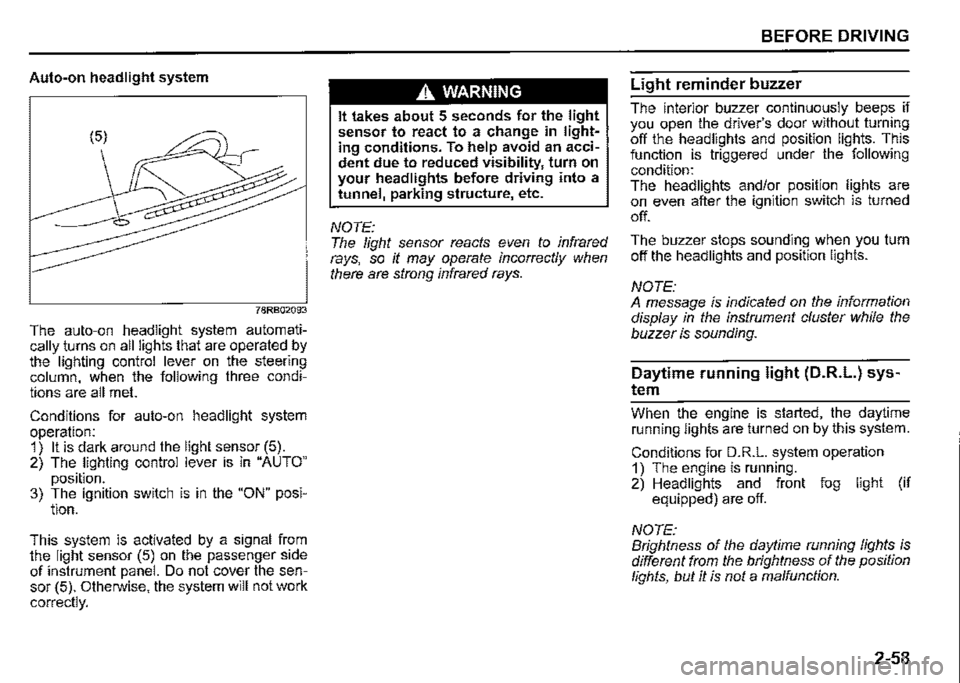
Auto-on headlight system
78RB02093
The auto-on headlight system automatically _turns on all lights that are operated by the lighting control lever on the steering column, when the following three conditions are all met.
Conditions for auto-on headlight system operation: 1) It is dark around the light sensor (5). 2) The lighting control lever is in "AUTO"
position. 3) The ignition switch is in the "ON" posi-tion.
This. system is activated by a signal from the light sensor (5) on the passenger side of instrument panel. Do not cover the sensor (5). Otherwise, the system will not work
correctly.
A WARNING
It takes about 5 seconds for the light sensor to react to a change in lighting conditions. To help avoid an accident due to reduced visibility, turn on your headlights before driving into a tunnel, parking structure, etc.
NOTE: The light sensor reacts even to infrared rays, so it may operate incorrectly when there are strong infrared rays.
BEFORE DRIVING
Light reminder buzzer
The interior buzzer continuously beeps if you open the driver's door without turning off the headlights and position lights. This function is triggered under the following condition: The headlights and/or position lights are on even after the ignition switch is turned
off.
The buzzer stops sounding when you turn off the headlights and position lights.
NOTE: A message is indicated on the information display in the instrument cluster while the buzzer is sounding.
Daytime running light (D.R.L.) sys
tem
Whe_n th_e engine is started, the daytime running lights are turned on by this system.
Conditions for D.R.L. system operation 1) The engine is running. 2) Headlights and front fog light (if equipped) are off.
NOTE: Brightness of the daytime running lights is different from the brightness of the position lights, but it is not a malfunction.
2-58
Page 131 of 421

Front fog light switch
(if equipped)
68PM00232
To turn the front fog light on, twist the knob as shown in the illustration with the position lights, tail lights and/or the headlights are on. When the front fog light is on, an indicator light on the instrument cluster will come on.
NOTE: In some countries the lighting operation may be different from the above description according to local regulations.
Rear fog light switch
(if equipped)
68PM00233
To turn the rear fog light on, twist the knob as shown in the illustration with the headlights on. When the rear fog light is on, an indicator light on the instrument cluster will come on. If you twist the knob to the mark of rear fog light with the front fog light on, the rear fog light will turn on and an indicator light on the instrument cluster will come on.
BEFORE DRIVING
Adjusting headlight pattern
Headlight pattern, left hand traffic
:::OD
78RB02076
Headlight pattern, right hand traffic
I .·
::m
78RB02077
2-60
Page 175 of 421

Changing cruising speed
Using the accelerator pedal To reset at a faster cruising speed, accelerate to the desired speed using the accelerator pedal and push down the "RES +/SET-" switch (3). The new speed will be main
tained.
Using the brake pedal To reset at a slower cruising speed, decelerate to the desired speed using the brake pedal and push down the "RES +/SET -" switch (3). The new speed will be main
tained.
NOTE: When the brake pedal is depressed, "SET" indicator light (5) or set indicator (7) goes off until the cruising speed is reset.
Using "RES +/SET-" switch To reset at a faster cruising speed, press repeatedly or hold push up the "RES +/ SET -" switch (3). Vehicle speed will steadily increase. When you release the switch, the new speed will be maintained.
To reset at a slower cruising speed, press repeatedly or hold push down the "RES +/ SET -" switch (3) until the vehicle has slowed to the desired speed, and then release the switch. The new speed will be maintained.
NOTE: You can adjust the set speed by approximately 1 km/h (1 mph) by pushing "RES +/ SET-" switch quickly
Cancelling cruise control
"SET' indicator light (5) or set indicator (7) will go off and the cruise control will be canceled temporarily with the following conditions:
Push "CANCEL" switch (2). Depress the brake pedal. For manual transmission vehicle, depress the clutch pedal. For automatic transmission vehicle, the gear position is changed to "L" When the transfer lever is operated, The vehicle speed falls more than about 20 percent from the set speed. Any time the vehicle speed falls below 40 km/h (25 mph). When the vehicle skids and ESP® is activated.
To resume the previously set speed, push up the "RES +/SET-" switch (3) and turn on "SET' indicator light (5) or set indicator (7). The vehicle speed must be above 40 km/h (25 mph) when the vehicle is not under the above conditions.
OPERATING YOUR VEHICLE
To turn off the cruise control system, push cruise switch (1) and check that the cruise indicator light (4) or cruise indicator (6)
goes off.
Also, if the malfunction indicator light in the instrument cluster comes on or blinks, the cruise control system will be turned off.
NOTE: If you turn off the cruise control system, the previously set speed in the memory is cleared. Reset your cruising speed again.
3-24
Page 176 of 421

OPERATING YOUR VEHICLE
Speed limiter (if equipped)
The speed limiter allows you to choose a maximum speed that you do not wish to exceed.
Setting maximum speed
Speed limiter switch
(3)
(1)
78RB03007
(1) "LIMIT" switch (2) "CANCEL" switch (3) "RES +/SET-" switch
3-25
Information display (For instrument cluster -Type B)
(For instrument cluster -Type A)
(6)
I~
(4)
SET
L[]□•
(4) (5) (6)
• •. . .,
(5) 78RB03008
L....-----------,"',"'•e;;;,;;;30;c30 (4) Limit indicator
(4) Limit indicator (5) "SET" indicator (6) Speed indication
(5) "SET" indicator (6) Speed indication
1) Turn on the speed limiter system by pushing "LIMIT" switch (1 ). When the limit indicator (4) appears in the information display, you can set the maximum speed. 2) Accelerate or decelerate to the desired speed. 3) Pull down the "RES +/SET -" switch (3), "SET" indicator (5) appears in the information display. The current vehicle speed is set as the maximum speed.
Page 203 of 421
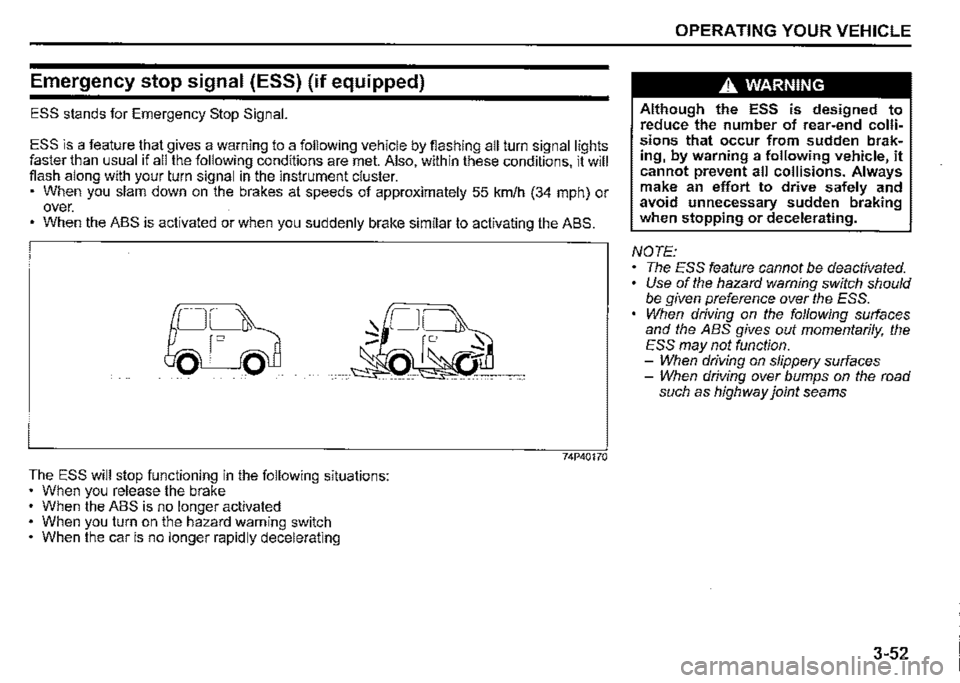
Emergency stop signal (ESS) (if equipped)
ESS stands for Emergency Stop Signal.
ESS is a feature t_hat gives a warning to a following vehicle by fiashing all turn signal lights faster than usual 1f all the following conditions are met. Also, within these conditions, it will fiash along with your turn signal in the instrument cluster. • When you slam down on the brakes at speeds of approximately 55 km/h (34 mph) or over. • When the ABS is activated or when you suddenly brake similar to activating the ABS.
The ESS will stop functioning in the following situations: • When you release the brake When the ABS is no longer activated When you turn on the hazard warning switch When the car is no longer rapidly decelerating
0
74P40170
OPERATING YOUR VEHICLE
A WARNING
Although the ESS is designed to reduce the number of rear-end collisions that occur from sudden braking, by warning a following vehicle, it cannot prevent all collisions. Always make an effort to drive safely and avoid unnecessary sudden braking when stopping or decelerating.
NOTE: The ESS feature cannot be deactivated. • Use of the hazard warning switch should be given preference over the ESS. When driving on the following surfaces and the ABS gives out momentarily, the ESS may not function. -When driving on slippery surfaces -When driving over bumps on the road such as highway joint seams
3-52
Page 206 of 421
OPERATING YOUR VEHICLE
A WARNING
If the ABS warning light (1) on the instrument cluster comes on and stays on while driving, there may be a problem with the ABS system. Ask a SUZUKI dealer to inspect the ABS system immediately. If the ABS system becomes inoperative, the brake system will function as an ordinary brake system that has no ABS. If the ABS warning light (1) and the brake system warning light (2) on the instrument cluster simultaneously stay on or come on while driving, both anti-lock function and rear brake force control function (proportioning valve function) of the ABS system may have failed. If so, the rear wheels may easily skid or the vehicle can even spin in the worst case when braking on a slippery road or when hard braking even on a dry paved road. Ask a SUZUKI dealer to inspect the ABS system immediately. Drive carefully, avoiding hard braking as much as possible.
3-55
How ABS works
A computer continuously monitors wheel speed. The computer compares the changes in wheel speed when braking. If the wheels slow suddenly. indicating a skidding situation, the computer will change braking pressure several times each second to prevent the wheels from locking. When you start your vehicle or when you accelerate after a hard stop. you may hear a momentary motor or clicking noise as the system resets or checks itself.
A WARNING
The ABS may not work properly if tyres or wheels other than those specified in the owner's manual are used. This is because the ABS works by comparing changes in wheel speed. When replacing tyres or wheels, use only the size and type specified in this owner's manual.
Electronic stability program
(ESP®)
ESP® is a registered trademark of Daimler
AG.
The Electronic Stability Program (ESP®) helps to control the vehicle during cornering if front wheels or rear wheels skid. It also assists you in maintaining traction while accelerating on loose or slippery road surfaces. It does this by regulating the engine's output, and by_ . selective!¥ applying the brakes. In add1t1on, ESP helps to avoid skidding by controlling braking pressure.
A WARNING
The ESP® cannot enhance the vehicle's driving stability in all situations and does not control your vehicle's entire braking system. The ESP® cannot prevent accidents, including those resulting from excessive speed in turns, or hydroplaning. Only safe and attentive drive can prevent accidents. The capabilities of an ESP®
equipped vehicle must never be used as a substitute for careful driving.
Page 209 of 421
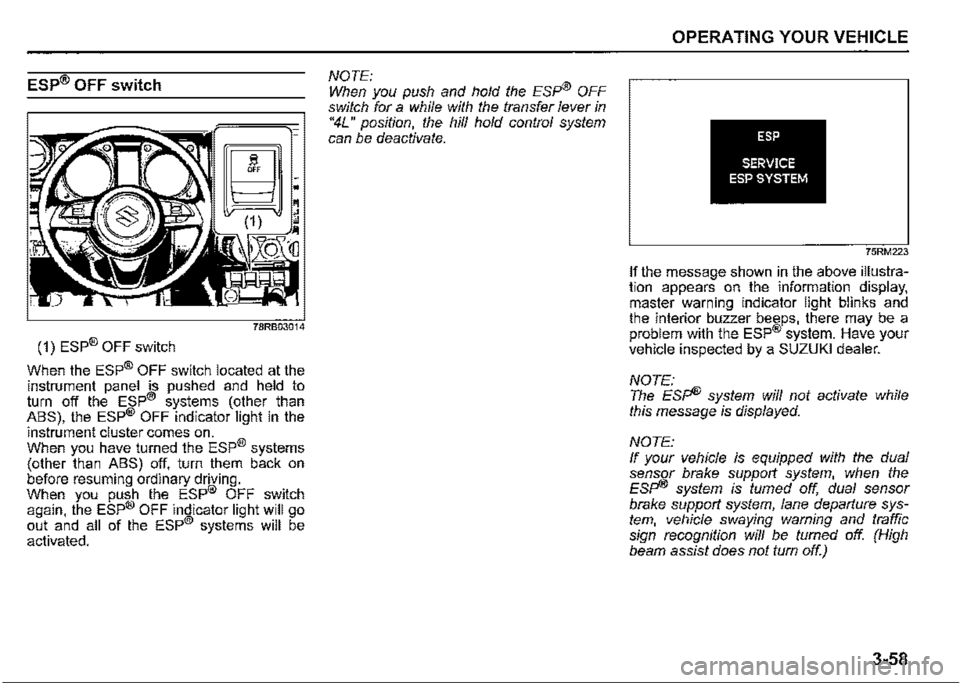
ESP® OFF switch
(1) ESP® OFF switch
When the ESP® OFF switch located at the instrument panel is pushed and held to turn off the ESP® systems (other than ABS), the ESP® OFF indicator light in the
instrument cluster comes on. When you have turned the ESP® systems (other than ABS) off, turn them back on before resuming ordinary driving. When you push the ESP® OFF switch again, the ESP® OFF indicator light will go out and all of the ESP® systems will be activated.
NOTE: When you push and hold the Esp® OFF switch for a while with the transfer lever in "4L" position, the hill hold control system can be deactivate.
OPERATING YOUR VEHICLE
ESP
SERVICE ESP SYSTEM
75RM223
If the message shown in the above illustration appears on the information display, master warning indicator light blinks and the interior buzzer beeps, there may be a problem with the ESP® system. Have your vehicle inspected by a SUZUKI dealer.
NOTE: The Esp® system will not activate while this message is displayed.
NOTE: If your vehicle is equipped with the dual sensor brake support system, when the Esp® system is turned off, dual sensor brake support system, lane departure system, vehicle swaying warning and traffic sign recognition will be fumed off. (High beam assist does not turn off.)
3-58
Page 210 of 421
OPERATING YOUR VEHICLE
ABS warning light/ brake system
warning light
See "Braking" in this section.
Hill descent control system
The hill descent control system is designed to reduce the driver's workload when going down steep, rough and/or slippery hills where the vehicle cannot decelerate enough by engine braking alone. The hill descent control system helps to control vehicle speed by automatically engaging the vehicle's brakes, as needed, so you can concentrate on steering the vehicle.
.A. WARNING
Do not rely excessively on the hill descent control system. The hill descent control system may not control the vehicle speed on a hill under all load or road conditions. Always be prepa!ed to control vehicle speed by applying the brakes. Failure to pay attention and control vehicle speed using the brakes when necessary may result in loss of control or an accident.
3-59
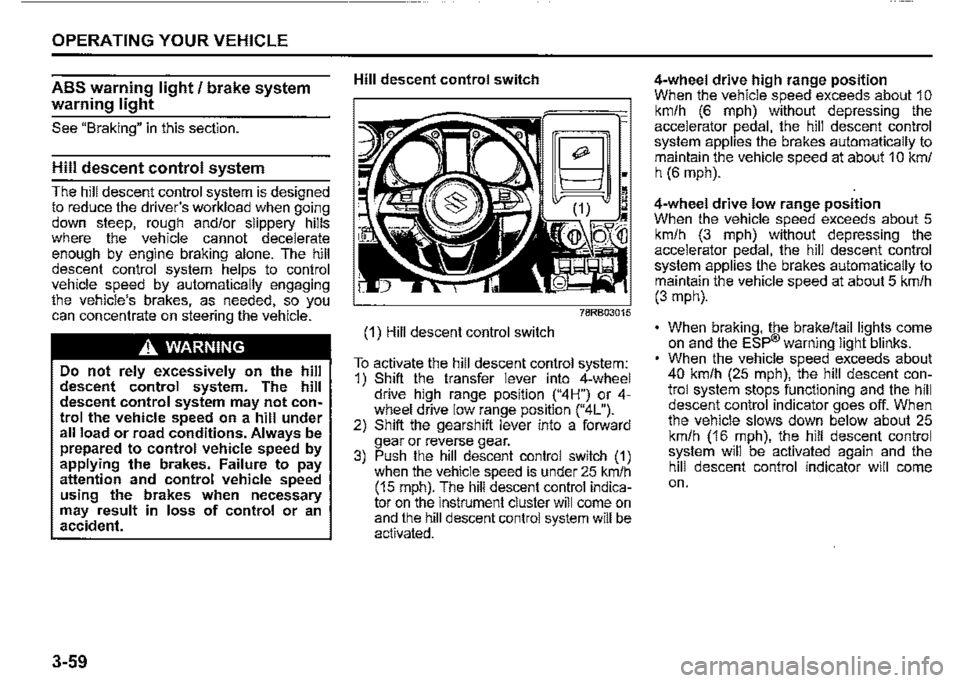
Hill descent control switch
(1) Hill descent control switch
~;
~~~:~M
To activate the hill descent control system: 1) Shift the transfer lever into 4-wheel drive hiQh range position ("4H") or 4-wh!"el drive low '.ange position ("4L"). 2) Shift the gearsh1ft lever into a forward gear or reverse gear. 3) Push the hill descent control switch (1) when the vehicle speed is under 25 km/h (15 mph). The hill descent control indicator on the instrument cluster will come on and the hill descent control system will be activated.
4-wheel drive high range position When the vehicle speed exceeds about 1 o km/h (6 mph) without depressing the accelerator pedal, the hill descent control system applies the brakes automatically to maintain the vehicle speed at about 1 O km/ h (6 mph).
4-wheel drive low range position When the vehicle speed exceeds about 5 km/h (3 mph) without depressing the accelerator pedal, the hill descent control system applies the brakes automatically to maintain the vehicle speed at about 5 km/h (3 mph).
• When braking, the brake/tail lights come on and the ESP® warning light blinks. When the vehicle speed exceeds about 40 km/h (25 mph), the hill descent control system stops functioning and the hill descent control indicator goes off. When the vehicle slows down below about 25 km/h (16 mph), the hill descent control system will be activated again and the hill descent control indicator will come on.
Page 213 of 421
A WARNING
(Continued) After you release your foot from the brake pedal, accelerate the vehicle to move up immediately. If you release your foot from the brake pedal over 2 seconds, the hill hold control system will be canceled. If so, the vehicle may roll downward, which can result in an accident depending on the degree of slope. And, the engine may stall and the power assist for the steering and brakes will not work so steering and braking will be much harder than usual which can result in an accident or vehicle damage. If you drive on the steep slope, the gravel, the sclnow-covered road, or the muddy r I'd and the hill hold control system is activated, there may be a possibility that the wheels will be locked and then the vehicle may lose the control.
The hill hold control system activates for a maximum of about 2 seconds if your foot is moved from the brake pedal when the following conditions are all met.
1) The gearshift lever is in a forward gear or reverse gear. 2) The parking brake is released. 3) The vehicle is on an upward incline.
NOTE: When the hill hold control system is activated, the following conditions may be found, but this is not a malfunction. You may hear a sound from the engine room. As brake pedal becomes heavy, it may be difficult for you to depress it.
ESP
HILL HOLD DISABLE
75RM224
If the message shown in the above illustration appears on the information display, master warning indicator light blinks and the interior buzzer beeps, there may be a problem with the hill descent control system and the hill hold control system. Have your vehicle inspected by a SUZUKI dealer.
NOTE: The hill hold control system will not activate while this message is displayed.
OPERATING YOUR VEHICLE
How to turn off Hill hold control system When driving on a steep slope, or a slippery road (icy, snow-covered, muddy, etc), it is possible to deactivate the hill hold control system.
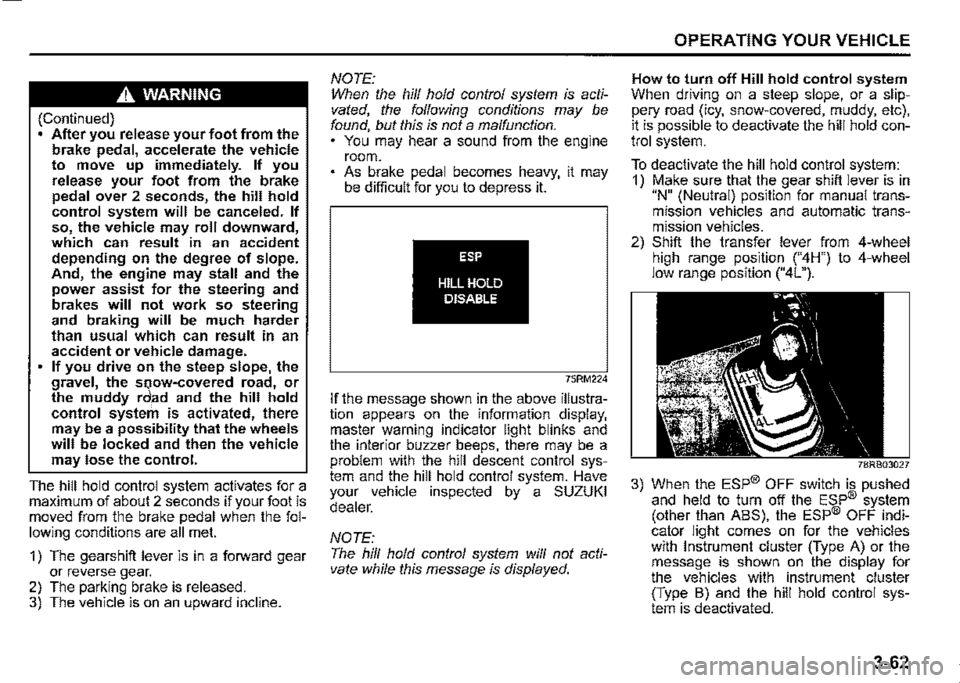
To deactivate the hill hold control system: 1) Make sure that the gear shift lever is in "N" (Neutral) position for manual transmission vehicles and automatic transmission vehicles. 2) Shift the transfer lever from 4-wheel high range position ("4H") to 4-wheel low range position ("4L").
78RB03027
3) When the ESP® OFF switch is pushed and held to turn off the ESP® system (other than ABS), the ESP® OFF indicator light comes on for the vehicles with Instrument cluster (Type A) or the message is shown on the display for the vehicles with instrument cluster (Type B) and the hill hold control system is deactivated.
3-62