radio SUZUKI JIMNY 2022 User Guide
[x] Cancel search | Manufacturer: SUZUKI, Model Year: 2022, Model line: JIMNY, Model: SUZUKI JIMNY 2022Pages: 421, PDF Size: 6.35 MB
Page 273 of 421
Stop using this unit and a Bluetooth®
ready device whenever requested.
This unit shares the communication fre
quency with other private or public wireless
communication equipment such as a wire
less LAN and other wireless communica
tion radios.
You should stop using this unit whenever
you are notified that your unit disturbs
other wireless communication immediately.
OTHER CONTROLS AND EQUIPMENT
NOTE:
These limits are designed to provide rea
sonable protection against harmful interfer
ence in a residential installation. This
equipment generates, uses and can radi
ate radio frequency energy and, if not
installed and used in accordance with the
instructions, may cause harmful interfer
ence to radio communications. However,
there is no guarantee that interference will
not occur in a particular installation. If this
equipment does cause harmful interfer
ence to radio or television reception, which
can be determined by turning the equip
ment off and on, the user is encouraged to
try to correct the interference by one or
more of the following measures:
Reorient or relocate the receiving anten
na.
Increase the separation between the
equipment and receiver.
Connect the equipment into an outlet on
a circuit different from that to which the
receiver is connected.
Consult the dealer or an experienced
radio/TV technician for help.
This transmitter must not be co-located
or operated in conjunction with any other
antenna or transmitter.
5-38
Page 276 of 421
OTHER CONTROLS AND EQUIPMENT
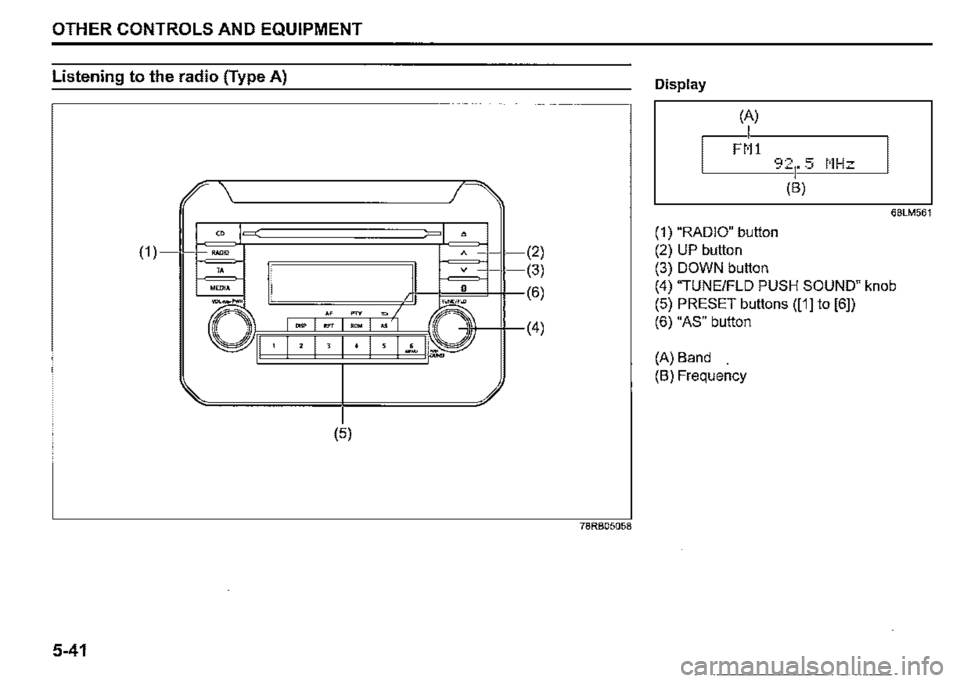
Listening to the radio (Type A)
" (1) =•
" MEDIA
" =
-"" """
' I ' I ' I "
(5)
5-41
• A (2)
(3)
(6)
~
•
I
(4)
78RB05058
Display
(A)
I FM!
68LM561
(1) "RADIO" button
(2) UP button
(3) DOWN button
(4) "TUNE/FLO PUSH SOUND" knob
(5) PRESET buttons ([1] to [6])
(6) "AS" button
(A) Band
(B) Frequency
Page 277 of 421
Selecting the reception band
Press the "RADIO" button (1 ).
Each time the button is pressed, the recep
tion band will change as follows:
Ff 1 ➔ FM2 ➔ DAB1 (if eq,uipped) l
AM <-DAB2 (if equipped)
Seek tuning
Press UP button (2) or DOWN button (3).
The unit stops searching for a station at a
frequency where a broadcast station is
available.
NOTE:
If AF is on, the unit searches for RDS sta
tions only.
Manual tuning
Turn "TUNE/FLO PUSH SOUND" knob (4).
The frequency being received is displayed.
OTHER CONTROLS AND EQUIPMENT
Preset memory
1) Select the desired station.
2) Hold down a desired button ([1] to [6])
of PRESET buttons (5) to which you
want to store the station for 2 seconds
or longer.
Auto store
Hold down "AS" button (6) for 2 seconds or
longer.
6 stations in good reception will automati
cally be stored to PRESET buttons (5) in
order, starting from a station whose fre
quency is the lowest.
NOTE:
• Auto store can be released by pressing
"AS" button (6) while auto store is under
way.
• When the auto store is performed, the
station previously stored in the memory
at the position is overwritten.
• When there are fewer than 6 stations
that can be stored even if 1 round of auto
store operation is performed, no station
will be stored at the remaining PRESET
buttons (5).
• 6 stations can be preset for FM1 and
FM2 in common, and 6 stations for AM in
auto store mode.
• ff AF is on, the unit searches for RDS
stations only.
Auto store mode on/off
Press "AS" button (6).
Each time the button is pressed, the mode
is switched as follows:
Radio reception
Radio reception can be affected by envi
ronment, atmospheric conditions, or radio
signal's power and distance from the sta
tion. Nearby mountains and buildings may
interfere or deflect radio reception, causing
poor reception. Poor reception or radio
static can also be caused by electric cur
rent from overhead wires or high voltage
power lines.
5-42
Page 278 of 421
OTHER CONTROLS AND EQUIPMENT
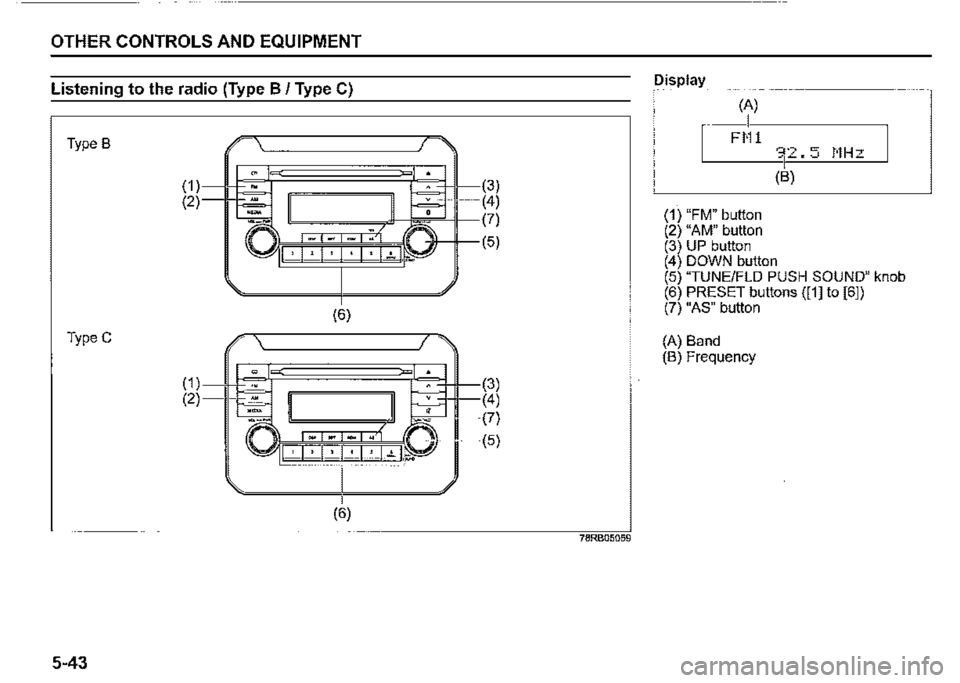
Listening to the radio (Type B / Type C)
Type B
TypeC
5-43
(1) (2)
(1) (2)
(6)
(3) (4)
~~~n~'M~(?)
I ' I ".' I 7 I ".' I : I ..,_ .P J (5)
(6)
78RB05059
Display
(A)
I FM1
(1) "FM" button (2) "AM" button (3) UP button
(B)
(4) DOWN button (5) "TUNE/FLO PUSH SOUND" knob (6) PRESET buttons ([1] to [61) (7) "AS" button
(A) Band (B) Frequency
Page 279 of 421
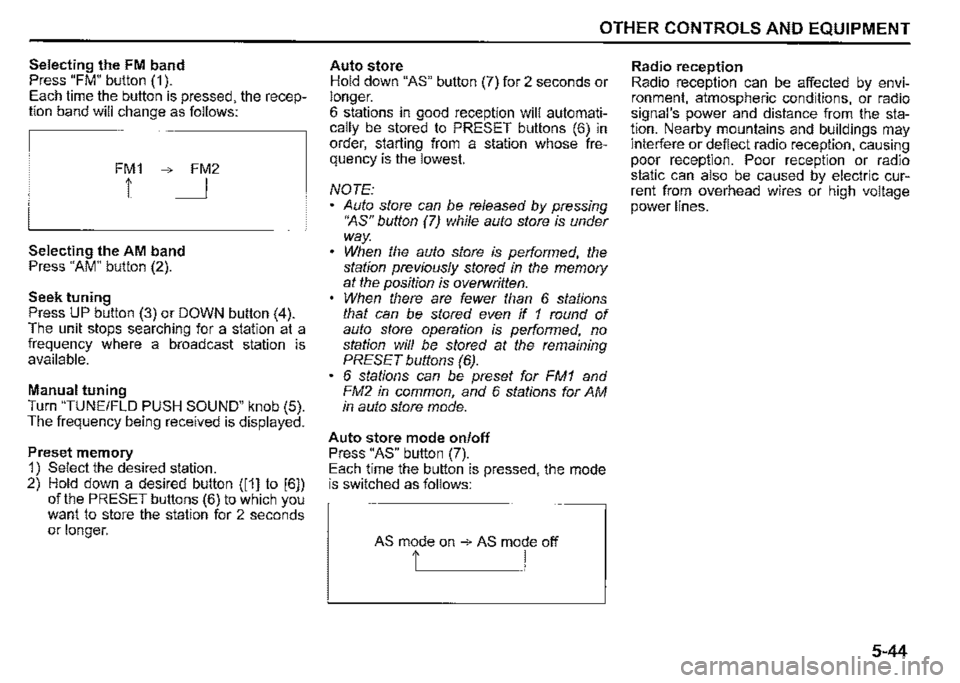
Selecting the FM band Press "FM" button (1 ). Each time the button is pressed, the reception band will change as follows:
FM1 ➔ FM2
1 I
Selecting the AM band Press "AM" button (2).
Seek tuning Press UP button (3) or DOWN button (4). The unit stops searching for a station at a frequency where a broadcast station is available.
Manual tuning Turn "TUNE/FLO PUSH SOUND" knob (5). The frequency being received is displayed.
Preset memory 1) Select the desired station. 2) Hold down a desired button ([1] to [6]) of the PRESET buttons (6) to which you want to store the station for 2 seconds or longer.
OTHER CONTROLS AND EQUIPMENT
Auto store Hold down "AS" button (7) for 2 seconds or longer. 6 stations in good reception will automatically be stored to PRESET buttons (6) in order, starting from a station whose frequency is the lowest.
NOTE: Auto store can be released by pressing •~s" button (7) while auto store is under way. When the auto store is performed, the station previously stored in the memory at the position is overwritten. When there are fewer than 6 stations that can be stored even if 1 round of auto store operation is performed, no station will be stored at the remaining PRESET buttons (6). 6 stations can be preset for FM1 and FM2 in common, and 6 stations for AM in auto store mode.
Auto store mode on/off Press "AS" button (7). Each time the button is pressed, the mode is switched as follows:
AS mode on ➔ AS mode off
t I
Radio reception Radio reception can be affected by environment, atmospheric conditions, or radio signal's power and distance from the station. Nearby mountains and buildings may interfere or deflect radio reception, causing poor reception. Poor reception or radio static can also be caused by electric current from overhead wires or high voltage power lines.
5-44
Page 282 of 421
OTHER CONTROLS AND EQUIPMENT
TA standby
At the moment traffic information is
received while the source is set to CD,
USB, iPod, DAB, or Bluetooth®audio with
TA activated, the source is automatically
changed to radio. After reception of traffic
information, the source, which was
selected before being changed to radio,
resumes.
NOTE:
If no TP station can be received while the
unit stands by for TA, it automatically
searches for a TP station.
EON (Enhanced Other Network)
When the EON data is received with TP or
TA activated, "EON" indicator lights up,
and the traffic information from a network
other than the currently received station is
allowed to be received.
Emergency announcement reception
Emergency announcements are automati
cally received and displayed.
5-47
Page 310 of 421
OTHER CONTROLS AND EQUIPMENT
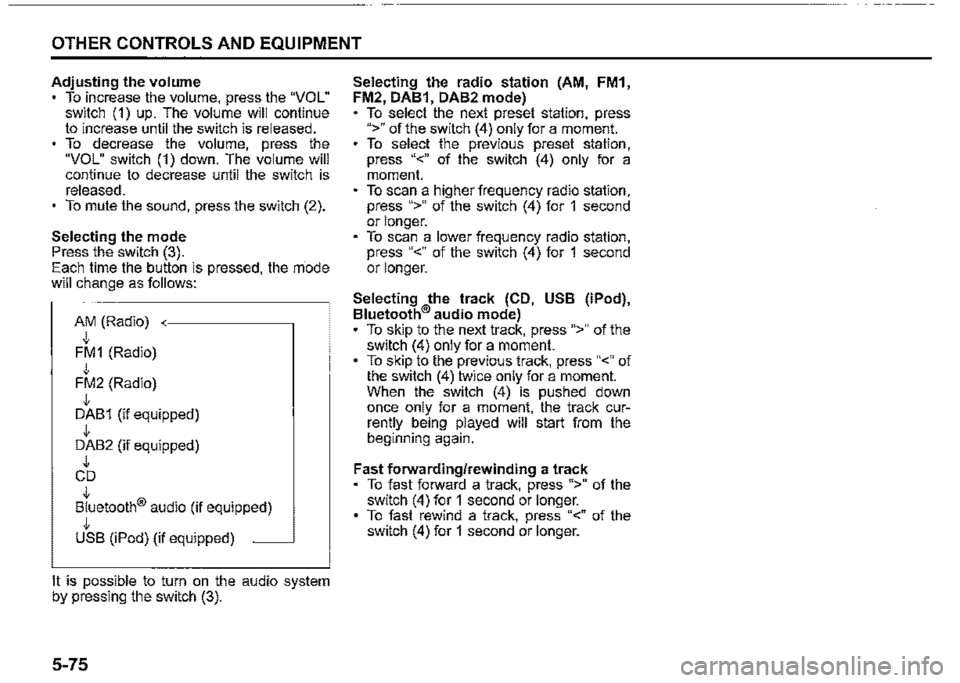
Adjusting the volume To increase the volume, press the "VOL" switch (1) up. The volume will continue to increase until the switch is released. To decrease the volume, press the "VOL" switch (1) down. The volume will continue to decrease until the switch is released. To mute the sound, press the switch (2).
Selecting the mode Press the switch (3). Each time the button is pressed, the rriode will change as follows:
AM (Radio) J, FM1 (Radio) J, FM2 (Radio) J, DAB1 (if equipped) J, DAB2 (if equipped) J, CD J, Bluetooth® audio (if equipped) J, USB (iPod) (if equipped) ~
It is possible to turn on the audio system by pressing the switch (3).
5-75
Selecting the radio station (AM, FM1, FM2, DAB1, DAB2 mode) To select the next preset station, press ">" of the switch (4) only for a moment. To select the previous preset station, press "<" of the switch (4) only for a moment. To scan a higher frequency radio station, press ">" of the switch (4) for 1 second or longer. To scan a lower frequency radio station, press "<" of the switch (4) for 1 second or longer.
Selecting the track (CD, USB (iPod), Bluetooth® audio mode) To skip to the next track, press ">" of the switch (4) only for a moment. To skip to the previous track, press "<" of the switch (4) twice only for a moment. When the switch (4) is pushed down once only for a moment, the track currently being played will start from the beginning again.
Fast forwarding/rewinding a track To fast forward a track, press ">" of the switch (4) for 1 second or longer. To fast rewind a track, press "<" of the switch (4) for 1 second or longer.
Page 313 of 421

OTHER CONTROLS AND EQUIPMENT
Troubleshooting
When encountering a problem, check and follow the instructions below.
If the described suggestions do not solve the problem, it is recommended to take the unit to your SUZUKI dealer.
Problem Possible cause Possible solution
Common
When "SECURITY" is displayed, enter
Unable to operate The security function is on. the PIN.
When "HELP" is displayed, contact your
SUZUKI dealer.
Unable to turn on the power Fuse is blown. Contact your SUZUKI dealer. (No sound is produced)
Radio
Much noise It may not be exactly tuned in to the sta-Tune it in exactly to the station. tion.
There rnay be no station emitting signals Pick up a station by manual tuning. powerful enough. Unable to receive by auto tuning If AF is on, the unit searches for RDS sta-
!ions only. Turn off AF.
CD
The disc is dirty. Wipe the disc with a soft cloth.
Sound skips or noise produced The disc has a major scratch or is Replace the disc with the one which has
warped. no scratch and warp.
5-78
Page 362 of 421
INSPECTION AND MAINTENANCE
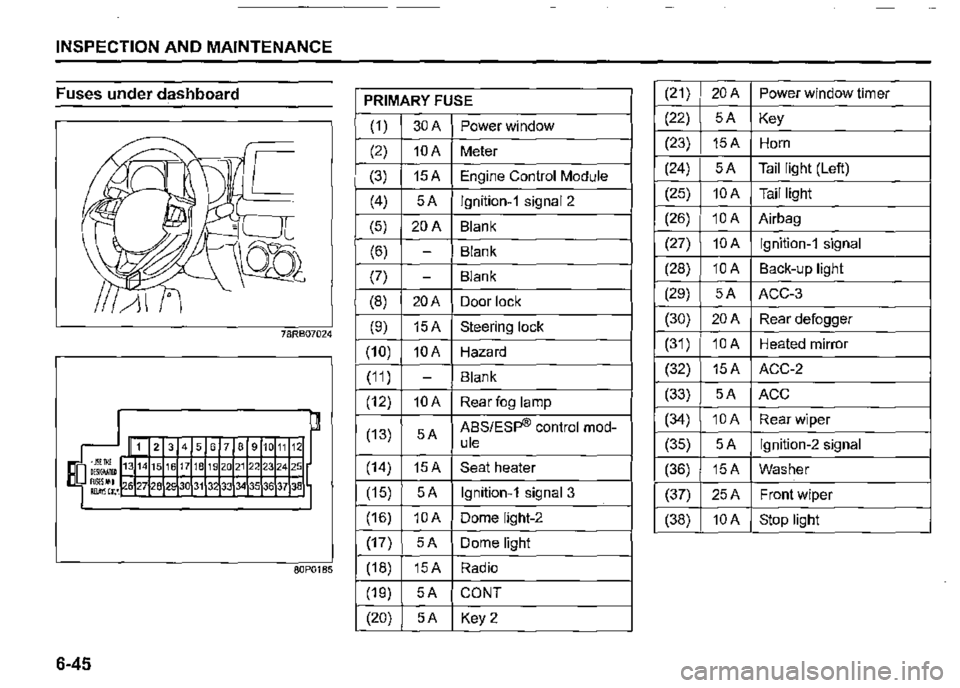
Fuses under dashboard
6-45
78RB07024
1 2 3 4 5 6 7 8 9 10 11 12
71819202122232425
80P0185
PRIMARY FUSE
(1) 30A Power window
(2) 10A Meter
(3) 15A Engine Control Module
(4) 5A lgnition-1 signal 2
(5) 20A Blank
(6) -Blank
(7) -Blank
(8) 20A Door lock
(9) 15A Steering lock
(10) 10A Hazard
(11) -Blank
(12) 10A Rear fog lamp
(13) 5A ABS/Esp® control mod-ule
(14) 15A Seat heater
(15) 5A lgnition-1 signal 3
(16) 10A Dome light-2
(17) 5A Dome light
(18) 15A Radio
(19) 5A CONT
(20) 5A Key2
(21) 20A Power window timer
(22) 5A Key
(23) 15A Horn
(24) 5A Tail light (Left)
(25) 10A Tail light
(26) 10A Airbag
(27) 10A lgnition-1 signal
(28) 10A Back-up light
(29) 5A ACC-3
(30) 20A Rear defogger
(31) 10A Heated mirror
(32) 15A ACC-2
(33) 5A ACC
(34) 10A Rear wiper
(35) 5A lgnition-2 signal
(36) 15A Washer
(37) 25A Front wiper
(38) 10A Stop light
Page 413 of 421
INDEX
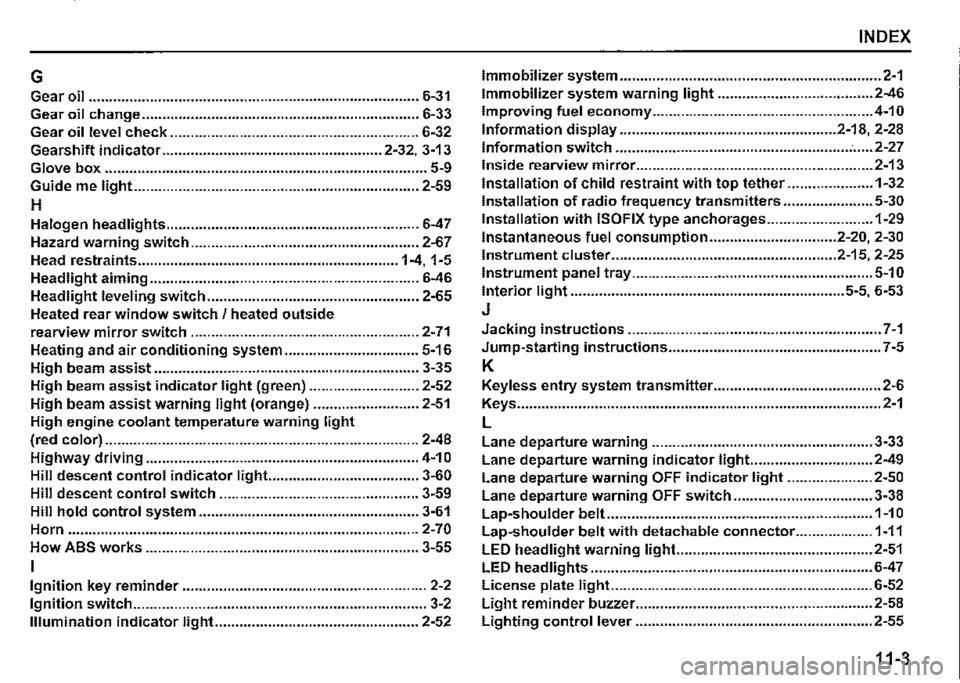
G Immobilizer system ................................................................ 2-1
Gear oil ................................................................................. 6-31 Immobilizer system warning light ...................................... 2-46
Gear oil change .................................................................... 6-33 Improving fuel economy ...................................................... 4-10
Gear oil level check ............................................................. 6-32 Information display ..................................................... 2-18, 2-28
Gearshift indicator ...................................................... 2-32, 3-13 Information switch ......................................................... : ..... 2-27
Glove box ............................................................................... 5-9 Inside rearview mirror .......................................................... 2-13
Guide me light ...................................................................... 2-59 Installation of child restraint with top tether ..................... 1-32
H Installation of radio frequency transmitters ...................... 5-30
Halogen headlights .............................................................. 6-47
Hazard warning switch ........................................................ 2-67
Head restraints ................................................................ 1-4, 1-5
Headlight aiming .................................................................. 6-46
Headlight leveling switch .................................................... 2-65
Heated rear window switch / heated outside
Installation with ISOFIX type anchorages .......................... 1-29
Instantaneous fuel consumption ............................... 2-20, 2-30
Instrument cluster ....................................................... 2-15, 2-25
Instrument panel tray ........................................................... 5-10
Interior light ................................................................... 5-5, 6-53
J
rearview mirror switch ........................................................ 2-71 Jacking instructions .............................................................. 7-1
Heating and air conditioning system ................................. 5-16 Jump-starting instructions .................................................... 7-5
High beam assist ................................................................. 3-35 K
High beam assist indicator light (green) ........................... 2-52 Keyless entry system transmitter ......................................... 2-6
High beam assist warning light (orange) .......................... 2-51 Keys ......................................................................................... 2-1
High engine coolant temperature warning light L
(red color) ............................................................................. 2-48 Lane departure warning ...................................................... 3-33 Highway driving ................................................................... 4-1 O Lane departure warning indicator light.. ............................ 2-49
Hill descent control indicator light... .................................. 3-60 Lane departure warning OFF indicator light ..................... 2-50 Hill descent control switch ................................................. 3-59 Lane departure warning OFF switch .................................. 3-38 Hill hold control system ...................................................... 3-61 Lap-shoulder belt ................................................................. 1-1 O Horn ...................................................................................... 2-70 Lap-shoulder belt with detachable connector ................... 1-11 How ABS works ................................................................... 3-55 LED headlight warning light.. .............................................. 2-51
I LED headlights ..................................................................... 6-47
Ignition key reminder ............................................................ 2-2 License plate light ................................................................ 6-52
Ignition switch ........................................................................ 3-2 Light reminder buzzer .......................................................... 2-58
Illumination indicator light.. ................................................ 2-52 Lighting control lever .......................................................... 2-55
11-3