Fog lights SUZUKI JIMNY 2022 Owners Manual
[x] Cancel search | Manufacturer: SUZUKI, Model Year: 2022, Model line: JIMNY, Model: SUZUKI JIMNY 2022Pages: 421, PDF Size: 6.35 MB
Page 12 of 421
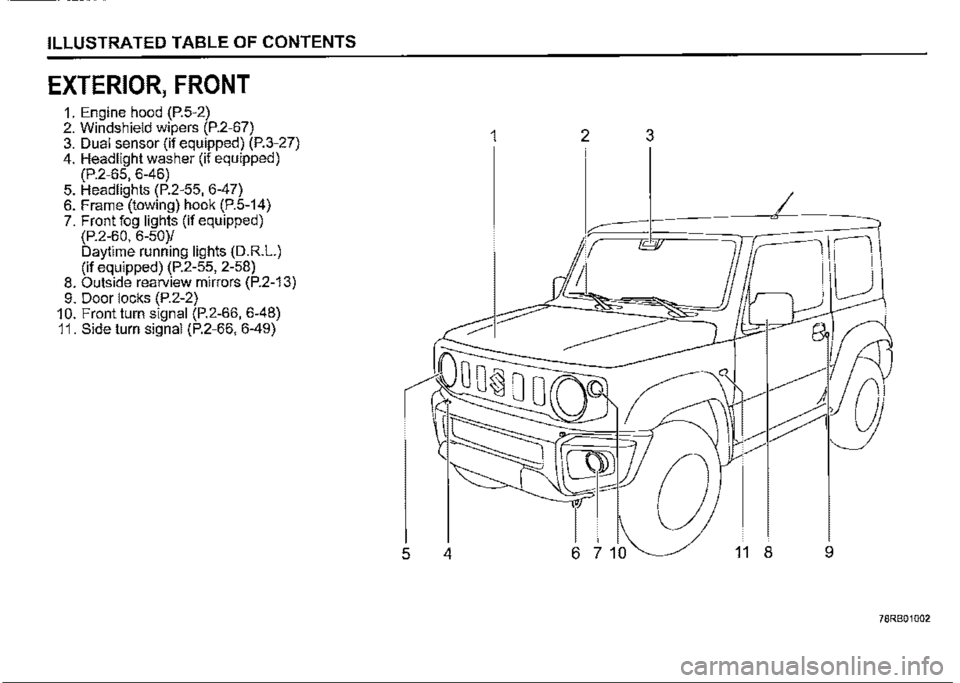
ILLUSTRATED TABLE OF CONTENTS
EXTERIOR, FRONT
1. Engine hood (P.5-2) 2. Windshield wipers (P.2-67) 3. Dual sensor (if equipped) (P.3-27) 4. Headlight washer (if equipped) (P.2-65, 6-46) 5. Headlights (P.2-55, 6-47) 6. Frame (towing) hook (P.5-14) 7. Front fog lights (if equipped) (P.2-60, 6-50)/ Daytime running lights (D.R.L.) (if equipped) (P.2-55, 2-58) 8. Outside rearview mirrors (P.2-13) 9. Door locks (P.2-2) 10. Front turn signal (P.2-66, 6-48) 11. Side turn signal (P.2-66, 6-49)
1 2 3
I
5 4 6 7 10 11 8 9
78RB01002
Page 13 of 421
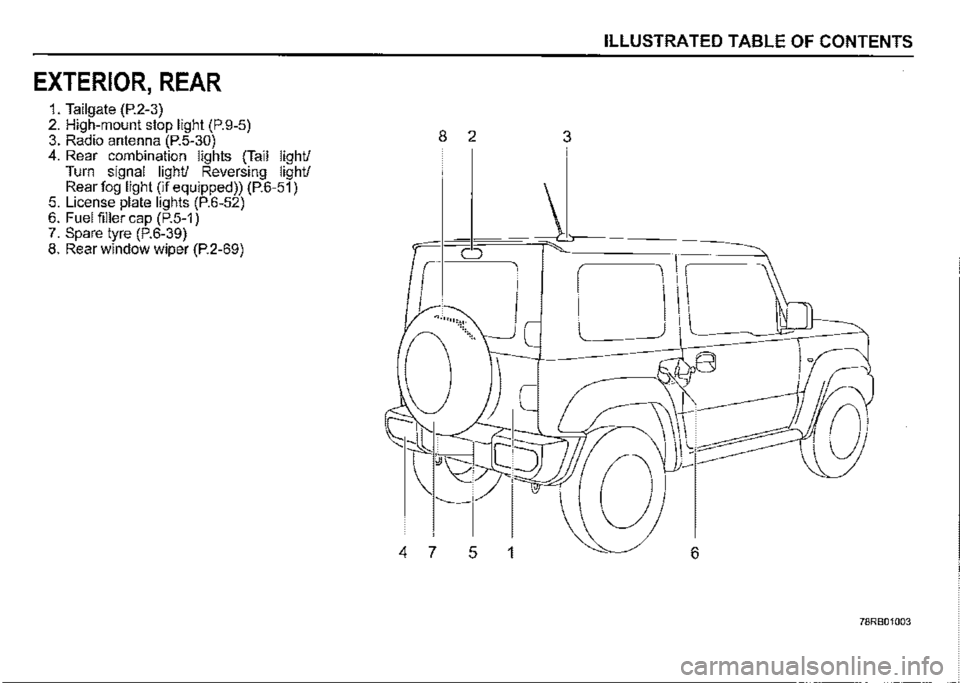
EXTERIOR, REAR
1. Tailgate (P.2-3) 2. High-mount stop light (P.9-5) 3. Radio antenna (P.5-30) 4. Rear combination lights (Tail light/ Turn signal light/ Reversing light/ Rear fog light (if equipped)) (P.6-51) 5. License plate lights (P.6-52) 6. Fuel filler cap (P.5-1) 7. Spare tyre (P.6-39) 8. Rear window wiper (P.2-69)
ILLUSTRATED TABLE OF CONTENTS
8 2 3
0
.... ,,.,,:\:<.
'----
4 7 5 1 6
78RB01003
Page 123 of 421
High beam assist indicator light
(green) (if equipped)
52RM20690
When the high beam assist is working, this light comes on by green.
For details, refer to "Dual sensor brake support (if equipped)" in "OPERATING YOUR VEHICLE" section.
Turn signal indicators
50G055
When you turn on the left or right turn signals, the corresponding green arrow on the instrument cluster will flash along with the respective turn signal lights. When you turn on the hazard warning switch, both arrows will flash along with all of the turn signal lights.
Main beam (high beam) indicator
light
50G056
This indicator comes on when headlight main beams (high beams) are turned on.
BEFORE DRIVING
Illumination indicator light
64J045
This indicator light comes on while the position lights, tail light and/or the headlights are on.
Front fog light indicator light
(if equipped)
68PM00268
The front fog light indicator light comes on when the front fog light operates.
2-52
Page 129 of 421
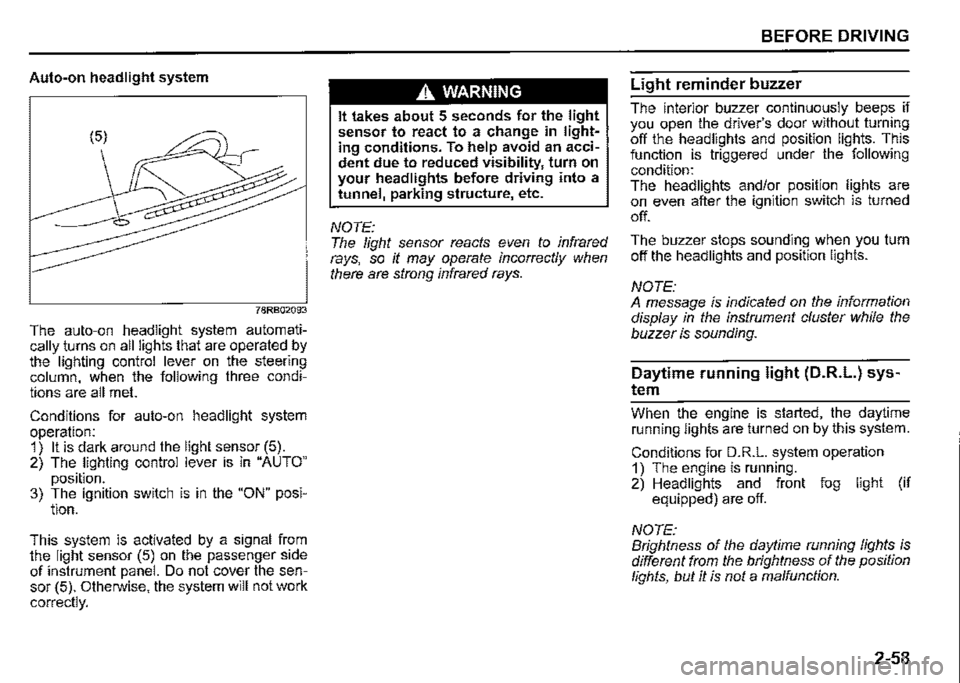
Auto-on headlight system
78RB02093
The auto-on headlight system automatically _turns on all lights that are operated by the lighting control lever on the steering column, when the following three conditions are all met.
Conditions for auto-on headlight system operation: 1) It is dark around the light sensor (5). 2) The lighting control lever is in "AUTO"
position. 3) The ignition switch is in the "ON" posi-tion.
This. system is activated by a signal from the light sensor (5) on the passenger side of instrument panel. Do not cover the sensor (5). Otherwise, the system will not work
correctly.
A WARNING
It takes about 5 seconds for the light sensor to react to a change in lighting conditions. To help avoid an accident due to reduced visibility, turn on your headlights before driving into a tunnel, parking structure, etc.
NOTE: The light sensor reacts even to infrared rays, so it may operate incorrectly when there are strong infrared rays.
BEFORE DRIVING
Light reminder buzzer
The interior buzzer continuously beeps if you open the driver's door without turning off the headlights and position lights. This function is triggered under the following condition: The headlights and/or position lights are on even after the ignition switch is turned
off.
The buzzer stops sounding when you turn off the headlights and position lights.
NOTE: A message is indicated on the information display in the instrument cluster while the buzzer is sounding.
Daytime running light (D.R.L.) sys
tem
Whe_n th_e engine is started, the daytime running lights are turned on by this system.
Conditions for D.R.L. system operation 1) The engine is running. 2) Headlights and front fog light (if equipped) are off.
NOTE: Brightness of the daytime running lights is different from the brightness of the position lights, but it is not a malfunction.
2-58
Page 130 of 421
BEFORE DRIVING
Guide me light (if equipped)
Guide me light has two functions of "To home" and "To car" for improving your visibility in the dark.
"To home" function Even after you leave the car, the ground will be illuminated for a short while with this function. You can turn on the front position lights and the headlights in the low beam setting for about 1 O seconds after the ignition switch is turned "LOCK".
To set the function: 1) Turn the lighting switch to "AUTO" position. 2) Turn the ignition switch to "LOCK" position. 3) Pull the lighting control lever toward you once and open the driver's side door within 60 seconds. Or pull the lighting control lever toward you once while the driver's side door is open.
2-59
To cancel the function: Perform any of the following operations. · If your vehicle is equipped with the keyless entry system (if equipped), it is necessary to insert the ignition key in the ignition switch. Pull the lighting control lever toward you once. Turn the ignition switch to "ACC" or "ON" position. Turn the lighting switch to any other position than "AUTO" position.
NOTE: When the "To home" is functioning, the front fog lights (if equipped), rear fog light and the headlights (high beam) are not turned on. Lighting time of the "To home" function can be changed on the information display. Refer to "Information display" in this section.
"To car" function Before you get in the vehicle, the ground will be illuminated for a short while to easily lead the driver to the vehicle. If "UNLOCK" button of the keyless entry system transmitter (if equipped) is pressed while the lighting switch is positioned in "AUTO", the front position lights and the headlights in the low beam are turned on for 1 O seconds. This function will operate only when it is dark outside the vehicle.
To cancel the function: Perform any of the following operations. If your vehicle is equipped with the keyless entry system (if equipped), it is necessary to insert the ignition key in the ignition switch. Lock the doors by using the keyless entry system transmitter, or the key in the driver's door lock. Turn the ignition switch to "ACC" or "ON" position. Turn the lighting switch to any other position than "AUTO" position.
NOTE: When the ''To car'' is functioning, the front fog lights (if equipped), rear fog fight and the headlights (high beam) are not turned on. Lighting time of the "To car'' function can be changed on the information display. Refer to "Information display" in this section.
Page 131 of 421

Front fog light switch
(if equipped)
68PM00232
To turn the front fog light on, twist the knob as shown in the illustration with the position lights, tail lights and/or the headlights are on. When the front fog light is on, an indicator light on the instrument cluster will come on.
NOTE: In some countries the lighting operation may be different from the above description according to local regulations.
Rear fog light switch
(if equipped)
68PM00233
To turn the rear fog light on, twist the knob as shown in the illustration with the headlights on. When the rear fog light is on, an indicator light on the instrument cluster will come on. If you twist the knob to the mark of rear fog light with the front fog light on, the rear fog light will turn on and an indicator light on the instrument cluster will come on.
BEFORE DRIVING
Adjusting headlight pattern
Headlight pattern, left hand traffic
:::OD
78RB02076
Headlight pattern, right hand traffic
I .·
::m
78RB02077
2-60
Page 188 of 421

OPERATING YOUR VEHICLE
Other than the described above, the dual sensor cannot be detected the vehicle in front of you or light source, and there is a case where high beam assist may not activate properly. Refer to "Situations where the dual sensor may not activate properly" in this section for details.
Under the following situations, switch high beam or low beam manually, When switching back and forth between the high beams (main beams) and low beams frequently When there is a problem using the high beams (main beams) When it is considered disturbing to other drivers or pedestrians
There is a case where high beams (main beams) is switched to low beams by the fog lights of the vehicle in front of you.
Street lights, traffic signals, and illumination of billboards or signs may cause the high beams (main beams) to switch to the low beams, or low beam to remain on.
3-37
Dual sensor brake support OFF switch
You can turn off the dual sensor brake support system. In the following situations, push and hold the dual sensor brake support OFF switch as unexpected dangers may be possible if ii is activated. -When the vehicle is placed upon atester such as when undergoing a vehicle inspection -When the vehicle is put up on a lift, and the tyres are idling -When the vehicle is being towed -When the vehicle is being carried on a car carrier -When the vehicle is being operated on a race track -When there is vinyl curtains or pendulous branches in front of the vehicle -When driving in the field covered with grown grass -When using an automatic car washer -When the vehicle is placed upon a car elevator or placed in a mechanical parking lot -With a spare tyre or snow chains equipped -When you have a temporarily repaired flat tyre -When you have an accident or breakdown -When the automatic brake system is activated frequently
-When tyres are not inflated to the recommended tyre pressure -With worn tyres equipped -With non-specified sized tyres or wheels equipped -With a modified suspension equipped -When attaching an item which inter-feres with the visibility of the dual sensor -When the vehicle is being weighed down by heavy items -When the vehicle is used to tow a trailer
78RB03010
Page 192 of 421

OPERATING YOUR VEHICLE
Types of recognized traffic signs
Information Type of the traffic sign message
[l[I Speed limit begins/ends
~~
No overtaking begins/ends
Speed limit with supplemental mark (Displayed simultaneously with speed limit)
Supplemental mark exists
I
(Display example)
~
All canceled (All restrictions canceled. Returns to default road regu-lation.)
NOTE: The above traffic signs are representative examples. The traffic signs may be different in every country.
3-41
Situations where the dual sensor may not activate properly There may be high possibility not to detect the traffic signs by the dual sensor under the following situations. Also the function of the dual sensor may be stopped temporarily. When the situations are improved, the temporary stop of the function will be canceled. When there is bad weather such as heavy rain, fog or a blizzard When the dual sensor is hit by a bright light such as sunlight or the headlight of oncoming vehicle When there is a sight of similar tone and color such as a snowscape When the vehicle runs on the road which became bright by the reflected light, When there are no lights or lamps as street lamps, etc around in the dark Front visibility is poor due to that there is water vapor, sand or smoke or when the vehicle in front of you is surrounded by exhaust gas, water or snow When you drive in the dawn, the dusk and the night or when you drive in a dark place as an indoor parking lot When the vehicle direction to go ahead or the vehicle position was largely changed (for example, the lane change, left turn, or right turn), When the windshield is covered in fog, snow, ice or dirt
Page 200 of 421
OPERATING YOUR VEHICLE
A WARNING
Even when the detection conditions are satisfied, not all pedestrians may be detected by the dual sensor. In the following situations, there may be a high possibility of undetectable or delay of detection. Always drive in a safe manner. • A person who walks in a group • A person who walks beside a wall or another obstacle A person who has an umbrella up A person whose color is similar to the background and who is blended into the scenery • A person who has a big luggage • A person who walks with a stoop or who crouches. • A person who is lying down • A person who is in a dark place • A person who jumps out in front of you • A person at night
NOTE: As the function of the dual sensor brake support is different depending on some destinations or areas, there are type of vehicles with the function not to detect the pedestrians.
3-49
Situations where the dual sensor may not activate properly In the following situations, there may be a high possibility that the dual sensor cannot detect a vehicle, a pedestrian, an object of the high beam assist (such as the lights of the vehicle in front of you and street lamps, etc.), partition lines or traffic sign. Also the function of the dual sensor may be stopped temporarily. When the situations are improved, the temporary stop of the function will be canceled.
81M40380
When there is bad weather such as heavy rain, fog or a blizzard When the dual sensor is hit by a bright light such as sunlight or the headlight of oncoming vehicle When there is a sight of similar tone and color such as a snowscape When there is a dark place and no landmark around When front visibility is poor due to that there is water vapor, sand or smoke or when the vehicle in front of you is surrounded by exhaust gas, water or snow
• When your vehicle gets close to an object in a dark place such as at dusk, at dawn or an indoor parking lot When the windshield is covered in fog, snow, ice or dirt • When raindrop, water or dirt on the windshield is not wiped up enough While using the windshield washer When a wiper blade other than SUZUKI genuine parts, including short type wiper blade is used When lens of dual sensor is dirty or dam
aged
72M20423
When the vision of the dual sensor is obstructed with the followings: -A sticker or film on the windshield -An accessory on the windshield -A crack or scratch of the windshield -A long object such as a roof carrier or ski board on the roof
Page 201 of 421

72M20405
When your vehicle is weighed down by heavy items in the luggage compartment or rear seat When wheel alignment is deviated When the tyres are not infiated to the recommended tyre pressure or the tyres are worn With snow chains or non-specified sized tyres equipped When you have a temporarily repaired fiat tyre With a modified suspension equipped When passing through the entrance or exit of the tunnel and the brightness is changed extremely When driving without lighting the headlights at night or in tunnels When driving on the following roads -On sharp curves or extremely rough surfaces -On a steep slope -On seam of the road When vehicle is swaying When the optical axis of the headlight is deviated
With modified headlights and/or front fog lights equipped When the headlights are covered in dirt, snow, ice or mud
When the following types of a vehicle are in front of you, or when the following situations occur, the dual sensor may not detect a vehicle in front of you or may need more time to detect a vehicle. ·
72M20407
Vehicles in front of you have small, low, or uneven backs as shown below: -A track without side or back gates, and when mounting no luggage on the cargo bed -A vehicle with luggage protruding out from the back -A specially shaped vehicle such as a car carrier trailer or a motorcycle with side car -A low-slung vehicle When ground clearance of vehicle in front of you is extremely high. When a vehicle is oncoming or retreating vehicle
OPERATING YOUR VEHICLE
When a vehicle facing sideways When a vehicle in front of you without turning on the tail lights at night or in tunnels When a vehicle in front of you refiects sunlight strongly When there is a wall in front of the parked vehicle When there is another obstacle beside a vehicle
D
72M20406
When only a part of the vehicle in front of you is within the dual sensor detection field When the difference of speed between the vehicle in front of you and your vehicle is increased When the distance to the vehicle in front of you is short When the vehicle in front of you is difficult to refiect the laser beam When driving on a curve For a while after escaping from a curve When the vehicle in front of you turns, accelerates or decelerates suddenly When a vehicle in front of you jumps out
3-50