page 39 SUZUKI JIMNY 2022 Owners Manual
[x] Cancel search | Manufacturer: SUZUKI, Model Year: 2022, Model line: JIMNY, Model: SUZUKI JIMNY 2022Pages: 421, PDF Size: 6.35 MB
Page 42 of 421
FOR SAFE DRIVING
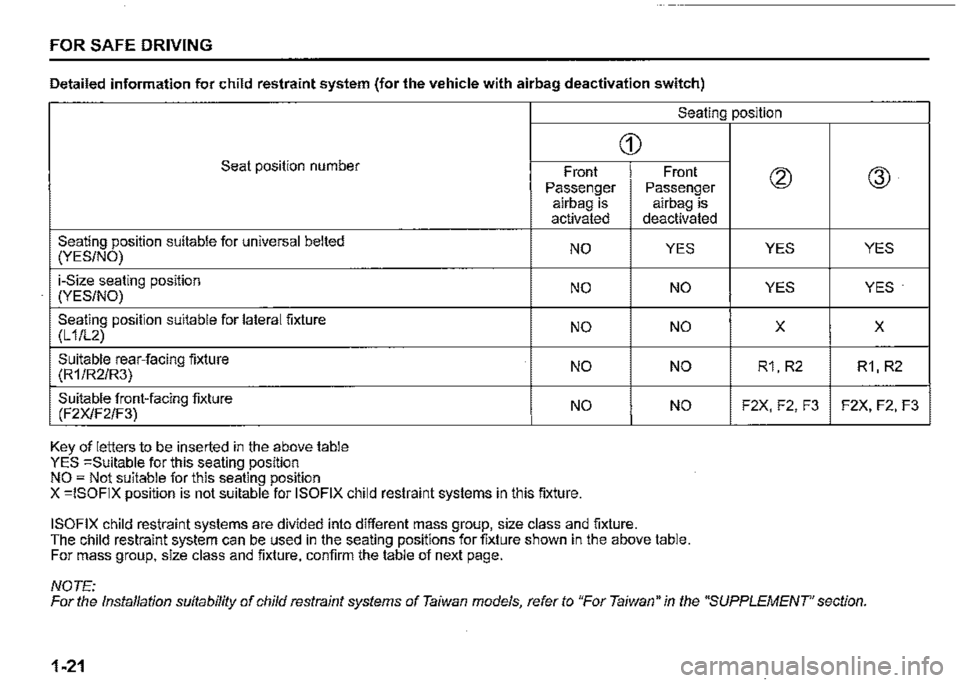
Detailed information for child restraint system (for the vehicle with airbag deactivation switch)
Seating position
Seat position number
Seating position suitable for universal belted (YES/NO)
i-Size seating position (YES/NO)
Seating position suitable for lateral fixture (L 1/L2)
Suitable rear-facing fixture (R1/R2/R3)
Suitable front-facing fixture (F2X/F2/F3)
Key of letters to be inserted in the above table YES =Suitable for this seating position NO = Not suitable for this seating position
Front Passenger airbag is activated
NO
NO
NO
NO
NO
X =ISOFIX position is not suitable for ISOFIX child restraint systems in this fixture.
G)
ISOFIX child restraint systems are divided into different mass group, size class and fixture.
Front Passenger airbag is deactivated
YES
NO
NO
NO
NO
The child restraint system can be used in the seating positions for fixture shown in the above table. For mass group, size class and fixture, confirm the table of next page.
NOTE:
(2)
YES
YES
X
R1, R2
F2X, F2, F3
@
YES
YES·
X
R1, R2
F2X, F2, F3
For the Installation suitability of child restraint systems of Taiwan models, refer to "For Taiwan" in the "SUPPLEMENT' section.
1-21
Page 46 of 421
FOR SAFE DRIVING
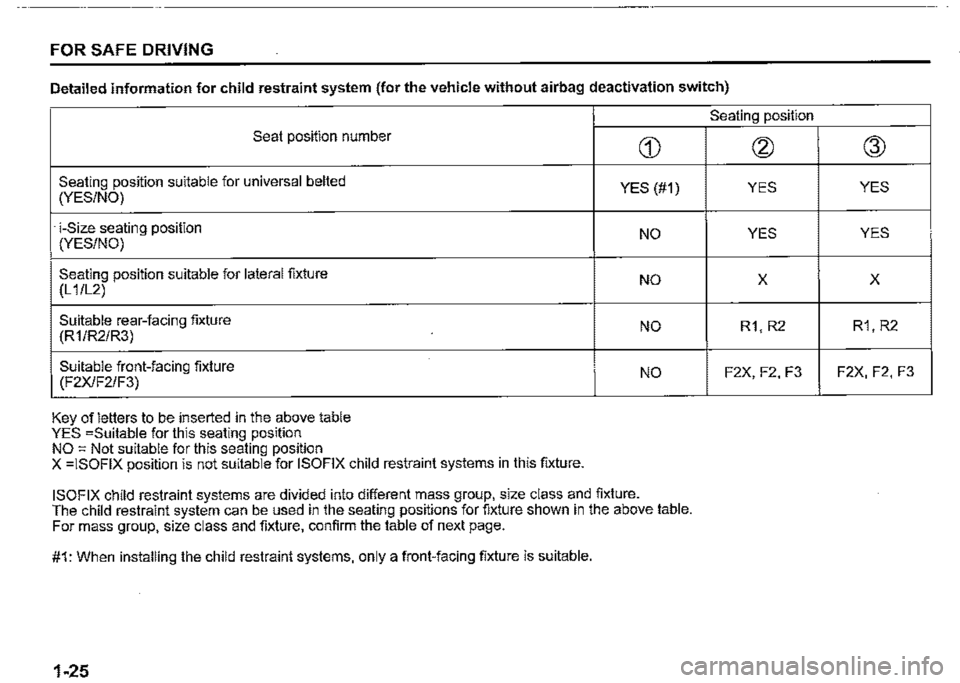
Detailed information for child restraint system (for the vehicle without airbag deactivation switch)
Seat position number
Seating position suitable for universal belted (YES/NO)
· i-Size seating position (YES/NO)
Seating position suitable for lateral fixture (L 1 /L2)
Suitable rear-facing fixture (R1/R2/R3)
Suitable front-facing fixture (F2X/F2/F3)
Key of letters to be inserted in the above table YES =Suitable for this seating position NO = Not suitable for this seating position X =ISOFIX position is not suitable for ISOFIX child restraint systems in this fixture.
CD
YES (#1)
NO
NO
NO
NO
ISOFIX child restraint systems are divided into different mass group, size class and fixture. The child restraint system can be used in the seating positions for fixture shown in the above table. For mass group, size class and fixture, confirm the table of next page.
#1: When installing the child restraint systems, only a front-facing fixture is suitable.
1-25
Seating position
@
YES
YES
X
R1, R2
F2X, F2, F3
@
YES
YES
X
R1, R2
F2X, F2, F3
Page 61 of 421

80J103
Collision that the front of your vehicle goes under the bed of a truck etc.
80J104
Collision with a utility pole or stumpage
80J105E
Collision with a fixed wall or guardrail at left and right angles of greater than about 30 degrees (1) from the front of your vehicle
80J106
Frontal collision with a fixed wall that
FOR SAFE DRIVING
Front airbags do not inflate Front airbags do not infiate in rear impacts, side impacts or rollovers, etc. However, these might inflate in a strong impact.
80J120
• Impact from the rear
80J119
does not move or deform at less than • Impact from the side about 25 km/h (15 mph)
1-40
Page 65 of 421

80J125
Impact from the side by a motorcycle or
bicycle
80J126
Collision with a utility pole or stumpage
FOR SAFE DRIVING
Side airbags and side curtain airbags do not inflate How the system works
80J120
• Impact from the rear
80J110
• Vehicle rollover
In a frontal collision, the crash sensors will detect rapid deceleration, and if the controller judges that the deceleration represents a severe frontal collision, the controller will trigger the infiators. If your vehicle is equipped with side airbags and side curtain airbags, crash sensors will detect a side collision, and if the controller judges that the side collision is severe enough, it will trigger the side airbag and side curtain airbag infiators. The infiators inflate the appropriate airbags with nitrogen or argon gas. The infiated airbags provide a cushion for your head (front airbags and side curtain airbags only) and upper body. The airbag inflates and defiates so quickly that you may not even realize that it has activated. The airbag will neither hinder your view nor make it harder to exit the vehicle.
Airbags must infiate quickly and forcefully in order to reduce the chance of serious or fatal injuries. However, an unavoidable consequence of the quick infiation is that the airbag may irritate bare skin, such as the facial area against a front airbag. Wash off any residue as soon as possible to prevent skin irritation. Also, upon inflation, a loud noise will occur and some powder and smoke will be released. These conditions are not harmful and do not indicate a fire in the vehicle. Be aware, however, that some airbag components may be hot for a while after infiation.
1-44
Page 95 of 421
•
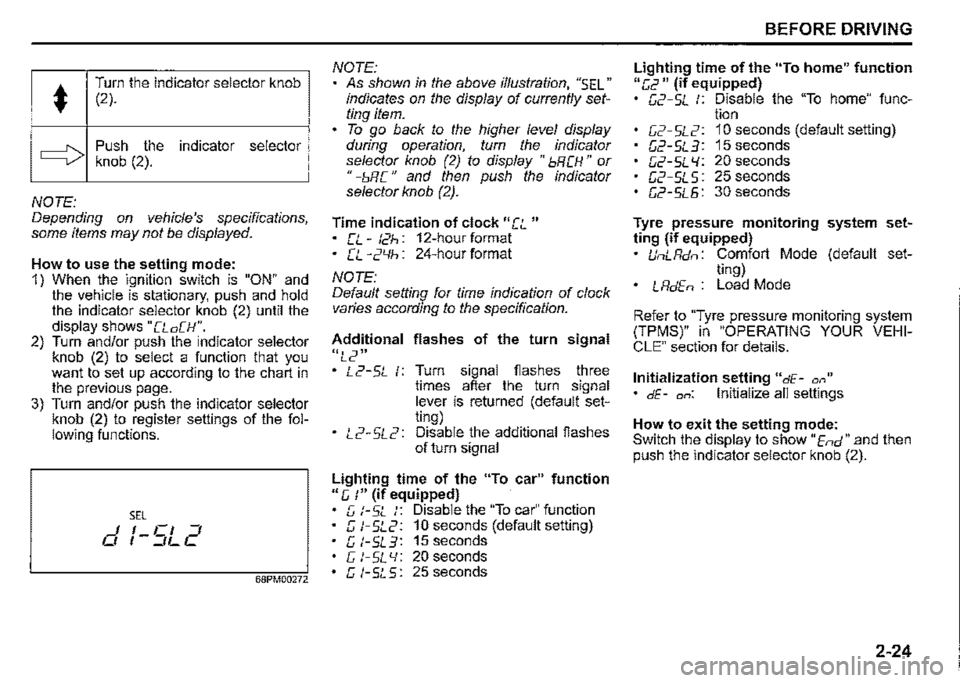
Turn the indicator selector knob (2).
c:::::> Push the indicator selector knob (2).
NOTE: Depending on vehicle's specifications, some items may not be displayed.
How to use the setting mode: 1) When the ignition switch is "ON" and the vehicle is stationary, push and hold the indicator selector knob (2) until the display shows "[Lo[H". 2) Turn and/or push the indicator selector knob (2) to select a function that you want to set up according to the chart in the previous page. 3) Turn and/or push the indicator selector knob (2) to register settings of the following functions.
SEL I I Cl ::J 0 , -::JL C
68PM00272
NOTE: As shown in the above illustration, "SEL" indicates on the display of currently setting item. To go back to the higher level display during operation, turn the indicator selector knob (2) to display "bRCH" or " -bR C " and then push the indicator selector knob (2).
Time indication of clock "[L " • [L-t2h: 12-hourformat • CL -2'-lh: 24-hour format
NOTE: Default setting for time indication of clock varies according to the specification.
Additional flashes of the turn signal
"L2" • L2-5L 1: Turn signal flashes three times after the turn signal lever is returned (default setting) • L2-5L2: Disable the additional flashes of turn signal
Lighting time of the "To car" function 11 e, :" (if equipped) G t-SL :: Disable the "To car" function c; t-5L2: 10 seconds (default setting) G l-5L3: 15 seconds c; t-SL 'I: 20 seconds G t-5L5: 25 seconds
BEFORE DRIVING
Lighting time of the "To home" function "[,2 11 (if equipped) G2-5L :: Disable the "To home" func-tion C2-5L2: 10 seconds (default setting) G2-5L3: 15seconds G2-5L l/: 20 seconds G2-SLS: 25 seconds G2-5L5: 30 seconds
Tyre pressure monitoring system setting (if equipped) UnLRdn: Comfort Mode (default set-ting) • LRdEn : Load Mode
Refer to "Tyre pressure monitoring system (TPMS)" in "OPERATING YOUR VEHICLE" section for details.
Initialization setting "dE-a,," • dE-on: Initialize all settings
How to exit the setting mode: Switch the display to show "End" and then push the indicator selector knob (2).
2-24
Page 226 of 421

DRIVING TIPS
Know Your Vehicle
Take time to familiarize yourself with the unique handling characteristics of your vehicle by first driving around in an area away from traffic. Practice turning the vehicle at a variety of speeds and in different directions. Get a feel for the greater steering response that your vehicle has over a conventional car.
Wear Your Seat Belts at All Times
The driver and all passengers should be properly restrained at all times, using the seat belts provided. Refer to the "SEAT BELTS" section for instructions on proper use of the seat belts.
Don't Make Sharp Turns
As mentioned before, small multipurpose vehicles have specific design characteristics that allow them to perform in a wide variety of applications. These characteristics also change the cornering behavior relative to conventional passenger cars. Remember, small multipurpose vehicles have more responsive steering and a higher center of gravity than conventional passenger cars. If at all possible, avoid making sharp turns in your vehicle.
4-3
Slow Down on Curves
Learn to approach curves cautiously and at a conservative speed. Do not attempt to take curves at the same speeds that you would in a vehicle with a lower center of gravity. Just as you would not drive a sports car on a trail, you should not attempt to drive your vehicle around curves like a sports car.
Slow Down and Use Caution on
Slippery Roads
60G089A
Under wet road conditions you should drive at a lower speed than on dry roads due to possible slippage of tyres during braking. When driving on icy, snow-covered, or muddy roads, reduce your speed and avoid sudden acceleration, abrupt braking, or sharp steering movements. Use 4-wheel drive high range (4H) for better traction.
Page 285 of 421

Random playback Press "ROM" button (7). Each time the button is pressed, the mode will change as follows:
OFF ➔ TRACK RANDOM
t I
TRACK RANDOM The random indicator "ROM" will light. The tracks in the loaded disc will be played in random order.
Repeat playback Press "RPT" button (6). Each time the button is pressed, the mode will change as follows:
OFF ➔ TRACK REPEAT
t I
• TRACK REPEAT The repeat indicator "RPT" will light. The track currently being played will be played repeatedly.
OTHER CONTROLS AND EQUIPMENT
Display change Press "DISP" button (8). Each time the button is pressed, display will change as follows:
Play time --------,!, Disc title .J, Track title --------~
NOTE: "NO TITLE" will be displayed when there is no text information in the disc currently being played. If text data contains more than 16 characters, ">" mark will appear at the right end. Holding down "DISP" button /8) for 1 second or longer can display the next
page.
5-50
Page 288 of 421
OTHER CONTROLS AND EQUIPMENT
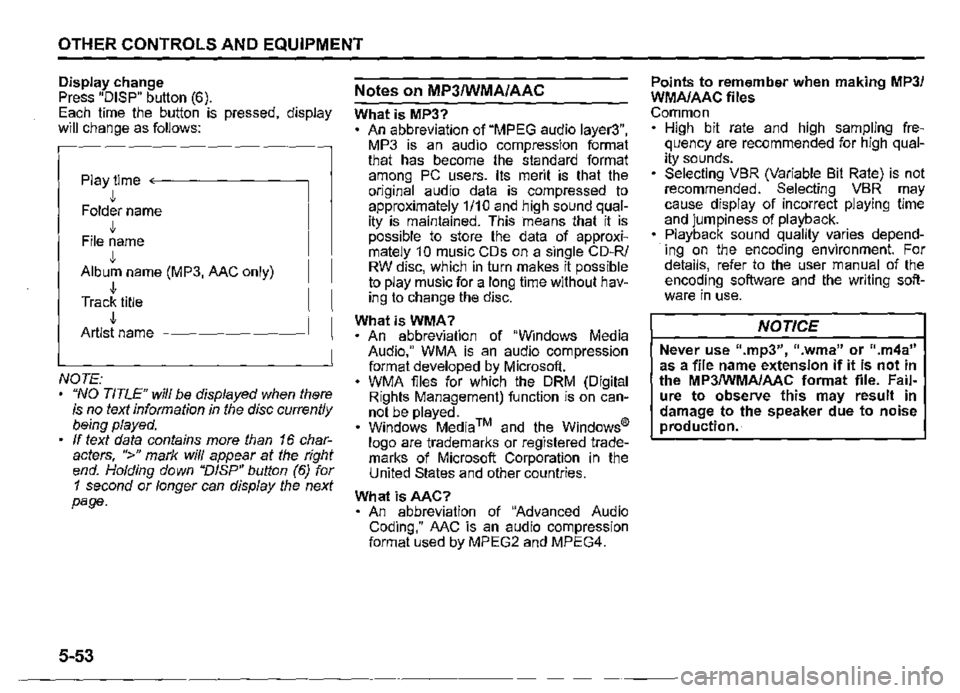
Display change Press "DISP" button (6). Each time the button is pressed, display will change as follows:
Play time <--------
• Folder name J, File name J, Album name (MP3, AAC only) J, Track title J, Artist name -------~
NOTE: "NO TITLE" will be displayed when there is no text information in the disc currently being played. If text data contains more than 16 characters, ">" mark will appear at the right end. Holding down "DISP" button (6) for 1 second or longer can display the next page.
5-53
Notes on MP3/WMA/AAC
What is MP3? An abbreviation of "MPEG audio layer3", MP3 is an audio compression format that has become the standard format among PC users. Its merit is that the original audio data is compressed to approximately 1/10 and high sound quality is maintained. This means that it is possible to store the data of approximately 1 0 music CDs on a single CD-R/ RW disc, which in turn makes it possible to play music for a long time without having to change the disc.
WhatisWMA? An abbreviation of "Windows Media Audio," WMA is an audio compression format developed by Microsoft. WMA files for which the ORM (Digital Rights Management) function is on cannot be played. Windows Media™ and the Windows® logo are trademarks or registered trademarks of Microsoft Corporation in the United States and other countries.
What isAAC? An abbreviation of "Advanced Audio Coding," AAC is an audio compression format used by MPEG2 and MPEG4.
Points to remember when making MP3/ WMA/AAC files Common High bit rate and high sampling frequency are recommended for high quality sounds. Selecting VBR (Variable Bit Rate) is not recommended. Selecting VBR may cause display of incorrect playing time and jumpiness of playback. Playback sound quality varies depending on the encoding environment. For details, refer to the user manual of the encoding software and the writing software in use.
NOTICE
Never use 11.mp3", 11 .wma" or ".m4a" as a file name extension if it is not in the MP3/WMA/AAC format file. Failure to observe this may result in damage to the speaker due to noise production.
Page 291 of 421
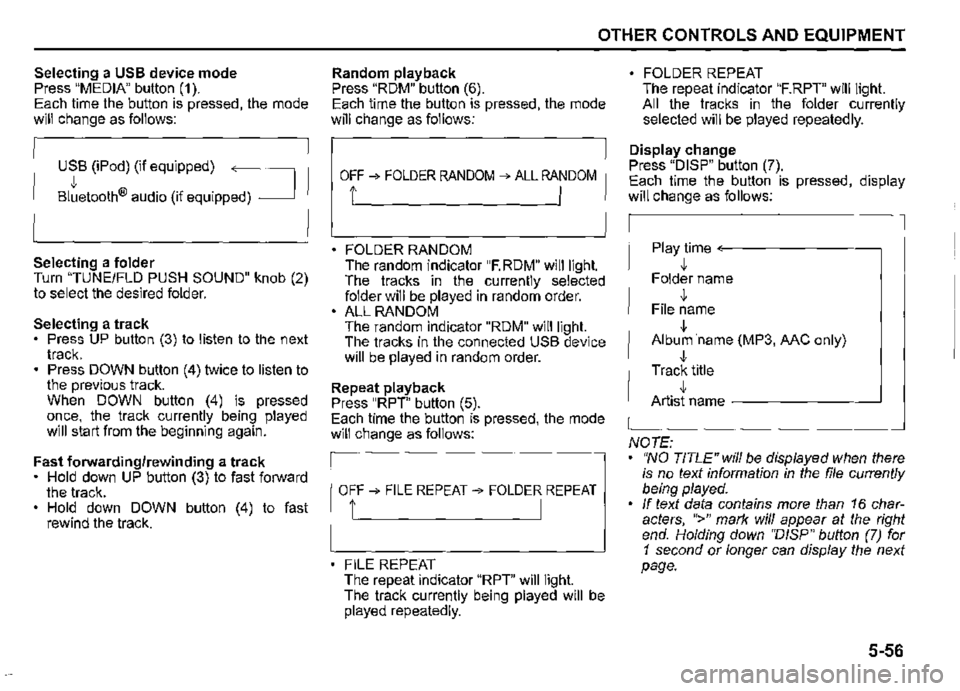
Selecting a USB device mode Press "MEDIA" button (1 ). Each time the button is pressed, the mode will change as follows:
USB (iPod) (if equipped) ~
Bltetooth® audio (if equipped) _J
Selecting a folder Turn "TUNEIFLD PUSH SOUND" knob (2) to select the desired folder.
Selecting a track Press UP button (3) to listen to the next track. Press DOWN button (4) twice to listen to the previous track. When DOWN button (4) is pressed once, the track currently being played will start from the beginning again.
Fast forwarding/rewinding a track • Hold down UP button (3) to fast forward the track. Hold down DOWN button (4) to fast rewind the track.
OTHER CONTROLS AND EQUIPMENT
Random playback Press "RDM" button (6). Each time the button is pressed, the mode will change as follows:
OFF ➔ FOLDER RANDOM ➔ ALL RANDOM
t I
FOLDER RANDOM The random indicator "F.RDM" will light. The tracks in the currently selected folder will be played in random order. ALL RANDOM The random indicator "RDM" will light. The tracks in the connected USB device will be played in random order.
Repeat playback Press "RPT" button (5). Each time the button is pressed, the mode will change as follows:
OFF➔ FILE REPEAT➔ FOLDER REPEAT
1' I
FILE REPEAT The repeat indicator "RPT" will light. The track currently being played will be played repeatedly.
FOLDER REPEAT The repeat indicator "F.RPT" will light. All the tracks in the folder currently selected will be played repeatedly.
Display change Press "DISP" button (7). Each time the button is pressed, display will change as follows:
Play time <---------~
,!, Folder name
,!, File name
,!, Album ·name (MP3, MC only)
,!, Track title ,!, Artist name -------~
NOTE: "NO TITLE" will be displayed when there is no text information in the file currently being played. If text data contains more than 16 characters, ">" mark will appear at the right end. Holding down ''D/SP" button (7) for 1 second or longer can display the next page.
5-56
Page 294 of 421
OTHER CONTROLS AND EQUIPMENT
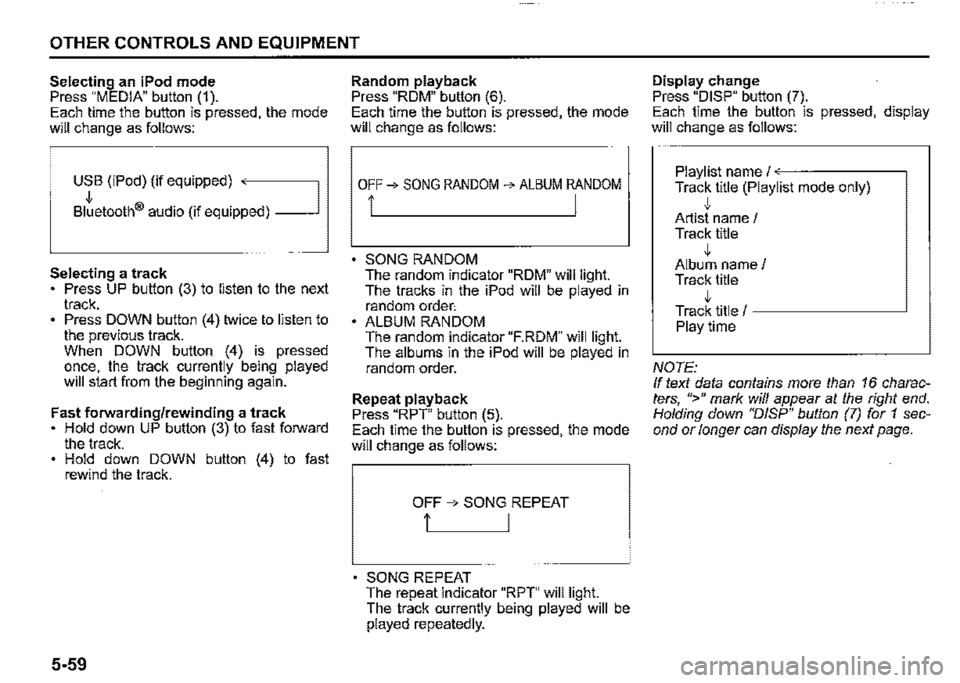
Selecting an iPod mode Press "MEDIA" button (1 ). Each time the button is pressed, the mode will change as follows:
USB (iPod) (if equipped) ,
Bltetooth® audio (if equipped) _J
Selecting a track Press UP button (3) to listen to the next track. Press DOWN button (4) twice to listen to the previous track. When DOWN button (4) is pressed once, the track currently being played will start from the beginning again.
Fast forwarding/rewinding a track Hold down UP button (3) to fast forward the track. Hold down DOWN button (4) to fast rewind the track.
5-59
Random playback Press "ROM" button (6). Each time the button is pressed, the mode will change as follows:
OFF➔ SONG RANDOM ➔ ALBUM RANDOM
i I
SONG RANDOM The random indicator "ROM" will light. The tracks in the iPod will be played in random order: ALBUM RANDOM The random indicator "F.RDM" will light. The albums in the iPod will be played in random order.
Repeat playback Press "RPT" button (5). Each time the button is pressed, the mode will change as follows:
OFF ➔ SONG REPEAT
t I
SONG REPEAT The repeat indicator "RPT" will light. The track currently being played will be played repeatedly.
Display change Press "DISP" button (7). Each time the button is pressed, display will change as follows:
Playlist name/<---·-----~
Track title (Playlist mode only) ,j, Artist name / Track title ,j, Album name/ Track title ,j, Track title / -----------'
Playtime
NOTE: If text data contains more than 16 characters, ">" mark will appear at the right end. Holding down "DISP" button (7) for 1 second or longer can display the next page.