light SUZUKI KIZASHI 2010 1.G User Guide
[x] Cancel search | Manufacturer: SUZUKI, Model Year: 2010, Model line: KIZASHI, Model: SUZUKI KIZASHI 2010 1.GPages: 388, PDF Size: 4.94 MB
Page 28 of 388

2-9BEFORE DRIVING
57L20-03E
NOTE:
If the remote controller is outside the
request switch operating range
described above, you will not be able to
operate the request switch.
If the battery of the remote controller
runs down or there are strong radio
waves or noise, the request switch oper-
ating range may be reduced or the
remote controller may be inoperative.
If the remote controller is too close to the
door, the request switches may not oper-
ate.
If a spare remote controller is in the vehi-
cle, the request switches may not oper-
ate normally.
The remote controller will only operate a
request switch if it is within the switch’s
operating range. For example, if the
remote controller is within the operating
range of the driver’s door request switch
but not the front passenger’s door
request switch, the driver’s door switch
can be operated but the front passen-
ger’s door switch cannot be operated.NOTE:
The keyless start system may not function
correctly in certain environments or under
certain operating conditions such as the
following:
When there are strong signals coming
from a television, power station or a cel-
lular phone.
When the remote controller is in contact
with or covered by a metal object.
When a radio wave type remote keyless
entry is used nearby.
When the remote controller is placed
near an electronic device such as per-
sonal computer.Some additional precautions you should
take and information you should be aware
of are:
Make sure the key is stowed in the
remote controller. If the remote controller
becomes unreliable, you will not be able
to lock or unlock the doors, or start the
engine.
Be sure that the driver always carries the
remote controller.
If you lose one of the remote controllers,
ask an authorized SUZUKI dealer as
soon as possible for a replacement. Be
sure to have your dealer program the
new remote controller code in your vehi-
cle’s memory so that the old code is
erased, or perform the programming pro-
cedure yourself according to the instruc-
tions in this section.
You can use up to four remote controllers
and keys for your vehicle. Ask an autho-
rized SUZUKI dealer for details.
The battery life of the remote controller
is about two years, but it can vary
depending on usage conditions.
CAUTION
The remote controller is a sensitive
electronic instrument. To avoid dam-
aging the remote controller:
Do not expose it to impacts, mois-
ture or high temperature such as by
leaving it on the dashboard under
direct sunlight.
Keep the remote controller away
from magnetic objects such as a
television.
Windows: 3, 8
Page 30 of 388
2-11BEFORE DRIVING
57L20-03E
NOTE:
Even with the remote controller within
the “inside sensing area”, the request
switch warning buzzer/remote controller
reminder function may not work under
any of the following conditions as the
presence of the remote controller may
not be sensed:
– The battery of the remote controller is
low.
– The remote controller is influenced by
strong radio waves or noise.
– The remote controller is in contact with
or covered by a metallic object.
– The remote controller is in the glove
box or a stowage for small articles
such as a door pocket.
– The remote controller is on the top or
in front of the instrument panel, in the
sun visor pocket or on the floor.
The remote controller may be sensed
under any of the following conditions
even when the controller is not within the
“inside sensing area”. The request
switch warning buzzer/remote controller
reminder function will then work.
– The remote controller is outside the
vehicle but very close to it.
– The remote controller is on the instru-
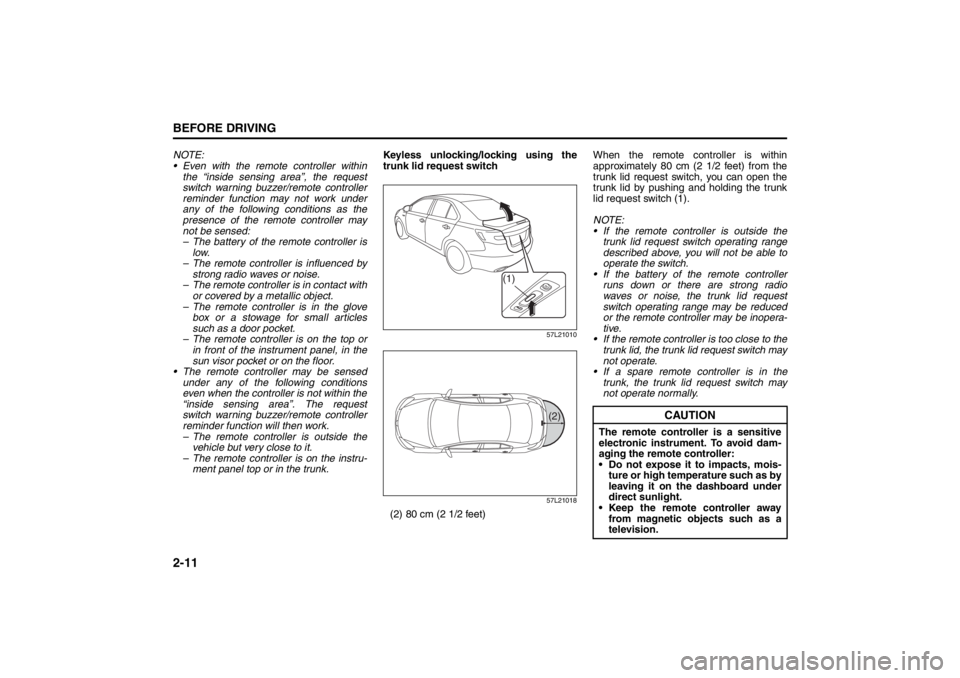
ment panel top or in the trunk.Keyless unlocking/locking using the
trunk lid request switch
57L21010
57L21018
(2) 80 cm (2 1/2 feet)When the remote controller is within
approximately 80 cm (2 1/2 feet) from the
trunk lid request switch, you can open the
trunk lid by pushing and holding the trunk
lid request switch (1).
NOTE:
If the remote controller is outside the
trunk lid request switch operating range
described above, you will not be able to
operate the switch.
If the battery of the remote controller
runs down or there are strong radio
waves or noise, the trunk lid request
switch operating range may be reduced
or the remote controller may be inopera-
tive.
If the remote controller is too close to the
trunk lid, the trunk lid request switch may
not operate.
If a spare remote controller is in the
trunk, the trunk lid request switch may
not operate normally.
(1)
(2)
CAUTION
The remote controller is a sensitive
electronic instrument. To avoid dam-
aging the remote controller:
Do not expose it to impacts, mois-
ture or high temperature such as by
leaving it on the dashboard under
direct sunlight.
Keep the remote controller away
from magnetic objects such as a
television.
Mirrors: 3, 8
Seat Adjustment: 3
Page 31 of 388
2-12
BEFORE DRIVING
57L20-03E
NOTE:
The keyless start system may not function
correctly in certain environments or under
certain operating conditions such as the
following:
When there are strong signals coming
from a television, power station or a cel-
lular phone.
When the remote controller is in contact
with or covered by a metal object.
When a radio wave type remote keyless
entry is used nearby.
When the remote controller is placed
near an electronic device such as per-
sonal computer.
Some additional precautions you should
take and information you should be aware
of are:
Make sure the key is stowed in the
remote controller. If the remote controller
becomes unreliable, you will not be able
to lock or unlock the doors, or start the
engine.
Be sure that the driver always carries the
remote controller.
If you lose one of the remote controllers,
ask an authorized SUZUKI dealer as
soon as possible for a replacement. Be
sure to have your dealer program the
new remote controller code in your vehi-
cle’s memory so that the old code is
erased, or perform the programming pro-
cedure yourself according to the instruc-
tions in this section. You can use up to four remote controllers
and keys for your vehicle. Ask an autho-
rized SUZUKI dealer for details.
The battery life of the remote controller
is about two years, but it can vary
depending on usage conditions.
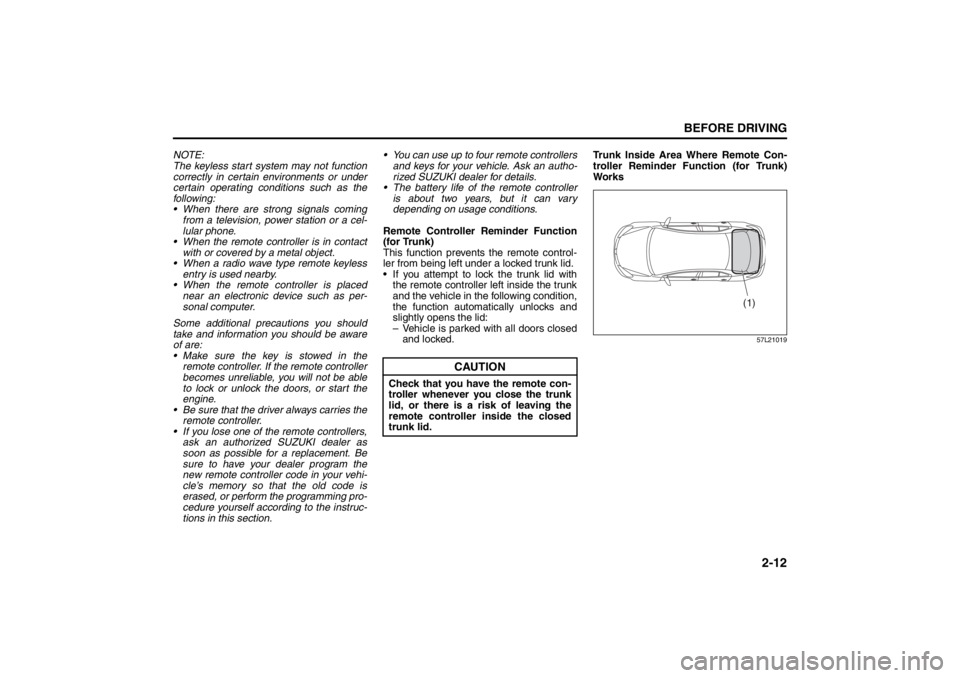
Remote Controller Reminder Function
(for Trunk)
This function prevents the remote control-
ler from being left under a locked trunk lid.
If you attempt to lock the trunk lid with
the remote controller left inside the trunk
and the vehicle in the following condition,
the function automatically unlocks and
slightly opens the lid:
– Vehicle is parked with all doors closed
and locked.Trunk Inside Area Where Remote Con-
troller Reminder Function (for Trunk)
Wo r k s
57L21019
CAUTION
Check that you have the remote con-
troller whenever you close the trunk
lid, or there is a risk of leaving the
remote controller inside the closed
trunk lid.
(1)
Seat Adjustment: 3
Page 34 of 388
2-15BEFORE DRIVING
57L20-03E
NOTE:
The theft deterrent alarm system gener-
ates alarms when any of the predeter-
mined conditions is met. However, the
system does not have any function of
blocking unauthorized entry into your
vehicle.
Always use the keyless start system
remote controller or the request switch to
unlock the doors when the theft deter-
rent alarm system has been armed.
Using a key instead will trigger the
alarm.
If a person who does not know the theft
deterrent alarm system is going to drive
your vehicle, we recommend you to
explain the system and its operation to
the person, or disable the system before-
hand. Mistakenly triggering the alarm
may cause a nuisance to others.
Even if the theft deterrent alarm system
is armed, you should still be careful to
guard against theft. Do not leave money
or things of value in your vehicle.How to arm the theft deterrent alarm
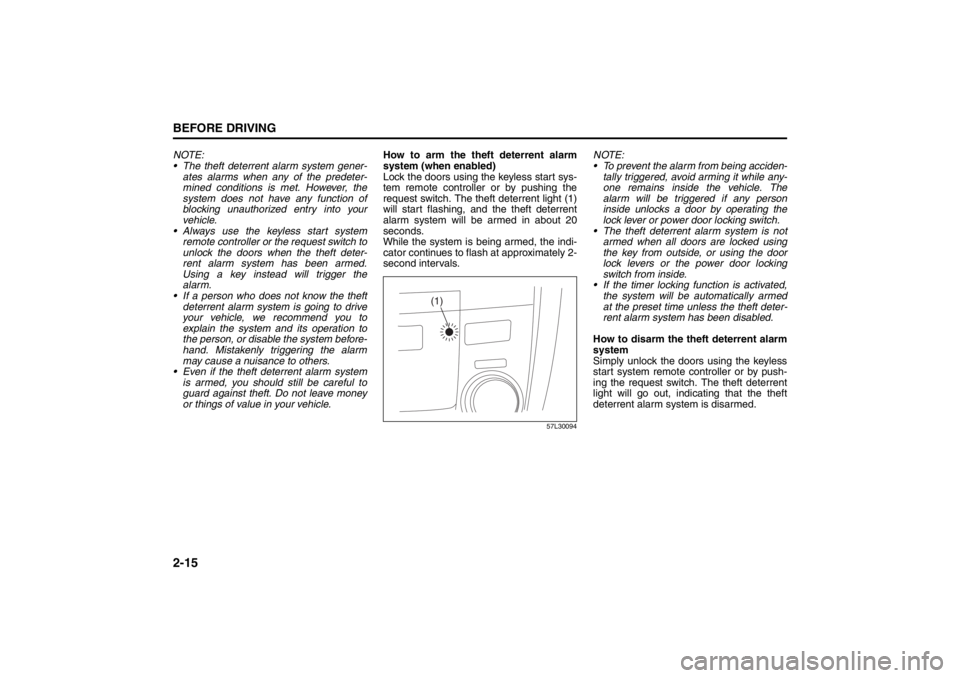
system (when enabled)
Lock the doors using the keyless start sys-
tem remote controller or by pushing the
request switch. The theft deterrent light (1)
will start flashing, and the theft deterrent
alarm system will be armed in about 20
seconds.
While the system is being armed, the indi-
cator continues to flash at approximately 2-
second intervals.
57L30094
NOTE:
To prevent the alarm from being acciden-
tally triggered, avoid arming it while any-
one remains inside the vehicle. The
alarm will be triggered if any person
inside unlocks a door by operating the
lock lever or power door locking switch.
The theft deterrent alarm system is not
armed when all doors are locked using
the key from outside, or using the door
lock levers or the power door locking
switch from inside.
If the timer locking function is activated,
the system will be automatically armed
at the preset time unless the theft deter-
rent alarm system has been disabled.
How to disarm the theft deterrent alarm
system
Simply unlock the doors using the keyless
start system remote controller or by push-
ing the request switch. The theft deterrent
light will go out, indicating that the theft
deterrent alarm system is disarmed.
(1)
Seat Belts and Child Restraint Systems: 3
Page 35 of 388
2-16
BEFORE DRIVING
57L20-03E
How to stop the alarm
Should the alarm be triggered accidentally,
change the ignition mode to “ON” by press-
ing the engine switch. The alarm will then
stop.
NOTE:
Even after the alarm has stopped, if you
lock the doors using the keyless start
system remote controller or by pushing
the request switch, the theft deterrent
alarm system will be rearmed with a
delay of about 20 seconds.
If you disconnect the battery while the
theft deterrent alarm system is in the
armed condition or the alarm is actually
in operation, the alarm will be triggered
or re-triggered when the battery is then
reconnected, although, in the latter case,
the alarm remains stopped for the period
between disconnection and reconnec-
tion of the battery.
Even after the alarm has stopped at the
end of the predetermined operation time,
it will be triggered again if any door is
opened without disarming the theft
deterrent alarm system.Checking whether the alarm has been
triggered during parking
If the alarm was triggered due to an unau-
thorized entry into the vehicle and you then
change the ignition mode to “ON” by press-
ing the engine switch, the theft deterrent
light will flash rapidly for about 8 seconds
and a buzzer will beep 4 times during this
period. If this happens, check whether your
vehicle has been broken into while you
were away from it.
Enabling and disabling the theft deter-
rent alarm system
The theft deterrent alarm system can be
either “enabled” or “disabled”.
When enabled (factory setting)
When the system is enabled, it causes the
hazard warning lights to flash for about 40
seconds if any of the alarm trigger condi-
tions is met. The system also causes the
interior buzzer to beep intermittently for
about 10 seconds, which is followed by
intermittent sounding of the horn for about
30 seconds.
*The theft deterrent light continues to flash
during this time.
When disabled
When the system is disabled, it stays dis-
armed even if you perform any system
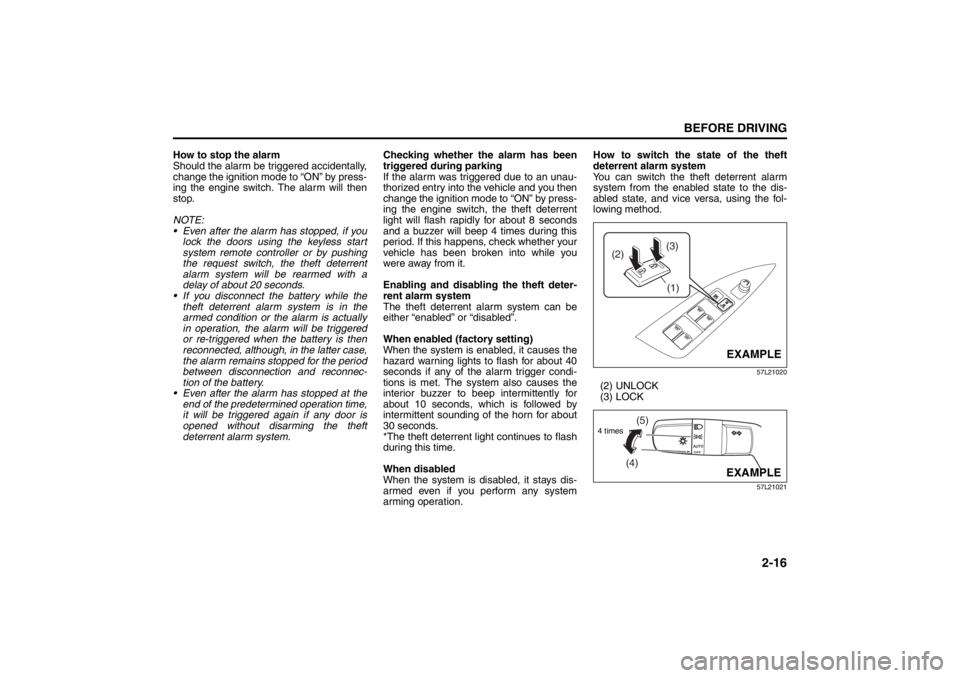
arming operation.How to switch the state of the theft
deterrent alarm system
You can switch the theft deterrent alarm
system from the enabled state to the dis-
abled state, and vice versa, using the fol-
lowing method.
57L21020
(2) UNLOCK
(3) LOCK
57L21021
(3)
(2)
(1)
EXAMPLE
(4)(5)
4 times
EXAMPLE
Seat Belts and Child Restraint Systems: 3
Page 36 of 388
2-17BEFORE DRIVING
57L20-03E
1) With the ignition mode changed to “ON”
by pressing the engine switch, close all
the doors as well as the engine hood
and the trunk lid and push the unlock
end (backward end) of the power door
locking switch (1) of the driver’s door.
Turn the knob control on the lighting
control lever to the OFF position (4).
NOTE:
All operations included in the following
steps 2) and 3) must be completed within
15 seconds.
2) Turn the knob control on the lighting
control lever to the position (5) and
then to the OFF position (4). Repeat
this operation 4 times with the control
finally set to the OFF position.
3) Push the lock end (forward end) of the
power door lock switch (1) to lock the
doors, and then the unlock end (back-
ward end) to unlock the doors. Repeat
these operations 3 times and finally
push the lock end of the switch.Every time you perform the series of the
above steps, the state of the theft deterrent
alarm system changes from the currently
selected one to the other. You can check
whether the system is enabled or disabled
by the number of interior buzzer beeps at
the end of the procedure as follows.
NOTE:
You cannot disable the theft deterrent
alarm system while it is in the armed
condition.
If you fail to complete the operations in
step 2) and 3) within 15 seconds, per-
form the procedure again from the
beginning.
Make sure all doors are closed when
performing the above procedure.
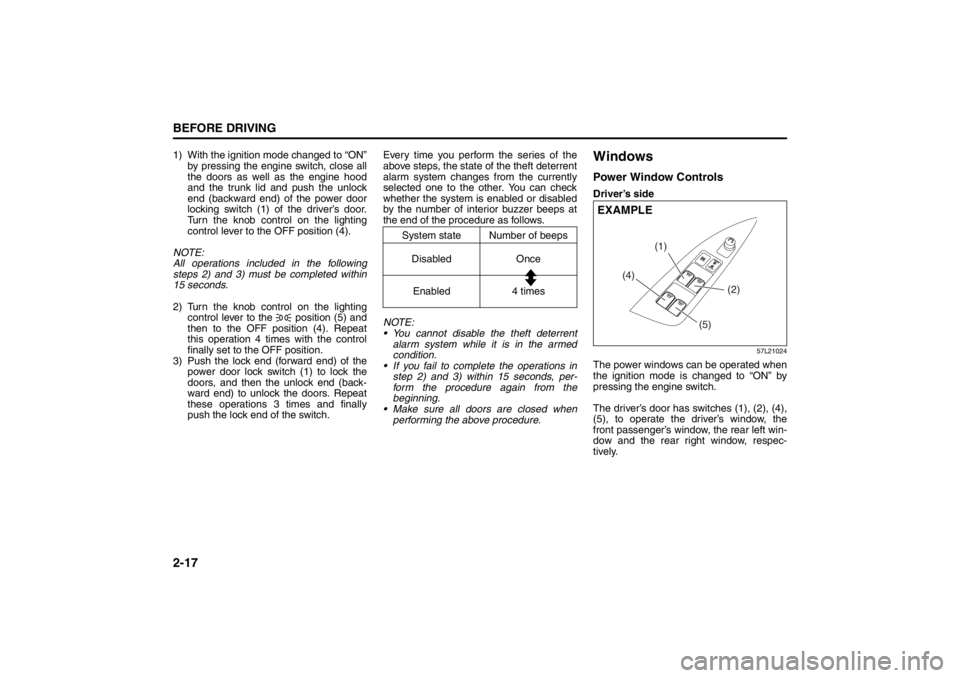
WindowsPower Window ControlsDriver’s side
57L21024
The power windows can be operated when
the ignition mode is changed to “ON” by
pressing the engine switch.
The driver’s door has switches (1), (2), (4),
(5), to operate the driver’s window, the
front passenger’s window, the rear left win-
dow and the rear right window, respec-
tively.
System state Number of beeps
Disabled Once
Enabled 4 times
(4)(1)
(2)
(5)
EXAMPLE
Seat Belts and Child Restraint Systems: 3
Page 39 of 388
2-20
BEFORE DRIVING
57L20-03E
NOTE:
Even if you cannot close the window by the
auto-up feature because there may be
something wrong with the pinching preven-
tion function, you can close the window by
holding the window switch in the “Up” posi-
tion.
If you drive in extreme off-road condition,
the pinching prevention function may oper-
ate accidentally because the window
reacts to vehicle jolting.
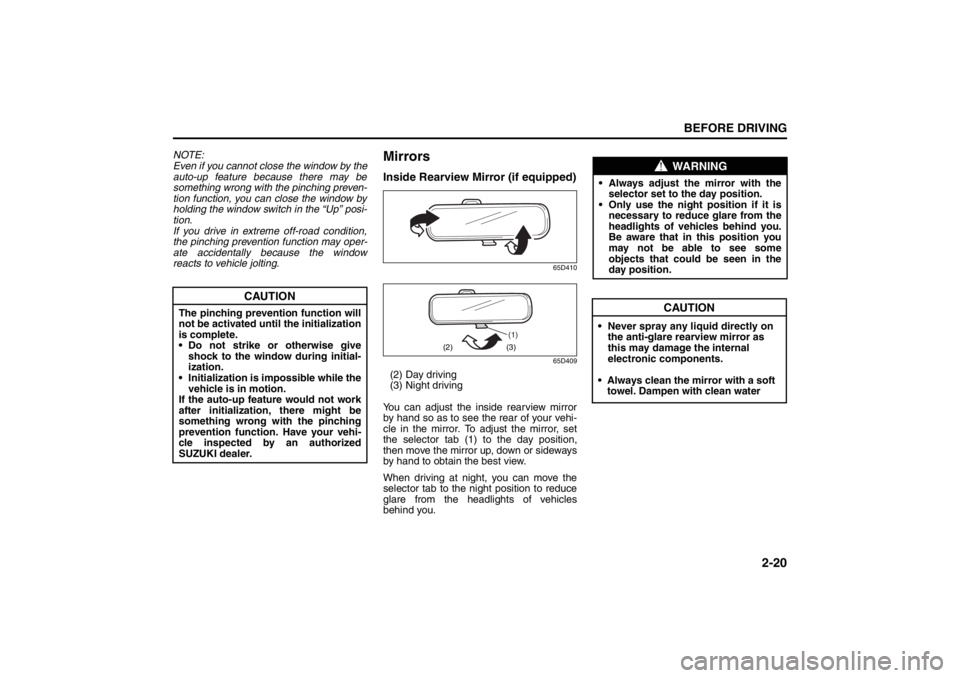
MirrorsInside Rearview Mirror (if equipped)
65D410
65D409
(2) Day driving
(3) Night driving
You can adjust the inside rearview mirror
by hand so as to see the rear of your vehi-
cle in the mirror. To adjust the mirror, set
t
he selector tab (1) to the day position,
then move the mirror up, down or sideways
by hand to obtain the best view.
When driving at night, you can move the
selector tab to the night position to reduce
glare from the headlights of vehicles
behind you.
CAUTION
The pinching prevention function will
not be activated until the initialization
is complete.
• Do not strike or otherwise give
shock to the window during initial-
ization.
• Initialization is impossible while the
vehicle is in motion.
If the auto-up feature would not work
after initialization,
there might be
something wrong with the pinching
prevention function. Have your vehi-
cle inspected by an authorized
SUZUKI dealer.
(1)
(2) (3)
WARNING
•Always adjust the mirror with the
selector set to the day position.
• Only use the night position if it is
necessary to reduce glare from the
headlights of vehicles behind you.
Be aware that in this position you
may not be able to see some
objects that could be seen in the
day position.
Seat Belts and Child Restraint Systems: 3
CAUTION
• Never spray any liquid directly on
the anti-glare rearview mirror as
this may damage the internal
electronic components.
• Always clean the mirror with a soft towel. Dampen with clean water
Page 40 of 388
2-21BEFORE DRIVING
57L20-03E
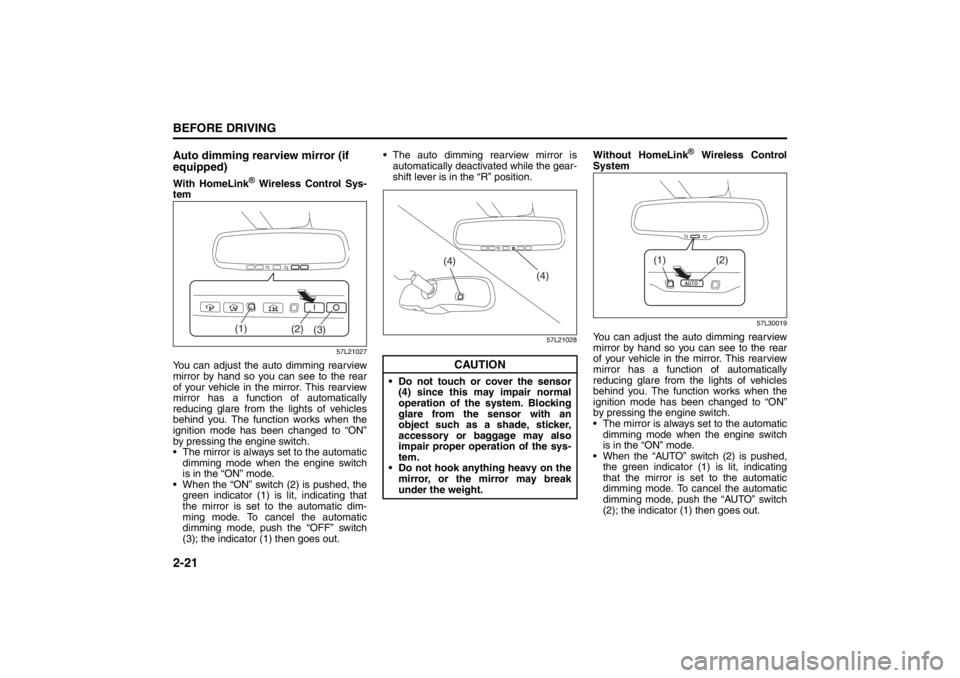
Auto dimming rearview mirror (if
equipped)With HomeLink
® Wireless Control Sys-
tem
57L21027
You can adjust the auto dimming rearview
mirror by hand so you can see to the rear
of your vehicle in the mirror. This rearview
mirror has a function of automatically
reducing glare from the lights of vehicles
behind you. The function works when the
ignition mode has been changed to “ON”
by pressing the engine switch.
The mirror is always set to the automatic
dimming mode when the engine switch
is in the “ON” mode.
When the “ON” switch (2) is pushed, the
green indicator (1) is lit, indicating that
the mirror is set to the automatic dim-
ming mode. To cancel the automatic
dimming mode, push the “OFF” switch
(3); the indicator (1) then goes out. The auto dimming rearview mirror is
automatically deactivated while the gear-
shift lever is in the “R” position.
57L21028
Without HomeLink
® Wireless Control
System
57L30019
You can adjust the auto dimming rearview
mirror by hand so you can see to the rear
of your vehicle in the mirror. This rearview
mirror has a function of automatically
reducing glare from the lights of vehicles
behind you. The function works when the
ignition mode has been changed to “ON”
by pressing the engine switch.
The mirror is always set to the automatic
dimming mode when the engine switch
is in the “ON” mode.
When the “AUTO” switch (2) is pushed,
the green indicator (1) is lit, indicating
that the mirror is set to the automatic
dimming mode. To cancel the automatic
dimming mode, push the “AUTO” switch
(2); the indicator (1) then goes out.
(2)
(3) (1)
CAUTION
Do not touch or cover the sensor
(4) since this may impair normal
operation of the system. Blocking
glare from the sensor with an
object such as a shade, sticker,
accessory or baggage may also
impair proper operation of the sys-
tem.
Do not hook anything heavy on the
mirror, or the mirror may break
under the weight.
(4)
(4)
(2)
(1)
Seat Belts and Child Restraint Systems: 3
Page 47 of 388
2-28
BEFORE DRIVING
57L20-03E
57L21037
To reinstall the head restraint, insert the
head restraint bars into the holes (4) and
push the head restraint down.
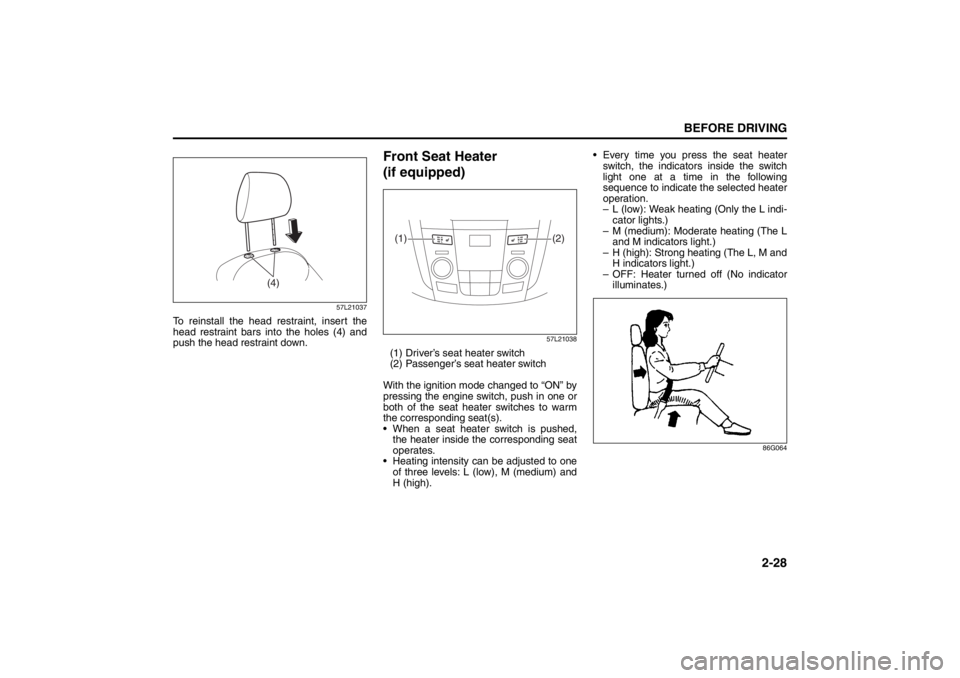
Front Seat Heater
(if equipped)
57L21038
(1) Driver’s seat heater switch
(2) Passenger’s seat heater switch
With the ignition mode changed to “ON” by
pressing the engine switch, push in one or
both of the seat heater switches to warm
the corresponding seat(s).
When a seat heater switch is pushed,
the heater inside the corresponding seat
operates.
Heating intensity can be adjusted to one
of three levels: L (low), M (medium) and
H (high). Every time you press the seat heater
switch, the indicators inside the switch
light one at a time in the following
sequence to indicate the selected heater
operation.
– L (low): Weak heating (Only the L indi-
cator lights.)
– M (medium): Moderate heating (The L
and M indicators light.)
– H (high): Strong heating (The L, M and
H indicators light.)
– OFF: Heater turned off (No indicator
illuminates.)
86G064
(4)
(2) (1)
Seat Belts and Child Restraint Systems: 3
Page 59 of 388
2-40
BEFORE DRIVING
57L20-03E
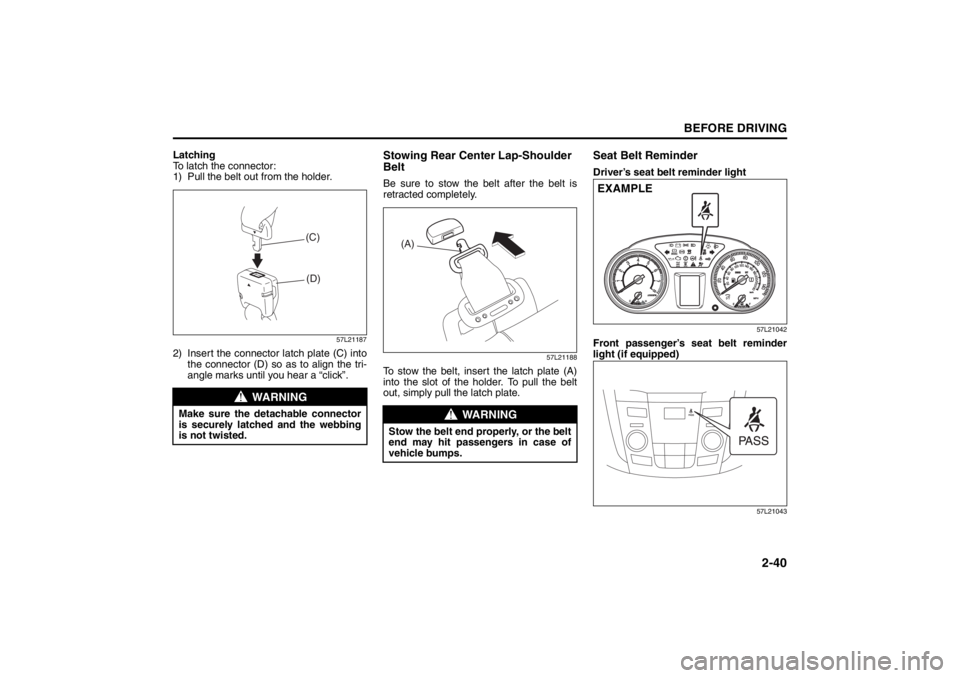
Latching
To latch the connector:
1) Pull the belt out from the holder.
57L21187
2) Insert the connector latch plate (C) intothe connector (D) so as to align the tri-
angle marks until you hear a “click”.
Stowing Rear Center Lap-Shoulder
BeltBe sure to stow the belt after the belt is
retracted completely.
57L21188
To stow the belt, insert the latch plate (A)
into the slot of the holder. To pull the belt
out, simply pull the latch plate.
Seat Belt ReminderDriver’s seat belt reminder light
57L21042
Front passenger’s seat belt reminder
light (if equipped)
57L21043
WARNING
Make sure the detachable connector
is securely latched and the webbing
is not twisted.
(C)
(D)
WARNING
Stow the belt end properly, or the belt
end may hit passengers in case of
vehicle bumps.
(A)
EXAMPLE
Supplemental Restraint System (advanced air bags):
3, 9, 12