warning SUZUKI KIZASHI 2010 1.G User Guide
[x] Cancel search | Manufacturer: SUZUKI, Model Year: 2010, Model line: KIZASHI, Model: SUZUKI KIZASHI 2010 1.GPages: 388, PDF Size: 4.94 MB
Page 30 of 388
2-11BEFORE DRIVING
57L20-03E
NOTE:
Even with the remote controller within
the “inside sensing area”, the request
switch warning buzzer/remote controller
reminder function may not work under
any of the following conditions as the
presence of the remote controller may
not be sensed:
– The battery of the remote controller is
low.
– The remote controller is influenced by
strong radio waves or noise.
– The remote controller is in contact with
or covered by a metallic object.
– The remote controller is in the glove
box or a stowage for small articles
such as a door pocket.
– The remote controller is on the top or
in front of the instrument panel, in the
sun visor pocket or on the floor.
The remote controller may be sensed
under any of the following conditions
even when the controller is not within the
“inside sensing area”. The request
switch warning buzzer/remote controller
reminder function will then work.
– The remote controller is outside the
vehicle but very close to it.
– The remote controller is on the instru-
ment panel top or in the trunk.Keyless unlocking/locking using the
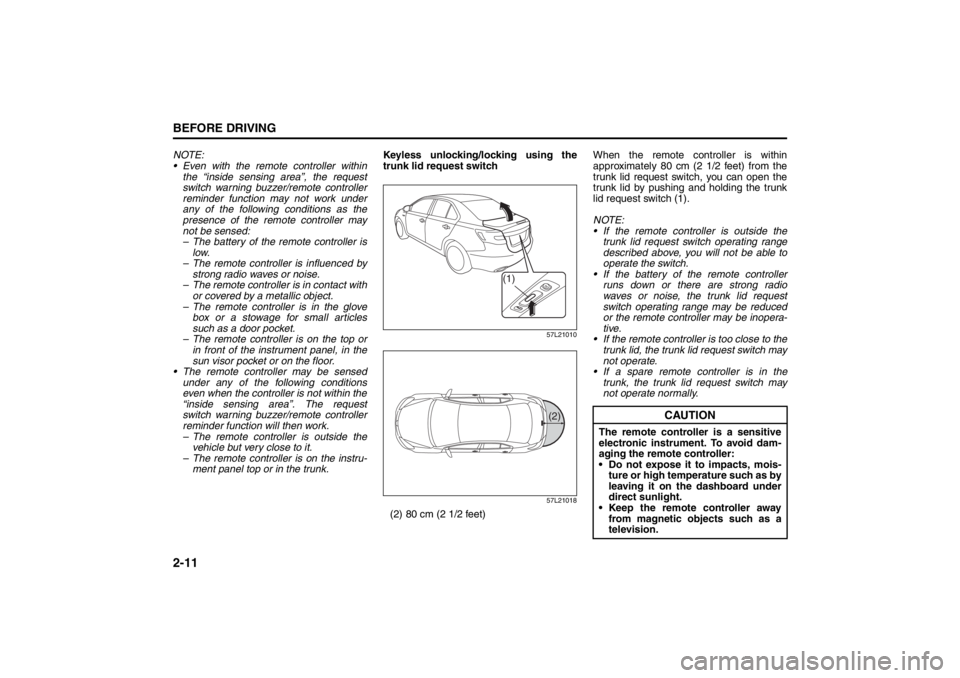
trunk lid request switch
57L21010
57L21018
(2) 80 cm (2 1/2 feet)When the remote controller is within
approximately 80 cm (2 1/2 feet) from the
trunk lid request switch, you can open the
trunk lid by pushing and holding the trunk
lid request switch (1).
NOTE:
If the remote controller is outside the
trunk lid request switch operating range
described above, you will not be able to
operate the switch.
If the battery of the remote controller
runs down or there are strong radio
waves or noise, the trunk lid request
switch operating range may be reduced
or the remote controller may be inopera-
tive.
If the remote controller is too close to the
trunk lid, the trunk lid request switch may
not operate.
If a spare remote controller is in the
trunk, the trunk lid request switch may
not operate normally.
(1)
(2)
CAUTION
The remote controller is a sensitive
electronic instrument. To avoid dam-
aging the remote controller:
Do not expose it to impacts, mois-
ture or high temperature such as by
leaving it on the dashboard under
direct sunlight.
Keep the remote controller away
from magnetic objects such as a
television.
Mirrors: 3, 8
Seat Adjustment: 3
Page 33 of 388

2-14
BEFORE DRIVING
57L20-03E
1. For USA
This device complies with Part 15 of the
FCC Rules. Operation is subject to the fol-
lowing two conditions:
1) This device may not cause harmful
interference, and
2) This device must accept any interfer-
ence received, including interference
that may cause undesired operation.
NOTE:
Changes or modifications not expressly
approved by the party responsible for com-
pliance could void the user’s authority to
operate the equipment.2. For Canada
This device complies with Industry Canada
Standard RSS-210. Operation is subject to
the following two conditions:
1) This device may not cause interference,
and
2) This device must accept any interfer-
ence, including interference that may
cause undesired operation of the
device.
The term “IC:” before the certification/reg-
istration number only signifies that the
Industry Canada technical specifications
were met.
Theft Deterrent Alarm SystemThe theft deterrent alarm system is armed
in about 20 seconds after you lock the
doors using the keyless start system
remote controller or by pushing the request
switch on the driver’s or front passenger’s
door handle. (The system, however, is not
armed when the engine hood or trunk lid is
open.)
Once the system is armed, any attempt to
open a door by using any other means (*)
than the keyless start system remote con-
troller or the request switch will cause the
alarm to be triggered.
* These means include the following:
–The key
– The lock lever on a door
– The power door lock knob
– The trunk lid unlatch switch
– The engine hood release handle
WARNING
Swallowing a lithium battery may
cause serious internal injury. Do not
allow anyone to swallow a lithium
battery. Keep lithium batteries away
from children and pets. If swallowed,
contact a physician immediately.
CAUTION
The remote controller is a sensitive
electronic instrument. To avoid dam-
aging it, do not expose it to dust or
moisture or tamper with internal
parts.
Head Restraints: 3
Seat Belts and Child Restraint Systems: 3
Page 35 of 388
2-16
BEFORE DRIVING
57L20-03E
How to stop the alarm
Should the alarm be triggered accidentally,
change the ignition mode to “ON” by press-
ing the engine switch. The alarm will then
stop.
NOTE:
Even after the alarm has stopped, if you
lock the doors using the keyless start
system remote controller or by pushing
the request switch, the theft deterrent
alarm system will be rearmed with a
delay of about 20 seconds.
If you disconnect the battery while the
theft deterrent alarm system is in the
armed condition or the alarm is actually
in operation, the alarm will be triggered
or re-triggered when the battery is then
reconnected, although, in the latter case,
the alarm remains stopped for the period
between disconnection and reconnec-
tion of the battery.
Even after the alarm has stopped at the
end of the predetermined operation time,
it will be triggered again if any door is
opened without disarming the theft
deterrent alarm system.Checking whether the alarm has been
triggered during parking
If the alarm was triggered due to an unau-
thorized entry into the vehicle and you then
change the ignition mode to “ON” by press-
ing the engine switch, the theft deterrent
light will flash rapidly for about 8 seconds
and a buzzer will beep 4 times during this
period. If this happens, check whether your
vehicle has been broken into while you
were away from it.
Enabling and disabling the theft deter-
rent alarm system
The theft deterrent alarm system can be
either “enabled” or “disabled”.
When enabled (factory setting)
When the system is enabled, it causes the
hazard warning lights to flash for about 40
seconds if any of the alarm trigger condi-
tions is met. The system also causes the
interior buzzer to beep intermittently for
about 10 seconds, which is followed by
intermittent sounding of the horn for about
30 seconds.
*The theft deterrent light continues to flash
during this time.
When disabled
When the system is disabled, it stays dis-
armed even if you perform any system
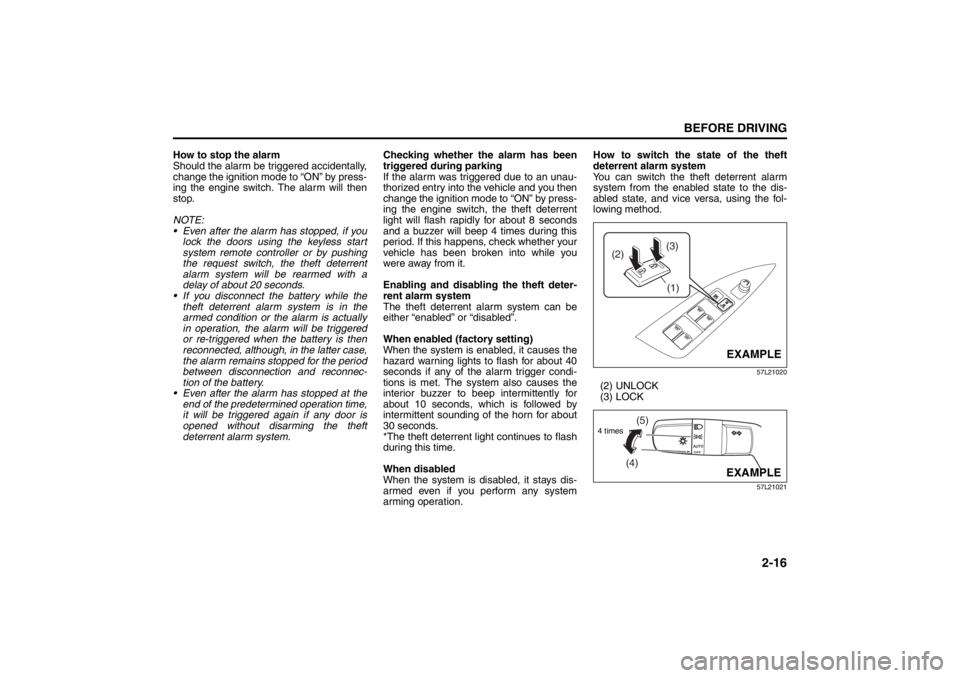
arming operation.How to switch the state of the theft
deterrent alarm system
You can switch the theft deterrent alarm
system from the enabled state to the dis-
abled state, and vice versa, using the fol-
lowing method.
57L21020
(2) UNLOCK
(3) LOCK
57L21021
(3)
(2)
(1)
EXAMPLE
(4)(5)
4 times
EXAMPLE
Seat Belts and Child Restraint Systems: 3
Page 38 of 388
2-19BEFORE DRIVING
57L20-03E
NOTE:
The driver’s and passenger’s windows can
be operated for 30 seconds even after the
ignition mode is changed from “ON” to
“ACC” or “LOCK” (OFF) by pressing the
engine switch. However, if either of the
front doors is opened within this 30-second
period, the windows cannot be operated
thereafter.
If you drive with one of the rear windows
open, you may hear a loud sound caused
by air vibration. To reduce the sound, openthe driver’s or front passenger’s window, or
narrow the rear window opening.
Initialization of Auto-Down/Up Function
If the auto-down/up function does not work
for some reason, initialize the function as
instructed below. Note that the initialization
must be performed using the switch for
each window; the function of the passen-
ger’s door window cannot be initialized
using the switch of the driver’s door win-
dow.
1) Start the engine.
2) Open the front window fully by holding
the window switch in the “Down” posi-
tion.
3) Close the front window by holding the
switch in the “Up” position, and keep
holding the switch for 2 seconds after
the window fully closed.
4) Check the front window if the auto-
down/up feature work.
Pinching Prevention Function
(if equipped)The front window is equipped with the
pinching prevention function. The function
detects a foreign object caught in the win-
dow while being closed by the “auto-up”
feature, which you can close the window
without holding the window switch in the
“Up” position, and stops the window clos-
ing to prevent damage.
WARNING
You should always lock the passen-
ger’s window operation when there
are children in the vehicle. Children
can be seriously injured if they get
part of their body caught by the
window during operation.
To avoid injuring an occupant by
window entrapment, be sure no
part of the occupant’s body such
as hands or head is in the path of
the electric windows when closing
them.
Always take the keyless start sys-
tem remote controller with you
when leaving the vehicle even if
only for a short time. Also do not
leave children alone in a parked
vehicle. Unattended children could
use the electric window switches
and get trapped by the window.
WARNING
To avoid injuring an occupant by win-
dow entrapment, be sure no part of
the occupant’s body such as hands
or head is in the path of the electric
window when closing it.
The function may not detect the
object depending on size, hardness,
and position of the object caught by
the closing window.
CAUTION
The pinching prevention function
does not act while you are holding
the window switch in the “Up” posi-
tion.
The pinching prevention function
may not detect an object caught in
the window where just before the
window fully closed.
Seat Belts and Child Restraint Systems: 3
Page 39 of 388
2-20
BEFORE DRIVING
57L20-03E
NOTE:
Even if you cannot close the window by the
auto-up feature because there may be
something wrong with the pinching preven-
tion function, you can close the window by
holding the window switch in the “Up” posi-
tion.
If you drive in extreme off-road condition,
the pinching prevention function may oper-
ate accidentally because the window
reacts to vehicle jolting.
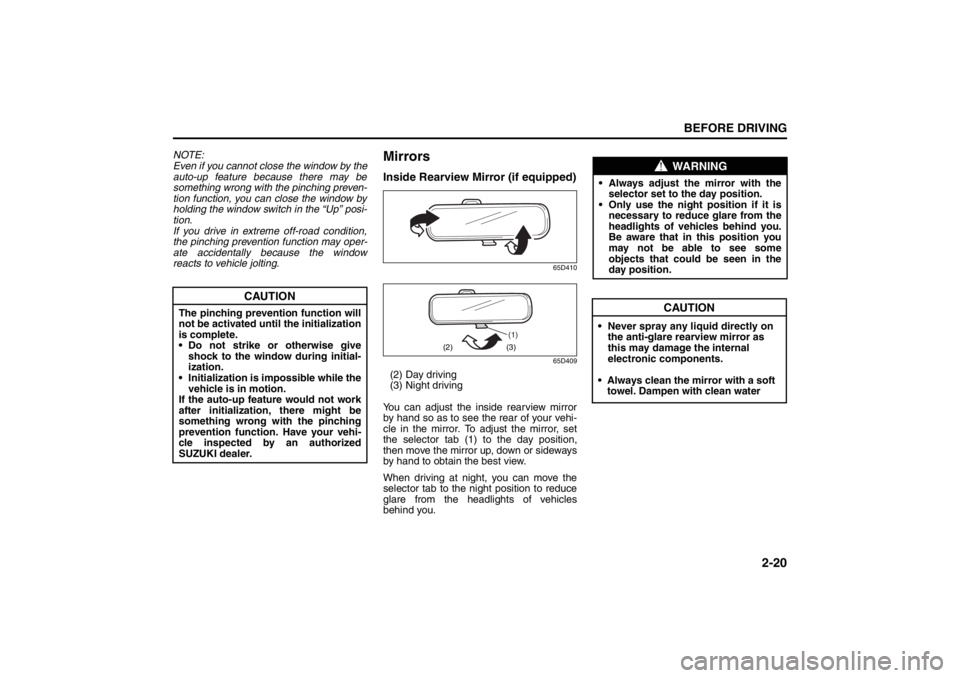
MirrorsInside Rearview Mirror (if equipped)
65D410
65D409
(2) Day driving
(3) Night driving
You can adjust the inside rearview mirror
by hand so as to see the rear of your vehi-
cle in the mirror. To adjust the mirror, set
t
he selector tab (1) to the day position,
then move the mirror up, down or sideways
by hand to obtain the best view.
When driving at night, you can move the
selector tab to the night position to reduce
glare from the headlights of vehicles
behind you.
CAUTION
The pinching prevention function will
not be activated until the initialization
is complete.
• Do not strike or otherwise give
shock to the window during initial-
ization.
• Initialization is impossible while the
vehicle is in motion.
If the auto-up feature would not work
after initialization,
there might be
something wrong with the pinching
prevention function. Have your vehi-
cle inspected by an authorized
SUZUKI dealer.
(1)
(2) (3)
WARNING
•Always adjust the mirror with the
selector set to the day position.
• Only use the night position if it is
necessary to reduce glare from the
headlights of vehicles behind you.
Be aware that in this position you
may not be able to see some
objects that could be seen in the
day position.
Seat Belts and Child Restraint Systems: 3
CAUTION
• Never spray any liquid directly on
the anti-glare rearview mirror as
this may damage the internal
electronic components.
• Always clean the mirror with a soft towel. Dampen with clean water
Page 41 of 388
2-22
BEFORE DRIVING
57L20-03E
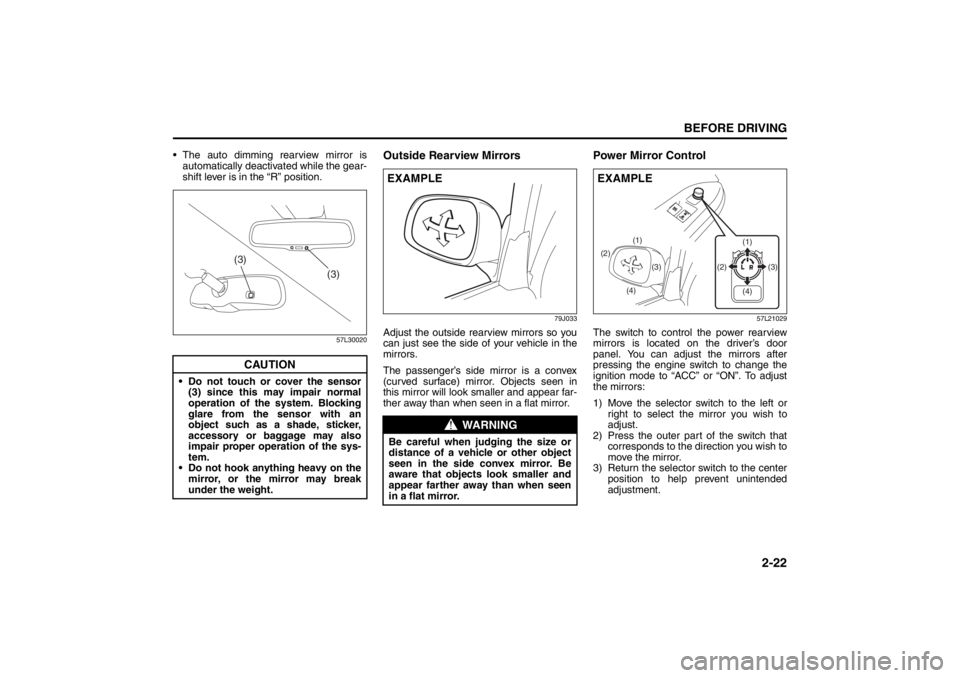
The auto dimming rearview mirror is
automatically deactivated while the gear-
shift lever is in the “R” position.
57L30020
Outside Rearview Mirrors
79J033
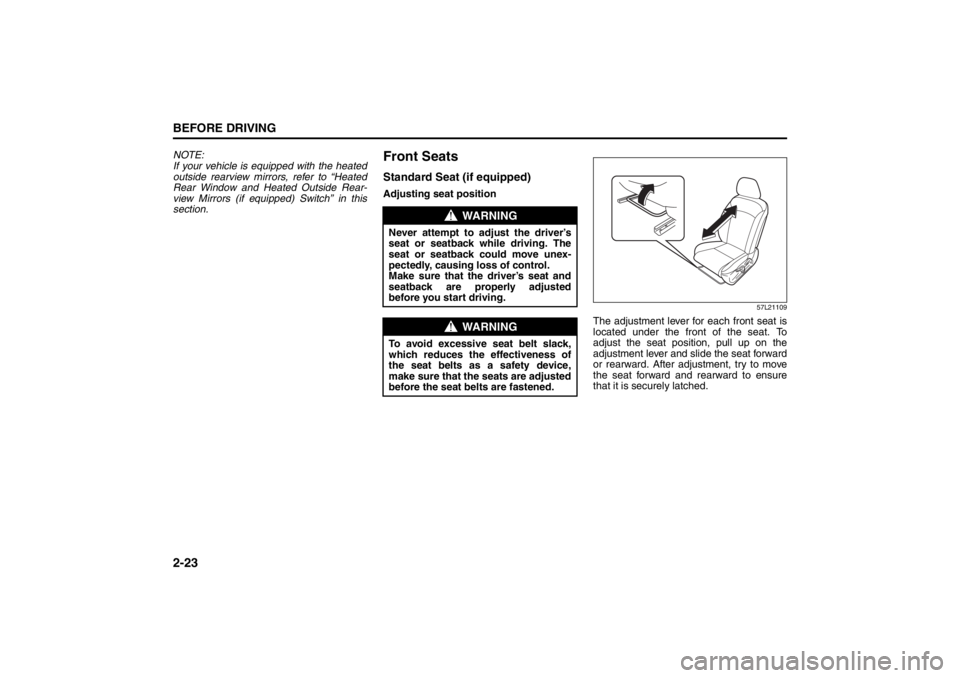
Adjust the outside rearview mirrors so you
can just see the side of your vehicle in the
mirrors.
The passenger’s side mirror is a convex
(curved surface) mirror. Objects seen in
this mirror will look smaller and appear far-
ther away than when seen in a flat mirror.
Power Mirror Control
57L21029
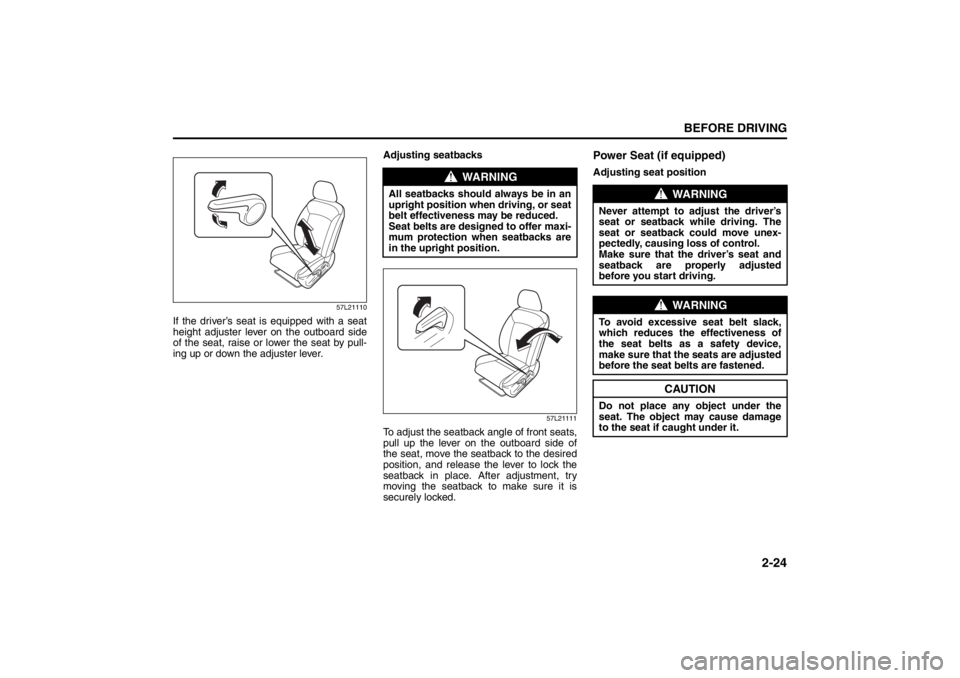
The switch to control the power rearview
mirrors is located on the driver’s door
panel. You can adjust the mirrors after
pressing the engine switch to change the
ignition mode to “ACC” or “ON”. To adjust
the mirrors:
1) Move the selector switch to the left or
right to select the mirror you wish to
adjust.
2) Press the outer part of the switch that
corresponds to the direction you wish to
move the mirror.
3) Return the selector switch to the center
position to help prevent unintended
adjustment.
CAUTION
Do not touch or cover the sensor
(3) since this may impair normal
operation of the system. Blocking
glare from the sensor with an
object such as a shade, sticker,
accessory or baggage may also
impair proper operation of the sys-
tem.
Do not hook anything heavy on the
mirror, or the mirror may break
under the weight.
(3)
(3)
WARNING
Be careful when judging the size or
distance of a vehicle or other object
seen in the side convex mirror. Be
aware that objects look smaller and
appear farther away than when seen
in a flat mirror.EXAMPLE
(2)
(4)(3) (1)
(1)
(3) (2)
(4)
EXAMPLE
Seat Belts and Child Restraint Systems: 3
Page 42 of 388
2-23BEFORE DRIVING
57L20-03E
NOTE:
If your vehicle is equipped with the heated
outside rearview mirrors, refer to “Heated
Rear Window and Heated Outside Rear-
view Mirrors (if equipped) Switch” in this
section.
Front SeatsStandard Seat (if equipped)Adjusting seat position
57L21109
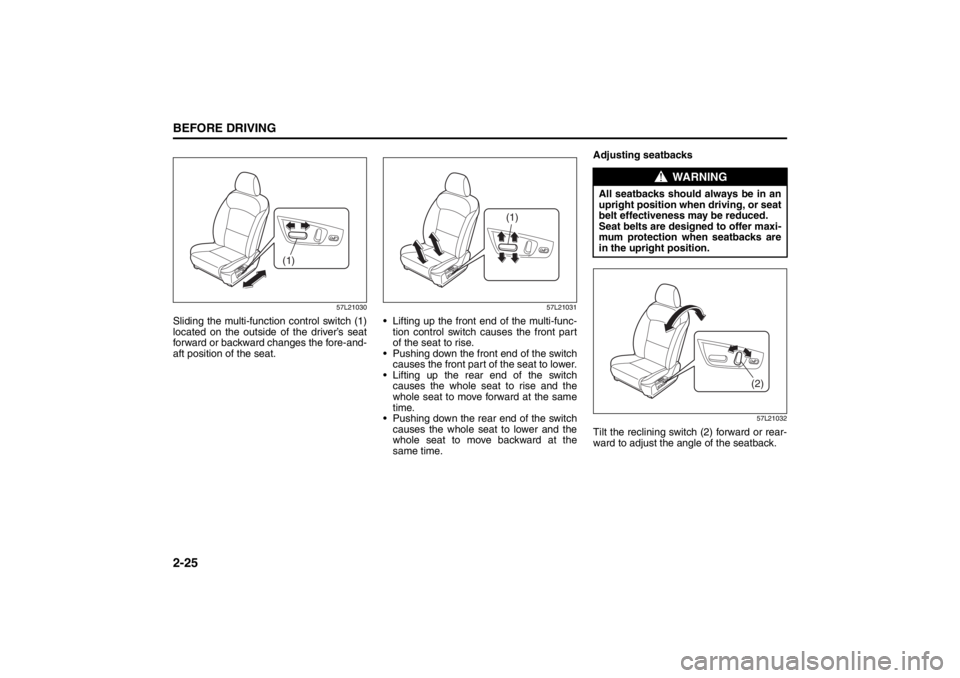
The adjustment lever for each front seat is
located under the front of the seat. To
adjust the seat position, pull up on the
adjustment lever and slide the seat forward
or rearward. After adjustment, try to move
the seat forward and rearward to ensure
that it is securely latched.
WARNING
Never attempt to adjust the driver’s
seat or seatback while driving. The
seat or seatback could move unex-
pectedly, causing loss of control.
Make sure that the driver’s seat and
seatback are properly adjusted
before you start driving.
WARNING
To avoid excessive seat belt slack,
which reduces the effectiveness of
the seat belts as a safety device,
make sure that the seats are adjusted
before the seat belts are fastened.
Seat Belts and Child Restraint Systems: 3
Page 43 of 388
2-24
BEFORE DRIVING
57L20-03E
57L21110
If the driver’s seat is equipped with a seat
height adjuster lever on the outboard side
of the seat, raise or lower the seat by pull-
ing up or down the adjuster lever.Adjusting seatbacks
57L21111
To adjust the seatback angle of front seats,
pull up the lever on the outboard side of
the seat, move the seatback to the desired
position, and release the lever to lock the
seatback in place. After adjustment, try
moving the seatback to make sure it is
securely locked.
Power Seat (if equipped)Adjusting seat position
WARNING
All seatbacks should always be in an
upright position when driving, or seat
belt effectiveness may be reduced.
Seat belts are designed to offer maxi-
mum protection when seatbacks are
in the upright position.
WARNING
Never attempt to adjust the driver’s
seat or seatback while driving. The
seat or seatback could move unex-
pectedly, causing loss of control.
Make sure that the driver’s seat and
seatback are properly adjusted
before you start driving.
WARNING
To avoid excessive seat belt slack,
which reduces the effectiveness of
the seat belts as a safety device,
make sure that the seats are adjusted
before the seat belts are fastened.
CAUTION
Do not place any object under the
seat. The object may cause damage
to the seat if caught under it.
Seat Belts and Child Restraint Systems: 3
Page 44 of 388
2-25BEFORE DRIVING
57L20-03E
57L21030
Sliding the multi-function control switch (1)
located on the outside of the driver’s seat
forward or backward changes the fore-and-
aft position of the seat.
57L21031
Lifting up the front end of the multi-func-
tion control switch causes the front part
of the seat to rise.
Pushing down the front end of the switch
causes the front part of the seat to lower.
Lifting up the rear end of the switch
causes the whole seat to rise and the
whole seat to move forward at the same
time.
Pushing down the rear end of the switch
causes the whole seat to lower and the
whole seat to move backward at the
same time.Adjusting seatbacks
57L21032
Tilt the reclining switch (2) forward or rear-
ward to adjust the angle of the seatback.
(1)
(1)
WARNING
All seatbacks should always be in an
upright position when driving, or seat
belt effectiveness may be reduced.
Seat belts are designed to offer maxi-
mum protection when seatbacks are
in the upright position.
(2)
Seat Belts and Child Restraint Systems: 3
Page 46 of 388
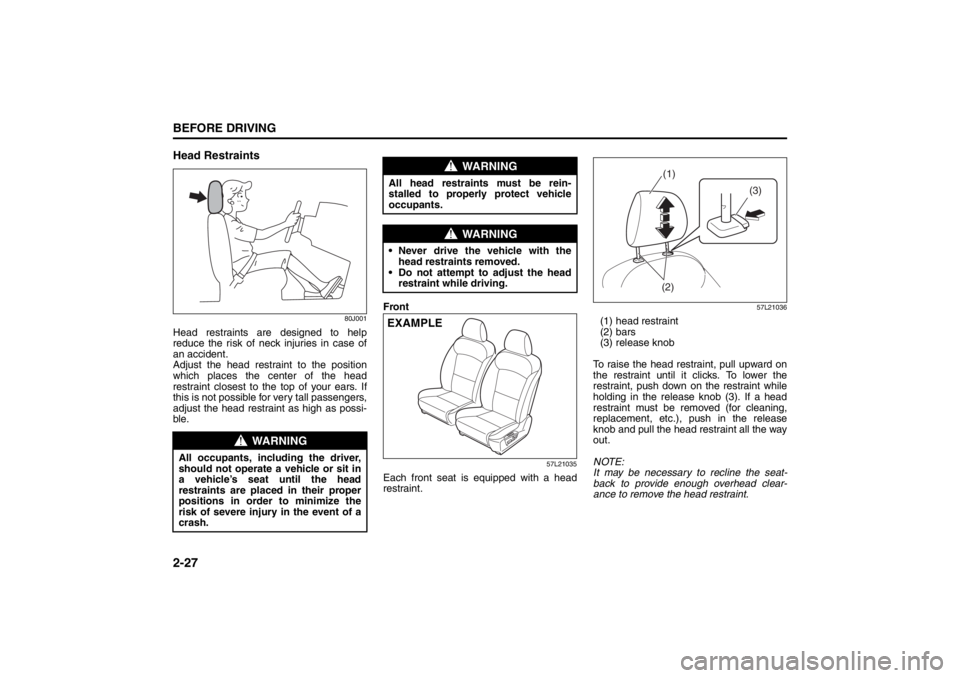
2-27BEFORE DRIVING
57L20-03E
Head Restraints
80J001
Head restraints are designed to help
reduce the risk of neck injuries in case of
an accident.
Adjust the head restraint to the position
which places the center of the head
restraint closest to the top of your ears. If
this is not possible for very tall passengers,
adjust the head restraint as high as possi-
ble.Front
57L21035
Each front seat is equipped with a head
restraint.
57L21036
(1) head restraint
(2) bars
(3) release knob
To raise the head restraint, pull upward on
the restraint until it clicks. To lower the
restraint, push down on the restraint while
holding in the release knob (3). If a head
restraint must be removed (for cleaning,
replacement, etc.), push in the release
knob and pull the head restraint all the way
out.
NOTE:
It may be necessary to recline the seat-
back to provide enough overhead clear-
ance to remove the head restraint.
WARNING
All occupants, including the driver,
should not operate a vehicle or sit in
a vehicle’s seat until the head
restraints are placed in their proper
positions in order to minimize the
risk of severe injury in the event of a
crash.
WARNING
All head restraints must be rein-
stalled to properly protect vehicle
occupants.
WARNING
Never drive the vehicle with the
head restraints removed.
Do not attempt to adjust the head
restraint while driving.EXAMPLE
(1)
(3)
(2)
Seat Belts and Child Restraint Systems: 3