warning light SUZUKI RENO 2008 1.G User Guide
[x] Cancel search | Manufacturer: SUZUKI, Model Year: 2008, Model line: RENO, Model: SUZUKI RENO 2008 1.GPages: 226, PDF Size: 4.98 MB
Page 59 of 226
2-11FEATURES AND CONTROLS
85Z14-03E
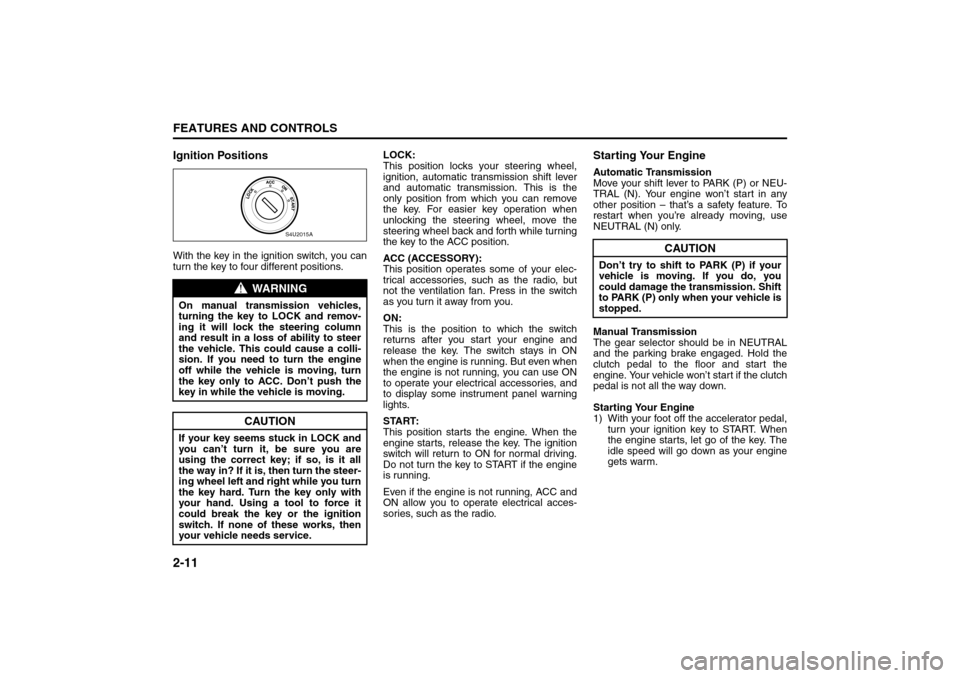
Ignition PositionsWith the key in the ignition switch, you can
turn the key to four different positions.LOCK:
This position locks your steering wheel,
ignition, automatic transmission shift lever
and automatic transmission. This is the
only position from which you can remove
the key. For easier key operation when
unlocking the steering wheel, move the
steering wheel back and forth while turning
the key to the ACC position.
ACC (ACCESSORY):
This position operates some of your elec-
trical accessories, such as the radio, but
not the ventilation fan. Press in the switch
as you turn it away from you.
ON:
This is the position to which the switch
returns after you start your engine and
release the key. The switch stays in ON
when the engine is running. But even when
the engine is not running, you can use ON
to operate your electrical accessories, and
to display some instrument panel warning
lights.
START:
This position starts the engine. When the
engine starts, release the key. The ignition
switch will return to ON for normal driving.
Do not turn the key to START if the engine
is running.
Even if the engine is not running, ACC and
ON allow you to operate electrical acces-
sories, such as the radio.
Starting Your EngineAutomatic Transmission
Move your shift lever to PARK (P) or NEU-
TRAL (N). Your engine won’t start in any
other position – that’s a safety feature. To
restart when you’re already moving, use
NEUTRAL (N) only.
Manual Transmission
The gear selector should be in NEUTRAL
and the parking brake engaged. Hold the
clutch pedal to the floor and start the
engine. Your vehicle won’t start if the clutch
pedal is not all the way down.
Starting Your Engine
1) With your foot off the accelerator pedal,
turn your ignition key to START. When
the engine starts, let go of the key. The
idle speed will go down as your engine
gets warm.
WARNING
On manual transmission vehicles,
turning the key to LOCK and remov-
ing it will lock the steering column
and result in a loss of ability to steer
the vehicle. This could cause a colli-
sion. If you need to turn the engine
off while the vehicle is moving, turn
the key only to ACC. Don’t push the
key in while the vehicle is moving.
CAUTION
If your key seems stuck in LOCK and
you can’t turn it, be sure you are
using the correct key; if so, is it all
the way in? If it is, then turn the steer-
ing wheel left and right while you turn
the key hard. Turn the key only with
your hand. Using a tool to force it
could break the key or the ignition
switch. If none of these works, then
your vehicle needs service.
S4U2015A
CAUTION
Don’t try to shift to PARK (P) if your
vehicle is moving. If you do, you
could damage the transmission. Shift
to PARK (P) only when your vehicle is
stopped.
Starting and Operating Your Vehicle:
Page 64 of 226
2-16
FEATURES AND CONTROLS
85Z14-03E
OND (2). Slowly let up on the clutch pedal
as you press the accelerator pedal.
To stop, let up on the accelerator pedal and
press the brake pedal. Just before the
vehicle stops, press the clutch pedal and
brake pedal, and shift to NEUTRAL.
NEUTRAL:
Use this position when you start or idle
your engine.
REVERSE (R):
To back up, press down the clutch pedal,
lift up the ring on the shift lever and shift
into REVERSE (R). Let up on the clutch
pedal slowly while pressing the accelerator
pedal.
Also, use REVERSE (R), along with the
parking brake, for parking your vehicle.Shift Speed
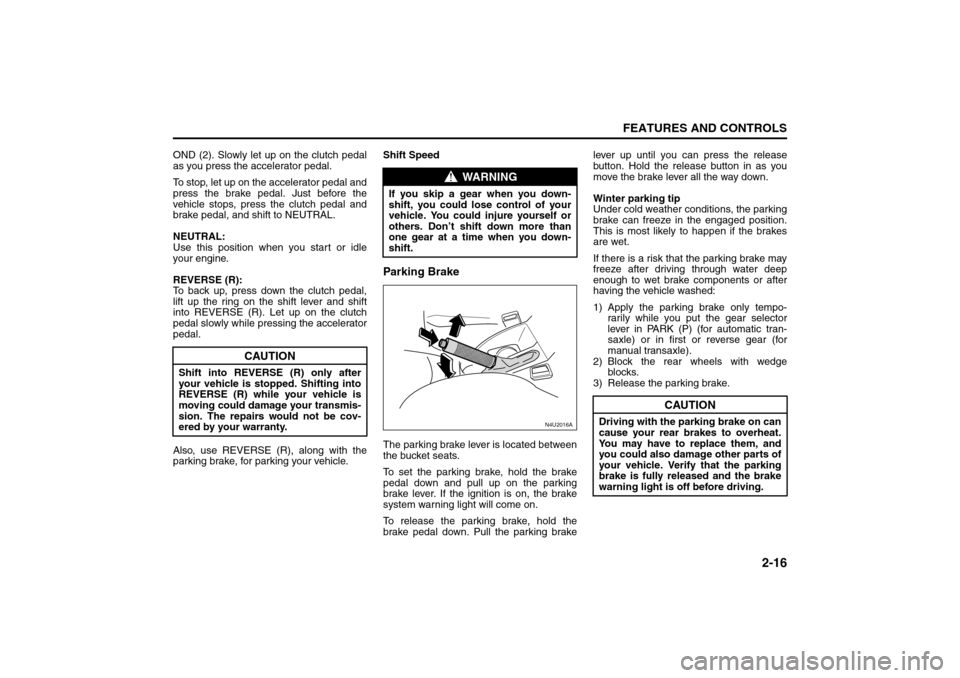
Parking BrakeThe parking brake lever is located between
the bucket seats.
To set the parking brake, hold the brake
pedal down and pull up on the parking
brake lever. If the ignition is on, the brake
system warning light will come on.
To release the parking brake, hold the
brake pedal down. Pull the parking brakelever up until you can press the release
button. Hold the release button in as you
move the brake lever all the way down.
Winter parking tip
Under cold weather conditions, the parking
brake can freeze in the engaged position.
This is most likely to happen if the brakes
are wet.
If there is a risk that the parking brake may
freeze after driving through water deep
enough to wet brake components or after
having the vehicle washed:
1) Apply the parking brake only tempo-
rarily while you put the gear selector
lever in PARK (P) (for automatic tran-
saxle) or in first or reverse gear (for
manual transaxle).
2) Block the rear wheels with wedge
blocks.
3) Release the parking brake.
CAUTION
Shift into REVERSE (R) only after
your vehicle is stopped. Shifting into
REVERSE (R) while your vehicle is
moving could damage your transmis-
sion. The repairs would not be cov-
ered by your warranty.
WARNING
If you skip a gear when you down-
shift, you could lose control of your
vehicle. You could injure yourself or
others. Don’t shift down more than
one gear at a time when you down-
shift.
N4U2016A
CAUTION
Driving with the parking brake on can
cause your rear brakes to overheat.
You may have to replace them, and
you could also damage other parts of
your vehicle. Verify that the parking
brake is fully released and the brake
warning light is off before driving.
Starting and Operating Your Vehicle:
Page 74 of 226
INSTRUMENT PANEL
3
85Z14-03E
INSTRUMENT PANELInstrument Panel Overview ................................................ 3-1
Climate Controls ................................................................. 3-12
Warning Lights, Gauges and Indicators ........................... 3-18
Audio System ...................................................................... 3-29
Page 75 of 226
3-1INSTRUMENT PANEL
85Z14-03E
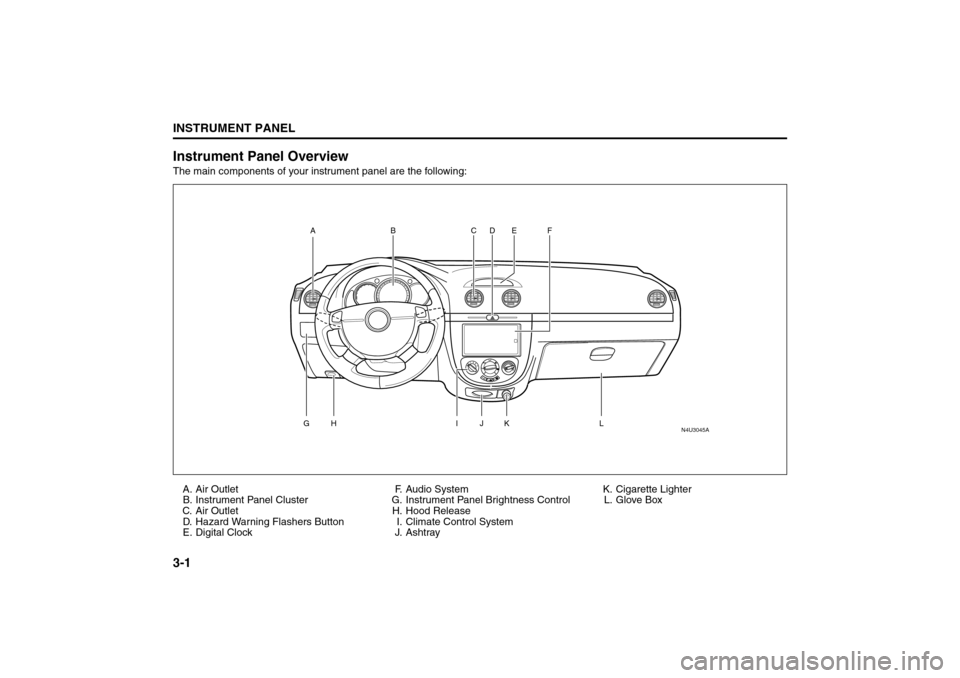
Instrument Panel OverviewThe main components of your instrument panel are the following:
A. Air Outlet
B. Instrument Panel Cluster
C. Air Outlet
D. Hazard Warning Flashers Button
E. Digital ClockF. Audio System
G. Instrument Panel Brightness Control
H. Hood Release
I. Climate Control System
J. AshtrayK. Cigarette Lighter
L. Glove Box
N4U3045A
AG
H
I
L
J
K CD E F
B
Instrument Panel Overview:
Page 81 of 226
3-7INSTRUMENT PANEL
85Z14-03E
Setting Cruise Control
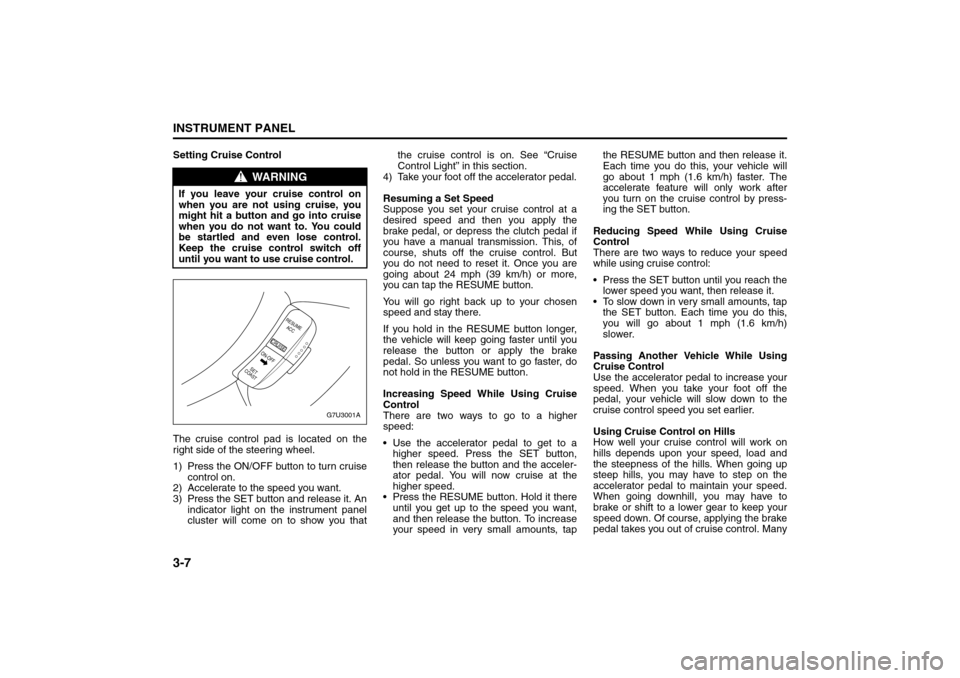
The cruise control pad is located on the
right side of the steering wheel.
1) Press the ON/OFF button to turn cruise
control on.
2) Accelerate to the speed you want.
3) Press the SET button and release it. An
indicator light on the instrument panel
cluster will come on to show you thatthe cruise control is on. See “Cruise
Control Light” in this section.
4) Take your foot off the accelerator pedal.
Resuming a Set Speed
Suppose you set your cruise control at a
desired speed and then you apply the
brake pedal, or depress the clutch pedal if
you have a manual transmission. This, of
course, shuts off the cruise control. But
you do not need to reset it. Once you are
going about 24 mph (39 km/h) or more,
you can tap the RESUME button.
You will go right back up to your chosen
speed and stay there.
If you hold in the RESUME button longer,
the vehicle will keep going faster until you
release the button or apply the brake
pedal. So unless you want to go faster, do
not hold in the RESUME button.
Increasing Speed While Using Cruise
Control
There are two ways to go to a higher
speed:
Use the accelerator pedal to get to a
higher speed. Press the SET button,
then release the button and the acceler-
ator pedal. You will now cruise at the
higher speed.
Press the RESUME button. Hold it there
until you get up to the speed you want,
and then release the button. To increase
your speed in very small amounts, tapthe RESUME button and then release it.
Each time you do this, your vehicle will
go about 1 mph (1.6 km/h) faster. The
accelerate feature will only work after
you turn on the cruise control by press-
ing the SET button.
Reducing Speed While Using Cruise
Control
There are two ways to reduce your speed
while using cruise control:
Press the SET button until you reach the
lower speed you want, then release it.
To slow down in very small amounts, tap
the SET button. Each time you do this,
you will go about 1 mph (1.6 km/h)
slower.
Passing Another Vehicle While Using
Cruise Control
Use the accelerator pedal to increase your
speed. When you take your foot off the
pedal, your vehicle will slow down to the
cruise control speed you set earlier.
Using Cruise Control on Hills
How well your cruise control will work on
hills depends upon your speed, load and
the steepness of the hills. When going up
steep hills, you may have to step on the
accelerator pedal to maintain your speed.
When going downhill, you may have to
brake or shift to a lower gear to keep your
speed down. Of course, applying the brake
pedal takes you out of cruise control. Many
WARNING
If you leave your cruise control on
when you are not using cruise, you
might hit a button and go into cruise
when you do not want to. You could
be startled and even lose control.
Keep the cruise control switch off
until you want to use cruise control.
G7U3001A
RESUME
ACC
CRUISE
SET
COASTON-OFF
Instrument Panel Overview:
Page 82 of 226
3-8
INSTRUMENT PANEL
85Z14-03E
drivers find this to be too much trouble and
do not use cruise control on steep hills.
Disengaging Cruise Control
There are two ways to turn off the cruise
control:
Step lightly on the brake pedal, or
depress the clutch pedal, if you have a
manual transmission.
Press the ON/OFF button on the cruise
control pad.
Erasing Speed Memory
When you turn off the cruise control or the
ignition, your cruise control set speed
memory is erased.
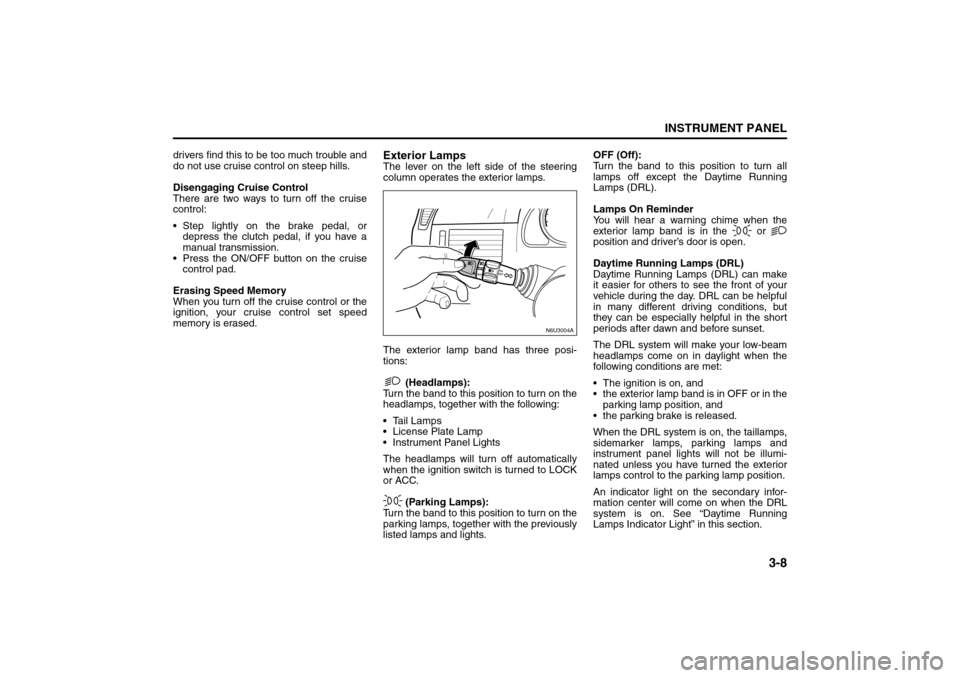
Exterior LampsThe lever on the left side of the steering
column operates the exterior lamps.
The exterior lamp band has three posi-
tions:
(Headlamps):
Turn the band to this position to turn on the
headlamps, together with the following:
Tail Lamps
License Plate Lamp
Instrument Panel Lights
The headlamps will turn off automatically
when the ignition switch is turned to LOCK
or ACC.
(Parking Lamps):
Turn the band to this position to turn on the
parking lamps, together with the previously
listed lamps and lights.OFF (Off):
Turn the band to this position to turn all
lamps off except the Daytime Running
Lamps (DRL).
Lamps On Reminder
You will hear a warning chime when the
exterior lamp band is in the or
position and driver’s door is open.
Daytime Running Lamps (DRL)
Daytime Running Lamps (DRL) can make
it easier for others to see the front of your
vehicle during the day. DRL can be helpful
in many different driving conditions, but
they can be especially helpful in the short
periods after dawn and before sunset.
The DRL system will make your low-beam
headlamps come on in daylight when the
following conditions are met:
The ignition is on, and
the exterior lamp band is in OFF or in the
parking lamp position, and
the parking brake is released.
When the DRL system is on, the taillamps,
sidemarker lamps, parking lamps and
instrument panel lights will not be illumi-
nated unless you have turned the exterior
lamps control to the parking lamp position.
An indicator light on the secondary infor-
mation center will come on when the DRL
system is on. See “Daytime Running
Lamps Indicator Light” in this section.
N6U3004A
Instrument Panel Overview:
Page 85 of 226
3-11INSTRUMENT PANEL
85Z14-03E
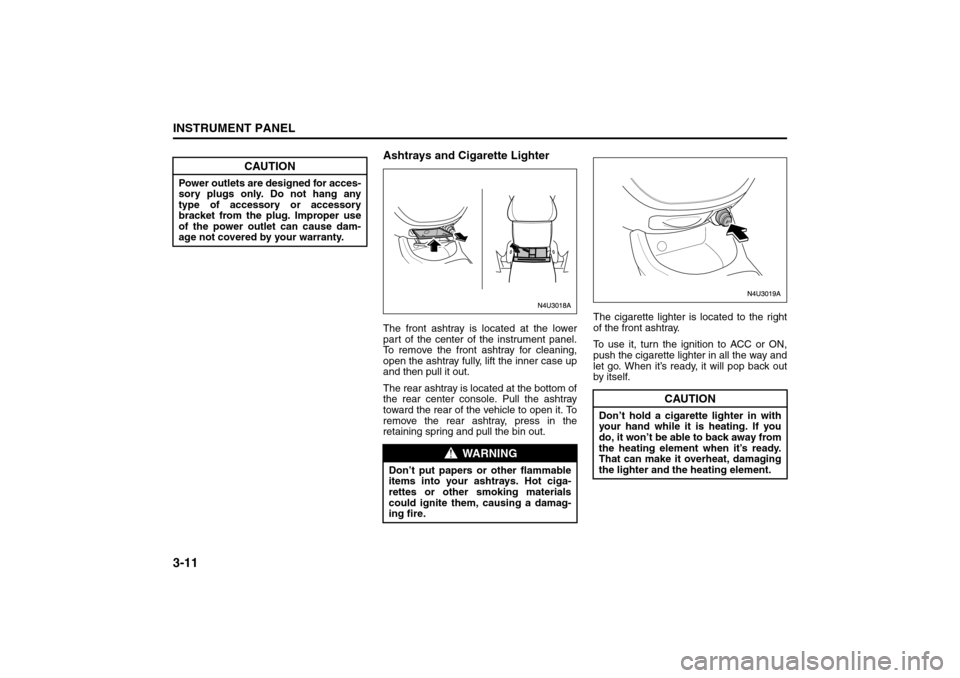
Ashtrays and Cigarette LighterThe front ashtray is located at the lower
part of the center of the instrument panel.
To remove the front ashtray for cleaning,
open the ashtray fully, lift the inner case up
and then pull it out.
The rear ashtray is located at the bottom of
the rear center console. Pull the ashtray
toward the rear of the vehicle to open it. To
remove the rear ashtray, press in the
retaining spring and pull the bin out.The cigarette lighter is located to the right
of the front ashtray.
To use it, turn the ignition to ACC or ON,
push the cigarette lighter in all the way and
let go. When it’s ready, it will pop back out
by itself.
CAUTION
Power outlets are designed for acces-
sory plugs only. Do not hang any
type of accessory or accessory
bracket from the plug. Improper use
of the power outlet can cause dam-
age not covered by your warranty.
WARNING
Don’t put papers or other flammable
items into your ashtrays. Hot ciga-
rettes or other smoking materials
could ignite them, causing a damag-
ing fire.
CAUTION
Don’t hold a cigarette lighter in with
your hand while it is heating. If you
do, it won’t be able to back away from
the heating element when it’s ready.
That can make it overheat, damaging
the lighter and the heating element.
Instrument Panel Overview:
Page 91 of 226
3-17INSTRUMENT PANEL
85Z14-03E
Outlet AdjustmentUse the lever located in the center of each
outlet to change the direction of the airflow.
Use the thumbwheel located next to the
outlets to turn them on and off.
Operation Tips
Clear away any ice, snow or leaves from
the air inlets at the base of the vehicle
that may block the flow of air into your
vehicle.
Use of non-SUZUKI approved hood
deflectors may adversely affect the per-
formance of the system.
Keep the path under the front seats clear
of objects to help circulate the air inside
of your vehicle more effectively.
Passenger Compartment Air FilterYour vehicle may be equipped with a pas-
senger compartment air filter. It is located
on the passenger side under the glove box.
The filter traps most of the pollen from air
entering the module. Like your engine’s air
cleaner/filter, it may need to be changed
periodically.
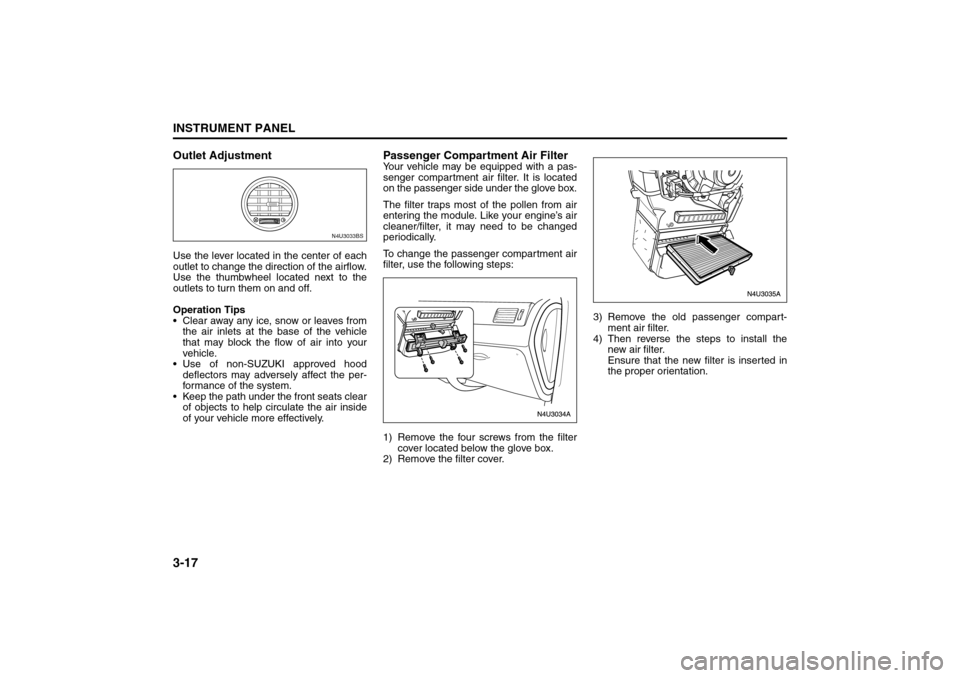
To change the passenger compartment air
filter, use the following steps:
1) Remove the four screws from the filter
cover located below the glove box.
2) Remove the filter cover.3) Remove the old passenger compart-
ment air filter.
4) Then reverse the steps to install the
new air filter.
Ensure that the new filter is inserted in
the proper orientation.
N4U3033BS
Climate Controls:
Warning Lights, Gauges and Indicators:
Page 92 of 226
3-18
INSTRUMENT PANEL
85Z14-03E
Warning Lights, Gauges and
IndicatorsThis section describes the warning lights
and gauges that may be on your vehicle.
The pictures will help you locate them.
Warning lights and gauges can signal that
something is wrong before it becomes seri-
ous enough to cause an expensive repair
or replacement. Paying attention to your
warning lights and gauges could also save
you or others from injury.
Warning lights come on when there may
be or is a problem with one of your vehi-
cle’s functions. As you will see in the
details on the next few pages, some warn-
ing lights come on briefly when you start
the engine just to let you know they’re
working. If you are familiar with this sec-
tion, you should not be alarmed when this
happens.
Gauges can indicate when there may be or
is a problem with one of your vehicle’s
functions. Often gauges and warning lights
work together to let you know when there’s
a problem with your vehicle.
When one of the warning lights comes on
and stays on when you are driving, or
when one of the gauges shows there may
be a problem, check the gauge that tells
you what to do about it. Please follow this
manual’s advice. Waiting to do repairs can
be costly – and even dangerous. So pleaseget to know your warning lights and
gauges. They’re a big help.
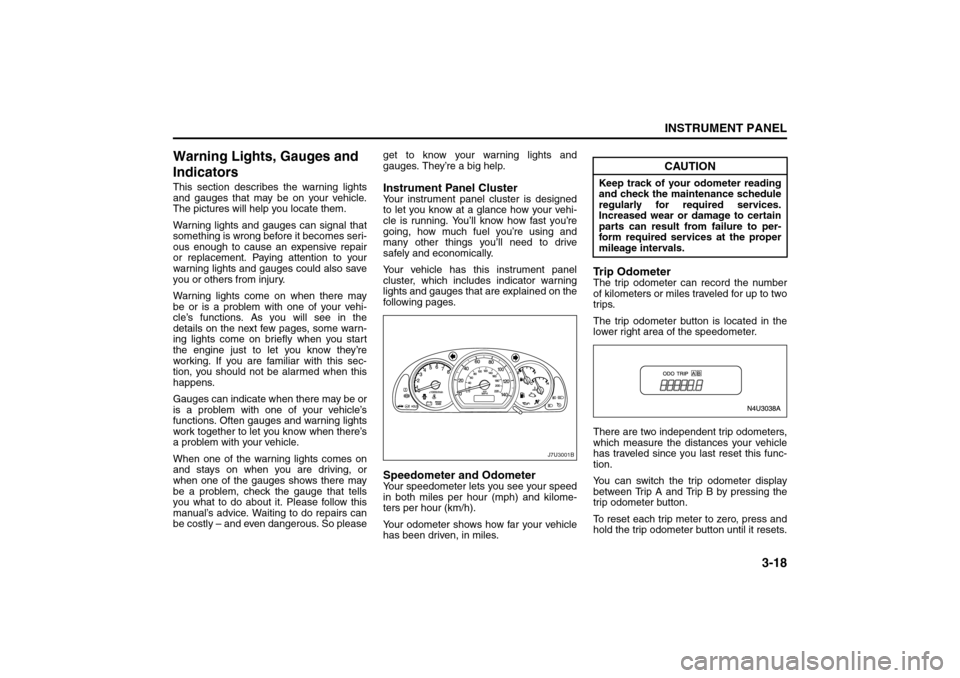
Instrument Panel ClusterYour instrument panel cluster is designed
to let you know at a glance how your vehi-
cle is running. You’ll know how fast you’re
going, how much fuel you’re using and
many other things you’ll need to drive
safely and economically.
Your vehicle has this instrument panel
cluster, which includes indicator warning
lights and gauges that are explained on the
following pages.Speedometer and OdometerYour speedometer lets you see your speed
in both miles per hour (mph) and kilome-
ters per hour (km/h).
Your odometer shows how far your vehicle
has been driven, in miles.
Trip OdometerThe trip odometer can record the number
of kilometers or miles traveled for up to two
trips.
The trip odometer button is located in the
lower right area of the speedometer.
There are two independent trip odometers,
which measure the distances your vehicle
has traveled since you last reset this func-
tion.
You can switch the trip odometer display
between Trip A and Trip B by pressing the
trip odometer button.
To reset each trip meter to zero, press and
hold the trip odometer button until it resets.
J7U3001B
CAUTION
Keep track of your odometer reading
and check the maintenance schedule
regularly for required services.
Increased wear or damage to certain
parts can result from failure to per-
form required services at the proper
mileage intervals.
Warning Lights, Gauges and Indicators:
Page 93 of 226
3-19INSTRUMENT PANEL
85Z14-03E
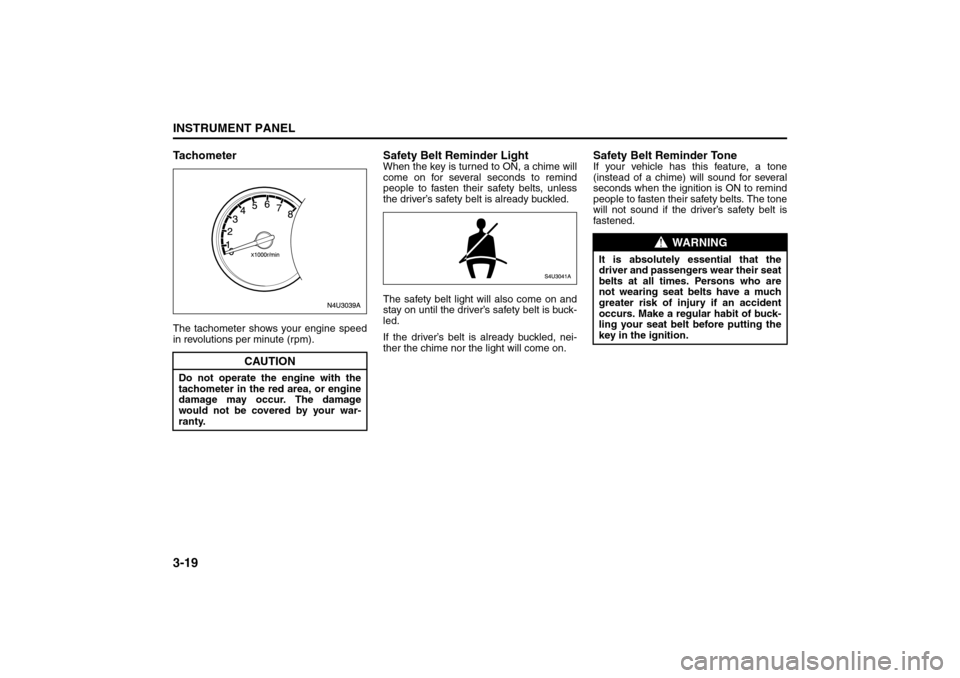
TachometerThe tachometer shows your engine speed
in revolutions per minute (rpm).
Safety Belt Reminder LightWhen the key is turned to ON, a chime will
come on for several seconds to remind
people to fasten their safety belts, unless
the driver’s safety belt is already buckled.
The safety belt light will also come on and
stay on until the driver’s safety belt is buck-
led.
If the driver’s belt is already buckled, nei-
ther the chime nor the light will come on.
Safety Belt Reminder ToneIf your vehicle has this feature, a tone
(instead of a chime) will sound for several
seconds when the ignition is ON to remind
people to fasten their safety belts. The tone
will not sound if the driver’s safety belt is
fastened.
CAUTION
Do not operate the engine with the
tachometer in the red area, or engine
damage may occur. The damage
would not be covered by your war-
ranty.
WARNING
It is absolutely essential that the
driver and passengers wear their seat
belts at all times. Persons who are
not wearing seat belts have a much
greater risk of injury if an accident
occurs. Make a regular habit of buck-
ling your seat belt before putting the
key in the ignition.
Warning Lights, Gauges and Indicators: