Ac panel SUZUKI SX4 2006 1.G Service User Guide
[x] Cancel search | Manufacturer: SUZUKI, Model Year: 2006, Model line: SX4, Model: SUZUKI SX4 2006 1.GPages: 1556, PDF Size: 37.31 MB
Page 509 of 1556
Downloaded from www.Manualslib.com manuals search engine Differential: 3B-12
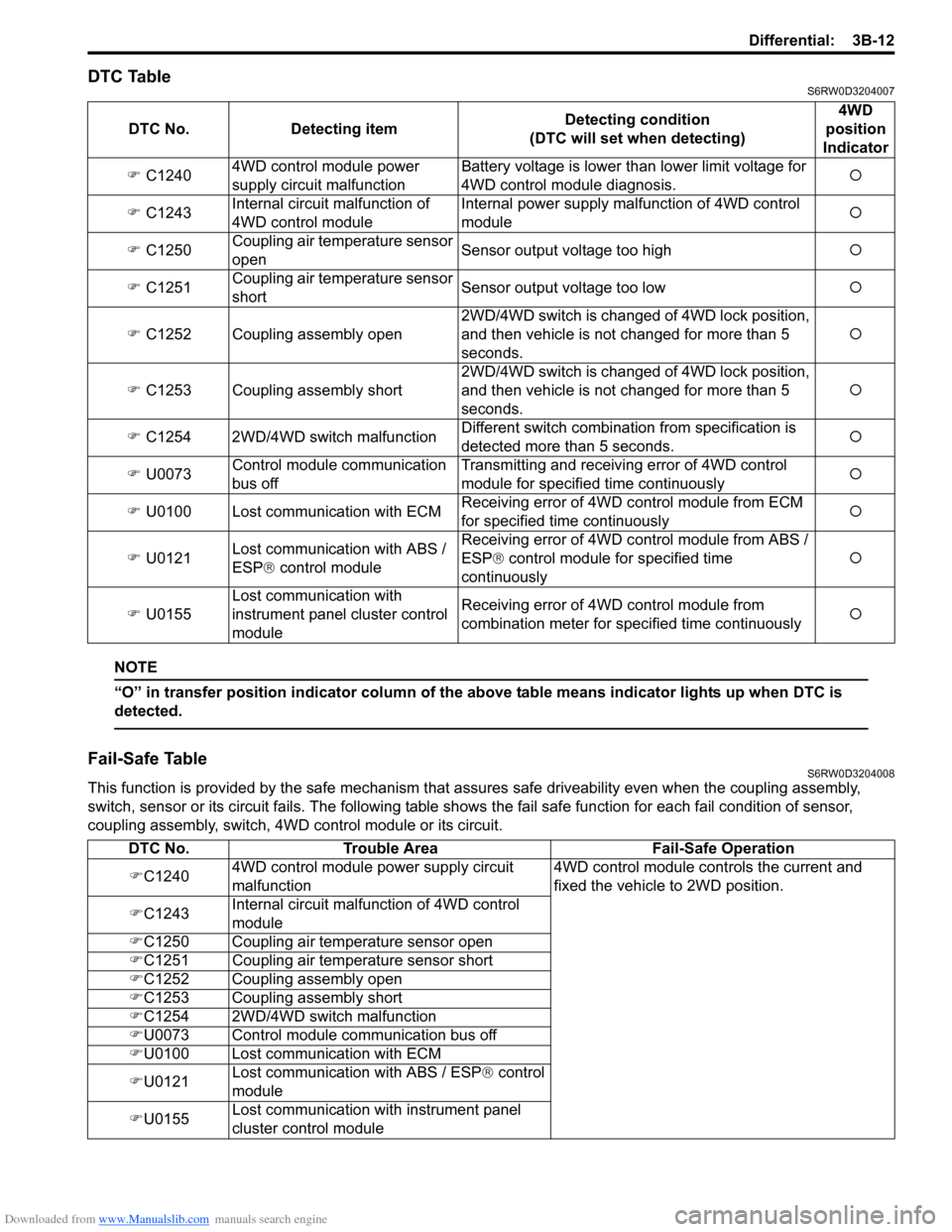
DTC TableS6RW0D3204007
NOTE
“O” in transfer position indicator column of the above table means indicator lights up when DTC is
detected.
Fail-Safe TableS6RW0D3204008
This function is provided by the safe mechanism that assures safe driveability even when the coupling assembly,
switch, sensor or its circuit fails. The following table shows the fail safe function for each fail condition of sensor,
coupling assembly, switch, 4WD control module or its circuit. DTC No. Detecting itemDetecting condition
(DTC will set when detecting)4WD
position
Indicator
) C12404WD control module power
supply circuit malfunctionBattery voltage is lower than lower limit voltage for
4WD control module diagnosis.{
) C1243Internal circuit malfunction of
4WD control moduleInternal power supply malfunction of 4WD control
module{
) C1250Coupling air temperature sensor
openSensor output voltage too high{
) C1251Coupling air temperature sensor
shortSensor output voltage too low{
) C1252 Coupling assembly open2WD/4WD switch is changed of 4WD lock position,
and then vehicle is not changed for more than 5
seconds.{
) C1253 Coupling assembly short2WD/4WD switch is changed of 4WD lock position,
and then vehicle is not changed for more than 5
seconds.{
) C1254 2WD/4WD switch malfunctionDifferent switch combination from specification is
detected more than 5 seconds.{
) U0073Control module communication
bus offTransmitting and receiving error of 4WD control
module for specified time continuously{
) U0100 Lost communication with ECMReceiving error of 4WD control module from ECM
for specified time continuously{
) U0121Lost communication with ABS /
ESP® control moduleReceiving error of 4WD control module from ABS /
ESP® control module for specified time
continuously{
) U0155Lost communication with
instrument panel cluster control
moduleReceiving error of 4WD control module from
combination meter for specified time continuously{
DTC No. Trouble Area Fail-Safe Operation
)C12404WD control module power supply circuit
malfunction4WD control module controls the current and
fixed the vehicle to 2WD position.
)C1243Internal circuit malfunction of 4WD control
module
)C1250 Coupling air temperature sensor open
)C1251 Coupling air temperature sensor short
)C1252 Coupling assembly open
)C1253 Coupling assembly short
)C1254 2WD/4WD switch malfunction
)U0073 Control module communication bus off
)U0100 Lost communication with ECM
)U0121Lost communication with ABS / ESP® control
module
)U0155Lost communication with instrument panel
cluster control module
Page 524 of 1556
Downloaded from www.Manualslib.com manuals search engine 3B-27 Differential:
DTC U0073: Control Module Communication Bus OffS6RW0D3204022
Refer to “Troubleshooting for CAN-DTC in Section 1A”.
DTC U0100: Lost Communication with ECMS6RW0D3204023
Refer to “Troubleshooting for CAN-DTC in Section 1A”.
DTC U0121: Lost Communication with ABS / ESP® Control ModuleS6RW0D3204024
Refer to “Troubleshooting for CAN-DTC in Section 1A”.
DTC U0155: Lost Communication with Instrument Panel Cluster (IPC) Control ModuleS6RW0D3204025
Refer to “Troubleshooting for CAN-DTC in Section 1A”.
Inspection of 4WD Control Module and Its CircuitsS6RW0D3204026
4WD control module and its circuits can be checked at coupler connected to 4WD control module by measuring
voltage, pulse signal.
CAUTION!
4WD control module cannot be checked by itself. It is strictly prohibited to connect voltmeter or
ohmmeter to 4WD control module with couplers disconnected from it.
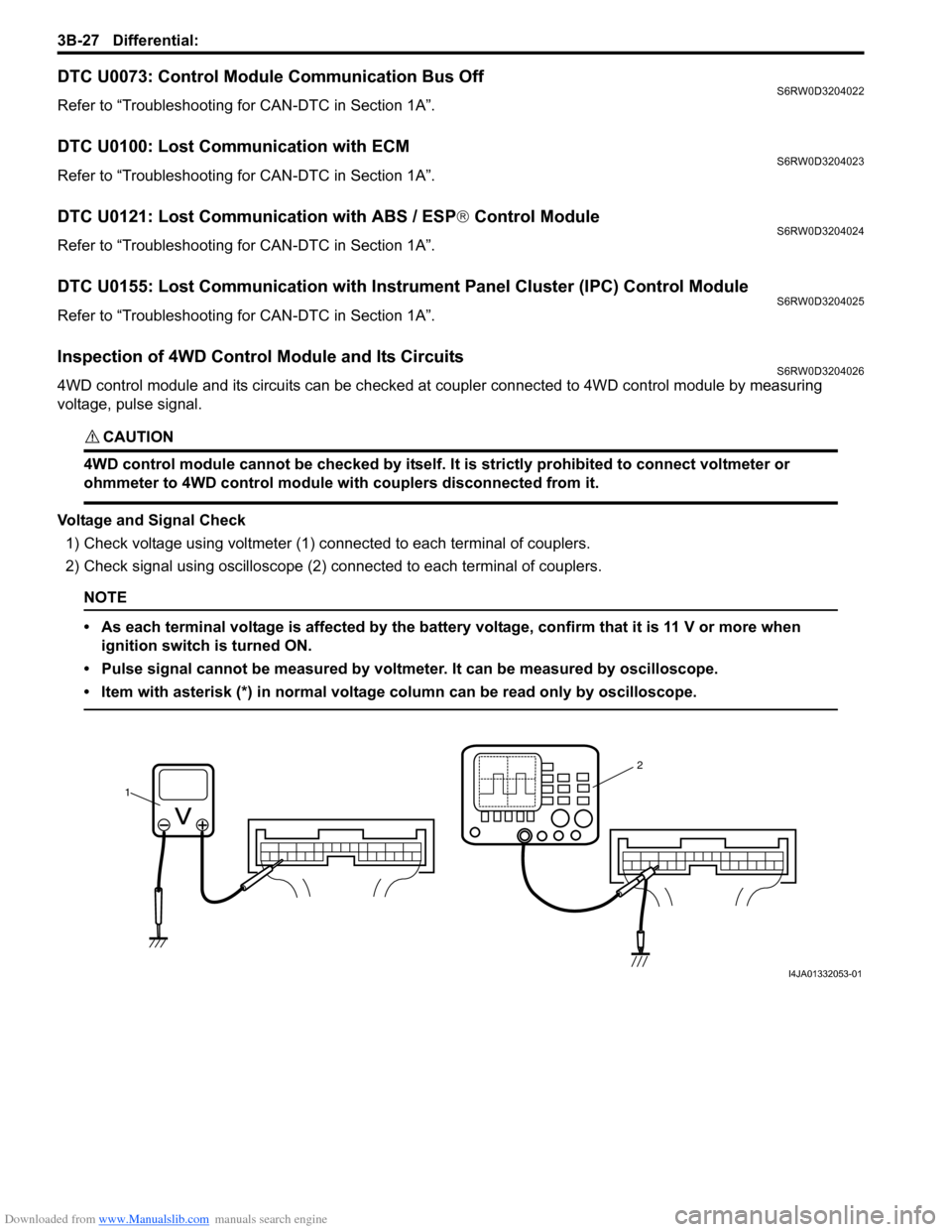
Voltage and Signal Check
1) Check voltage using voltmeter (1) connected to each terminal of couplers.
2) Check signal using oscilloscope (2) connected to each terminal of couplers.
NOTE
• As each terminal voltage is affected by the battery voltage, confirm that it is 11 V or more when
ignition switch is turned ON.
• Pulse signal cannot be measured by voltmeter. It can be measured by oscilloscope.
• Item with asterisk (*) in normal voltage column can be read only by oscilloscope.
12
I4JA01332053-01
Page 573 of 1556
Downloaded from www.Manualslib.com manuals search engine Brake Control System and Diagnosis: 4A-2
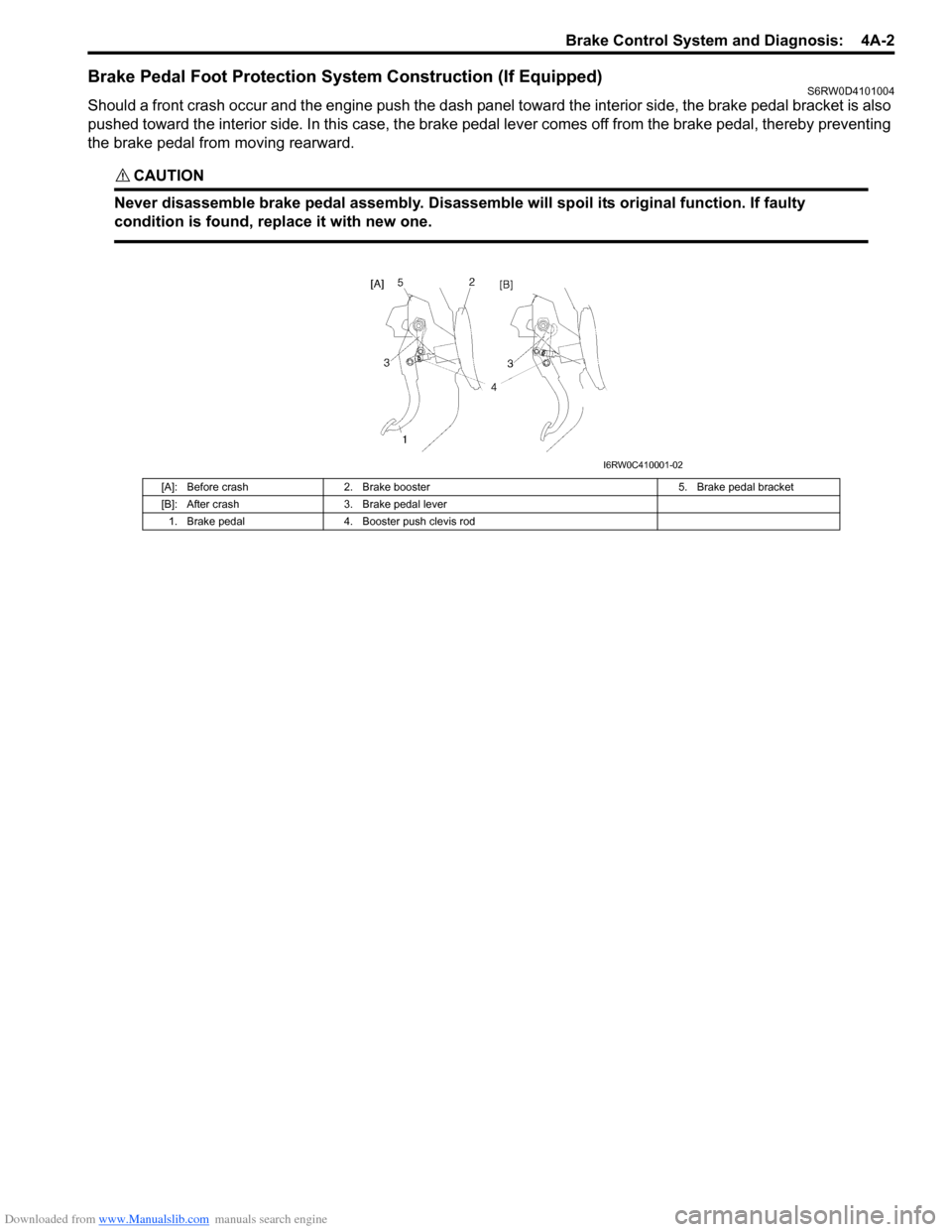
Brake Pedal Foot Protection System Construction (If Equipped)S6RW0D4101004
Should a front crash occur and the engine push the dash panel toward the interior side, the brake pedal bracket is also
pushed toward the interior side. In this case, the brake pedal lever comes off from the brake pedal, thereby preventing
the brake pedal from moving rearward.
CAUTION!
Never disassemble brake pedal assembly. Disassemble will spoil its original function. If faulty
condition is found, replace it with new one.
[A]: Before crash 2. Brake booster 5. Brake pedal bracket
[B]: After crash 3. Brake pedal lever
1. Brake pedal 4. Booster push clevis rod
I6RW0C410001-02
Page 578 of 1556
Downloaded from www.Manualslib.com manuals search engine 4A-7 Brake Control System and Diagnosis:
Repair Instructions
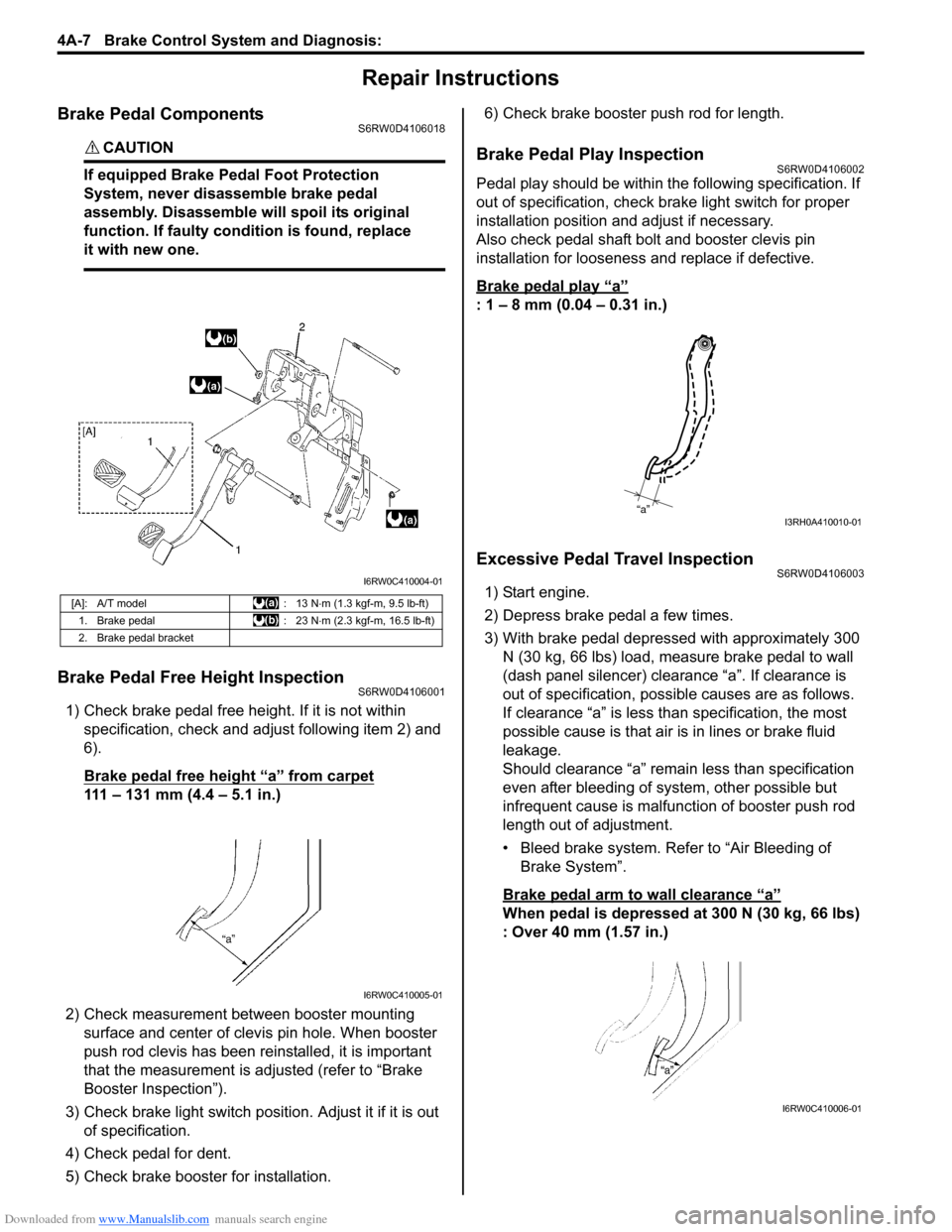
Brake Pedal ComponentsS6RW0D4106018
CAUTION!
If equipped Brake Pedal Foot Protection
System, never disassemble brake pedal
assembly. Disassemble will spoil its original
function. If faulty condition is found, replace
it with new one.
Brake Pedal Free Height InspectionS6RW0D4106001
1) Check brake pedal free height. If it is not within
specification, check and adjust following item 2) and
6).
Brake pedal free height “a” from carpet
111 – 131 mm (4.4 – 5.1 in.)
2) Check measurement between booster mounting
surface and center of clevis pin hole. When booster
push rod clevis has been reinstalled, it is important
that the measurement is adjusted (refer to “Brake
Booster Inspection”).
3) Check brake light switch position. Adjust it if it is out
of specification.
4) Check pedal for dent.
5) Check brake booster for installation.6) Check brake booster push rod for length.
Brake Pedal Play InspectionS6RW0D4106002
Pedal play should be within the following specification. If
out of specification, check brake light switch for proper
installation position and adjust if necessary.
Also check pedal shaft bolt and booster clevis pin
installation for looseness and replace if defective.
Brake pedal play
“a”
: 1 – 8 mm (0.04 – 0.31 in.)
Excessive Pedal Travel InspectionS6RW0D4106003
1) Start engine.
2) Depress brake pedal a few times.
3) With brake pedal depressed with approximately 300
N (30 kg, 66 lbs) load, measure brake pedal to wall
(dash panel silencer) clearance “a”. If clearance is
out of specification, possible causes are as follows.
If clearance “a” is less than specification, the most
possible cause is that air is in lines or brake fluid
leakage.
Should clearance “a” remain less than specification
even after bleeding of system, other possible but
infrequent cause is malfunction of booster push rod
length out of adjustment.
• Bleed brake system. Refer to “Air Bleeding of
Brake System”.
Brake pedal arm to wall clearance
“a”
When pedal is depressed at 300 N (30 kg, 66 lbs)
: Over 40 mm (1.57 in.)
[A]: A/T model : 13 N⋅m (1.3 kgf-m, 9.5 lb-ft)
1. Brake pedal : 23 N⋅m (2.3 kgf-m, 16.5 lb-ft)
2. Brake pedal bracket
I6RW0C410004-01
I6RW0C410005-01
“a”I3RH0A410010-01
I6RW0C410006-01
Page 586 of 1556
Downloaded from www.Manualslib.com manuals search engine 4A-15 Brake Control System and Diagnosis:
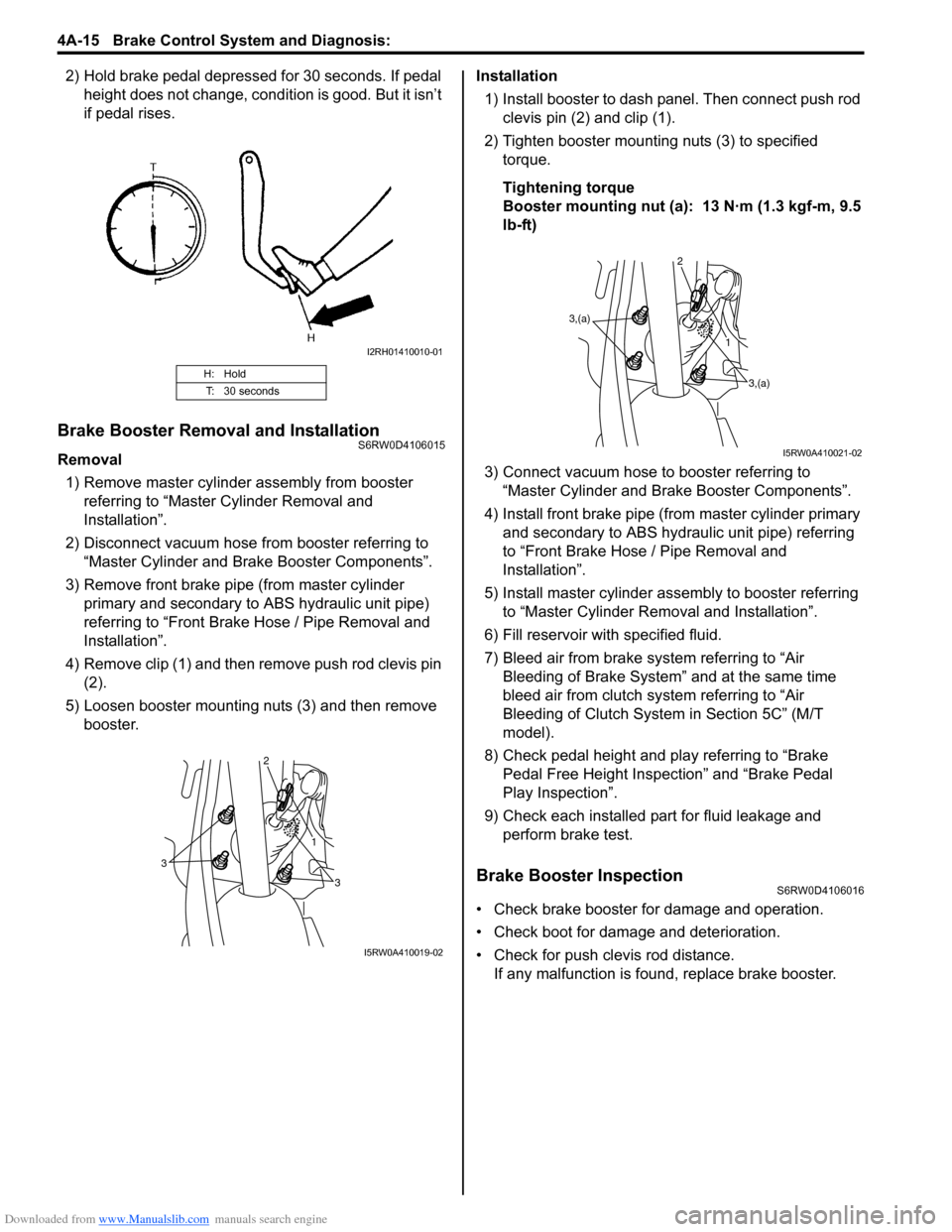
2) Hold brake pedal depressed for 30 seconds. If pedal
height does not change, condition is good. But it isn’t
if pedal rises.
Brake Booster Removal and InstallationS6RW0D4106015
Removal
1) Remove master cylinder assembly from booster
referring to “Master Cylinder Removal and
Installation”.
2) Disconnect vacuum hose from booster referring to
“Master Cylinder and Brake Booster Components”.
3) Remove front brake pipe (from master cylinder
primary and secondary to ABS hydraulic unit pipe)
referring to “Front Brake Hose / Pipe Removal and
Installation”.
4) Remove clip (1) and then remove push rod clevis pin
(2).
5) Loosen booster mounting nuts (3) and then remove
booster.Installation
1) Install booster to dash panel. Then connect push rod
clevis pin (2) and clip (1).
2) Tighten booster mounting nuts (3) to specified
torque.
Tightening torque
Booster mounting nut (a): 13 N·m (1.3 kgf-m, 9.5
lb-ft)
3) Connect vacuum hose to booster referring to
“Master Cylinder and Brake Booster Components”.
4) Install front brake pipe (from master cylinder primary
and secondary to ABS hydraulic unit pipe) referring
to “Front Brake Hose / Pipe Removal and
Installation”.
5) Install master cylinder assembly to booster referring
to “Master Cylinder Removal and Installation”.
6) Fill reservoir with specified fluid.
7) Bleed air from brake system referring to “Air
Bleeding of Brake System” and at the same time
bleed air from clutch system referring to “Air
Bleeding of Clutch System in Section 5C” (M/T
model).
8) Check pedal height and play referring to “Brake
Pedal Free Height Inspection” and “Brake Pedal
Play Inspection”.
9) Check each installed part for fluid leakage and
perform brake test.
Brake Booster InspectionS6RW0D4106016
• Check brake booster for damage and operation.
• Check boot for damage and deterioration.
• Check for push clevis rod distance.
If any malfunction is found, replace brake booster.
H: Hold
T: 30 seconds
I2RH01410010-01
3
3 1 2
I5RW0A410019-02
3,(a)
3,(a) 1 2
I5RW0A410021-02
Page 734 of 1556

Downloaded from www.Manualslib.com manuals search engine 5A-86 Automatic Transmission/Transaxle:
Select Cable ComponentsS6RW0D5106006
Select Cable Removal and InstallationS6RW0D5106007
Removal
1) Remove console box referring to “Console Box
Components in Section 9H”.
2) Disconnect select cable from select lever and then
detach from bracket.
3) Remove clip and disconnect select cable from
manual select lever.
4) Remove select cable retainer from dash panel.
Installation
Install select cable by reversing removal procedure.
The important steps in installation are as follows.
• Apply grease to pin and cable joint.
• Tighten bolts to specified torque referring to “Select
Cable Components”.• Adjusting procedure is as follows. Refer to “Select
Cable Adjustment”.Select Cable AdjustmentS6RW0D5106008
1) Shift manual shift lever to “N” range (transmission
range sensor “N” range).
(a)
(b)
(c)
6
7A
112
[B]
[B] [A]
[A]
34
5
9
8
101
A
I5RW0C510031-01
[A]: View [A] 5. Clip 11. Radiator inlet hose
[B]: View [B] 6. Manual select lever pin
: Apply lithium grease 99000-25011 to all around pin (0.15 g):23 N⋅m (2.0 kgf-m, 17.0 lb-ft)
1. Select lever assembly 7. Select lever pin
: Apply lithium grease 99000-25011 to all around pin (0.15 g):6.5 N⋅m (0.65 kgf-m, 5.0 lb-ft)
2. Select cable 8. Adjuster case : 13 N⋅m (1.3 kgf-m, 9.5 lb-ft)
3. Cable bracket 9. Lock
4. Manual select lever 10. P/S control module
“P”“R”“N”
“D”
“2”
“L”
I2RH0B510040-01
Page 821 of 1556
Downloaded from www.Manualslib.com manuals search engine Manual Transmission/Transaxle: 5B-9
Gear Shift Control Lever and Cable Removal
and Installation
S6RW0D5206005
Removal
1) Remove console box.
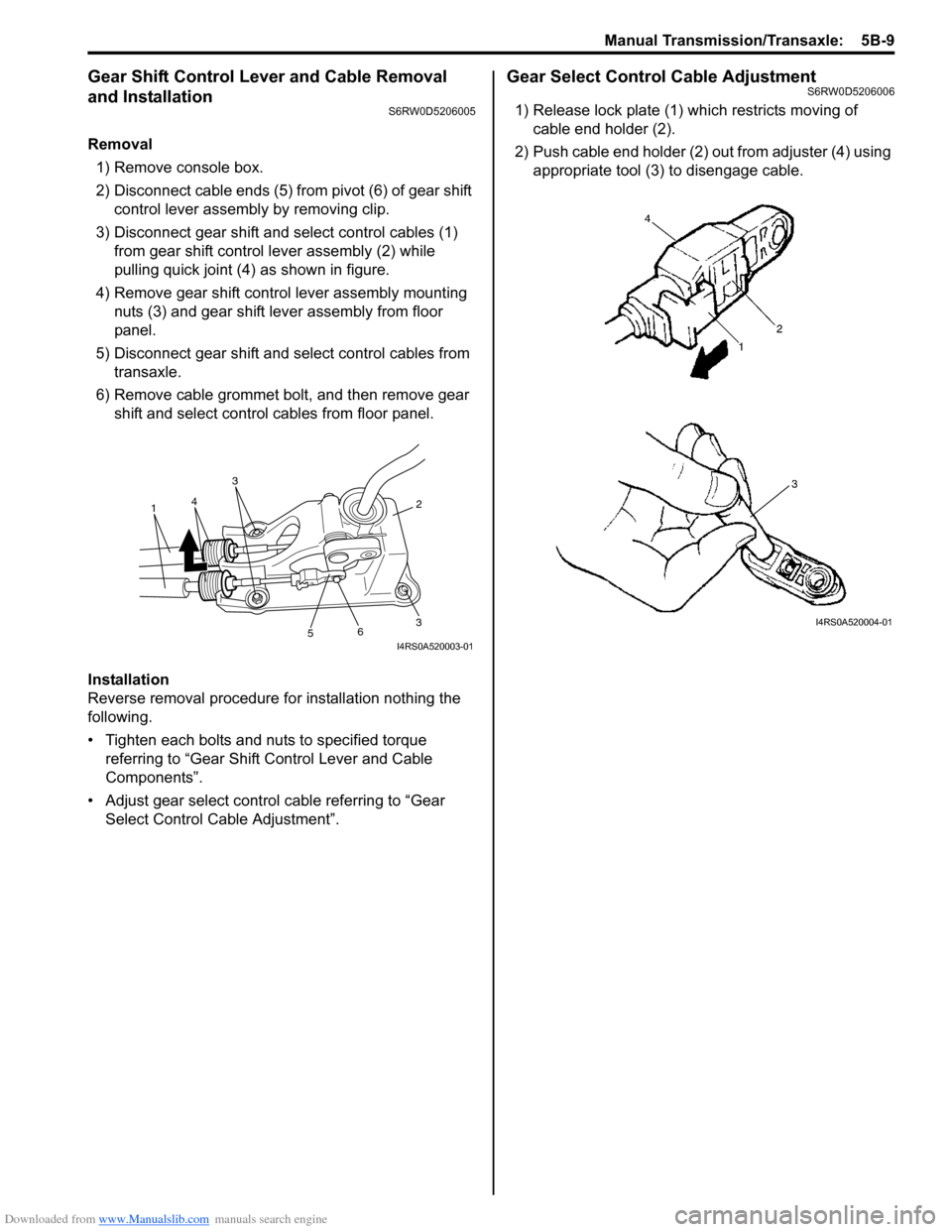
2) Disconnect cable ends (5) from pivot (6) of gear shift
control lever assembly by removing clip.
3) Disconnect gear shift and select control cables (1)
from gear shift control lever assembly (2) while
pulling quick joint (4) as shown in figure.
4) Remove gear shift control lever assembly mounting
nuts (3) and gear shift lever assembly from floor
panel.
5) Disconnect gear shift and select control cables from
transaxle.
6) Remove cable grommet bolt, and then remove gear
shift and select control cables from floor panel.
Installation
Reverse removal procedure for installation nothing the
following.
• Tighten each bolts and nuts to specified torque
referring to “Gear Shift Control Lever and Cable
Components”.
• Adjust gear select control cable referring to “Gear
Select Control Cable Adjustment”.
Gear Select Control Cable AdjustmentS6RW0D5206006
1) Release lock plate (1) which restricts moving of
cable end holder (2).
2) Push cable end holder (2) out from adjuster (4) using
appropriate tool (3) to disengage cable.
36
5
2
3
41
I4RS0A520003-01
I4RS0A520004-01
Page 875 of 1556
Downloaded from www.Manualslib.com manuals search engine Steering Wheel and Column: 6B-6
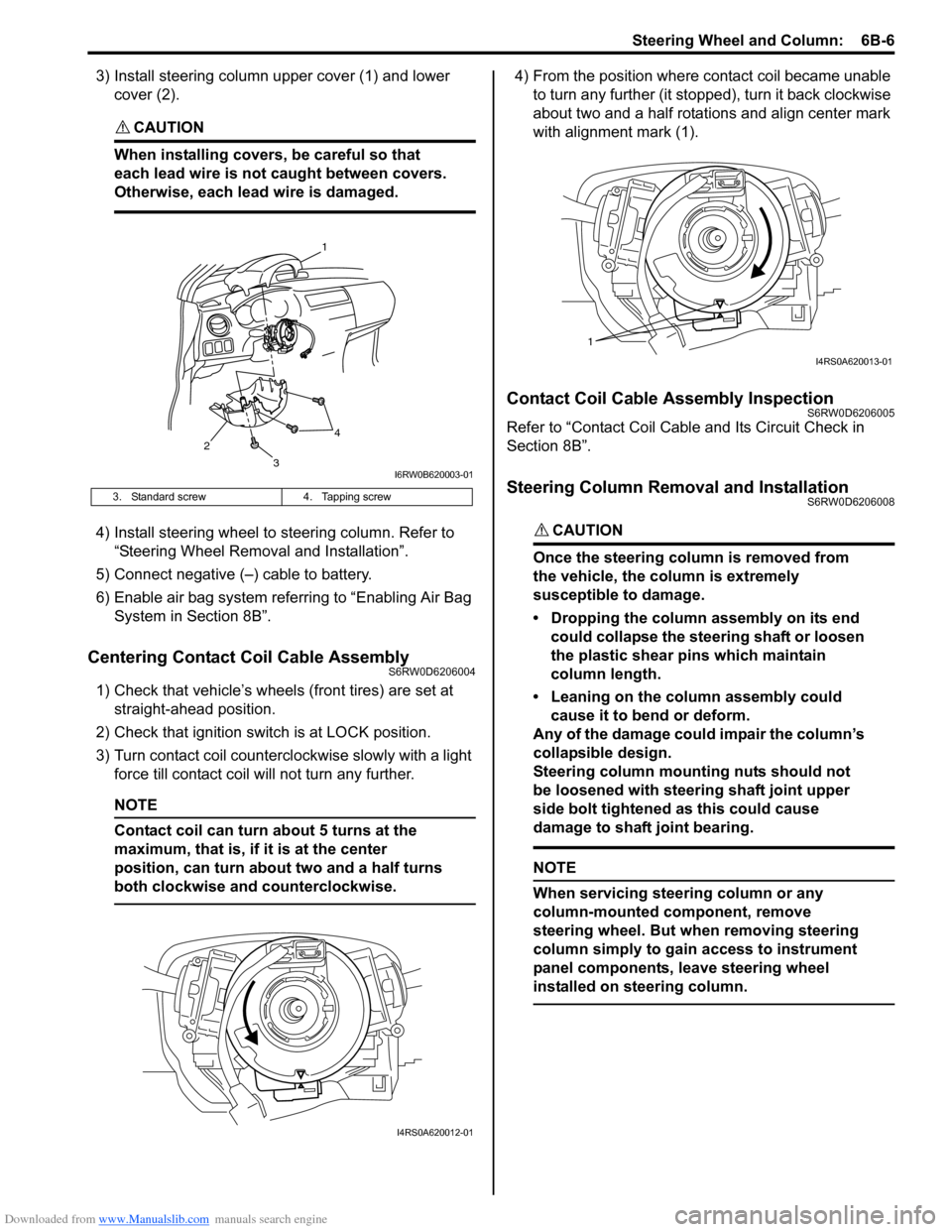
3) Install steering column upper cover (1) and lower
cover (2).
CAUTION!
When installing covers, be careful so that
each lead wire is not caught between covers.
Otherwise, each lead wire is damaged.
4) Install steering wheel to steering column. Refer to
“Steering Wheel Removal and Installation”.
5) Connect negative (–) cable to battery.
6) Enable air bag system referring to “Enabling Air Bag
System in Section 8B”.
Centering Contact Coil Cable AssemblyS6RW0D6206004
1) Check that vehicle’s wheels (front tires) are set at
straight-ahead position.
2) Check that ignition switch is at LOCK position.
3) Turn contact coil counterclockwise slowly with a light
force till contact coil will not turn any further.
NOTE
Contact coil can turn about 5 turns at the
maximum, that is, if it is at the center
position, can turn about two and a half turns
both clockwise and counterclockwise.
4) From the position where contact coil became unable
to turn any further (it stopped), turn it back clockwise
about two and a half rotations and align center mark
with alignment mark (1).
Contact Coil Cable Assembly InspectionS6RW0D6206005
Refer to “Contact Coil Cable and Its Circuit Check in
Section 8B”.
Steering Column Removal and InstallationS6RW0D6206008
CAUTION!
Once the steering column is removed from
the vehicle, the column is extremely
susceptible to damage.
• Dropping the column assembly on its end
could collapse the steering shaft or loosen
the plastic shear pins which maintain
column length.
• Leaning on the column assembly could
cause it to bend or deform.
Any of the damage could impair the column’s
collapsible design.
Steering column mounting nuts should not
be loosened with steering shaft joint upper
side bolt tightened as this could cause
damage to shaft joint bearing.
NOTE
When servicing steering column or any
column-mounted component, remove
steering wheel. But when removing steering
column simply to gain access to instrument
panel components, leave steering wheel
installed on steering column.
3. Standard screw 4. Tapping screw
2
1
3
4
I6RW0B620003-01
I4RS0A620012-01
1
I4RS0A620013-01
Page 888 of 1556
Downloaded from www.Manualslib.com manuals search engine 6C-8 Power Assisted Steering System:
Step 8: Steering Symptom Diagnosis and P/S
System Symptom Diagnosis
Perform basic steering system check according to
“Steering Symptom Diagnosis in Section 6A” first. When
the end of the flow has been reached, check the parts of
the system suspected as a possible cause referring to
“P/S System Symptom Diagnosis” and based on
symptoms appearing on the vehicle (symptoms obtained
through steps of customer complaint analysis, trouble
symptom confirmation and/or basic P/S system check)
and repair or replace faulty parts, if any.
Step 9: Troubleshooting for DTC (See each DTC
Diag. Flow)
Based on the DTC indicated in Step 6 or 7 and referring
to the applicable DTC diag. flow, locate the cause of the
trouble, namely in a sensor, switch, wire harness,
connector, actuator, P/S control module or other part and
repair or replace faulty parts.
Step 10: Intermittent Problems Check
Check parts where an intermittent trouble is easy to
occur (e.g., wire harness, connector, etc.), referring to
“Intermittent and Poor Connection Inspection in Section
00” and related circuit of DTC recorded in Step 2.
Step 11: Final Confirmation Test
Confirm that the problem symptom has gone and the P/
S system is free from any abnormal conditions. If what
has been repaired is related to the DTC, clear the DTC
once, perform DTC confirmation procedure and confirm
that no DTC is indicated.
“EPS” Warning Light CheckS6RW0D6304002
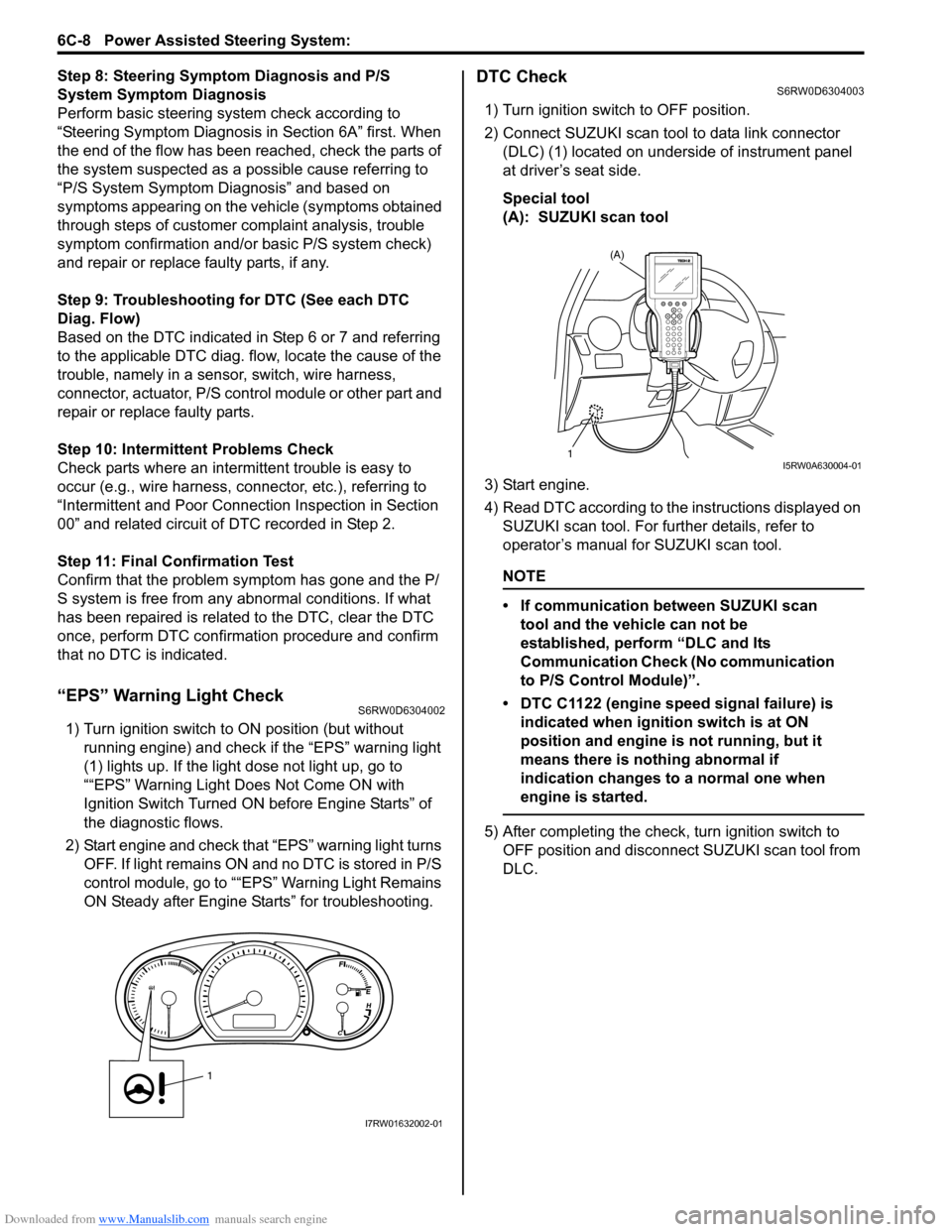
1) Turn ignition switch to ON position (but without
running engine) and check if the “EPS” warning light
(1) lights up. If the light dose not light up, go to
““EPS” Warning Light Does Not Come ON with
Ignition Switch Turned ON before Engine Starts” of
the diagnostic flows.
2) Start engine and check that “EPS” warning light turns
OFF. If light remains ON and no DTC is stored in P/S
control module, go to ““EPS” Warning Light Remains
ON Steady after Engine Starts” for troubleshooting.
DTC CheckS6RW0D6304003
1) Turn ignition switch to OFF position.
2) Connect SUZUKI scan tool to data link connector
(DLC) (1) located on underside of instrument panel
at driver’s seat side.
Special tool
(A): SUZUKI scan tool
3) Start engine.
4) Read DTC according to the instructions displayed on
SUZUKI scan tool. For further details, refer to
operator’s manual for SUZUKI scan tool.
NOTE
• If communication between SUZUKI scan
tool and the vehicle can not be
established, perform “DLC and Its
Communication Check (No communication
to P/S Control Module)”.
• DTC C1122 (engine speed signal failure) is
indicated when ignition switch is at ON
position and engine is not running, but it
means there is nothing abnormal if
indication changes to a normal one when
engine is started.
5) After completing the check, turn ignition switch to
OFF position and disconnect SUZUKI scan tool from
DLC.
1
I7RW01632002-01
(A)
1I5RW0A630004-01
Page 889 of 1556
Downloaded from www.Manualslib.com manuals search engine Power Assisted Steering System: 6C-9
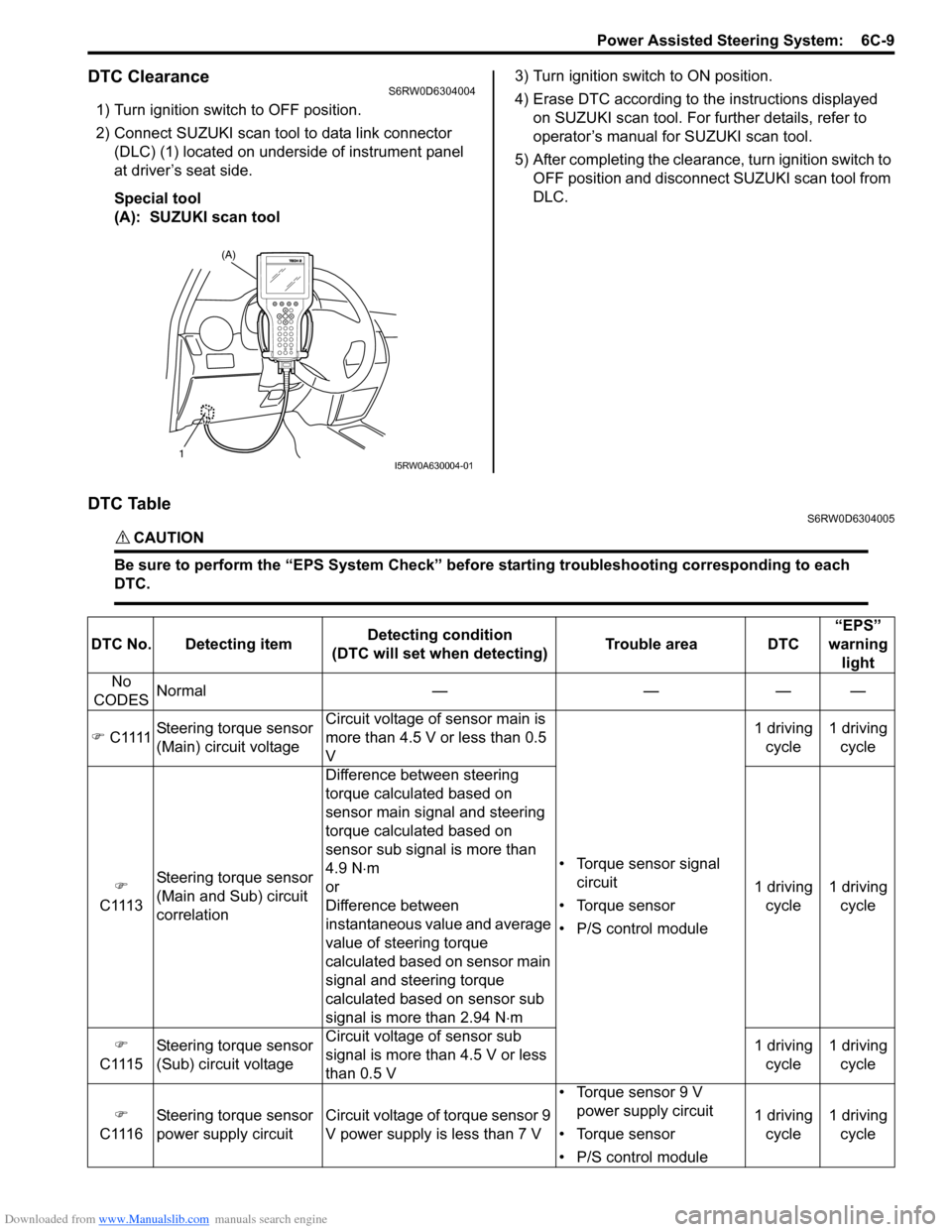
DTC ClearanceS6RW0D6304004
1) Turn ignition switch to OFF position.
2) Connect SUZUKI scan tool to data link connector
(DLC) (1) located on underside of instrument panel
at driver’s seat side.
Special tool
(A): SUZUKI scan tool3) Turn ignition switch to ON position.
4) Erase DTC according to the instructions displayed
on SUZUKI scan tool. For further details, refer to
operator’s manual for SUZUKI scan tool.
5) After completing the clearance, turn ignition switch to
OFF position and disconnect SUZUKI scan tool from
DLC.
DTC TableS6RW0D6304005
CAUTION!
Be sure to perform the “EPS System Check” before starting troubleshooting corresponding to each
DTC.
(A)
1I5RW0A630004-01
DTC No. Detecting itemDetecting condition
(DTC will set when detecting)Trouble area DTC“EPS”
warning
light
No
CODESNormal — — — —
) C1111Steering torque sensor
(Main) circuit voltageCircuit voltage of sensor main is
more than 4.5 V or less than 0.5
V
• Torque sensor signal
circuit
• Torque sensor
• P/S control module1 driving
cycle1 driving
cycle
)
C1113Steering torque sensor
(Main and Sub) circuit
correlationDifference between steering
torque calculated based on
sensor main signal and steering
torque calculated based on
sensor sub signal is more than
4.9 N⋅m
or
Difference between
instantaneous value and average
value of steering torque
calculated based on sensor main
signal and steering torque
calculated based on sensor sub
signal is more than 2.94 N⋅m1 driving
cycle1 driving
cycle
)
C1115Steering torque sensor
(Sub) circuit voltageCircuit voltage of sensor sub
signal is more than 4.5 V or less
than 0.5 V1 driving
cycle1 driving
cycle
)
C1116Steering torque sensor
power supply circuit Circuit voltage of torque sensor 9
V power supply is less than 7 V• Torque sensor 9 V
power supply circuit
• Torque sensor
• P/S control module1 driving
cycle1 driving
cycle