instrument panel SUZUKI SX4 2006 1.G Service User Guide
[x] Cancel search | Manufacturer: SUZUKI, Model Year: 2006, Model line: SX4, Model: SUZUKI SX4 2006 1.GPages: 1556, PDF Size: 37.31 MB
Page 875 of 1556
Downloaded from www.Manualslib.com manuals search engine Steering Wheel and Column: 6B-6
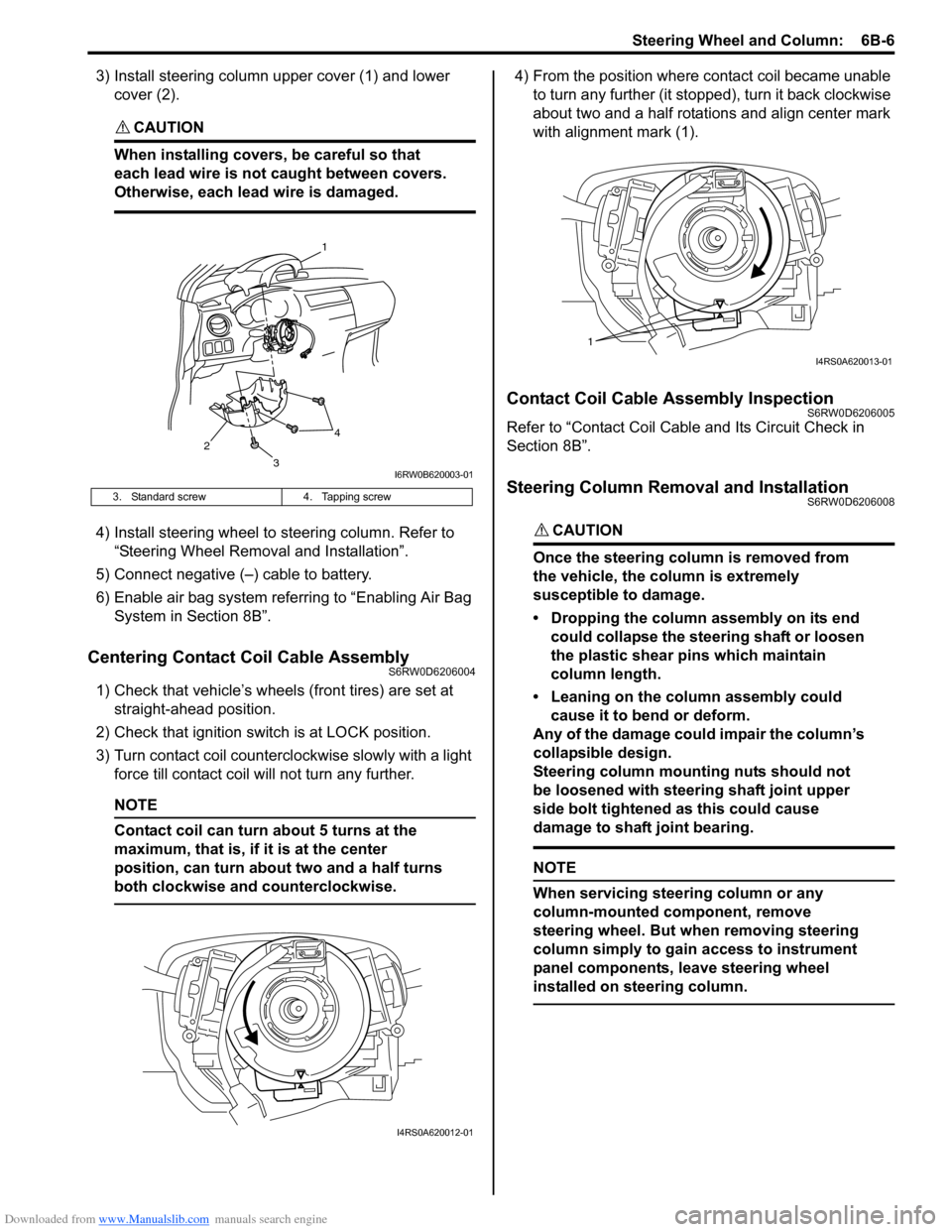
3) Install steering column upper cover (1) and lower
cover (2).
CAUTION!
When installing covers, be careful so that
each lead wire is not caught between covers.
Otherwise, each lead wire is damaged.
4) Install steering wheel to steering column. Refer to
“Steering Wheel Removal and Installation”.
5) Connect negative (–) cable to battery.
6) Enable air bag system referring to “Enabling Air Bag
System in Section 8B”.
Centering Contact Coil Cable AssemblyS6RW0D6206004
1) Check that vehicle’s wheels (front tires) are set at
straight-ahead position.
2) Check that ignition switch is at LOCK position.
3) Turn contact coil counterclockwise slowly with a light
force till contact coil will not turn any further.
NOTE
Contact coil can turn about 5 turns at the
maximum, that is, if it is at the center
position, can turn about two and a half turns
both clockwise and counterclockwise.
4) From the position where contact coil became unable
to turn any further (it stopped), turn it back clockwise
about two and a half rotations and align center mark
with alignment mark (1).
Contact Coil Cable Assembly InspectionS6RW0D6206005
Refer to “Contact Coil Cable and Its Circuit Check in
Section 8B”.
Steering Column Removal and InstallationS6RW0D6206008
CAUTION!
Once the steering column is removed from
the vehicle, the column is extremely
susceptible to damage.
• Dropping the column assembly on its end
could collapse the steering shaft or loosen
the plastic shear pins which maintain
column length.
• Leaning on the column assembly could
cause it to bend or deform.
Any of the damage could impair the column’s
collapsible design.
Steering column mounting nuts should not
be loosened with steering shaft joint upper
side bolt tightened as this could cause
damage to shaft joint bearing.
NOTE
When servicing steering column or any
column-mounted component, remove
steering wheel. But when removing steering
column simply to gain access to instrument
panel components, leave steering wheel
installed on steering column.
3. Standard screw 4. Tapping screw
2
1
3
4
I6RW0B620003-01
I4RS0A620012-01
1
I4RS0A620013-01
Page 888 of 1556
Downloaded from www.Manualslib.com manuals search engine 6C-8 Power Assisted Steering System:
Step 8: Steering Symptom Diagnosis and P/S
System Symptom Diagnosis
Perform basic steering system check according to
“Steering Symptom Diagnosis in Section 6A” first. When
the end of the flow has been reached, check the parts of
the system suspected as a possible cause referring to
“P/S System Symptom Diagnosis” and based on
symptoms appearing on the vehicle (symptoms obtained
through steps of customer complaint analysis, trouble
symptom confirmation and/or basic P/S system check)
and repair or replace faulty parts, if any.
Step 9: Troubleshooting for DTC (See each DTC
Diag. Flow)
Based on the DTC indicated in Step 6 or 7 and referring
to the applicable DTC diag. flow, locate the cause of the
trouble, namely in a sensor, switch, wire harness,
connector, actuator, P/S control module or other part and
repair or replace faulty parts.
Step 10: Intermittent Problems Check
Check parts where an intermittent trouble is easy to
occur (e.g., wire harness, connector, etc.), referring to
“Intermittent and Poor Connection Inspection in Section
00” and related circuit of DTC recorded in Step 2.
Step 11: Final Confirmation Test
Confirm that the problem symptom has gone and the P/
S system is free from any abnormal conditions. If what
has been repaired is related to the DTC, clear the DTC
once, perform DTC confirmation procedure and confirm
that no DTC is indicated.
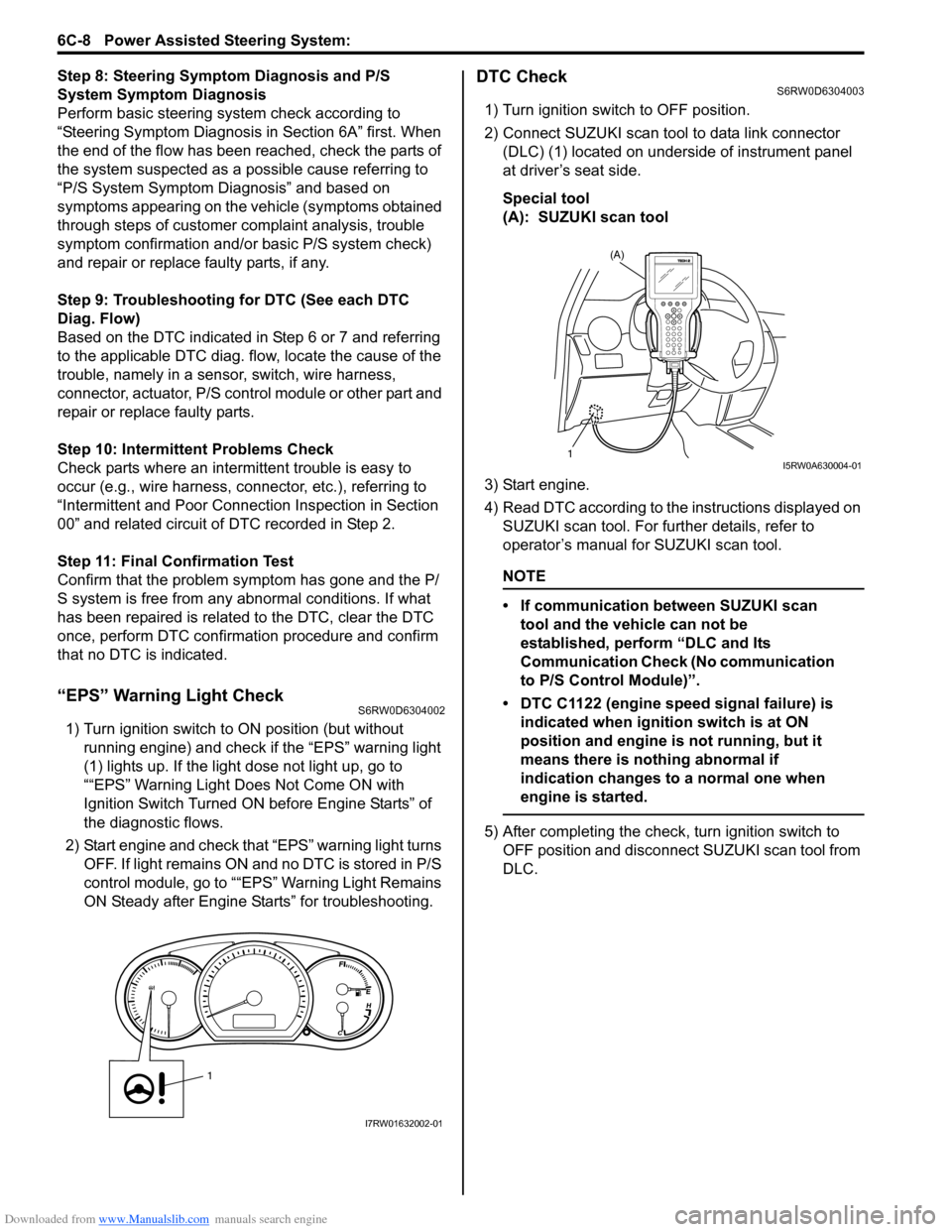
“EPS” Warning Light CheckS6RW0D6304002
1) Turn ignition switch to ON position (but without
running engine) and check if the “EPS” warning light
(1) lights up. If the light dose not light up, go to
““EPS” Warning Light Does Not Come ON with
Ignition Switch Turned ON before Engine Starts” of
the diagnostic flows.
2) Start engine and check that “EPS” warning light turns
OFF. If light remains ON and no DTC is stored in P/S
control module, go to ““EPS” Warning Light Remains
ON Steady after Engine Starts” for troubleshooting.
DTC CheckS6RW0D6304003
1) Turn ignition switch to OFF position.
2) Connect SUZUKI scan tool to data link connector
(DLC) (1) located on underside of instrument panel
at driver’s seat side.
Special tool
(A): SUZUKI scan tool
3) Start engine.
4) Read DTC according to the instructions displayed on
SUZUKI scan tool. For further details, refer to
operator’s manual for SUZUKI scan tool.
NOTE
• If communication between SUZUKI scan
tool and the vehicle can not be
established, perform “DLC and Its
Communication Check (No communication
to P/S Control Module)”.
• DTC C1122 (engine speed signal failure) is
indicated when ignition switch is at ON
position and engine is not running, but it
means there is nothing abnormal if
indication changes to a normal one when
engine is started.
5) After completing the check, turn ignition switch to
OFF position and disconnect SUZUKI scan tool from
DLC.
1
I7RW01632002-01
(A)
1I5RW0A630004-01
Page 889 of 1556
Downloaded from www.Manualslib.com manuals search engine Power Assisted Steering System: 6C-9
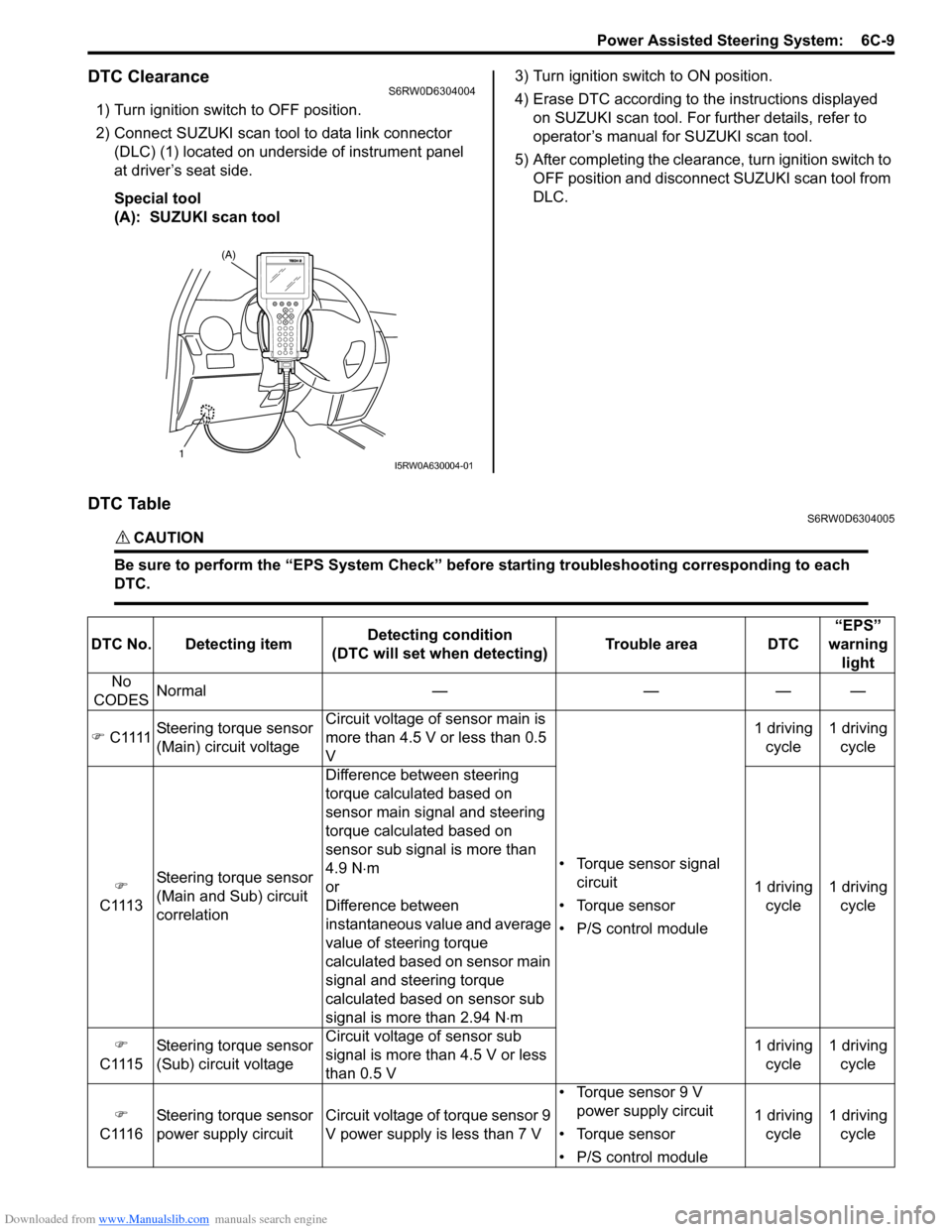
DTC ClearanceS6RW0D6304004
1) Turn ignition switch to OFF position.
2) Connect SUZUKI scan tool to data link connector
(DLC) (1) located on underside of instrument panel
at driver’s seat side.
Special tool
(A): SUZUKI scan tool3) Turn ignition switch to ON position.
4) Erase DTC according to the instructions displayed
on SUZUKI scan tool. For further details, refer to
operator’s manual for SUZUKI scan tool.
5) After completing the clearance, turn ignition switch to
OFF position and disconnect SUZUKI scan tool from
DLC.
DTC TableS6RW0D6304005
CAUTION!
Be sure to perform the “EPS System Check” before starting troubleshooting corresponding to each
DTC.
(A)
1I5RW0A630004-01
DTC No. Detecting itemDetecting condition
(DTC will set when detecting)Trouble area DTC“EPS”
warning
light
No
CODESNormal — — — —
) C1111Steering torque sensor
(Main) circuit voltageCircuit voltage of sensor main is
more than 4.5 V or less than 0.5
V
• Torque sensor signal
circuit
• Torque sensor
• P/S control module1 driving
cycle1 driving
cycle
)
C1113Steering torque sensor
(Main and Sub) circuit
correlationDifference between steering
torque calculated based on
sensor main signal and steering
torque calculated based on
sensor sub signal is more than
4.9 N⋅m
or
Difference between
instantaneous value and average
value of steering torque
calculated based on sensor main
signal and steering torque
calculated based on sensor sub
signal is more than 2.94 N⋅m1 driving
cycle1 driving
cycle
)
C1115Steering torque sensor
(Sub) circuit voltageCircuit voltage of sensor sub
signal is more than 4.5 V or less
than 0.5 V1 driving
cycle1 driving
cycle
)
C1116Steering torque sensor
power supply circuit Circuit voltage of torque sensor 9
V power supply is less than 7 V• Torque sensor 9 V
power supply circuit
• Torque sensor
• P/S control module1 driving
cycle1 driving
cycle
Page 932 of 1556
Downloaded from www.Manualslib.com manuals search engine 7A-4 Heater and Ventilation:
Repair Instructions
HVAC Unit ComponentsS6RW0D7106001
For non-A/C and manual A/C, refer to “HVAC Unit
Components in Section 7B”.
For auto A/C, refer to “HVAC Unit Components in
Section 7B”.
HVAC Unit Removal and Installation (Non-A/C)S6RW0D7106002
For manual A/C and auto A/C, refer to “HVAC Unit
Removal and Installation in Section 7B”.
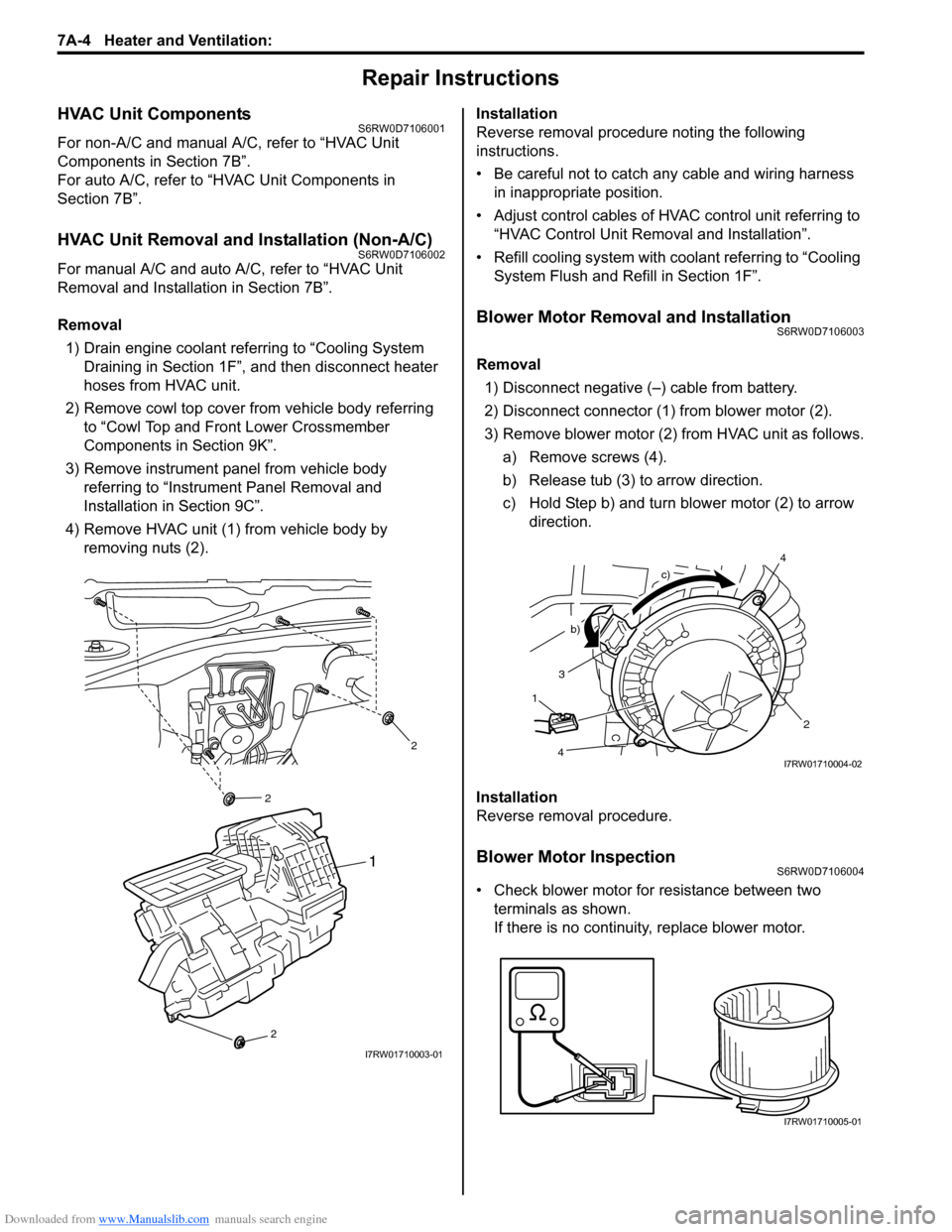
Removal
1) Drain engine coolant referring to “Cooling System
Draining in Section 1F”, and then disconnect heater
hoses from HVAC unit.
2) Remove cowl top cover from vehicle body referring
to “Cowl Top and Front Lower Crossmember
Components in Section 9K”.
3) Remove instrument panel from vehicle body
referring to “Instrument Panel Removal and
Installation in Section 9C”.
4) Remove HVAC unit (1) from vehicle body by
removing nuts (2).Installation
Reverse removal procedure noting the following
instructions.
• Be careful not to catch any cable and wiring harness
in inappropriate position.
• Adjust control cables of HVAC control unit referring to
“HVAC Control Unit Removal and Installation”.
• Refill cooling system with coolant referring to “Cooling
System Flush and Refill in Section 1F”.
Blower Motor Removal and InstallationS6RW0D7106003
Removal
1) Disconnect negative (–) cable from battery.
2) Disconnect connector (1) from blower motor (2).
3) Remove blower motor (2) from HVAC unit as follows.
a) Remove screws (4).
b) Release tub (3) to arrow direction.
c) Hold Step b) and turn blower motor (2) to arrow
direction.
Installation
Reverse removal procedure.
Blower Motor InspectionS6RW0D7106004
• Check blower motor for resistance between two
terminals as shown.
If there is no continuity, replace blower motor.
2
2
2
1
I7RW01710003-01
3
2
b)
c)
1
4
4I7RW01710004-02
I7RW01710005-01
Page 933 of 1556
Downloaded from www.Manualslib.com manuals search engine Heater and Ventilation: 7A-5
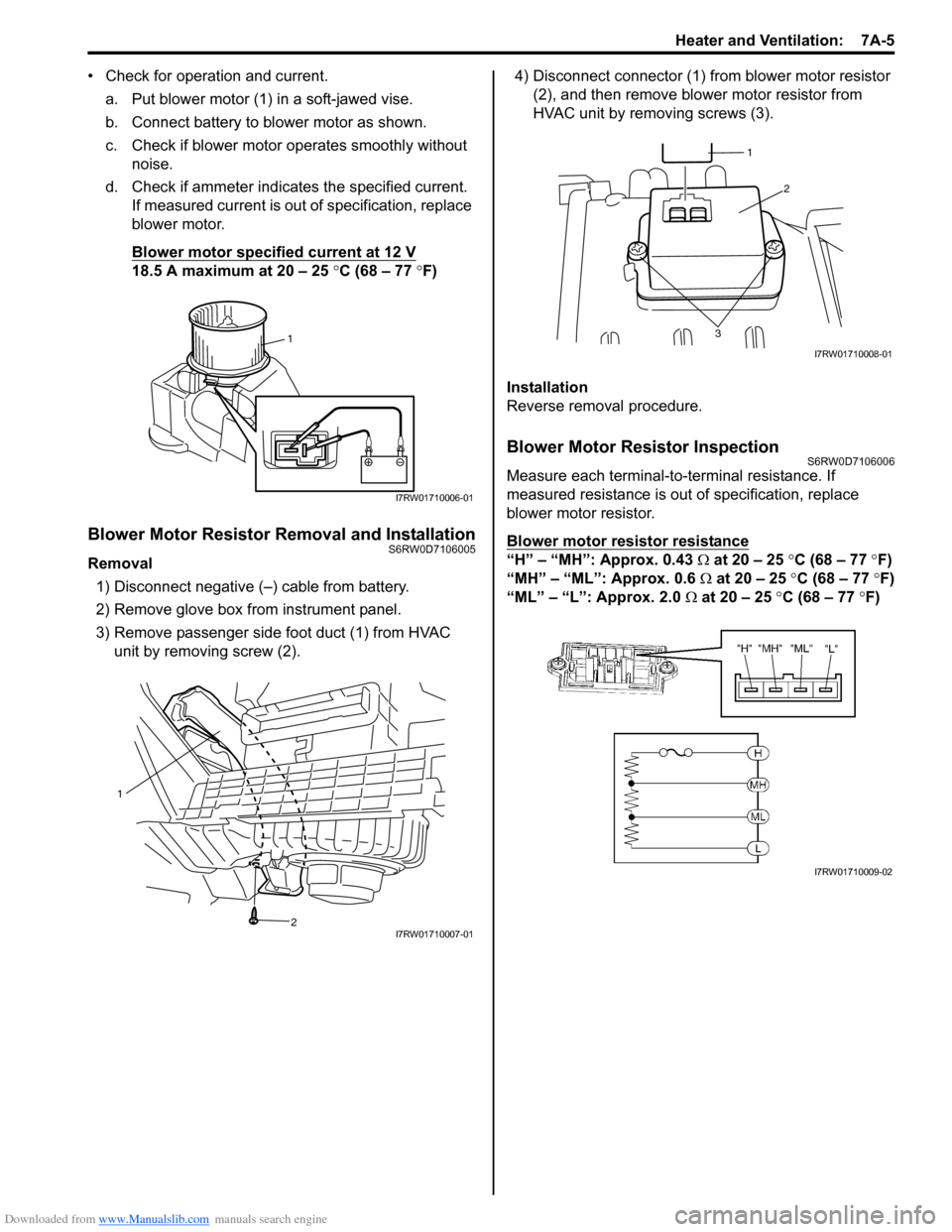
• Check for operation and current.
a. Put blower motor (1) in a soft-jawed vise.
b. Connect battery to blower motor as shown.
c. Check if blower motor operates smoothly without
noise.
d. Check if ammeter indicates the specified current.
If measured current is out of specification, replace
blower motor.
Blower motor specified current at 12 V
18.5 A maximum at 20 – 25 °C (68 – 77 °F)
Blower Motor Resistor Removal and InstallationS6RW0D7106005
Removal
1) Disconnect negative (–) cable from battery.
2) Remove glove box from instrument panel.
3) Remove passenger side foot duct (1) from HVAC
unit by removing screw (2).4) Disconnect connector (1) from blower motor resistor
(2), and then remove blower motor resistor from
HVAC unit by removing screws (3).
Installation
Reverse removal procedure.
Blower Motor Resistor InspectionS6RW0D7106006
Measure each terminal-to-terminal resistance. If
measured resistance is out of specification, replace
blower motor resistor.
Blower motor resistor resistance
“H” – “MH”: Approx. 0.43 Ω at 20 – 25 °C (68 – 77 °F)
“MH” – “ML”: Approx. 0.6 Ω at 20 – 25 °C (68 – 77 °F)
“ML” – “L”: Approx. 2.0 Ω at 20 – 25 °C (68 – 77 °F)
1
I7RW01710006-01
1
2
I7RW01710007-01
2
3
1
I7RW01710008-01
I7RW01710009-02
Page 935 of 1556
Downloaded from www.Manualslib.com manuals search engine Heater and Ventilation: 7A-7
HVAC Control Unit Removal and InstallationS6RW0D7106009
Removal
1) Disconnect negative (–) cable at battery.
2) Remove steering column hole cover from instrument
panel.
3) Remove audio unit from instrument panel referring to
“Audio Unit Removal and Installation (If Equipped) in
Section 9C”.
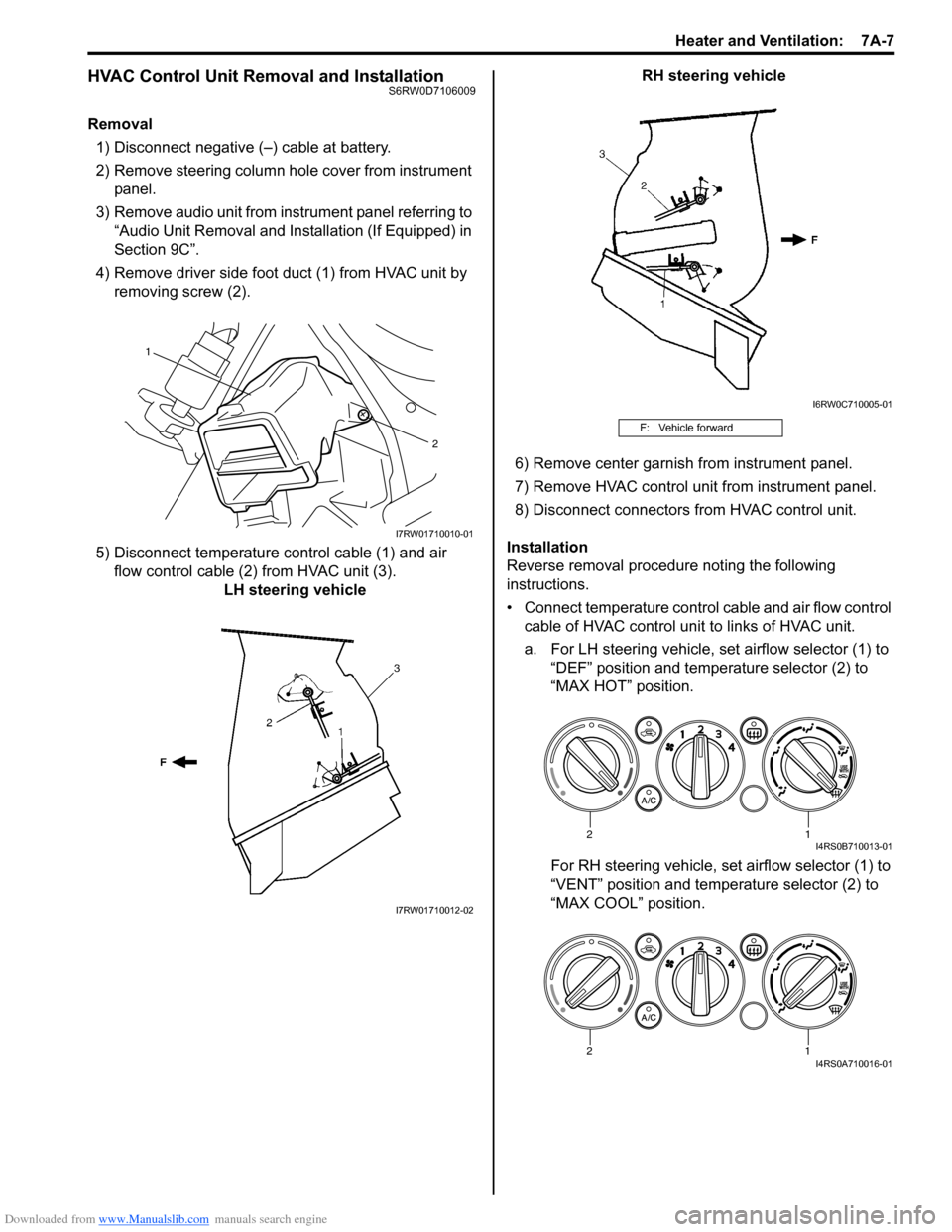
4) Remove driver side foot duct (1) from HVAC unit by
removing screw (2).
5) Disconnect temperature control cable (1) and air
flow control cable (2) from HVAC unit (3).
LH steering vehicleRH steering vehicle
6) Remove center garnish from instrument panel.
7) Remove HVAC control unit from instrument panel.
8) Disconnect connectors from HVAC control unit.
Installation
Reverse removal procedure noting the following
instructions.
• Connect temperature control cable and air flow control
cable of HVAC control unit to links of HVAC unit.
a. For LH steering vehicle, set airflow selector (1) to
“DEF” position and temperature selector (2) to
“MAX HOT” position.
For RH steering vehicle, set airflow selector (1) to
“VENT” position and temperature selector (2) to
“MAX COOL” position.
1
2
I7RW01710010-01
I7RW01710012-02
F: Vehicle forward
I6RW0C710005-01
12I4RS0B710013-01
12I4RS0A710016-01
Page 937 of 1556
Downloaded from www.Manualslib.com manuals search engine Heater and Ventilation: 7A-9
Blower Speed Selector InspectionS6RW0D7106010
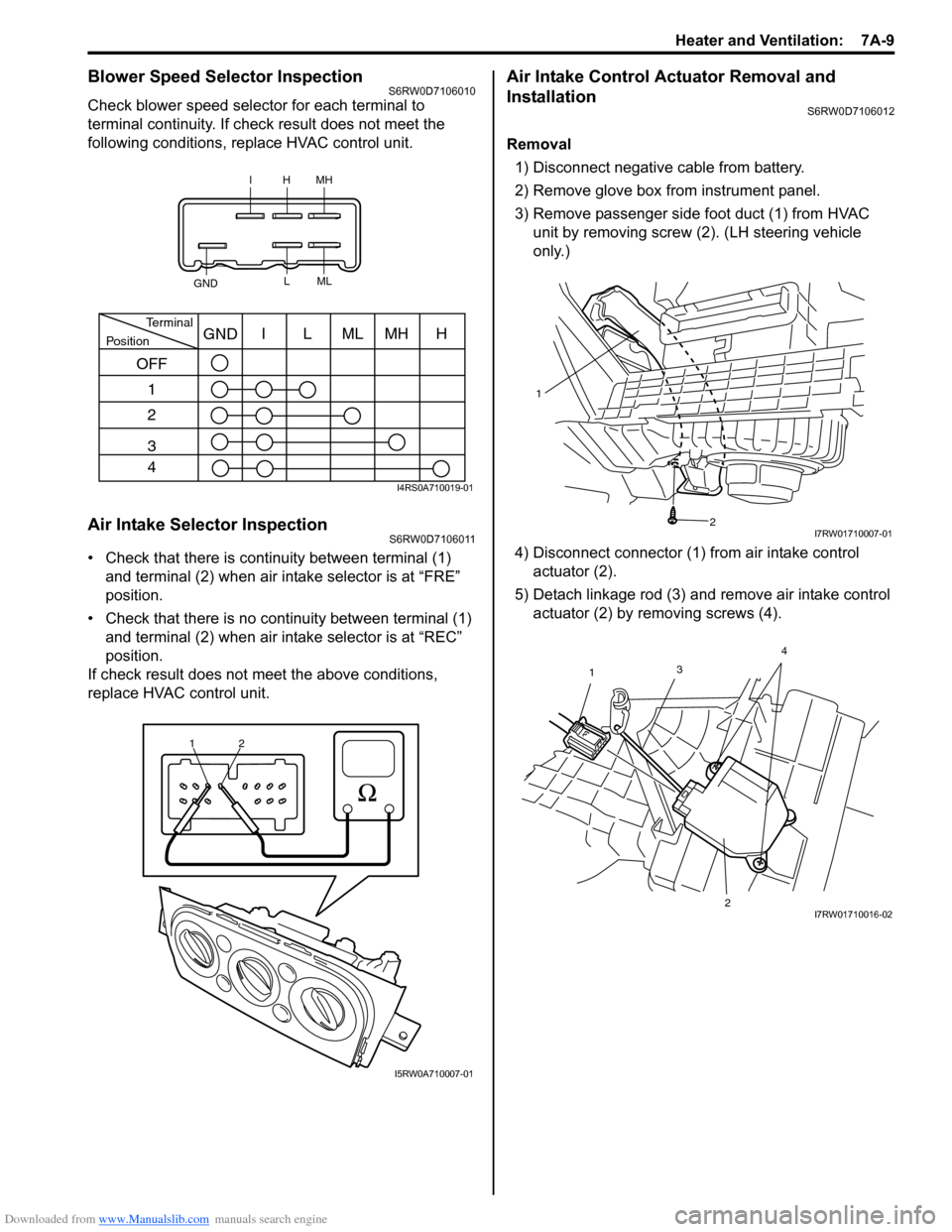
Check blower speed selector for each terminal to
terminal continuity. If check result does not meet the
following conditions, replace HVAC control unit.
Air Intake Selector InspectionS6RW0D7106011
• Check that there is continuity between terminal (1)
and terminal (2) when air intake selector is at “FRE”
position.
• Check that there is no continuity between terminal (1)
and terminal (2) when air intake selector is at “REC”
position.
If check result does not meet the above conditions,
replace HVAC control unit.
Air Intake Control Actuator Removal and
Installation
S6RW0D7106012
Removal
1) Disconnect negative cable from battery.
2) Remove glove box from instrument panel.
3) Remove passenger side foot duct (1) from HVAC
unit by removing screw (2). (LH steering vehicle
only.)
4) Disconnect connector (1) from air intake control
actuator (2).
5) Detach linkage rod (3) and remove air intake control
actuator (2) by removing screws (4).
IHMH
GNDLML
PositionTerminalI
OFF
1
2
3
4LMLMHHGND
I4RS0A710019-01
1
2
I5RW0A710007-01
1
2
I7RW01710007-01
3
1
24I7RW01710016-02
Page 939 of 1556
Downloaded from www.Manualslib.com manuals search engine Heater and Ventilation: 7A-11
Center Ventilation Louver Removal and
Installation
S6RW0D7106014
Removal
1) Disconnect negative (–) cable from battery.
2) Remove audio unit from instrument panel referring to
“Audio Unit Removal and Installation (If Equipped) in
Section 9C”.
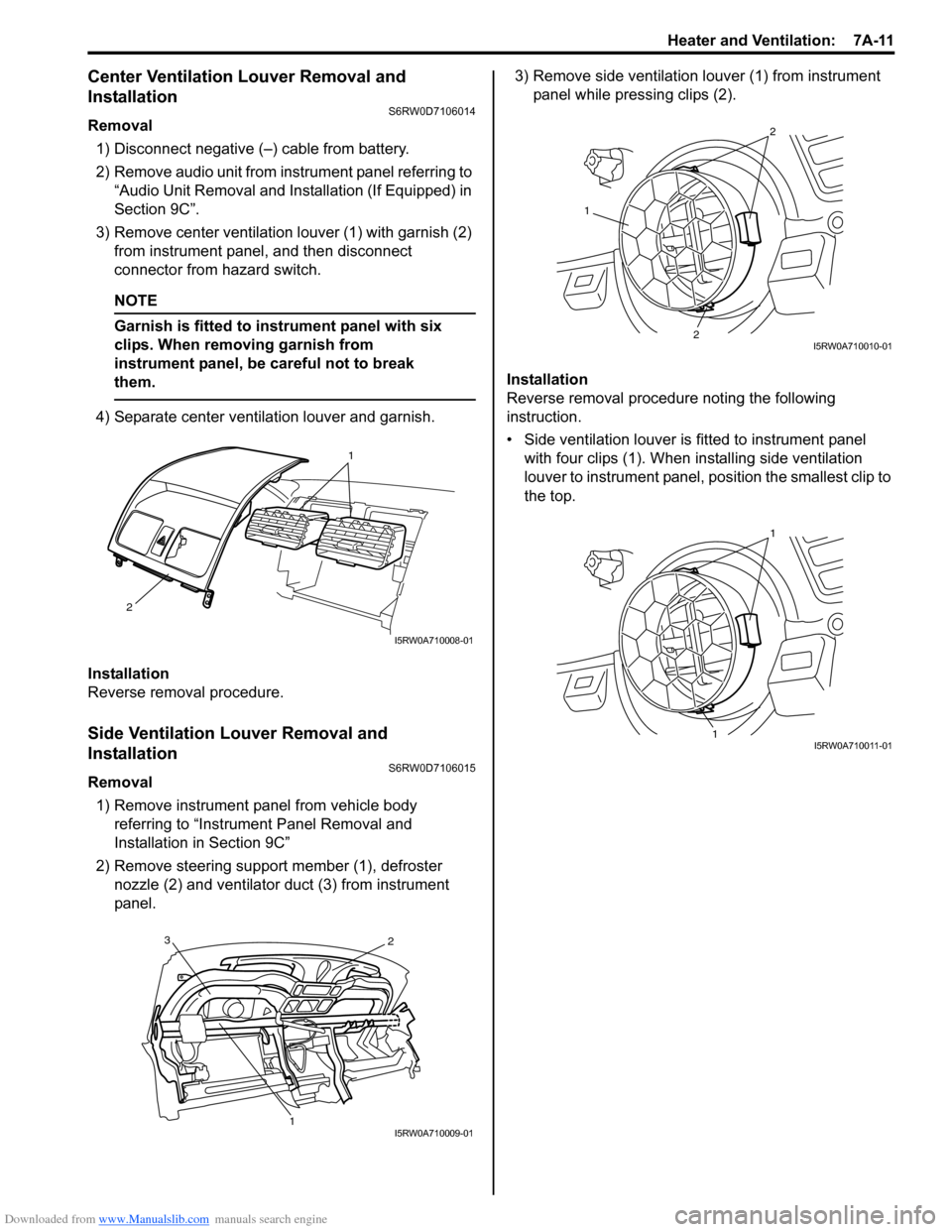
3) Remove center ventilation louver (1) with garnish (2)
from instrument panel, and then disconnect
connector from hazard switch.
NOTE
Garnish is fitted to instrument panel with six
clips. When removing garnish from
instrument panel, be careful not to break
them.
4) Separate center ventilation louver and garnish.
Installation
Reverse removal procedure.
Side Ventilation Louver Removal and
Installation
S6RW0D7106015
Removal
1) Remove instrument panel from vehicle body
referring to “Instrument Panel Removal and
Installation in Section 9C”
2) Remove steering support member (1), defroster
nozzle (2) and ventilator duct (3) from instrument
panel.3) Remove side ventilation louver (1) from instrument
panel while pressing clips (2).
Installation
Reverse removal procedure noting the following
instruction.
• Side ventilation louver is fitted to instrument panel
with four clips (1). When installing side ventilation
louver to instrument panel, position the smallest clip to
the top.
1
2
I5RW0A710008-01
3
12
I5RW0A710009-01
1
2
2
I5RW0A710010-01
1
1
I5RW0A710011-01
Page 940 of 1556
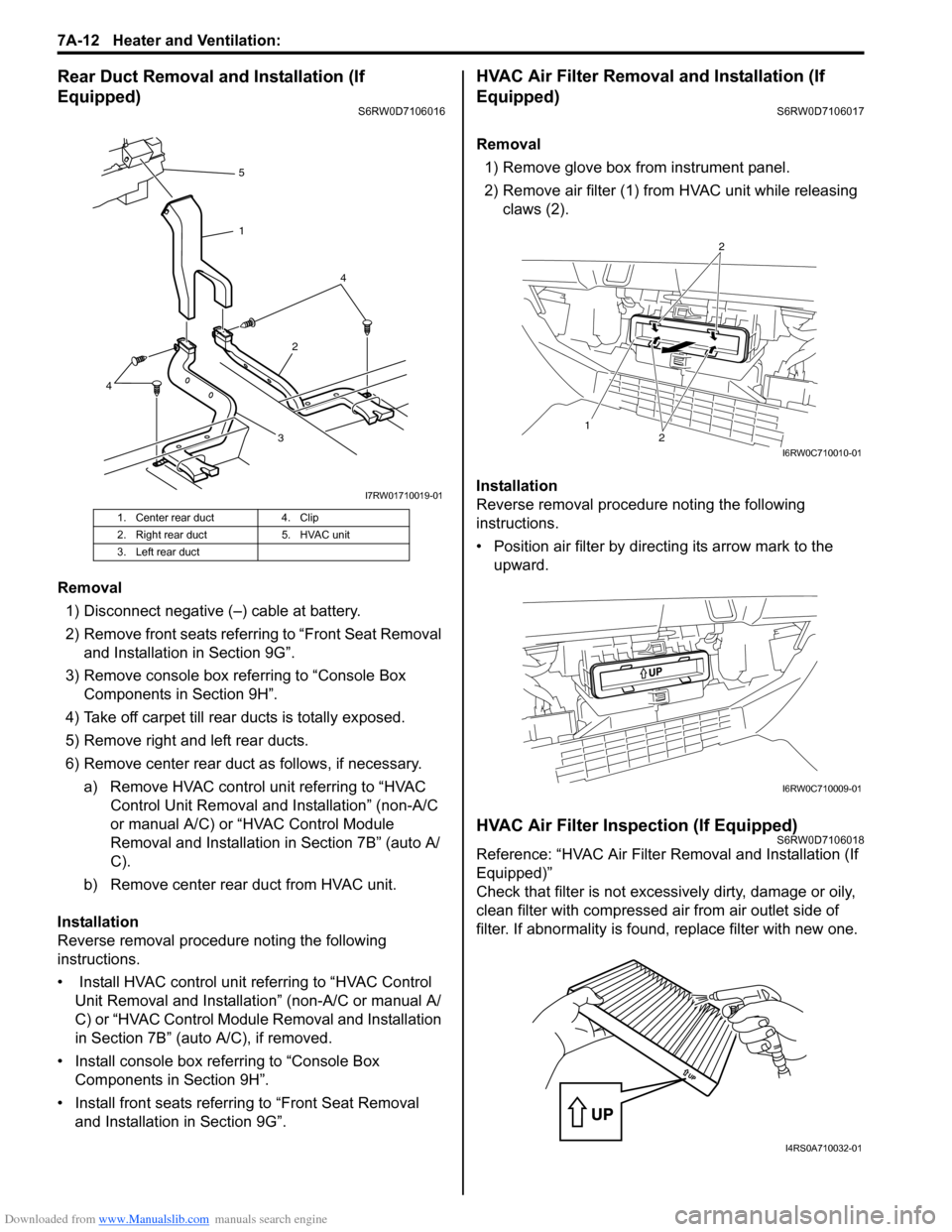
Downloaded from www.Manualslib.com manuals search engine 7A-12 Heater and Ventilation:
Rear Duct Removal and Installation (If
Equipped)
S6RW0D7106016
Removal
1) Disconnect negative (–) cable at battery.
2) Remove front seats referring to “Front Seat Removal
and Installation in Section 9G”.
3) Remove console box referring to “Console Box
Components in Section 9H”.
4) Take off carpet till rear ducts is totally exposed.
5) Remove right and left rear ducts.
6) Remove center rear duct as follows, if necessary.
a) Remove HVAC control unit referring to “HVAC
Control Unit Removal and Installation” (non-A/C
or manual A/C) or “HVAC Control Module
Removal and Installation in Section 7B” (auto A/
C).
b) Remove center rear duct from HVAC unit.
Installation
Reverse removal procedure noting the following
instructions.
• Install HVAC control unit referring to “HVAC Control
Unit Removal and Installation” (non-A/C or manual A/
C) or “HVAC Control Module Removal and Installation
in Section 7B” (auto A/C), if removed.
• Install console box referring to “Console Box
Components in Section 9H”.
• Install front seats referring to “Front Seat Removal
and Installation in Section 9G”.
HVAC Air Filter Removal and Installation (If
Equipped)
S6RW0D7106017
Removal
1) Remove glove box from instrument panel.
2) Remove air filter (1) from HVAC unit while releasing
claws (2).
Installation
Reverse removal procedure noting the following
instructions.
• Position air filter by directing its arrow mark to the
upward.
HVAC Air Filter Inspection (If Equipped)S6RW0D7106018
Reference: “HVAC Air Filter Removal and Installation (If
Equipped)”
Check that filter is not excessively dirty, damage or oily,
clean filter with compressed air from air outlet side of
filter. If abnormality is found, replace filter with new one.
1. Center rear duct 4. Clip
2. Right rear duct 5. HVAC unit
3. Left rear duct
324 5
1
4
I7RW01710019-01
12
2
I6RW0C710010-01
I6RW0C710009-01
I4RS0A710032-01
Page 966 of 1556

Downloaded from www.Manualslib.com manuals search engine 7B-26 Air Conditioning System: Manual Type
HVAC Unit Removal and InstallationS6RW0D7216008
Removal
1) Recover refrigerant from A/C system with recovery
and recycling equipment referring to “Recovery” in
“Operation Procedure for Refrigerant Charge”.
2) Drain engine coolant referring to “Cooling System
Draining in Section 1F”, and then disconnect heater
hoses from HVAC unit.
3) Remove cowl top cover from vehicle body referring
to “Cowl Top and Front Lower Crossmember
Components in Section 9K”
4) Remove instrument panel from vehicle body
referring to “Instrument Panel Removal and
Installation in Section 9C”.
5) Loosen a bolt (1) and remove pipes from expansion
valve (2).6) Remove HVAC unit (1) from vehicle body by
removing nuts (2).
7. Cover (without HVAC air
filter)14. Heater core 21. Temperature control lever : Do not reuse.
1
2
I7RW01721016-01
2
2
2
1
I7RW01710003-01