Lower bracket SUZUKI SX4 2006 1.G Service Owner's Manual
[x] Cancel search | Manufacturer: SUZUKI, Model Year: 2006, Model line: SX4, Model: SUZUKI SX4 2006 1.GPages: 1556, PDF Size: 37.31 MB
Page 809 of 1556
Downloaded from www.Manualslib.com manuals search engine Automatic Transmission/Transaxle: 5A-161
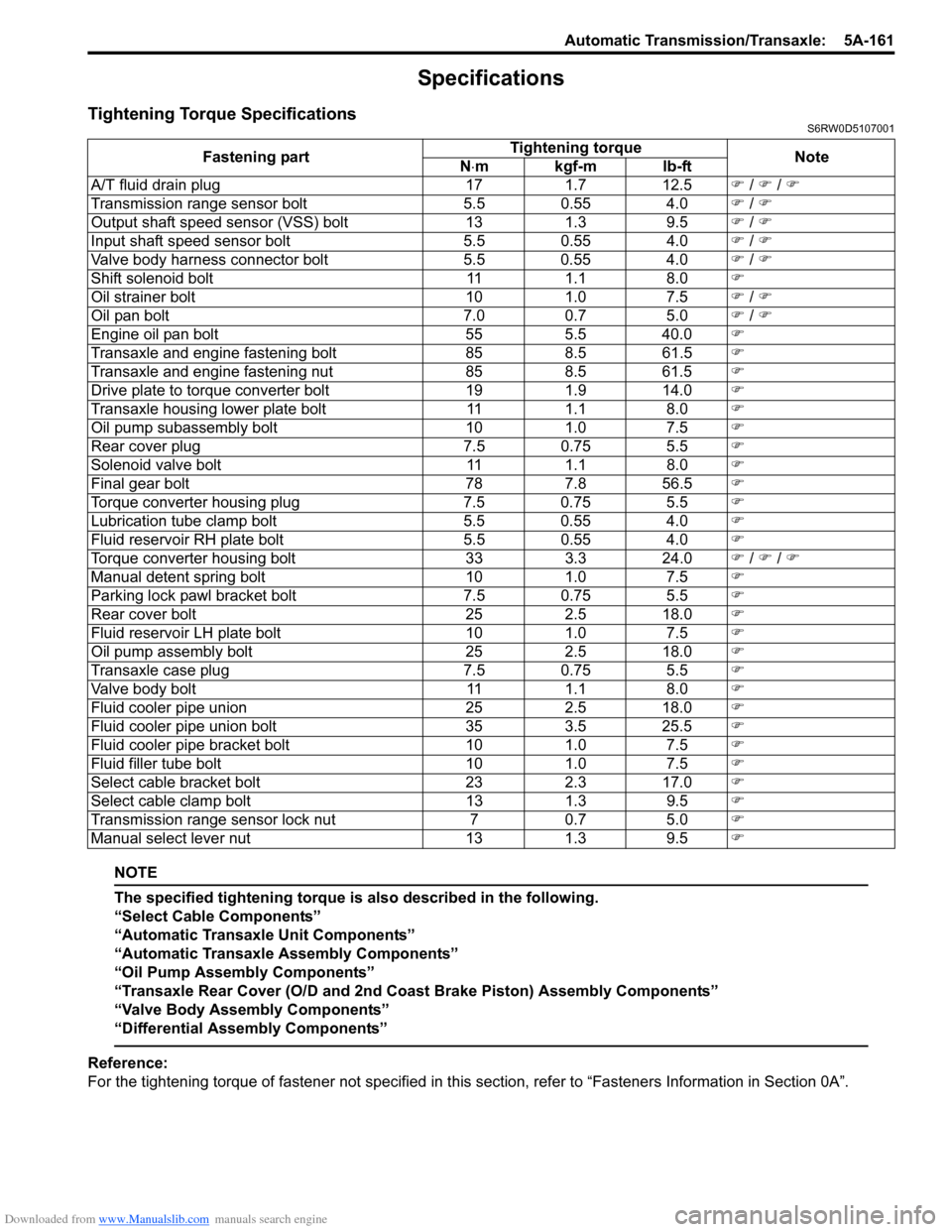
Specifications
Tightening Torque SpecificationsS6RW0D5107001
NOTE
The specified tightening torque is also described in the following.
“Select Cable Components”
“Automatic Transaxle Unit Components”
“Automatic Transaxle Assembly Components”
“Oil Pump Assembly Components”
“Transaxle Rear Cover (O/D and 2nd Coast Brake Piston) Assembly Components”
“Valve Body Assembly Components”
“Differential Assembly Components”
Reference:
For the tightening torque of fastener not specified in this section, refer to “Fasteners Information in Section 0A”. Fastening partTightening torque
Note
N⋅mkgf-mlb-ft
A/T fluid drain plug 17 1.7 12.5) / ) / )
Transmission range sensor bolt 5.5 0.55 4.0) / )
Output shaft speed sensor (VSS) bolt 13 1.3 9.5) / )
Input shaft speed sensor bolt 5.5 0.55 4.0) / )
Valve body harness connector bolt 5.5 0.55 4.0) / )
Shift solenoid bolt 11 1.1 8.0)
Oil strainer bolt 10 1.0 7.5) / )
Oil pan bolt 7.0 0.7 5.0) / )
Engine oil pan bolt 55 5.5 40.0)
Transaxle and engine fastening bolt 85 8.5 61.5)
Transaxle and engine fastening nut 85 8.5 61.5)
Drive plate to torque converter bolt 19 1.9 14.0)
Transaxle housing lower plate bolt 11 1.1 8.0)
Oil pump subassembly bolt 10 1.0 7.5)
Rear cover plug 7.5 0.75 5.5)
Solenoid valve bolt 11 1.1 8.0)
Final gear bolt 78 7.8 56.5)
Torque converter housing plug 7.5 0.75 5.5)
Lubrication tube clamp bolt 5.5 0.55 4.0)
Fluid reservoir RH plate bolt 5.5 0.55 4.0)
Torque converter housing bolt 33 3.3 24.0) / ) / )
Manual detent spring bolt 10 1.0 7.5)
Parking lock pawl bracket bolt 7.5 0.75 5.5)
Rear cover bolt 25 2.5 18.0)
Fluid reservoir LH plate bolt 10 1.0 7.5)
Oil pump assembly bolt 25 2.5 18.0)
Transaxle case plug 7.5 0.75 5.5)
Valve body bolt 11 1.1 8.0)
Fluid cooler pipe union 25 2.5 18.0)
Fluid cooler pipe union bolt 35 3.5 25.5)
Fluid cooler pipe bracket bolt 10 1.0 7.5)
Fluid filler tube bolt 10 1.0 7.5)
Select cable bracket bolt 23 2.3 17.0)
Select cable clamp bolt 13 1.3 9.5)
Transmission range sensor lock nut 7 0.7 5.0)
Manual select lever nut 13 1.3 9.5)
Page 824 of 1556
Downloaded from www.Manualslib.com manuals search engine 5B-12 Manual Transmission/Transaxle:
Manual Transaxle Unit Dismounting and
Remounting
S6RW0D5206010
Dismounting
1) Drain coolant.
2) Remove battery and tray with ECM.
3) Remove air cleaner case and resonator.
4) Remove clutch fluid pipe referring to “Clutch Fluid
Pipe Removal and Installation in Section 5C”.
5) Disconnect back up light switch coupler and undo
wiring harness clamps.
6) Disconnect gear shift and gear select control cables
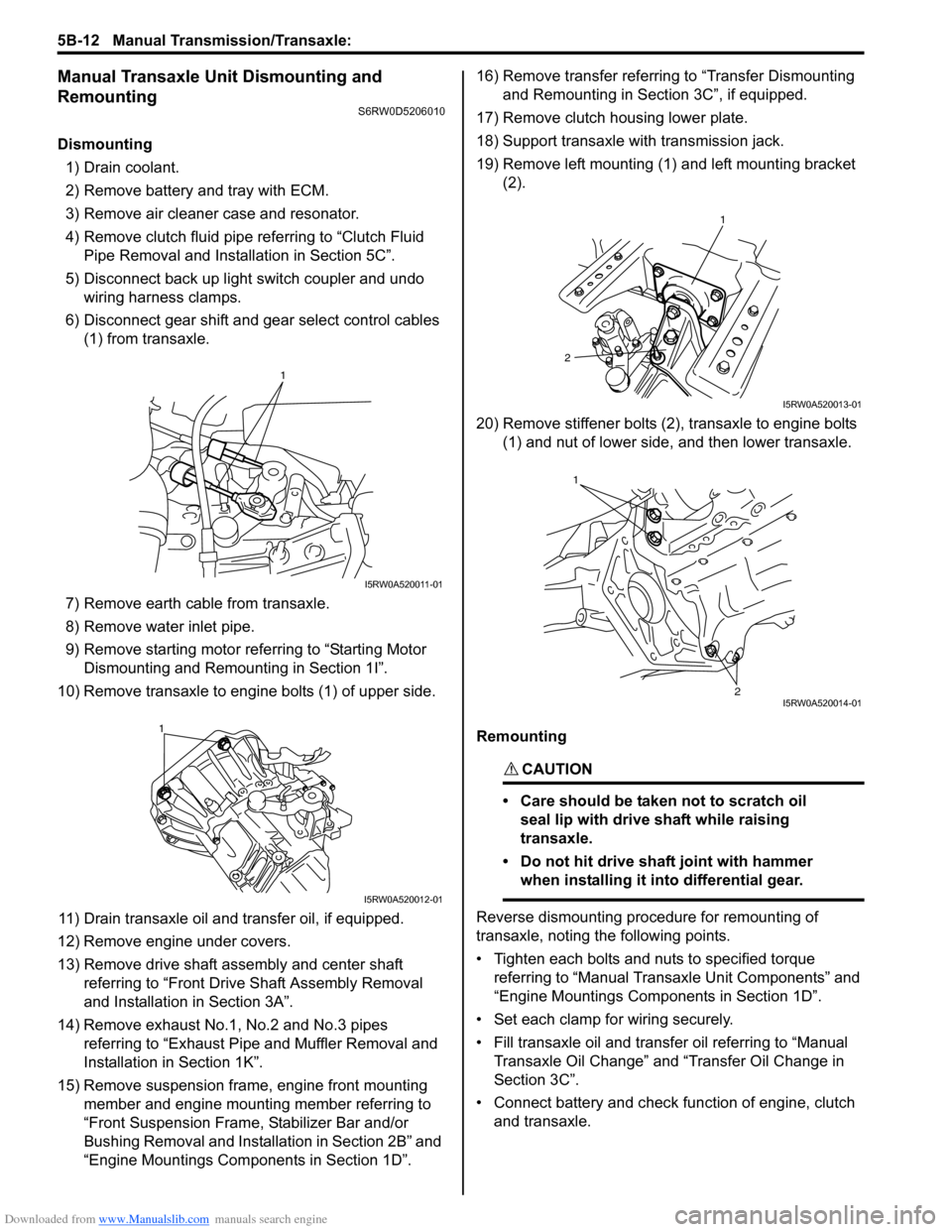
(1) from transaxle.
7) Remove earth cable from transaxle.
8) Remove water inlet pipe.
9) Remove starting motor referring to “Starting Motor
Dismounting and Remounting in Section 1I”.
10) Remove transaxle to engine bolts (1) of upper side.
11) Drain transaxle oil and transfer oil, if equipped.
12) Remove engine under covers.
13) Remove drive shaft assembly and center shaft
referring to “Front Drive Shaft Assembly Removal
and Installation in Section 3A”.
14) Remove exhaust No.1, No.2 and No.3 pipes
referring to “Exhaust Pipe and Muffler Removal and
Installation in Section 1K”.
15) Remove suspension frame, engine front mounting
member and engine mounting member referring to
“Front Suspension Frame, Stabilizer Bar and/or
Bushing Removal and Installation in Section 2B” and
“Engine Mountings Components in Section 1D”.16) Remove transfer referring to “Transfer Dismounting
and Remounting in Section 3C”, if equipped.
17) Remove clutch housing lower plate.
18) Support transaxle with transmission jack.
19) Remove left mounting (1) and left mounting bracket
(2).
20) Remove stiffener bolts (2), transaxle to engine bolts
(1) and nut of lower side, and then lower transaxle.
Remounting
CAUTION!
• Care should be taken not to scratch oil
seal lip with drive shaft while raising
transaxle.
• Do not hit drive shaft joint with hammer
when installing it into differential gear.
Reverse dismounting procedure for remounting of
transaxle, noting the following points.
• Tighten each bolts and nuts to specified torque
referring to “Manual Transaxle Unit Components” and
“Engine Mountings Components in Section 1D”.
• Set each clamp for wiring securely.
• Fill transaxle oil and transfer oil referring to “Manual
Transaxle Oil Change” and “Transfer Oil Change in
Section 3C”.
• Connect battery and check function of engine, clutch
and transaxle.
1
I5RW0A520011-01
1
I5RW0A520012-01
1
2
I5RW0A520013-01
1
2I5RW0A520014-01
Page 871 of 1556

Downloaded from www.Manualslib.com manuals search engine Steering Wheel and Column: 6B-2
Diagnostic Information and Procedures
Checking Steering Column for Accident
Damage
S6RW0D6204001
NOTE
Vehicles involved in accidents resulting in
body damage, where steering column has
been impacted or air bag deployed may have
a damaged or misaligned steering column.
• Check that two capsules (1) are attached to steering
column bracket securely. If found loose, replace
steering column assembly.
• Take measurement “a”, “b” and “c” as follows.
If it is shorter than specified length, replace steering
column assembly or steering lower shaft with new
one.
Steering column length
“a”: 339 ± 2 mm (13.3 ± 0.08 in.)
“b”: 59.5 ± 2.1 mm (2.4 ± 0.08 in.)
Steering lower shaft length
“c”: 348 ± 1 mm (13.7 ± 0.04 in.)• Check that there is no axial looseness “d” and no
axially-vertical looseness “e” for steering column
shaft.
If found defective, replace steering column assembly
with new one.
• Check steering shaft joints and shaft for any damages
such as crack, breakage, malfunction or excessive
play.
If anything is found faulty, replace as lower shaft
assembly or steering column assembly.
• Check steering shaft for smooth rotation.
If found defective, replace as steering column
assembly.
• Check steering shaft and steering column for bend,
cracks or deformation.
If found defective, replace.
1
1
I4RS0A620001-01
“a”
“d”
“e”“b”
“c”
I7RW01620002-01
I4RS0A620003-01
Page 876 of 1556
Downloaded from www.Manualslib.com manuals search engine 6B-7 Steering Wheel and Column:
Removal
WARNING!
Never rest a steering column assembly on
the steering wheel with the air bag (inflator)
module face down and column vertical.
Otherwise, personal injury may result.
1) Disconnect negative (–) cable at battery.
2) Disable air bag system. Refer to “Disabling Air Bag
System in Section 8B”.
3) Remove steering wheel and contact coil cable
assembly referring to “Steering Wheel Removal and
Installation” and “Contact Coil Cable Assembly
Removal and Installation”.
4) (Immobilizer model)
Remove immobilizer control module from steering
column, referring to “ICM Removal and Installation in
Section 10C”.
5) Detach lighting switch and wiper switch from steering
column.
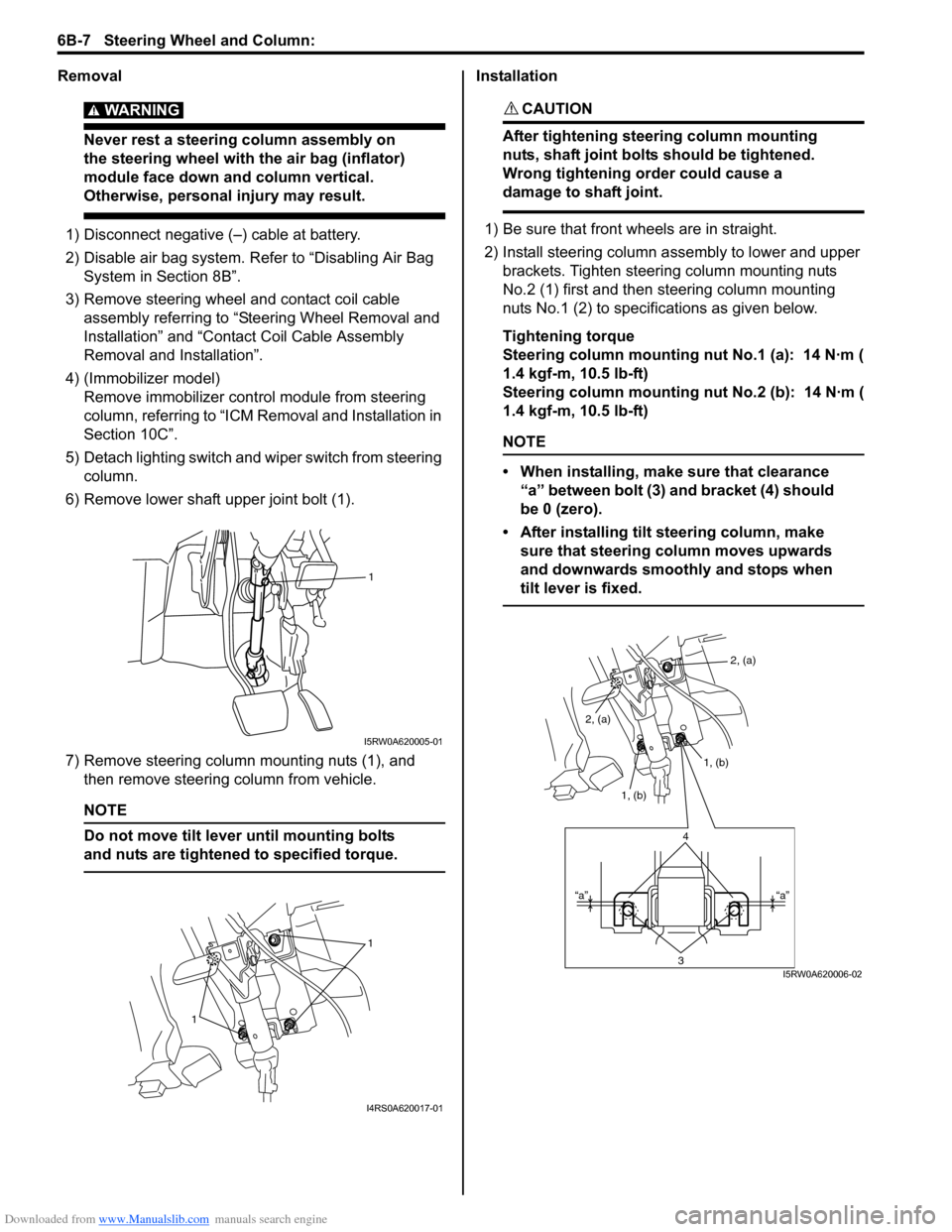
6) Remove lower shaft upper joint bolt (1).
7) Remove steering column mounting nuts (1), and
then remove steering column from vehicle.
NOTE
Do not move tilt lever until mounting bolts
and nuts are tightened to specified torque.
Installation
CAUTION!
After tightening steering column mounting
nuts, shaft joint bolts should be tightened.
Wrong tightening order could cause a
damage to shaft joint.
1) Be sure that front wheels are in straight.
2) Install steering column assembly to lower and upper
brackets. Tighten steering column mounting nuts
No.2 (1) first and then steering column mounting
nuts No.1 (2) to specifications as given below.
Tightening torque
Steering column mounting nut No.1 (a): 14 N·m (
1.4 kgf-m, 10.5 lb-ft)
Steering column mounting nut No.2 (b): 14 N·m (
1.4 kgf-m, 10.5 lb-ft)
NOTE
• When installing, make sure that clearance
“a” between bolt (3) and bracket (4) should
be 0 (zero).
• After installing tilt steering column, make
sure that steering column moves upwards
and downwards smoothly and stops when
tilt lever is fixed.
1
I5RW0A620005-01
1
1
I4RS0A620017-01
2, (a)
1, (b)
1, (b) 2, (a)
4
3“a” “a”
I5RW0A620006-02
Page 918 of 1556
Downloaded from www.Manualslib.com manuals search engine 6C-38 Power Assisted Steering System:
2) Install steering gear case to vehicle, and then install
front suspension frame referring to “Front
Suspension Frame, Stabilizer Bar and/or Bushing
Removal and Installation in Section 2B”.
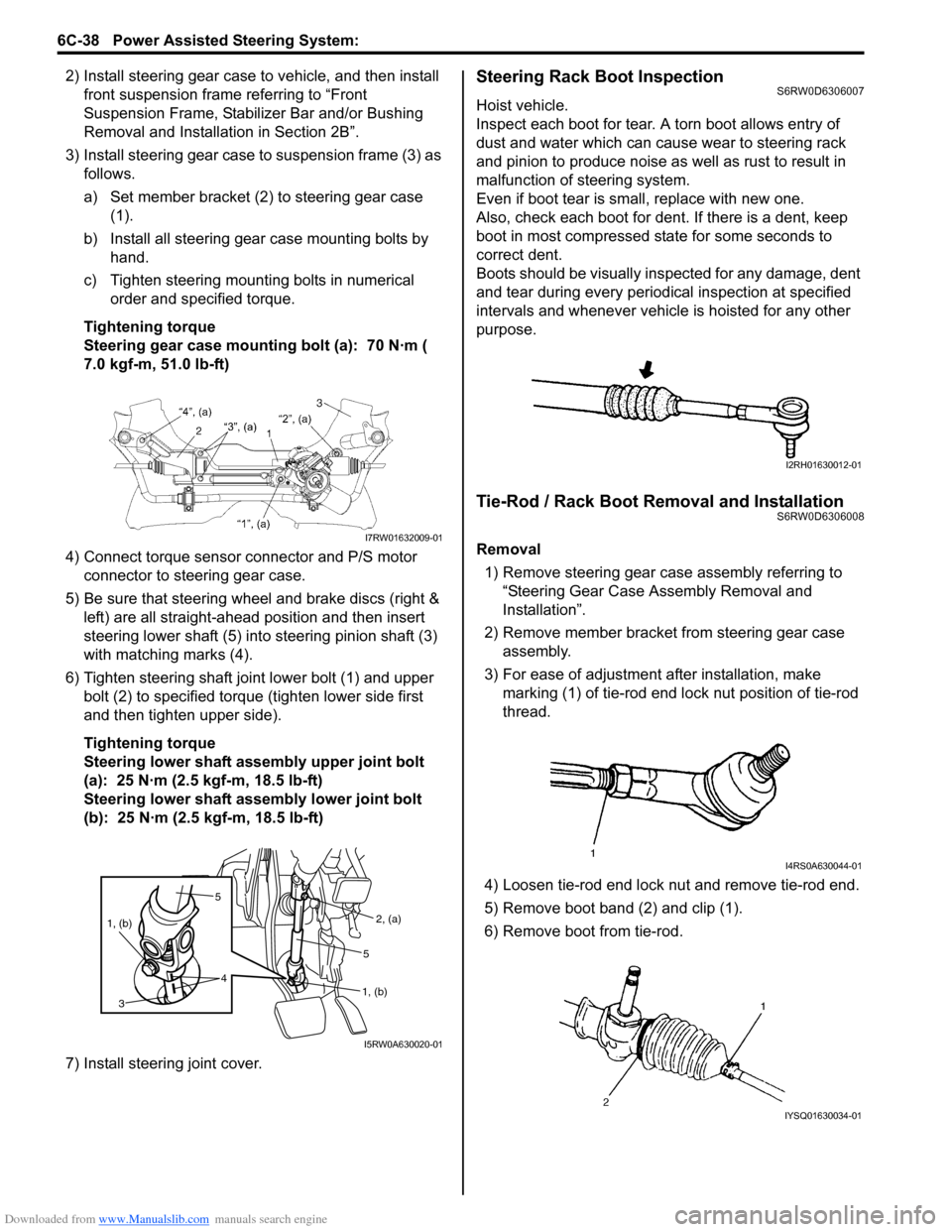
3) Install steering gear case to suspension frame (3) as
follows.
a) Set member bracket (2) to steering gear case
(1).
b) Install all steering gear case mounting bolts by
hand.
c) Tighten steering mounting bolts in numerical
order and specified torque.
Tightening torque
Steering gear case mounting bolt (a): 70 N·m (
7.0 kgf-m, 51.0 lb-ft)
4) Connect torque sensor connector and P/S motor
connector to steering gear case.
5) Be sure that steering wheel and brake discs (right &
left) are all straight-ahead position and then insert
steering lower shaft (5) into steering pinion shaft (3)
with matching marks (4).
6) Tighten steering shaft joint lower bolt (1) and upper
bolt (2) to specified torque (tighten lower side first
and then tighten upper side).
Tightening torque
Steering lower shaft assembly upper joint bolt
(a): 25 N·m (2.5 kgf-m, 18.5 lb-ft)
Steering lower shaft assembly lower joint bolt
(b): 25 N·m (2.5 kgf-m, 18.5 lb-ft)
7) Install steering joint cover.Steering Rack Boot InspectionS6RW0D6306007
Hoist vehicle.
Inspect each boot for tear. A torn boot allows entry of
dust and water which can cause wear to steering rack
and pinion to produce noise as well as rust to result in
malfunction of steering system.
Even if boot tear is small, replace with new one.
Also, check each boot for dent. If there is a dent, keep
boot in most compressed state for some seconds to
correct dent.
Boots should be visually inspected for any damage, dent
and tear during every periodical inspection at specified
intervals and whenever vehicle is hoisted for any other
purpose.
Tie-Rod / Rack Boot Removal and InstallationS6RW0D6306008
Removal
1) Remove steering gear case assembly referring to
“Steering Gear Case Assembly Removal and
Installation”.
2) Remove member bracket from steering gear case
assembly.
3) For ease of adjustment after installation, make
marking (1) of tie-rod end lock nut position of tie-rod
thread.
4) Loosen tie-rod end lock nut and remove tie-rod end.
5) Remove boot band (2) and clip (1).
6) Remove boot from tie-rod.I7RW01632009-01
5
4 1, (b)
3
2, (a)
1, (b)5
I5RW0A630020-01
I2RH01630012-01
I4RS0A630044-01
IYSQ01630034-01
Page 956 of 1556
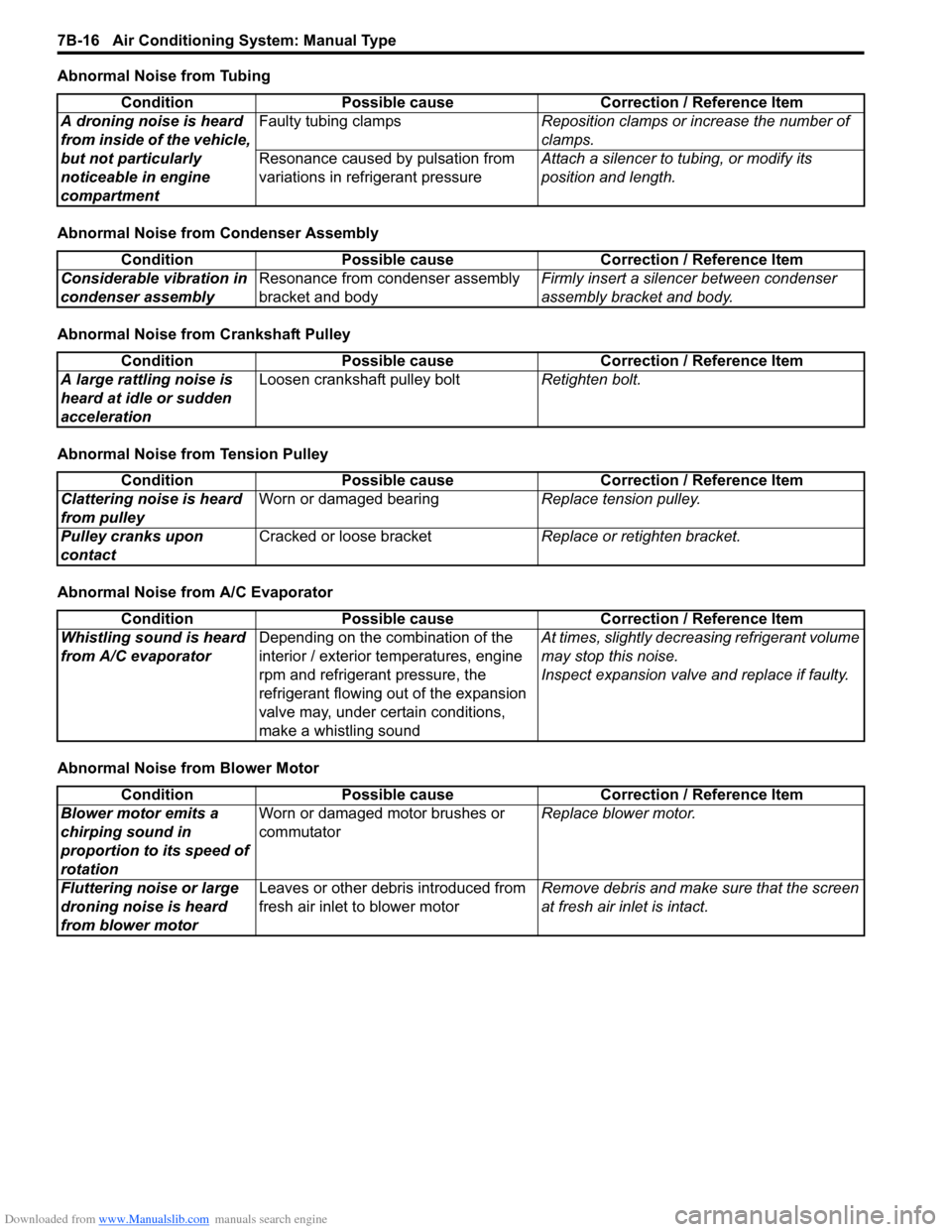
Downloaded from www.Manualslib.com manuals search engine 7B-16 Air Conditioning System: Manual Type
Abnormal Noise from Tubing
Abnormal Noise from Condenser Assembly
Abnormal Noise from Crankshaft Pulley
Abnormal Noise from Tension Pulley
Abnormal Noise from A/C Evaporator
Abnormal Noise from Blower MotorCondition Possible cause Correction / Reference Item
A droning noise is heard
from inside of the vehicle,
but not particularly
noticeable in engine
compartmentFaulty tubing clampsReposition clamps or increase the number of
clamps.
Resonance caused by pulsation from
variations in refrigerant pressureAttach a silencer to tubing, or modify its
position and length.
Condition Possible cause Correction / Reference Item
Considerable vibration in
condenser assemblyResonance from condenser assembly
bracket and bodyFirmly insert a silencer between condenser
assembly bracket and body.
Condition Possible cause Correction / Reference Item
A large rattling noise is
heard at idle or sudden
accelerationLoosen crankshaft pulley boltRetighten bolt.
Condition Possible cause Correction / Reference Item
Clattering noise is heard
from pulleyWorn or damaged bearingReplace tension pulley.
Pulley cranks upon
contactCracked or loose bracketReplace or retighten bracket.
Condition Possible cause Correction / Reference Item
Whistling sound is heard
from A/C evaporatorDepending on the combination of the
interior / exterior temperatures, engine
rpm and refrigerant pressure, the
refrigerant flowing out of the expansion
valve may, under certain conditions,
make a whistling soundAt times, slightly decreasing refrigerant volume
may stop this noise.
Inspect expansion valve and replace if faulty.
Condition Possible cause Correction / Reference Item
Blower motor emits a
chirping sound in
proportion to its speed of
rotationWorn or damaged motor brushes or
commutatorReplace blower motor.
Fluttering noise or large
droning noise is heard
from blower motorLeaves or other debris introduced from
fresh air inlet to blower motorRemove debris and make sure that the screen
at fresh air inlet is intact.
Page 1133 of 1556

Downloaded from www.Manualslib.com manuals search engine Air Bag System: 8B-94
5) Install driver and passenger side front pillar lower
trim.
6) Side-air bag (inflator) model:
Connect yellow connector (1) of side-air bag
(inflator) module by pushing connector till click is
heard from it.
7) Side curtain-air bag (inflator) model:
Connect yellow connector (1) of side curtain-air bag
(inflator) module by pushing connector till click is
heard from it.
8) Install right-side rear quarter lower trim.
9) Install “A/B” fuse to fuse box.
10) Connect negative (–) cable at battery.
11) Turn ignition switch to ON position and verify that
“AIR BAG” warning light flashes 6 times and then
turns OFF. If it does not operate as described,
perform “Air Bag Diagnostic System Check”.
SDM Removal and InstallationS6RW0D8206003
WARNING!
During service procedures, be very careful
when handling a Sensing and Diagnostic
Module (SDM).
Be sure to read “Precautions on Service and
Diagnosis of Air Bag System” before starting
to work and observe every precaution during
work. Neglecting them may result in personal
injury or inactivation of the air bag system
when necessary.
Removal
1) Disconnect negative (–) cable at battery.
2) Disable air bag system referring to “Disabling Air
Bag System”.
3) Remove console box referring to “Console Box
Components in Section 9H”.
4) Remove G sensor referring to “G Sensor Removal
and Installation (4WD Model) in Section 4E” and its
bracket (1).
5) Disconnect SDM connector (1) from SDM (2).
6) Remove SDM (2) from vehicle.
1
I5JB0A820070-01
1
I5RW0A820063-01
2. SDM
A: Forward
1
2
I5RW0A820064-01
2
1
A
I4RS0A820056-01
Page 1144 of 1556

Downloaded from www.Manualslib.com manuals search engine 8B-105 Air Bag System:
Side Impact-Sensor Removal and InstallationS6RW0D8206024
WARNING!
During service procedures, be very careful
when handling a sensor.
• Never strike or jar a sensor.
• A sensor bolt must be carefully torqued to
assure proper operation. Under loose
connection, it could cause improper
operation of the air bag system.
Removal
1) Disconnect negative (–) cable at battery.
2) Disable air bag system. Refer to “Disabling Air Bag
System”.
3) Remove center pillar lower trim.
4) Turn up floor carpet at front seat side.
5) Disconnect side impact-sensor connector (1) sliding
connector outer (2) as shown.
6) Remove side impact-sensor bolts (3), and side
impact-sensor (4) from side sill inner panel (5).
Installation
CAUTION!
Proper operation of side impact-sensor
requires that sensor is rigidly attached to
specified position.
1) Check that none of following faulty conditions exists.
• Bend, deformity or rust of under body.
• Foreign matter on mating surface of sensor.2) Install side impact-sensor (1) to side sill inner panel
(2) and tighten side impact-sensor bolt (3) to
specified torque.
Tightening torque
Side impact-sensor bolt (a): 9 N·m (0.9 kgf-m,
6.5 lb-ft)
3) Connect side impact-sensor connector (4) by
pushing connector till click is heard from it.
4) Return the carpet, and install center pillar lower trim.
5) Enable air bag system. Refer to “Enabling Air Bag
System”.
6) Connect negative (–) cable at battery.
Side Impact-Sensor InspectionS6RW0D8206025
WARNING!
During service procedures, be very careful
when handling a sensor.
• Never strike or jar a sensor.
• A sensor and mounting bracket bolts must
be carefully torqued to assure proper
operation. Under loose connection, it
could cause improper operation of the air
bag system.
CAUTION!
• Never disassemble side impact-sensor.
• Sensor should be replaced when it was
dropped from a height of 90 cm (3 ft) or
more.
• Check sensor for dents, crack, deformation.
• Check sensor connector (sensor side and harness
side), lock mechanism or sensor lead wire for
damage, crack, scorching or melting.
• Check connector terminals for bent, corrosion or rust.
If any faulty condition is found in above checks,
replace.
5
4
3
2
1I7RW01822149-01
2
1
3, (a)
4I7RW01822150-01
Page 1348 of 1556
Downloaded from www.Manualslib.com manuals search engine 9B-29 Lighting Systems:
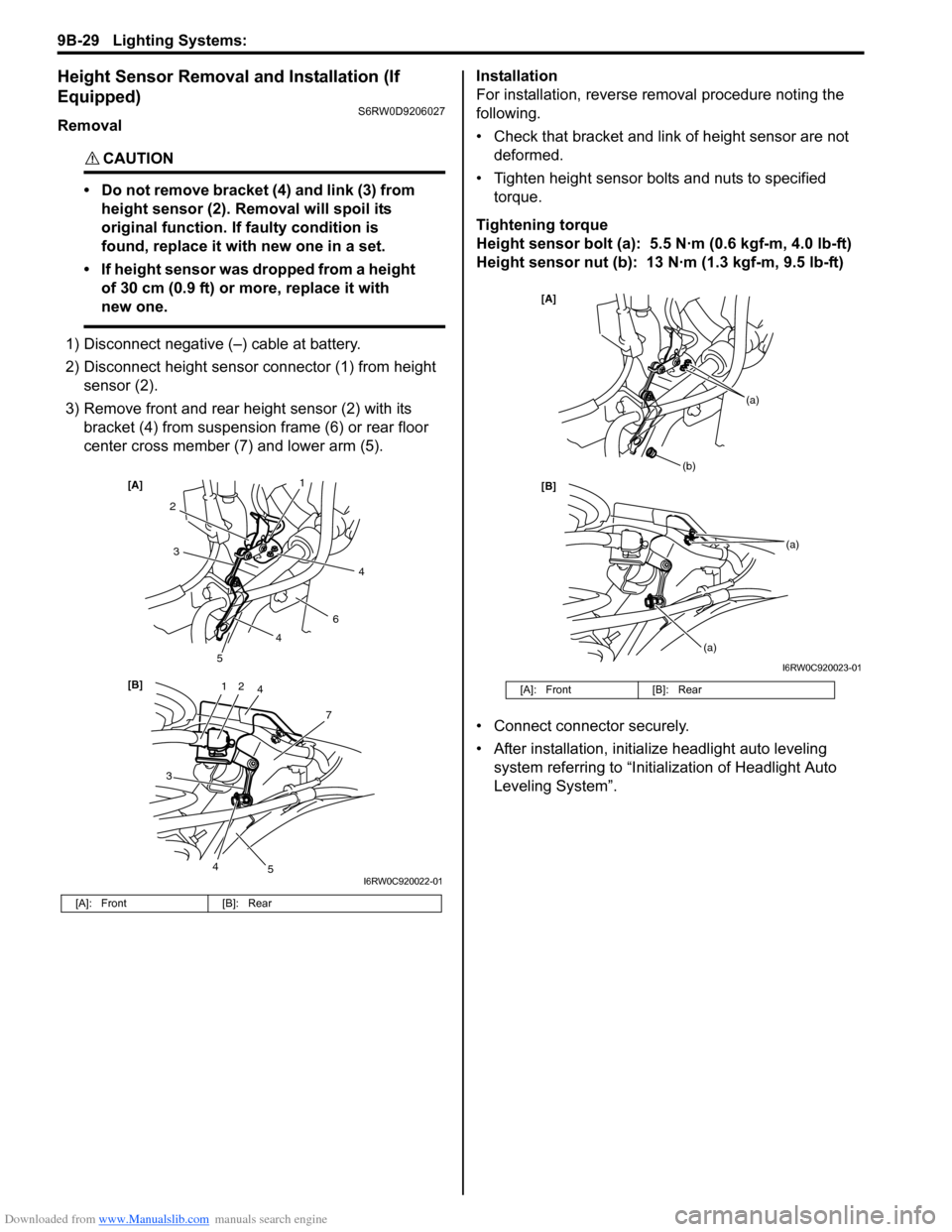
Height Sensor Removal and Installation (If
Equipped)
S6RW0D9206027
Removal
CAUTION!
• Do not remove bracket (4) and link (3) from
height sensor (2). Removal will spoil its
original function. If faulty condition is
found, replace it with new one in a set.
• If height sensor was dropped from a height
of 30 cm (0.9 ft) or more, replace it with
new one.
1) Disconnect negative (–) cable at battery.
2) Disconnect height sensor connector (1) from height
sensor (2).
3) Remove front and rear height sensor (2) with its
bracket (4) from suspension frame (6) or rear floor
center cross member (7) and lower arm (5).Installation
For installation, reverse removal procedure noting the
following.
• Check that bracket and link of height sensor are not
deformed.
• Tighten height sensor bolts and nuts to specified
torque.
Tightening torque
Height sensor bolt (a): 5.5 N·m (0.6 kgf-m, 4.0 lb-ft)
Height sensor nut (b): 13 N·m (1.3 kgf-m, 9.5 lb-ft)
• Connect connector securely.
• After installation, initialize headlight auto leveling
system referring to “Initialization of Headlight Auto
Leveling System”.
[A]: Front [B]: Rear
12
7
[B] [A]
4
3
2
6
3
5
5
1
4
4
4
I6RW0C920022-01
[A]: Front [B]: Rear
[B] [A]
(b)
(a)
(a)
(a)
I6RW0C920023-01
Page 1349 of 1556
Downloaded from www.Manualslib.com manuals search engine Lighting Systems: 9B-30
Height Sensor and Its Circuit Inspection (If
Equipped)
S6RW0D9206028
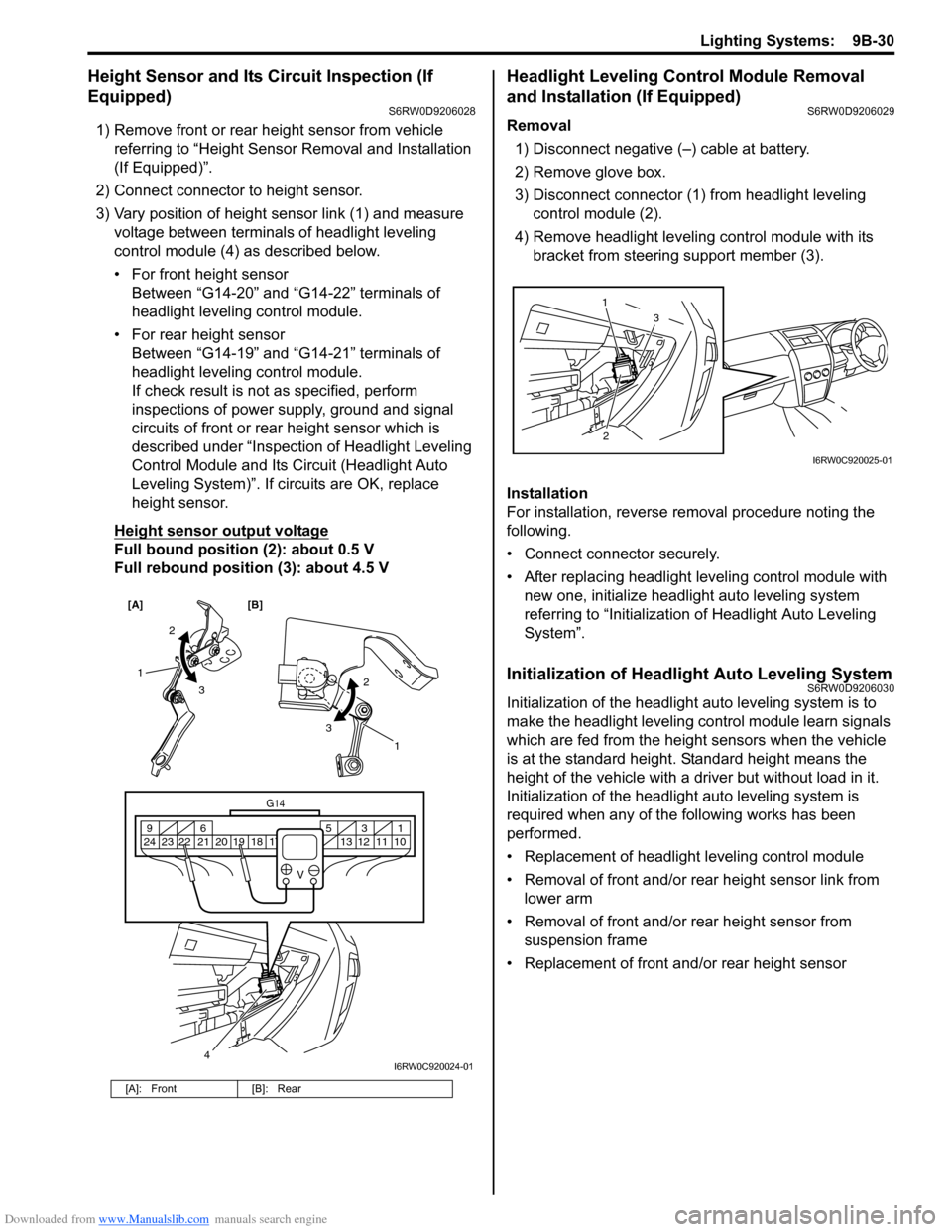
1) Remove front or rear height sensor from vehicle
referring to “Height Sensor Removal and Installation
(If Equipped)”.
2) Connect connector to height sensor.
3) Vary position of height sensor link (1) and measure
voltage between terminals of headlight leveling
control module (4) as described below.
• For front height sensor
Between “G14-20” and “G14-22” terminals of
headlight leveling control module.
• For rear height sensor
Between “G14-19” and “G14-21” terminals of
headlight leveling control module.
If check result is not as specified, perform
inspections of power supply, ground and signal
circuits of front or rear height sensor which is
described under “Inspection of Headlight Leveling
Control Module and Its Circuit (Headlight Auto
Leveling System)”. If circuits are OK, replace
height sensor.
Height sensor output voltage
Full bound position (2): about 0.5 V
Full rebound position (3): about 4.5 V
Headlight Leveling Control Module Removal
and Installation (If Equipped)
S6RW0D9206029
Removal
1) Disconnect negative (–) cable at battery.
2) Remove glove box.
3) Disconnect connector (1) from headlight leveling
control module (2).
4) Remove headlight leveling control module with its
bracket from steering support member (3).
Installation
For installation, reverse removal procedure noting the
following.
• Connect connector securely.
• After replacing headlight leveling control module with
new one, initialize headlight auto leveling system
referring to “Initialization of Headlight Auto Leveling
System”.
Initialization of Headlight Auto Leveling SystemS6RW0D9206030
Initialization of the headlight auto leveling system is to
make the headlight leveling control module learn signals
which are fed from the height sensors when the vehicle
is at the standard height. Standard height means the
height of the vehicle with a driver but without load in it.
Initialization of the headlight auto leveling system is
required when any of the following works has been
performed.
• Replacement of headlight leveling control module
• Removal of front and/or rear height sensor link from
lower arm
• Removal of front and/or rear height sensor from
suspension frame
• Replacement of front and/or rear height sensor
[A]: Front [B]: Rear
[A] [B]
4
G14
10 11 12 13 16 17 18 19 2031 5 6 9
21 22 23 24
V
2
3 1
2
3
1
I6RW0C920024-01
23 1
I6RW0C920025-01