belt SUZUKI SX4 2006 1.G Service Owner's Manual
[x] Cancel search | Manufacturer: SUZUKI, Model Year: 2006, Model line: SX4, Model: SUZUKI SX4 2006 1.GPages: 1556, PDF Size: 37.31 MB
Page 368 of 1556
Downloaded from www.Manualslib.com manuals search engine 1F-3 Engine Cooling System:
Diagnostic Information and Procedures
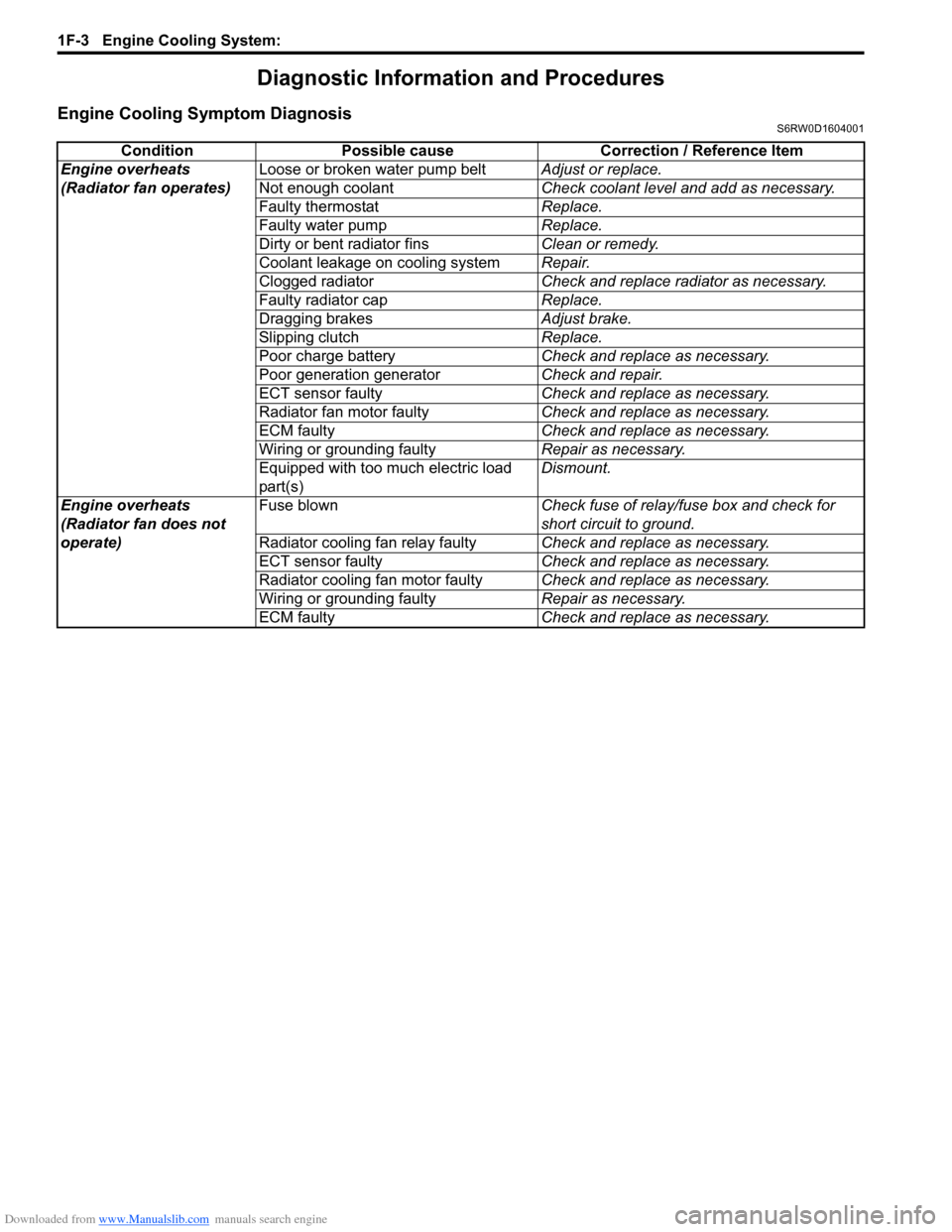
Engine Cooling Symptom DiagnosisS6RW0D1604001
Condition Possible cause Correction / Reference Item
Engine overheats
(Radiator fan operates)Loose or broken water pump beltAdjust or replace.
Not enough coolantCheck coolant level and add as necessary.
Faulty thermostatReplace.
Faulty water pumpReplace.
Dirty or bent radiator finsClean or remedy.
Coolant leakage on cooling systemRepair.
Clogged radiatorCheck and replace radiator as necessary.
Faulty radiator capReplace.
Dragging brakesAdjust brake.
Slipping clutchReplace.
Poor charge batteryCheck and replace as necessary.
Poor generation generatorCheck and repair.
ECT sensor faultyCheck and replace as necessary.
Radiator fan motor faultyCheck and replace as necessary.
ECM faultyCheck and replace as necessary.
Wiring or grounding faultyRepair as necessary.
Equipped with too much electric load
part(s)Dismount.
Engine overheats
(Radiator fan does not
operate)Fuse blownCheck fuse of relay/fuse box and check for
short circuit to ground.
Radiator cooling fan relay faultyCheck and replace as necessary.
ECT sensor faultyCheck and replace as necessary.
Radiator cooling fan motor faultyCheck and replace as necessary.
Wiring or grounding faultyRepair as necessary.
ECM faultyCheck and replace as necessary.
Page 375 of 1556
Downloaded from www.Manualslib.com manuals search engine Engine Cooling System: 1F-10
Water Pump / Generator Drive Belt Tension
Inspection and Adjustment
S6RW0D1606014
WARNING!
• Disconnect negative cable at battery
before checking and adjusting belt
tension.
• To help avoid danger of being burned, do
not remove radiator cap while engine and
radiator are still hot. Scalding fluid and
steam can be blown out under pressure if
cap is taken off too soon.
1) Inspect belt for cracks, cuts, deformation, wear and
cleanliness. If it is necessary to replace belt, refer to
“Water Pump / Generator Drive Belt Removal and
Installation”.
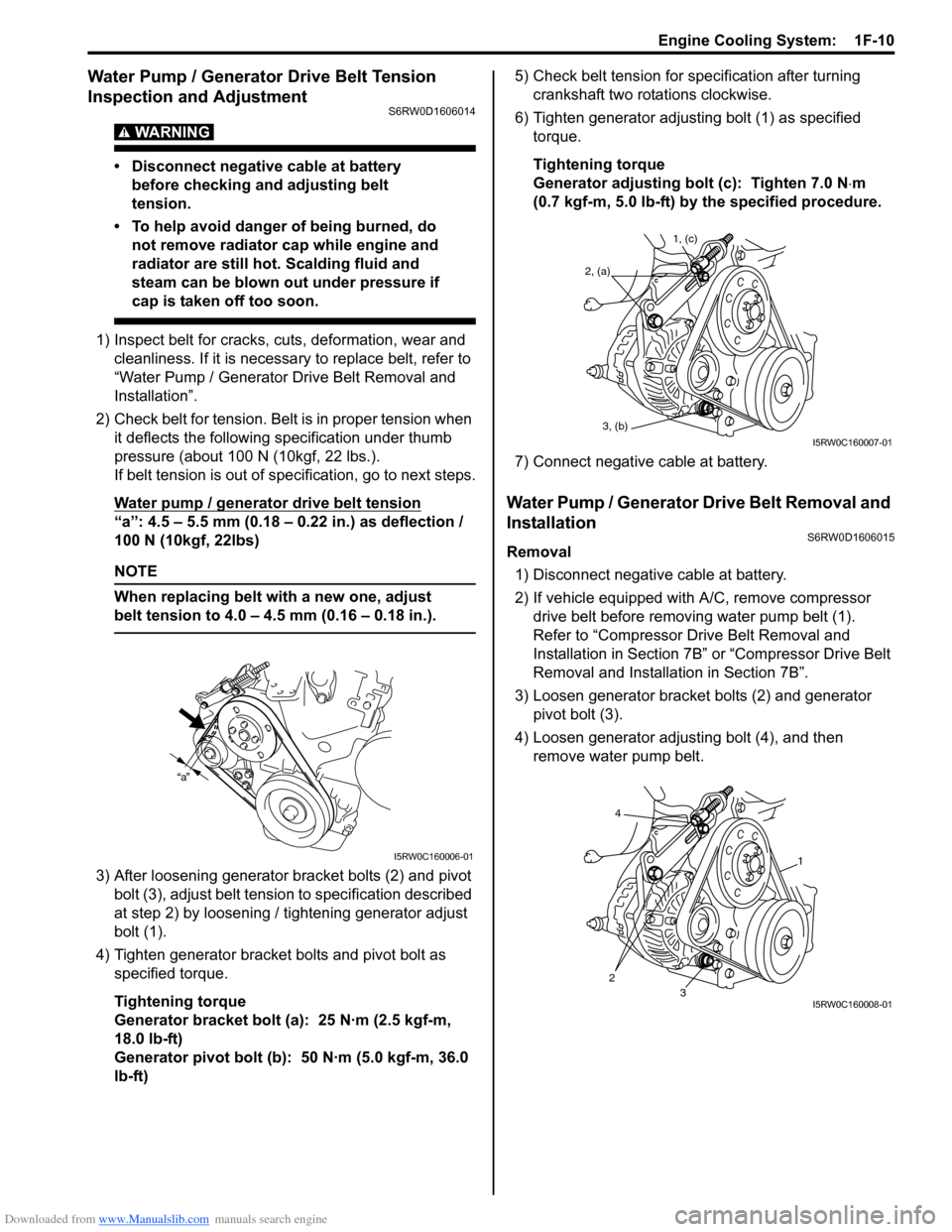
2) Check belt for tension. Belt is in proper tension when
it deflects the following specification under thumb
pressure (about 100 N (10kgf, 22 lbs.).
If belt tension is out of specification, go to next steps.
Water pump / generator drive belt tension
“a”: 4.5 – 5.5 mm (0.18 – 0.22 in.) as deflection /
100 N (10kgf, 22lbs)
NOTE
When replacing belt with a new one, adjust
belt tension to 4.0 – 4.5 mm (0.16 – 0.18 in.).
3) After loosening generator bracket bolts (2) and pivot
bolt (3), adjust belt tension to specification described
at step 2) by loosening / tightening generator adjust
bolt (1).
4) Tighten generator bracket bolts and pivot bolt as
specified torque.
Tightening torque
Generator bracket bolt (a): 25 N·m (2.5 kgf-m,
18.0 lb-ft)
Generator pivot bolt (b): 50 N·m (5.0 kgf-m, 36.0
lb-ft)5) Check belt tension for specification after turning
crankshaft two rotations clockwise.
6) Tighten generator adjusting bolt (1) as specified
torque.
Tightening torque
Generator adjusting bolt (c): Tighten 7.0 N⋅m
(0.7 kgf-m, 5.0 lb-ft) by the specified procedure.
7) Connect negative cable at battery.
Water Pump / Generator Drive Belt Removal and
Installation
S6RW0D1606015
Removal
1) Disconnect negative cable at battery.
2) If vehicle equipped with A/C, remove compressor
drive belt before removing water pump belt (1).
Refer to “Compressor Drive Belt Removal and
Installation in Section 7B” or “Compressor Drive Belt
Removal and Installation in Section 7B”.
3) Loosen generator bracket bolts (2) and generator
pivot bolt (3).
4) Loosen generator adjusting bolt (4), and then
remove water pump belt.
a
I5RW0C160006-01
1, (c)
2, (a)
3, (b)
I5RW0C160007-01
4
23
1
I5RW0C160008-01
Page 376 of 1556
Downloaded from www.Manualslib.com manuals search engine 1F-11 Engine Cooling System:
Installation
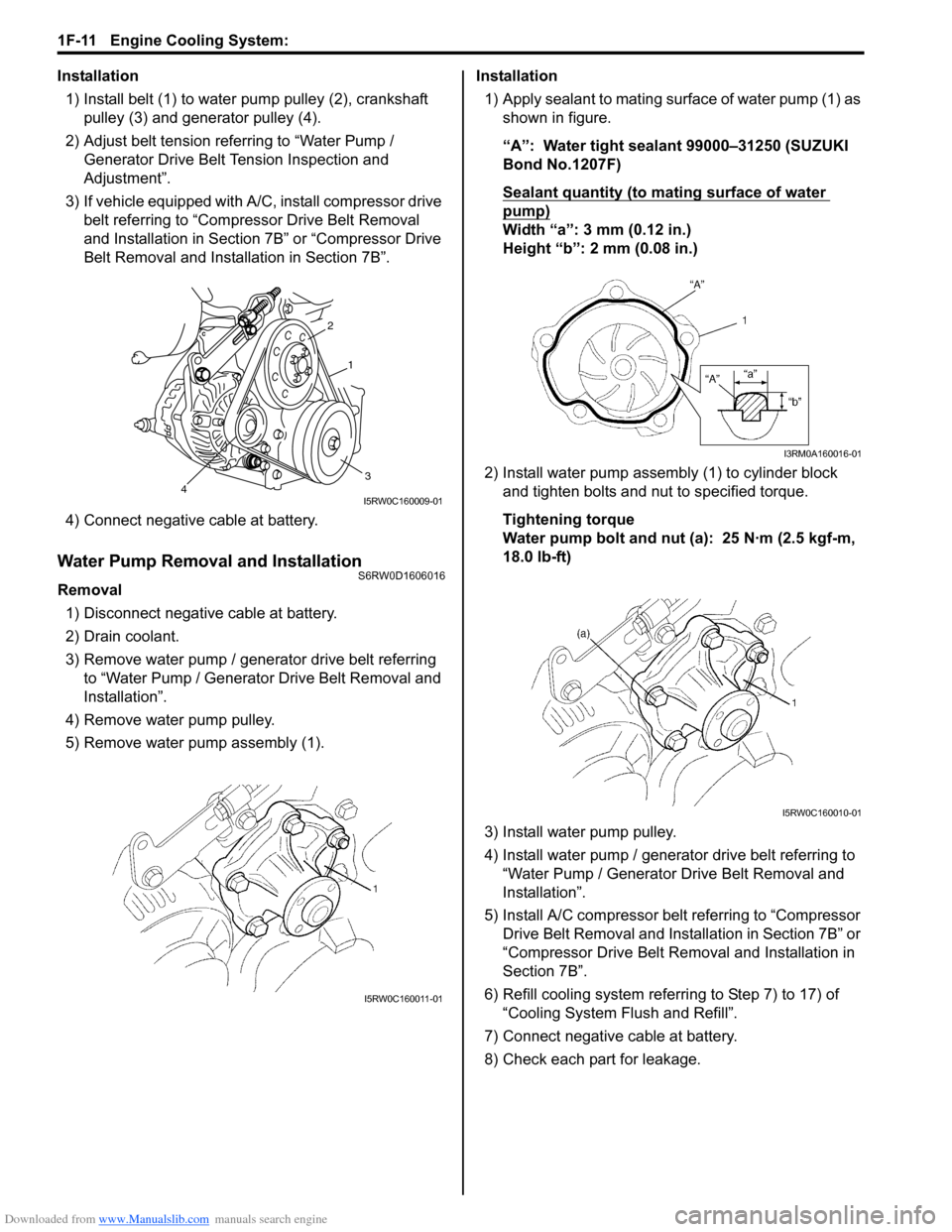
1) Install belt (1) to water pump pulley (2), crankshaft
pulley (3) and generator pulley (4).
2) Adjust belt tension referring to “Water Pump /
Generator Drive Belt Tension Inspection and
Adjustment”.
3) If vehicle equipped with A/C, install compressor drive
belt referring to “Compressor Drive Belt Removal
and Installation in Section 7B” or “Compressor Drive
Belt Removal and Installation in Section 7B”.
4) Connect negative cable at battery.
Water Pump Removal and InstallationS6RW0D1606016
Removal
1) Disconnect negative cable at battery.
2) Drain coolant.
3) Remove water pump / generator drive belt referring
to “Water Pump / Generator Drive Belt Removal and
Installation”.
4) Remove water pump pulley.
5) Remove water pump assembly (1).Installation
1) Apply sealant to mating surface of water pump (1) as
shown in figure.
“A”: Water tight sealant 99000–31250 (SUZUKI
Bond No.1207F)
Sealant quantity (to mating surface of water
pump)
Width “a”: 3 mm (0.12 in.)
Height “b”: 2 mm (0.08 in.)
2) Install water pump assembly (1) to cylinder block
and tighten bolts and nut to specified torque.
Tightening torque
Water pump bolt and nut (a): 25 N·m (2.5 kgf-m,
18.0 lb-ft)
3) Install water pump pulley.
4) Install water pump / generator drive belt referring to
“Water Pump / Generator Drive Belt Removal and
Installation”.
5) Install A/C compressor belt referring to “Compressor
Drive Belt Removal and Installation in Section 7B” or
“Compressor Drive Belt Removal and Installation in
Section 7B”.
6) Refill cooling system referring to Step 7) to 17) of
“Cooling System Flush and Refill”.
7) Connect negative cable at battery.
8) Check each part for leakage.
2
1
34I5RW0C160009-01
I5RW0C160011-01
I3RM0A160016-01
I5RW0C160010-01
Page 383 of 1556

Downloaded from www.Manualslib.com manuals search engine Fuel System: 1G-6
Fuel Hose Disconnecting and ReconnectingS6RW0D1706002
WARNING!
Before starting the following procedure, be sure to observe “Precautions on Fuel System Service” in
order to reduce the risk of fire and personal injury.
For Connection Other Than Quick Joint
• Clamp around fuel tank
NOTE
Be sure to install hose to spool of pipe surely.
9. Fuel tank bolt 19. Grommet
10. Fuel tank belt 20. O-ring
I7RW01170005-01
[A]: Connection A “b”: 30 mm (1.18 in.) 1. Pipe
[B]: Connection B “c”: 38 mm (1.50 in.) 2. Hose
[C]: Connection C “d”: 5 – 12 mm (0.20 – 0.48 in.) 3. Clamp
[D]: Connection D “e”: 7 – 14 mm (0.28 – 0.55 in.) : 1.5 N⋅m (0.15 kgf-m, 1.0 lb-ft)
“a”: 3 – 7 mm (0.12 – 0.28 in.) “f”: 2 mm (0.08 in.)
Page 418 of 1556
Downloaded from www.Manualslib.com manuals search engine 1J-4 Charging System:
Diagnostic Information and Procedures
Battery InspectionS6RW0D1A04001
Common Causes of Failure
A battery is not designed to last indefinitely; however,
with proper care, it will provide many years of service. If
the battery performs satisfactorily during test buy fails to
operate properly for no apparent reason, the following
are some factors that may point to the cause of trouble:
• Accessories left on overnight or for an extended
period without the generator operating.
• Slow average driving speed for short periods.
• Electrical load exceeding generator output particularly
with addition of aftermarket equipment.
• Defects in charging system such as high resistance,
slipping drive belt, loose generator output terminal,
faulty generator or voltage regulator. Refer to
“Generator Symptom Diagnosis”.
• Battery abuse, including failure to keep battery cable
terminals clean and tight or loose battery hold down.
• Mechanical problems in electrical system such as
shorted or pinched wires.
Visual Inspection
Check for obvious damage, such as cracked or broken
case or cover, that could permit loss of electrolyte. If
obvious damage is noted, replace battery. Determine
cause of damage and correct as needed.
Generator Symptom DiagnosisS6RW0D1A04002
CAUTION!
• Do not mistake polarities of “IG” terminal
and “L” terminal.
• Do not create short circuit between “IG”
and “L” terminals. Always connect these
terminals through a lamp.
• Do not connect any load between “L” and
“E” terminals.
• When connecting charger or booster
battery to vehicle battery, refer to “Jump
Starting in Case of Emergency”.
Trouble in charging system will show up as one or more
of the following conditions:
1) Faulty indicator lamp operation.
2) An undercharged battery as evidenced by slow
cranking or indicator dark.
3) An overcharged battery as evidenced by excessive
spewing of electrolyte from vents.
Noise from generator may be caused by loose drive
pulley, loose mounting bolts, worn or dirty bearings,
defective diode, or defective stator.
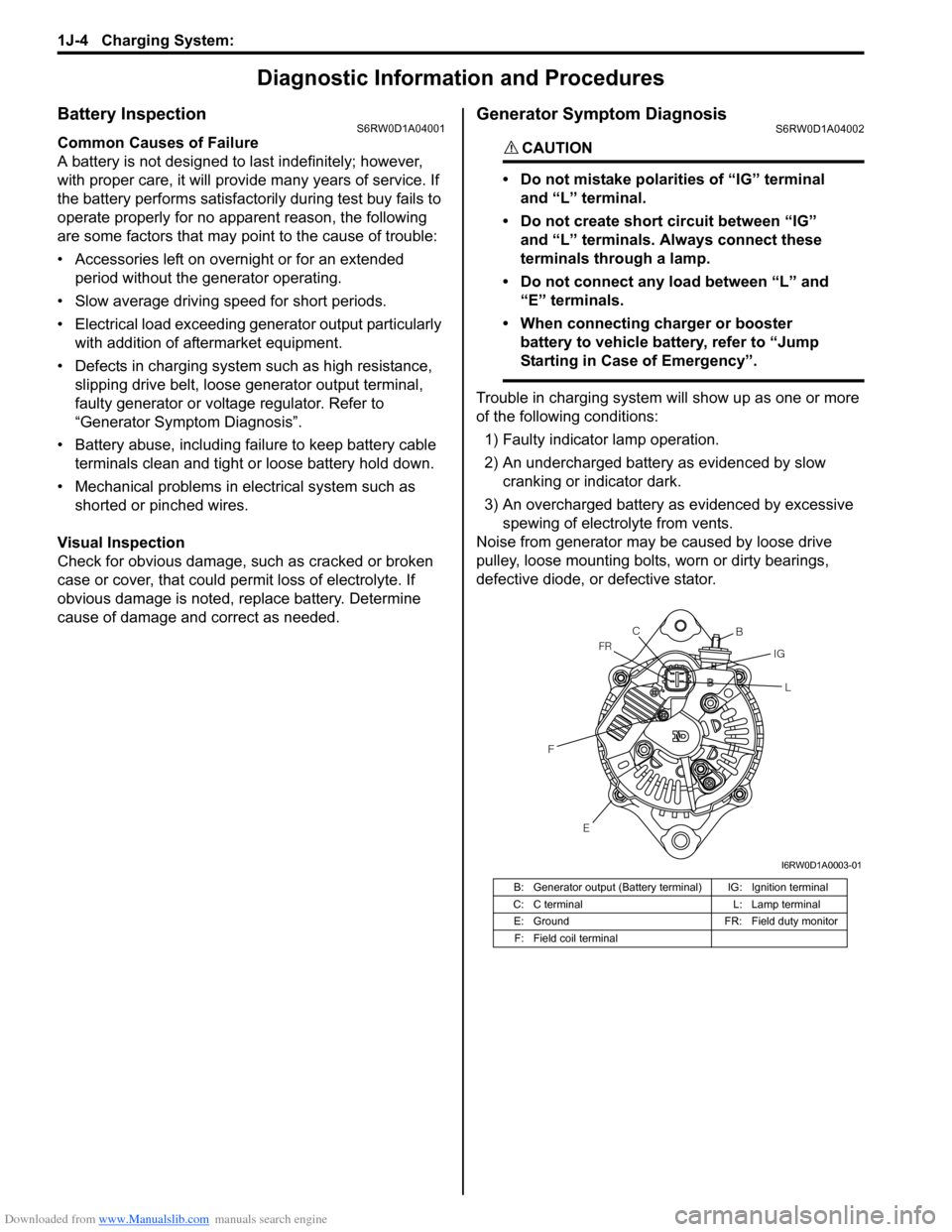
B: Generator output (Battery terminal) IG: Ignition terminal
C: C terminal L: Lamp terminal
E: Ground FR: Field duty monitor
F: Field coil terminal
E FFRC
B
IG
L
I6RW0D1A0003-01
Page 419 of 1556
Downloaded from www.Manualslib.com manuals search engine Charging System: 1J-5
Charging Indicator Lamp Operation
Generator Test (Undercharged Battery Check)S6RW0D1A04003
This condition, as evidenced by slow cranking or low
specific gravity can be caused by one or more of the
following conditions even though indicator lamp may be
operating normal. The following procedure also applies
to cars with voltmeter and ammeter.
• Make sure that undercharged condition has not been
caused by accessories left on for extended period of
time.
• Check drive belt for proper tension.
• If battery defect is suspected, refer to “Battery
Description”.
• Inspect wiring for defects. Check all connections for
tightness and cleanliness, battery cable connections
at battery, starting motor and ignition ground cable.
No-Load Check
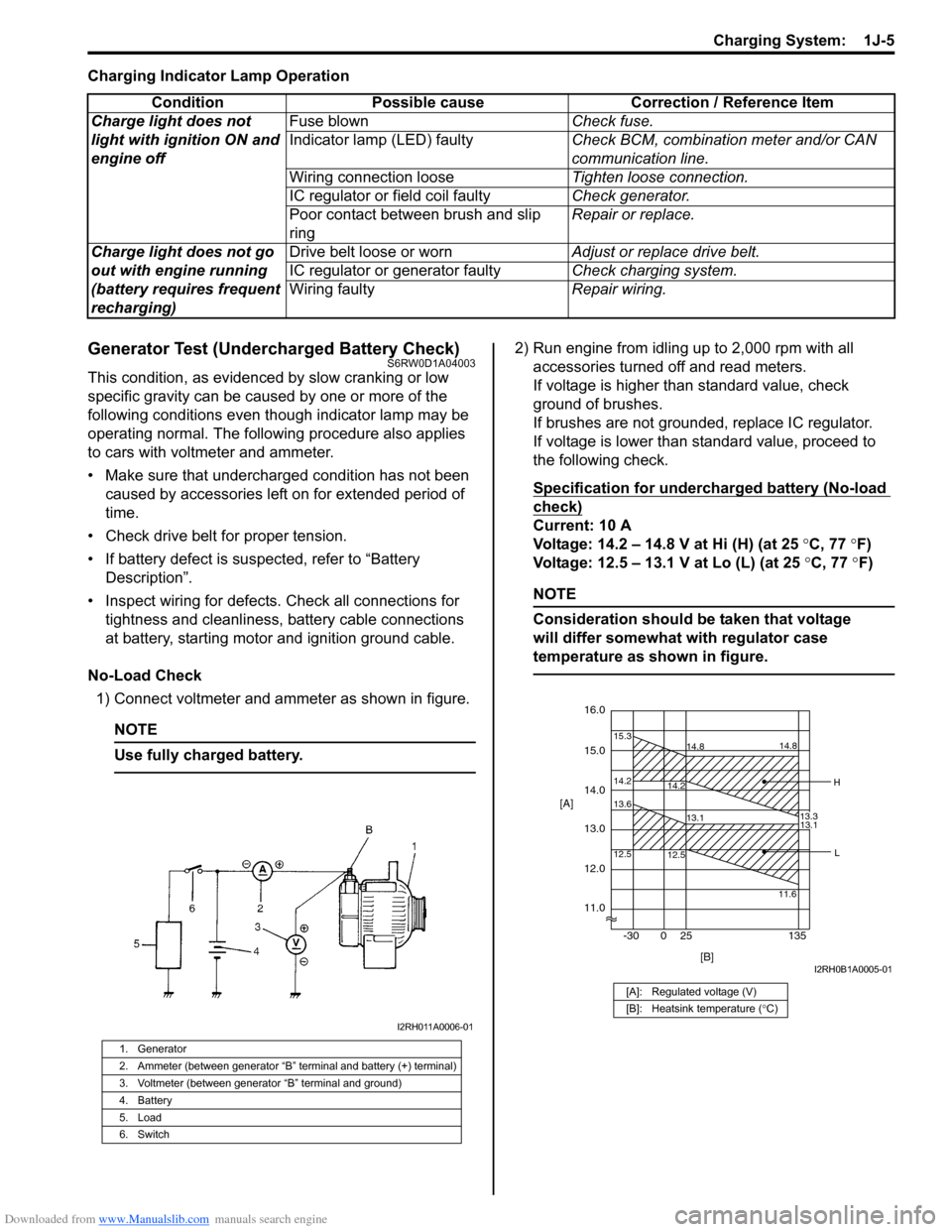
1) Connect voltmeter and ammeter as shown in figure.
NOTE
Use fully charged battery.
2) Run engine from idling up to 2,000 rpm with all
accessories turned off and read meters.
If voltage is higher than standard value, check
ground of brushes.
If brushes are not grounded, replace IC regulator.
If voltage is lower than standard value, proceed to
the following check.
Specification for undercharged battery (No-load
check)
Current: 10 A
Voltage: 14.2 – 14.8 V at Hi (H) (at 25 °C, 77 °F)
Voltage: 12.5 – 13.1 V at Lo (L) (at 25 °C, 77 °F)
NOTE
Consideration should be taken that voltage
will differ somewhat with regulator case
temperature as shown in figure.
Condition Possible cause Correction / Reference Item
Charge light does not
light with ignition ON and
engine offFuse blownCheck fuse.
Indicator lamp (LED) faultyCheck BCM, combination meter and/or CAN
communication line.
Wiring connection looseTighten loose connection.
IC regulator or field coil faultyCheck generator.
Poor contact between brush and slip
ringRepair or replace.
Charge light does not go
out with engine running
(battery requires frequent
recharging)Drive belt loose or wornAdjust or replace drive belt.
IC regulator or generator faultyCheck charging system.
Wiring faultyRepair wiring.
1. Generator
2. Ammeter (between generator “B” terminal and battery (+) terminal)
3. Voltmeter (between generator “B” terminal and ground)
4. Battery
5. Load
6. Switch
I2RH011A0006-01
[A]: Regulated voltage (V)
[B]: Heatsink temperature (°C)
16.0
12.0
14.2 15.3
14.8
14.2
13.3 14.8
15.0
11.0 14.0
13.0 [A]
12.5 13.6
13.1
12.5
11.613.1
[B] -30 0 25 135
H
L
I2RH0B1A0005-01
Page 421 of 1556
Downloaded from www.Manualslib.com manuals search engine Charging System: 1J-7
1) Set parking brake and place automatic transaxle in
PARK (NEUTRAL on manual transaxle). Turn off
ignition, turn off lights and all other electrical loads.
2) Check electrolyte level. If it is below low level line,
add distilled water.
3) Attach end of one jumper cable to positive terminal
of booster battery and the other end of the same
cable to positive terminal of discharged battery. (Use
12-volt battery only to jump start engine).
4) Attach one end of the remaining negative cable to
negative terminal of booster battery, and the other
end to a solid engine ground (such as exhaust
manifold) at least 45 cm (18 in.) away from battery of
vehicle being started.
5) Start engine of vehicle with booster battery and turn
off electrical accessories. Then start engine of the
vehicle with discharged battery.
6) Disconnect jumper cables in the exact reverse order.
With Charging Equipment
CAUTION!
When jump starting engine with charging
equipment, be sure equipment used is 12-
volt and negative ground. Do not use 24-volt
charging equipment. Using such equipment
can cause serious damage to electrical
system or electronic parts.
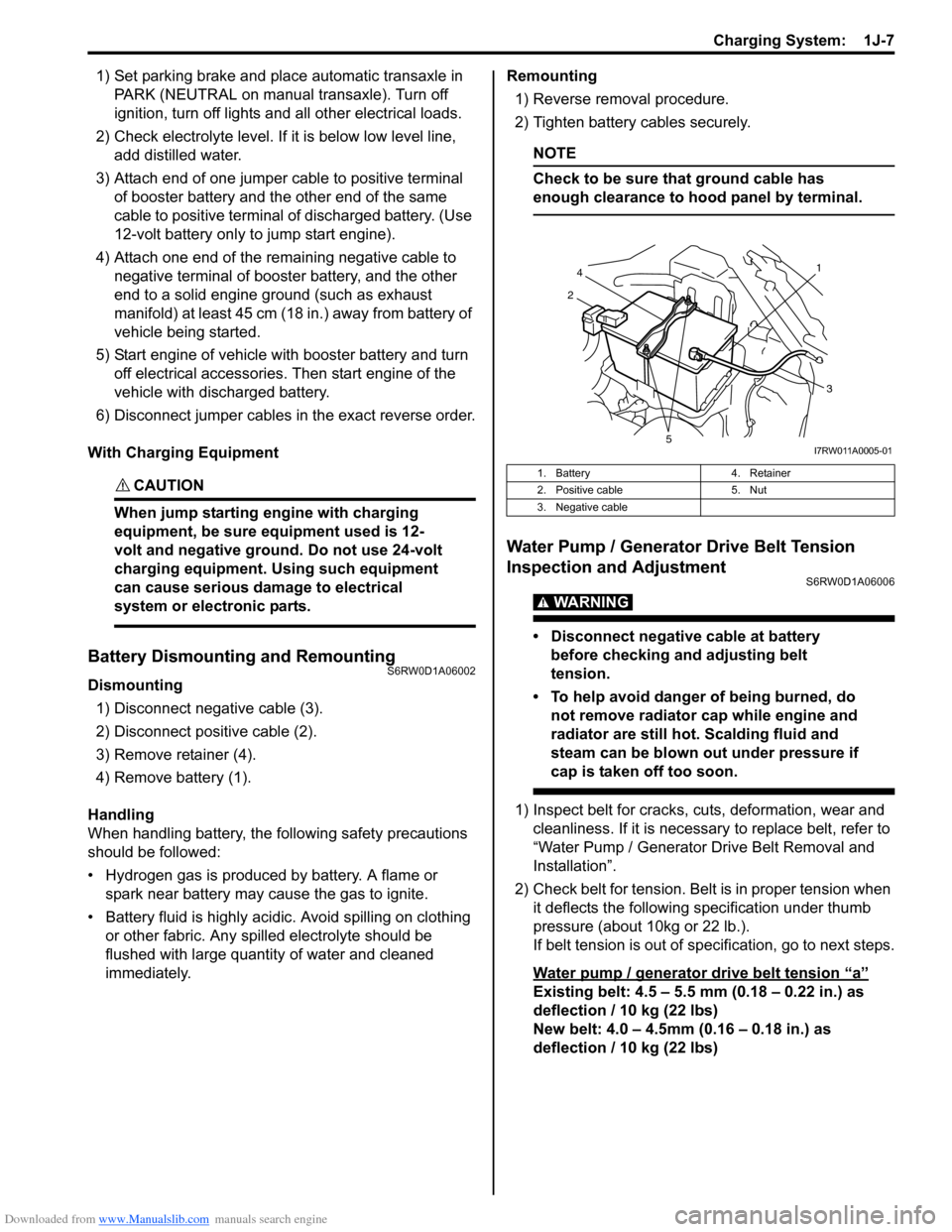
Battery Dismounting and RemountingS6RW0D1A06002
Dismounting
1) Disconnect negative cable (3).
2) Disconnect positive cable (2).
3) Remove retainer (4).
4) Remove battery (1).
Handling
When handling battery, the following safety precautions
should be followed:
• Hydrogen gas is produced by battery. A flame or
spark near battery may cause the gas to ignite.
• Battery fluid is highly acidic. Avoid spilling on clothing
or other fabric. Any spilled electrolyte should be
flushed with large quantity of water and cleaned
immediately.Remounting
1) Reverse removal procedure.
2) Tighten battery cables securely.
NOTE
Check to be sure that ground cable has
enough clearance to hood panel by terminal.
Water Pump / Generator Drive Belt Tension
Inspection and Adjustment
S6RW0D1A06006
WARNING!
• Disconnect negative cable at battery
before checking and adjusting belt
tension.
• To help avoid danger of being burned, do
not remove radiator cap while engine and
radiator are still hot. Scalding fluid and
steam can be blown out under pressure if
cap is taken off too soon.
1) Inspect belt for cracks, cuts, deformation, wear and
cleanliness. If it is necessary to replace belt, refer to
“Water Pump / Generator Drive Belt Removal and
Installation”.
2) Check belt for tension. Belt is in proper tension when
it deflects the following specification under thumb
pressure (about 10kg or 22 lb.).
If belt tension is out of specification, go to next steps.
Water pump / generator drive belt tension
“a”
Existing belt: 4.5 – 5.5 mm (0.18 – 0.22 in.) as
deflection / 10 kg (22 lbs)
New belt: 4.0 – 4.5mm (0.16 – 0.18 in.) as
deflection / 10 kg (22 lbs)
1. Battery 4. Retainer
2. Positive cable 5. Nut
3. Negative cable
21
4
3
5I7RW011A0005-01
Page 422 of 1556
Downloaded from www.Manualslib.com manuals search engine 1J-8 Charging System:
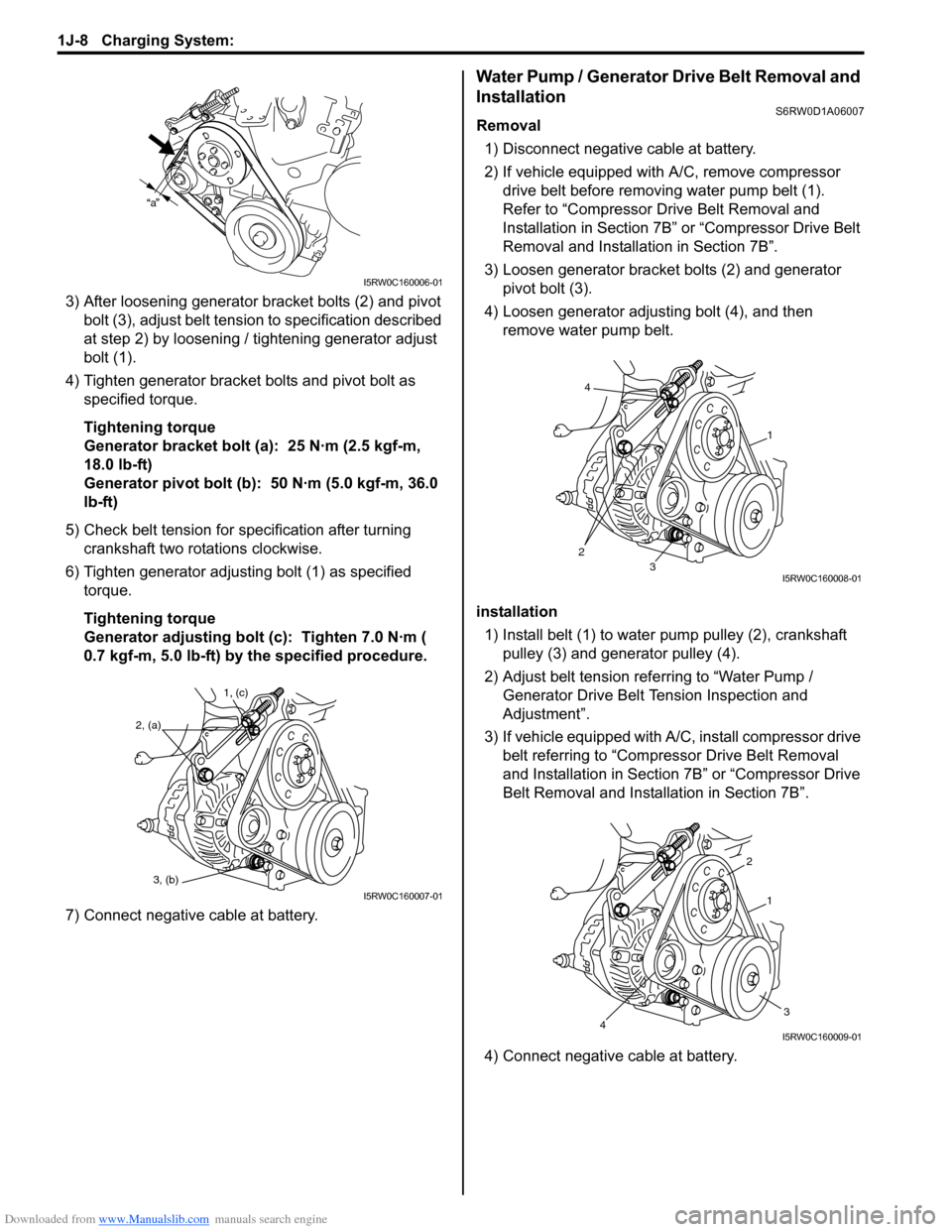
3) After loosening generator bracket bolts (2) and pivot
bolt (3), adjust belt tension to specification described
at step 2) by loosening / tightening generator adjust
bolt (1).
4) Tighten generator bracket bolts and pivot bolt as
specified torque.
Tightening torque
Generator bracket bolt (a): 25 N·m (2.5 kgf-m,
18.0 lb-ft)
Generator pivot bolt (b): 50 N·m (5.0 kgf-m, 36.0
lb-ft)
5) Check belt tension for specification after turning
crankshaft two rotations clockwise.
6) Tighten generator adjusting bolt (1) as specified
torque.
Tightening torque
Generator adjusting bolt (c): Tighten 7.0 N·m (
0.7 kgf-m, 5.0 lb-ft) by the specified procedure.
7) Connect negative cable at battery.
Water Pump / Generator Drive Belt Removal and
Installation
S6RW0D1A06007
Removal
1) Disconnect negative cable at battery.
2) If vehicle equipped with A/C, remove compressor
drive belt before removing water pump belt (1).
Refer to “Compressor Drive Belt Removal and
Installation in Section 7B” or “Compressor Drive Belt
Removal and Installation in Section 7B”.
3) Loosen generator bracket bolts (2) and generator
pivot bolt (3).
4) Loosen generator adjusting bolt (4), and then
remove water pump belt.
installation
1) Install belt (1) to water pump pulley (2), crankshaft
pulley (3) and generator pulley (4).
2) Adjust belt tension referring to “Water Pump /
Generator Drive Belt Tension Inspection and
Adjustment”.
3) If vehicle equipped with A/C, install compressor drive
belt referring to “Compressor Drive Belt Removal
and Installation in Section 7B” or “Compressor Drive
Belt Removal and Installation in Section 7B”.
4) Connect negative cable at battery.
a
I5RW0C160006-01
1, (c)
2, (a)
3, (b)
I5RW0C160007-01
4
23
1
I5RW0C160008-01
2
1
34I5RW0C160009-01
Page 423 of 1556
Downloaded from www.Manualslib.com manuals search engine Charging System: 1J-9
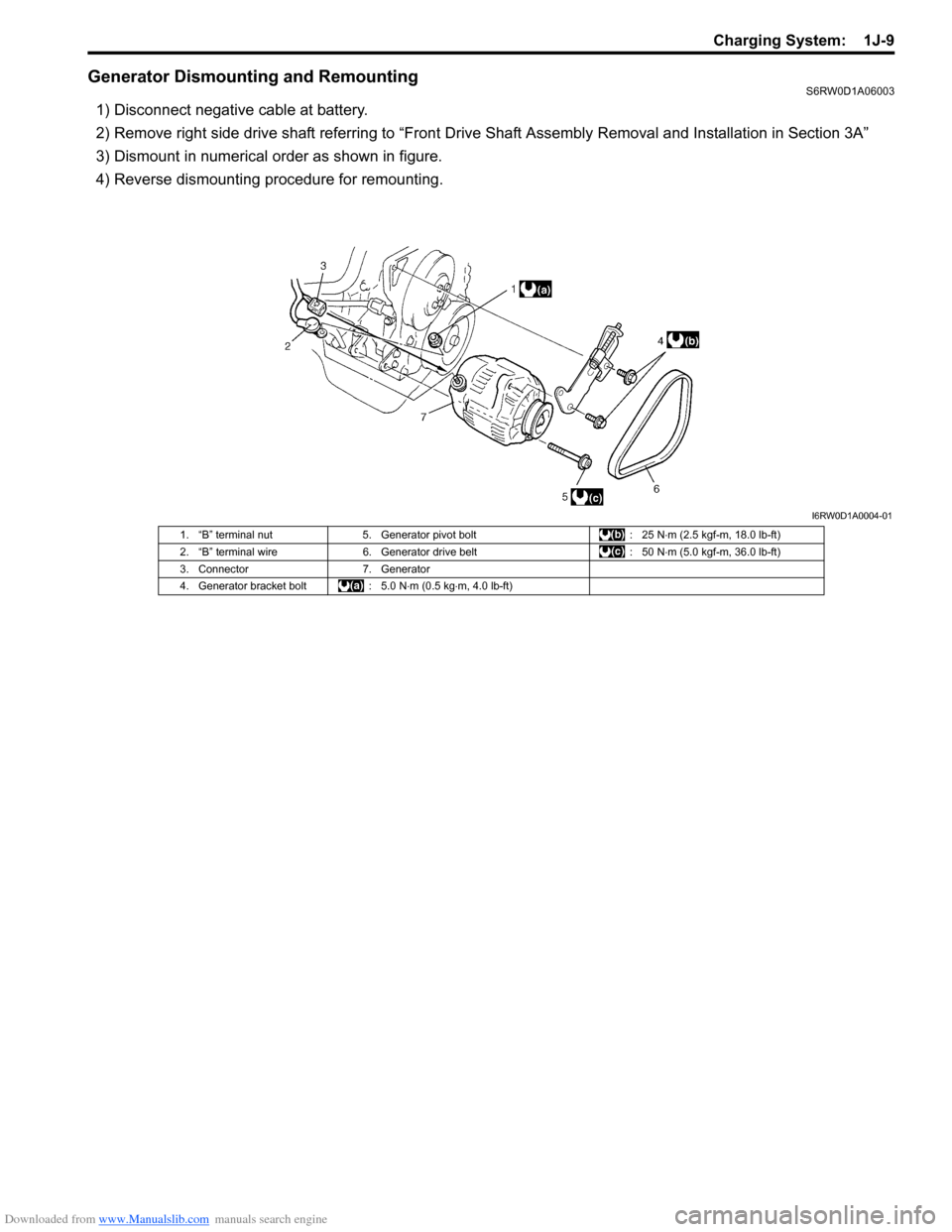
Generator Dismounting and RemountingS6RW0D1A06003
1) Disconnect negative cable at battery.
2) Remove right side drive shaft referring to “Front Drive Shaft Assembly Removal and Installation in Section 3A”
3) Dismount in numerical order as shown in figure.
4) Reverse dismounting procedure for remounting.
I6RW0D1A0004-01
1. “B” terminal nut 5. Generator pivot bolt : 25 N⋅m (2.5 kgf-m, 18.0 lb-ft)
2. “B” terminal wire 6. Generator drive belt : 50 N⋅m (5.0 kgf-m, 36.0 lb-ft)
3. Connector 7. Generator
4. Generator bracket bolt : 5.0 N⋅m (0.5 kg⋅m, 4.0 lb-ft)
Page 471 of 1556
Downloaded from www.Manualslib.com manuals search engine Wheels and Tires: 2D-2
Replacement Tires
When replacement is necessary, the original equipment
type tire should be used. Refer to the Tire Placard.
Replacement tires should be of the same size, load
range and construction as those originally on the vehicle.
Use of any other size or type tire may affect ride,
handling, speedometer / odometer calibration, vehicle
ground clearance and tire or snow chain clearance to the
body and chassis.
It is recommended that new tires be installed in pairs on
the same axle. If necessary to replace only one tire, it
should be paired with the tire having the most tread, to
equalize braking traction.
WARNING!
Do not mix different types of tires on the
same vehicle such as radial, bias and bias-
belted tires except in emergencies, because
handling may be seriously affected and may
result in loss of control.
The metric term for tire inflation pressure is the kilo
pascal (kPa). Tire pressures is usually printed in both
kPa and kgf/cm
2 on the “Tire Placard”.
Metric tire gauges are available from tool suppliers.
The chart, shown in the table, converts commonly used
inflation pressures from kPa to kgf/cm
2 and psi.
Wheels DescriptionS6RW0D2401002
Wheel Maintenance
Wheel repairs that use welding, heating, or peening are
not approved. All damaged wheels should be replaced.
Replacement Wheels
Wheels must be replaced if they are bent, dented, have
excessive lateral or radial runout, air leak through welds,
have elongated bolt holes, if lug wheel bolts won’t stay
tight, or if they are heavily rusted. Wheels with greater
runout than shown in the following may cause
objectional vibrations.
Replacement wheels must be equivalent to the original
equipment wheels in load capacity, diameter, rim with
offset and mounting configuration. A wheel of improper
size or type may affect wheel and bearing life, brake
cooling, speedometer / odometer calibration, vehicle
ground clearance and tire clearance to body and
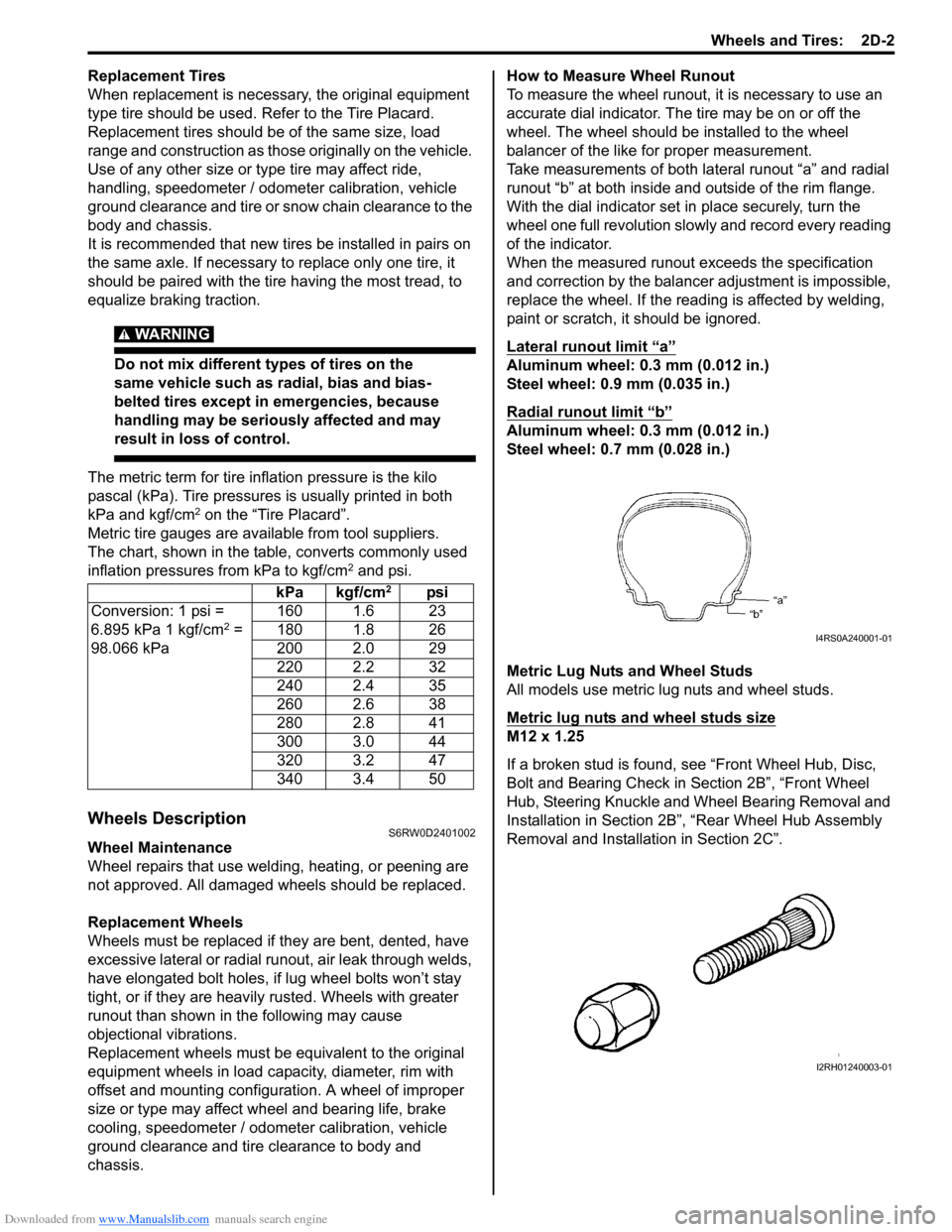
chassis.How to Measure Wheel Runout
To measure the wheel runout, it is necessary to use an
accurate dial indicator. The tire may be on or off the
wheel. The wheel should be installed to the wheel
balancer of the like for proper measurement.
Take measurements of both lateral runout “a” and radial
runout “b” at both inside and outside of the rim flange.
With the dial indicator set in place securely, turn the
wheel one full revolution slowly and record every reading
of the indicator.
When the measured runout exceeds the specification
and correction by the balancer adjustment is impossible,
replace the wheel. If the reading is affected by welding,
paint or scratch, it should be ignored.
Lateral runout limit “a”
Aluminum wheel: 0.3 mm (0.012 in.)
Steel wheel: 0.9 mm (0.035 in.)
Radial runout limit “b”
Aluminum wheel: 0.3 mm (0.012 in.)
Steel wheel: 0.7 mm (0.028 in.)
Metric Lug Nuts and Wheel Studs
All models use metric lug nuts and wheel studs.
Metric lug nuts and wheel studs size
M12 x 1.25
If a broken stud is found, see “Front Wheel Hub, Disc,
Bolt and Bearing Check in Section 2B”, “Front Wheel
Hub, Steering Knuckle and Wheel Bearing Removal and
Installation in Section 2B”, “Rear Wheel Hub Assembly
Removal and Installation in Section 2C”. kPa kgf/cm
2psi
Conversion: 1 psi =
6.895 kPa 1 kgf/cm
2 =
98.066 kPa160 1.6 23
180 1.8 26
200 2.0 29
220 2.2 32
240 2.4 35
260 2.6 38
280 2.8 41
300 3.0 44
320 3.2 47
340 3.4 50I4RS0A240001-01
I2RH01240003-01