change time SUZUKI SX4 2006 1.G Service Owner's Manual
[x] Cancel search | Manufacturer: SUZUKI, Model Year: 2006, Model line: SX4, Model: SUZUKI SX4 2006 1.GPages: 1556, PDF Size: 37.31 MB
Page 1347 of 1556
Downloaded from www.Manualslib.com manuals search engine Lighting Systems: 9B-28
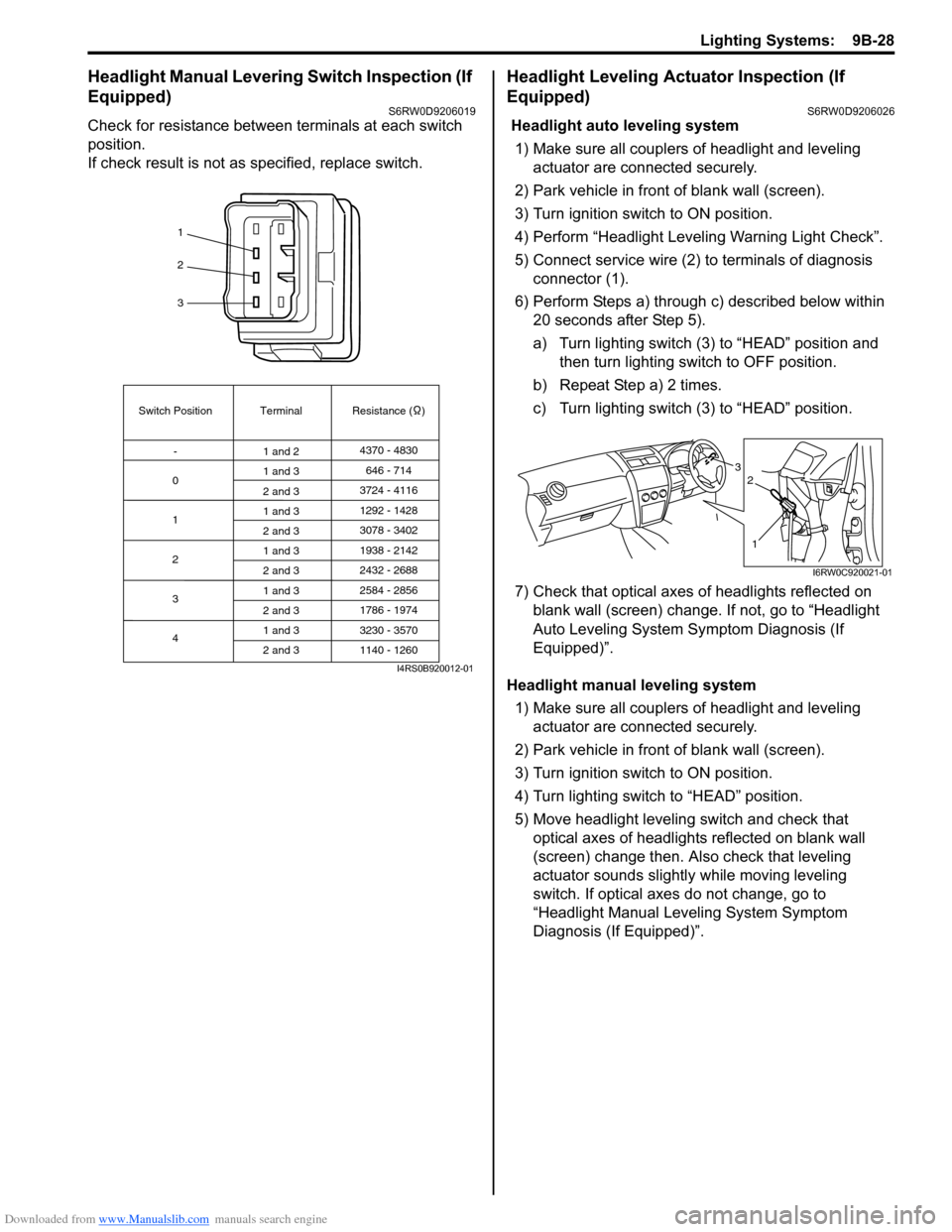
Headlight Manual Levering Switch Inspection (If
Equipped)
S6RW0D9206019
Check for resistance between terminals at each switch
position.
If check result is not as specified, replace switch.
Headlight Leveling Actuator Inspection (If
Equipped)
S6RW0D9206026
Headlight auto leveling system
1) Make sure all couplers of headlight and leveling
actuator are connected securely.
2) Park vehicle in front of blank wall (screen).
3) Turn ignition switch to ON position.
4) Perform “Headlight Leveling Warning Light Check”.
5) Connect service wire (2) to terminals of diagnosis
connector (1).
6) Perform Steps a) through c) described below within
20 seconds after Step 5).
a) Turn lighting switch (3) to “HEAD” position and
then turn lighting switch to OFF position.
b) Repeat Step a) 2 times.
c) Turn lighting switch (3) to “HEAD” position.
7) Check that optical axes of headlights reflected on
blank wall (screen) change. If not, go to “Headlight
Auto Leveling System Symptom Diagnosis (If
Equipped)”.
Headlight manual leveling system
1) Make sure all couplers of headlight and leveling
actuator are connected securely.
2) Park vehicle in front of blank wall (screen).
3) Turn ignition switch to ON position.
4) Turn lighting switch to “HEAD” position.
5) Move headlight leveling switch and check that
optical axes of headlights reflected on blank wall
(screen) change then. Also check that leveling
actuator sounds slightly while moving leveling
switch. If optical axes do not change, go to
“Headlight Manual Leveling System Symptom
Diagnosis (If Equipped)”.
1
2
3
Switch Position
0Terminal Resistance ( )
-
1
2
3
41 and 24370 - 4830
1 and 3
2 and 3
1 and 3
2 and 3
1 and 3
2 and 3
1 and 3
2 and 3
1 and 3
2 and 3646 - 714
3724 - 4116
3078 - 3402 1292 - 1428
1938 - 2142
2584 - 2856
3230 - 3570 2432 - 2688
1786 - 1974
1140 - 1260
I4RS0B920012-01
3
1
2
I6RW0C920021-01
Page 1383 of 1556
Downloaded from www.Manualslib.com manuals search engine Wipers / Washers: 9D-9
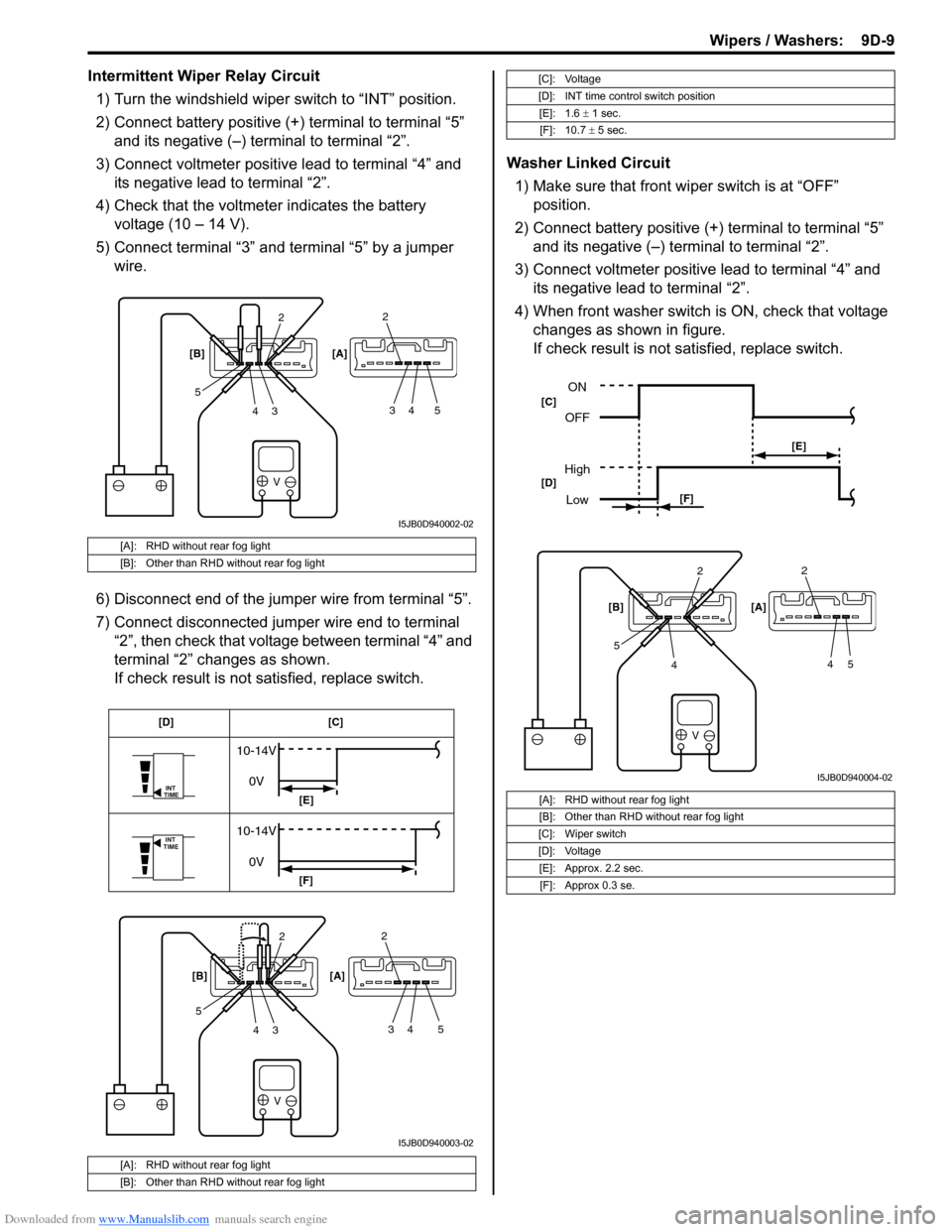
Intermittent Wiper Relay Circuit
1) Turn the windshield wiper switch to “INT” position.
2) Connect battery positive (+) terminal to terminal “5”
and its negative (–) terminal to terminal “2”.
3) Connect voltmeter positive lead to terminal “4” and
its negative lead to terminal “2”.
4) Check that the voltmeter indicates the battery
voltage (10 – 14 V).
5) Connect terminal “3” and terminal “5” by a jumper
wire.
6) Disconnect end of the jumper wire from terminal “5”.
7) Connect disconnected jumper wire end to terminal
“2”, then check that voltage between terminal “4” and
terminal “2” changes as shown.
If check result is not satisfied, replace switch.Washer Linked Circuit
1) Make sure that front wiper switch is at “OFF”
position.
2) Connect battery positive (+) terminal to terminal “5”
and its negative (–) terminal to terminal “2”.
3) Connect voltmeter positive lead to terminal “4” and
its negative lead to terminal “2”.
4) When front washer switch is ON, check that voltage
changes as shown in figure.
If check result is not satisfied, replace switch.
[A]: RHD without rear fog light
[B]: Other than RHD without rear fog light
[A]: RHD without rear fog light
[B]: Other than RHD without rear fog light
V
2
3 4 52
34 5 [B] [A]
I5JB0D940002-02
V
INT
TIME
INT
TIME
10-14V
0V
10-14V
0V
2
3 4 52
34 5 [B] [A][C] [D]
[E]
[F]
I5JB0D940003-02
[C]: Voltage
[D]: INT time control switch position
[E]: 1.6 ± 1 sec.
[F]: 10.7 ± 5 sec.
[A]: RHD without rear fog light
[B]: Other than RHD without rear fog light
[C]: Wiper switch
[D]: Voltage
[E]: Approx. 2.2 sec.
[F]: Approx 0.3 se.
V
2
4 52
45 [B] [A]
ON
OFF
High
Low
[E]
[F] [C]
[D]
I5JB0D940004-02
Page 1425 of 1556
Downloaded from www.Manualslib.com manuals search engine Security and Locks: 9F-14
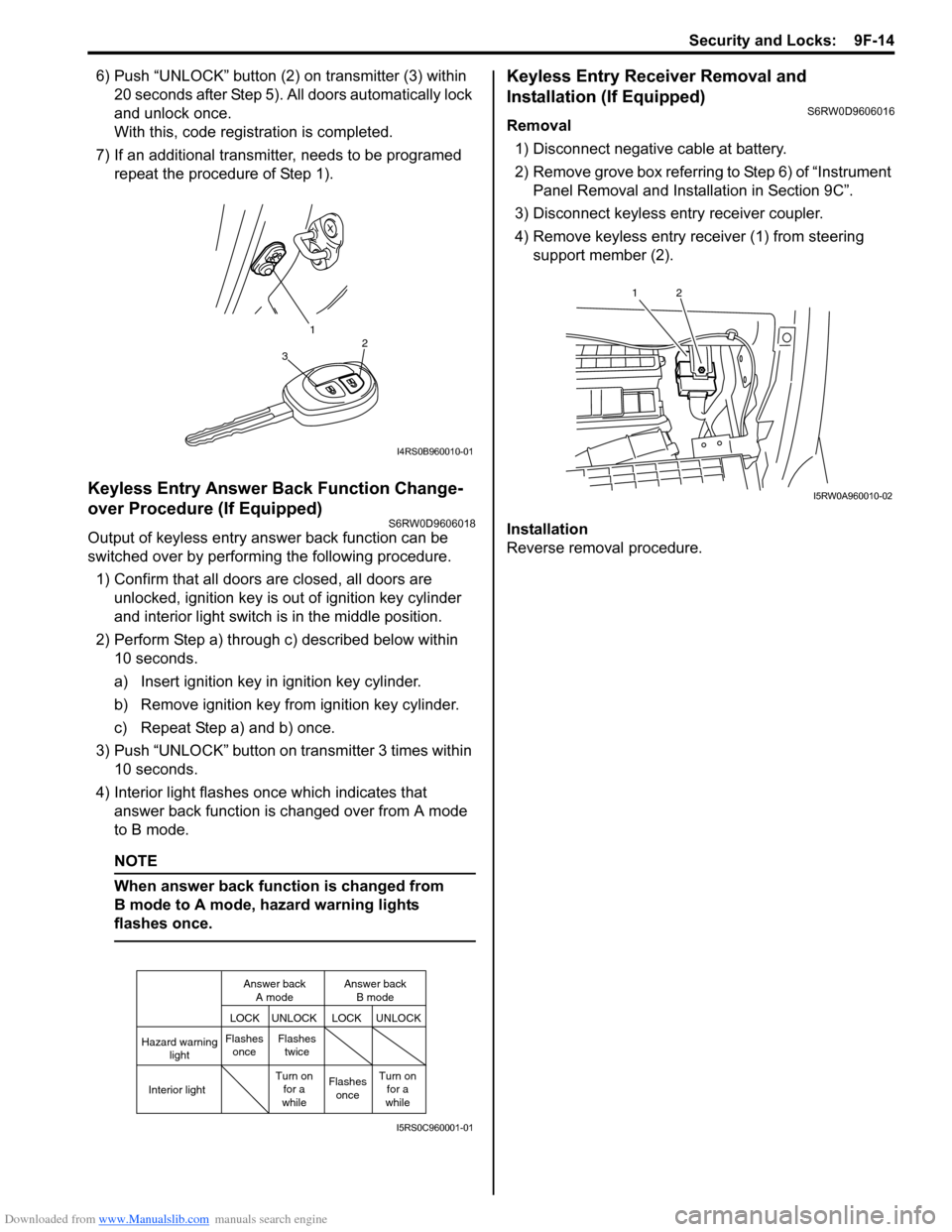
6) Push “UNLOCK” button (2) on transmitter (3) within
20 seconds after Step 5). All doors automatically lock
and unlock once.
With this, code registration is completed.
7) If an additional transmitter, needs to be programed
repeat the procedure of Step 1).
Keyless Entry Answer Back Function Change-
over Procedure (If Equipped)
S6RW0D9606018
Output of keyless entry answer back function can be
switched over by performing the following procedure.
1) Confirm that all doors are closed, all doors are
unlocked, ignition key is out of ignition key cylinder
and interior light switch is in the middle position.
2) Perform Step a) through c) described below within
10 seconds.
a) Insert ignition key in ignition key cylinder.
b) Remove ignition key from ignition key cylinder.
c) Repeat Step a) and b) once.
3) Push “UNLOCK” button on transmitter 3 times within
10 seconds.
4) Interior light flashes once which indicates that
answer back function is changed over from A mode
to B mode.
NOTE
When answer back function is changed from
B mode to A mode, hazard warning lights
flashes once.
Keyless Entry Receiver Removal and
Installation (If Equipped)
S6RW0D9606016
Removal
1) Disconnect negative cable at battery.
2) Remove grove box referring to Step 6) of “Instrument
Panel Removal and Installation in Section 9C”.
3) Disconnect keyless entry receiver coupler.
4) Remove keyless entry receiver (1) from steering
support member (2).
Installation
Reverse removal procedure.
1
32
I4RS0B960010-01
Hazard warning
light
LOCK LOCKUNLOCK UNLOCK
Interior lightFlashes
onceFlashes
twice
Flashes
once Turn on
for a
whileTurn on
for a
while Answer back
A modeAnswer back
B mode
I5RS0C960001-01
12
I5RW0A960010-02
Page 1502 of 1556

Downloaded from www.Manualslib.com manuals search engine 10B-29 Body Electrical Control System:
5) Disconnect connectors from BCM and junction
block.
6) Detach wiring harness clamp from junction block.
Installation
Reverse removal procedure for installation, noting
following points.
• Connect connectors securely.
• Enable air bag system referring to “Enabling Air Bag
System in Section 8B”.
• With keyless entry system (other than keyless start
model), if BCM is replaced, register transmitter code
into BCM, referring to “Programming Transmitter
Code for Keyless Entry System (Other than Keyless
Start Model) in Section 9F”.
Security Alarm Mode Selection Procedure (If
Equipped)
S6RW0DA206005
Security alarm mode can be selected by performing the
following procedure.
1) Confirm that all doors are closed, all doors are
unlocked and ignition key is inserted in ignition key
cylinder.
2) Remove ignition key from ignition key cylinder.
3) Perform Step a) through e) described below within
15 seconds.
a) Insert ignition key (1) in ignition key cylinder (2).
b) Remove ignition key from ignition key cylinder.
c) Repeat Step a) and b) twice.
d) Insert ignition key in ignition key cylinder.
e) Push lock side (3) of driver side manual lock
switch (4) 3 times.4) When Step 3) is completed, the mode changes to
the next one automatically. The warning buzzer
(located in BCM) sounds by the number of specified
for each mode as follows.
• Changed from A mode to B mode: Buzzer sounds
4 times
• Changed from B mode to A mode: Buzzer sounds
once
Outside Air Temperature Sensor Removal and
Installation
S6RW0DA206002
For removal and installation, refer to “Outside Air
Temperature Sensor Removal and Installation (If
Equipped) in Section 9C”.
Outside Air Temperature Sensor InspectionS6RW0DA206003
For inspection, refer to “Outside Air Temperature Sensor
Inspection (If Equipped) in Section 9C”.
Special Tools and Equipment
Special ToolS6RW0DA208001
1 2
4
3
I7JB01A20007-01
SUZUKI scan tool
—
This kit includes following
items. 1. Tech 2, 2. PCMCIA
card, 3. DLC cable, 4. SAE
16/19 adapter, 5. Cigarette
cable, 6. DLC loop back
adapter, 7. Battery power
cable, 8. RS232 cable, 9.
RS232 adapter, 10. RS232
loop back connector, 11.
Storage case, 12. )
Page 1534 of 1556
Downloaded from www.Manualslib.com manuals search engine 10E-12 Keyless Start System:
DTC TableS6RW0DA504008
DTC ClearanceS6RW0DA504009
1) Perform Steps 1) through 5) of DTC check procedure
and have DTC indicated.
2) Open driver side door.
3) Close driver side door and within 10 seconds after
that, perform Steps a) to c) described below.
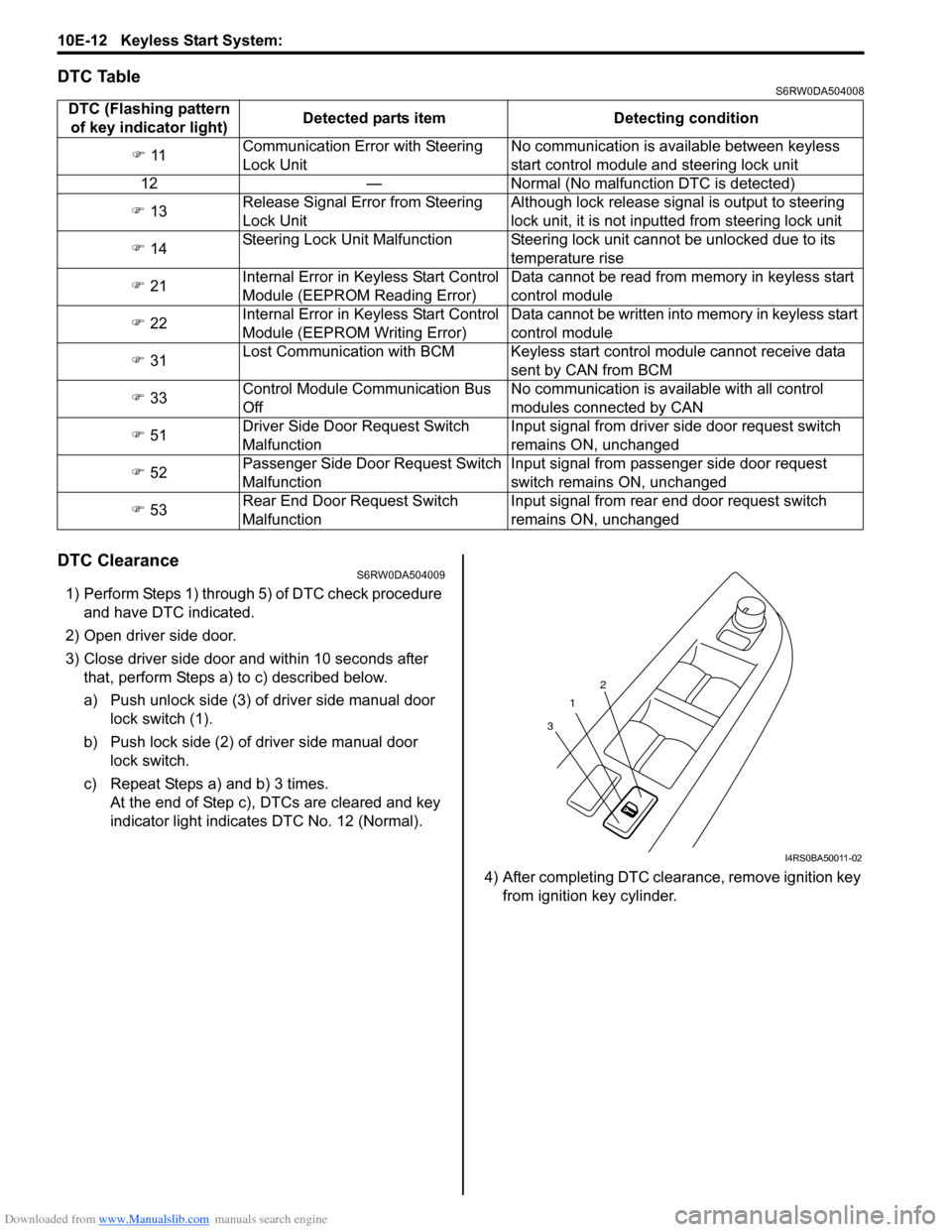
a) Push unlock side (3) of driver side manual door
lock switch (1).
b) Push lock side (2) of driver side manual door
lock switch.
c) Repeat Steps a) and b) 3 times.
At the end of Step c), DTCs are cleared and key
indicator light indicates DTC No. 12 (Normal).
4) After completing DTC clearance, remove ignition key
from ignition key cylinder. DTC (Flashing pattern
of key indicator light)Detected parts item Detecting condition
) 11Communication Error with Steering
Lock UnitNo communication is available between keyless
start control module and steering lock unit
12 — Normal (No malfunction DTC is detected)
) 13Release Signal Error from Steering
Lock UnitAlthough lock release signal is output to steering
lock unit, it is not inputted from steering lock unit
) 14Steering Lock Unit Malfunction Steering lock unit cannot be unlocked due to its
temperature rise
) 21Internal Error in Keyless Start Control
Module (EEPROM Reading Error)Data cannot be read from memory in keyless start
control module
) 22Internal Error in Keyless Start Control
Module (EEPROM Writing Error)Data cannot be written into memory in keyless start
control module
) 31Lost Communication with BCM Keyless start control module cannot receive data
sent by CAN from BCM
) 33Control Module Communication Bus
OffNo communication is available with all control
modules connected by CAN
) 51Driver Side Door Request Switch
MalfunctionInput signal from driver side door request switch
remains ON, unchanged
) 52Passenger Side Door Request Switch
MalfunctionInput signal from passenger side door request
switch remains ON, unchanged
) 53Rear End Door Request Switch
MalfunctionInput signal from rear end door request switch
remains ON, unchanged
1
32
I4RS0BA50011-02
Page 1540 of 1556
Downloaded from www.Manualslib.com manuals search engine 10E-18 Keyless Start System:
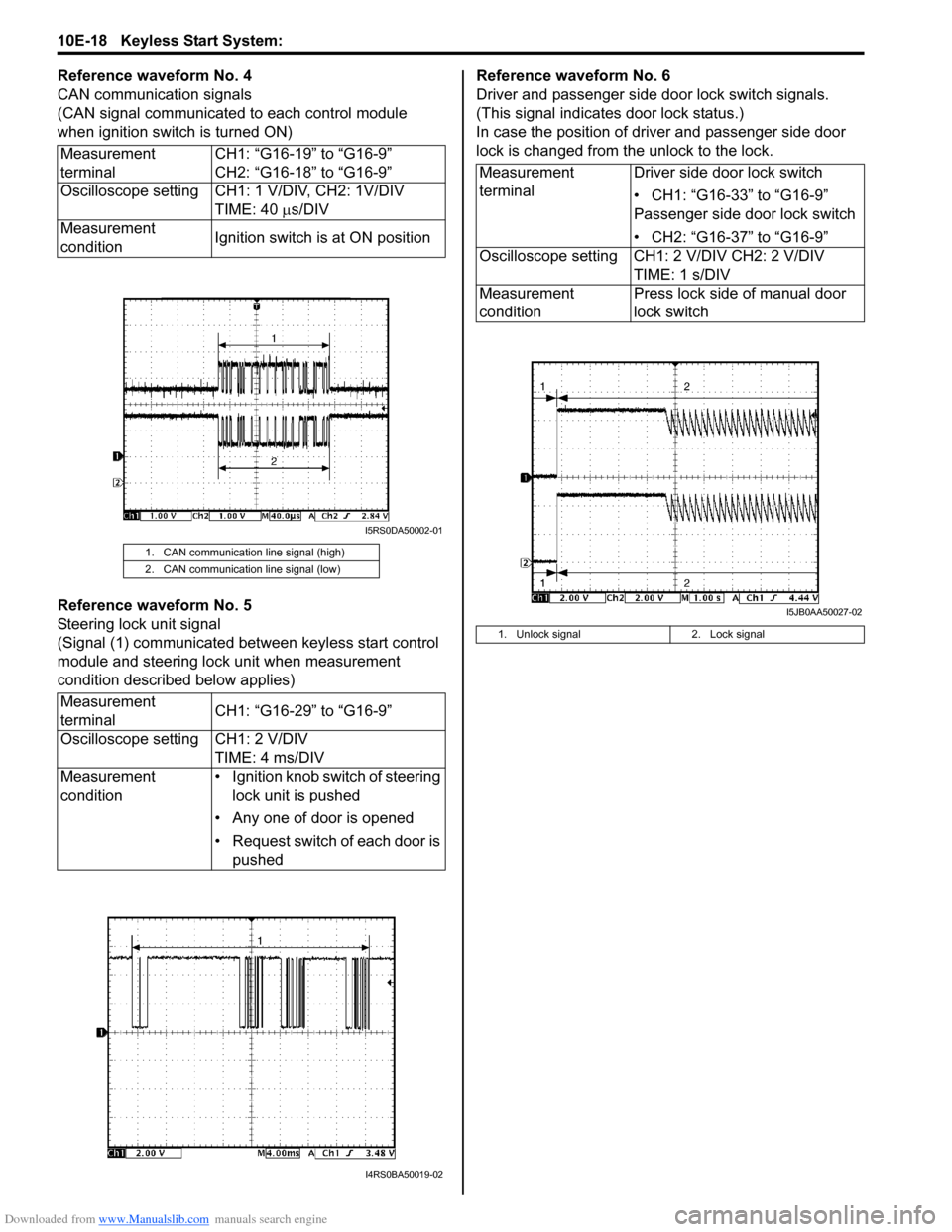
Reference waveform No. 4
CAN communication signals
(CAN signal communicated to each control module
when ignition switch is turned ON)
Reference waveform No. 5
Steering lock unit signal
(Signal (1) communicated between keyless start control
module and steering lock unit when measurement
condition described below applies)Reference waveform No. 6
Driver and passenger side door lock switch signals.
(This signal indicates door lock status.)
In case the position of driver and passenger side door
lock is changed from the unlock to the lock.
Measurement
terminalCH1: “G16-19” to “G16-9”
CH2: “G16-18” to “G16-9”
Oscilloscope setting CH1: 1 V/DIV, CH2: 1V/DIV
TIME: 40 µs/DIV
Measurement
conditionIgnition switch is at ON position
1. CAN communication line signal (high)
2. CAN communication line signal (low)
Measurement
terminalCH1: “G16-29” to “G16-9”
Oscilloscope setting CH1: 2 V/DIV
TIME: 4 ms/DIV
Measurement
condition• Ignition knob switch of steering
lock unit is pushed
• Any one of door is opened
• Request switch of each door is
pushed
I5RS0DA50002-01
I4RS0BA50019-02
Measurement
terminalDriver side door lock switch
• CH1: “G16-33” to “G16-9”
Passenger side door lock switch
• CH2: “G16-37” to “G16-9”
Oscilloscope setting CH1: 2 V/DIV CH2: 2 V/DIV
TIME: 1 s/DIV
Measurement
conditionPress lock side of manual door
lock switch
1. Unlock signal 2. Lock signal
I5JB0AA50027-02
Page 1541 of 1556
Downloaded from www.Manualslib.com manuals search engine Keyless Start System: 10E-19
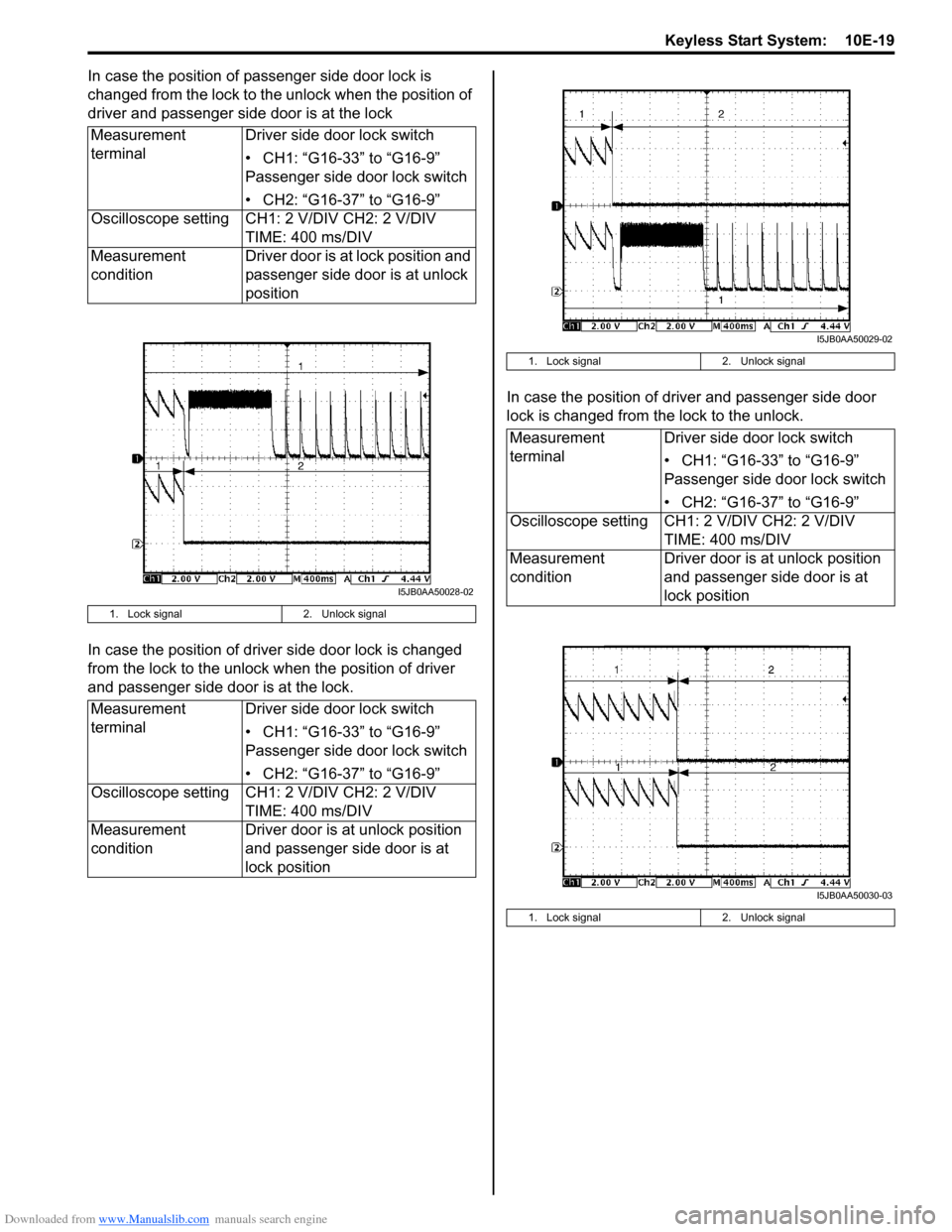
In case the position of passenger side door lock is
changed from the lock to the unlock when the position of
driver and passenger side door is at the lock
In case the position of driver side door lock is changed
from the lock to the unlock when the position of driver
and passenger side door is at the lock.In case the position of driver and passenger side door
lock is changed from the lock to the unlock. Measurement
terminalDriver side door lock switch
• CH1: “G16-33” to “G16-9”
Passenger side door lock switch
• CH2: “G16-37” to “G16-9”
Oscilloscope setting CH1: 2 V/DIV CH2: 2 V/DIV
TIME: 400 ms/DIV
Measurement
conditionDriver door is at lock position and
passenger side door is at unlock
position
1. Lock signal 2. Unlock signal
Measurement
terminalDriver side door lock switch
• CH1: “G16-33” to “G16-9”
Passenger side door lock switch
• CH2: “G16-37” to “G16-9”
Oscilloscope setting CH1: 2 V/DIV CH2: 2 V/DIV
TIME: 400 ms/DIV
Measurement
conditionDriver door is at unlock position
and passenger side door is at
lock position
I5JB0AA50028-02
1. Lock signal 2. Unlock signal
Measurement
terminalDriver side door lock switch
• CH1: “G16-33” to “G16-9”
Passenger side door lock switch
• CH2: “G16-37” to “G16-9”
Oscilloscope setting CH1: 2 V/DIV CH2: 2 V/DIV
TIME: 400 ms/DIV
Measurement
conditionDriver door is at unlock position
and passenger side door is at
lock position
1. Lock signal 2. Unlock signal
I5JB0AA50029-02
I5JB0AA50030-03