terminal SUZUKI SX4 2006 1.G Service Workshop Manual
[x] Cancel search | Manufacturer: SUZUKI, Model Year: 2006, Model line: SX4, Model: SUZUKI SX4 2006 1.GPages: 1556, PDF Size: 37.31 MB
Page 1423 of 1556

Downloaded from www.Manualslib.com manuals search engine Security and Locks: 9F-12
Rear End Door Lock Assembly Removal and
Installation
S6RW0D9606011
Removal
1) Remove door trim (1) from rear end door panel (2).
2) Disconnect door lock motor lead wire (if equipped).
3) Loosen door latch bolts (1) and remove door latch
assembly (2).
Installation
Reverse removal procedure to install rear end door lock
assembly noting the following instruction.
• Tighten rear end door latch bolt to specified torque.
Tightening torque
Rear end door latch bolt (a): 10 N·m (1.0 kgf-m,
7.5 lb-ft)• Adjust door latch striker so that its center aligns with
the center of groove in door latch base.
Tightening torque
Rear end door striker screw (a): 23 N·m (2.3 kgf-
m, 17.0 lb-ft)
Rear End Door Lock Assembly InspectionS6RW0D9606012
• Check that door opens and closes smoothly and
properly.
• Check that door stops in the secondary latched
position properly (preventing door from opening
freely) and that door closes completely in the fully
latched position.
• Adjust door latch striker position referring to “Front
Door Lock Assembly Removal and Installation”, if
necessary.
Rear End Door Opener Switch Inspection (If
Equipped)
S6RW0D9606013
1) Remove rear end door trim.
2) Disconnect rear end door switch coupler.
3) Check that there is continuity between terminals “a”
and “b” when rear end door opener switch (1) is
pushed.
4) Check that there is no continuity between terminals
when rear end door opener switch (1) is not pushed.
2
1
I5RW0A960008-02
1
2
I4RS0A960017-01
(a)
I4RS0A960018-01
(a)
I4RS0A960019-01
Page 1424 of 1556
Downloaded from www.Manualslib.com manuals search engine 9F-13 Security and Locks:
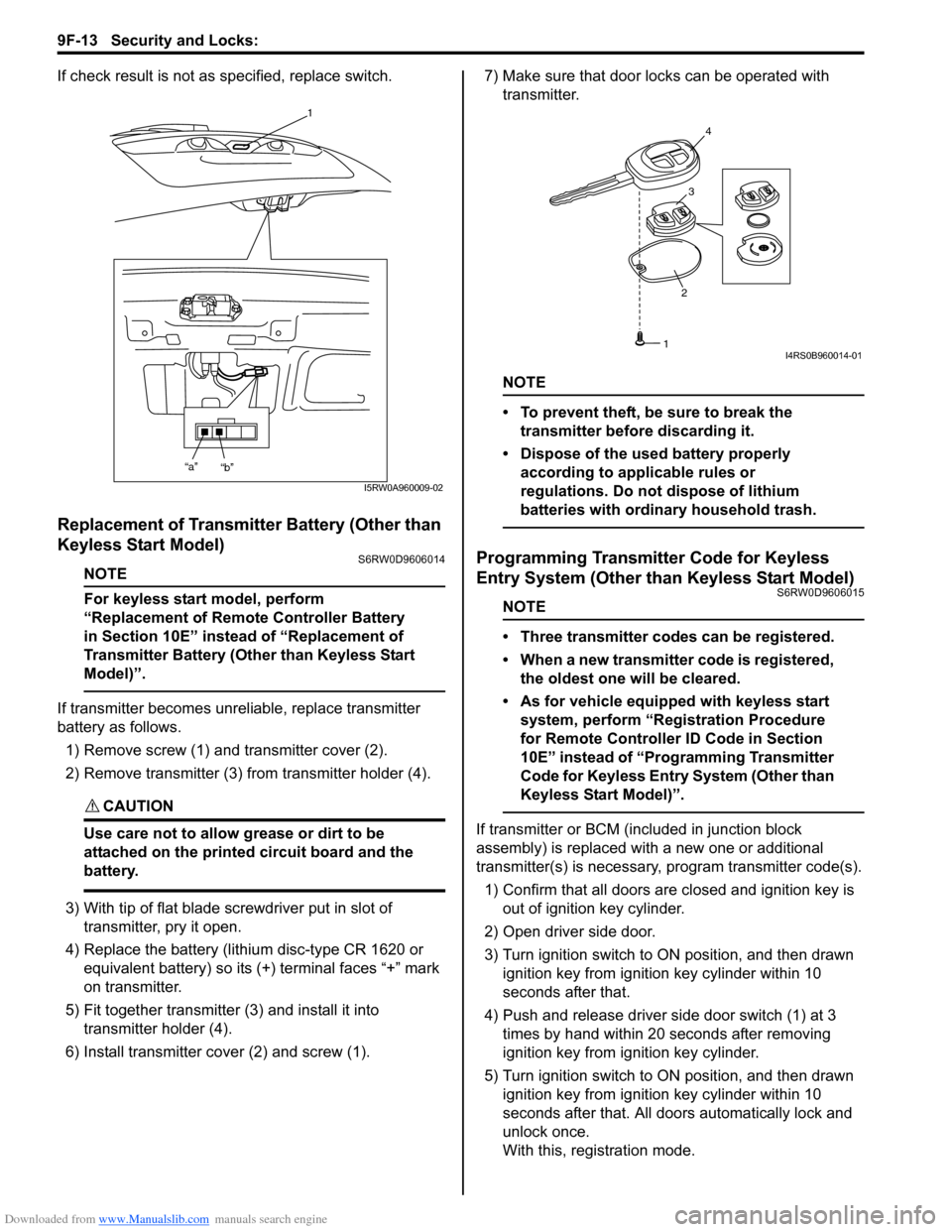
If check result is not as specified, replace switch.
Replacement of Transmitter Battery (Other than
Keyless Start Model)
S6RW0D9606014
NOTE
For keyless start model, perform
“Replacement of Remote Controller Battery
in Section 10E” instead of “Replacement of
Transmitter Battery (Other than Keyless Start
Model)”.
If transmitter becomes unreliable, replace transmitter
battery as follows.
1) Remove screw (1) and transmitter cover (2).
2) Remove transmitter (3) from transmitter holder (4).
CAUTION!
Use care not to allow grease or dirt to be
attached on the printed circuit board and the
battery.
3) With tip of flat blade screwdriver put in slot of
transmitter, pry it open.
4) Replace the battery (lithium disc-type CR 1620 or
equivalent battery) so its (+) terminal faces “+” mark
on transmitter.
5) Fit together transmitter (3) and install it into
transmitter holder (4).
6) Install transmitter cover (2) and screw (1).7) Make sure that door locks can be operated with
transmitter.
NOTE
• To prevent theft, be sure to break the
transmitter before discarding it.
• Dispose of the used battery properly
according to applicable rules or
regulations. Do not dispose of lithium
batteries with ordinary household trash.
Programming Transmitter Code for Keyless
Entry System (Other than Keyless Start Model)
S6RW0D9606015
NOTE
• Three transmitter codes can be registered.
• When a new transmitter code is registered,
the oldest one will be cleared.
• As for vehicle equipped with keyless start
system, perform “Registration Procedure
for Remote Controller ID Code in Section
10E” instead of “Programming Transmitter
Code for Keyless Entry System (Other than
Keyless Start Model)”.
If transmitter or BCM (included in junction block
assembly) is replaced with a new one or additional
transmitter(s) is necessary, program transmitter code(s).
1) Confirm that all doors are closed and ignition key is
out of ignition key cylinder.
2) Open driver side door.
3) Turn ignition switch to ON position, and then drawn
ignition key from ignition key cylinder within 10
seconds after that.
4) Push and release driver side door switch (1) at 3
times by hand within 20 seconds after removing
ignition key from ignition key cylinder.
5) Turn ignition switch to ON position, and then drawn
ignition key from ignition key cylinder within 10
seconds after that. All doors automatically lock and
unlock once.
With this, registration mode.
1
“a”
“b”
I5RW0A960009-02
234
1I4RS0B960014-01
Page 1426 of 1556
Downloaded from www.Manualslib.com manuals search engine 9F-15 Security and Locks:
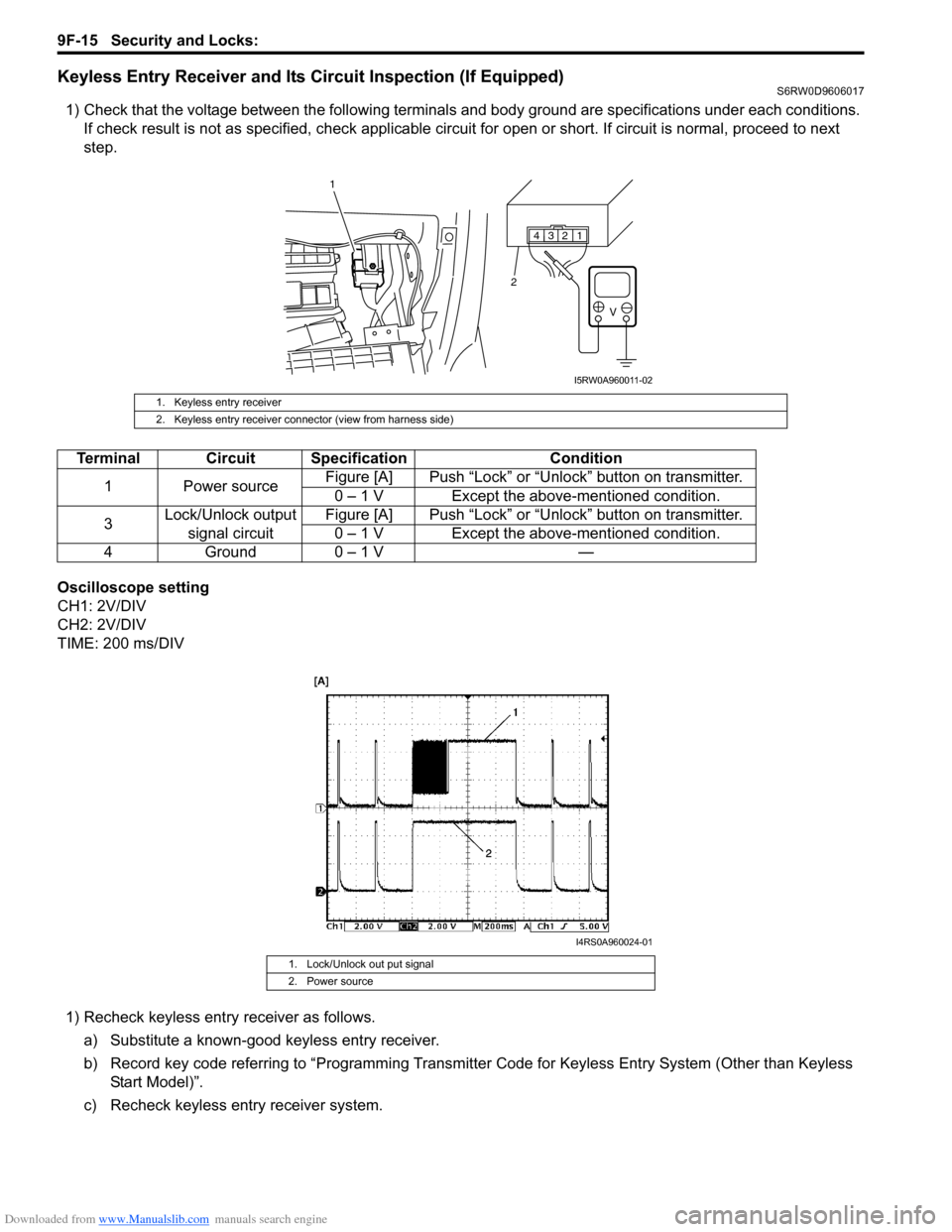
Keyless Entry Receiver and Its Circuit Inspection (If Equipped)S6RW0D9606017
1) Check that the voltage between the following terminals and body ground are specifications under each conditions.
If check result is not as specified, check applicable circuit for open or short. If circuit is normal, proceed to next
step.
Oscilloscope setting
CH1: 2V/DIV
CH2: 2V/DIV
TIME: 200 ms/DIV
1) Recheck keyless entry receiver as follows.
a) Substitute a known-good keyless entry receiver.
b) Record key code referring to “Programming Transmitter Code for Keyless Entry System (Other than Keyless
Start Model)”.
c) Recheck keyless entry receiver system.
1. Keyless entry receiver
2. Keyless entry receiver connector (view from harness side)
Terminal Circuit Specification Condition
1 Power sourceFigure [A] Push “Lock” or “Unlock” button on transmitter.
0 – 1 V Except the above-mentioned condition.
3Lock/Unlock output
signal circuitFigure [A] Push “Lock” or “Unlock” button on transmitter.
0 – 1 V Except the above-mentioned condition.
4 Ground 0 – 1 V —
1. Lock/Unlock out put signal
2. Power source
1 2 3 4
V
2
1
I5RW0A960011-02
I4RS0A960024-01
Page 1430 of 1556
Downloaded from www.Manualslib.com manuals search engine 9G-3 Seats:
Front Seat Removal and InstallationS6RW0D9706002
Removal
1) Disable air bag system referring to “Disabling Air
Bag System in Section 8B”.
2) Disconnect seat harness coupler and side air bag
coupler, if equipped.
3) Remove 4 mounting bolts to remove seat assembly.
4) Disassemble and repair seat as necessary.
Installation
Reverse removal procedure to install front seat.
• Torque to specifications as shown in “Front Seat
Components”.
• Enable air bag system referring to “Enabling Air Bag
System in Section 8B”.
Front Seat Heater Switch (Driver and Passenger
Side) Inspection (If Equipped)
S6RW0D9706005
1) Confirm that ignition switch is OFF position.
2) Remove console box.
3) Disconnect seat heater switch coupler and remove
seat heater switch.
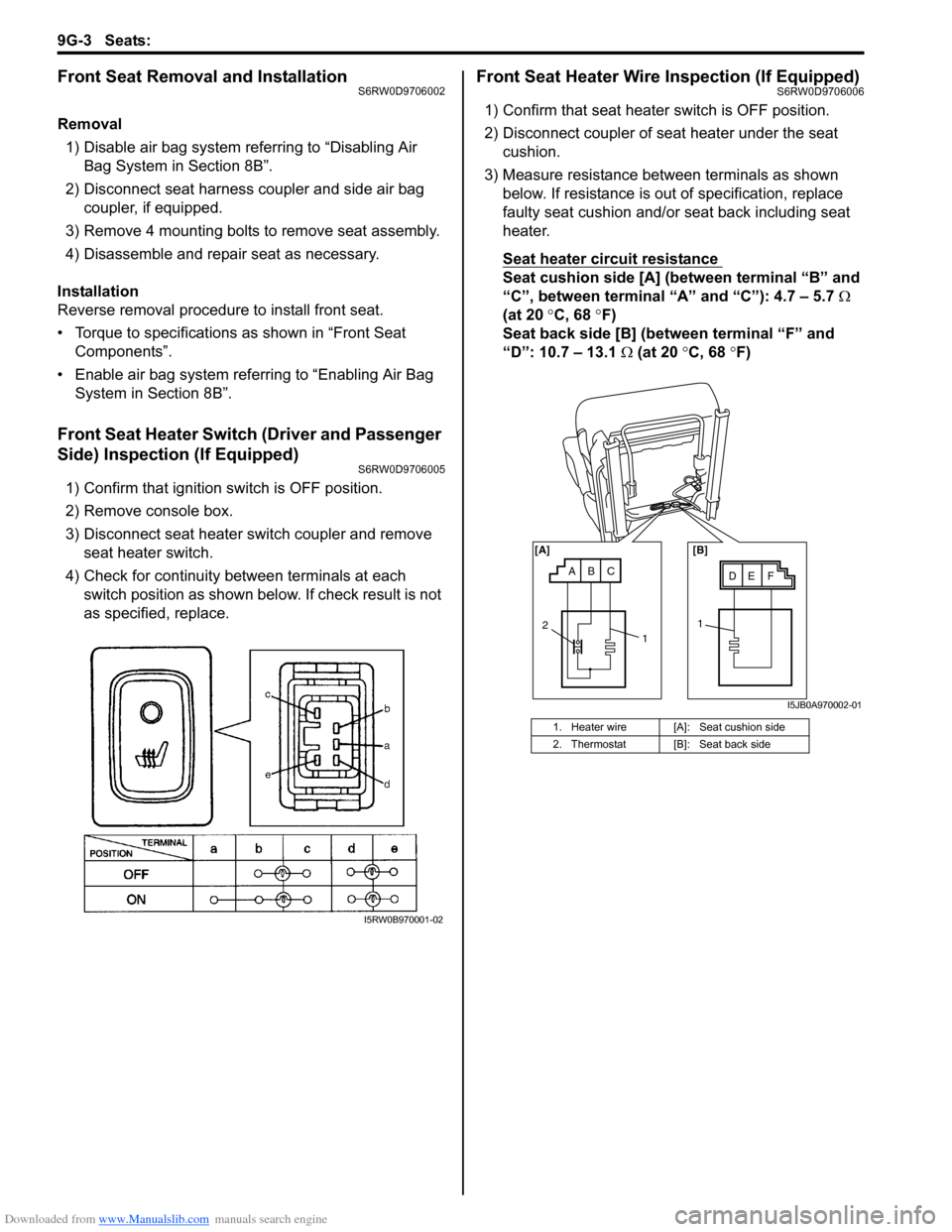
4) Check for continuity between terminals at each
switch position as shown below. If check result is not
as specified, replace.
Front Seat Heater Wire Inspection (If Equipped)S6RW0D9706006
1) Confirm that seat heater switch is OFF position.
2) Disconnect coupler of seat heater under the seat
cushion.
3) Measure resistance between terminals as shown
below. If resistance is out of specification, replace
faulty seat cushion and/or seat back including seat
heater.
Seat heater circuit resistance
Seat cushion side [A] (between terminal “B” and
“C”, between terminal “A” and “C”): 4.7 – 5.7 Ω
(at 20 °C, 68 °F)
Seat back side [B] (between terminal “F” and
“D”: 10.7 – 13.1 Ω (at 20 °C, 68 °F)
I5RW0B970001-02
1. Heater wire [A]: Seat cushion side
2. Thermostat [B]: Seat back side
ABCDE F [A] [B]
11
2
I5JB0A970002-01
Page 1489 of 1556

Downloaded from www.Manualslib.com manuals search engine Body Electrical Control System: 10B-16
BCM Power Circuit and Ground Circuit CheckS6RW0DA204007
Wiring Diagram
Troubleshooting
+B
IG1
+BB
GRNG273-2BLKBLK/ORNG272-9
G271-3
BLK/ORNL314-4
BLU G273-5
WHTE324-22
3
1
E324 L314
1 2 4 53 6 7 8 9
10
11 12 13 14 15 16 17 181 21 2 4 53 61
2 4 53 6 7 8 9 10
7 8 9 10 11 12
11 12 13 14 15 16 17 18 19 20
G272 G271
1 2
4
65
G273[A] [A] [A]
3
[A]
I6RW0CA20006-02
[A]: Junction block connector viewed from harness side 2. Ignition switch
1. Junction block 3. Battery
Step Action Yes No
1Fuse check
1) Turn ignition switch to OFF position.
2) Check circuit fuses for condition.
Are circuit fuses in good condition?Go to Step 2. Replace fuse and check
for short circuit to
ground.
2Power supply circuit check
1) Disconnect connectors from junction block.
2) Check for proper connection to junction block connector
at terminal “E324-2”.
3) If OK, then measure voltage between “E324-2” terminal
of junction block connector and vehicle body ground.
Is voltage 10 – 14 V?Go to Step 3. Repair power supply
circuit.
3Power supply circuit check
1) Check for proper connection to junction block connector
at terminals “G273-2” and “G273-5”.
2) If OK, turn ignition switch to ON position.
3) Measure voltage between following terminals.
• Between “G273-2” terminal of junction block
connector and vehicle body ground
• Between “G273-5” terminal of junction block
connector and vehicle body ground
Is each voltage 10 – 14 V?Go to Step 4. Repair power supply
circuit.
Page 1490 of 1556

Downloaded from www.Manualslib.com manuals search engine 10B-17 Body Electrical Control System:
DTC B1133 (DTC No. 1133): Battery Voltage Too HighS6RW0DA204008
Wiring Diagram
Refer to “BCM Power Circuit and Ground Circuit Check”.
DTC Detecting Condition and Possible Cause
Flow Test Description
Step 1: Check charging system
DTC Troubleshooting4Ground circuit check
1) Turn ignition switch to OFF position.
2) Check for proper connection to junction block connector
at terminals “G271-3”, “G272-9” and “L314-4”.
3) If OK, then measure resistance between following
terminals.
• Between “G271-3” terminal of junction block
connector and vehicle body ground
• Between “G272-9” terminal of junction block
connector and vehicle body ground
• Between “L314-4” terminal of junction block connector
and vehicle body ground
Is each resistance 2
Ω or less?BCM power supply
circuit and ground circuit
are in good condition.Repair ground circuit. Step Action Yes No
DTC detecting condition Possible cause
Power voltage supplied from battery to BCM is
higher than 16V.• Charging system malfunction
• BCM malfunction
Step Action Yes No
1Charging system operation check
1) Check generator for operation referring to “Generator
Test (Overcharged Battery Check) in Section 1J”.
Is it in good condition?Substitute a known
good BCM (included in
junction block) and
recheck.Repair charging system.
Page 1491 of 1556

Downloaded from www.Manualslib.com manuals search engine Body Electrical Control System: 10B-18
DTC B1141 / DTC B1142 (No. 1141 / No. 1142) Outside Air Temperature (Ambient Temp.) Sensor
Circuit Malfunction
S6RW0DA204009
Wiring Diagram
DTC Detecting Condition and Possible Cause
Flow Test Description
Step 1: Check whether malfunction is in outside air temperature sensor.
Step 2: Check outside air temperature sensor circuit.
DTC Troubleshooting
YEL/RED
YEL/BLK
5V
E04-10
E04-8
12E04
1 2 4 53 6 7
8 9 10 11 12 13 14
[A]
I6RW0CA20007-01
[A]: BCM connector viewed from harness side 2. BCM
1. Outside air temperature sensor
DTC detecting condition Possible cause
DTC B1141 (DTC No. 1141):
Input signal from outside air temperature sensor is higher
than 4.88 V.• Open in outside air temperature sensor circuit
• Outside air temperature sensor malfunction
• BCM malfunction
DTC B1142 (DTC No. 1142):
Input signal from outside air temperature sensor is lower
than 0.1 V.• Short in outside air temperature sensor circuit
• Outside air temperature sensor malfunction
• BCM malfunction
Step Action Yes No
1 Outside air temperature sensor check
1) Turn ignition switch to OFF position.
2) Disconnect connector from outside air temperature
sensor.
3) Check outside air temperature sensor for resistance
referring to “Outside Air Temperature Sensor Inspection
(If Equipped) in Section 9C”.
Is it in good condition?Go to Step 2. Replace outside air
temperature sensor.
2Outside air temperature sensor circuit check
1) Disconnect connector from BCM and check for proper
terminal connection to BCM connector.
2) If connections are OK, check outside air temperature
sensor circuit for open, short and high resistance.
Is each circuit in good condition?Substitute a known-
good BCM (included in
junction block) and
recheck.Repair circuit.
Page 1492 of 1556

Downloaded from www.Manualslib.com manuals search engine 10B-19 Body Electrical Control System:
DTC B1150 (No. 1150): Air Bag Communication Circuit MalfunctionS6RW0DA204010
Wiring Diagram
DTC Detecting Condition and Possible Cause
Flow Test Description
Step 1: Check air bag communication circuit.
Step 2: Check air bag communication circuit.
DTC Troubleshooting
YEL
5V
L313-2L04-37
2
1
L313
1 2 43
[A]
I6RW0CA20008-01
[A]: Junction block connector viewed from harness side 2. BCM
1. SDM
DTC detecting condition Possible cause
After ignition switch is turned ON, abnormal signal is fed
from SDM to BCM.• Air bag communication circuit open or short
• SDM malfunction
• BCM malfunction
Step Action Yes No
1Air bag communication circuit check
1) Turn ignition switch to OFF position.
2) Disconnect connectors from junction block and SDM.
3) Check for proper terminal connection to BCM and SDM
connectors.
4) If connections are OK, check air bag communication
circuit for open, short and high resistance.
Is circuit in good condition?Go to Step 2. Repair circuit.
2Air bag communication circuit check
1) Turn ignition switch to OFF position.
2) Connect connectors to junction block.
3) Turn ignition switch to ON position.
4) Measure voltage between “L313-2” terminal of junction
block connector and vehicle body ground.
Is voltage 4 – 6 V?Substitute a known-
good SDM and recheck.Substitute a known-
good BCM (included in
junction block) and
recheck.
Page 1494 of 1556

Downloaded from www.Manualslib.com manuals search engine 10B-21 Body Electrical Control System:
Inspection of BCM and Its CircuitsS6RW0DA204017
BCM and its circuits can be checked at BCM wiring couplers by measuring voltage and resistance.
CAUTION!
BCM cannot be checked by itself. It is strictly prohibited to connect voltmeter or ohmmeter to BCM
with couplers disconnected from it.
Voltage Check
1) Disconnect negative cable (–) at battery.
2) Remove BCM (included in junction block) referring to “BCM (Included in Junction Block) Removal and Installation”.
3) Connect connectors to BCM (1) and junction block (2).
4) Check voltage at each terminal number of couplers connected.
For connector and terminal number, refer to “Connector Layout Diagram of BCM and Junction Block”.
NOTE
• As each terminal voltage is affected by the battery voltage, confirm that it is 11 V or more when
ignition switch is ON.
• Voltage with asterisk (*) can not be measured by voltmeter because it is pulse signal.
Check it with oscilloscope if necessary.
BCM connector “L01”
1
2
1
2
I4RS0AA20030-01
Terminal Circuit Normal voltage Condition
L01-1Passenger side door lock
actuator control (Unlock) (if
equipped)10 – 14 VUnlock signal is output for passenger side
door lock actuator
0 VUnlock signal is not output for passenger side
door lock actuator
L01-2 — — —
L01-3 Rear end door switch10 – 14 V Rear end door is closed
0 V Rear end door is opened
L01-4Rear end door opener switch
(if equipped)10 – 14 V Rear end door opener switch is not pushed
0 V Rear end door opener switch is pushed
L01-5Manual door lock switch
(Unlock) (if equipped)10 – 14 VManual door lock switch is at any position
other than unlock position
0 V Manual door lock switch is at unlock position
L01-6 Parking brake switch*0 – 3 V
↑↓
10 – 14 VRefer to “Reference waveform No. 1: ”
0 VIgnition switch is at ON position and parking
brake lever is pulled up
L01-7 Driver side door switch10 – 14 V Driver side door is closed
0 V Driver side door is opened
L01-8 — — —
L01-9 — — —
Page 1495 of 1556

Downloaded from www.Manualslib.com manuals search engine Body Electrical Control System: 10B-22
BCM connector “E04”L01-10Driver side door lock
actuator control (Unlock) (if
equipped)10 – 14 VUnlock signal is output for driver side door
lock actuator
0 VUnlock signal is not output for driver side
door lock actuator
L01-11Rear end door opener
actuator control (if equipped)0 VRear end door actuator motor is not in
operation
10 – 14 V Rear end door actuator motor is in operation
L01-12Manual door lock switch
(Lock) (if equipped)10 – 14 VManual door lock switch is at any position
other than lock position
0 V Manual door lock switch is at lock position
L01-13 — — —
L01-14 Driver side seat belt switch*0 – 3 V
↑↓
10 – 14 VRefer to “Reference waveform No. 2: ”
0 VIgnition switch is at ON position and driver
side seat belt is unfastened
L01-15Door switch (other than
driver side door and rear end
door)10 – 14 VRear right and left side door and passenger
side door are closed
0 VAny one of the door is opened (except driver
side door and rear end door)
L01-16Driver side door key cylinder
switch (Lock) (if equipped)10 – 14 VDriver side door key cylinder switch is at any
position other than lock position
0 VDriver side door key cylinder switch is at lock
position
L01-17Driver side door key cylinder
switch (Unlock) (if equipped)10 – 14 VDriver side door key cylinder switch is at any
position other than unlock position
0 VDriver side door key cylinder switch is at
unlock position
L01-18 — — —
Terminal Circuit Normal voltage Condition
E04-1CAN communication line (high)
for ABS control module*2.5 – 3.6 V
Refer to “Reference waveform No. 3: ”
E04-2CAN communication line (low)
for ABS control module*1.6 – 2.5 V
E04-3 — — —
E04-4 Generator “L” terminal10 – 14 V Engine is running
0 V Ignition switch is at ON position
E04-5 Brake fluid level switch*0 – 3 V
↑↓
10 – 14 VRefer to “Reference waveform No. 1: ”
0 VIgnition switch is at ON position, parking brake
lever is released and brake fluid level is lower
than MIN level
E04-6 — — —
E04-7 — — —
E04-8Sensor ground for outside air
temperature sensor (if
equipped)0 V —
E04-9Serial communication line of
data link connector for ABS
control module7 – 12 V Ignition switch is at ON position
E04-10Outside air temperature sensor
(if equipped)About 1.5 VIgnition switch is at ON position and outside
air temperature approx. 20 °C (68
°F)
E04-11 Oil pressure switch*3 – 14 V Refer to “Reference waveform No. 4: ”
0 VIgnition switch is at ON position and engine is
at stop
E04-12 — — — Terminal Circuit Normal voltage Condition