Can troubleshooting SUZUKI SX4 2006 1.G Service Repair Manual
[x] Cancel search | Manufacturer: SUZUKI, Model Year: 2006, Model line: SX4, Model: SUZUKI SX4 2006 1.GPages: 1556, PDF Size: 37.31 MB
Page 211 of 1556
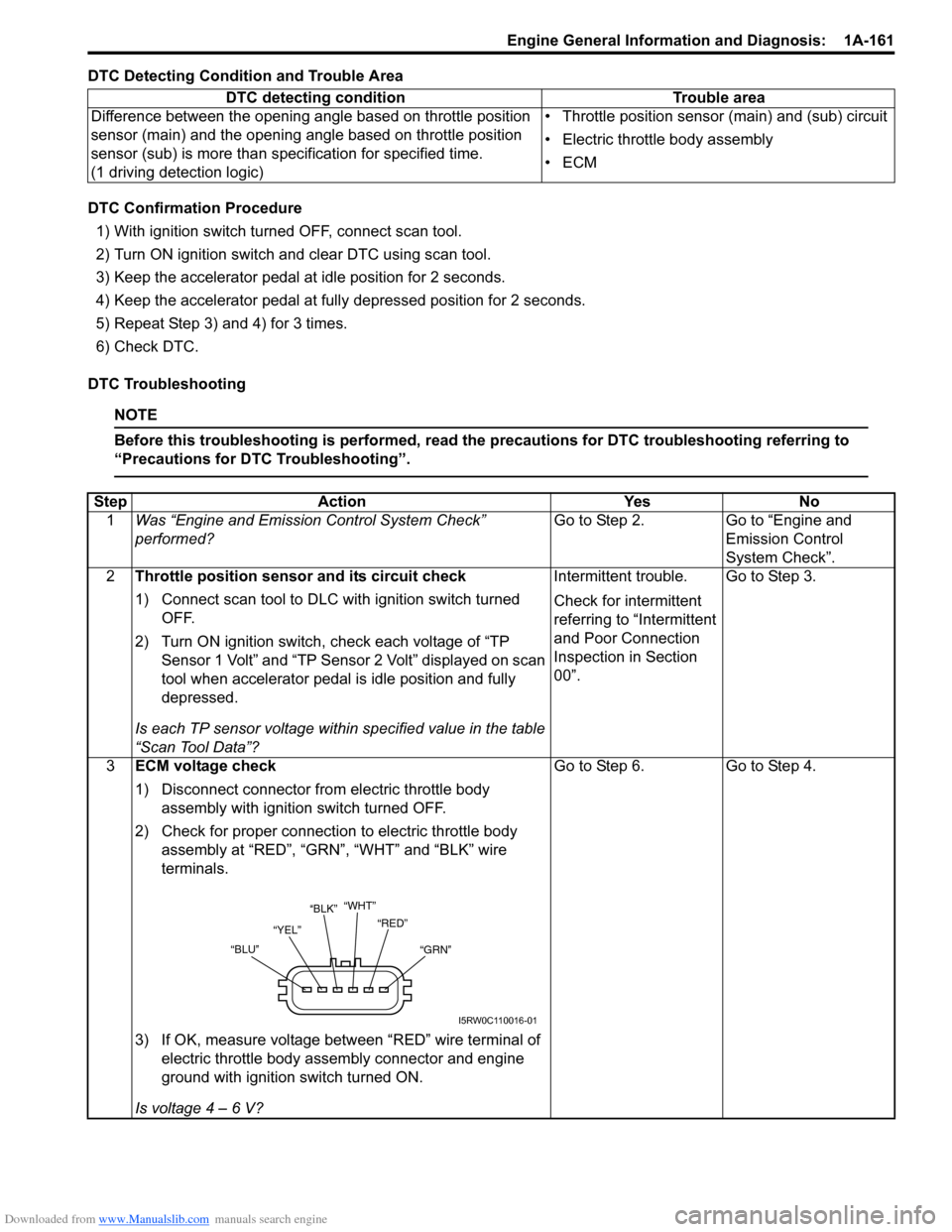
Downloaded from www.Manualslib.com manuals search engine Engine General Information and Diagnosis: 1A-161
DTC Detecting Condition and Trouble Area
DTC Confirmation Procedure
1) With ignition switch turned OFF, connect scan tool.
2) Turn ON ignition switch and clear DTC using scan tool.
3) Keep the accelerator pedal at idle position for 2 seconds.
4) Keep the accelerator pedal at fully depressed position for 2 seconds.
5) Repeat Step 3) and 4) for 3 times.
6) Check DTC.
DTC Troubleshooting
NOTE
Before this troubleshooting is performed, read the precautions for DTC troubleshooting referring to
“Precautions for DTC Troubleshooting”.
DTC detecting condition Trouble area
Difference between the opening angle based on throttle position
sensor (main) and the opening angle based on throttle position
sensor (sub) is more than specification for specified time.
(1 driving detection logic)• Throttle position sensor (main) and (sub) circuit
• Electric throttle body assembly
•ECM
Step Action Yes No
1Was “Engine and Emission Control System Check”
performed?Go to Step 2. Go to “Engine and
Emission Control
System Check”.
2Throttle position sensor and its circuit check
1) Connect scan tool to DLC with ignition switch turned
OFF.
2) Turn ON ignition switch, check each voltage of “TP
Sensor 1 Volt” and “TP Sensor 2 Volt” displayed on scan
tool when accelerator pedal is idle position and fully
depressed.
Is each TP sensor voltage within specified value in the table
“Scan Tool Data”?Intermittent trouble.
Check for intermittent
referring to “Intermittent
and Poor Connection
Inspection in Section
00”.Go to Step 3.
3ECM voltage check
1) Disconnect connector from electric throttle body
assembly with ignition switch turned OFF.
2) Check for proper connection to electric throttle body
assembly at “RED”, “GRN”, “WHT” and “BLK” wire
terminals.
3) If OK, measure voltage between “RED” wire terminal of
electric throttle body assembly connector and engine
ground with ignition switch turned ON.
Is voltage 4 – 6 V?Go to Step 6. Go to Step 4.
“WHT”
“YEL”“RED”
“GRN” “BLU”“BLK”
I5RW0C110016-01
Page 214 of 1556
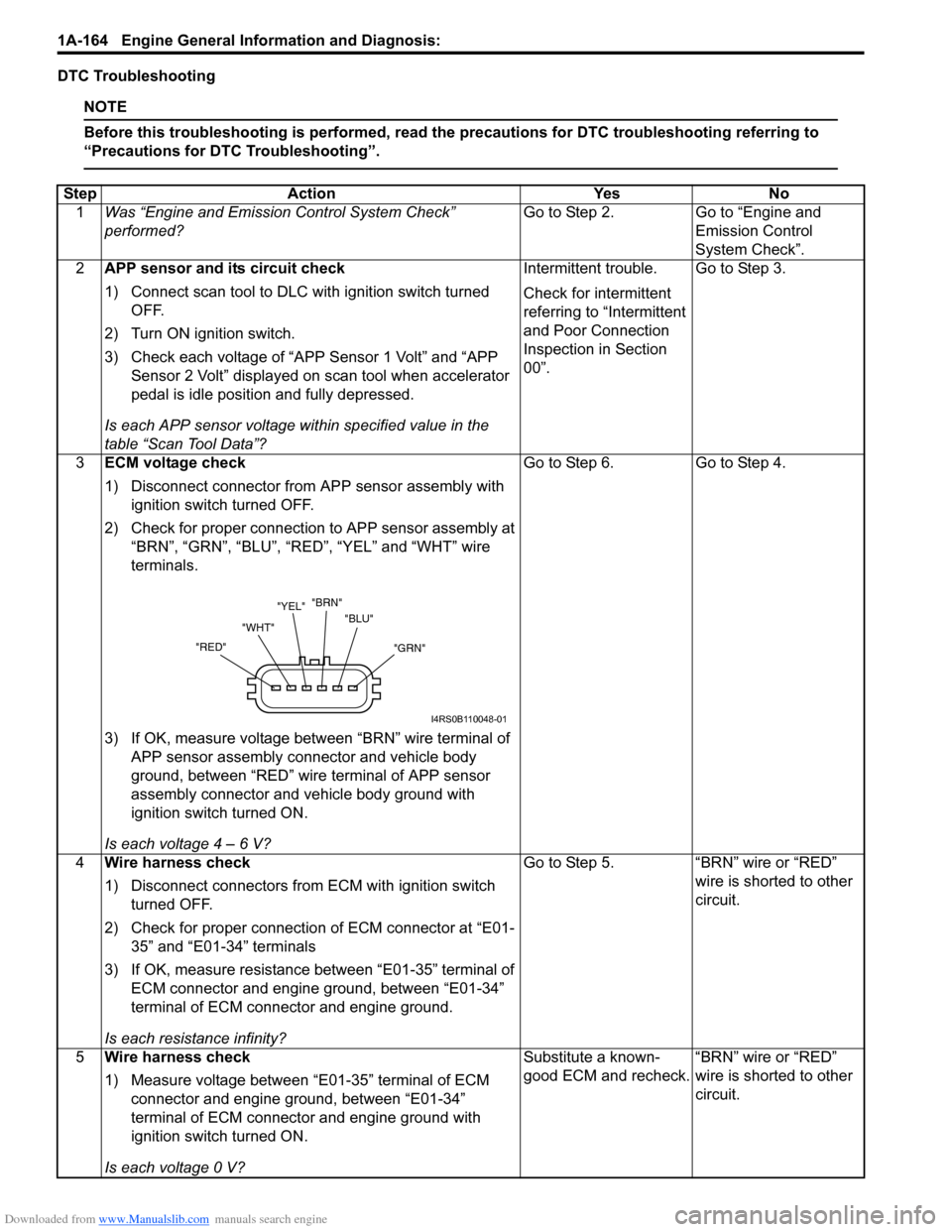
Downloaded from www.Manualslib.com manuals search engine 1A-164 Engine General Information and Diagnosis:
DTC Troubleshooting
NOTE
Before this troubleshooting is performed, read the precautions for DTC troubleshooting referring to
“Precautions for DTC Troubleshooting”.
Step Action Yes No
1Was “Engine and Emission Control System Check”
performed?Go to Step 2. Go to “Engine and
Emission Control
System Check”.
2APP sensor and its circuit check
1) Connect scan tool to DLC with ignition switch turned
OFF.
2) Turn ON ignition switch.
3) Check each voltage of “APP Sensor 1 Volt” and “APP
Sensor 2 Volt” displayed on scan tool when accelerator
pedal is idle position and fully depressed.
Is each APP sensor voltage within specified value in the
table “Scan Tool Data”?Intermittent trouble.
Check for intermittent
referring to “Intermittent
and Poor Connection
Inspection in Section
00”.Go to Step 3.
3ECM voltage check
1) Disconnect connector from APP sensor assembly with
ignition switch turned OFF.
2) Check for proper connection to APP sensor assembly at
“BRN”, “GRN”, “BLU”, “RED”, “YEL” and “WHT” wire
terminals.
3) If OK, measure voltage between “BRN” wire terminal of
APP sensor assembly connector and vehicle body
ground, between “RED” wire terminal of APP sensor
assembly connector and vehicle body ground with
ignition switch turned ON.
Is each voltage 4 – 6 V?Go to Step 6. Go to Step 4.
4Wire harness check
1) Disconnect connectors from ECM with ignition switch
turned OFF.
2) Check for proper connection of ECM connector at “E01-
35” and “E01-34” terminals
3) If OK, measure resistance between “E01-35” terminal of
ECM connector and engine ground, between “E01-34”
terminal of ECM connector and engine ground.
Is each resistance infinity?Go to Step 5. “BRN” wire or “RED”
wire is shorted to other
circuit.
5Wire harness check
1) Measure voltage between “E01-35” terminal of ECM
connector and engine ground, between “E01-34”
terminal of ECM connector and engine ground with
ignition switch turned ON.
Is each voltage 0 V?Substitute a known-
good ECM and recheck.“BRN” wire or “RED”
wire is shorted to other
circuit.
"GRN" "BLU" "BRN"
"YEL"
"WHT"
"RED"
I4RS0B110048-01
Page 216 of 1556

Downloaded from www.Manualslib.com manuals search engine 1A-166 Engine General Information and Diagnosis:
DTC Confirmation Procedure
DTC P2227:
WARNING!
• When performing a road test, select a place where there is no traffic or possibility of a traffic
accident and be very careful during testing to avoid occurrence of an accident.
• Road test should be carried out by 2 persons, a driver and a tester, on a level road.
1) Connect scan tool to DLC with ignition switch turned OFF.
2) Turn ON ignition switch and clear DTC, pending DTC and freeze frame data by using scan tool and warm up
engine to normal operating temperature.
3) Check DTC and pending DTC by using scan tool.
DTC P2228 / P2229:
1) Connect scan tool to DLC with ignition switch turned OFF.
2) Turn ON ignition switch, clear DTC by using scan tool and run engine for 1 min.
3) Check DTC and pending DTC by using scan tool.
DTC Troubleshooting
NOTE
Before this troubleshooting is performed, read the precautions for DTC troubleshooting referring to
“Precautions for DTC Troubleshooting”.
DTC U0073: Control Module Communication Bus OffS6RW0D1104069
Refer to “Troubleshooting for CAN-DTC”.
DTC U0101: Lost Communication with TCMS6RW0D1104082
Refer to “Troubleshooting for CAN-DTC”.
DTC U0121: Lost Communication with ABS Control ModuleS6RW0D1104070
Refer to“Troubleshooting for CAN-DTC”.
DTC U0140: Lost Communication with Body Control ModuleS6RW0D1104071
Refer to“Troubleshooting for CAN-DTC”.Step Action Yes No
1Was “Engine and Emission Control System Check”
performed?Go to Step 2. Go to “Engine and
Emission Control
System Check”.
2Is DTC P2227 set?Go to Step 3. Substitute a known-
good ECM and recheck.
3MAP sensor check
1) Check MAP sensor and its circuit referring to “DTC
P0107: Manifold Absolute Pressure Circuit Low
Input”and/or “DTC P0108: Manifold Absolute Pressure
Circuit High Input”.
Is check result satisfactory?Substitute a known-
good ECM and recheck.MAP sensor or its circuit
malfunction.
Page 217 of 1556
Downloaded from www.Manualslib.com manuals search engine Engine General Information and Diagnosis: 1A-167
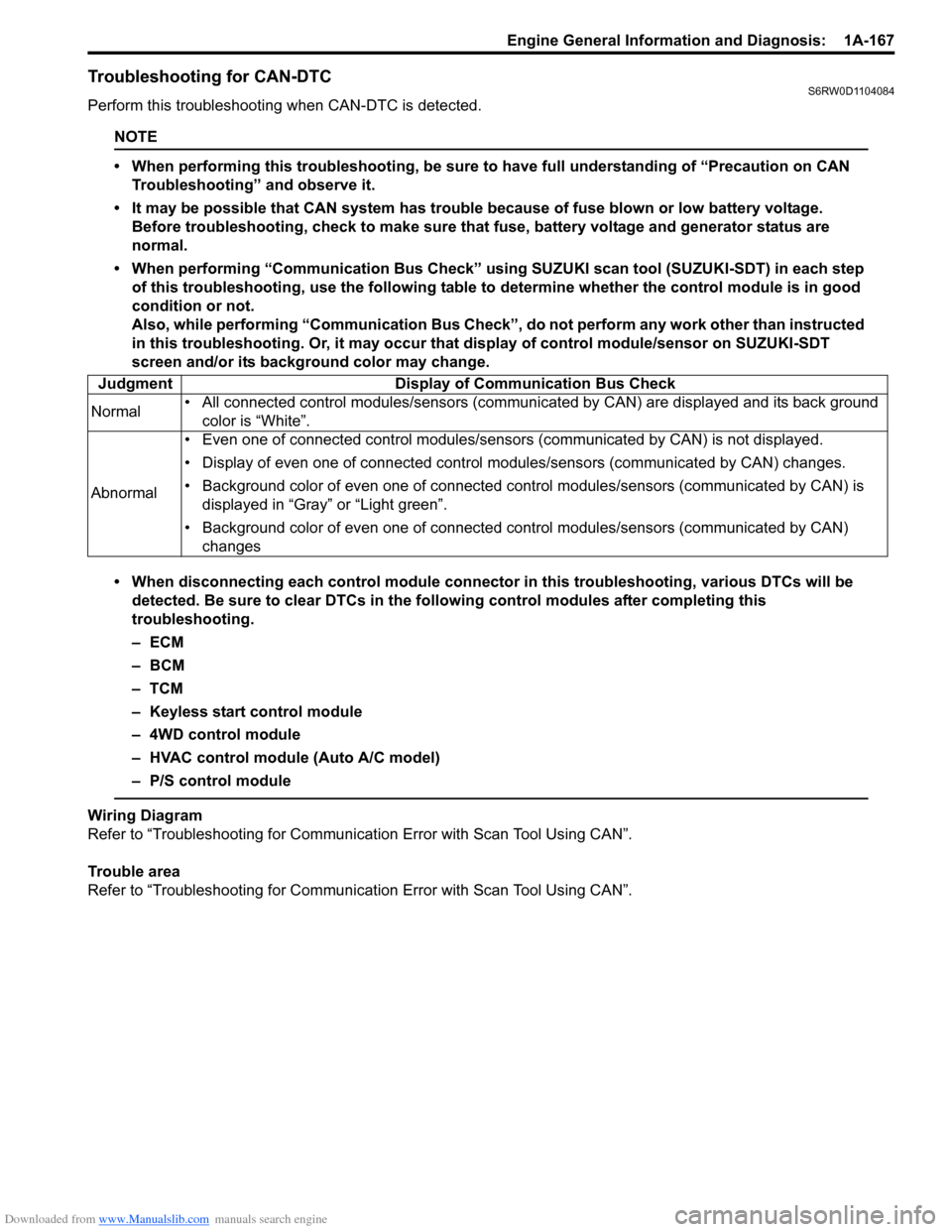
Troubleshooting for CAN-DTCS6RW0D1104084
Perform this troubleshooting when CAN-DTC is detected.
NOTE
• When performing this troubleshooting, be sure to have full understanding of “Precaution on CAN
Troubleshooting” and observe it.
• It may be possible that CAN system has trouble because of fuse blown or low battery voltage.
Before troubleshooting, check to make sure that fuse, battery voltage and generator status are
normal.
• When performing “Communication Bus Check” using SUZUKI scan tool (SUZUKI-SDT) in each step
of this troubleshooting, use the following table to determine whether the control module is in good
condition or not.
Also, while performing “Communication Bus Check”, do not perform any work other than instructed
in this troubleshooting. Or, it may occur that display of control module/sensor on SUZUKI-SDT
screen and/or its background color may change.
• When disconnecting each control module connector in this troubleshooting, various DTCs will be
detected. Be sure to clear DTCs in the following control modules after completing this
troubleshooting.
–ECM
– BCM
–TCM
– Keyless start control module
– 4WD control module
– HVAC control module (Auto A/C model)
– P/S control module
Wiring Diagram
Refer to “Troubleshooting for Communication Error with Scan Tool Using CAN”.
Trouble area
Refer to “Troubleshooting for Communication Error with Scan Tool Using CAN”. Judgment Display of Communication Bus Check
Normal• All connected control modules/sensors (communicated by CAN) are displayed and its back ground
color is “White”.
Abnormal• Even one of connected control modules/sensors (communicated by CAN) is not displayed.
• Display of even one of connected control modules/sensors (communicated by CAN) changes.
• Background color of even one of connected control modules/sensors (communicated by CAN) is
displayed in “Gray” or “Light green”.
• Background color of even one of connected control modules/sensors (communicated by CAN)
changes
Page 218 of 1556

Downloaded from www.Manualslib.com manuals search engine 1A-168 Engine General Information and Diagnosis:
Troubleshooting
Step Action Yes No
1DTC Check
1) Turn ignition switch to OFF position.
2) Connect scan tool to DLC.
3) Check DTC in the following control modules.
•ECM
•TCM
•BCM
• Keyless start control module
• 4WD control module
Is there any DTC other than CAN-DTC?Go to applicable
troubleshooting of DTC
other than CAN-DTC.Go to Step 2.
2Control module connector check
1) Turn ignition switch to OFF position.
2) Be sure to disconnect scan tool from DLC.
3) Disconnect all the following control module connectors.
• Control modules communicated by CAN
–ECM
–TCM
– ABS control module
–BCM
– Combination meter
– Keyless start control module
– 4WD control module
4) Check for proper connection to terminal of each CAN
line of all control module (communicated by CAN)
connectors.
5) If OK, connect all connectors of control module
communicated by CAN securely.
6) Recheck DTC for all control modules communicated by
CAN.
Is there any CAN-DTC?Go to Step 3. Intermittent trouble.
Check for intermittent
referring to “Intermittent
and Poor Connection
Inspection in Section
00”.
Page 253 of 1556
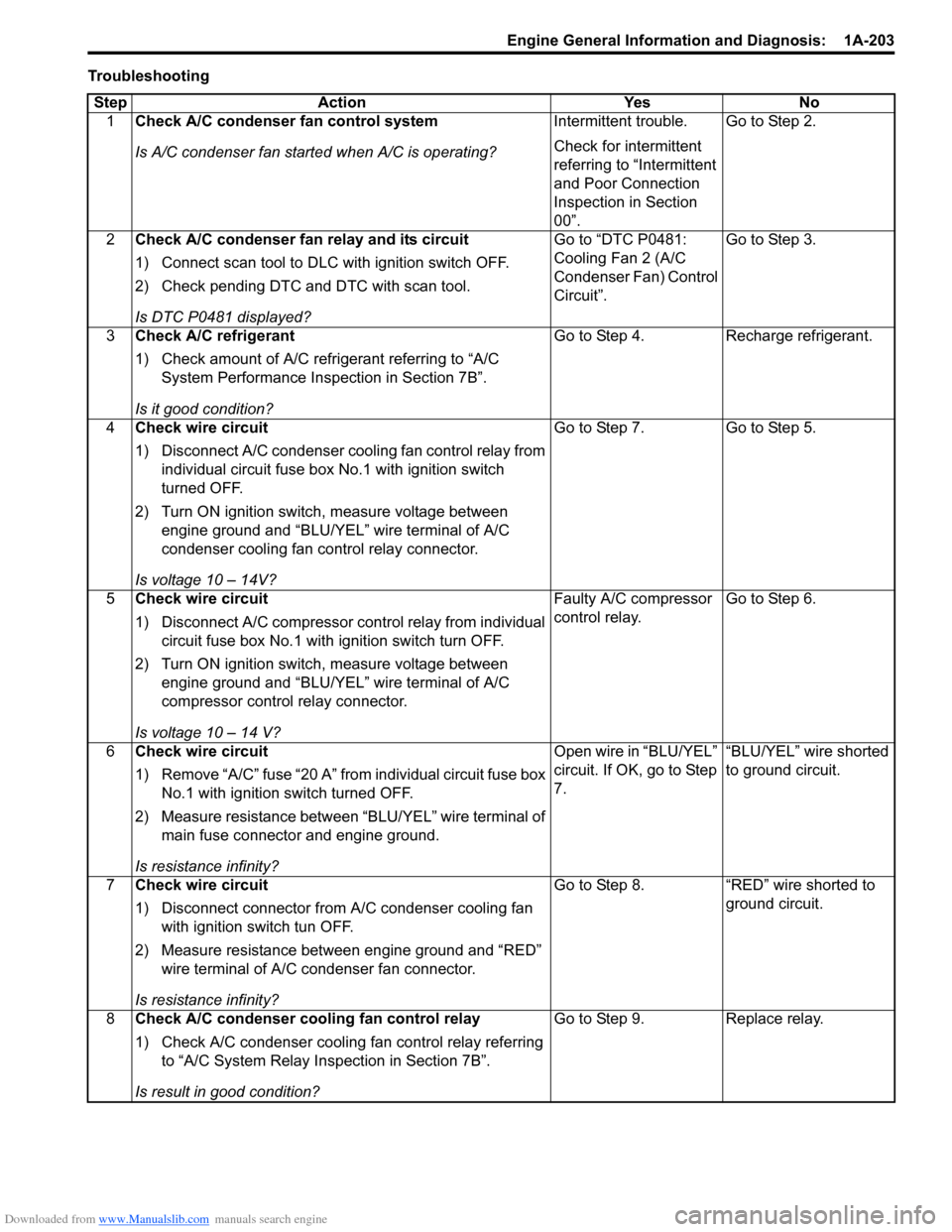
Downloaded from www.Manualslib.com manuals search engine Engine General Information and Diagnosis: 1A-203
Troubleshooting
Step Action Yes No
1Check A/C condenser fan control system
Is A/C condenser fan started when A/C is operating?Intermittent trouble.
Check for intermittent
referring to “Intermittent
and Poor Connection
Inspection in Section
00”.Go to Step 2.
2Check A/C condenser fan relay and its circuit
1) Connect scan tool to DLC with ignition switch OFF.
2) Check pending DTC and DTC with scan tool.
Is DTC P0481 displayed?Go to “DTC P0481:
Cooling Fan 2 (A/C
Condenser Fan) Control
Circuit”.Go to Step 3.
3Check A/C refrigerant
1) Check amount of A/C refrigerant referring to “A/C
System Performance Inspection in Section 7B”.
Is it good condition?Go to Step 4. Recharge refrigerant.
4Check wire circuit
1) Disconnect A/C condenser cooling fan control relay from
individual circuit fuse box No.1 with ignition switch
turned OFF.
2) Turn ON ignition switch, measure voltage between
engine ground and “BLU/YEL” wire terminal of A/C
condenser cooling fan control relay connector.
Is voltage 10 – 14V?Go to Step 7. Go to Step 5.
5Check wire circuit
1) Disconnect A/C compressor control relay from individual
circuit fuse box No.1 with ignition switch turn OFF.
2) Turn ON ignition switch, measure voltage between
engine ground and “BLU/YEL” wire terminal of A/C
compressor control relay connector.
Is voltage 10 – 14 V?Faulty A/C compressor
control relay.Go to Step 6.
6Check wire circuit
1) Remove “A/C” fuse “20 A” from individual circuit fuse box
No.1 with ignition switch turned OFF.
2) Measure resistance between “BLU/YEL” wire terminal of
main fuse connector and engine ground.
Is resistance infinity?Open wire in “BLU/YEL”
circuit. If OK, go to Step
7.“BLU/YEL” wire shorted
to ground circuit.
7Check wire circuit
1) Disconnect connector from A/C condenser cooling fan
with ignition switch tun OFF.
2) Measure resistance between engine ground and “RED”
wire terminal of A/C condenser fan connector.
Is resistance infinity?Go to Step 8. “RED” wire shorted to
ground circuit.
8Check A/C condenser cooling fan control relay
1) Check A/C condenser cooling fan control relay referring
to “A/C System Relay Inspection in Section 7B”.
Is result in good condition?Go to Step 9. Replace relay.
Page 256 of 1556
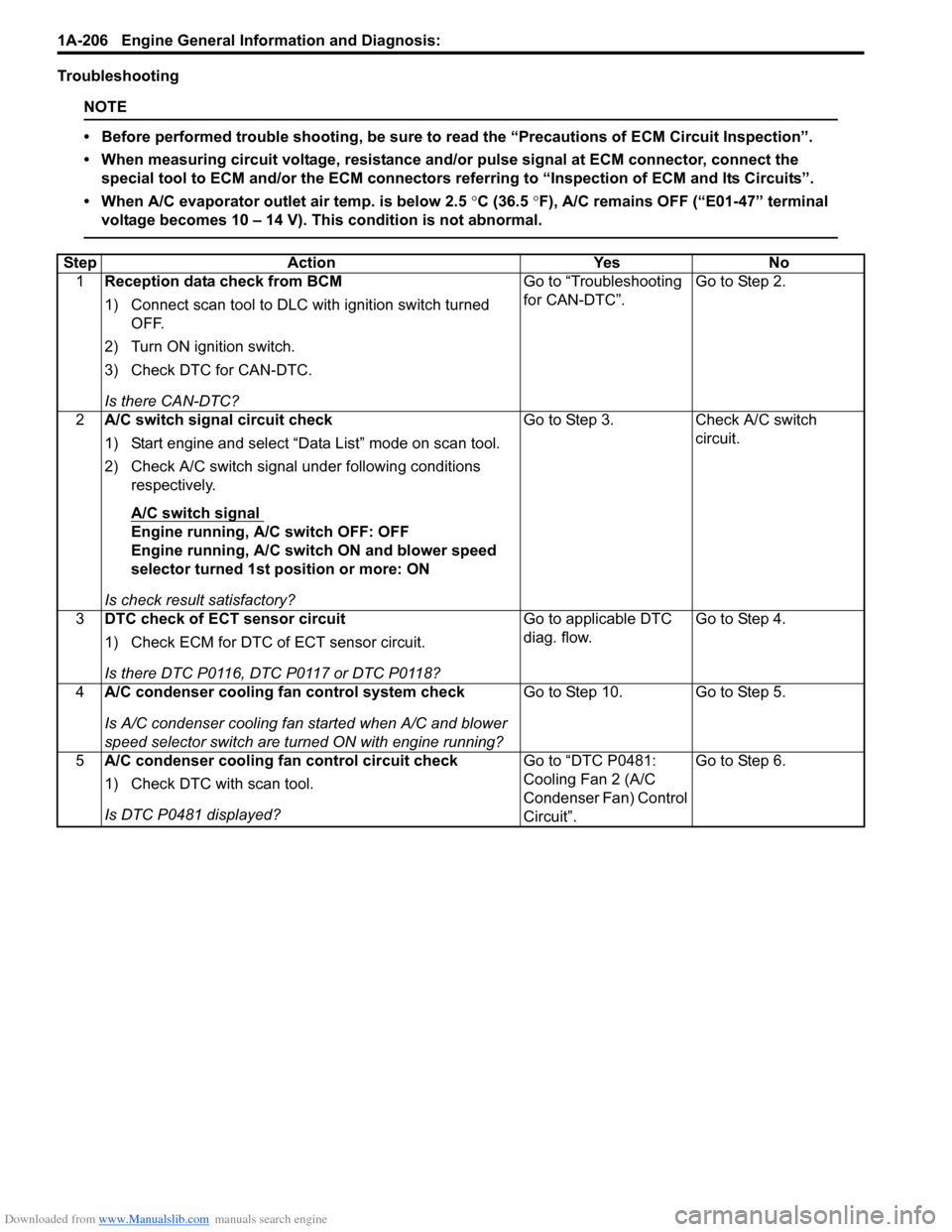
Downloaded from www.Manualslib.com manuals search engine 1A-206 Engine General Information and Diagnosis:
Troubleshooting
NOTE
• Before performed trouble shooting, be sure to read the “Precautions of ECM Circuit Inspection”.
• When measuring circuit voltage, resistance and/or pulse signal at ECM connector, connect the
special tool to ECM and/or the ECM connectors referring to “Inspection of ECM and Its Circuits”.
• When A/C evaporator outlet air temp. is below 2.5 °C (36.5 °F), A/C remains OFF (“E01-47” terminal
voltage becomes 10 – 14 V). This condition is not abnormal.
Step Action Yes No
1Reception data check from BCM
1) Connect scan tool to DLC with ignition switch turned
OFF.
2) Turn ON ignition switch.
3) Check DTC for CAN-DTC.
Is there CAN-DTC?Go to “Troubleshooting
for CAN-DTC”.Go to Step 2.
2A/C switch signal circuit check
1) Start engine and select “Data List” mode on scan tool.
2) Check A/C switch signal under following conditions
respectively.
A/C switch signal
Engine running, A/C switch OFF: OFF
Engine running, A/C switch ON and blower speed
selector turned 1st position or more: ON
Is check result satisfactory?Go to Step 3. Check A/C switch
circuit.
3DTC check of ECT sensor circuit
1) Check ECM for DTC of ECT sensor circuit.
Is there DTC P0116, DTC P0117 or DTC P0118?Go to applicable DTC
diag. flow.Go to Step 4.
4A/C condenser cooling fan control system check
Is A/C condenser cooling fan started when A/C and blower
speed selector switch are turned ON with engine running?Go to Step 10. Go to Step 5.
5A/C condenser cooling fan control circuit check
1) Check DTC with scan tool.
Is DTC P0481 displayed?Go to “DTC P0481:
Cooling Fan 2 (A/C
Condenser Fan) Control
Circuit”.Go to Step 6.
Page 260 of 1556
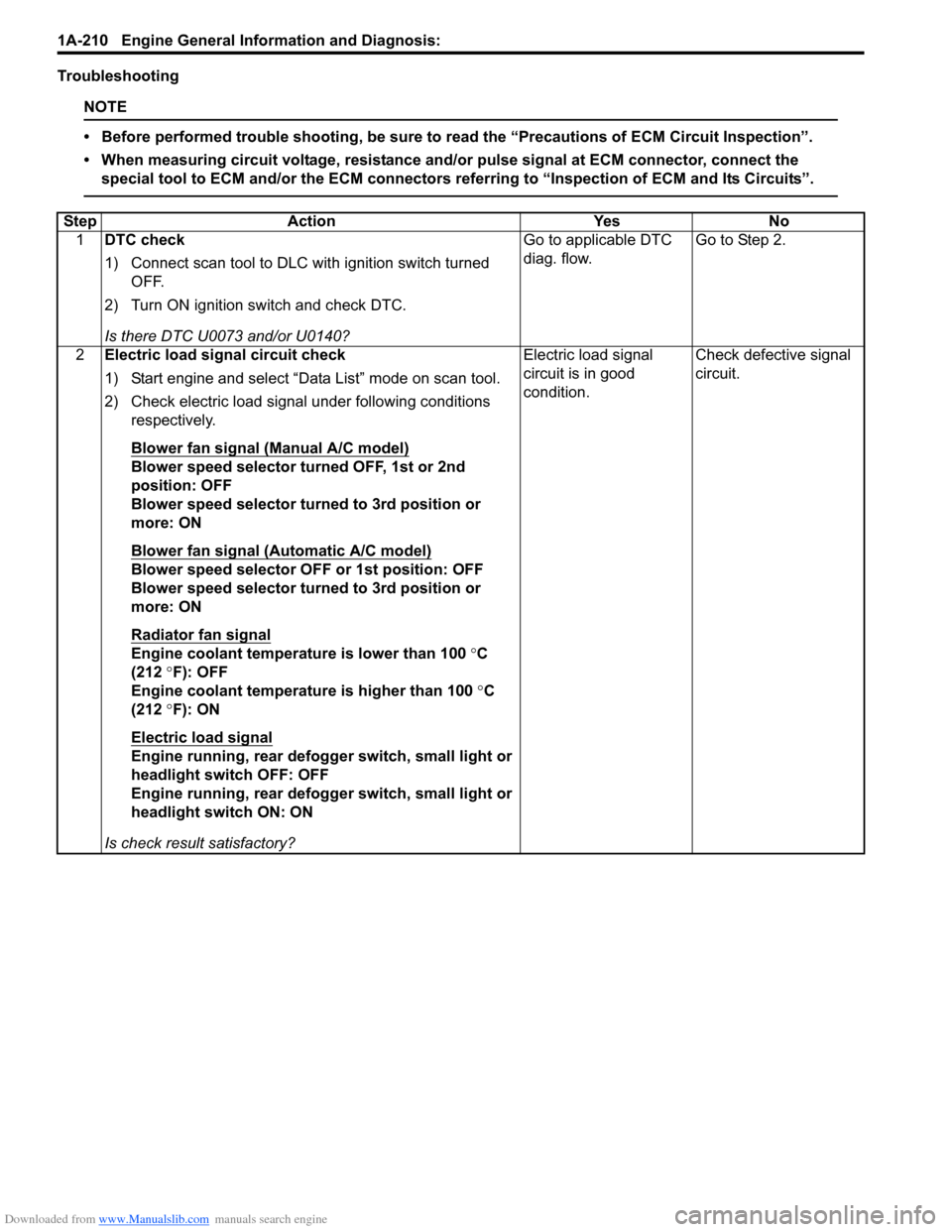
Downloaded from www.Manualslib.com manuals search engine 1A-210 Engine General Information and Diagnosis:
Troubleshooting
NOTE
• Before performed trouble shooting, be sure to read the “Precautions of ECM Circuit Inspection”.
• When measuring circuit voltage, resistance and/or pulse signal at ECM connector, connect the
special tool to ECM and/or the ECM connectors referring to “Inspection of ECM and Its Circuits”.
Step Action Yes No
1DTC check
1) Connect scan tool to DLC with ignition switch turned
OFF.
2) Turn ON ignition switch and check DTC.
Is there DTC U0073 and/or U0140?Go to applicable DTC
diag. flow.Go to Step 2.
2Electric load signal circuit check
1) Start engine and select “Data List” mode on scan tool.
2) Check electric load signal under following conditions
respectively.
Blower fan signal (Manual A/C model)
Blower speed selector turned OFF, 1st or 2nd
position: OFF
Blower speed selector turned to 3rd position or
more: ON
Blower fan signal (Automatic A/C model)
Blower speed selector OFF or 1st position: OFF
Blower speed selector turned to 3rd position or
more: ON
Radiator fan signal
Engine coolant temperature is lower than 100 °C
(212 °F): OFF
Engine coolant temperature is higher than 100 °C
(212 °F): ON
Electric load signal
Engine running, rear defogger switch, small light or
headlight switch OFF: OFF
Engine running, rear defogger switch, small light or
headlight switch ON: ON
Is check result satisfactory?Electric load signal
circuit is in good
condition.Check defective signal
circuit.
Page 261 of 1556
Downloaded from www.Manualslib.com manuals search engine Engine General Information and Diagnosis: 1A-211
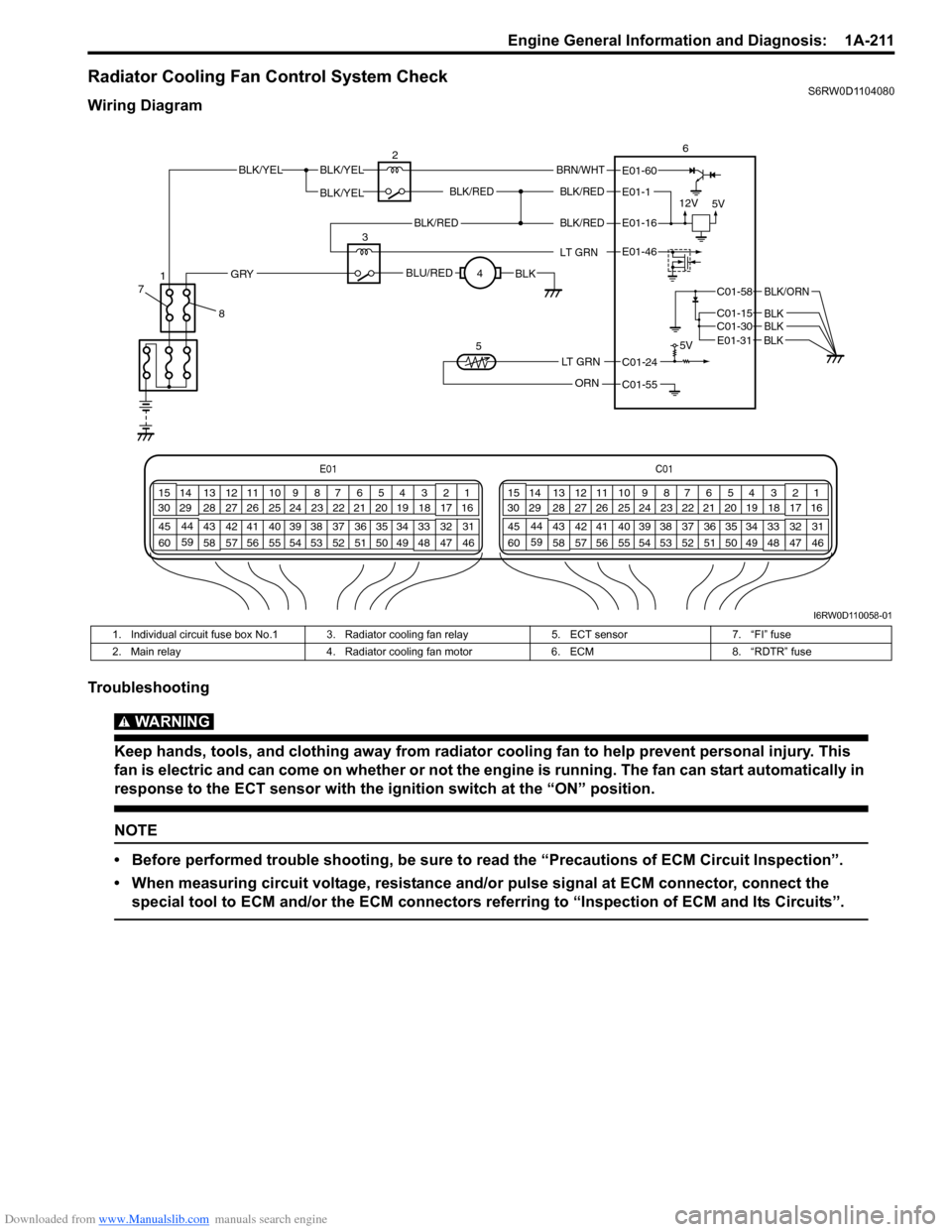
Radiator Cooling Fan Control System CheckS6RW0D1104080
Wiring Diagram
Troubleshooting
WARNING!
Keep hands, tools, and clothing away from radiator cooling fan to help prevent personal injury. This
fan is electric and can come on whether or not the engine is running. The fan can start automatically in
response to the ECT sensor with the ignition switch at the “ON” position.
NOTE
• Before performed trouble shooting, be sure to read the “Precautions of ECM Circuit Inspection”.
• When measuring circuit voltage, resistance and/or pulse signal at ECM connector, connect the
special tool to ECM and/or the ECM connectors referring to “Inspection of ECM and Its Circuits”.
E01C01
3 4
18 19 5 6 7 10 11
17 20
47 46 49 50 51 21 22
5216 259
24 14
29
55 57 54 53 59
60 582
26 27 28 15
30
56 4832 31 34 35 36 37 40 42 39 38 44
45 43 41 331 12 13
238 3 4
18 19 5 6 7 10 11
17 20
47 46 49 50 51 21 22
5216 259
24 14
29
55 57 54 53 59
60 582
26 27 28 15
30
56 4832 31 34 35 36 37 40 42 39 38 44
45 43 41 331 12 13
238
BLK/REDBLK/RED
BLK/YELBLK/YEL
BLK/YEL
BRN/WHT
12V
5V5V
26
E01-1
E01-60
C01-58
C01-15 C01-30
BLK/ORN
BLKBLK
BLK/RED
LT GRN
BLK/REDE01-16
E01-46
BLU/REDBLKGRY
LT GRN
ORN
C01-24
C01-55 3
4
5
E01-31 BLK
8 71
I6RW0D110058-01
1. Individual circuit fuse box No.1 3. Radiator cooling fan relay 5. ECT sensor 7. “FI” fuse
2. Main relay 4. Radiator cooling fan motor 6. ECM 8. “RDTR” fuse
Page 479 of 1556
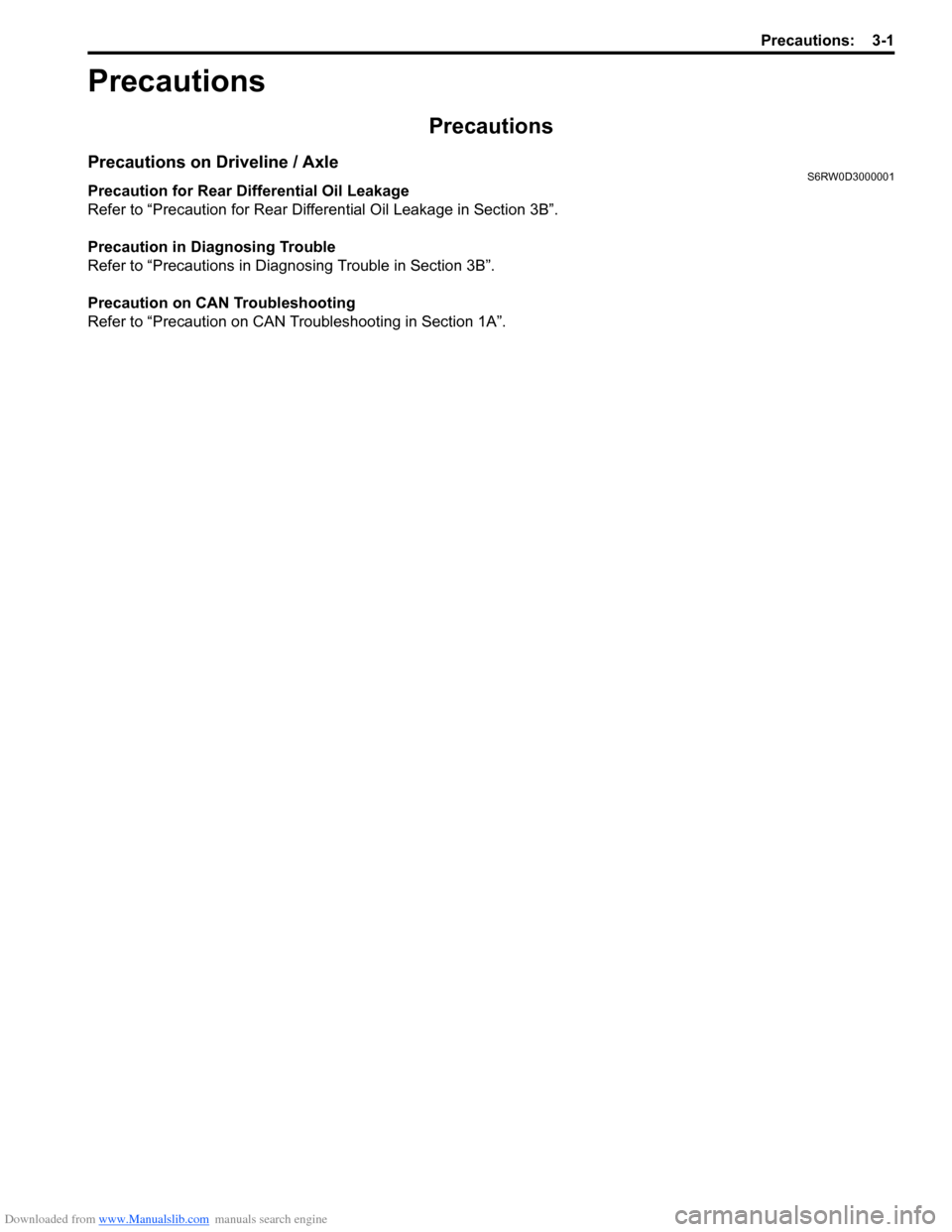
Downloaded from www.Manualslib.com manuals search engine Precautions: 3-1
Driveline / Axle
Precautions
Precautions
Precautions on Driveline / AxleS6RW0D3000001
Precaution for Rear Differential Oil Leakage
Refer to “Precaution for Rear Differential Oil Leakage in Section 3B”.
Precaution in Diagnosing Trouble
Refer to “Precautions in Diagnosing Trouble in Section 3B”.
Precaution on CAN Troubleshooting
Refer to “Precaution on CAN Troubleshooting in Section 1A”.