instrument SUZUKI XL7 2007 2.G User Guide
[x] Cancel search | Manufacturer: SUZUKI, Model Year: 2007, Model line: XL7, Model: SUZUKI XL7 2007 2.GPages: 274, PDF Size: 6.12 MB
Page 51 of 274
1-39 SEATS AND RESTRAINT SYSTEMS
78J00-03E
In many crashes severe enough to inflate
the airbag, windshields are broken by vehi-
cle deformation. Additional windshield
breakage may also occur from the right
front passenger airbag.
Airbags are designed to inflate only
once. After an airbag inflates, you will
need some new parts for your airbag
system. If you do not get them, the air-
bag system will not be there to help pro-
tect you in another crash. A new system
will include airbag modules and possibly
other parts. The service manual for your
vehicle covers the need to replace other
parts.
Your vehicle has a crash sensing and
diagnostic module which records infor-
mation after a crash.
Let only qualified technicians work on
the airbag system. Improper service can
mean that an airbag system will not work
properly. See your dealer for service.Passenger Sensing SystemYour vehicle has a passenger sensing sys-
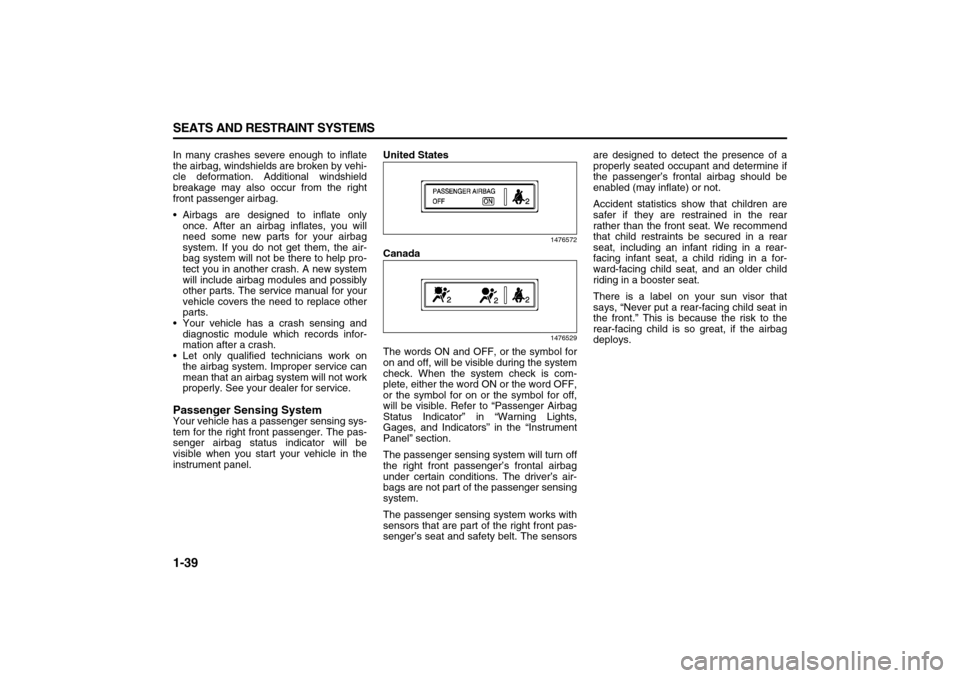
tem for the right front passenger. The pas-
senger airbag status indicator will be
visible when you start your vehicle in the
instrument panel.United States
1476572
Canada
1476529
The words ON and OFF, or the symbol for
on and off, will be visible during the system
check. When the system check is com-
plete, either the word ON or the word OFF,
or the symbol for on or the symbol for off,
will be visible. Refer to “Passenger Airbag
Status Indicator” in “Warning Lights,
Gages, and Indicators” in the “Instrument
Panel” section.
The passenger sensing system will turn off
the right front passenger’s frontal airbag
under certain conditions. The driver’s air-
bags are not part of the passenger sensing
system.
The passenger sensing system works with
sensors that are part of the right front pas-
senger’s seat and safety belt. The sensorsare designed to detect the presence of a
properly seated occupant and determine if
the passenger’s frontal airbag should be
enabled (may inflate) or not.
Accident statistics show that children are
safer if they are restrained in the rear
rather than the front seat. We recommend
that child restraints be secured in a rear
seat, including an infant riding in a rear-
facing infant seat, a child riding in a for-
ward-facing child seat, and an older child
riding in a booster seat.
There is a label on your sun visor that
says, “Never put a rear-facing child seat in
the front.” This is because the risk to the
rear-facing child is so great, if the airbag
deploys.
Page 53 of 274

1-41 SEATS AND RESTRAINT SYSTEMS
78J00-03E
If, after reinstalling the child restraint and
restarting the vehicle, the on indicator is
still lit, check to make sure that the vehi-
cle’s seatback is not pressing the child
restraint into the seat cushion. If this hap-
pens, slightly recline the vehicle’s seatback
and adjust the seat cushion if possible.
Also make sure the child restraint is not
trapped under the vehicle head restraint. If
this happens, adjust the head restraint.
If the on indicator is still lit, secure the child
in the child restraint in a rear seat position
in the vehicle if one is available and check
with your dealer.
The passenger sensing system is
designed to enable (may inflate) the right
front passenger’s frontal airbag anytime
the system senses that a person of adult
size is sitting properly in the right front pas-
senger’s seat. When the passenger sens-
ing system has allowed the airbag to be
enabled, the on indicator will light and stay
lit to remind you that the airbag is active.
For some children who have outgrown
child restraints and for very small adults,
the passenger sensing system may or may
not turn off the right front passenger’s fron-
tal airbag, depending upon the person’s
seating posture and body build. Everyone
in your vehicle who has outgrown child
restraints should wear a safety belt prop-
erly – whether or not there is an airbag for
that person.If a person of adult-size is sitting in the
right front passenger’s seat, but the off
indicator is lit, it could be because that per-
son is not sitting properly in the seat. If this
happens, turn the vehicle off and ask the
person to place the seatback in the fully
upright position, then sit upright in the seat,
centered on the seat cushion, with the per-
son’s legs comfortably extended. Restart
the vehicle and have the person remain in
this position for about two minutes. This
will allow the system to detect that person
and then enable the passenger’s airbag.
849515
A thick layer of additional material, such as
a blanket, or aftermarket equipment such
as seat covers, seat heaters, and seat
massagers, can affect how well the pas-
senger sensing system operates. Remove
any additional material from the seat cush-
ion before reinstalling or securing the child
restraint and before a small occupant,
including a small adult, sits in the passen-
ger position. You may want to consider not
using seat covers or other aftermarket
equipment. Refer to “Adding Equipment to
Your Airbag-Equipped Vehicle” in this sec-
tion for more information about modifica-
tions that can affect how the system
operates.
WARNING
If the airbag readiness light in the
instrument panel cluster ever comes
on and stays on, it means that some-
thing may be wrong with the airbag
system. If this ever happens, have
the vehicle serviced promptly,
because an adult-size person sitting
in the right front passenger’s seat
may not have the protection of the
frontal airbag. Refer to “Airbag
Readiness Light” in “Warning Lights,
Gages, and Indicators” in the “Instru-
ment Panel” section for more on this,
including important safety informa-
tion.
Page 54 of 274

1-42 SEATS AND RESTRAINT SYSTEMS
78J00-03E
Servicing Your Airbag-Equipped
VehicleAirbags affect how your vehicle should be
serviced. There are parts of the airbag
system in several places around your vehi-
cle. You do not want the system to inflate
while someone is working on your vehicle.
Your dealer and the service manual have
information about servicing your vehicle
and the airbag system.
The airbag system does not need regular
maintenance.
Adding Equipment to Your Airbag-
Equipped VehicleQuestion:
Is there anything I might add to the front
or sides of the vehicle that could keep
the airbags from working properly?
Answer:
Yes. If you add things that change your
vehicle’s frame, bumper system, height,
front end or side sheet metal, they may
keep the airbag system from working prop-
erly. Also, the airbag system may not work
properly if you relocate any of the airbag
sensors. If you have any questions about
this, you should contact Customer Assis-
tance before you modify your vehicle.
Question:
Because I have a disability, I have to get
my vehicle modified. How can I find out
whether this will affect my airbag sys-
tem?
Answer:
Changing or moving any parts of the front
seats, safety belts, the airbag sensing and
diagnostic module, rollover sensor module,
steering wheel, instrument panel, over-
head console, ceiling headliner, ceiling
and pillar garnish trim, roof-mounted roll-
over airbag modules, or airbag wiring can
affect the operation of the airbag system. If
you have questions, call Customer Assis-
tance.
Restraint System CheckChecking the Restraint SystemsNow and then, make sure the safety belt
reminder light and all your belts, buckles,
latch plates, retractors and anchorages are
working properly. Look for any other loose
or damaged safety belt system parts. If you
see anything that might keep a safety belt
system from doing its job, have it repaired.
Keep safety belts clean and dry. Refer to
“Care of Safety Belts” in “Appearance
Care” in the “Service and Appearance
Care” section for more information.
Torn or frayed safety belts may not protect
you in a crash. They can rip apart under
impact forces. If a belt is torn or frayed, get
a new one right away.
Also look for any opened or broken airbag
covers, and have them repaired or
replaced. The airbag system does not
need regular maintenance.
WARNING
Stowing of articles under the passen-
ger’s seat or between the passen-
ger’s seat cushion and seatback may
interfere with the proper operation of
the passenger sensing system.
WARNING
For up to 10 seconds, after the igni-
tion is turned off and the battery is
disconnected, an airbag can still
inflate during improper service. You
can be injured if you are close to an
airbag when it inflates. Avoid yellow
connectors. They are probably part of
the airbag system. Be sure to follow
proper service procedures, and make
sure the person performing work for
you is qualified to do so.
Page 55 of 274

1-43 SEATS AND RESTRAINT SYSTEMS
78J00-03E
Replacing Restraint System Parts
After a Crash
If you have had a crash, do you need new
belts or LATCH system parts?
After a very minor collision, nothing may be
necessary. But if the belts were stretched,
as they would be if worn during a more
severe crash, then you need new parts.
If the LATCH system was being used dur-
ing a more severe crash, you may need
new LATCH system parts.
If belts are cut or damaged, replace them.
Collision damage also may mean you will
need to have LATCH system, safety belt or
seat parts repaired or replaced. New parts
and repairs may be necessary even if the
belt or LATCH system was not being used
at the time of the collision.
If an airbag inflates, you will need to
replace airbag system parts. See the part
on the airbag system earlier in this section.
If the frontal airbags inflate you will also
need to replace the driver and front pas-
senger’s safety belt retractor assembly. Be
sure to do so. Then the new retractor
assembly will be there to help protect you
in a collision.
After a crash you may need to replace the
driver and front passenger’s safety belt
retractor assemblies, even if the frontal air-
bags have not deployed. The driver and
front passenger’s safety belt retractor
assemblies contain the safety belt preten-
sioners. Have your safety belt pretension-
ers checked if your vehicle has been in acollision, or if your airbag readiness light
stays on after you start your vehicle or
while you are driving. Refer to “Airbag
Readiness Light” in “Warning Lights,
Gages, and Indicators” in the “Instrument
Panel” section.
CAUTION
If you damage the covering for the
driver’s or the right front passenger’s
airbag, or the side impact airbag cov-
ering on the ceiling near the side win-
dows, the airbag may not work
properly. You may have to replace the
airbag module in the steering wheel,
both the airbag module and the
instrument panel for the right front
passenger’s airbag, or side impact
airbag module and ceiling covering
for roof-mounted rollover airbags. Do
not open or break the airbag cover-
ings.
WARNING
A crash can damage the restraint
systems in your vehicle. A damaged
restraint system may not properly
protect the person using it, resulting
in serious injury or even death in a
crash. To help make sure your
restraint systems are working prop-
erly after a crash, have them
inspected and any necessary
replacements made as soon as pos-
sible.
Page 58 of 274
2-2 FEATURES AND CONTROLS
78J00-03E
Remote Keyless Entry (RKE)
System OperationThe vehicle’s doors can be locked and
unlocked from about 3 feet (1 m) up to 65
feet (20 m) away with the Remote Keyless
Entry (RKE) transmitter.
If your vehicle has the remote start feature
you can also start your vehicle with the
RKE transmitter. Your RKE transmitter,
with the remote start button, provides an
increased range of 195 feet (60 m) away.
However, the range may be less while the
vehicle is running. As a result, you may
need to be closer to your vehicle to turn it
off than you were to turn it on.
There are other conditions which can
affect the performance of the transmitter.
Refer to “Remote Keyless Entry (RKE)
System” in this section.Remote Keyless Entry with
Remote Start
1686604
Remote Keyless Entry without Remote
Start
1686606
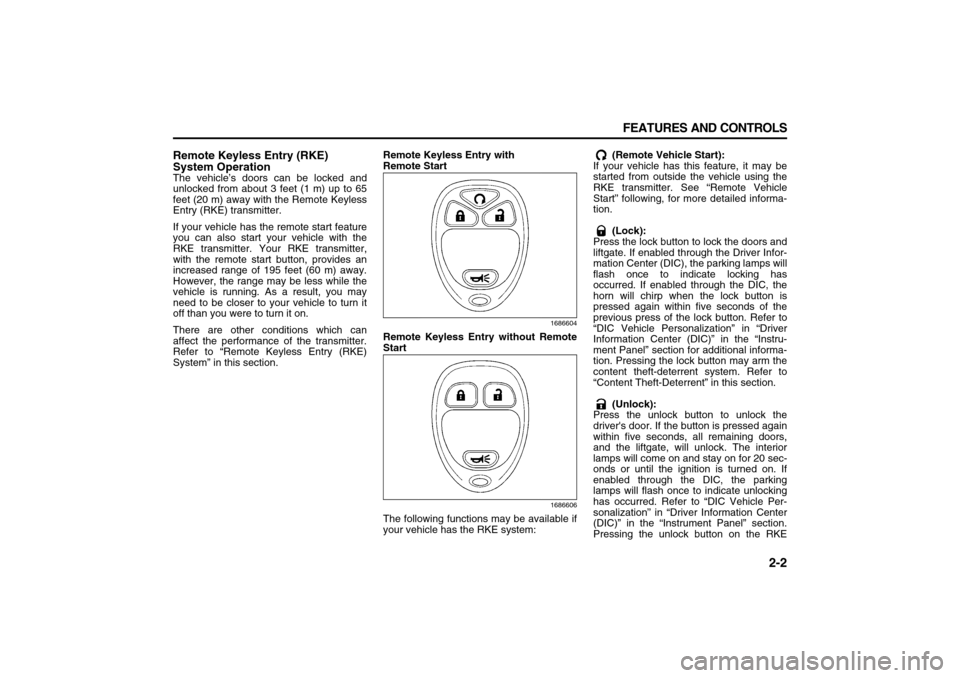
The following functions may be available if
your vehicle has the RKE system: (Remote Vehicle Start):
If your vehicle has this feature, it may be
started from outside the vehicle using the
RKE transmitter. See “Remote Vehicle
Start” following, for more detailed informa-
tion.
(Lock):
Press the lock button to lock the doors and
liftgate. If enabled through the Driver Infor-
mation Center (DIC), the parking lamps will
flash once to indicate locking has
occurred. If enabled through the DIC, the
horn will chirp when the lock button is
pressed again within five seconds of the
previous press of the lock button. Refer to
“DIC Vehicle Personalization” in “Driver
Information Center (DIC)” in the “Instru-
ment Panel” section for additional informa-
tion. Pressing the lock button may arm the
content theft-deterrent system. Refer to
“Content Theft-Deterrent” in this section.
(Unlock):
Press the unlock button to unlock the
driver's door. If the button is pressed again
within five seconds, all remaining doors,
and the liftgate, will unlock. The interior
lamps will come on and stay on for 20 sec-
onds or until the ignition is turned on. If
enabled through the DIC, the parking
lamps will flash once to indicate unlocking
has occurred. Refer to “DIC Vehicle Per-
sonalization” in “Driver Information Center
(DIC)” in the “Instrument Panel” section.
Pressing the unlock button on the RKE
Page 59 of 274
2-3 FEATURES AND CONTROLS
78J00-03E
transmitter will disarm the content theft-
deterrent system. Refer to “Content Theft-
Deterrent” in this section.
(Vehicle Locator/Panic Alarm):
Press and release this button to locate
your vehicle. The turn signal lamps will
flash and the horn will sound three times.
Press and hold this button for more than
two seconds to activate the panic alarm.
The turn signal lamps will flash and the
horn will sound repeatedly for 30 seconds.
The alarm will turn off when the ignition is
moved to RUN or the alarm button is
pressed again. The ignition must be in
LOCK for the panic alarm to work.
The RKE transmitter is used to arm/disarm
the content theft-deterrent system. Your
vehicle’s theft-deterrent system can be
programmed to three different modes.
Refer to “Content Theft-Deterrent” in this
section.
If you accidentally set off the alarm when
entering or exiting the vehicle, you can
shut it off by pressing the lock or unlock
button once or the panic alarm button
twice.
Matching Transmitter(s) to Your Vehicle
Each RKE transmitter is coded to prevent
another transmitter from unlocking your
vehicle. If a transmitter is lost or stolen, a
replacement can be purchased through
your dealer. Remember to bring any addi-
tional transmitters so they can also be re-coded to match the new transmitter. Once
your dealer has coded the new transmitter,
the lost transmitter will not unlock your
vehicle. The vehicle can have a maximum
of four transmitters matched to it. Or, refer
to “Relearn Remote Key” under “DIC Oper-
ation and Displays” in “Driver Information
Center (DIC)” in the “Instrument Panel”
section for instructions on how to match
RKE transmitters to your vehicle.
Battery Replacement
Under normal use, the battery in your RKE
transmitter should last about four years.
The battery is weak if the transmitter will
not work at the normal range in any loca-
tion. If you have to get close to your vehi-
cle before the transmitter works, it is
probably time to change the battery.
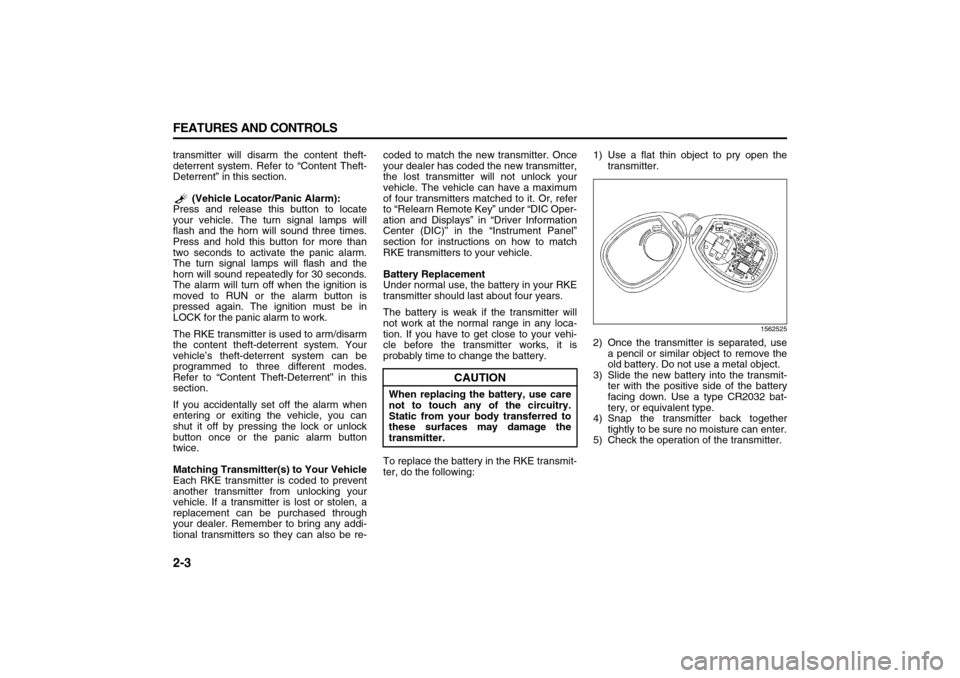
To replace the battery in the RKE transmit-
ter, do the following:1) Use a flat thin object to pry open the
transmitter.
1562525
2) Once the transmitter is separated, use
a pencil or similar object to remove the
old battery. Do not use a metal object.
3) Slide the new battery into the transmit-
ter with the positive side of the battery
facing down. Use a type CR2032 bat-
tery, or equivalent type.
4) Snap the transmitter back together
tightly to be sure no moisture can enter.
5) Check the operation of the transmitter.
CAUTION
When replacing the battery, use care
not to touch any of the circuitry.
Static from your body transferred to
these surfaces may damage the
transmitter.
Page 60 of 274

2-4 FEATURES AND CONTROLS
78J00-03E
Remote Vehicle StartYour vehicle may have the remote start
feature. This feature allows you to start the
engine from outside the vehicle. Refer to
“REMOTE START” under “DIC Vehicle
Personalization” in “Driver Information
Center (DIC)” in the “Instrument Panel”
section for instructions on how to enable
and disable this feature.
During a remote start, the climate control
system will turn on at the fan, temperature,
and mode settings the vehicle was set to
when the vehicle was last turned off and
will also turn on the rear window defogger.
Laws in some local communities may
restrict the use of remote starters. For
example, some laws may require a person
using remote start to have the vehicle in
view when doing so. Check local regula-
tions for any requirements on remote start-
ing of vehicles.
(Remote Vehicle Start):
Press and release the lock button and then
press and hold the remote start button to
start the vehicle.
Your RKE transmitter, with the remote start
button, provides an increased range of
operation. However, the range may be less
while the vehicle is running. As a result,
you may need to be closer to your vehicle
to turn it off, than you were to turn it on.If your vehicle is low on fuel, do not use the
remote start feature. The vehicle may run
out of fuel.
To start the engine using the remote start
feature, do the following:
1) Aim the RKE transmitter, that has a
remote vehicle start button, at the vehi-
cle.
2) Press and release the transmitter’s lock
button, then immediately press and
hold the remote vehicle start button
until the vehicle’s turn signal lamps
flash, or for at least four seconds, if the
vehicle’s lights are not visible. The vehi-
cle’s doors will be locked. Pressing the
remote start button again after the vehi-
cle has started will turn off the ignition.
3) When the vehicle’s engine starts, the
parking lamps will turn on and remain
on while the engine is running.
4) If it is your first remote start since last
driving, repeat these steps while the
engine is still running for a 10 minute
time extension.
When you enter the vehicle during a
remote start, and the engine is still running,
turn the key to the RUN position to drive
the vehicle
.After a remote start, the engine will auto-
matically shut off after 10 minutes unless a
time extension has been done or the vehi-
cle’s key is inserted into the ignition switch
and turned to RUN.The maximum number of remote starts or
remote start attempts between ignition
cycles with the key is two.
If the remote start procedure is used again
before the first 10 minute time frame has
ended, the first 10 minutes will immediately
expire and the second 10 minute time
frame will start.
For example, if the lock button and then
the remote start buttons are pressed again
after the vehicle has been running for five
minutes, 10 minutes are added, allowing
the engine to run for 15 minutes.
After your vehicle’s engine has been
started two times using the remote vehicle
start button, the vehicle’s ignition switch
must be turned to RUN and then back to
LOCK using the key before the remote
start procedure can be used again.
If you enter the vehicle after a remote start,
and the engine is running, insert the key
into the ignition switch and turn it to the
RUN position to drive the vehicle.
To manually shut off the engine after a
remote start, do any of the following:
Aim the RKE transmitter at the vehicle
and press the remote start button until
the parking lamps turn off.
Turn on the hazard warning flashers.
Insert the vehicle’s key into the ignition
switch and turn the switch to RUN and
then back to LOCK.
Page 61 of 274

2-5 FEATURES AND CONTROLS
78J00-03E
The remote vehicle start feature will not
operate if:
The vehicle’s key is in the ignition.
The vehicle’s hood, liftgate or doors are
not closed.
The hazard warning flashers are on.
There is an emission control system
malfunction.
The engine coolant temperature is too
high.
The oil pressure is low.
Two remote vehicle starts have already
been used. The maximum number of
remote starts or remote start attempts
between ignition cycles with the key is
two.
Vehicles that have the remote vehicle start
feature are shipped from the factory with
the remote vehicle start system enabled.
The system may be enabled or disabled
through the DIC. Refer to “REMOTE
START” under “DIC Vehicle Personaliza-
tion” in “Driver Information Center (DIC)” in
the “Instrument Panel” section for addi-
tional information.
Doors and LocksDoor LocksThere are a couple of ways to manually
lock or unlock your vehicle.
From the outside, use the key in the
driver’s door.
From the inside, use the lock control on the
door.
Power Door LocksThe power door lock switches are located
on the driver’s and front passenger’s
doors.
(Unlock):
To unlock the doors, press the unlock sym-
bol.
(Lock):
Remove the ignition key and press the lock
symbol to lock all of the doors.
WARNING
Unlocked doors can be dangerous.
Passengers, especially children,
can easily open the doors and fall
out of a moving vehicle. When a
door is locked, the handle will not
open it. You increase the chance of
being thrown out of the vehicle in a
crash if the doors are not locked.
So, wear safety belts properly and
lock the doors whenever you drive.
Young children who get into
unlocked vehicles may be unable
to get out. A child can be overcome
by extreme heat and can suffer per-
manent injuries or even death from
heat stroke. Always lock your vehi-
cle whenever you leave it.
Outsiders can easily enter through
an unlocked door when you slow
down or stop your vehicle. Locking
your doors can help prevent this
from happening.
Page 62 of 274
2-6 FEATURES AND CONTROLS
78J00-03E
Delayed LockingA chime will sound three times to indicate
a door or liftgate is open when you try to
lock the doors with the remote keyless
entry (RKE) transmitter or the power door
lock switch. The doors will not lock, and
the theft-deterrent system will not arm until
all the doors are closed and ten seconds
have passed.
The delayed locking feature can be pro-
grammed through the Driver Information
Center (DIC). Refer to “DIC Vehicle Per-
sonalization” in “Driver Information Center
(DIC)” in the “Instrument Panel” section.Programmable Automatic Door
LocksYour vehicle has an automatic lock/unlock
feature which enables you to program the
power door locks through the Driver Infor-
mation Center (DIC). Refer to “DIC Vehicle
Personalization” in “Driver Information
Center (DIC)” in the “Instrument Panel”
section for more information on DIC pro-
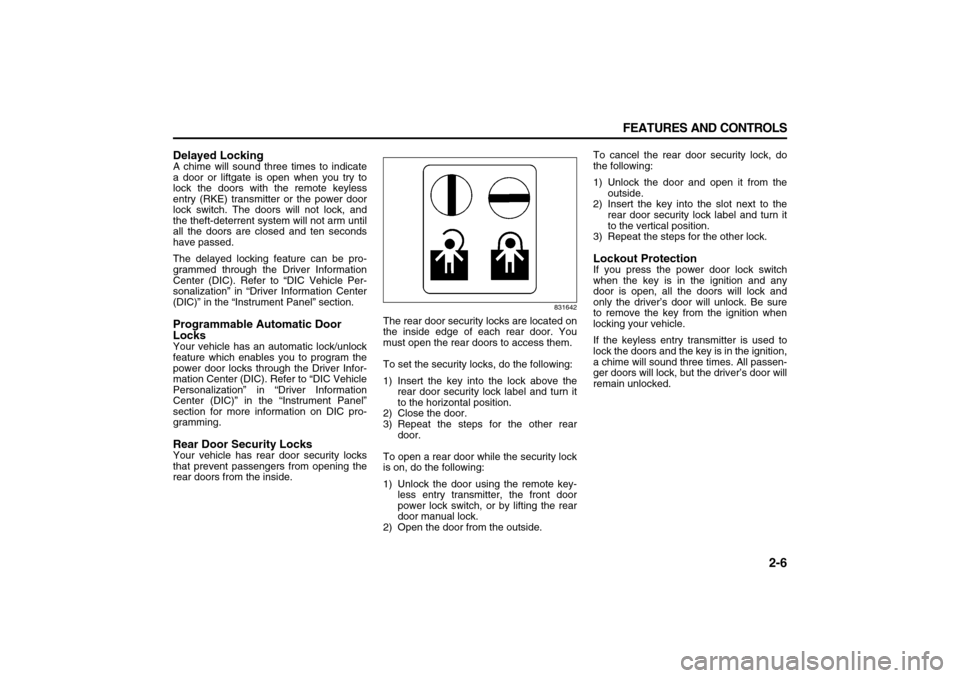
gramming.Rear Door Security LocksYour vehicle has rear door security locks
that prevent passengers from opening the
rear doors from the inside.
831642
The rear door security locks are located on
the inside edge of each rear door. You
must open the rear doors to access them.
To set the security locks, do the following:
1) Insert the key into the lock above the
rear door security lock label and turn it
to the horizontal position.
2) Close the door.
3) Repeat the steps for the other rear
door.
To open a rear door while the security lock
is on, do the following:
1) Unlock the door using the remote key-
less entry transmitter, the front door
power lock switch, or by lifting the rear
door manual lock.
2) Open the door from the outside.To cancel the rear door security lock, do
the following:
1) Unlock the door and open it from the
outside.
2) Insert the key into the slot next to the
rear door security lock label and turn it
to the vertical position.
3) Repeat the steps for the other lock.
Lockout ProtectionIf you press the power door lock switch
when the key is in the ignition and any
door is open, all the doors will lock and
only the driver’s door will unlock. Be sure
to remove the key from the ignition when
locking your vehicle.
If the keyless entry transmitter is used to
lock the doors and the key is in the ignition,
a chime will sound three times. All passen-
ger doors will lock, but the driver’s door will
remain unlocked.
Page 63 of 274
2-7 FEATURES AND CONTROLS
78J00-03E
LiftgateTo unlock the liftgate, press the unlock but-
ton on the Remote Keyless Entry (RKE)
transmitter twice or use the power door
lock switch.
To lock the liftgate, press the lock button
on the RKE transmitter or use the power
door lock switch. The liftgate does not
have a key lock cylinder.To open the liftgate, pull up on the handle
located in the center of the liftgate.
When closing the liftgate, use the molded
handles to pull the liftgate down. Push the
liftgate closed until it latches.
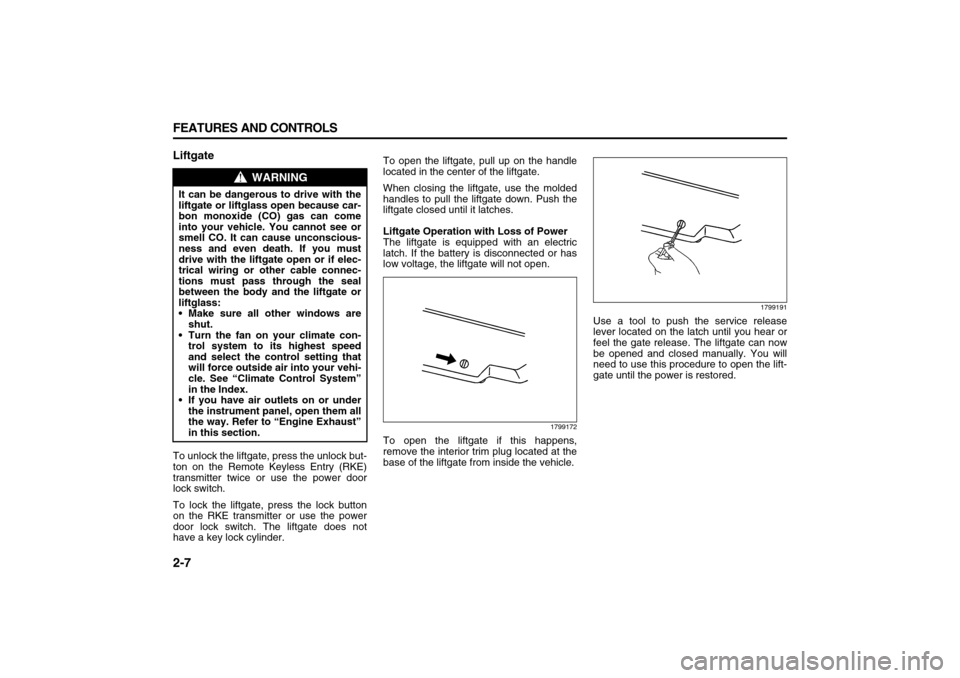
Liftgate Operation with Loss of Power
The liftgate is equipped with an electric
latch. If the battery is disconnected or has
low voltage, the liftgate will not open.
1799172
To open the liftgate if this happens,
remove the interior trim plug located at the
base of the liftgate from inside the vehicle.
1799191
Use a tool to push the service release
lever located on the latch until you hear or
feel the gate release. The liftgate can now
be opened and closed manually. You will
need to use this procedure to open the lift-
gate until the power is restored.
WARNING
It can be dangerous to drive with the
liftgate or liftglass open because car-
bon monoxide (CO) gas can come
into your vehicle. You cannot see or
smell CO. It can cause unconscious-
ness and even death. If you must
drive with the liftgate open or if elec-
trical wiring or other cable connec-
tions must pass through the seal
between the body and the liftgate or
liftglass:
Make sure all other windows are
shut.
Turn the fan on your climate con-
trol system to its highest speed
and select the control setting that
will force outside air into your vehi-
cle. See “Climate Control System”
in the Index.
If you have air outlets on or under
the instrument panel, open them all
the way. Refer to “Engine Exhaust”
in this section.