pressure TESLA MODEL 3 2022 Owner´s Manual
[x] Cancel search | Manufacturer: TESLA, Model Year: 2022, Model line: MODEL 3, Model: TESLA MODEL 3 2022Pages: 248, PDF Size: 7.76 MB
Page 57 of 248
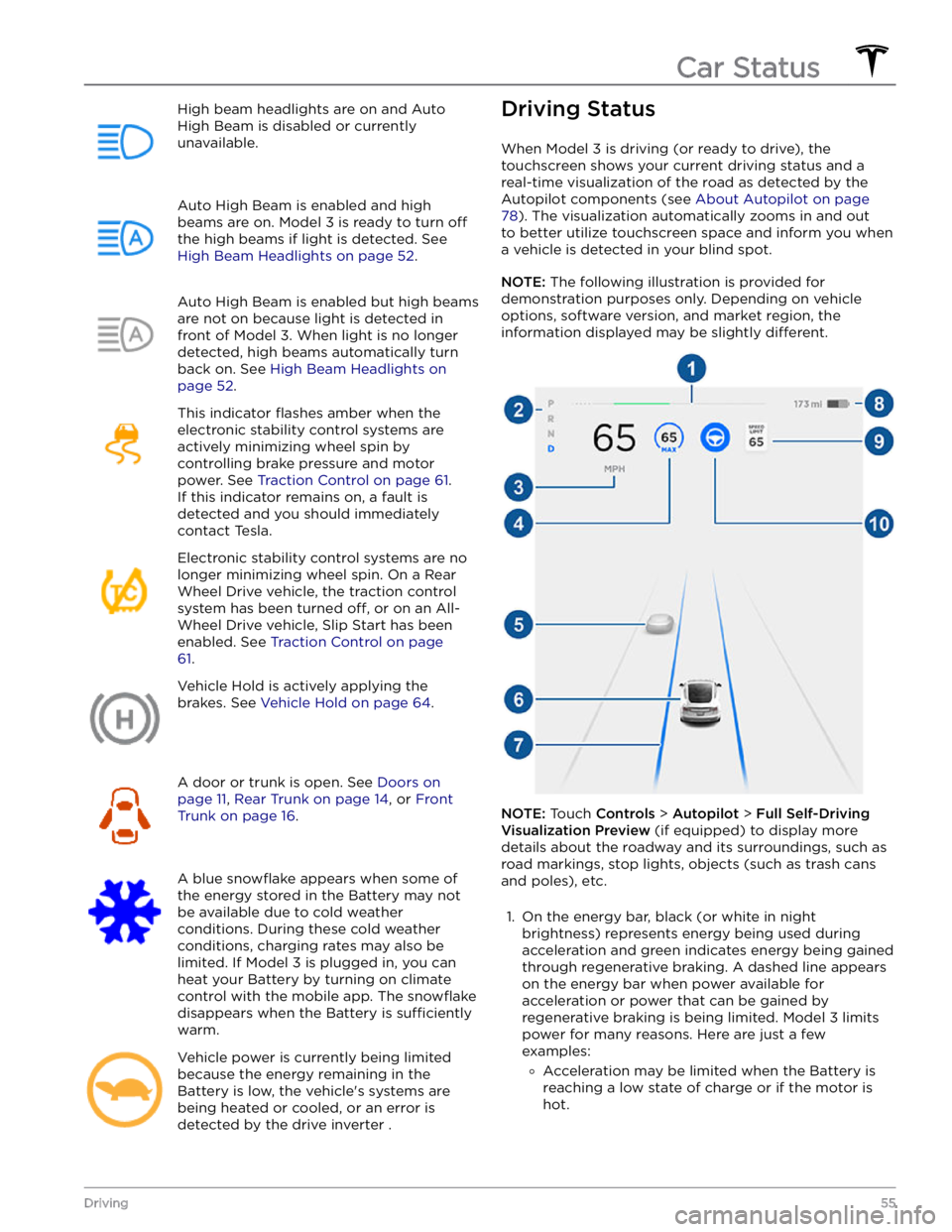
High beam headlights are on and Auto
High Beam is disabled or currently
unavailable.Auto High Beam is enabled and high
beams are on.
Model 3 is ready to turn off
the high beams if light is detected. See
High Beam Headlights on page 52.
Auto High Beam is enabled but high beams
are not on because light is detected in front of
Model 3. When light is no longer
detected, high beams automatically turn
back on. See
High Beam Headlights on
page 52.
This indicator flashes amber when the
electronic stability control systems are actively minimizing wheel spin by
controlling brake pressure and motor
power. See
Traction Control on page 61.
If this indicator remains on, a fault is detected and you should immediately contact Tesla.
Electronic stability control systems are no longer minimizing wheel spin. On a Rear Wheel Drive vehicle, the traction control system has been turned
off, or on an All-
Wheel Drive vehicle, Slip Start has been
enabled. See
Traction Control on page
61.
Vehicle Hold is actively applying the brakes. See
Vehicle Hold on page 64.
A door or trunk is open. See Doors on
page 11, Rear Trunk on page 14, or Front
Trunk on page 16.
A blue snowflake appears when some of
the energy stored in the Battery may not be available due to cold weather
conditions. During these cold weather
conditions, charging rates may also be limited. If
Model 3 is plugged in, you can
heat your Battery by turning on climate control with the mobile app. The
snowflake
disappears when the Battery is sufficiently
warm.
Vehicle power is currently being limited
because the energy remaining in the
Battery is low, the vehicle
Page 60 of 248
Braking SystemsWARNING: Properly functioning braking systems
are critical to ensure safety. If you experience a
problem with the brake pedal, brake calipers, or
any component of a Model 3 braking system,
contact Tesla immediately.
Model 3 has an anti-lock braking system (ABS) that
prevents the wheels from locking when you apply
maximum brake pressure. This improves steering control
during heavy braking in most road conditions.
During emergency braking conditions, the ABS
constantly monitors the speed of each wheel and varies
the brake pressure according to the grip available.
The alteration of brake pressure can be felt as a pulsing sensation through the brake pedal. This demonstrates that the ABS is operating and is not a cause for concern. Keep
firm and steady pressure on the brake pedal while
experiencing the pulsing.
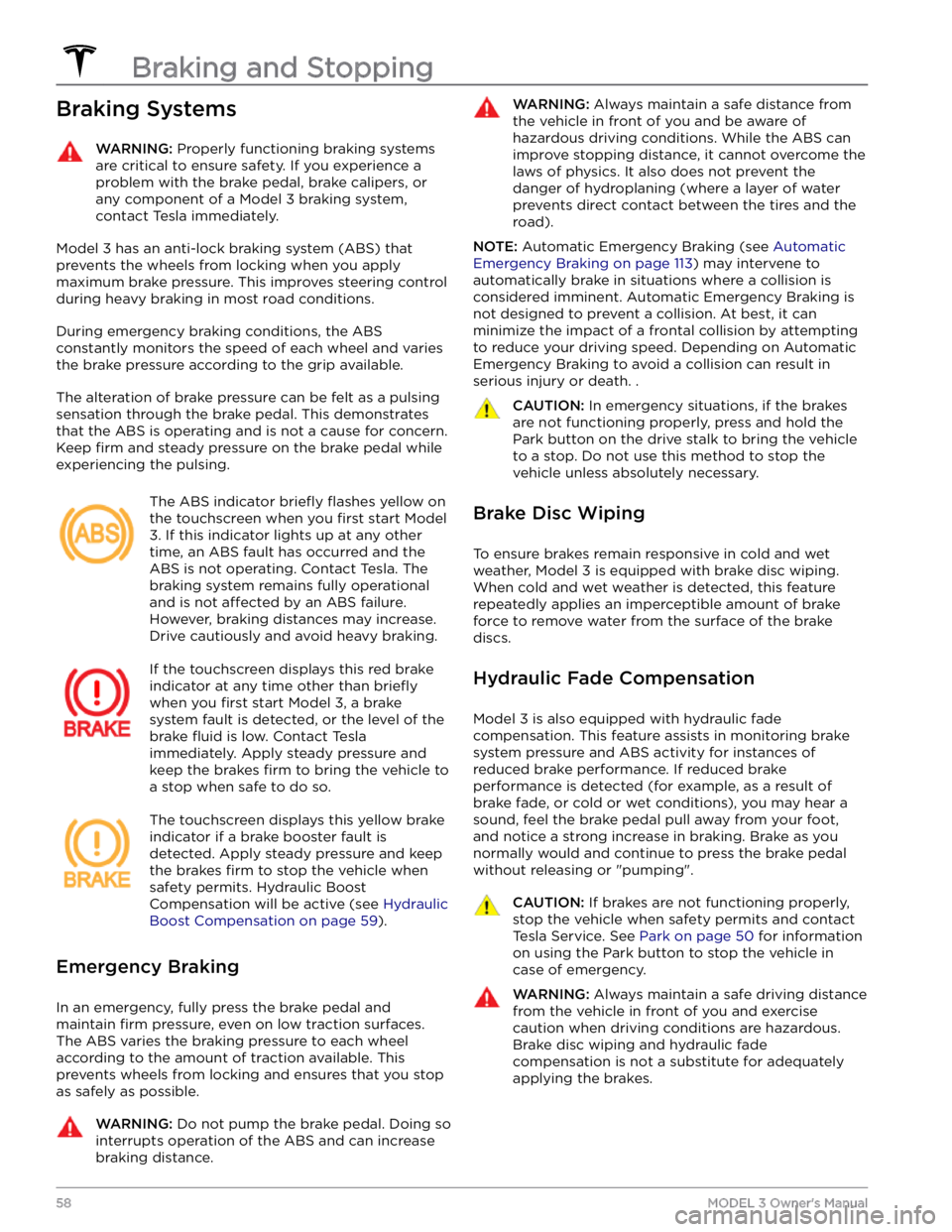
The ABS indicator briefly flashes yellow on
the
touchscreen when you first start Model
3. If this indicator lights up at any other
time, an ABS fault has occurred and the ABS is not operating. Contact Tesla. The
braking system remains fully operational
and is not
affected by an ABS failure.
However, braking distances may increase. Drive cautiously and avoid heavy braking.
If the touchscreen displays this red brake
indicator at any time other than
briefly
when you first start Model 3, a brake
system fault is detected, or the level of the
brake
fluid is low. Contact Tesla
immediately. Apply steady pressure and
keep the brakes
firm to bring the vehicle to
a stop when safe to do so.
The touchscreen displays this yellow brake
indicator if a brake booster fault is detected. Apply steady pressure and keep
the brakes
firm to stop the vehicle when
safety permits. Hydraulic Boost
Compensation will be active (see
Hydraulic
Boost Compensation on page 59).
Emergency Braking
In an emergency, fully press the brake pedal and
maintain
firm pressure, even on low traction surfaces.
The ABS varies the braking pressure to each wheel according to the amount of traction available. This prevents wheels from locking and ensures that you stop as safely as possible.
WARNING: Do not pump the brake pedal. Doing so
interrupts operation of the ABS and can increase
braking distance.
WARNING: Always maintain a safe distance from
the vehicle in front of you and be aware of
hazardous driving conditions. While the ABS can
improve stopping distance, it cannot overcome the
laws of physics. It also does not prevent the
danger of hydroplaning (where a layer of water
prevents direct contact between the tires and the
road).
NOTE: Automatic Emergency Braking (see Automatic
Emergency Braking on page 113) may intervene to
automatically brake in situations where a collision is considered imminent. Automatic Emergency Braking is
not designed to prevent a collision. At best, it can
minimize the impact of a frontal collision by attempting to reduce your driving speed. Depending on Automatic
Emergency Braking to avoid a collision can result in serious injury or death. .
CAUTION: In emergency situations, if the brakes
are not functioning properly, press and hold the
Park button on the drive stalk to bring the vehicle
to a stop. Do not use this method to stop the
vehicle unless absolutely necessary.
Brake Disc Wiping
To ensure brakes remain responsive in cold and wet
weather,
Model 3 is equipped with brake disc wiping.
When cold and wet weather is detected, this feature repeatedly applies an imperceptible amount of brake force to remove water from the surface of the brake discs.
Hydraulic Fade Compensation
Model 3 is also equipped with hydraulic fade
compensation. This feature assists in monitoring brake system pressure and ABS activity for instances of reduced brake performance. If reduced brake
performance is detected (for example, as a result of
brake fade, or cold or wet conditions), you may hear a sound, feel the brake pedal pull away from your foot, and notice a strong increase in braking. Brake as you
normally would and continue to press the brake pedal
without releasing or "pumping".
CAUTION: If brakes are not functioning properly,
stop the vehicle when safety permits and contact
Tesla Service. See Park on page 50 for information
on using the Park button to stop the vehicle in
case of emergency.
WARNING: Always maintain a safe driving distance
from the vehicle in front of you and exercise
caution when driving conditions are hazardous.
Brake disc wiping and hydraulic fade
compensation is not a substitute for adequately
applying the brakes.
Braking and Stopping
58MODEL 3 Owner
Page 63 of 248
How It Works
The traction control system constantly monitors the speed of the front and rear wheels. If
Model 3
experiences a loss of traction, the system minimizes wheel spin by controlling brake pressure and motor power. By default, the traction control system is on. Under normal conditions, it should remain on to ensure
maximum safety.
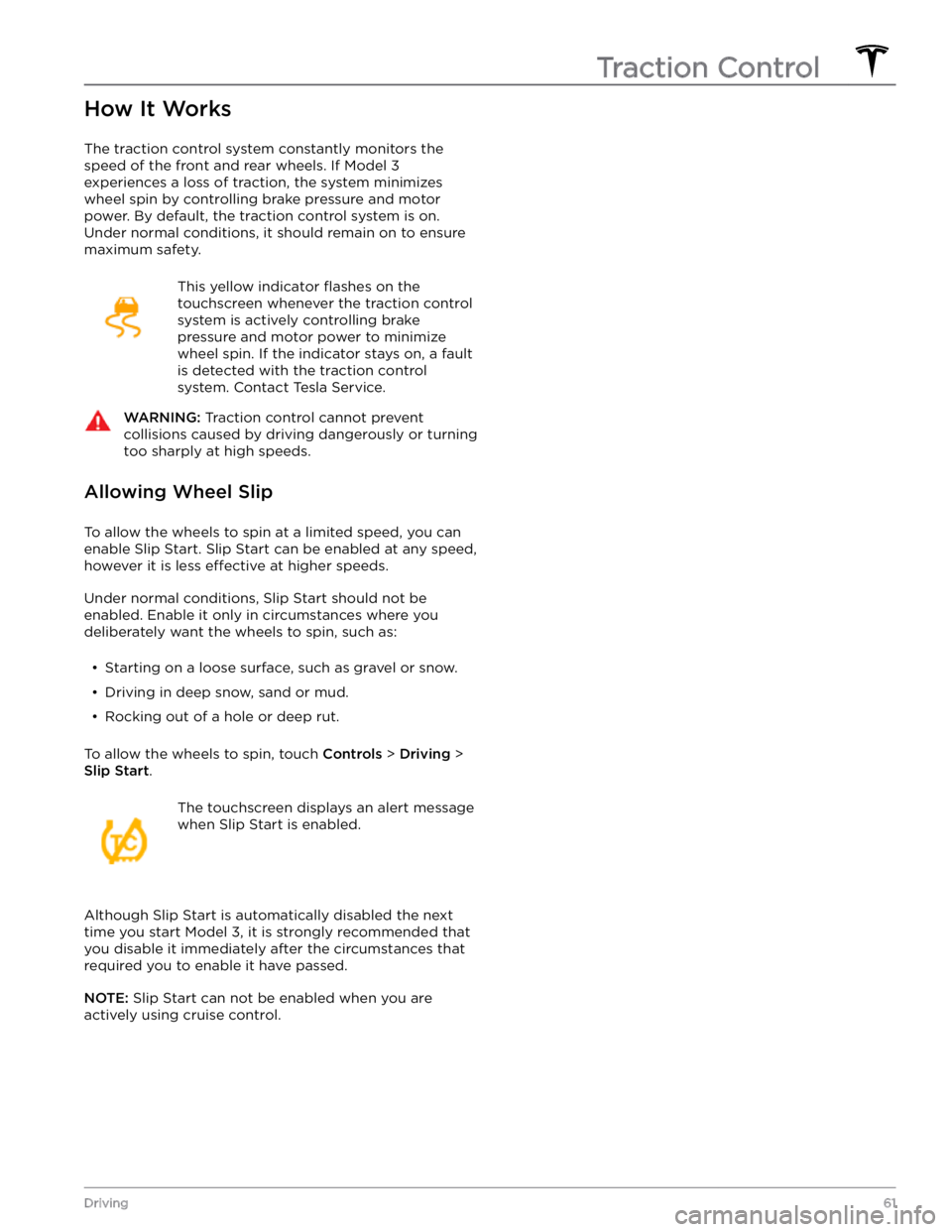
This yellow indicator flashes on the
touchscreen whenever the traction control
system is actively controlling brake
pressure and motor power to minimize wheel spin. If the indicator stays on, a fault is detected with the traction control system. Contact Tesla Service.
WARNING: Traction control cannot prevent
collisions caused by driving dangerously or turning
too sharply at high speeds.
Allowing Wheel Slip
To allow the wheels to spin at a limited speed, you can
enable Slip Start.
Slip Start can be enabled at any speed,
however it is less effective at higher speeds.
Under normal conditions, Slip Start should not be enabled. Enable it only in circumstances where you deliberately want the wheels to spin, such as:
Page 64 of 248
How Park Assist Works
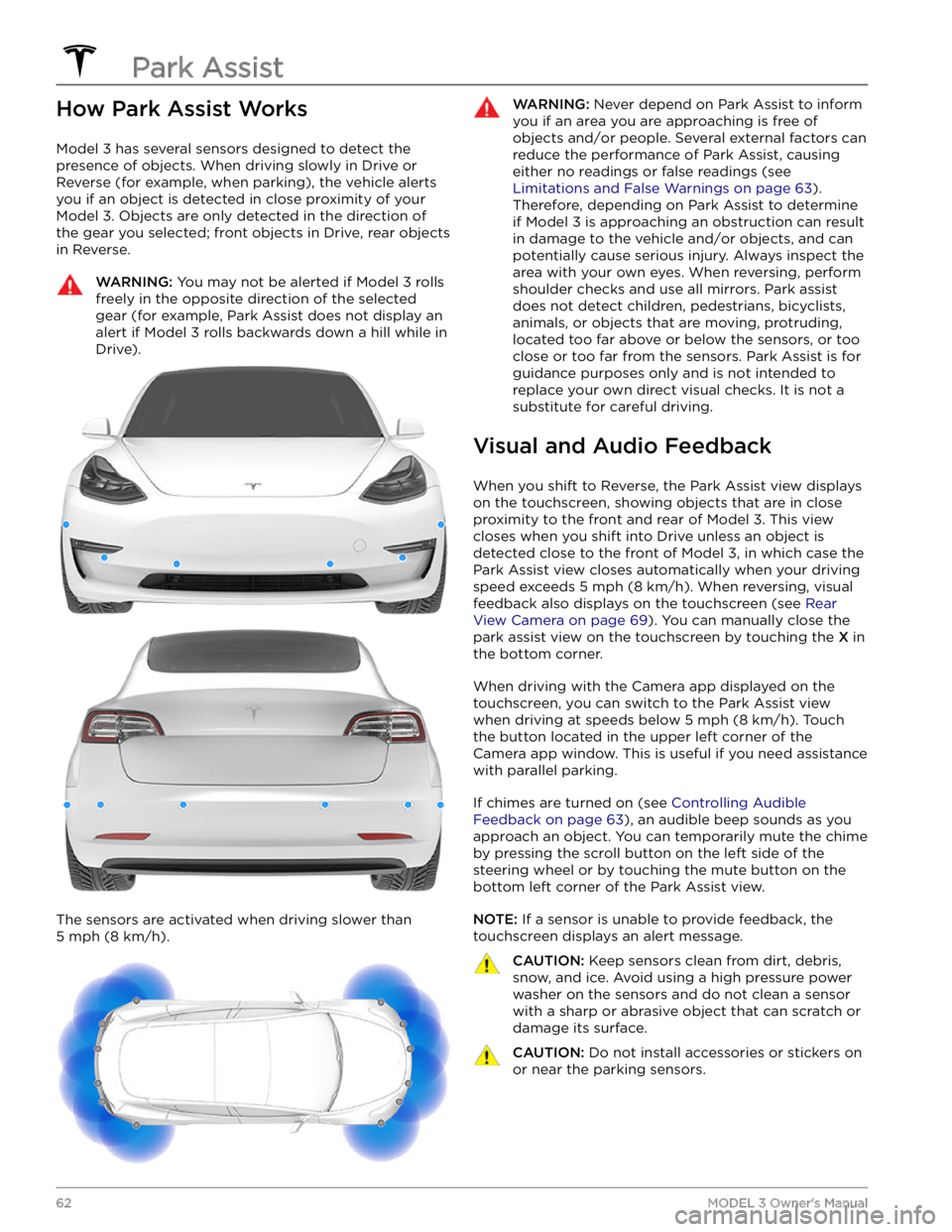
Model 3 has several sensors designed to detect the
presence of objects. When driving slowly in Drive or
Reverse (for example, when parking), the vehicle alerts
you if an object is detected in close proximity of your
Model 3. Objects are only detected in the direction of
the gear you selected; front objects in Drive, rear objects
in Reverse.
WARNING: You may not be alerted if Model 3 rolls
freely in the opposite direction of the selected
gear (for example, Park Assist does not display an
alert if Model 3 rolls backwards down a hill while in
Drive).
The sensors are activated when driving slower than
5 mph (8 km/h).
WARNING: Never depend on Park Assist to inform
you if an area you are approaching is free of
objects and/or people. Several external factors can
reduce the performance of Park Assist, causing
either no readings or false readings (see
Limitations and False Warnings on page 63).
Therefore, depending on Park Assist to determine
if Model 3 is approaching an obstruction can result
in damage to the vehicle and/or objects, and can
potentially cause serious injury. Always inspect the
area with your own eyes. When reversing, perform
shoulder checks and use all mirrors. Park assist
does not detect children, pedestrians, bicyclists,
animals, or objects that are moving, protruding,
located too far above or below the sensors, or too
close or too far from the sensors. Park Assist is for
guidance purposes only and is not intended to
replace your own direct visual checks. It is not a
substitute for careful driving.
Visual and Audio Feedback
When you shift to Reverse, the Park Assist view displays on the
touchscreen, showing objects that are in close
proximity to the front and rear of
Model 3. This view
closes when you shift into Drive unless an object is
detected close to the front of
Model 3, in which case the
Park Assist view closes automatically when your driving speed exceeds
5 mph (8 km/h). When reversing, visual
feedback also displays on the touchscreen (see
Rear
View Camera on page 69). You can manually close the
park assist view on the touchscreen by touching the
X in
the bottom corner.
When driving with the Camera app displayed on the
touchscreen, you can switch to the Park Assist view
when driving at speeds below
5 mph (8 km/h). Touch
the button located in the upper left corner of the Camera app window. This is useful if you need assistance
with parallel parking.
If chimes are turned on (see Controlling Audible
Feedback on page 63), an audible beep sounds as you
approach an object. You can temporarily mute the chime by pressing the scroll button on the left side of the
steering wheel or by touching the mute button on the
bottom left corner of the Park Assist view.
NOTE: If a sensor is unable to provide feedback, the
touchscreen displays an alert message.
CAUTION: Keep sensors clean from dirt, debris,
snow, and ice. Avoid using a high pressure power
washer on the sensors and do not clean a sensor
with a sharp or abrasive object that can scratch or
damage its surface.
CAUTION: Do not install accessories or stickers on
or near the parking sensors.
Park Assist
62MODEL 3 Owner
Page 163 of 248
Maintaining Tire Pressures
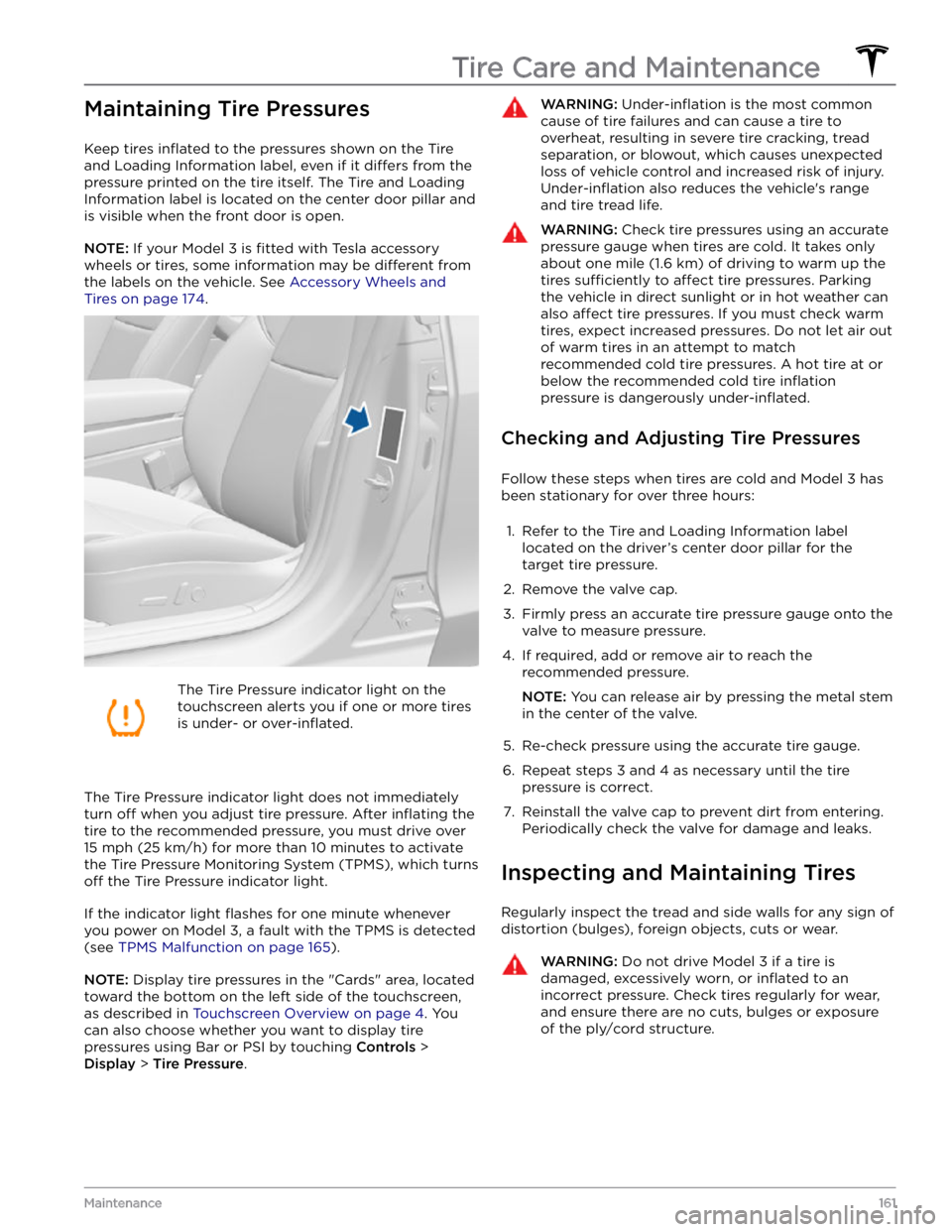
Keep tires inflated to the pressures shown on the Tire
and Loading Information label, even if it
differs from the
pressure printed on the tire itself. The Tire and Loading
Information label is located on the center door pillar and
is visible when the front door is open.
NOTE: If your Model 3 is fitted with Tesla accessory
wheels or tires, some information may be
different from
the labels on the vehicle.
See Accessory Wheels and
Tires on page 174.
The Tire Pressure indicator light on the
touchscreen alerts you if one or more tires
is under-
or over-inflated.
The Tire Pressure indicator light does not immediately
turn off when you adjust tire pressure. After inflating the
tire to the recommended pressure, you must drive over
15 mph (25 km/h) for more than 10 minutes to activate
the Tire Pressure Monitoring System (TPMS), which turns
off the Tire Pressure indicator light.
If the indicator light flashes for one minute whenever
you power on
Model 3, a fault with the TPMS is detected
(see
TPMS Malfunction on page 165).
NOTE: Display tire pressures in the "Cards" area, located
toward the bottom on the left side of the touchscreen
,
as described in Touchscreen Overview on page 4. You
can also choose whether you want to display tire pressures using Bar or PSI by touching
Controls >
Display > Tire Pressure.
WARNING: Under-inflation is the most common
cause of tire failures and can cause a tire to
overheat, resulting in severe tire cracking, tread
separation, or blowout, which causes unexpected
loss of vehicle control and increased risk of injury.
Under-inflation also reduces the vehicle
Page 167 of 248
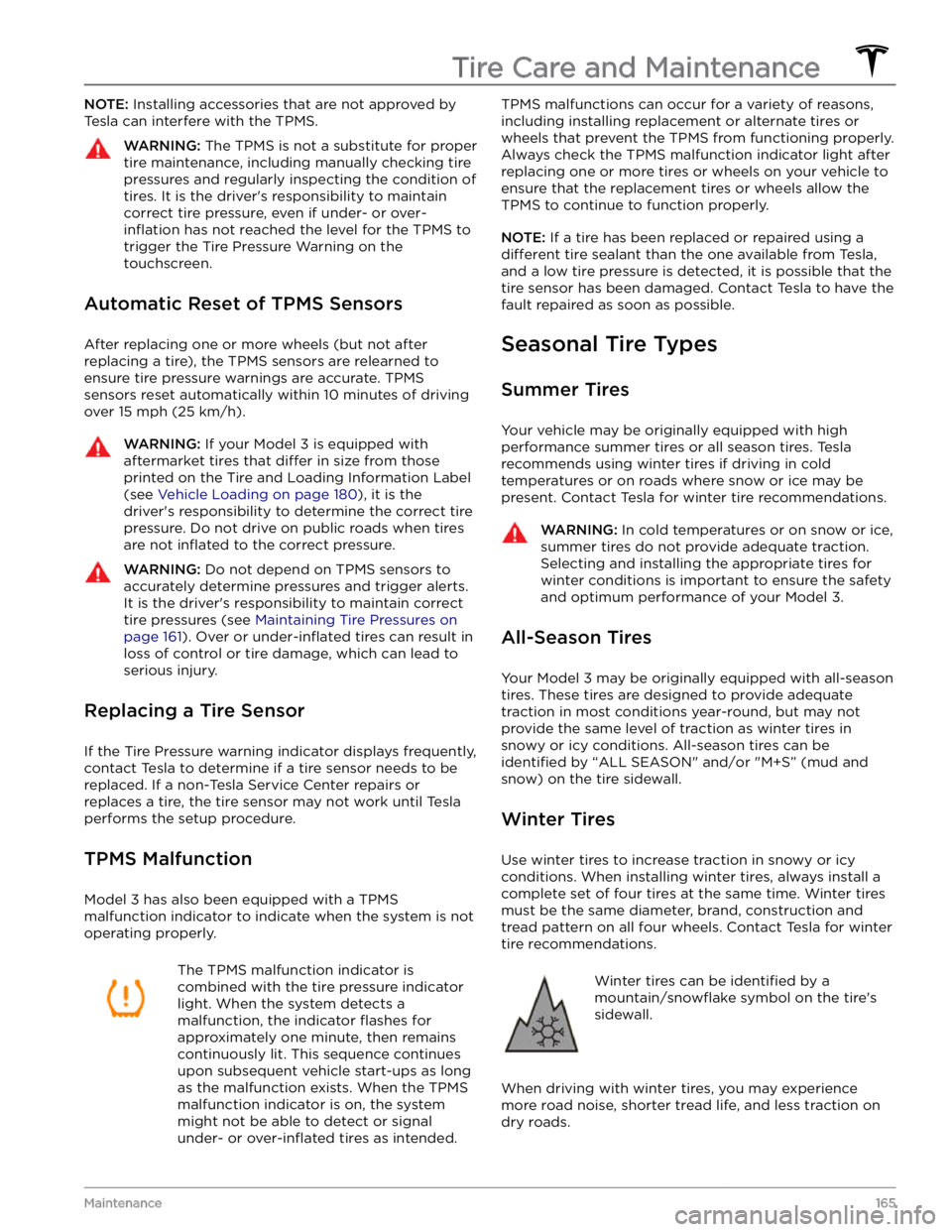
NOTE: Installing accessories that are not approved by
Tesla can interfere with the TPMS.WARNING: The TPMS is not a substitute for proper
tire maintenance, including manually checking tire
pressures and regularly inspecting the condition of
tires. It is the driver
Page 170 of 248
CAUTION: To avoid corrosive damage that may
not be covered by the warranty, rinse away any
road salt from the underside of the vehicle, wheel
wells, and brakes. After cleaning the vehicle, dry
the brakes by going on a short drive and applying
the brakes multiple times.
CAUTION: Avoid using tight-napped or rough
cloths, such as washing mitts. A high-quality
microfiber cleaning cloth is recommended.
CAUTION: If washing in an automatic car wash, use
touchless car washes only. These car washes have
no parts (brushes, etc.) that touch the surfaces of
Model 3. Some touchless car washes use caustic
solutions that, over time, can cause discoloration
of decorative exterior trim. Avoid exposure to
soaps and chemicals above pH 13. If unsure, check
the product label or ask the staff at the car wash.
Damage caused by improper washing is not
covered by the warranty.
CAUTION: If washing in an automatic car wash,
make sure the vehicle is locked. In addition, avoid
using controls on the touchscreen that can result
in accidentally opening doors or trunks while the
vehicle is being washed. Any damage caused is
not covered by the warranty.
CAUTION: Ensure the wipers are off before
washing Model 3 to avoid the risk of damaging the
wipers.
CAUTION: Do not use chemical based wheel
cleaners or pre-wash products. These can damage
the finish on the wheels.
WARNING: Never spray liquid at a high velocity
(for example, if using a pressure washer) towards
the charge port while Model 3 is charging. Failure
to follow these instructions can result in serious
injury or damage to the vehicle, charging
equipment, or property.
Cleaning the Interior
Frequently inspect and clean the interior to maintain its appearance and to prevent premature wear. If possible, immediately wipe up spills and remove marks. For
general cleaning, wipe interior surfaces using a soft cloth (such as
microfiber) dampened with a mixture of warm
water and mild non-detergent cleaner (test all cleaners on a concealed area before use). To avoid streaks, dry immediately with a soft lint-free cloth.
Interior Glass
Do not scrape, or use any abrasive cleaning fluid on
glass or mirrored surfaces. This can damage the
reflective surface of the mirror and the heating elements
in the rear window.
Airbags
Do not allow any substance to enter an airbag cover.
This could
affect correct operation.
Dashboard and Plastic Surfaces
Do not polish the upper surfaces of the dashboard. Polished surfaces are
reflective and could interfere with
your driving view.
Seats
Wipe spills as soon as possible using a soft cloth
moistened with warm water and non-detergent soap.
Wipe gently in a circular motion. Then wipe dry using a soft, lint-free cloth.
If equipped with polyurethane seats, be careful with dyes, such as from clothing or denim, that come into contact with the seats. Over time, dyes can
diffuse into
the seat material and cause staining.
Vacuum cloth seats as needed to remove any loose dirt.
CAUTION: Aftermarket, non-Tesla seat covers may
inhibit the sensitivity of a seat
Page 176 of 248
Parts, Accessories, and
Modifications
Use only genuine Tesla parts and accessories. Tesla
performs rigorous testing on parts to ensure their
suitability, safety, and reliability. Purchase these parts
from Tesla, where they are professionally installed and
where you can receive expert advice about
modifications to Model 3. Accessories are available for
purchase from Tesla stores or online at
www.tesla.com.
NOTE: Some accessories may not be available in your
market region.
Tesla is unable to assess parts manufactured by other distributors and therefore accepts no responsibility if you use non-Tesla parts on
Model 3.
WARNING: Installing non-approved parts and
accessories, or performing non-approved
modifications, can affect the performance of
Model 3 and the safety of its occupants. Any
damage caused by using or installing non-
approved parts, or by performing non-approved
modifications, is not covered by the warranty.
WARNING: Tesla does not accept liability for
death, personal injury or damage that occurs if you
use or install non-approved accessories or make
non-approved modifications.
Accessory Wheels and Tires
If your Model 3 is fitted with Tesla accessory wheels or
tires, the Gross Axle Weight Rating (GAWR), wheel, tire, and loading information may be
different from the labels
shown on the vehicle. Refer to the relevant following
section for updated information.
NOTE: If your vehicle is not fitted with Tesla accessory
wheels or tires (it is
fitted with the factory original
wheels and tires, including Tesla genuine replacement
parts), refer to the labels attached to the center door pillar for the most accurate information for your
Model 3.
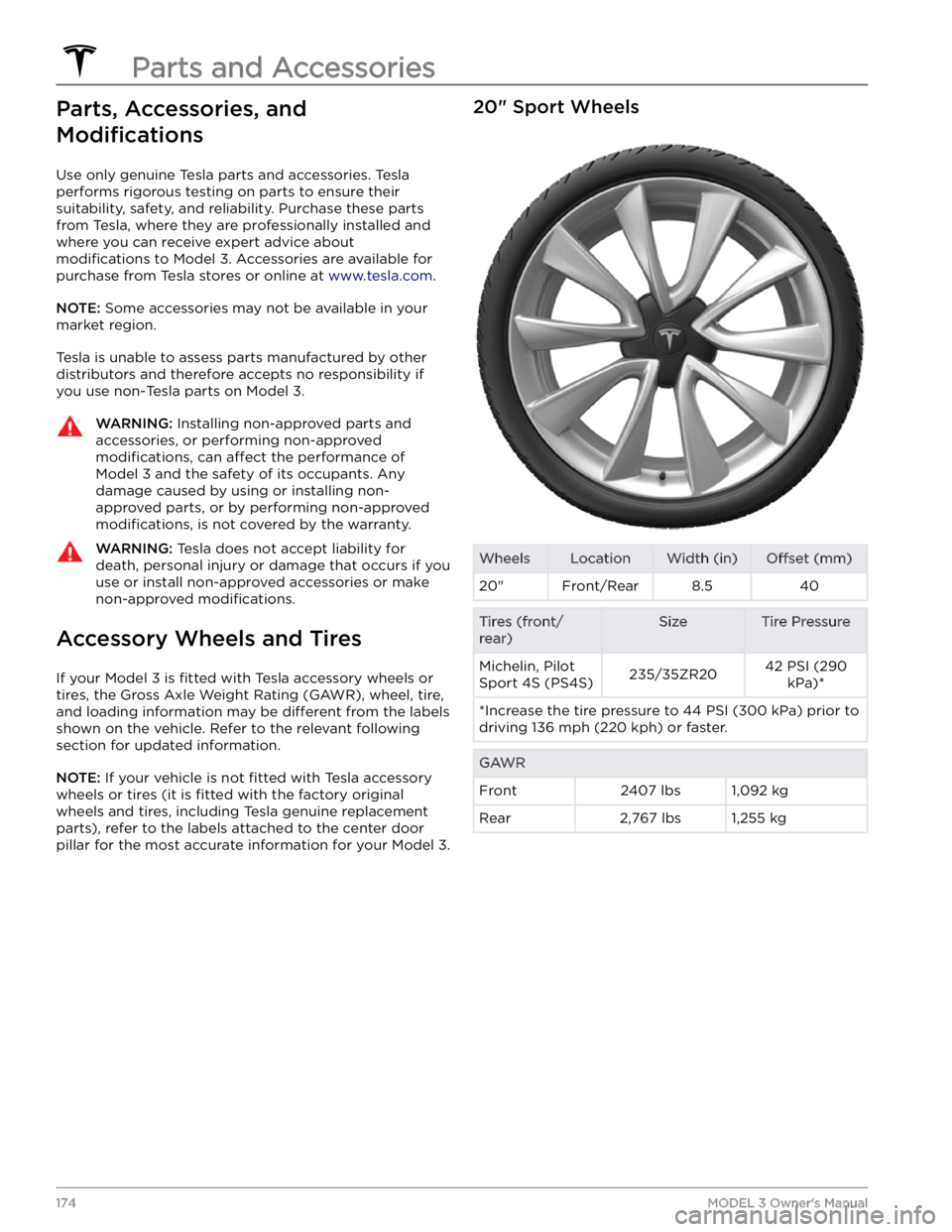
20" Sport WheelsWheelsLocationWidth (in)Offset (mm)20"Front/Rear8.540Tires (front/
rear)SizeTire PressureMichelin, Pilot
Sport 4S (PS4S)235/35ZR2042 PSI (290 kPa)**Increase the tire pressure to 44 PSI (300 kPa) prior to driving 136 mph (220 kph) or faster.GAWRFront2407 lbs1,092 kgRear2,767 lbs1,255 kg
Parts and Accessories
174MODEL 3 Owner
Page 177 of 248
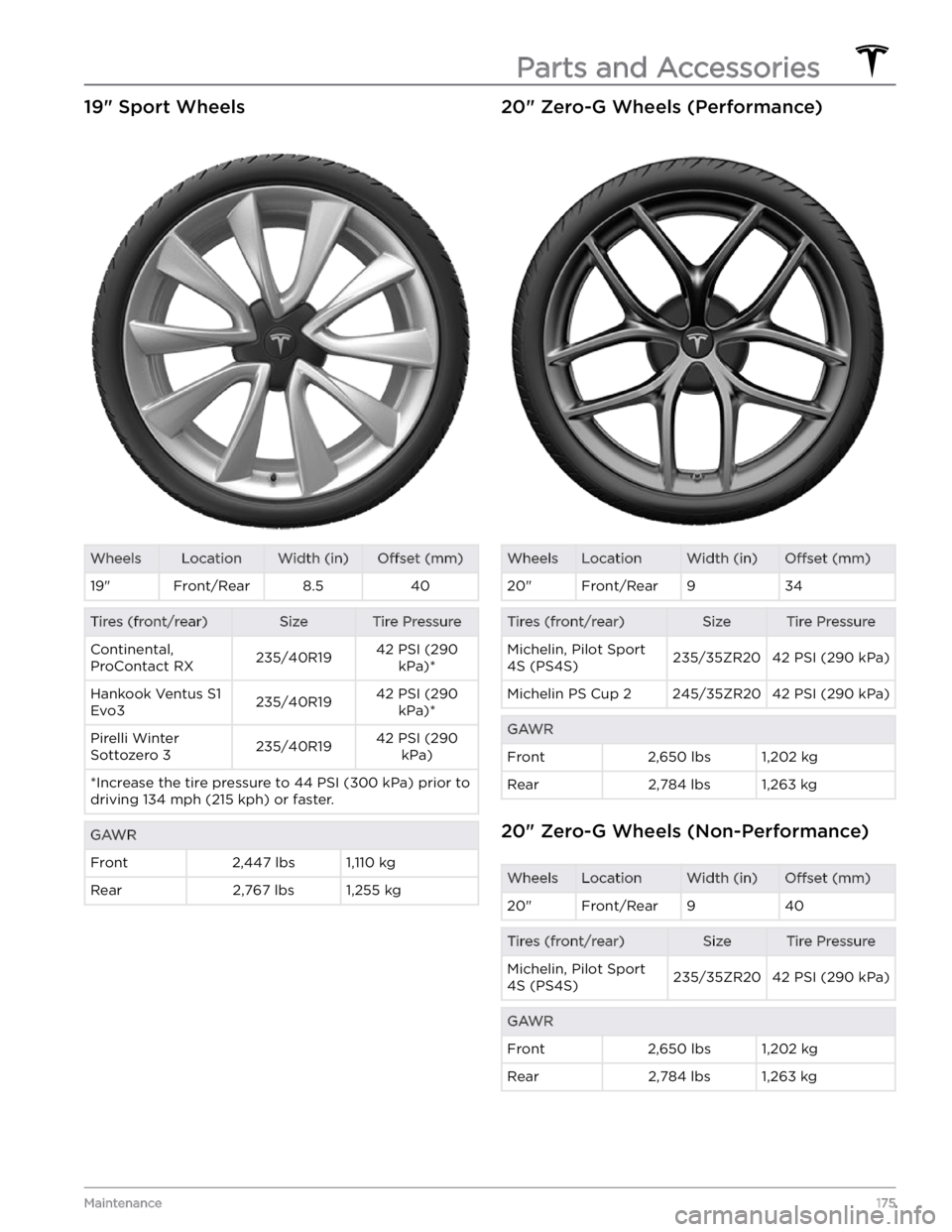
19" Sport WheelsWheelsLocationWidth (in)Offset (mm)19"Front/Rear8.540Tires (front/rear)SizeTire PressureContinental,
ProContact RX235/40R1942 PSI (290 kPa)*Hankook Ventus S1
Evo3235/40R1942 PSI (290 kPa)*Pirelli Winter
Sottozero 3235/40R1942 PSI (290 kPa)*Increase the tire pressure to 44 PSI (300 kPa) prior to driving 134 mph (215 kph) or faster.GAWRFront2,447 lbs1,110 kgRear2,767 lbs1,255 kg20" Zero-G Wheels (Performance)WheelsLocationWidth (in)Offset (mm)20"Front/Rear934Tires (front/rear)SizeTire PressureMichelin, Pilot Sport
4S (PS4S)235/35ZR2042 PSI (290 kPa)Michelin PS Cup 2245/35ZR2042 PSI (290 kPa)GAWRFront2,650 lbs1,202 kgRear2,784 lbs1,263 kg
20" Zero-G Wheels (Non-Performance)
WheelsLocationWidth (in)Offset (mm)20"Front/Rear940Tires (front/rear)SizeTire PressureMichelin, Pilot Sport
4S (PS4S)235/35ZR2042 PSI (290 kPa)GAWRFront2,650 lbs1,202 kgRear2,784 lbs1,263 kg
Parts and Accessories
175Maintenance
Page 178 of 248
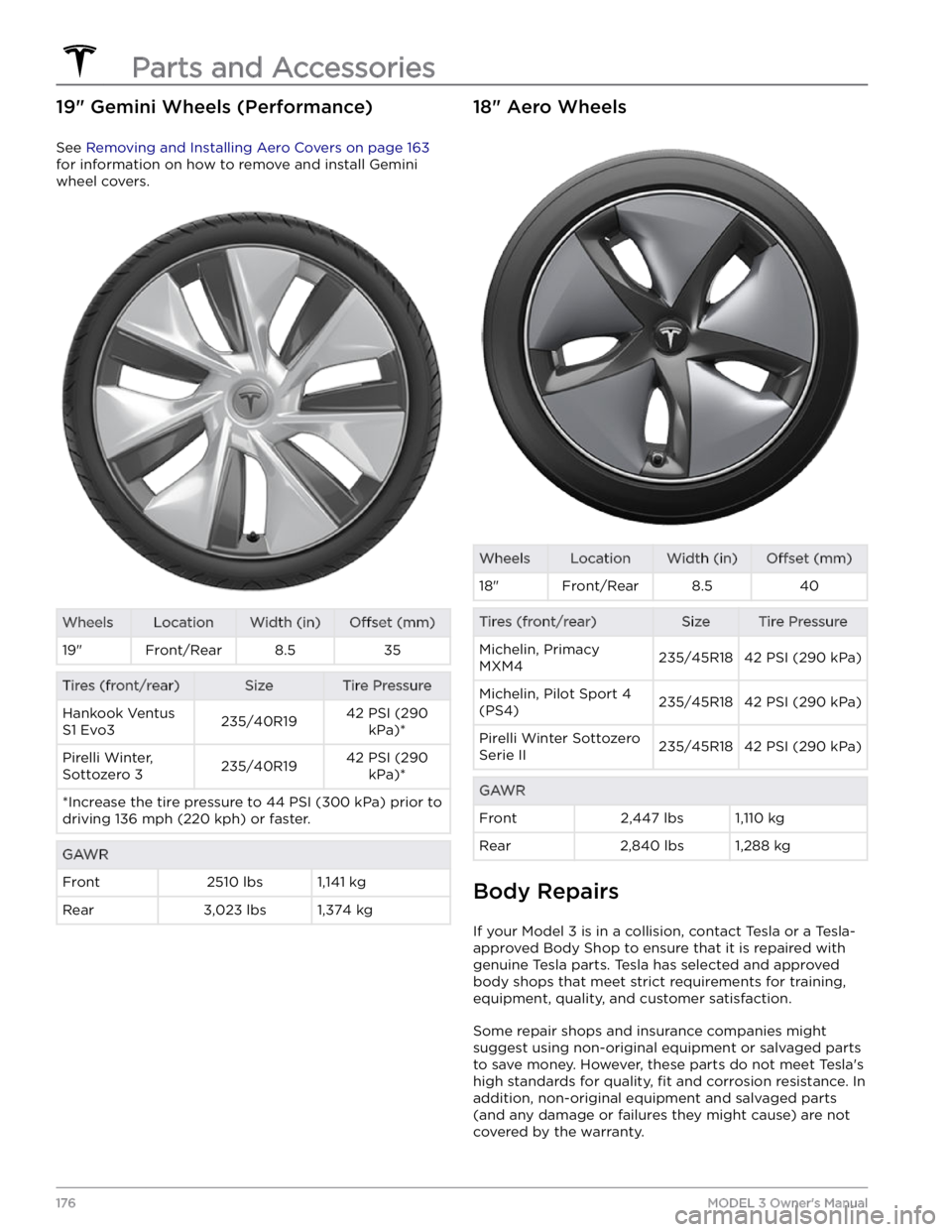
19" Gemini Wheels (Performance)
See Removing and Installing Aero Covers on page 163
for information on how to remove and install Gemini
wheel covers.
WheelsLocationWidth (in)Offset (mm)19"Front/Rear8.535Tires (front/rear)SizeTire PressureHankook Ventus
S1 Evo3235/40R1942 PSI (290 kPa)*Pirelli Winter,
Sottozero 3235/40R1942 PSI (290 kPa)**Increase the tire pressure to 44 PSI (300 kPa) prior to driving 136 mph (220 kph) or faster.GAWRFront2510 lbs1,141 kgRear3,023 lbs1,374 kg18" Aero WheelsWheelsLocationWidth (in)Offset (mm)18"Front/Rear8.540Tires (front/rear)SizeTire PressureMichelin, Primacy
MXM4235/45R1842 PSI (290 kPa)Michelin, Pilot Sport 4
(PS4)235/45R1842 PSI (290 kPa)Pirelli Winter Sottozero
Serie II235/45R1842 PSI (290 kPa)GAWRFront2,447 lbs1,110 kgRear2,840 lbs1,288 kg
Body Repairs
If your Model 3 is in a collision, contact Tesla or a Tesla-
approved Body Shop to ensure that it is repaired with genuine Tesla parts. Tesla has selected and approved
body shops that meet strict requirements for training, equipment, quality, and customer satisfaction.
Some repair shops and insurance companies might
suggest using non-original equipment or salvaged parts
to save money. However, these parts do not meet Tesla