lane TESLA MODEL 3 2023 User Guide
[x] Cancel search | Manufacturer: TESLA, Model Year: 2023, Model line: MODEL 3, Model: TESLA MODEL 3 2023Pages: 296, PDF Size: 9.84 MB
Page 102 of 296

This feature may be temporarily limited or inactive until
it is enabled with a future software update for vehicles
manufactured as of approximately October 2022.
NOTE: Depending on market region, vehicle
configuration, options purchased, and software version,
your vehicle may not be equipped with Autopark.
Autopark uses data to simplify parking on public roads by maneuvering
Model 3 into parallel and perpendicular
parking spaces.
CAUTION: Ensure all cameras and sensors (if
equipped) are clean. Dirty cameras and sensors, as
well as environmental conditions such as rain and
faded lane markings, can affect Autopilot
performance.
WARNING: Autopark
Page 104 of 296

This feature may be temporarily limited or inactive until
it is enabled with a future software update for vehicles
manufactured as of approximately October 2022.
NOTE: Depending on market region, vehicle
configuration, options purchased, and software version,
your vehicle may not be equipped with Summon, or the
feature may not operate exactly as described.
Summon allows you to automatically park and retrieve
Model 3 while you are standing outside the vehicle.
Summon moves
Model 3 forward and reverse up to 39
feet (12 meters) in, or out of, a parking space.
To move Model 3 a longer distance while steering
around objects, you can use Smart Summon
(if
equipped) and your mobile phone. Smart Summon
allows your vehicle to
find you (or you can send your
vehicle to a chosen location). See
Smart Summon on
page 105.
CAUTION: Ensure all cameras and sensors (if
equipped) are clean. Dirty cameras and sensors, as
well as environmental conditions such as rain and
faded lane markings, can affect Autopilot
performance.
WARNING: Summon is designed and intended for
use only on parking lots and driveways on private
property where the surrounding area is familiar
and predictable.
WARNING: Summon is a BETA feature. You must
continually monitor the vehicle and its
surroundings and stay prepared to take immediate
action at any time. It is the driver
Page 110 of 296
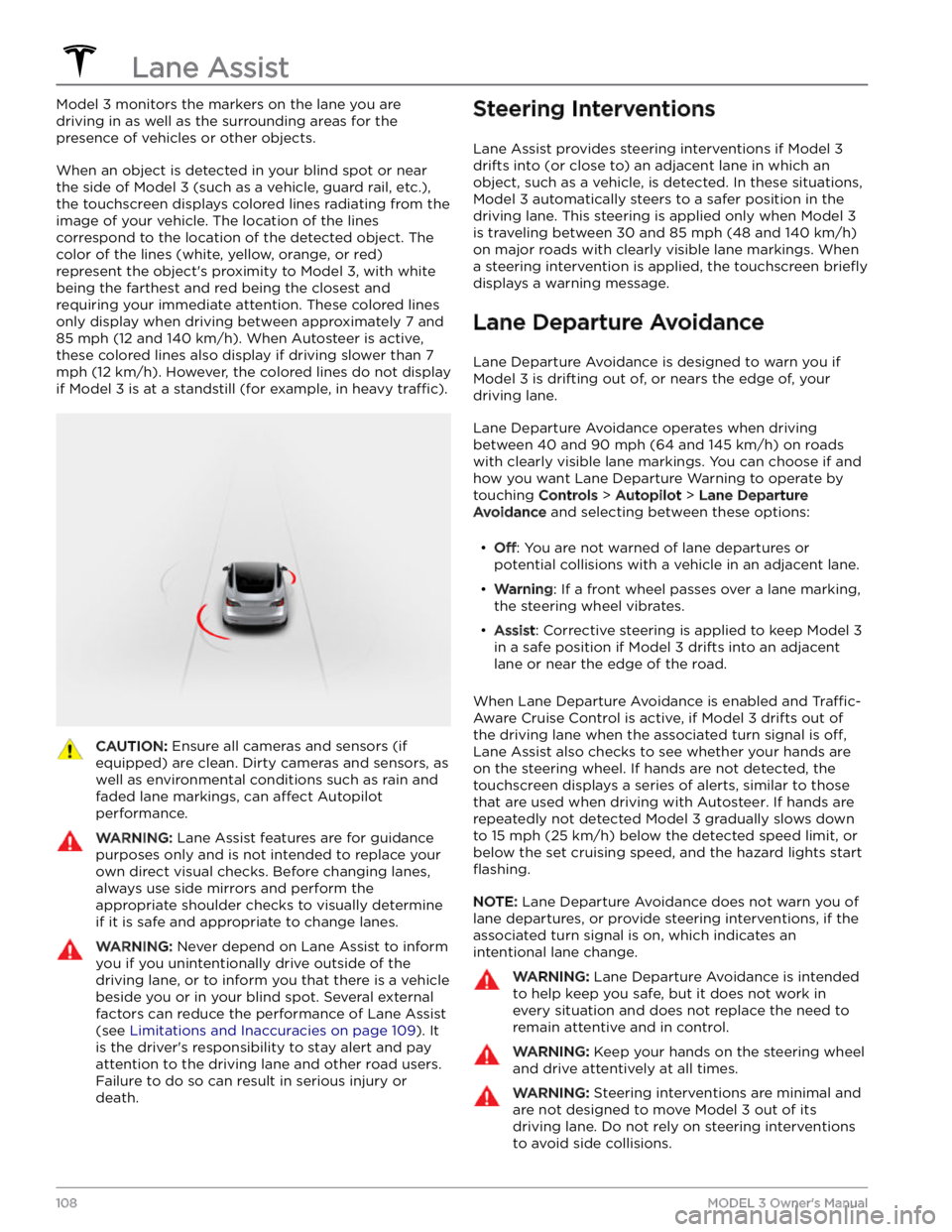
Model 3 monitors the markers on the lane you are
driving in as well as the surrounding areas for the presence of vehicles or other objects.
When an object is detected in your blind spot or near
the side of
Model 3 (such as a vehicle, guard rail, etc.),
the
touchscreen displays colored lines radiating from the
image of your vehicle. The location of the lines correspond to the location of the detected object. The color of the lines (white, yellow, orange, or red)
represent the object
Page 111 of 296

Emergency Lane Departure Avoidance
Emergency Lane Departure Avoidance automatically
applies steering to avoid a potential collision in
situations where:
Page 112 of 296

In addition, Lane Assist may not steer Model 3 away
from an adjacent vehicle, or may apply unnecessary or
inappropriate steering, in these situations:
Page 146 of 296
While navigating, the map tracks your location and
displays the current leg of your trip. You can display the
entire route at any time by swiping down to expand the
turn-by-turn direction list or touching the route overview
icon.
To stop navigating, touch Cancel, located in the bottom
corner of the turn-by-turn direction list.
If Navigate on Autopilot (if available in
your market region) is enabled, you can
turn it on for the navigation route by
touching
Navigate on Autopilot in the
turn-by-turn direction list (when the
feature is active, the icon is blue).
Navigate
on Autopilot is a full self-driving (Beta)
feature that automatically changes lanes
and steers
Model 3 on controlled-access
roads (like highways and freeways), along a
navigation route. For details, see
Navigate
on Autopilot on page 90.
Selecting an Alternate Route
Depending on market region and vehicle configuration,
this feature may not be available on your vehicle. Your
vehicle must be equipped with Premium Connectivity.
After you have entered a destination with one stop, the
map displays up to three alternate routes. This allows you to easily compare total travel time and
traffic
information for each route. If you do not select a
preferred route within the timeout period, the fastest route is automatically selected.
Adding Stops to a Route
After you have entered a destination, you can edit your
route by adding, deleting or reordering stops. Touch the three dots at the bottom of the turn-by-turn direction
list to view options to edit your route.
Add Stop allows you to add a stop by
searching for a location or adding a Home,
Recent or Favorite destination. You can
also add a stop by touching any pin on the map and selecting
Add from the popup.
Edit Stop allows you to set up a complex
trip by adding or deleting stops on your route. Drag and drop stops by touching the equal sign to reorder your trip.
Automatic Navigation
NOTE: Automatic Navigation may not be available in all
market regions and on all vehicle configurations.
Automatic Navigation can predict a destination when
you get in your vehicle. When your phone
Page 179 of 296

WARNING: Do not drive Model 3 if a tire is
damaged, excessively worn, or inflated to an
incorrect pressure. Check tires regularly for wear,
and ensure there are no cuts, bulges or exposure
of the ply/cord structure.
Tire Wear
Adequate tread depth is important for proper tire
performance. Tires with a tread depth less than
4/32”
(3 mm) are more likely to hydroplane in wet conditions
and should not be used. Tires with a tread depth less than
5/32” (4 mm) do not perform well in snow and
slush and should not be used when driving in winter conditions.
Model 3 is originally fitted with tires that have wear
indicators molded into the tread pattern. When the tread has been worn down to
4/32” (3 mm), the
indicators start to appear at the surface of the tread pattern, producing the
effect of a continuous band of
rubber across the width of the tire. For optimal performance and safety, Tesla recommends replacing
tires before the wear indicators are visible.
To improve vehicle handling characteristics and minimize
hydroplaning in wet conditions, put tires with the most tread on the rear of the car.
Tire Rotation, Balance, and Wheel
Alignment
Tesla recommends rotating the tires every 6,250 miles
(10,000 km) or if tread depth difference is 2/32 in (1.5
mm) or greater, whichever comes first.
Tire rotation is an essential part of tire maintenance. It helps maintain an even treadwear pattern which enhances the tire
Page 289 of 296

A
ABS (Anti-lock Braking System): 60
absolute speed limit: 114
acceleration, chill: 68
acceleration, sport: 68
acceleration, standard: 68
accessories: 23
plugging into power socket: 23
adjacent lane speed: 85
aero covers: 178
air conditioning: 116
air filter: 120
air vents: 119
airbag safety information: 44
airbags, location: 38
alarm: 127, 131
all-season tires: 181
Always Show Estimated Round Trip Energy: 146
ambient lights: 53
anti-lock braking (ABS): 60
apps: 5
Arcade: 151
audio: 47, 148, 151
playing files: 148, 151
settings: 148
steering wheel scroll button: 47
volume control: 148
auto fold: 49
auto high beam: 54
Auto Lane Change: 87
auto tilt: 49
AUTO wipers: 59
automatic emergency braking: 112
automatic navigation: 142
navigating: 142
Autopark: 100
autopilot: 108
side collision warning: 108
Autopilot: 77, 80, 85, 87, 100, 102, 111, 114
Auto Lane Change: 87
automatic emergency braking: 111
Autopark: 100
Autosteer: 85
collision avoidance assist: 111
forward collision warning: 111
overtake acceleration: 80
overview: 77
speed assist: 114
speed limit warning: 114
staying within speed limits: 114
Summon: 102
Traffic-Aware Cruise Control: 80
Autopilot components: 77
Autosteer: 85
average range: 165
B
backup camera: 72
Battery (high voltage): 156, 211
care of: 156
specifications: 211
temperature limits: 156
battery (key), replacing: 12
battery (low voltage): 156, 211
complete discharge: 156
specifications: 211
Blind Spot Camera: 108
Blind Spot Collision Warning: 108
Blind Spot Collision Warning Chime: 108
Bluetooth: 122, 149
devices, playing audio files from: 149
general information: 122
phone, pairing and using: 122
body repairs: 192
body touch up: 185
Boombox: 151, 152
brakes: 60, 112, 210
automatic in emergencies: 112
overview of: 60
specifications: 210
Bumper Clearance (Summon): 102
C
cabin air filter: 120
cabin camera: 115
cabin temperature control: 116
Calendar: 122, 124
calibrating windows: 16
California Proposition 65: 283
camera, rear-facing: 72
cameras (autopilot): 77
Camp: 118
car cover: 185
car wash mode: 183
car washes: 184
Caraoke): 149
card: 10
cargo area: 18
cargo volume: 210
Index
Page 290 of 296

carpets, cleaning: 184
CCS (Combo): 155
certifications (FCC, ISED, CE, NCC): 285
CHAdeMO: 155
chains: 181
change of ownership: 9
charge port: 158
charge port light: 159
charge port manual release: 161
charge port release cable: 161
charging: 154, 155, 158, 159, 160
charge settings: 159, 160
charging status: 159, 160
components and equipment: 154
instructions: 158
public charging stations: 155
scheduling: 159, 160
charging locations, finding: 145
charging stations, displaying on map: 142
child protection: 16
disabling rear window switches: 16
child seats, installing and using: 32
cleaning: 183
climate controls: 116
coat hangers: 24
cold weather best practices: 74
collision avoidance assist: 111
Colorizer: 151
connecting to Wi-Fi: 137
console: 22, 23
low voltage power socket: 23
opening: 22
rear: 22
USB ports: 23
consumption chart: 165
contact information: 221, 285
roadside assistance: 221
Tesla: 285
copyrights: 280
cruise control: 80
D
dashboard overview: 5
Dashcam: 129
data recording: 282
data sharing: 282
delivery mileage: 283
devices: 149
Bluetooth, playing audio files: 149
dimensions: 208
display settings: 5
Dog: 118
dome (map) lights: 53
door handles: 14
door labels: 206
door seals: 185
cleaning: 185
doors: 14, 15
Child Lock: 15
exterior door handles: 14
interior locking and unlocking: 15
locking: 14
opening from exterior: 14
opening from interior: 14
Unlock on Park: 15
unlocking: 14
doors function: 15
Walk-Away Door Lock: 15
drive away locking: 15
drive mode, Drive: 51
drive mode, Neutral: 51
drive mode, Park: 51
drive mode, Reverse: 51
drive modes, shifting: 51
driver: 45
profiles: 45
driving: 25, 50, 164
seating position: 25
starting: 50
tips to maximize range: 164
E
easy entry, driver profile: 45
EDR (event data recorder): 282
electric parking brake: 62
emergency braking: 111
emergency flashers: 55
Emergency Lane Departure Avoidance: 108
emission label: 205
energy: 56, 61
gained from regenerative braking: 61
range information: 56
Energy app: 165
energy use predictions (navigating): 146
Entertainment: 151
Erase & Reset: 9
event data recording: 282
exterior: 3, 53, 183, 185, 208
car cover: 185
cleaning: 183
Index
Page 292 of 296
vehicle certification: 206
lane assist: 108
lane change, automatic: 87
Lane Departure Avoidance: 108
Lap Timer: 69
LATCH child seats, installing: 34
license plate bracket: 202
lifting: 189
lights: 53, 54, 55
hazard warning: 55
headlights after exit: 54
turn signals: 54
load limits: 206
location tracking: 142
locking: 14
lug nut covers: 179
lumbar adjustment: 25
M
maintenance: 166, 167, 176, 183, 187, 188
cleaning: 183
daily checks: 166
fluid replacement intervals: 167
monthly checks: 166
replacing wiper blades: 187
service intervals: 166
tires: 176
washer fluid, topping up: 187
washer jets, cleaning: 188
map orientation: 142
map updates: 147
mats: 186
media: 148, 151
settings: 148
sources, show and hide: 148
mileage upon delivery: 283
mirrors: 49
mobile app: 140
mobile app access: 140
Mobile Connector: 155, 158
description: 155
using: 158
modifications: 190
motor specifications: 210
My Apps: 8
my car does what?: 151
myQ: 134
programming and using: 134
N
naming your vehicle: 9
Navigate on Autopilot: 90
NHTSA, contacting: 285
O
Obstacle-Aware Acceleration: 111
occupancy sensor, front passenger: 40
occupant classification: 42
odometer: 71
Off-Peak Charging: 163
offset from speed limit: 114
Online Routing: 146
overhang dimensions: 208
overtake acceleration: 80
Owner Information, about: 280
P
Park Assist: 65
parking brake: 62
parking, using Autopark: 100
parking, using Summon: 102
parts replacement: 190
passenger detection: 40
passenger detection, front: 40
pedestrian warning: 73
personal data, erasing: 9
phone: 10, 122
authenticating as a key: 10
using: 122
phone app: 123
phone key: 10, 13
adding as a key: 13
removing as a key: 13
PIN: 46
PIN to Drive: 127
Post-drive Cooling (Track Mode): 69
power: 61
gained from regenerative braking: 61
power cycling: 50
power socket: 23
power windows: 16, 204
powering on and off: 50
Preconditioning: 163
Proposition 65: 283
public charging stations: 155
R
radio: 148, 151
Index