steering wheel TESLA MODEL 3 2023 User Guide
[x] Cancel search | Manufacturer: TESLA, Model Year: 2023, Model line: MODEL 3, Model: TESLA MODEL 3 2023Pages: 296, PDF Size: 9.84 MB
Page 89 of 296
NOTE: If Autosteer cancels because you started steering
manually, Traffic-Aware Cruise Control remains active.
Disengage
Traffic-Aware Cruise Control as you normally
would, by pressing the brake pedal
moving the drive
stalk upward.
NOTE: If you move the drive stalk upward and hold it up
for more than one second,
Model 3 shifts into Neutral
after canceling Autosteer.
To disable Autosteer so it is no longer available, touch
Controls > Autopilot > Autosteer (Beta).
Auto Lane Change
NOTE: Depending on market region, vehicle
configuration, options purchased, and software version,
your vehicle may not be equipped with Auto Lane
Change, or the feature may not operate exactly as
described.
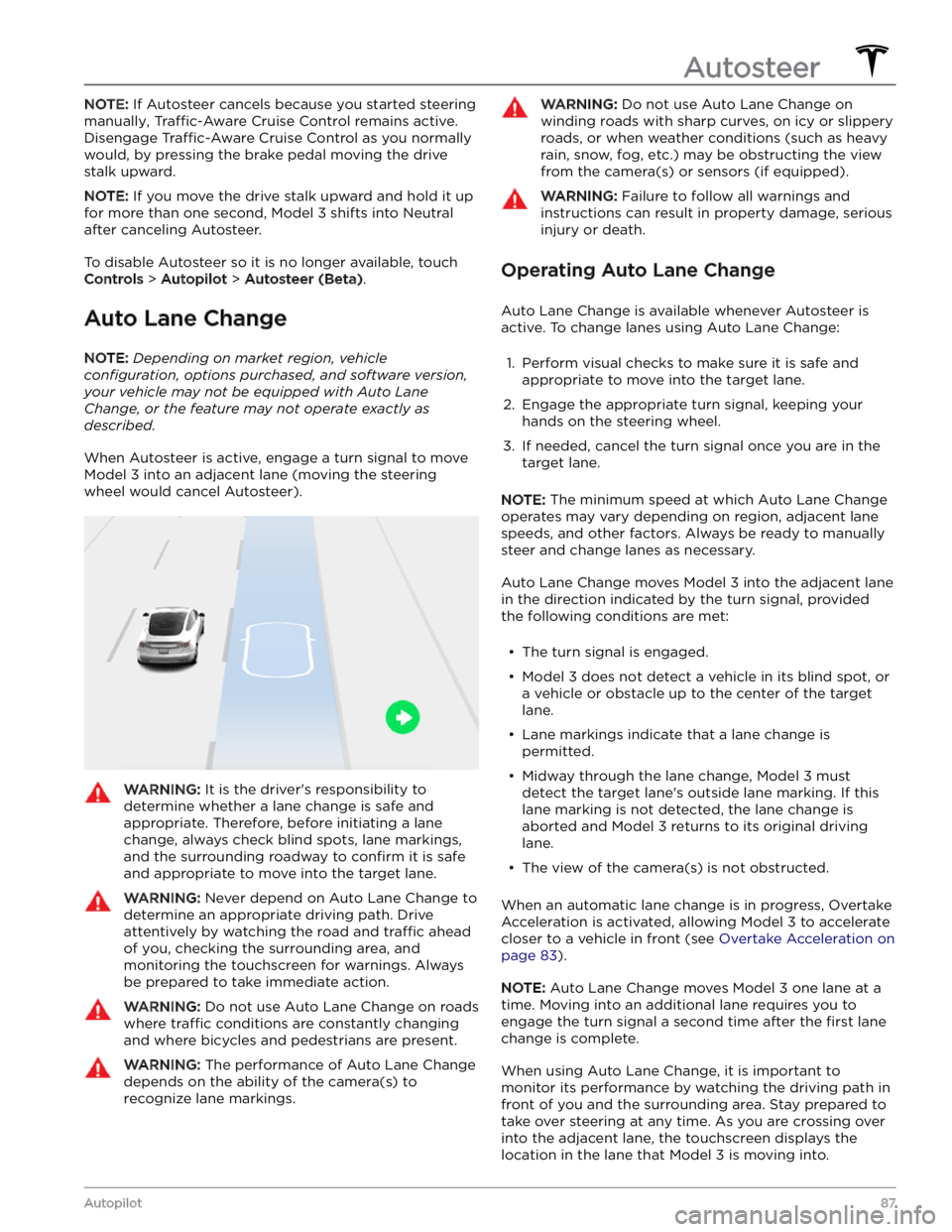
When Autosteer is active, engage a turn signal to move
Model 3 into an adjacent lane (moving the steering
wheel would cancel Autosteer).
WARNING: It is the driver
Page 92 of 296
NOTE: Depending on market region, vehicle
configuration, options purchased, and software version,
your vehicle may not be equipped with Navigate on
Autopilot, or the feature may not operate exactly as
described.
NOTE: Navigate on Autopilot is a BETA feature.
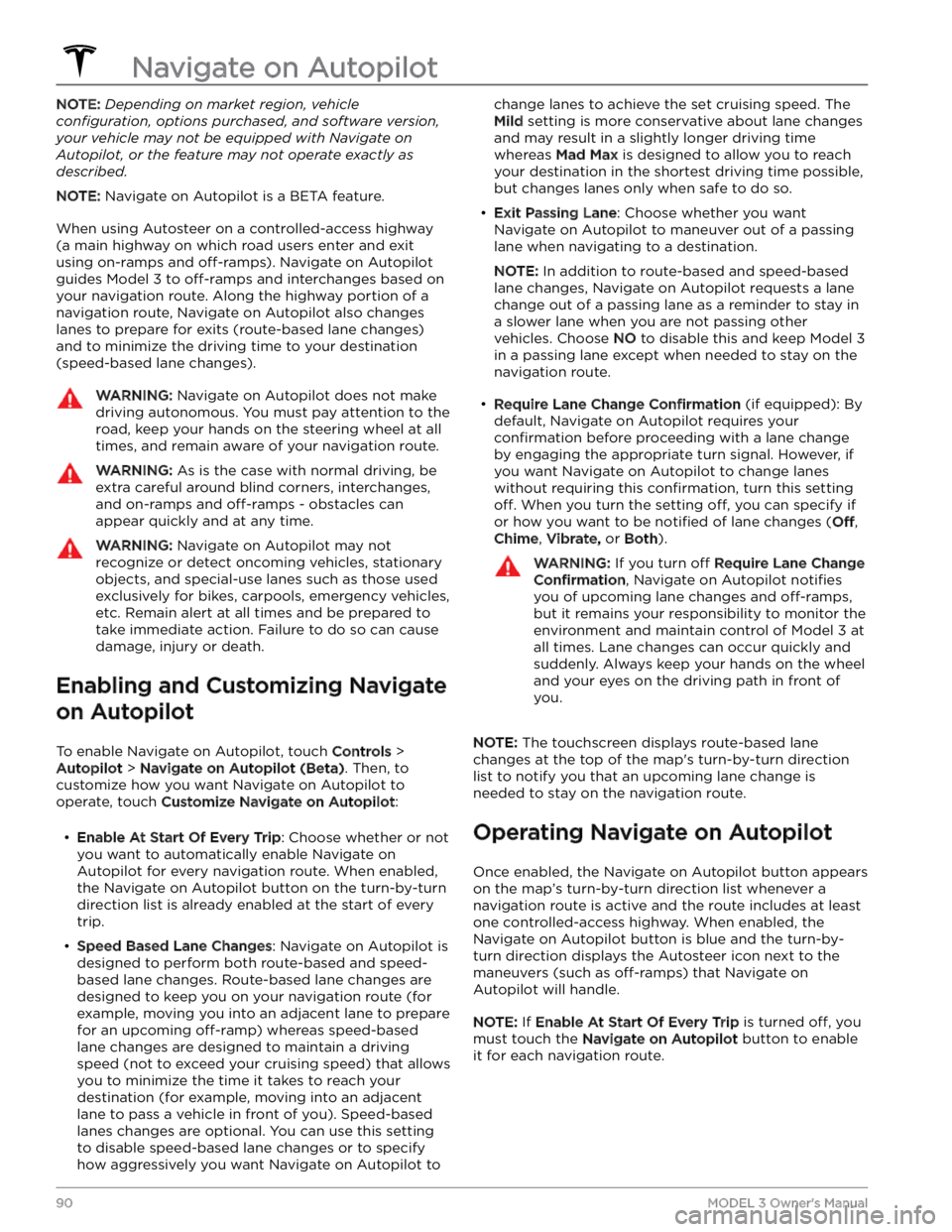
When using Autosteer on a controlled-access highway (a main highway on which road users enter and exit
using on-ramps and
off-ramps). Navigate on Autopilot
guides
Model 3 to off-ramps and interchanges based on
your navigation route. Along the highway portion of a navigation route, Navigate on Autopilot also changes
lanes to prepare for exits (route-based lane changes) and to minimize the driving time to your destination (speed-based lane changes).
WARNING: Navigate on Autopilot does not make
driving autonomous. You must pay attention to the
road, keep your hands on the steering wheel at all
times, and remain aware of your navigation route.
WARNING: As is the case with normal driving, be
extra careful around blind corners, interchanges,
and on-ramps and off-ramps - obstacles can
appear quickly and at any time.
WARNING: Navigate on Autopilot may not
recognize or detect oncoming vehicles, stationary
objects, and special-use lanes such as those used
exclusively for bikes, carpools, emergency vehicles,
etc. Remain alert at all times and be prepared to
take immediate action. Failure to do so can cause
damage, injury or death.
Enabling and Customizing Navigate
on Autopilot
To enable Navigate on Autopilot, touch Controls >
Autopilot > Navigate on Autopilot (Beta). Then, to
customize how you want Navigate on Autopilot to operate, touch
Customize Navigate on Autopilot:
Page 97 of 296
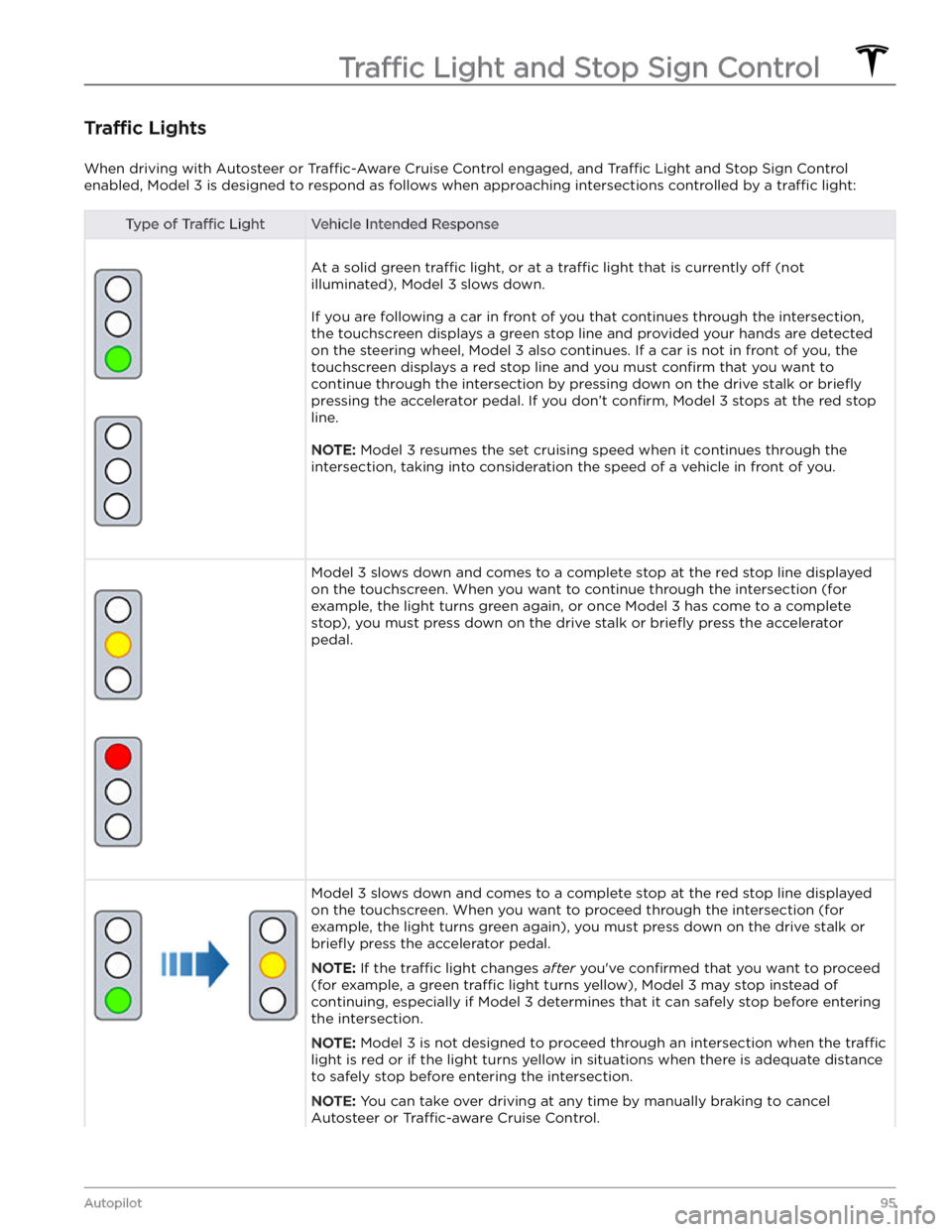
Traffic Lights
When driving with Autosteer or Traffic-Aware Cruise Control engaged, and Traffic Light and Stop Sign Control
enabled,
Model 3 is designed to respond as follows when approaching intersections controlled by a traffic light:
Type of Traffic LightVehicle Intended Response
At a solid green traffic light, or at a traffic light that is currently off (not
illuminated),
Model 3 slows down.
If you are following a car in front of you that continues through the intersection,
the
touchscreen displays a green stop line and provided your hands are detected
on the
steering wheel, Model 3 also continues. If a car is not in front of you, the
touchscreen displays a red stop line and you must confirm that you want to
continue through the intersection by
pressing down on the drive stalk or briefly
pressing the accelerator pedal. If you don
Page 99 of 296
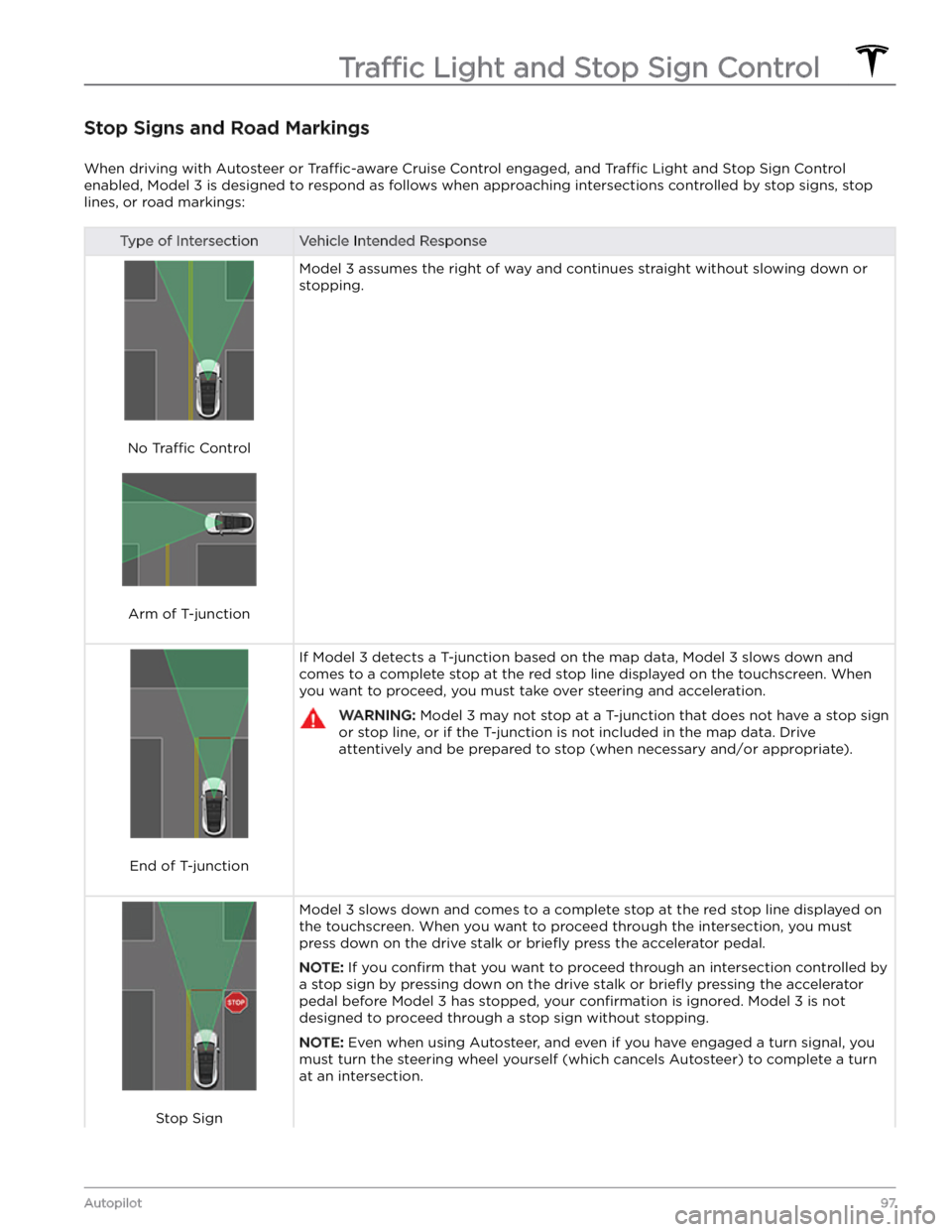
Stop Signs and Road Markings
When driving with Autosteer or Traffic-aware Cruise Control engaged, and Traffic Light and Stop Sign Control
enabled,
Model 3 is designed to respond as follows when approaching intersections controlled by stop signs, stop
lines, or road markings:
Type of IntersectionVehicle Intended Response
No Traffic Control
Arm of T-junction
Model 3 assumes the right of way and continues straight without slowing down or
stopping.
End of T-junction
If Model 3 detects a T-junction based on the map data, Model 3 slows down and
comes to a complete stop at the red stop line displayed on the
touchscreen. When
you want to proceed, you must take over steering and acceleration.
WARNING: Model 3 may not stop at a T-junction that does not have a stop sign
or stop line, or if the T-junction is not included in the map data. Drive
attentively and be prepared to stop (when necessary and/or appropriate).
Stop Sign
Model 3 slows down and comes to a complete stop at the red stop line displayed on
the
touchscreen. When you want to proceed through the intersection, you must
press down on the drive stalk or briefly press the accelerator pedal.
NOTE: If you confirm that you want to proceed through an intersection controlled by
a stop sign by
pressing down on the drive stalk or briefly pressing the accelerator
pedal before
Model 3 has stopped, your confirmation is ignored. Model 3 is not
designed to proceed through a stop sign without stopping.
NOTE: Even when using Autosteer, and even if you have engaged a turn signal, you
must turn the
steering wheel yourself (which cancels Autosteer) to complete a turn
at an intersection.
Traffic Light and Stop Sign Control
97Autopilot
Page 103 of 296

WARNING: When Autopark is actively steering
Model 3, the steering wheel moves in accordance
with Autopark
Page 153 of 296

Overview
NOTE: Entertainment options vary by market region.
The touchscreen displays the Entertainment screen when you choose any of the following apps:
Theater: Play various video streaming services (such as Netflix, YouTube, Hulu, etc.) while parked.
Available only if
Model 3 is connected to WiFi, or is equipped with premium connectivity and a cellular
signal is available.
Arcade: Want to game? Depending on the game, you may need to use the steering wheel buttons or a
Bluetooth or USB controller to play. See
Gaming Controllers on page 153.
NOTE: For some vehicles manufactured after approximately November 1, 2021, the center console USB
ports can only be used to charge devices. On these vehicles, you must use the USB port inside the glove box.
Toybox: Play in the Toybox while parked.WARNING: Use these features only when Model 3 is parked. Always pay attention to road and traffic
conditions when driving. Using these features while driving is illegal and very dangerous.
NOTE: You can also use voice commands to access these features (see Voice Commands on page 125).
Toybox
Your vehicle
Page 212 of 296

Motor Type(s)
Rear motor: AC permanent magnet synchronous motor, liquid-cooled, with variable frequency drive.
Front motor (AWD vehicles): AC induction motor, liquid-cooled, with variable frequency drive.
Transmission
TypeSingle speed fixed gearGearbox Ratio9:1
Steering
SteeringSpecificationsTypeRack and pinion with electronic power steering, speed sensitiveNumber of turns lock to lock2.00Turning Circle (curb to curb)38 ft (11.6 m)
Brakes
Type4-wheel anti-lock braking system (ABS) with Electronic Brake Force Distribution, Integrated Advanced Stability Control and Electronic
Accelerator pedal actuated regenerative braking systemCalipers
Front: Four piston fixed
Rear: Integrated Electronic Parking Brake Sliding
Rotor Diameter (ventilated)
Front (non-Performance): 12.6"/320 mm
Front (Performance): 13.98"/355 mm
Rear (non-Performance): 13.2"/335 mm
Rear (Performance): 13.2”/335 mm
Front Rotor thickness
New: 0.98"/25 mm
Service limit: 0.91”/23 mm
Rear Rotor thickness
New: 0.79"/20 mm
Service limit: 0.71”/18 mm
Lateral runout
0.050 mm
Subsystems
210MODEL 3 Owner
Page 230 of 296

APP_w218
Autosteer speed limit exceeded
Take control of steering wheel
What this alert means:
Autosteer is unavailable because your vehicle has exceeded the maximum speed limit for this driver assistance
feature.
What to do:
Take immediate control of the steering wheel and maintain control until you reach your destination.
In most cases, Autosteer will not be available for the rest of your current drive. To reset it, bring the vehicle to a
complete stop and shift into Park. When you shift into Drive to travel to your next destination, Autosteer should be
available again.
NOTE: If this alert becomes active while you are driving in Germany, Autosteer should be available again once your
vehicle is traveling below the Autosteer speed limit.
If Autosteer is not available during your next drive, and remains unavailable throughout subsequent drives, schedule
service at your convenience. Your vehicle is OK to drive in the meantime.
For more information, see Autosteer on page 85.
APP_w221
Cruise control unavailable
Reduced front radar visibility
What this alert means:
Traffic-Aware Cruise Control and Autosteer are unavailable because the radar located in the front bumper area of
your vehicle has no or low visibility.
This could be a temporary obstruction caused by factors like snow, ice, dirt, or mud.
What to do:
Continue to your destination. Your vehicle is OK to drive. Traffic-Aware Cruise Control and Autosteer will remain
unavailable as long as the radar lacks adequate visibility.
If the alert persists throughout your drive, examine the front bumper before your next planned drive and attempt to
clear any obstruction. See the About Autopilot on page 77 sections “How It Works” and “Cleaning Cameras and
Sensors” for more information on clearing dirt or debris from that area of the vehicle.
If this alert persists throughout subsequent drives but no obstruction is visible on the front bumper where the radar
is located, schedule service at your earliest convenience. Your vehicle is OK to drive in the meantime.
APP_w222
Cruise control unavailable
Reduced front camera visibility
What this alert means:
Traffic-Aware Cruise Control and Autosteer are unavailable because one or more of the front cameras in your vehicle
is blocked or blinded by external conditions.
Traffic-Aware Cruise Control and Autosteer will remain unavailable while a front camera lacks adequate visibility.
Cameras can be blocked or blinded by:
Troubleshooting Alerts
228MODEL 3 Owner
Page 289 of 296

A
ABS (Anti-lock Braking System): 60
absolute speed limit: 114
acceleration, chill: 68
acceleration, sport: 68
acceleration, standard: 68
accessories: 23
plugging into power socket: 23
adjacent lane speed: 85
aero covers: 178
air conditioning: 116
air filter: 120
air vents: 119
airbag safety information: 44
airbags, location: 38
alarm: 127, 131
all-season tires: 181
Always Show Estimated Round Trip Energy: 146
ambient lights: 53
anti-lock braking (ABS): 60
apps: 5
Arcade: 151
audio: 47, 148, 151
playing files: 148, 151
settings: 148
steering wheel scroll button: 47
volume control: 148
auto fold: 49
auto high beam: 54
Auto Lane Change: 87
auto tilt: 49
AUTO wipers: 59
automatic emergency braking: 112
automatic navigation: 142
navigating: 142
Autopark: 100
autopilot: 108
side collision warning: 108
Autopilot: 77, 80, 85, 87, 100, 102, 111, 114
Auto Lane Change: 87
automatic emergency braking: 111
Autopark: 100
Autosteer: 85
collision avoidance assist: 111
forward collision warning: 111
overtake acceleration: 80
overview: 77
speed assist: 114
speed limit warning: 114
staying within speed limits: 114
Summon: 102
Traffic-Aware Cruise Control: 80
Autopilot components: 77
Autosteer: 85
average range: 165
B
backup camera: 72
Battery (high voltage): 156, 211
care of: 156
specifications: 211
temperature limits: 156
battery (key), replacing: 12
battery (low voltage): 156, 211
complete discharge: 156
specifications: 211
Blind Spot Camera: 108
Blind Spot Collision Warning: 108
Blind Spot Collision Warning Chime: 108
Bluetooth: 122, 149
devices, playing audio files from: 149
general information: 122
phone, pairing and using: 122
body repairs: 192
body touch up: 185
Boombox: 151, 152
brakes: 60, 112, 210
automatic in emergencies: 112
overview of: 60
specifications: 210
Bumper Clearance (Summon): 102
C
cabin air filter: 120
cabin camera: 115
cabin temperature control: 116
Calendar: 122, 124
calibrating windows: 16
California Proposition 65: 283
camera, rear-facing: 72
cameras (autopilot): 77
Camp: 118
car cover: 185
car wash mode: 183
car washes: 184
Caraoke): 149
card: 10
cargo area: 18
cargo volume: 210
Index
Page 293 of 296

Radio regulatory information: 285
range: 61, 164
driving tips to maximize: 164
regenerative braking: 61
range assurance: 165
re-naming your vehicle: 9
Re-route: 146
rear seats, folding and raising: 26
rear view camera: 72
rear window switches, disabling: 16
recent (Media Player): 149
Recents (navigation): 142
recording: 129, 131
recording videos (Track Mode): 69
regenerative braking: 61
regenerative braking, in Track Mode: 69
relative speed limit: 114
release notes: 139
restarting the touchscreen: 50
RFID transponders: 190
roadside assistance: 221
roof racks: 207
rotating tires: 177
Round Trip Energy (navigating): 146
run out of range: 224, 225
S
safety defects, reporting: 285
safety information: 31, 37
child seats: 37
seat belts: 31
Schedule: 163
schedule service: 140
scheduled charging: 163
scheduled departure: 163
using: 163
seat belts: 29, 30, 185
cleaning: 185
in a collision: 30
overview of: 29
pre-tensioners: 30
wearing when pregnant: 30
seat covers: 28
seat heaters: 116
seating capacity: 206
seats: 25, 116
adjusting: 25
heaters: 116
security settings: 127
sensors: 77
Sentry Mode: 131
service data recording: 282
service intervals: 166
settings, acceleration: 68
Settings, erasing: 9
shifting drive modes: 51
shortcuts: 7, 8
adding to My Apps: 8
restarting the touchscreen: 7
Show Calendar Upon Entry: 122, 124
side camera(s): 72
Side Clearance (Summon): 102
side collision warning: 108
slip start: 64
Smart Summon: 105
smartphone: 10
authenticating as a key: 10
Software Reinstall: 138
software reset: 9
software update preferences: 138
software updates: 138
specifications: 208, 210, 211, 213
brakes: 210
cargo volume: 210
dimensions: 208
exterior: 208
High Voltage Battery: 211
interior: 208
low voltage battery: 211
motor: 210
steering: 210
subsystems: 210
suspension: 211
tires: 213
transmission: 210
wheels: 213
speed assist: 114
speed limit warning: 114
Stability Assist (Track Mode): 69
stability control: 64
standby: 131
starting: 50
steering specifications: 210
steering wheel: 53
lights, controlling: 53
steering, automatic: 85
summer tires: 181
Summon: 102
Summon Distance: 102
superchargers, displaying on map: 142
Index