brakes TESLA MODEL 3 2023 Owners Manual
[x] Cancel search | Manufacturer: TESLA, Model Year: 2023, Model line: MODEL 3, Model: TESLA MODEL 3 2023Pages: 296, PDF Size: 9.84 MB
Page 59 of 296
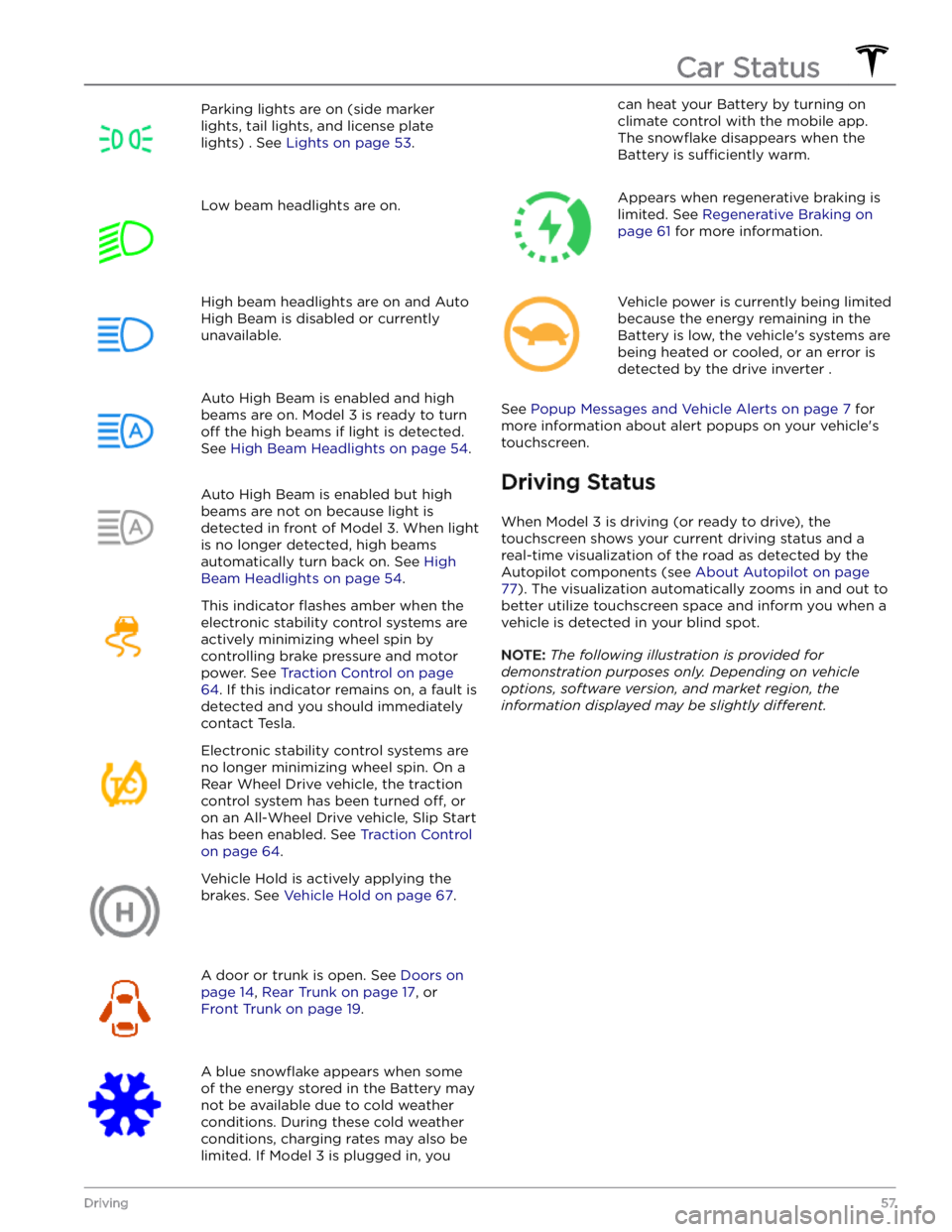
Parking lights are on (side marker
lights, tail lights, and license plate lights) . See
Lights on page 53.
Low beam headlights are on.High beam headlights are on and Auto
High Beam is disabled or currently
unavailable.Auto High Beam is enabled and high
beams are on.
Model 3 is ready to turn
off the high beams if light is detected.
See
High Beam Headlights on page 54.
Auto High Beam is enabled but high beams are not on because light is
detected in front of
Model 3. When light
is no longer detected, high beams
automatically turn back on. See
High
Beam Headlights on page 54.
This indicator flashes amber when the
electronic stability control systems are actively minimizing wheel spin by
controlling brake pressure and motor
power. See
Traction Control on page
64. If this indicator remains on, a fault is
detected and you should immediately contact Tesla.
Electronic stability control systems are no longer minimizing wheel spin. On a
Rear Wheel Drive vehicle, the traction
control system has been turned
off, or
on an All-Wheel Drive vehicle, Slip Start has been enabled. See
Traction Control
on page 64.
Vehicle Hold is actively applying the brakes. See
Vehicle Hold on page 67.
A door or trunk is open. See Doors on
page 14, Rear Trunk on page 17, or
Front Trunk on page 19.
A blue snowflake appears when some
of the energy stored in the Battery may not be available due to cold weather conditions. During these cold weather
conditions, charging rates may also be
limited. If
Model 3 is plugged in, you
can heat your Battery by turning on climate control with the mobile app.
The
snowflake disappears when the
Battery is
sufficiently warm.
Appears when regenerative braking is limited. See
Regenerative Braking on
page 61 for more information.
Vehicle power is currently being limited
because the energy remaining in the
Battery is low, the vehicle
Page 62 of 296
Braking SystemsWARNING: Properly functioning braking systems
are critical to ensure safety. If you experience a
problem with the brake pedal, brake calipers, or
any component of a Model 3 braking system,
contact Tesla immediately.
Model 3 has an anti-lock braking system (ABS) that
prevents the wheels from locking when you apply
maximum brake pressure. This improves steering control
during heavy braking in most road conditions.
During emergency braking conditions, the ABS
constantly monitors the speed of each wheel and varies
the brake pressure according to the grip available.
The alteration of brake pressure can be felt as a pulsing sensation through the brake pedal. This demonstrates that the ABS is operating and is not a cause for concern. Keep
firm and steady pressure on the brake pedal while
experiencing the pulsing.
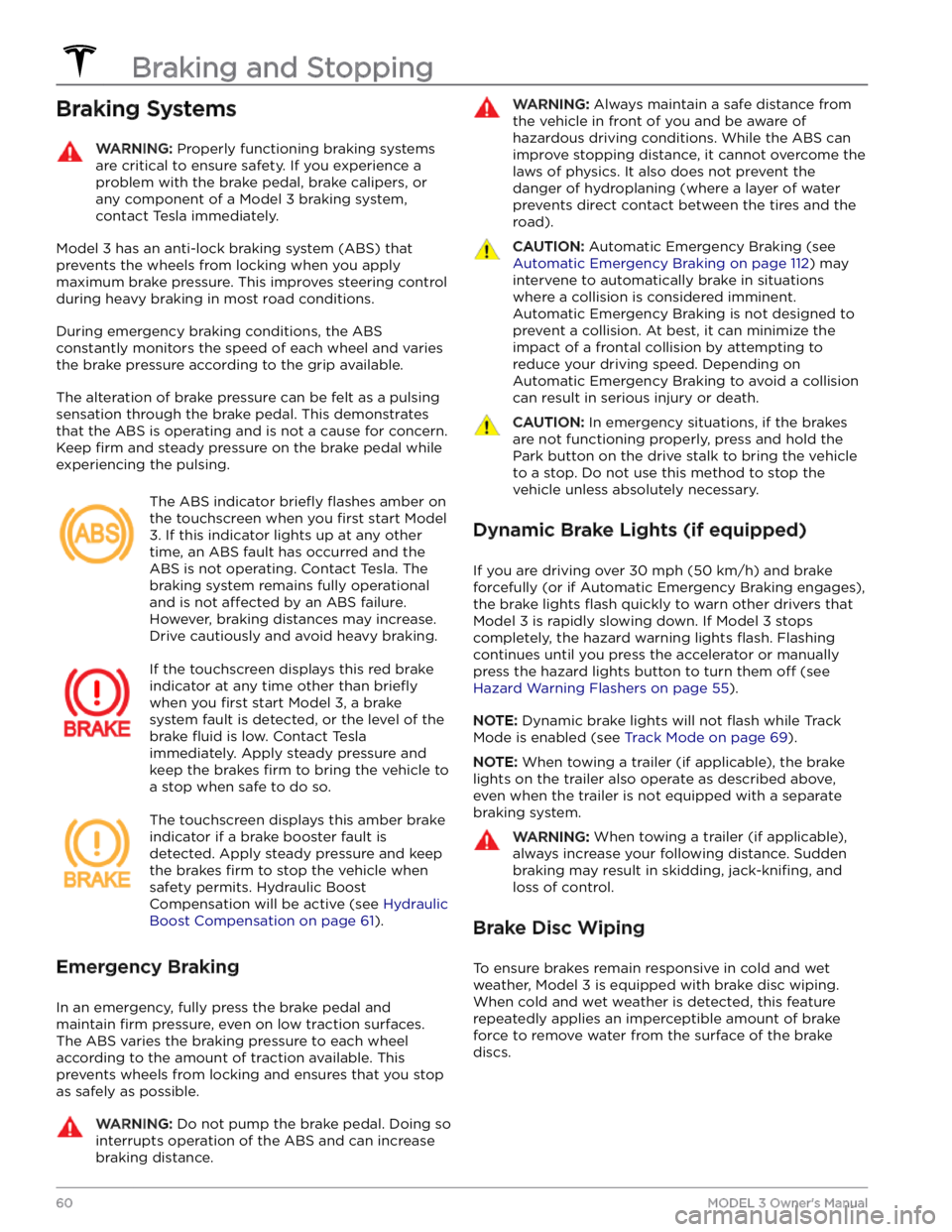
The ABS indicator briefly flashes amber on
the
touchscreen when you first start Model
3. If this indicator lights up at any other
time, an ABS fault has occurred and the ABS is not operating. Contact Tesla. The
braking system remains fully operational
and is not
affected by an ABS failure.
However, braking distances may increase. Drive cautiously and avoid heavy braking.
If the touchscreen displays this red brake
indicator at any time other than
briefly
when you first start Model 3, a brake
system fault is detected, or the level of the
brake
fluid is low. Contact Tesla
immediately. Apply steady pressure and
keep the brakes
firm to bring the vehicle to
a stop when safe to do so.
The touchscreen displays this amber brake
indicator if a brake booster fault is detected. Apply steady pressure and keep the brakes
firm to stop the vehicle when
safety permits. Hydraulic Boost
Compensation will be active (see
Hydraulic
Boost Compensation on page 61).
Emergency Braking
In an emergency, fully press the brake pedal and
maintain
firm pressure, even on low traction surfaces.
The ABS varies the braking pressure to each wheel according to the amount of traction available. This prevents wheels from locking and ensures that you stop as safely as possible.
WARNING: Do not pump the brake pedal. Doing so
interrupts operation of the ABS and can increase
braking distance.
WARNING: Always maintain a safe distance from
the vehicle in front of you and be aware of
hazardous driving conditions. While the ABS can
improve stopping distance, it cannot overcome the
laws of physics. It also does not prevent the
danger of hydroplaning (where a layer of water
prevents direct contact between the tires and the
road).
CAUTION: Automatic Emergency Braking (see
Automatic Emergency Braking on page 112) may
intervene to automatically brake in situations
where a collision is considered imminent.
Automatic Emergency Braking is not designed to
prevent a collision. At best, it can minimize the
impact of a frontal collision by attempting to
reduce your driving speed. Depending on
Automatic Emergency Braking to avoid a collision
can result in serious injury or death.
CAUTION: In emergency situations, if the brakes
are not functioning properly, press and hold the
Park button on the drive stalk to bring the vehicle
to a stop. Do not use this method to stop the
vehicle unless absolutely necessary.
Dynamic Brake Lights (if equipped)
If you are driving over 30 mph (50 km/h) and brake
forcefully
(or if Automatic Emergency Braking engages),
the brake lights
flash quickly to warn other drivers that
Model 3 is rapidly slowing down. If Model 3 stops
completely, the hazard warning lights
flash. Flashing
continues until you press the accelerator or manually press the hazard lights button to turn them
off (see
Hazard Warning Flashers on page 55).
NOTE: Dynamic brake lights will not flash while Track
Mode is enabled (see
Track Mode on page 69).
NOTE: When towing a trailer (if applicable), the brake
lights on the trailer also operate as described above,
even when the trailer is not equipped with a separate
braking system.
WARNING: When towing a trailer (if applicable),
always increase your following distance. Sudden
braking may result in skidding, jack-knifing, and
loss of control.
Brake Disc Wiping
To ensure brakes remain responsive in cold and wet
weather,
Model 3 is equipped with brake disc wiping.
When cold and wet weather is detected, this feature repeatedly applies an imperceptible amount of brake
force to remove water from the surface of the brake discs.
Braking and Stopping
60MODEL 3 Owner
Page 63 of 296

Hydraulic Fade Compensation
Model 3 is equipped with hydraulic fade compensation.
This assists in monitoring brake system pressure and ABS activity for instances of reduced brake
performance. If reduced brake performance is detected (for example, as a result of brake fade, or cold or wet
conditions), you may hear a sound, feel the brake pedal pull away from your foot, and notice a strong increase in braking. Brake as you normally would and continue to
press the brake pedal without releasing or pumping the
brakes.
CAUTION: If brakes are not functioning properly,
stop the vehicle when safety permits and contact
Tesla Service. See Park on page 51 for information
on using the Park button to stop the vehicle in
case of emergency.
WARNING: Always maintain a safe driving distance
from the vehicle in front of you and exercise
caution when driving conditions are hazardous.
Brake disc wiping and hydraulic fade
compensation is not a substitute for adequately
applying the brakes.
Hydraulic Boost Compensation
Model 3 is equipped with a brake booster that activates
the brakes when the brake pedal is pressed. Hydraulic boost compensation provides mechanical assistance if the brake booster fails. If a brake booster failure is detected, the brake pedal feels
stiffer to press and you
may hear a sound when you press the brake pedal. To
stop
Model 3, apply steady force to the brake pedal
without releasing or pumping. Drive cautiously and
maintain a safe distance from other road users
Page 65 of 296
WARNING: In snowy or icy conditions the rear
wheels may not have sufficient traction to prevent
Model 3 from sliding down a slope, particularly if
not using winter tires. Avoid parking on hills in
snowy or icy conditions. You are always
responsible for parking safely.
WARNING: Your Model 3 may display an alert if
the road is too steep to safely park on, or if the
parking brakes are not properly engaged. These
alerts are for guidance purposes only and are not a
substitute for the driver
Page 69 of 296

When Model 3 is stopped, Vehicle Hold can continue to
apply the brakes even after you remove your foot from
the brake pedal.
Vehicle Hold will activate in two ways:
Page 90 of 296
In situations where Auto Lane Change is unable to operate at optimal performance, or cannot operate due to inadequate data, the
touchscreen displays a series of
warnings. Therefore, when using Auto Lane Change,
always pay attention to the
touchscreen and be
prepared to manually steer
Model 3.
Adjacent Lane Speed
NOTE: Depending on market region, vehicle
configuration, options purchased, and software version,
your vehicle may not be equipped with Adjacent Lane
Speed, or the feature may not operate exactly as
described.
When moving significantly faster than vehicles in
adjacent lanes,
Model 3 automatically reduces the
driving speed. This is especially helpful in heavy
traffic
situations or when vehicles are constantly merging into
different lanes. When Model 3 detects other vehicles
driving
significantly slower, the touchscreen highlights
the adjacent lanes with arrows and detected vehicles in gray, and
Model 3 reduces the driving speed as
appropriate. To temporarily override this feature, press
the accelerator pedal.
WARNING: Never depend on Autopilot to
determine a safe driving speed; you are
responsible for driving safely and according to
traffic laws in your market region.
Stop Light and Stop Sign Warning
NOTE: Depending on market region, vehicle
configuration, options purchased, and software version,
your vehicle may not be equipped with Stop Light and
Stop Sign Warning, or the feature may not operate
exactly as described.
While Autosteer is in use, Model 3 displays a warning on
the
touchscreen and sounds a chime if it detects that
you are likely to run through a red stop light or stop sign. If this happens,
TAKE IMMEDIATE CORRECTIVE
ACTION!
The visual and audible warnings cancel after a few seconds, or when you press the brake pedal, whichever
comes
first.
Stop Light and Stop Sign Warning provides warnings
only. It does not slow down or stop
Model 3 at red traffic
lights, stop signs, road markings, etc. If equipped with
Traffic Light and Stop Sign Control, you can enable this
feature to automatically stop Model 3 at traffic lights
and stop signs (see Traffic Light and Stop Sign Control
on page 93).
CAUTION: Stop Light and Stop Sign Warning
requires on-board maps to know that a particular
stop light or stop sign exists at a location. In some
cases, map data is inaccurate or outdated and may
not include all stop lights or stop signs. Therefore,
Stop Light and Stop Sign Warning may not detect
all stop lights and stop signs.
WARNING: The Stop Light and Stop Sign Warning
feature does not apply the brakes or decelerate
Model 3 and may not detect all stop lights and
stop signs. Stop Light and Stop Sign Warning is
designed for guidance purposes only and is not a
substitute for attentive driving and sound
judgment. Keep your eyes on the road when
driving and never depend on Stop Light and Stop
Sign Warning to warn you of a stop light or stop
sign.
WARNING: Stop Light and Stop Sign Warning is
designed to warn you only when approaching a
visible red stop sign, solid red or later portion of a
yellow traffic light. It may not warn you of
intersections with flashing lights and it does not
warn you of yield signs or temporary stop and
yield signs (such as those used in construction
areas). Additionally, Stop Light and Stop Sign
Warning does not warn you of approaching stop
lights or stop signs when you are pressing the
accelerator pedal or brake pedal (which disables
Autosteer).
Limitations
Autosteer and its associated functions are particularly
unlikely to operate as intended when:
Page 114 of 296

WARNING: Forward Collision Warning may
provide a warning in situations where the
likelihood of collision may not exist. Stay alert and
always pay attention to the area in front of Model 3
so you can anticipate whether any action is
required.
Forward Collision Warning operates only when driving between approximately
3 mph (5 km/h) and 90 mph
(150 km/h).
WARNING: Forward Collision Warning does not
provide a warning when the driver is already
applying the brake.
Automatic Emergency Braking
Model 3 is designed to determine the distance from a
detected object traveling in front of it. When a frontal collision is considered unavoidable, Automatic Emergency Braking is designed to apply the brakes to
reduce the vehicle
Page 185 of 296

Cleaning the Exterior
To prevent damage to the paint, immediately remove
corrosive substances (bird droppings, tree resin, dead insects, tar spots, road salt, industrial fallout, etc.). Do not wait until
Model 3 is due for a complete wash. If
necessary, use denatured alcohol to remove tar spots
and stubborn grease stains, then immediately wash the area with water and a mild, non-detergent soap to remove the alcohol.
Keep the exterior cameras free of dirt, condensation, or obstructions. These substances can cause unclear pictures or Autopilot and safety features to stop working (see
Cleaning a Camera on page 183).
Follow these steps when washing the exterior of Model
3:
1.
Rinse Thoroughly
Before washing, flush grime and grit from the vehicle
using a hose. Flush away accumulations of mud in areas where debris easily collects (such as wheel wells and panel seams). If salt has been used on the highways (such as during winter months), thoroughly
rinse all traces of road salt from the underside of the
vehicle, wheel wells, and brakes.
2.
Hand Wash
Hand wash Model 3 using a clean soft cloth and cold
or lukewarm water containing a mild, high-quality car shampoo.
CAUTION: Some cleaners and car shampoos
contain chemicals that can cause damage or
discoloration, especially to plastic trim pieces,
lamps, or camera lenses. For example, some car
cleaning formulas contain hydroxide or other
highly alkaline or caustic ingredients that can
damage exterior components. Damage or
discoloration resulting from cleaning products
is not covered by the warranty.
3.
Rinse with Clean Water
After washing, rinse with clean water to prevent soap from drying on the surfaces.
4.
Dry Thoroughly and Clean Exterior Glass
After washing and rinsing, dry thoroughly with a chamois. If necessary, dry the brakes by going on a
short drive and applying the brakes multiple times.
Window Cleaning and Treatments
Clean windows and mirrors using an automotive glass
cleaner. Do not scrape or use any abrasive cleaning
fluid
on glass or mirrored surfaces. Follow the directions in
Cleaning the Exterior on page 183 for best practices in
cleaning the exterior glass.
To add a hydrophobic coating to your vehicle
Page 186 of 296

Cautions for Exterior CleaningCAUTION: Do not wash in direct sunlight.CAUTION: Do not use windshield treatment fluids.
Doing so can interfere with wiper friction and
cause a chattering sound.
CAUTION: Do not use hot water, detergents, or
highly alkaline or caustic cleaning products,
especially those containing hydroxide.
CAUTION: If using a pressure washer, maintain a
distance of at least 12" (30 cm) between the
nozzle and the surface of Model 3. Avoid aiming
the water jet directly at parking sensors (if
equipped). Keep the nozzle moving and do not
concentrate the water jet on any one area.
CAUTION: Do not aim water hoses directly at
windows, door, or hood seals or at electronic
modules or exposed cabling.
CAUTION: To avoid corrosive damage that may
not be covered by the warranty, rinse away any
road salt from the underside of the vehicle, wheel
wells, and brakes. After cleaning the vehicle, dry
the brakes by going on a short drive and applying
the brakes multiple times.
CAUTION: Avoid using tight-napped or rough
cloths, such as washing mitts. A high-quality
microfiber cleaning cloth is recommended.
CAUTION: If washing in an automatic car wash, use
touchless car washes only. These car washes have
no parts (brushes, etc.) that touch the surfaces of
Model 3. Some touchless car washes use caustic
solutions that, over time, can cause discoloration
of decorative exterior trim. Avoid exposure to
soaps and chemicals above pH 13. If unsure, check
the product label or ask the staff at the car wash.
Damage caused by improper washing is not
covered by the warranty.
CAUTION: If washing in an automatic car wash,
make sure the vehicle is locked. In addition, avoid
using controls on the touchscreen that can result
in accidentally opening doors or trunks while the
vehicle is being washed. Any damage caused is
not covered by the warranty.
CAUTION: Ensure the wipers are off before
washing Model 3 to avoid the risk of damaging the
wipers.
CAUTION: Do not use chemical based wheel
cleaners or pre-wash products. These can damage
the finish on the wheels.
WARNING: Never spray liquid at a high velocity
(for example, if using a pressure washer) towards
the charge port while Model 3 is charging. Failure
to follow these instructions can result in serious
injury or damage to the vehicle, charging
equipment, or property.
Cleaning the Interior
Frequently inspect and clean the interior to maintain its
appearance and to prevent premature wear. If possible,
immediately wipe up spills and remove marks. For
general cleaning, wipe interior surfaces using a soft cloth (such as
microfiber) dampened with a mixture of warm
water and mild non-detergent cleaner (test all cleaners on a concealed area before use). To avoid streaks, dry immediately with a soft lint-free cloth.
Interior Glass
Do not scrape, or use any abrasive cleaning fluid on
glass or mirrored surfaces. This can damage the
reflective surface of the mirror and the heating elements
in the rear window.
Airbags
Do not allow any substance to enter an airbag cover. This could
affect correct operation.
Dashboard and Plastic Surfaces
Do not polish the upper surfaces of the dashboard. Polished surfaces are
reflective and could interfere with
your driving view.
Seats
Wipe spills and chemical residues from interior surfaces as soon as possible using a soft cloth moistened with warm water and non-detergent soap. Wipe gently in a circular motion. Then wipe dry using a soft, lint-free cloth.
Although seating surfaces are designed to repel stains, Tesla recommends regular cleaning to maintain
performance and an as-new appearance. Promptly treat
dye transfer from clothing, such as indigo-dyed denim.
Avoid contact with harsh chemicals, including certain cosmetics. Never use cleaners containing alcohol or bleach. Spot-test cleaners on an inconspicuous area
before applying to visible surfaces.
Vacuum cloth seats as needed to remove any loose dirt.
CAUTION: Aftermarket, non-Tesla seat covers may
inhibit the sensitivity of a seat
Page 212 of 296

Motor Type(s)
Rear motor: AC permanent magnet synchronous motor, liquid-cooled, with variable frequency drive.
Front motor (AWD vehicles): AC induction motor, liquid-cooled, with variable frequency drive.
Transmission
TypeSingle speed fixed gearGearbox Ratio9:1
Steering
SteeringSpecificationsTypeRack and pinion with electronic power steering, speed sensitiveNumber of turns lock to lock2.00Turning Circle (curb to curb)38 ft (11.6 m)
Brakes
Type4-wheel anti-lock braking system (ABS) with Electronic Brake Force Distribution, Integrated Advanced Stability Control and Electronic
Accelerator pedal actuated regenerative braking systemCalipers
Front: Four piston fixed
Rear: Integrated Electronic Parking Brake Sliding
Rotor Diameter (ventilated)
Front (non-Performance): 12.6"/320 mm
Front (Performance): 13.98"/355 mm
Rear (non-Performance): 13.2"/335 mm
Rear (Performance): 13.2”/335 mm
Front Rotor thickness
New: 0.98"/25 mm
Service limit: 0.91”/23 mm
Rear Rotor thickness
New: 0.79"/20 mm
Service limit: 0.71”/18 mm
Lateral runout
0.050 mm
Subsystems
210MODEL 3 Owner