lock TESLA MODEL S 2016 User Guide
[x] Cancel search | Manufacturer: TESLA, Model Year: 2016, Model line: MODEL S, Model: TESLA MODEL S 2016Pages: 190, PDF Size: 4.85 MB
Page 49 of 190

1. If you turn on DOME lights, all interior dome (map) lights turn on when you unlock Model S,open a door upon exiting, or shift into P (Park). They turn off after 60 seconds, when you lock
Model S, or when you shift into a driving gear. If set to AUTO, dome lights turn on only when
little or no light is detected.
You can also manually turn an individual dome light on or
off by pressing its lens. If you
manually turn a dome light on, it turns off when Model S powers off. If Model S was already
powered off when you manually turned the light on, it turns off after 60 minutes.
2. If you turn on AMBIENT lights, the lights on the door armrests turn on whenever the headlights are on.
3. If you turn on AUTO HIGH BEAM, high beam headlights turn on and
off automatically based
on whether or not light is detected in front of Model S (see High Beam Headlights on page
51). This feature is available only if Model S is equipped with the optional Autopilot Tech Package.
4. DRL (Daytime Running Lights) operate only when driving with the headlights
off. In
jurisdictions where required by law (Canada), daytime running lights can not be turned off.5. If Model S is equipped with optional front fog lights, touch to turn them on or off.
The Front Fog indicator displays on the instrument panel whenever the
optional front fog lights are on.
The fog lights operate only when low beam headlights are on. Whenever headlights are
turned off, fog lights also turn off.
Lights
Driving49
Page 54 of 190
Braking Systems
Model S has an anti-lock braking system (ABS) that prevents the wheels from locking when
you apply maximum brake pressure. This
improves steering control during heavy
braking in most road conditions.
During emergency braking conditions, the
ABS constantly monitors the speed of each
wheel and varies the brake pressure according
to the grip available.
The alteration of brake pressure can be felt as
a pulsing sensation through the brake pedal.
This demonstrates that the ABS is operating
and is not a cause for concern. Keep
firm and
steady pressure on the brake pedal while
experiencing the pulsing.
The ABS indicator flashes briefly on
the instrument panel when you firststart Model S. If this indicator lights
up at any other time, an ABS fault
has occurred and the ABS is not
operating. Contact Tesla. The braking system remains fully operational and
is not
affected by an ABS failure.
However, braking distances may increase.
If the instrument panel displays this
indicator at any time other than
displaying
briefly when you first start
Model S, a brake system fault is
detected or the brake
fluid level is
low. Contact Tesla immediately.
Emergency Braking
In an emergency, fully press the brake pedal
and maintain
firm pressure, even on low
traction surfaces. The ABS varies the braking
pressure to each wheel according to the
amount of traction available. This prevents
wheels from locking and ensures that you stop
as safely as possible.
Warning: Do not pump the brake pedal.
Doing so interrupts operation of the ABS
and can increase braking distance.Warning: Always maintain a safe distance
from the vehicle in front of you and be
aware of hazardous driving conditions.
While the ABS can improve stopping
distance, it cannot overcome the laws of physics. It also does not prevent the
danger of hydroplaning (where a layer of
water prevents direct contact between the tires and the road).
If Model S is equipped with Autopilot
hardware, Automatic Emergency Braking
automatically applies full braking in situations
where a collision is considered imminent (see
Automatic Emergency Braking on page 86).
Brake Wear Model S brake pads are equipped with wear
indicators. A wear indicator is a thin metal
strip attached to the brake pad that squeals as it rubs against the rotor when the pad wears
down. This squealing sound indicates that the
brake pads have reached the end of their
service life and require replacement. To stop
the squealing, contact Tesla Service.
Warning: Neglecting to replace worn
brake pads results in damage to the
braking system and can create a braking
hazard.
Brakes
54Model S Owner
Page 91 of 190
1. Status barThe top line displays provides shortcuts to lock/unlock Model S, to access HomeLink andDriver
Profiles, display vehicle information (the Tesla “T”), download software updates, display
network strength and Bluetooth
Page 93 of 190
3. Main viewing areaThe main viewing area changes depending on the app you have chosen (in the example, the
Nav and Media apps are displayed). For some apps (such as Nav and Web), you can zoom in and out using standard touchscreen
finger gestures.
4. Maximize/minimize app
Touch the small rectangle to expand the associated app to
fill the entire main viewing area
(some apps are not expandable). Touch again to display two apps in half-screen view.
5. Controls
Touch to access all Model S controls and settings (doors, locks, lights, etc).
6. Climate controls (see Climate Controls on page 104).
7. Volume control
Touch the up and down arrows to increase or decrease the volume of the speakers. You can
also adjust the volume using the scroll wheel on the left side of the steering wheel.
8. Reverse the position of the two currently displayed apps.
Warning: Paying attention to road and traffic conditions must always be the driver
Page 121 of 190

About the Security System
If Model S does not detect a key nearby and a
locked door or trunk is opened, an alarm sounds and headlights and turn signals
flash.To deactivate the alarm, press any button on the key.
To manually enable or disable the alarm
system, touch Controls > Settings > Safety &
Security > Alarm. When set to on, Model S
activates its alarm one minute after the doors
lock and a recognized key is no longer
detected nearby.
Security Settings
Using the Touchscreen121
Page 125 of 190

Loading New Software
Model S updates its software wirelessly,
providing new features throughout your term of ownership. The
first time you enter Model S
after an update is made available, a scheduling
window displays on the touchscreen.
Note: Some software updates can take from
two to three hours to complete. Model S must be in P (Park) when the new software is being
installed. To ensure the fastest and most
reliable delivery of software updates, leave the
Wi-Fi turned on and connected whenever
possible (see Connecting to Wi-Fi on page
124).
When a software update is available, a yellow
clock icon appears on the touchscreen
Page 147 of 190
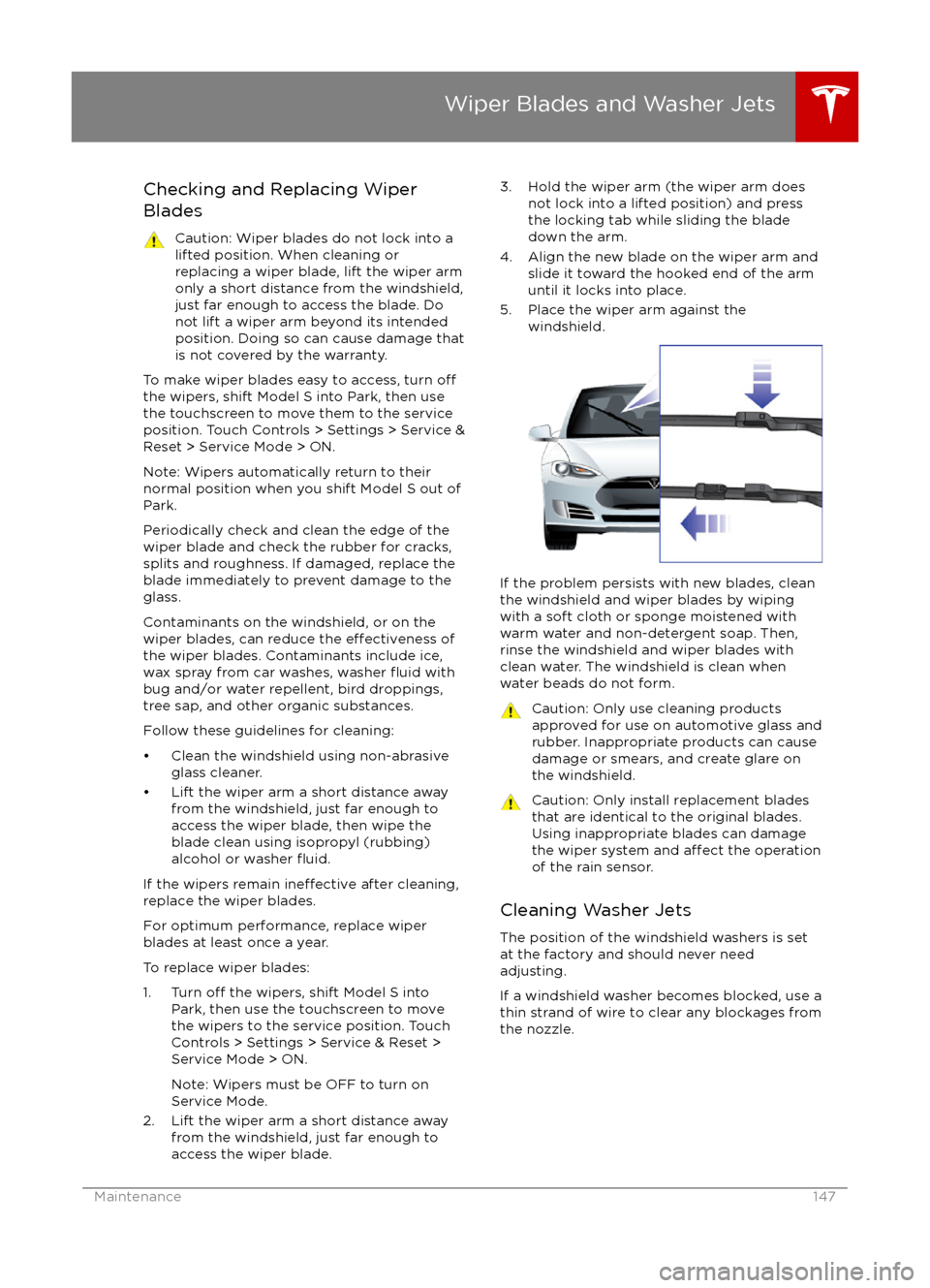
Checking and Replacing Wiper
BladesCaution: Wiper blades do not lock into a lifted position. When cleaning or
replacing a wiper blade, lift the wiper arm
only a short distance from the windshield,
just far enough to access the blade. Do
not lift a wiper arm beyond its intended
position. Doing so can cause damage that
is not covered by the warranty.
To make wiper blades easy to access, turn offthe wipers, shift Model S into Park, then use
the touchscreen to move them to the service
position. Touch Controls > Settings > Service &
Reset > Service Mode > ON.
Note: Wipers automatically return to their
normal position when you shift Model S out of Park.
Periodically check and clean the edge of the wiper blade and check the rubber for cracks,
splits and roughness. If damaged, replace the blade immediately to prevent damage to the
glass.
Contaminants on the windshield, or on the wiper blades, can reduce the
effectiveness of
the wiper blades. Contaminants include ice,
wax spray from car washes, washer
fluid with
bug and/or water repellent, bird droppings,
tree sap, and other organic substances.
Follow these guidelines for cleaning:
Page 166 of 190

MotorTypeAC induction motor, liquid-cooled, withvariable frequency driveRating320 VoltsMaximum speed of large motors:
- rear motor on all single motor models
- rear motor on P85D16000 rpmMaximum speed of small motors:
- front motor on all dual motor models
- front and rear motor on 85D18000 rpmMaximum net power* and engine speed of large motorsBase: 285 kW @ 6850 rpm
Performance: 375 kW @ 5950 rpmMaximum net power* and engine speed of small
motorsBase: 145 kW @ 5700 rpm
Performance: 193 kW @ 6100 rpmMaximum torque of large motorsBase: 440 Nm
Performance: 650 NmMaximum torque of small motorsBase: 250 Nm
Performance: 330 Nm*Tested in accordance with ECE R85
Transmission
TypeSingle speed fixed gearOverall Final Drive Ratio9.73:1Reverse GearReverse direction of motor, limited to
15 mph (24 km/h)
Steering
TypeRack and pinion with electronic power steering
Variable ratio and speed sensitiveNumber of turns lock to lock2.45Turning Circle (curb to curb)40.7 ft (12.4 m)
Subsystems
166Model S Owner
Page 167 of 190

Brakes
Type
4-wheel anti-lock braking system (ABS)
with Electronic Brake Force Distribution,
Integrated Advanced Stability Control and
Electronic Accelerator pedal actuated
regenerative braking systemCalipersFour piston fixedRotor Diameters (ventilated)Front: 13.98”/355 mm
Rear: 14.37”/365 mmFront Rotor thicknessNew: 1.26”/32 mm
Service limit: 1.18”/30 mmRear Rotor thicknessNew: 1.10”/28 mm
Service limit: 1.02”/26 mmFront Brake Pad Thickness (excluding back plate)New: 0.354”/9.0 mm
Service limit: 0.078”/2 mmRear Brake Pad Thickness (excluding back plate)New: 0.315”/8.0 mm
Service limit: 0.078”/2 mmElectronic Parking Brake (EPB) Pad Thickness
(excluding back plate). Electronic calipers self-
adjust for pad wear.New: 0.216”/5.5 mm
Service limit: 0.039”/1 mmParking brakeElectrically actuated parking brake
calipers
Suspension
FrontIndependent, double wishbone, air spring
or coil spring/telescopic damper, sway barRearIndependent, multi-link, air spring or coil
spring/telescopic damper, sway bar (air
suspension vehicles only)
Battery - 12V
Rating33 amp-hr or higherVoltage and Polarity12V negative (-) ground
Subsystems
Specifications167
Page 177 of 190

3. If applicable, disconnect the bumpersensors.
If Model S is equipped with Autopilot
components (see About Driver Assistance
on page 65), you also need to disconnect
the cords for the ultrasonic sensors. To do
so, press down on the tab and pull to release.
4. Insert the towing eye.
Fully insert the towing eye into the
opening on the right side, then turn it
counter-clockwise until securely fastened.
5. Attach the winch cable to the towing eye.
Caution: Before pulling, make sure the
towing eye is securely tightened.Pull Onto the Trailer and Secure the
Wheels
Secure wheels using the eight-point tie-downmethod with basket straps or tie-down straps: