no power TESLA MODEL S 2016 User Guide
[x] Cancel search | Manufacturer: TESLA, Model Year: 2016, Model line: MODEL S, Model: TESLA MODEL S 2016Pages: 190, PDF Size: 4.85 MB
Page 47 of 190

8. Use the right steering wheel buttons to change what displays on the right side of theinstrument panel whenever a phone call is not active (see Using Left Steering Wheel Buttons
on page 37).
9. Total estimated driving distance (or energy) available. Instead of driving distance, you can display the percentage of battery energy remaining. To do so, touch Controls > Settings >
Units & Format > Energy & Charging (see Settings on page 99).
Note: When anticipating when you need to charge, use range estimates as a general guideline only.
Note: In cold weather, some of the stored energy in the Battery may not be available on your drive because the Battery is too cold. When this happens, a portion of the Battery meter isblue and the driving distance value has a
snowflake image next to it. If Model S is plugged in,
you can heat your Battery using wall power by turning on climate control using the mobile app. When the Battery warms up, the blue portion on the meter and the
snowflake image are
no longer displayed.
10. The speed limit (if available) that is currently being detected by Speed Assist (see Speed
Assist on page 88).
11. The car in front of you (if applicable).
12. Pay attention to important driving-related messages that appear at the bottom center of the instrument panel.
13. Your Model S.
14. When Autosteer is active, the driving lane is highlighted in blue (see Autosteer on page 74).
The lane may highlight in red If a front wheel passes over a lane marking and the associated
turn signal is
off (see Lane Assist on page 83).
15. The following distance that Traffic-Aware Cruise Control will maintain from the car in front of
you. You can adjust the following distance as appropriate for driving conditions (see Traffic-
Aware Cruise Control on page 68).
16. Currently selected gear: Park, Reverse, Neutral, or Drive.
Instrument Panel
Driving47
Page 49 of 190

1. If you turn on DOME lights, all interior dome (map) lights turn on when you unlock Model S,open a door upon exiting, or shift into P (Park). They turn off after 60 seconds, when you lock
Model S, or when you shift into a driving gear. If set to AUTO, dome lights turn on only when
little or no light is detected.
You can also manually turn an individual dome light on or
off by pressing its lens. If you
manually turn a dome light on, it turns off when Model S powers off. If Model S was already
powered off when you manually turned the light on, it turns off after 60 minutes.
2. If you turn on AMBIENT lights, the lights on the door armrests turn on whenever the headlights are on.
3. If you turn on AUTO HIGH BEAM, high beam headlights turn on and
off automatically based
on whether or not light is detected in front of Model S (see High Beam Headlights on page
51). This feature is available only if Model S is equipped with the optional Autopilot Tech Package.
4. DRL (Daytime Running Lights) operate only when driving with the headlights
off. In
jurisdictions where required by law (Canada), daytime running lights can not be turned off.5. If Model S is equipped with optional front fog lights, touch to turn them on or off.
The Front Fog indicator displays on the instrument panel whenever the
optional front fog lights are on.
The fog lights operate only when low beam headlights are on. Whenever headlights are
turned off, fog lights also turn off.
Lights
Driving49
Page 55 of 190
Regenerative Braking
Whenever Model S is moving and your foot is
off the accelerator, regenerative braking slows
down Model S and feeds any surplus energy
back to the Battery.
By anticipating your stops and simply
removing pressure from the accelerator to slow down, you can take advantage ofregenerative braking to increase driving range.
Of course, this is no substitute for regular
braking when needed for safety.
Note: If regenerative braking is aggressively
slowing Model S, such as on a steep descent,
brake lights turn on to alert other road users
that you are slowing down.
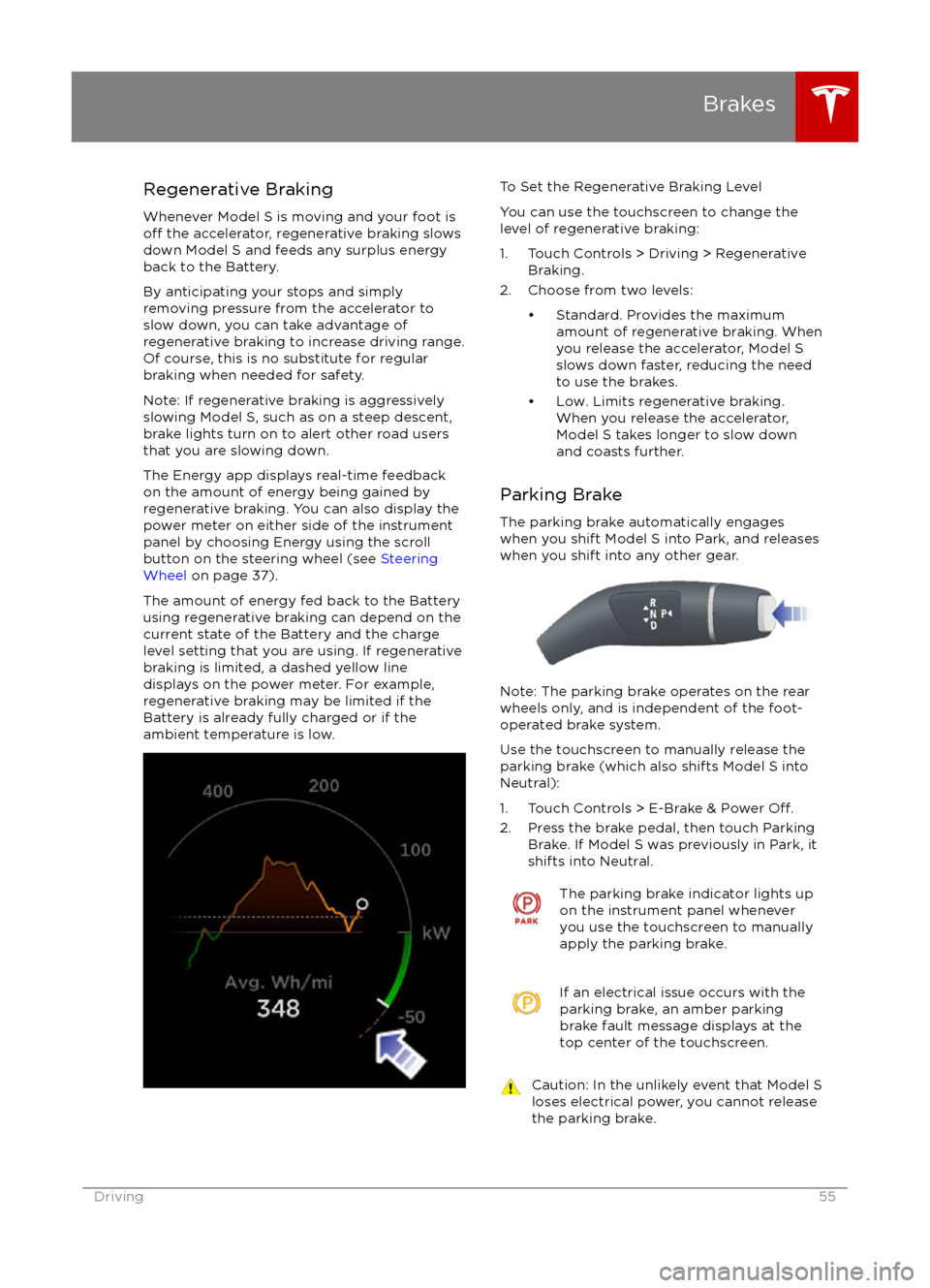
The Energy app displays real-time feedback
on the amount of energy being gained by
regenerative braking. You can also display the
power meter on either side of the instrument
panel by choosing Energy using the scroll
button on the steering wheel (see Steering
Wheel on page 37).
The amount of energy fed back to the Battery using regenerative braking can depend on the
current state of the Battery and the charge
level setting that you are using. If regenerative
braking is limited, a dashed yellow line
displays on the power meter. For example,
regenerative braking may be limited if the Battery is already fully charged or if the
ambient temperature is low.
To Set the Regenerative Braking Level
You can use the touchscreen to change the
level of regenerative braking:
1. Touch Controls > Driving > Regenerative Braking.
2. Choose from two levels:
Page 56 of 190
How It WorksThe traction control system constantly
monitors the speed of the front and rear
wheels. If Model S experiences a loss of
traction, the system minimizes wheel spin by
controlling brake pressure and motor power.
By default, the traction control system is
always active. Under normal conditions, it should remain active to ensure maximum
safety.
On standard (single motor) Model S vehicles,
traction control can be turned
off at any time.
Turn it off only in circumstances where you
deliberately want the wheels to spin, such as
when Model S is stuck in snow or mud.
On a dual motor Model S, you can enable slip
start to allow the wheels to spin at a limited speed. Slip start can be enabled only when
Model S is moving 20 mph (32 km/h) or
slower. Slip start automatically disables when
the speed exceeds 40 mph (64 km/h).
This indicator flashes on the
instrument panel whenever the
traction control system is actively
controlling brake pressure and motor
power to minimize wheel spin. If the
indicator stays on, a fault is detected with the traction control system.
Contact Tesla Service.Warning: Traction control can not prevent
accidents caused by driving dangerously
or turning too sharply at high speeds.Warning: If the above indicator remains
illuminated without turning off traction
control (single motor vehicles) or
enabling slip start (dual motor vehicles), the traction control system may not be
operating correctly. Contact Tesla Service immediately.
Disabling Traction Control (single motor
vehicles)
Under normal conditions, the traction control
system should remain enabled. Disable it only
in circumstances where you deliberately want
the wheels to spin, such as:
Page 58 of 190
the camera app window. You must be drivingat speeds below 5 mph (8 km/h).
Note: If a sensor is unable to provide
feedback, the instrument panel displays an
alert message.Caution: Keep sensors clean from dirt,
debris, snow, and ice. Avoid using a high
pressure power washer on the sensors
and do not clean a sensor with a sharp or abrasive object that can scratch or
damage its surface.Caution: Do not install accessories or
stickers on or near the parking sensors.
Controlling Audible Feedback
You can use Park Assist with or without
audible feedback. To turn chimes on or
off,touch Controls > Settings > Safety &
Security > Park Assist Chimes.
You can also mute the chimes temporarily by
pressing the scroll wheel on the left side of the steering wheel or by touching the mute buttonin the bottom left corner of the Park Assist
view. The chimes are muted until you shift into
a
different gear or drive over 5 mph (8 km/h).
Limitations and False Warnings
The parking sensors may not function
correctly in these situations:
Page 62 of 190

Driving Tips to Maximize Range
You can maximize your driving range using
the same driving habits that you use to conserve fuel in a gasoline-powered vehicle. In
addition to driving habits, energy
consumption depends on environmental conditions (such as cold weather and hilly
roads). To get the maximum mileage from a
charge:
Page 96 of 190

1. CloseTouch the circled X in the top left corner of a window to close it (or you can touch anywhere
outside the window).
2. Sunroof
If Model S is equipped with a sunroof, touch to adjust its position (see Sunroof on page 15).
3. Suspension
If Model S is equipped with Smart Air Suspension, touch to manually raise or lower Model S, orto remove a previously saved auto-raising location (see Smart Air Suspension on page 108).
Model S must be powered on and you must press the brake pedal before you can change
suspension settings. Smart Air Suspension causes Model S to self-level, even when powered
off. Therefore, when towing or lifting, you must disable self-leveling (see Instructions for
Transporters on page 175 and Jacking and Lifting on page 158).
Controls
96Model S Owner
Page 98 of 190
5. Cold WeatherIf Model S is equipped with the optional cold weather package, you can control all seat
heaters as well as the heated wipers and steering wheel. Heaters that are turned on are displayed in red. To turn
off all seat heaters, touch All Off. Note that you can also control the
front driver and passenger seats using the main climate control panel located on the bottom
of the touchscreen (see Climate Controls on page 104).
6. Trips
View and reset the trip meters that summarize how far you have driven (see Trip Information
on page 61).
7. Displays
Manually control the brightness and the Day (light background) or Night (dark background)setting of the touchscreen and instrument panel. When set to Auto, the brightness changes
automatically between day and night brightness based on ambient lighting conditions. When
Auto-adjust is checked, the displays are further adjusted based on both the surroundings and
by learning your preferences (i.e. it remembers the type of manual adjustments you make).
To disable the touchscreen momentarily for cleaning purposes, touch Clean Mode.You can also put Model S into an energy saving mode so it consumes less energy when not inuse (see Getting Maximum Range on page 62).
Note: The Displays settings can also be accessed from the Settings screen.
8. E-Brake & Power
Off
You can manually:
Page 104 of 190

Overview of Climate Controls
The climate controls are always available at the bottom of the touchscreen. By default, climate control is set to Auto On, which maintains optimum comfort in all but the most severe weather conditions. When you adjust the temperature, the system automatically adjusts the heating, air
conditioning, air distribution, air circulation, and fan speed to maintain your selected temperature. To override these settings, touch Auto On (see Customizing Climate Control on page 105).
The fan, heating, and air conditioning systems are powered by the Battery. Therefore, prolonged use decreases driving range.
Note: The following illustration is provided for demonstration purposes only. Depending on vehicle
options, software version, market region, and settings, the information displayed may be slightly
different.
1. The front seats are equipped with heating pads that operate at three levels from 3 (highest) to 1 (lowest).
When operating, the indicator turns red and displays the setting number.
Note: If Model S is equipped with the optional cold weather package, you can also control seat heaters in the rear seats, heated wipers, and heated steering wheel by touchingControls > Cold Weather (see Controls on page 94). When equipped with the optional
executive rear seats, you can control the seat and the backrest separately in each second row
passenger seat.
2. Touch the up or down arrow to set the cabin temperature (from LO, 63
Page 105 of 190
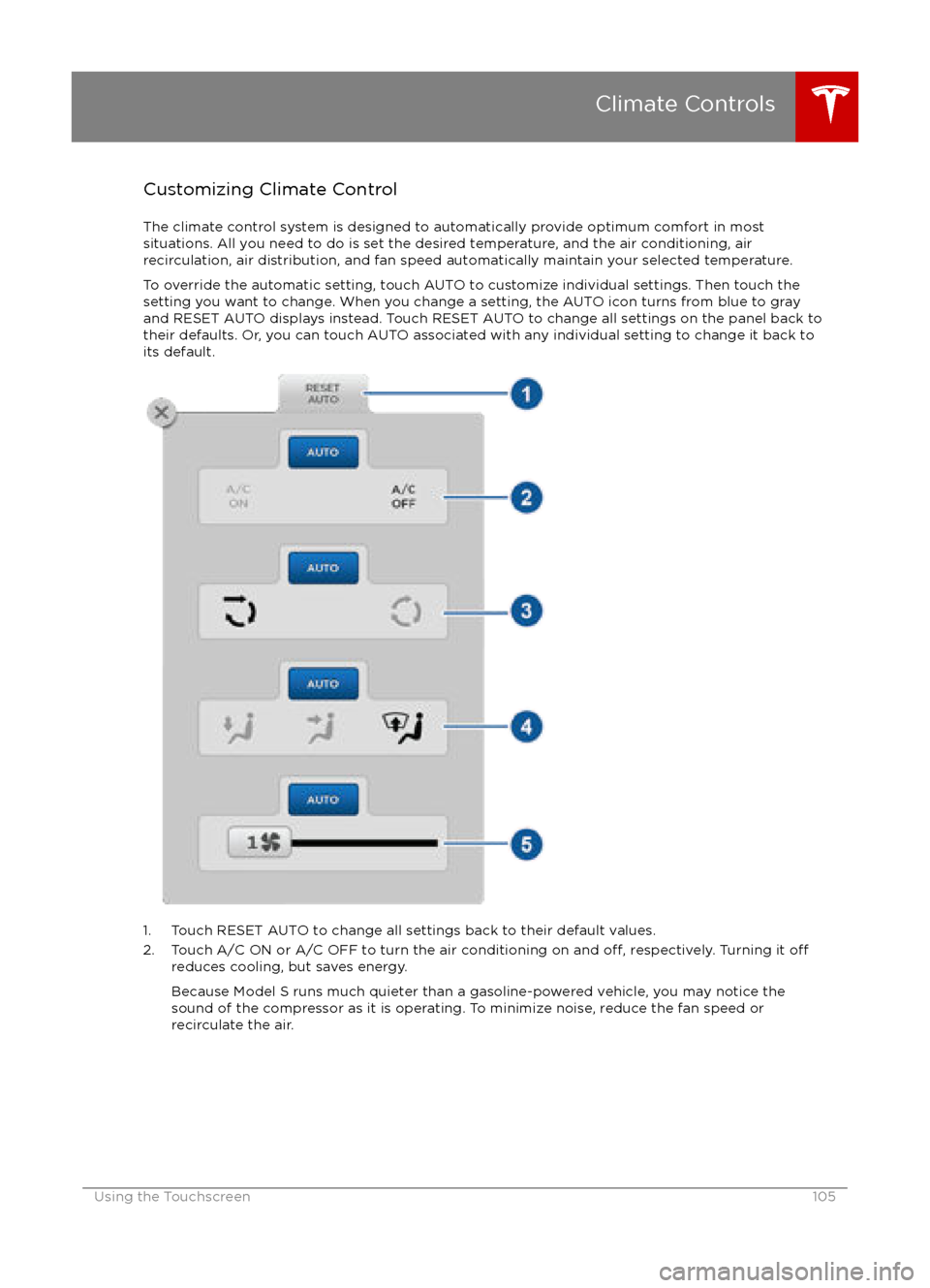
Customizing Climate ControlThe climate control system is designed to automatically provide optimum comfort in most
situations. All you need to do is set the desired temperature, and the air conditioning, air
recirculation, air distribution, and fan speed automatically maintain your selected temperature.
To override the automatic setting, touch AUTO to customize individual settings. Then touch the
setting you want to change. When you change a setting, the AUTO icon turns from blue to gray
and RESET AUTO displays instead. Touch RESET AUTO to change all settings on the panel back to
their defaults. Or, you can touch AUTO associated with any individual setting to change it back to its default.
1. Touch RESET AUTO to change all settings back to their default values.
2. Touch A/C ON or A/C OFF to turn the air conditioning on and off, respectively. Turning it offreduces cooling, but saves energy.
Because Model S runs much quieter than a gasoline-powered vehicle, you may notice the
sound of the compressor as it is operating. To minimize noise, reduce the fan speed or
recirculate the air.
Climate Controls
Using the Touchscreen105