phone TESLA MODEL S 2016 Owner's Manual
[x] Cancel search | Manufacturer: TESLA, Model Year: 2016, Model line: MODEL S, Model: TESLA MODEL S 2016Pages: 190, PDF Size: 4.85 MB
Page 5 of 190
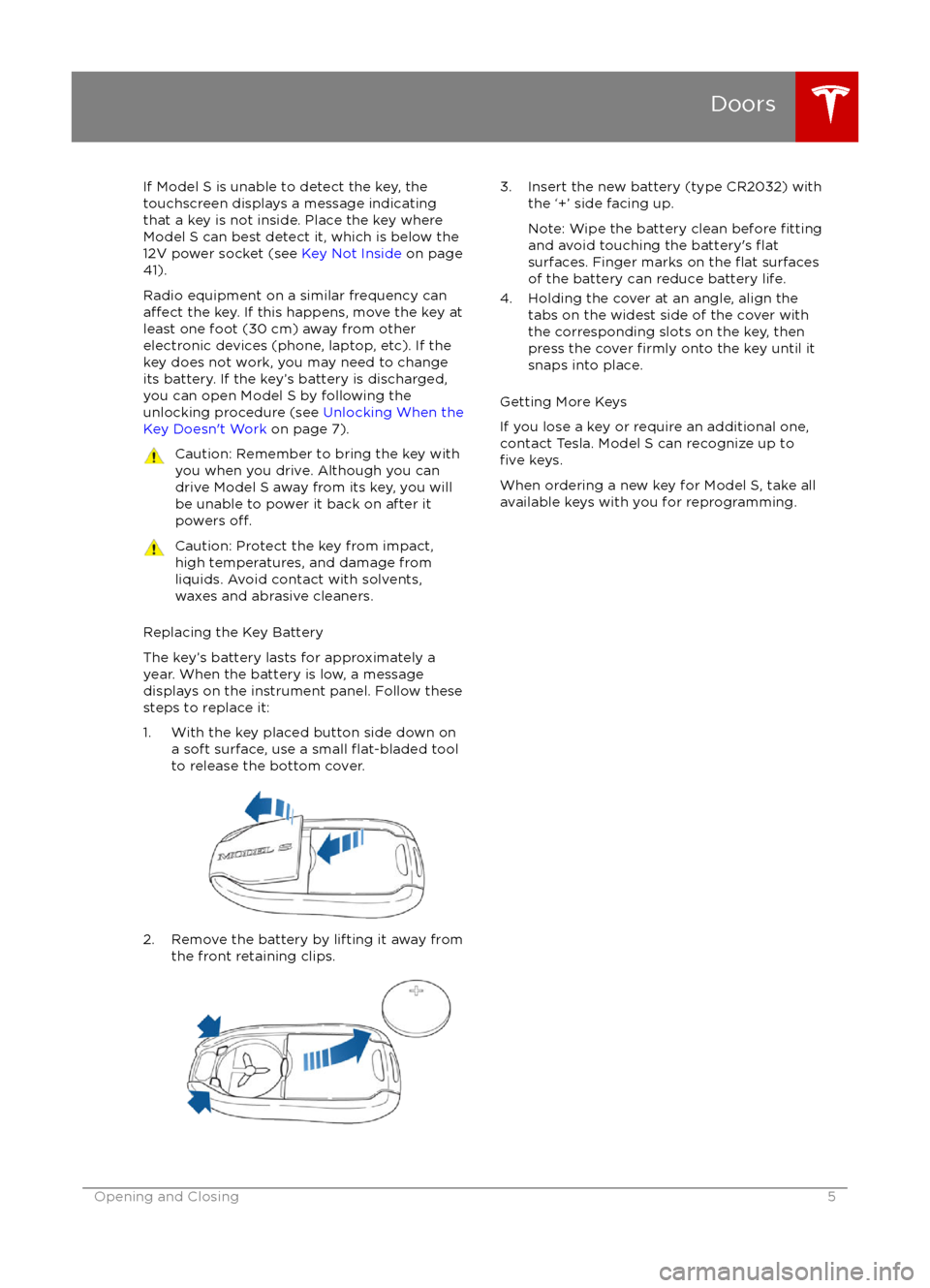
If Model S is unable to detect the key, the
touchscreen displays a message indicating that a key is not inside. Place the key where
Model S can best detect it, which is below the
12V power socket (see Key Not Inside on page
41).
Radio equipment on a similar frequency can
affect the key. If this happens, move the key at
least one foot (30 cm) away from other electronic devices (phone, laptop, etc). If the
key does not work, you may need to change
its battery. If the key
Page 38 of 190
automatically changes to display navigation
instructions (if applicable), or to let you know
if a door or trunk is open when Model S is in a driving gear.
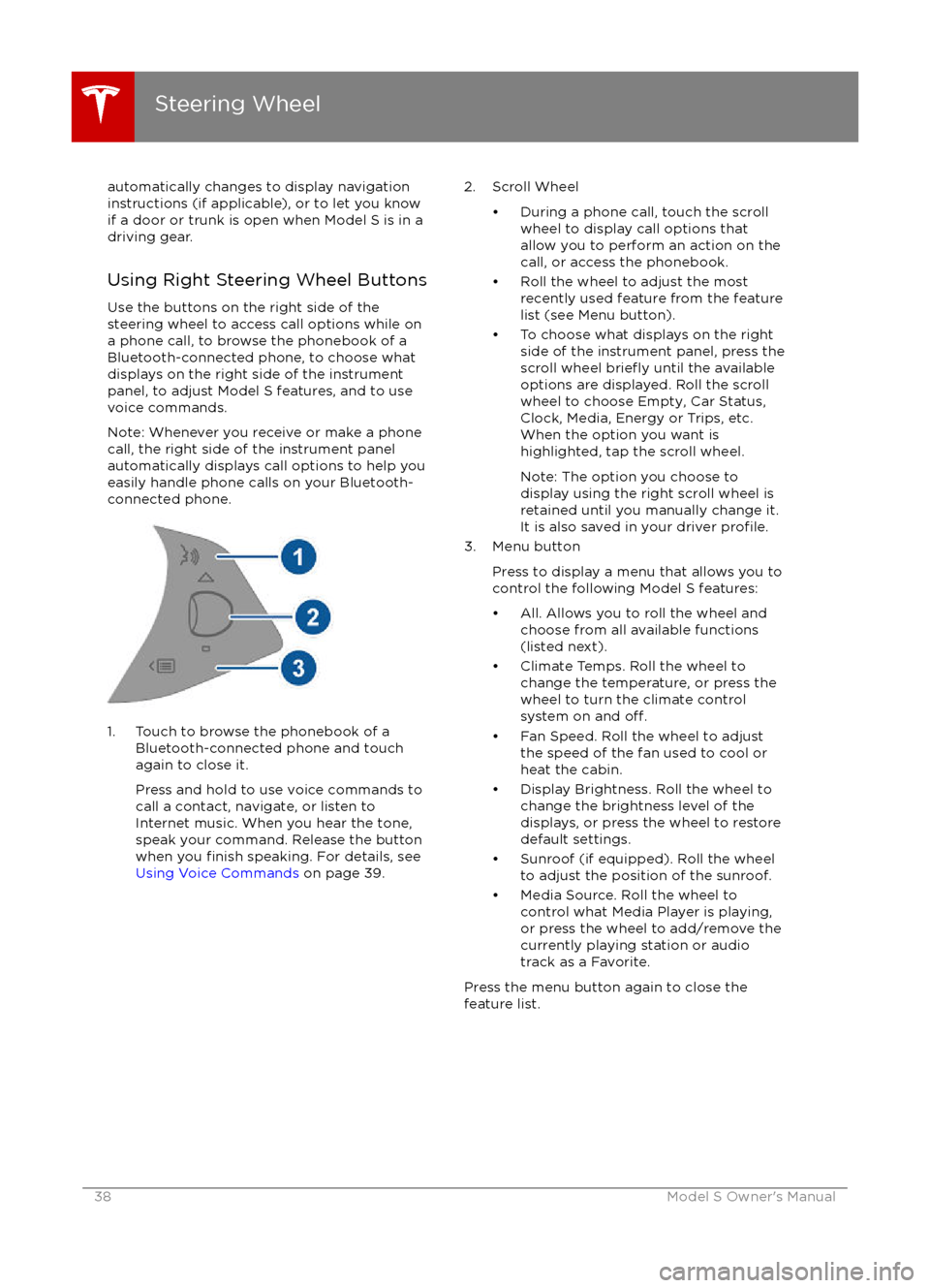
Using Right Steering Wheel Buttons Use the buttons on the right side of thesteering wheel to access call options while on
a phone call, to browse the phonebook of a
Bluetooth-connected phone, to choose what
displays on the right side of the instrument
panel, to adjust Model S features, and to use
voice commands.
Note: Whenever you receive or make a phone call, the right side of the instrument panelautomatically displays call options to help you
easily handle phone calls on your Bluetooth-
connected phone.
1. Touch to browse the phonebook of a
Bluetooth-connected phone and touch
again to close it.
Press and hold to use voice commands to
call a contact, navigate, or listen to Internet music. When you hear the tone,
speak your command. Release the button
when you
finish speaking. For details, see
Using Voice Commands on page 39.
2. Scroll Wheel
Page 47 of 190

8. Use the right steering wheel buttons to change what displays on the right side of theinstrument panel whenever a phone call is not active (see Using Left Steering Wheel Buttons
on page 37).
9. Total estimated driving distance (or energy) available. Instead of driving distance, you can display the percentage of battery energy remaining. To do so, touch Controls > Settings >
Units & Format > Energy & Charging (see Settings on page 99).
Note: When anticipating when you need to charge, use range estimates as a general guideline only.
Note: In cold weather, some of the stored energy in the Battery may not be available on your drive because the Battery is too cold. When this happens, a portion of the Battery meter isblue and the driving distance value has a
snowflake image next to it. If Model S is plugged in,
you can heat your Battery using wall power by turning on climate control using the mobile app. When the Battery warms up, the blue portion on the meter and the
snowflake image are
no longer displayed.
10. The speed limit (if available) that is currently being detected by Speed Assist (see Speed
Assist on page 88).
11. The car in front of you (if applicable).
12. Pay attention to important driving-related messages that appear at the bottom center of the instrument panel.
13. Your Model S.
14. When Autosteer is active, the driving lane is highlighted in blue (see Autosteer on page 74).
The lane may highlight in red If a front wheel passes over a lane marking and the associated
turn signal is
off (see Lane Assist on page 83).
15. The following distance that Traffic-Aware Cruise Control will maintain from the car in front of
you. You can adjust the following distance as appropriate for driving conditions (see Traffic-
Aware Cruise Control on page 68).
16. Currently selected gear: Park, Reverse, Neutral, or Drive.
Instrument Panel
Driving47
Page 110 of 190

Overview
Touch the Media icon to listen to the radio or
play audio
files. The touchscreen displays the
Media Player. Media Player has two tabs. Use the Browse tab to select what you want to
play and use the Now Playing tab to view and
control what is currently playing. You can play
AM and FM radio (including HD), and XM
satellite radio (if Model S is equipped with the optional sound package). You can also play
Internet radio (such as TuneIn), and audio
filesfrom a Bluetooth-connected device or a USB-
connected flash drive.
Volume Control To adjust the media volume, roll the scroll
wheel on the left side of the steering wheel up
or down. To mute the volume, tap the scroll
wheel.
Note: The scroll wheel adjusts the volume for
media, navigation instructions and phone calls
based on what is currently in use. As you
adjust volume, the instrument panel displays
the volume level and whether you are
adjusting volume for media, navigation or phone.
Note: Muting the volume during a phone call
also mutes the microphone.
AM and FM Radio Model S provides AM and FM radio services.
These can be selected from the Browse tab or using the Source Picker, located in the upper
right corner of the Media Player window.
You can manually tune the radio to any
frequency by touching and dragging the
channel selector bar on the Now Playing
screen. The channel selector bar allows you to
move from one available radio station to the next.
XM Radio If Model S is equipped with the optional sound
studio package, you can listen to XM radio, a
subscription-based satellite radio service. To
receive XM radio channels, you must provide
the radio service provider with the radio ID for
your touchscreen.
To view the radio ID:
1. Select the XM radio source.
2. Tune it to channel 0.
3. The Radio ID displays in the station information area.
To select an XM radio channel, you can either
manually scroll through the channel numbers, or you can browse the channels by category.
To browse by category, touch Browse >
Radio > XM Satellite Radio.
Note: On some vehicles, XM radio is available
only if Model S is equipped with both the
optional sound studio package and the panoramic roof. To optimize aerodynamics,
Model S does not have an external antenna. The internal antenna is compatible only with
the transparent panoramic roof.
Media and Audio
110Model S Owner
Page 115 of 190

Connecting to a Paired Phone
Model S automatically connects with the last
phone to which it was connected, provided it
is within operating range and has Bluetooth turned on. If the last phone is not within range,
it attempts to connect with the next phone
that it has been paired with.
To connect to a
different phone, touch the
Bluetooth icon on the touchscreen
Page 119 of 190
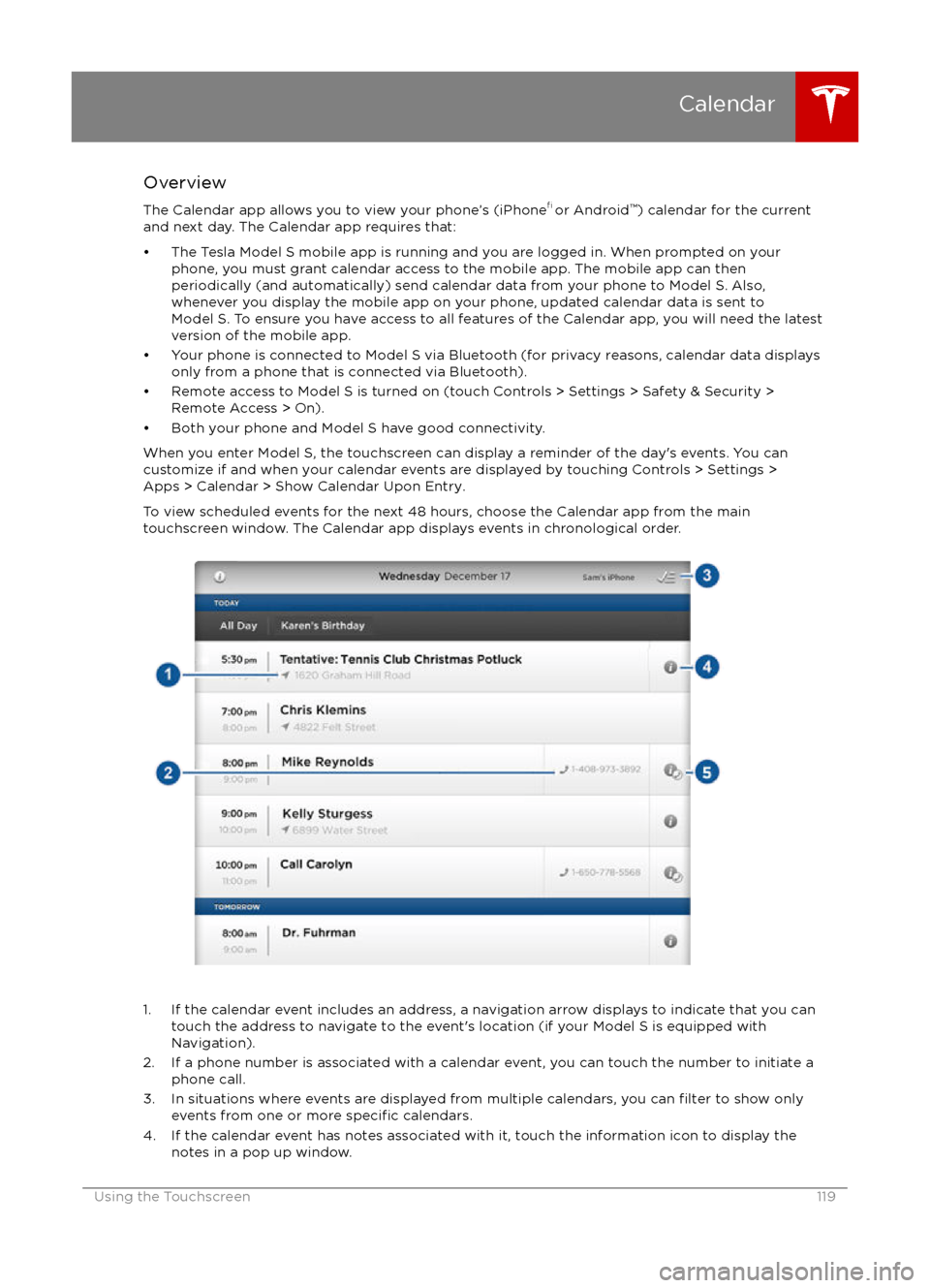
Overview
The Calendar app allows you to view your phone
Page 126 of 190

Model S Mobile AppThe Tesla Model S mobile app allows you to
communicate with Model S remotely using
your iPhone
Page 185 of 190

AABS (Anti-lock Braking System) 54
Acceleration (dual motor) 94
access panel, removing 149accessoriesinstalling 159
plugging into power socket 113
air circulation 105
air conditioning 104
air distribution 105
air
filter 107
air suspension 109
air vents 107
airbags 31
alarm 121
all-season tires 137
always connected, setting 62
anti-lock braking (ABS) 54
audioplaying files 110
steering wheel buttons 37
volume control 110
Auto High Beam 51
Auto Lane Change 77
auto-raising suspension 108
automatic emergency braking 85
Autopark 79
Autopilot 65
Autosteer 74
B backup camera 64
battery (12V)complete discharge 129specifications 167Battery (high voltage)care of 129
coolant 149
specifications 168
temperature limits 129
battery (key), replacing 5
blind spot warning 83
Bluetoothdevices, playing audio files from 112
general information 114
phone, pairing and using 114
body repairs 159
body touch up 146
brake
fluid replacement 134
brakesautomatic in emergencies 85fluid level 150
overview of 54
specifications 167
brightness of displays 99
C
cabin temperature control 104
calendar 119
California Proposition 65 180
camera (rear view) 64
car cover 146
car washes 144
cargo volume 164
carpets, cleaning 145
CE
certifications 182
CHAdeMO 128
chains 138
change of ownership 103
charge port 130
charge port light 131
chargingcharge settings 132
components and equipment 127
instructions 130
public charging stations 128
scheduling 132
status of 133child protectiondisabling liftgate and rear door handles 7
disabling rear window switches 9child seatscleaning 145
installing and using 22
Tesla built-in rear facing 27
cleaning 144
climate controls 104
climate ionizer 99
clock 37
Cold Weather controls 94
collision avoidance assist 85
console12V power socket 113
cup holders 16
USB ports 113contact informationroadside assistance 174
Tesla 181coolantBattery, checking level of 149
Battery, replacement interval 134
copyrights 178, 179
Creep 94
cruise control 68
cup holders 16
customizing 99
D
dashboard overview 2
data recording 180
day mode 99
declarations of conformity 182
Index
Index185
Page 188 of 190

odometerresetting trip odometer 61
outside temperature 37
overhang dimensions 163
overtake acceleration 68
Owner Information, about 178, 179
P Park Assist 57
Park gear 42
parking brake 55
parking, automatic 79
parts replacement 159
passenger detection 33
passenger front airbag 33
personal data, erasing 103
phonesteering wheel controls for 38
using 114
PIN 35
power management 62
power socket 113
power windows 9
powering on and
off 41
Preconditioning 99
preferences, setting 99
Proposition 65 180
public charging stations 128
R
radar 65
radio 110
Radio Frequency information 182
radio frequency, FCC information 184
rain sensor 53
rangedisplayed on instrument panel 43, 46
driving tips to maximize 62
regenerative braking 55
range assurance 62
range mode 62
Range Mode 94
Rated range 99
rear seats, folding and raising 18
rear view camera 64
rear window switches, disabling 9
regenerative braking 55
region format 99
release notes 125
Reverse gear 42
roadside assistance 174
roof racks 162
rotating tires 136
route overview 116
Ssafety defectsreporting (Canada) 181
reporting (U.S.) 181
safety defects, reporting 181
safety informationairbags 34
child seats 26
rear facing child seats 30
seat belts 20seat beltscleaning 145
in a collision 20
overview of 19
pre-tensioners 20
wearing when pregnant 19
seat covers 18
seat heaters 104
seating capacity 161
seatsadjusting 17
heaters 104
Tesla built-in rear facing 27
security settings 121
self parking and unparking 79
sensors 65
service data recording 180
service intervals 134
Settings 99
Settings, erasing 103
shifting gears 42
side collision avoidance 83
side collision warning 83
Slacker 111
slip start 56
Smart Preconditioning 99
software reset 103
software updates 125
specificationscargo volume 164
dimensions 163
exterior 163
interior 163
motor 166
subsystems 166
tires 169
weights 165
wheels 169
stability control 56
starting 41
steering
specifications 166
steering wheel 37
steering, automatic 74
summer tires 137
Summon 79
sunroof 15
suspension 109
suspension
specifications 167
Index
188Model S Owner
Page 189 of 190

T
telematics 180telephonesteering wheel controls for 38
using 114temperatureBattery (high voltage), limits 129
cabin, controls for 104
outside 37, 43
tires 172
tie-down straps 177
tilt detection 121
Tire and Loading Information label 161
tire noise 138
Tire Pressure Monitoring SystemFCC certification 183
overview of 138
tire pressures, checking 135
tire repair kitinflating with air only 142inflating with sealant 141
replacing the sealant canister 143tiresall-season 137
balancing 136
chains 138
industry glossary of terms 173
inspecting and maintaining 136
pressures, how to check 135
quality grading 172
replacing 137
replacing a tire sensor 139
rotation 136
specification 169
summer 137
temperature grades 172
tire markings 170
tire sealant 140
traction grade 172
treadwear grade 172
winter 138
torque specifications 166
touch up body 146
touchscreenclean mode 145
cleaning 145
Controls 94
overview 90
Settings 99
software updates 125
Tow mode 175
towing 175
towing a trailer 162
towing eye, locating 176
towing instructions 175
TPMSFCC certification 183
overview of 138traction control 56
trademarks 178, 179
traffic alerts 112Traffic-Aware Cruise Control 68
trailer hitches 162
transmission
specifications 166
Transport Canada, contacting 181
transporting 175
trip chart 62
trip information 61
trip overview 116
trip planner 116
trunk, front 12
trunk, rearchild protection lock 7
disabling interior handle 7
TuneIn 111
turn signals 51
U ultrasonic sensors 65
uniform tire quality grading 172
Units & Format 99
Unlock on Park 4
unlockingtrunk, front 12
trunk, rear 10
unlocking and locking doors 4
unlocking when key doesn