air condition TESLA MODEL S 2017 Owner's Manual
[x] Cancel search | Manufacturer: TESLA, Model Year: 2017, Model line: MODEL S, Model: TESLA MODEL S 2017Pages: 188, PDF Size: 5.46 MB
Page 103 of 188
Overview of Climate Controls
The climate controls are always available at the bottom of the touchscreen. By default, climate control is set to Auto, which maintains optimum comfort in all but the most severe weather conditions. When you adjust the temperature, the system automatically adjusts the heating, air
conditioning, air distribution, air circulation, and fan speed to maintain your selected temperature. To override these settings, touch Auto (see Customizing Climate Control on page 103).
The fan, heating, and air conditioning systems are powered by the Battery. Therefore, prolonged
use decreases driving range.
Note: The following illustration is provided for demonstration purposes only. Depending on vehicle
options, software version, market region, and settings, the information displayed may be slightly
different.
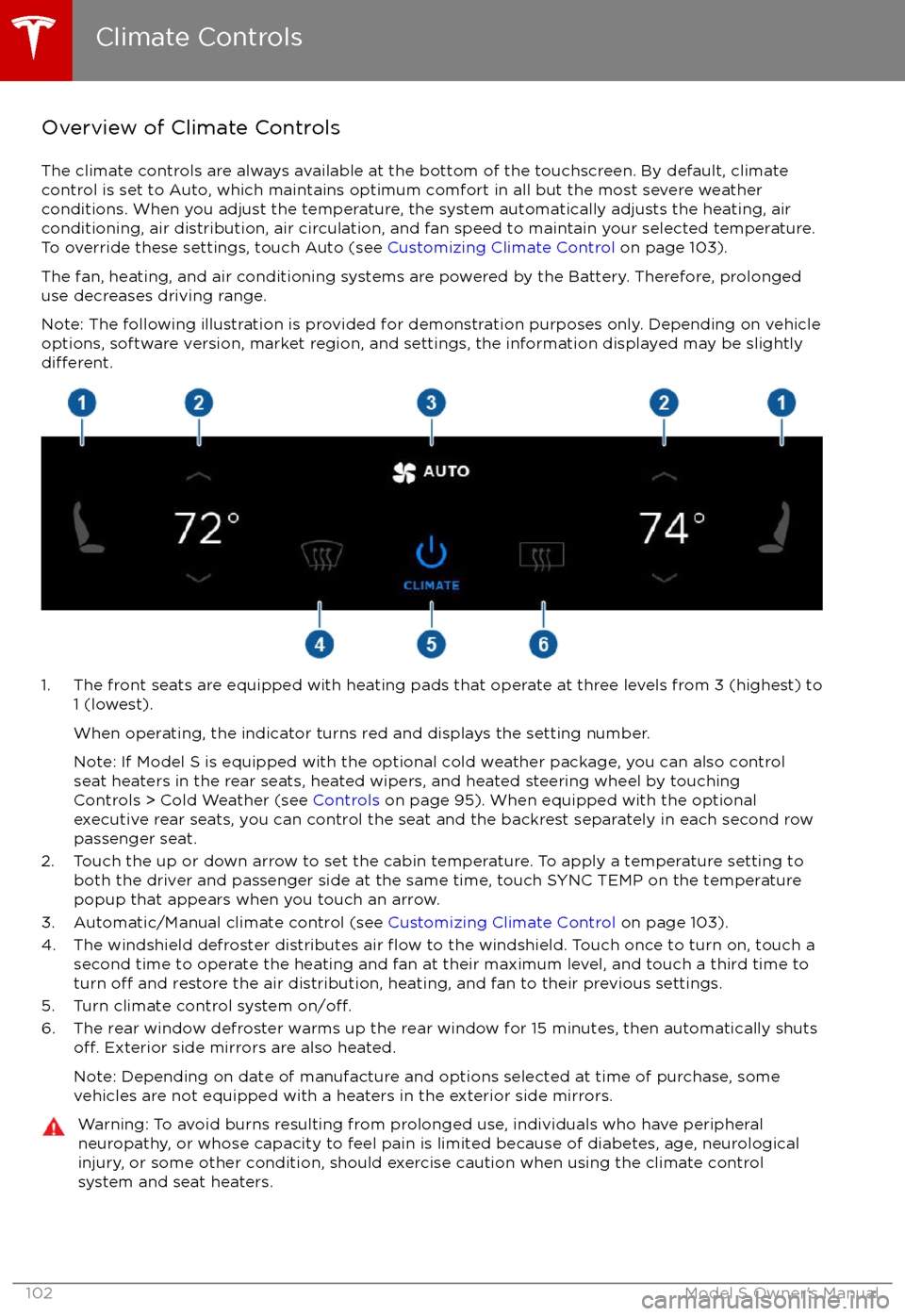
1. The front seats are equipped with heating pads that operate at three levels from 3 (highest) to 1 (lowest).
When operating, the indicator turns red and displays the setting number.
Note: If Model S is equipped with the optional cold weather package, you can also control seat heaters in the rear seats, heated wipers, and heated steering wheel by touchingControls > Cold Weather (see Controls on page 95). When equipped with the optional
executive rear seats, you can control the seat and the backrest separately in each second row
passenger seat.
2. Touch the up or down arrow to set the cabin temperature. To apply a temperature setting to both the driver and passenger side at the same time, touch SYNC TEMP on the temperaturepopup that appears when you touch an arrow.
3. Automatic/Manual climate control (see Customizing Climate Control on page 103).
4. The windshield defroster distributes air
flow to the windshield. Touch once to turn on, touch a
second time to operate the heating and fan at their maximum level, and touch a third time to
turn
off and restore the air distribution, heating, and fan to their previous settings.
5. Turn climate control system on/off.6. The rear window defroster warms up the rear window for 15 minutes, then automatically shutsoff. Exterior side mirrors are also heated.
Note: Depending on date of manufacture and options selected at time of purchase, some vehicles are not equipped with a heaters in the exterior side mirrors.
Warning: To avoid burns resulting from prolonged use, individuals who have peripheral neuropathy, or whose capacity to feel pain is limited because of diabetes, age, neurologicalinjury, or some other condition, should exercise caution when using the climate control
system and seat heaters.
Climate Controls
102Model S Owner
Page 104 of 188
Customizing Climate ControlThe climate control system is designed to automatically provide optimum comfort in most
situations. All you need to do is set the desired temperature, and the air conditioning, air
recirculation, air distribution, and fan speed automatically maintain your selected temperature.
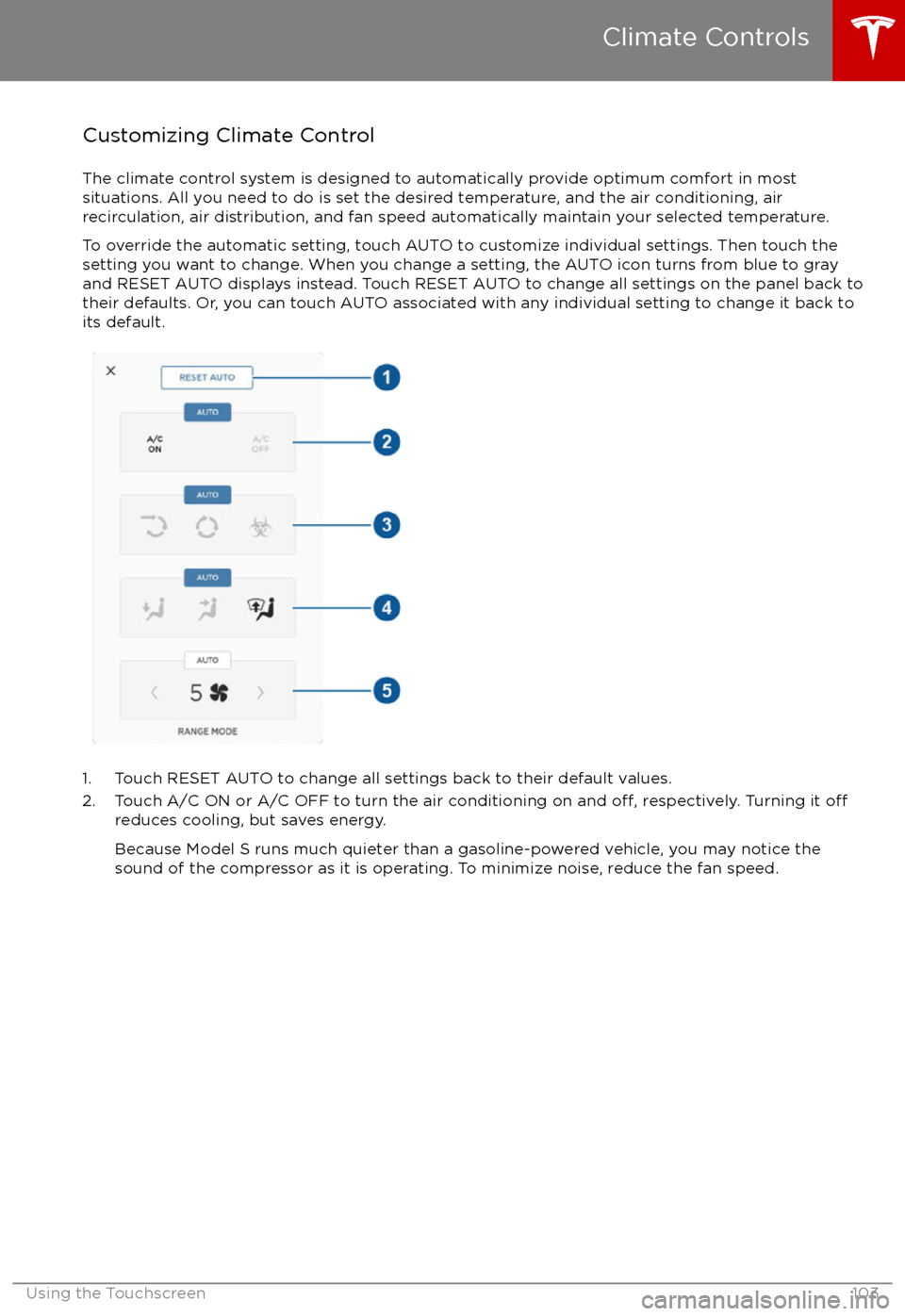
To override the automatic setting, touch AUTO to customize individual settings. Then touch the
setting you want to change. When you change a setting, the AUTO icon turns from blue to gray
and RESET AUTO displays instead. Touch RESET AUTO to change all settings on the panel back to
their defaults. Or, you can touch AUTO associated with any individual setting to change it back to its default.
1. Touch RESET AUTO to change all settings back to their default values.
2. Touch A/C ON or A/C OFF to turn the air conditioning on and off, respectively. Turning it offreduces cooling, but saves energy.
Because Model S runs much quieter than a gasoline-powered vehicle, you may notice the
sound of the compressor as it is operating. To minimize noise, reduce the fan speed.
Climate Controls
Using the Touchscreen103
Page 105 of 188
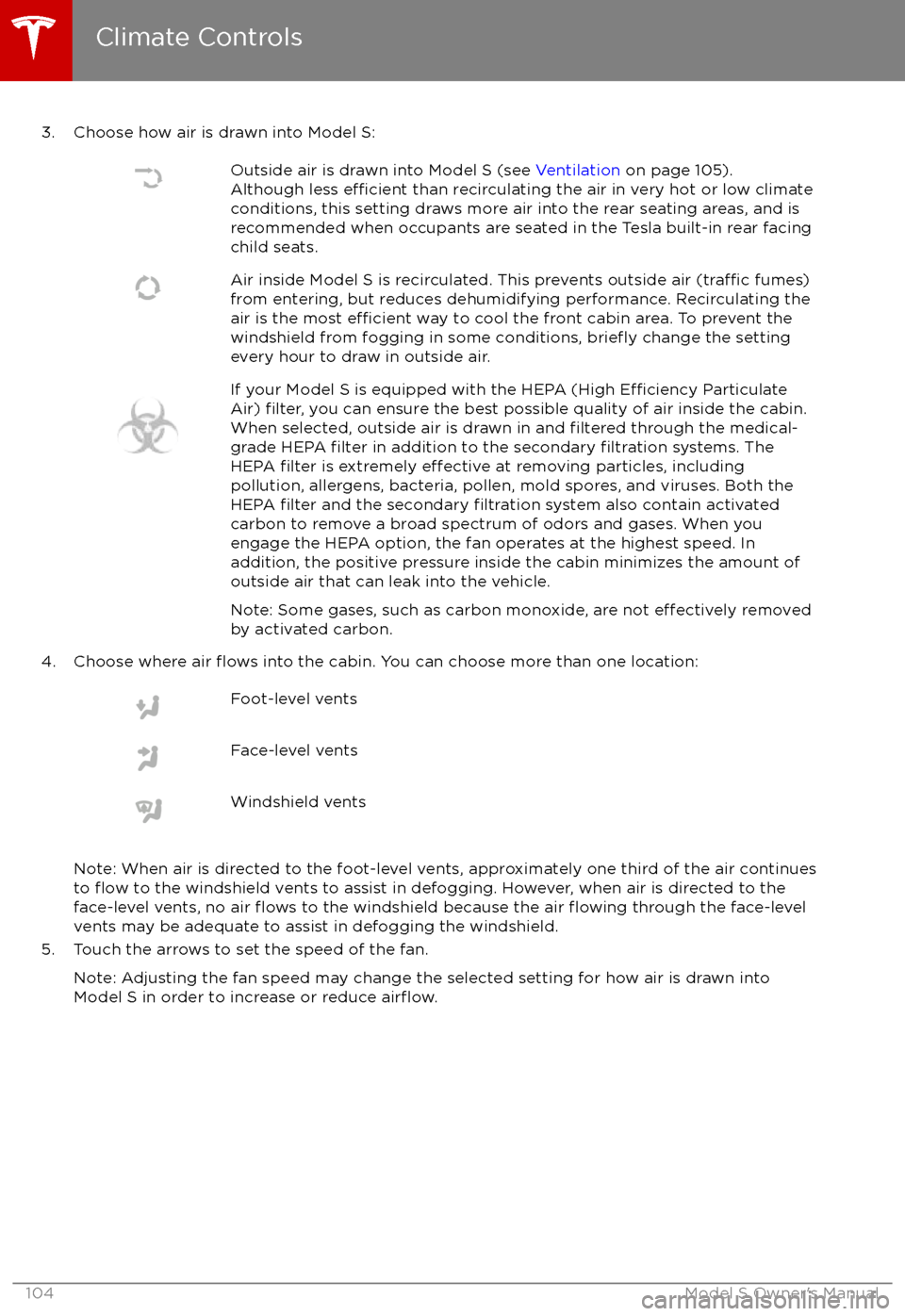
3. Choose how air is drawn into Model S:Outside air is drawn into Model S (see Ventilation on page 105).
Although less efficient than recirculating the air in very hot or low climate
conditions, this setting draws more air into the rear seating areas, and is
recommended when occupants are seated in the Tesla built-in rear facing
child seats.Air inside Model S is recirculated. This prevents outside air (traffic fumes)
from entering, but reduces dehumidifying performance. Recirculating the
air is the most
efficient way to cool the front cabin area. To prevent the
windshield from fogging in some conditions, briefly change the setting
every hour to draw in outside air.
If your Model S is equipped with the HEPA (High Efficiency Particulate
Air) filter, you can ensure the best possible quality of air inside the cabin.
When selected, outside air is drawn in and filtered through the medical-
grade HEPA filter in addition to the secondary filtration systems. The
HEPA filter is extremely effective at removing particles, including
pollution, allergens, bacteria, pollen, mold spores, and viruses. Both the
HEPA
filter and the secondary filtration system also contain activated
carbon to remove a broad spectrum of odors and gases. When you
engage the HEPA option, the fan operates at the highest speed. In
addition, the positive pressure inside the cabin minimizes the amount of
outside air that can leak into the vehicle.
Note: Some gases, such as carbon monoxide, are not
effectively removed
by activated carbon.
4. Choose where air flows into the cabin. You can choose more than one location:
Foot-level ventsFace-level ventsWindshield vents
Note: When air is directed to the foot-level vents, approximately one third of the air continues
to flow to the windshield vents to assist in defogging. However, when air is directed to the
face-level vents, no air flows to the windshield because the air flowing through the face-level
vents may be adequate to assist in defogging the windshield.
5. Touch the arrows to set the speed of the fan.
Note: Adjusting the fan speed may change the selected setting for how air is drawn intoModel S in order to increase or reduce
airflow.
Climate Controls
104Model S Owner
Page 106 of 188
VentilationOutside air is drawn into Model S through the
grill in front of the windshield. Keep the grill
clear of obstructions such as leaves and snow.
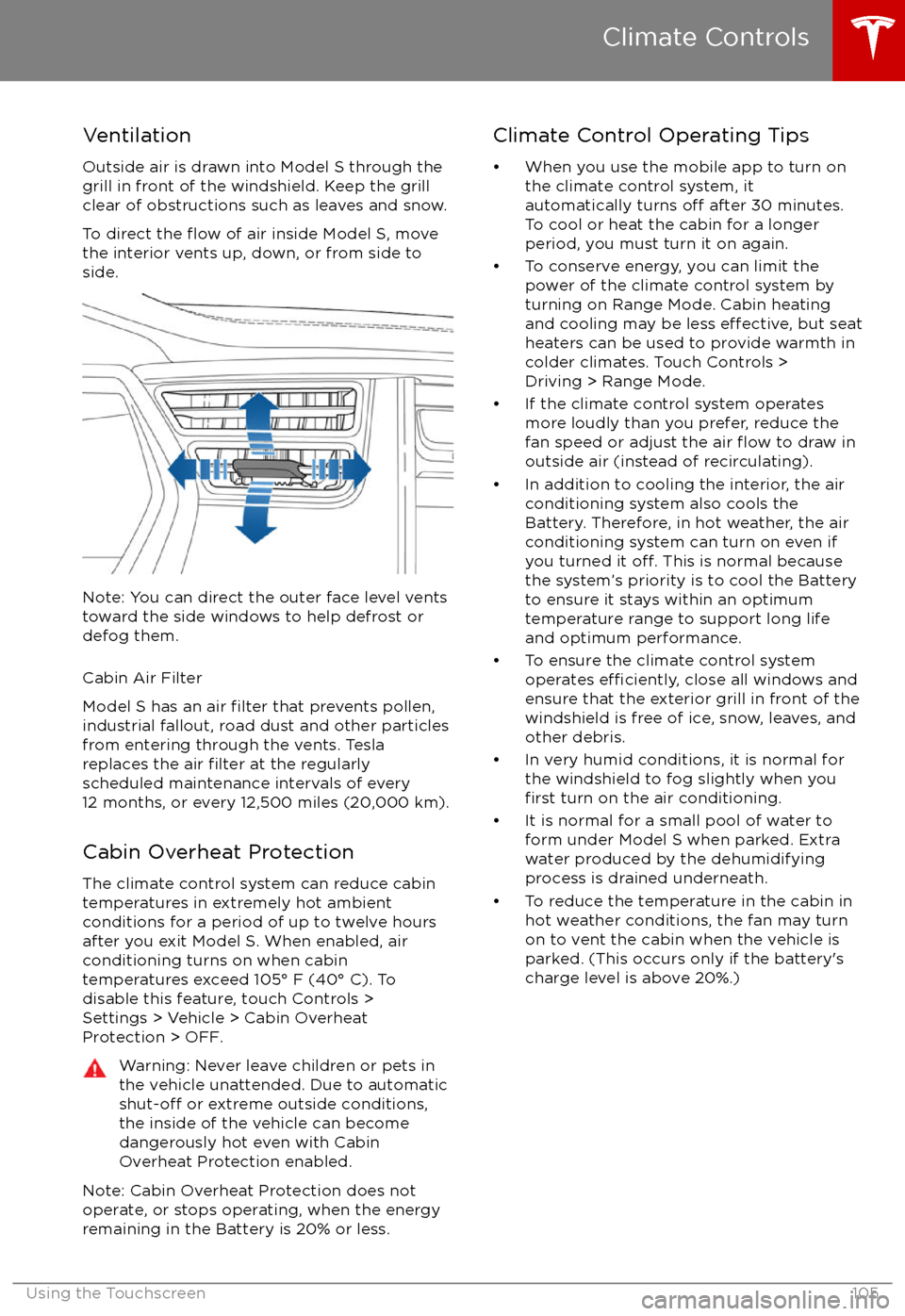
To direct the
flow of air inside Model S, move
the interior vents up, down, or from side to
side.
Note: You can direct the outer face level vents
toward the side windows to help defrost or
defog them.
Cabin Air Filter
Model S has an air
filter that prevents pollen,
industrial fallout, road dust and other particles
from entering through the vents. Tesla
replaces the air
filter at the regularly
scheduled maintenance intervals of every
12 months, or every 12,500 miles (20,000 km).
Cabin Overheat Protection
The climate control system can reduce cabin temperatures in extremely hot ambientconditions for a period of up to twelve hours
after you exit Model S. When enabled, air conditioning turns on when cabin
temperatures exceed 105
Page 140 of 188
Inspecting and Maintaining TiresRegularly inspect the tread and side walls for
any sign of distortion (bulges), cuts or wear.Warning: Do not drive Model S if a tire is
damaged, excessively worn, or inflated to
an incorrect pressure. Check tires
regularly for wear, and ensure there are
no cuts, bulges or exposure of the ply/
cord structure.
Tire Wear
Adequate tread depth is important for proper
tire performance. Tires with a tread depth less
than 4/32” (3 mm) are more likely to
hydroplane in wet conditions and should not
be used. Tires with a tread depth less than
5/32” (4 mm) do not perform well in snow and
slush and should not be used when driving in
winter conditions.
Model S is originally
fitted with tires that have
wear indicators molded into the tread pattern. When the tread has been worn down to 4/32”(3 mm), the indicators start to appear at thesurface of the tread pattern, producing the
effect of a continuous band of rubber across
the width of the tire. For optimal performance
and safety, Tesla recommends replacing tires
before the wear indicators are visible.
Tire Rotation, Balance, and Wheel Alignment
Tesla recommends rotating the tires every
6250 miles (10,000 km).
Unbalanced wheels (sometimes noticeable as
vibration through the steering wheel)
affectvehicle handling and tire life. Even with regular
use, wheels can get out of balance. Therefore,
they should be balanced as required.
If tire wear is uneven (on one side of the tire
only) or becomes abnormally excessive, check
the alignment of wheels.
Note: When replacing only two tires, always
install the new tires on the rear.
Punctured Tires
A puncture eventually causes the tire to lose pressure, which is why it is important to check
tire pressures frequently. Permanently repair
or replace punctured or damaged tires as
soon as possible.
Your tubeless tires may not leak when
penetrated, provided the object remains in the tire. If, however, you feel a sudden vibration or
ride disturbance while driving, or you suspect a tire is damaged, immediately reduce yourspeed. Drive slowly, while avoiding heavy
braking or sharp steering and, when safe to do so, stop the vehicle. Arrange to have Model S
transported to a Tesla service center, or to a
nearby tire repair center.
Note: In some cases, you can temporarily
repair small tire punctures (under 1/4” (6
mm)) using an optional tire repair kit available from Tesla. This allows you to slowly drive
Model S to Tesla or to a nearby tire repair
facility (see Temporary Tire Repair on page
144).Warning: Do not drive with a punctured
tire, even if the puncture has not causedthe tire to
deflate. A punctured tire candeflate suddenly at any time.
Flat Spots
If Model S is stationary for a long period in
high temperatures, tires can form
flat spots.
When Model S is driven, these flat spots cause
a vibration which gradually disappears as the
tires warm up and regain their original shape.
To minimize
flat spots during storage, inflatetires to the maximum pressure indicated on the tire wall. Then, before driving, release airto adjust tire pressure to the recommendedlevels.
Improving Tire Mileage
To improve the mileage you get from your
tires, maintain tires at the recommended tire
pressures, observe speed limits and advisory
speeds, and avoid:
Page 141 of 188
Replacing Tires and Wheels
Tires degrade over time due to the
effects of
ultraviolet light, extreme temperatures, high
loads, and environmental conditions. It is
recommended that tires are replaced every six
years, or sooner if required.
Wheel rims and tires are matched to suit the
handling characteristics of the vehicle.
Replacement tires must comply with the
original
specification. If tires other than thosespecified are used, ensure that the load and
speed ratings marked on the tire (see Understanding Tire Markings on page 167)
equal or exceed those of the original
specification.
Ideally, you should replace all four tires at the same time. If this is not possible, replace the
tires in pairs (both front or both rear). When replacing tires, always re-balance and checkthe alignment of wheels.
If you replace a wheel, the TPMS (Tire Pressure
Monitoring System) sensors need to be reset to ensure they provide accurate warnings
when tires are under- or
over-inflated (see
Resetting the TPMS Sensors on page 142).
For the
specification of the original wheels
and tires installed on Model S, see Wheels and
Tires on page 166.
Warning: For your safety, use only tires
and wheels that match the original
specification (see Wheels and Tires on
page 166). Tires that do not match the
original
specification can affect the
operation of the Tire Pressure Monitoring System (TPMS).
Warning: Never exceed the speed rating
of your vehicle
Page 150 of 188
Cleaning the Interior
Frequently inspect and clean the interior to maintain its appearance and to prevent
premature wear. If possible, immediately wipe up spills and remove marks. For general
cleaning, wipe interior surfaces using a soft
cloth (such as micro
fiber) dampened with a
mixture of warm water and mild non-
detergent cleaner (test all cleaners on a
concealed area before use). To avoid streaks,
dry immediately with a soft lint-free cloth.
Interior Glass
Do not scrape, or use any abrasive cleaning
fluid on glass or mirrored surfaces. This can
damage the reflective surface of the mirror
and the heating elements in the rear window.
Airbags
Do not allow any substance to enter an airbag
cover. This could
affect correct operation.
Dashboard and Plastic Surfaces
Do not polish the upper surfaces of the
dashboard. Polished surfaces are
reflectiveand could interfere with your driving view.
Leather Seats
Leather is prone to dye-transfer which can
cause discoloration, particularly on light
colored leather. White and tan leather is coated with an anti-soiling treatment. Wipespills as soon as possible using a soft cloth
moistened with warm water and non-
detergent soap. Wipe gently in a circular
motion. Then wipe dry using a soft, lint-free
cloth. Using detergents or commercially
available leather cleaners and conditioners is
not recommended because they can discolor or dry out the leather.
Polyurethane Seats
Wipe spills as soon as possible using a soft
cloth moistened with warm water and non-
detergent soap. Wipe gently in a circular
motion. After cleaning, allow the seats to air
dry.
Cloth Seats
Wipe spills as soon as possible using a soft
cloth moistened with warm water and non-
detergent soap. Wipe gently in a circular
motion. Then wipe dry using a soft, lint-free
cloth. Vacuum the seats as needed to remove
any loose dirt.
Carpets
Avoid over-wetting carpets. For heavily soiled
areas, use a diluted upholstery cleaner.
Seat Belts
Extend the belts to wipe. Do not use any type
of detergent or chemical cleaning agent.
Allow the belts to dry naturally while
extended, preferably away from direct
sunlight.
Tesla Built-In Rear Facing Child Seats
Vacuum the seats to remove any loose dirt. Wipe the seats with a soft cloth dampened
with warm water. You can also use an upholstery cleaner designed for automotive
use. Extend the belts to wipe. Allow the belts
to dry naturally, preferably away from direct
sunlight.
Touchscreen and Instrument Panel
Clean the touchscreen and instrument panel
using a soft lint-free cloth
specificallydesigned to clean monitors and displays. Do not use cleaners (such as a glass cleaner) and
do not use a wet wipe or a dry statically- charged cloth (such as a recently washed
microfiber). To wipe the touchscreen without
activating buttons and changing settings, you
can enable clean mode. Touch Controls > Displays > Clean Mode. The display darkens to
make it easy to see dust and smudges.
Chrome and Metal Surfaces
Polish, abrasive cleaners or hard cloths can
damage the
finish on chrome and metal
surfaces.
Cautions for Interior Cleaning
Warning: If you notice any damage on an
airbag or seat belt, contact Tesla
immediately.Warning: Do not allow any water,
cleaners, or fabric to enter a seat belt
mechanism.Caution: Using solvents (including alcohol), bleach, citrus, naphtha, orsilicone-based products or additives on
interior components can cause damage.Caution: Statically-charged materials can
cause damage to the touchscreen or
instrument panel.
Cleaning
Maintenance149
Page 155 of 188

Checking Brake FluidWarning: Contact Tesla immediately if you
notice increased movement of the brake
pedal or a
significant loss of brake fluid.Driving under these conditions can result in extended stopping distances or
complete brake failure.
The Brake indicator on the
instrument panel alerts you if the
quantity of
fluid in the brake
reservoir drops below the
recommended level. If it displays
while driving, stop as soon as safety
permits by gently applying the
brakes. Do not continue driving.
Contact Tesla immediately.
Fluid Level Check
Tesla checks the brake
fluid level at the
regularly scheduled maintenance intervals. To
check it yourself, park Model S on level
ground. When Model S is cool, remove the
maintenance panel (see Removing the
Maintenance Panel on page 153).
Check the fluid level visually by looking at the
outside marks on the side of the reservoir
without removing the
filler cap.
The brake
fluid level should always be
between the MIN and the MAX marks.
Note: Although brake
fluid level drops slightly
during normal use as a result of brake pad
wear, it should not drop below the MIN mark.
Topping Up the Brake Fluid
Do not top up your brake
fluid. Tesla service
does this when you bring Model S in for
regular servicing. The following instructions
are provided for information purposes and future reference only:
1. Clean the filler cap before removing to
prevent dirt from entering the reservoir.
2. Unscrew the cap and remove.
3. Top up the reservoir to the MAX mark using brake
fluid meeting DOT3specifications.4. Replace the filler cap.
Warning: Only use new fluid from a sealed
air-tight container. Never use previously
used
fluid or fluid from a previously
opened container
Page 181 of 188

Article XIV: The use of low-power radio-
frequency devices shall not influence aircraft
security and interfere with legal
communications; interference phenomenon discovered over time, should be immediately
suspended, and improved to no interference
before use can continue. Legal
communications, referring to the provisions of
the Telecommunications Act of radio
communications operations. Low-power radio
communications shall tolerate radio wave
interference from radiated devices, legal or
industrial,
scientific and medical.
Tire Pressure Monitoring System FCC IDs: TZSTPMS201, Z9F-201FS43X
IC ID: 11852A-201FS4X
The tire pressure monitoring system (TPMS) complies with Part 15 of the FCC rules and
RSS-210 of Industry Canada. Operation is subject to the following two conditions:
1. This device may not cause harmful interference, and
2. This device must accept any interference received, including interference that may
cause undesired operation.
Changes or
modifications not expressly
approved by Tesla could void the user
Page 182 of 188
AABS (Anti-lock Braking System) 54
Acceleration (dual-motor) 95
access panel, removing 153accessoriesinstalling 157
plugging into power socket 112
adaptive headlights 51
air circulation 103
air conditioning 102
air distribution 103
air
filter 105
air suspension 107
air vents 105
airbags 31
alarm 122
all-season tires 141
always connected, setting 62
anti-lock braking (ABS) 54
audioplaying files 108
steering wheel buttons 37
volume control 108
Auto High Beam 51
Auto Lane Change 76
auto-raising suspension 106
automatic emergency braking 85
Autopark 78
Autopilot 65
Autosteer 73
average range 62
B backup camera 64
battery (12V)complete discharge 130specifications 164Battery (high voltage)care of 130
coolant 153
specifications 165
temperature limits 130
battery (key), replacing 5
blind spot warning 83
Bluetoothdevices, playing audio files from 111
general information 113
phone, pairing and using 113
body repairs 157
body touch up 150
brake
fluid replacement 137
brakesautomatic in emergencies 85fluid level 154
overview of 54
specifications 164
brightness of displays 98
C Cabin Overheat Protection setting 98
cabin temperature control 102
Calendar app 120
California Proposition 65 177
camera (rear view) 64
car cover 150
car washes 148
cargo volume 162
carpets, cleaning 149
CE
certifications 179
CHAdeMO 129
chains 141
change of ownership 101
charge port 131
charge port light 134
chargingcharge settings 135
components and equipment 128
instructions 131
public charging stations 129
scheduling 135
status of 136
charging locations, finding 116
child protectiondisabling liftgate and rear door handles 7
disabling rear window switches 9child seatscleaning 149
installing and using 22
Tesla built-in rear facing 27
cleaning 148
climate controls 102
Cold Weather controls 95
collision avoidance assist 85
console12V power socket 112
cup holders 16
USB ports 111
consumption chart 62
contact informationroadside assistance 171
Tesla 178coolantBattery, checking level of 153
Battery, replacement interval 137
copyrights 175, 176
Creep 95
cruise control 67
cup holders 16
D
dashboard overview 2
Index
Index181