wheel TESLA MODEL X 2017 (UK) User Guide
[x] Cancel search | Manufacturer: TESLA, Model Year: 2017, Model line: MODEL X, Model: TESLA MODEL X 2017Pages: 202, PDF Size: 4.82 MB
Page 63 of 202
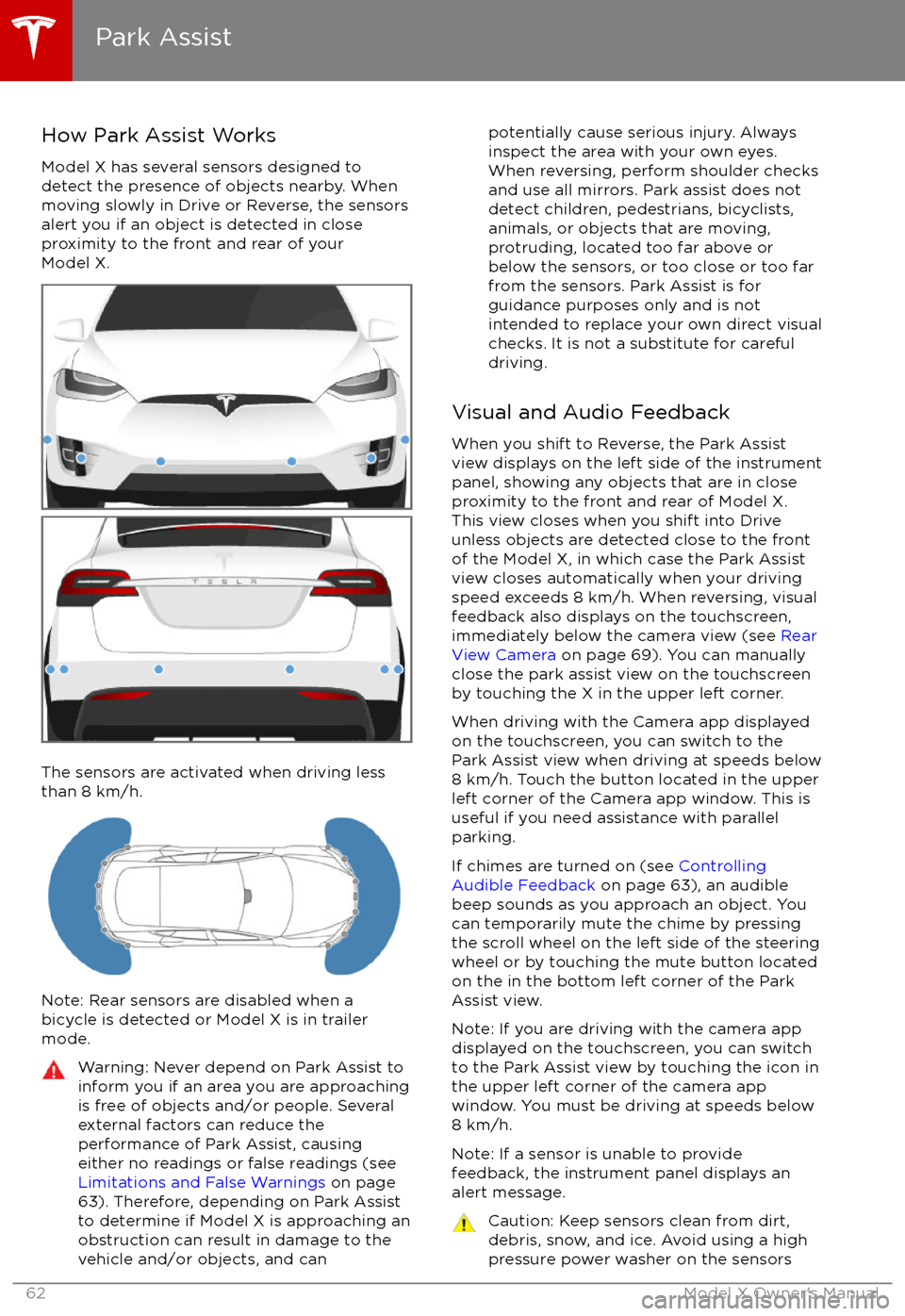
How Park Assist Works
Model X has several sensors designed to
detect the presence of objects nearby. When
moving slowly in Drive or Reverse, the sensors
alert you if an object is detected in close
proximity to the front and rear of your
Model X.
The sensors are activated when driving less
than 8 km/h.
Note: Rear sensors are disabled when a
bicycle is detected or Model X is in trailer
mode.
Warning: Never depend on Park Assist to
inform you if an area you are approaching is free of objects and/or people. Several
external factors can reduce the
performance of Park Assist, causing
either no readings or false readings (see
Limitations and False Warnings on page
63). Therefore, depending on Park Assist
to determine if Model X is approaching an
obstruction can result in damage to the vehicle and/or objects, and canpotentially cause serious injury. Always
inspect the area with your own eyes.
When reversing, perform shoulder checks and use all mirrors. Park assist does not
detect children, pedestrians, bicyclists,
animals, or objects that are moving, protruding, located too far above or
below the sensors, or too close or too far
from the sensors. Park Assist is for
guidance purposes only and is not intended to replace your own direct visual
checks. It is not a substitute for careful
driving.
Visual and Audio Feedback
When you shift to Reverse, the Park Assist
view displays on the left side of the instrument
panel, showing any objects that are in close
proximity to the front and rear of Model X.
This view closes when you shift into Drive
unless objects are detected close to the front
of the Model X, in which case the Park Assist
view closes automatically when your driving
speed exceeds 8 km/h. When reversing, visual
feedback also displays on the touchscreen,
immediately below the camera view (see Rear
View Camera on page 69). You can manually
close the park assist view on the touchscreen
by touching the X in the upper left corner.
When driving with the Camera app displayed
on the touchscreen, you can switch to the
Park Assist view when driving at speeds below
8 km/h. Touch the button located in the upper
left corner of the Camera app window. This is
useful if you need assistance with parallel parking.
If chimes are turned on (see Controlling
Audible Feedback on page 63), an audible
beep sounds as you approach an object. You
can temporarily mute the chime by pressing
the scroll wheel on the left side of the steering
wheel or by touching the mute button located
on the in the bottom left corner of the Park Assist view.
Note: If you are driving with the camera app
displayed on the touchscreen, you can switch to the Park Assist view by touching the icon inthe upper left corner of the camera app
window. You must be driving at speeds below
8 km/h.
Note: If a sensor is unable to provide
feedback, the instrument panel displays an
alert message.
Caution: Keep sensors clean from dirt,
debris, snow, and ice. Avoid using a high
pressure power washer on the sensors
Park Assist
62Model X Owner
Page 64 of 202

and do not clean a sensor with a sharp orabrasive object that can scratch or
damage its surface.Caution: Do not install accessories or
stickers on or near the parking sensors.
Controlling Audible Feedback
You can use Park Assist with or without
audible feedback. To turn chimes on or
off,touch Controls > Settings > Safety &
Security > Park Assist Chimes.
You can also mute the chimes temporarily by
pressing the scroll wheel on the left side of the
steering wheel or by touching the mute buttonin the bottom left corner of the Park Assist
view. The chimes are muted until you shift into
a
different gear or drive over 8 km/h.
Limitations and False Warnings
The parking sensors may not function
correctly in these situations:
Page 70 of 202
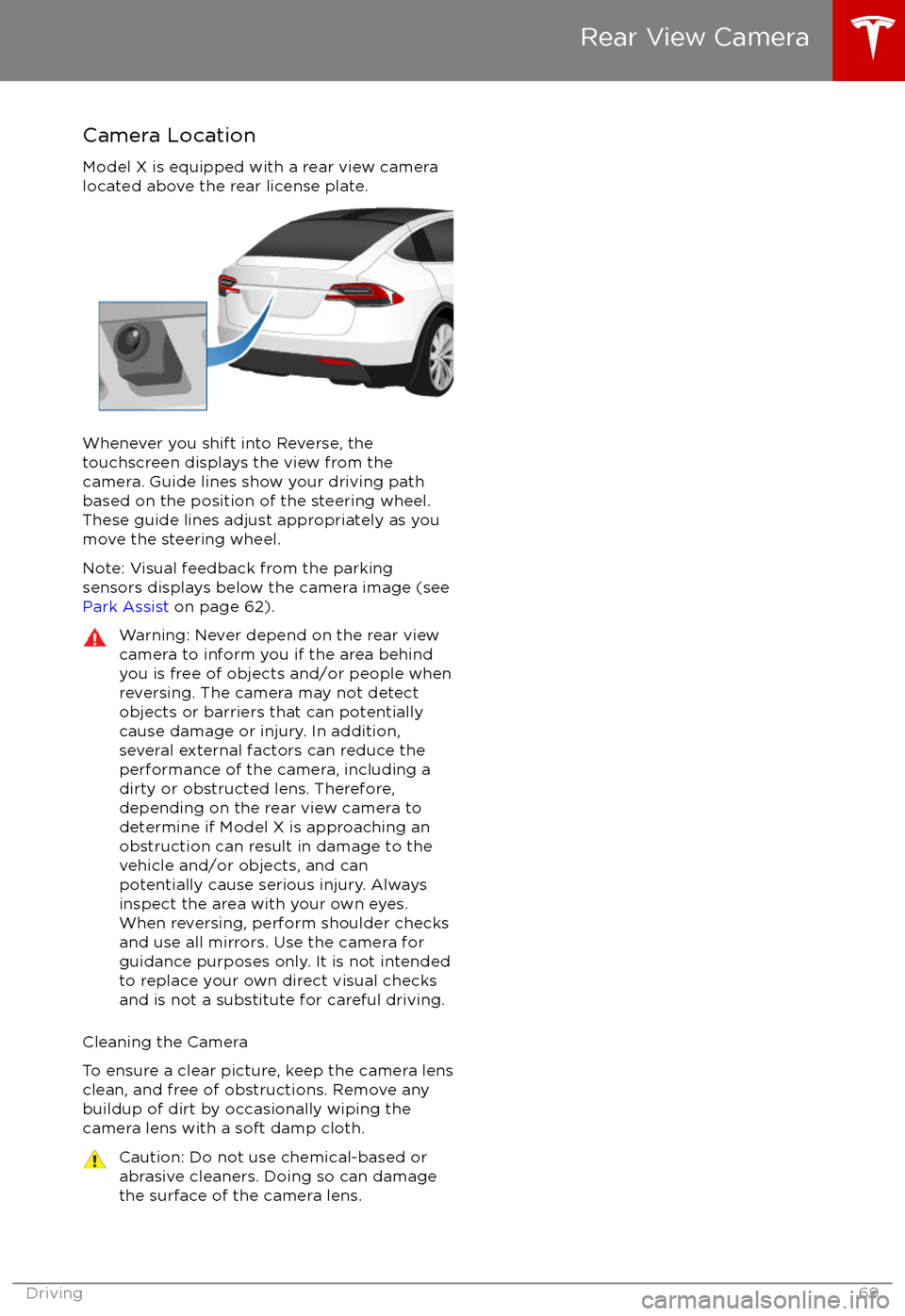
Camera Location
Model X is equipped with a rear view camera
located above the rear license plate.
Whenever you shift into Reverse, the
touchscreen displays the view from the
camera. Guide lines show your driving path
based on the position of the steering wheel. These guide lines adjust appropriately as you
move the steering wheel.
Note: Visual feedback from the parking
sensors displays below the camera image (see
Park Assist on page 62).
Warning: Never depend on the rear view
camera to inform you if the area behind
you is free of objects and/or people when
reversing. The camera may not detect
objects or barriers that can potentially
cause damage or injury. In addition, several external factors can reduce the
performance of the camera, including a
dirty or obstructed lens. Therefore,
depending on the rear view camera to
determine if Model X is approaching an
obstruction can result in damage to the vehicle and/or objects, and can
potentially cause serious injury. Always
inspect the area with your own eyes.
When reversing, perform shoulder checks and use all mirrors. Use the camera forguidance purposes only. It is not intendedto replace your own direct visual checks
and is not a substitute for careful driving.
Cleaning the Camera
To ensure a clear picture, keep the camera lens clean, and free of obstructions. Remove any
buildup of dirt by occasionally wiping the
camera lens with a soft damp cloth.
Caution: Do not use chemical-based or abrasive cleaners. Doing so can damage
the surface of the camera lens.
Rear View Camera
Driving69
Page 86 of 202
Note: Autosteer is a BETA feature.
If Model X is equipped with Driver Assistance
components (see About Driver Assistance on
page 77), and you have purchased the
optional Autopilot Tech Package, you can use
Autosteer to manage steering and speed under certain circumstances. Autosteer builds
upon
Traffic-Aware Cruise Control,
intelligently keeping Model X in its driving lane
when cruising at a set speed. Using the
forward looking camera, the radar sensor, and
the ultrasonic sensors, Autosteer detects lane
markings and the presence of vehicles and
objects, assisting you in steering Model X
based on the lane markings and the vehicle
directly in front of you.
Warning: Autosteer is a hands-on feature.
You must keep your hands on the steering
wheel at all times.Warning: Autosteer is intended for use
only on highways and limited-access
roads with a fully attentive driver. When using Autosteer, hold the steering wheel
and be mindful of road conditions and
surrounding
traffic. Do not use Autosteer
on city streets, in construction zones, or
in areas where bicyclists or pedestrians
may be present. Never depend on
Autosteer to determine an appropriate driving path. Always be prepared to take
immediate action. Failure to follow these instructions could cause serious property
damage, injury or death.
Operating Autosteer
Before you can operate Autosteer, you must
enable it by touching Controls > Settings >
Driver Assistance > Autosteer > Enable.
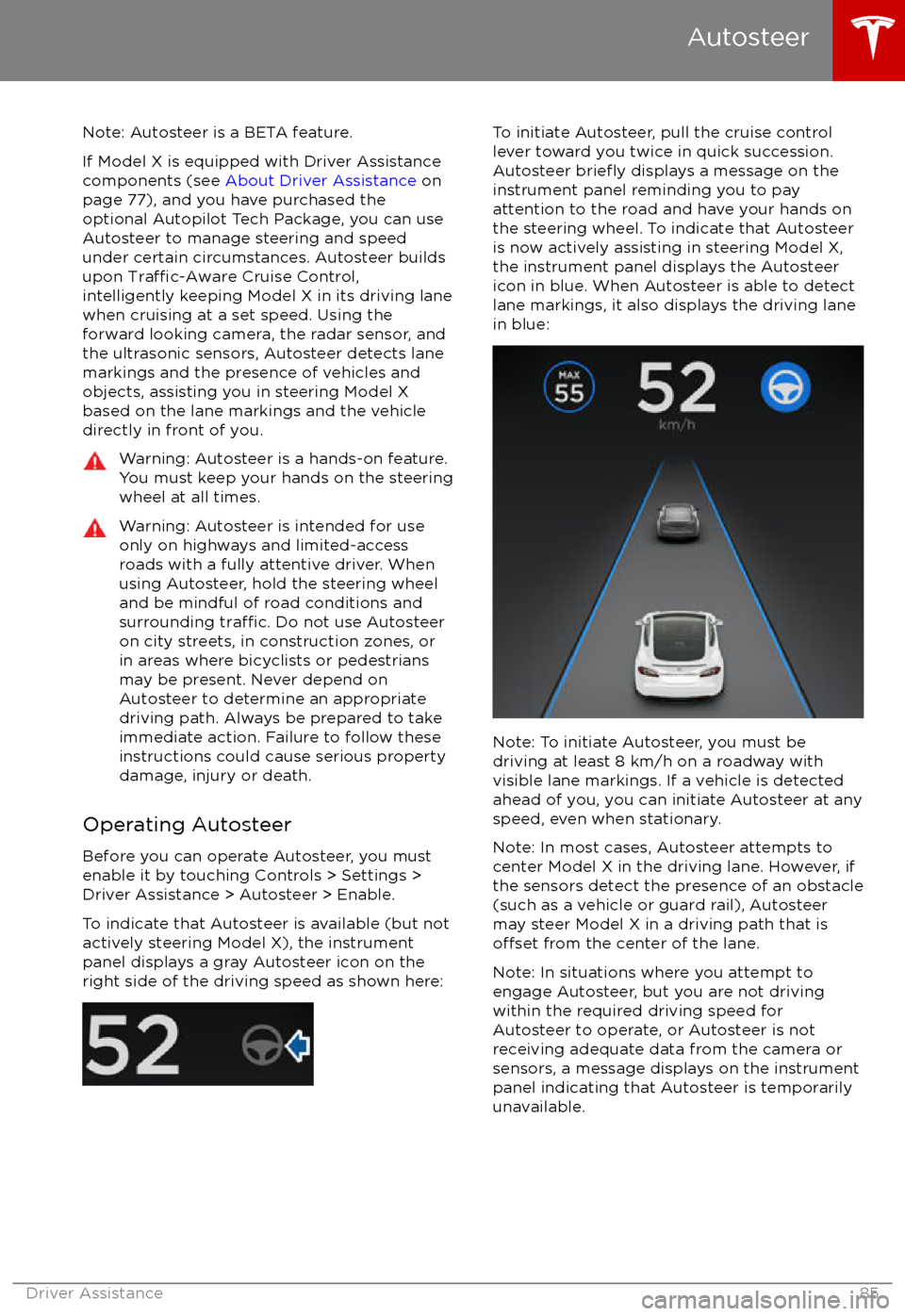
To indicate that Autosteer is available (but not actively steering Model X), the instrumentpanel displays a gray Autosteer icon on theright side of the driving speed as shown here:
To initiate Autosteer, pull the cruise control
lever toward you twice in quick succession. Autosteer
briefly displays a message on the
instrument panel reminding you to pay
attention to the road and have your hands on
the steering wheel. To indicate that Autosteer
is now actively assisting in steering Model X, the instrument panel displays the Autosteericon in blue. When Autosteer is able to detectlane markings, it also displays the driving lane
in blue:
Note: To initiate Autosteer, you must be
driving at least 8 km/h on a roadway with
visible lane markings. If a vehicle is detected ahead of you, you can initiate Autosteer at any
speed, even when stationary.
Note: In most cases, Autosteer attempts to
center Model X in the driving lane. However, if
the sensors detect the presence of an obstacle
(such as a vehicle or guard rail), Autosteer
may steer Model X in a driving path that is
offset from the center of the lane.
Note: In situations where you attempt to
engage Autosteer, but you are not driving
within the required driving speed for Autosteer to operate, or Autosteer is notreceiving adequate data from the camera or
sensors, a message displays on the instrument panel indicating that Autosteer is temporarily
unavailable.
Autosteer
Driver Assistance85
Page 87 of 202
Restricted Speed
Autosteer is intended for use on freeways and
highways where access is limited by entry and
exit ramps. When using Autosteer on residential roads, a road without a centerdivider, or a road where access is not limited,
Autosteer limits the driving speed. The
maximum driving speed is calculated based
on the detected speed limit plus 10 km/h. In situations where the speed limit cannot be
detected, speed is limited to 70 km/h. When
Autosteer is engaged in these situations, it
reduces your driving speed and your set
speed to be within these limits. You can
manually accelerate to exceed the limited speed, but when you release the accelerator
pedal, Autosteer slows Model X to the limited
speed. When you leave the road, or disengage
Autosteer by using the steering wheel, you can increase your set speed again, if desired.
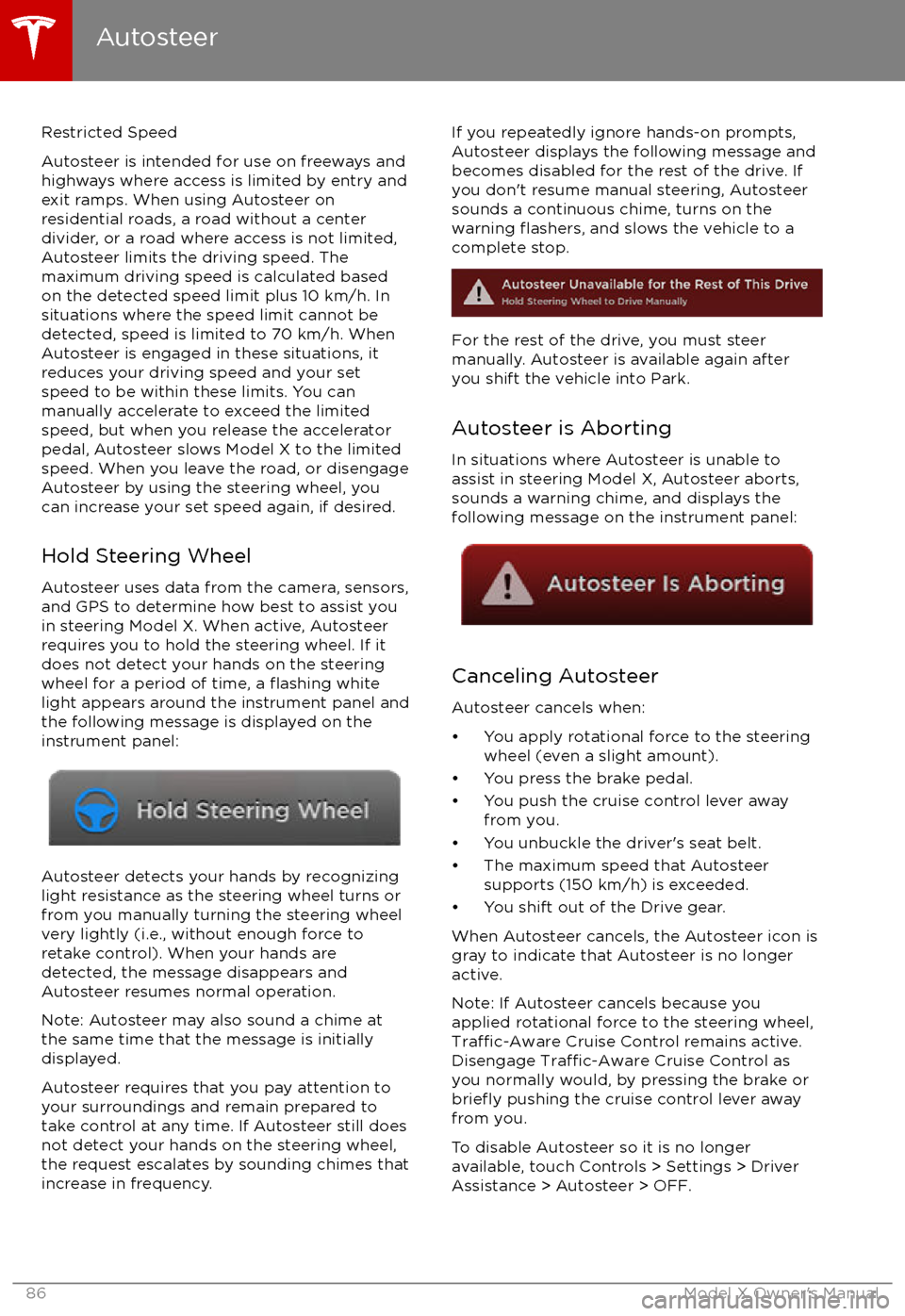
Hold Steering Wheel Autosteer uses data from the camera, sensors,and GPS to determine how best to assist you
in steering Model X. When active, Autosteer requires you to hold the steering wheel. If itdoes not detect your hands on the steering
wheel for a period of time, a
flashing white
light appears around the instrument panel and
the following message is displayed on the
instrument panel:
Autosteer detects your hands by recognizing
light resistance as the steering wheel turns or
from you manually turning the steering wheel very lightly (i.e., without enough force toretake control). When your hands are
detected, the message disappears and Autosteer resumes normal operation.
Note: Autosteer may also sound a chime at
the same time that the message is initially
displayed.
Autosteer requires that you pay attention to your surroundings and remain prepared totake control at any time. If Autosteer still doesnot detect your hands on the steering wheel,the request escalates by sounding chimes that
increase in frequency.
If you repeatedly ignore hands-on prompts,
Autosteer displays the following message and
becomes disabled for the rest of the drive. If
you don
Page 92 of 202

Note: If you press the brake when Autopark is
actively parking Model X, the parking process pauses until you press the Resume button onthe touchscreen.
Note: Autopark detects potential
perpendicular parking spaces that are at least
2.9 meters wide with a vehicle parked on each
side. Autopark detects parallel parking spaces that are at least six meters, but less than 15
meters long. Autopark does not operate on angled parking spaces.Warning: Never depend on Autopark tofind a parking space that is legal, suitable,
and safe. Autopark may not always detect
objects in the parking space. Always
perform visual checks to
confirm that a
parking space is appropriate and safe.
Warning: When Autopark is actively
steering Model X, the steering wheel
moves in accordance with Autopark
Page 107 of 202

6. Climate controls (see Climate Controls on page 115).
7. Volume control
Touch the up and down arrows to increase or decrease the volume of the speakers. You can
also adjust the volume using the scroll wheel on the left side of the steering wheel.
8. Reverse the position of the two currently displayed apps.Warning: Paying attention to road and traffic conditions must always be the driver
Page 109 of 202
1. CloseTouch the circled X in the top left corner of a window to close it (or you can touch anywhere
outside the window).
2. Doors
Touch to open or close doors.
3. Seats
Touch to move the second row seats forward or back.
4. Cold Weather
If Model X is equipped with the optional cold weather package, you can control all seatheaters as well as the heated wipers and steering wheel. Heaters that are turned on are displayed in red. To turn
off all seat heaters, touch All Off. Note that you can also control the
front driver and passenger seats using the main climate control panel located on the bottom
of the touchscreen (see Climate Controls on page 115).
5. Suspension
If Model X is equipped with Smart Air Suspension, touch to manually raise or lower Model X,or to remove a previously saved auto-raising location (see Smart Air Suspension on page
120). Model X must be powered on and you must press the brake pedal before you can
change suspension settings. Smart Air Suspension causes Model X to self-level, even when powered
off. Therefore, when towing or lifting, you must disable self-leveling (see Instructions
for Transporters on page 183 and Jacking and Lifting on page 166).
6. Driving
Page 116 of 202
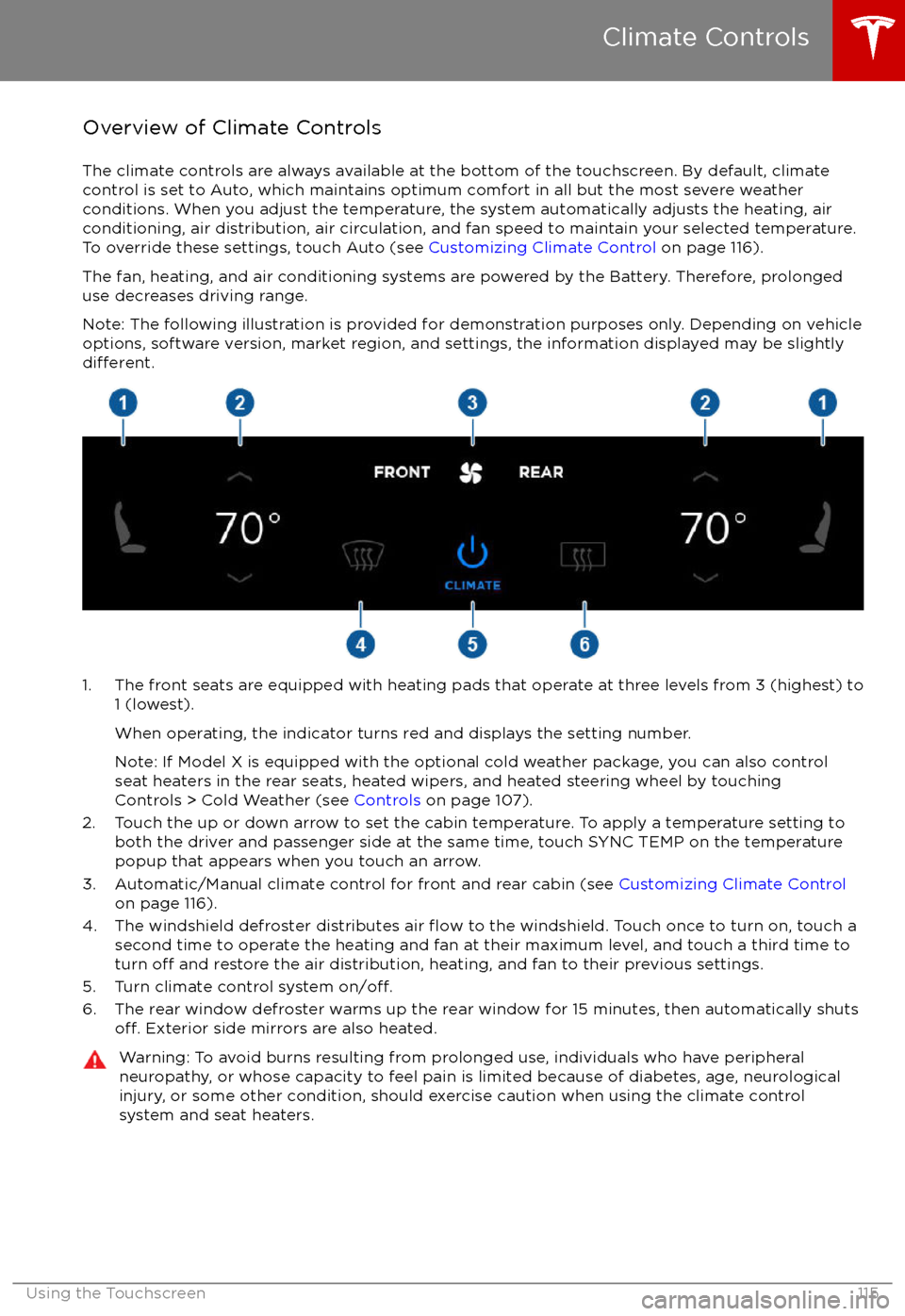
Overview of Climate Controls
The climate controls are always available at the bottom of the touchscreen. By default, climate control is set to Auto, which maintains optimum comfort in all but the most severe weather conditions. When you adjust the temperature, the system automatically adjusts the heating, air
conditioning, air distribution, air circulation, and fan speed to maintain your selected temperature. To override these settings, touch Auto (see Customizing Climate Control on page 116).
The fan, heating, and air conditioning systems are powered by the Battery. Therefore, prolonged
use decreases driving range.
Note: The following illustration is provided for demonstration purposes only. Depending on vehicle
options, software version, market region, and settings, the information displayed may be slightly
different.
1. The front seats are equipped with heating pads that operate at three levels from 3 (highest) to 1 (lowest).
When operating, the indicator turns red and displays the setting number.
Note: If Model X is equipped with the optional cold weather package, you can also control seat heaters in the rear seats, heated wipers, and heated steering wheel by touchingControls > Cold Weather (see Controls on page 107).
2. Touch the up or down arrow to set the cabin temperature. To apply a temperature setting to both the driver and passenger side at the same time, touch SYNC TEMP on the temperaturepopup that appears when you touch an arrow.
3. Automatic/Manual climate control for front and rear cabin (see Customizing Climate Control
on page 116).
4. The windshield defroster distributes air
flow to the windshield. Touch once to turn on, touch a
second time to operate the heating and fan at their maximum level, and touch a third time to
turn
off and restore the air distribution, heating, and fan to their previous settings.
5. Turn climate control system on/off.6. The rear window defroster warms up the rear window for 15 minutes, then automatically shutsoff. Exterior side mirrors are also heated.
Warning: To avoid burns resulting from prolonged use, individuals who have peripheral neuropathy, or whose capacity to feel pain is limited because of diabetes, age, neurologicalinjury, or some other condition, should exercise caution when using the climate control
system and seat heaters.
Climate Controls
Using the Touchscreen115
Page 126 of 202

To play the next song in a selected playlist or
album, touch the previous or next arrows on
the Now Playing view, or use the buttons on
the left side of the steering wheel (see Using
Left Steering Wheel Buttons on page 42). You
can also
shu