brake TESLA MODEL X 2017 Owner's Manual (UK)
[x] Cancel search | Manufacturer: TESLA, Model Year: 2017, Model line: MODEL X, Model: TESLA MODEL X 2017Pages: 202, PDF Size: 4.82 MB
Page 3 of 202
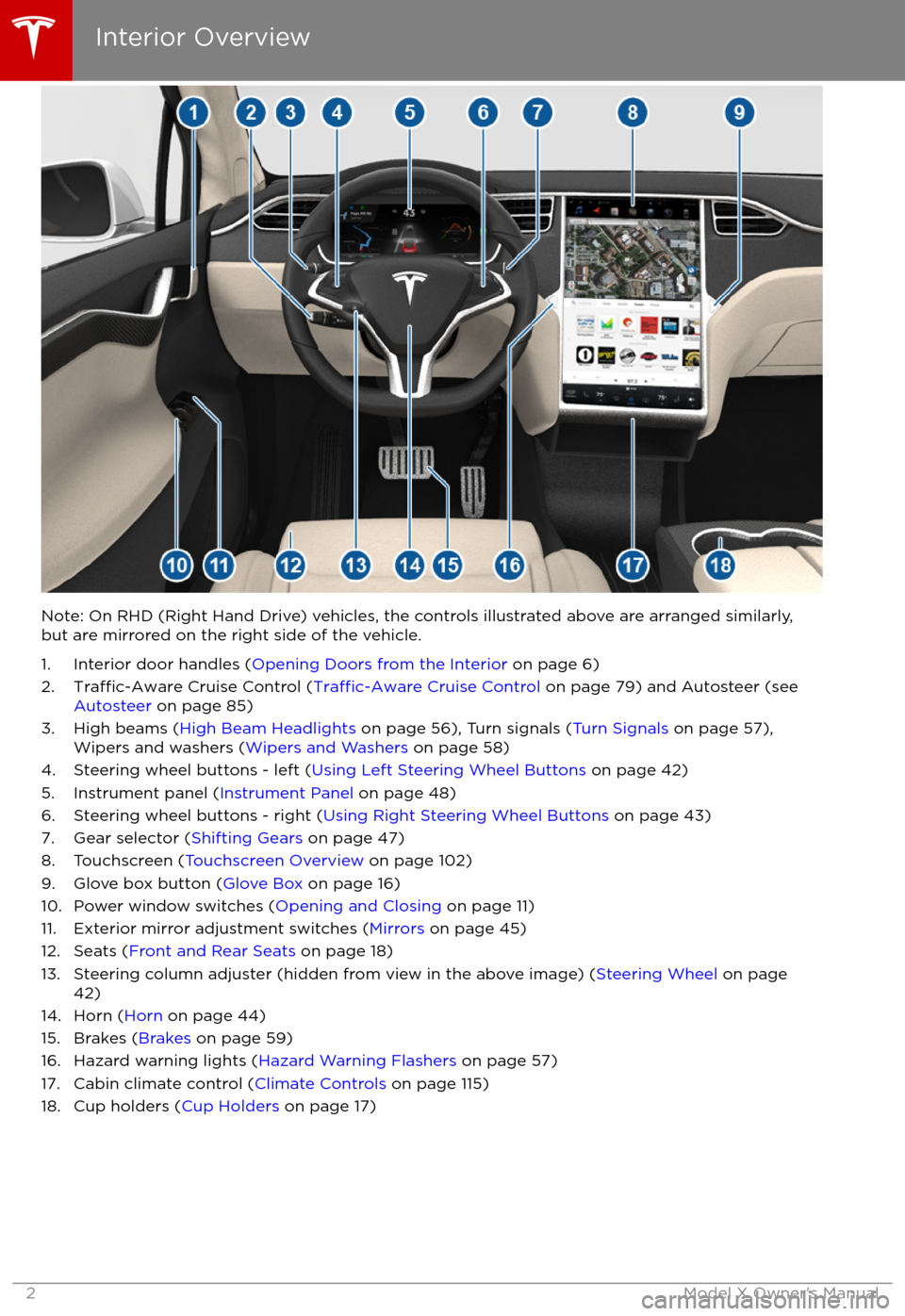
Note: On RHD (Right Hand Drive) vehicles, the controls illustrated above are arranged similarly,but are mirrored on the right side of the vehicle.
1. Interior door handles ( Opening Doors from the Interior on page 6)
2.
Traffic-Aware Cruise Control (Traffic-Aware Cruise Control on page 79) and Autosteer (see
Autosteer on page 85)
3. High beams ( High Beam Headlights on page 56), Turn signals ( Turn Signals on page 57),
Wipers and washers ( Wipers and Washers on page 58)
4. Steering wheel buttons - left ( Using Left Steering Wheel Buttons on page 42)
5. Instrument panel ( Instrument Panel on page 48)
6. Steering wheel buttons - right ( Using Right Steering Wheel Buttons on page 43)
7. Gear selector ( Shifting Gears on page 47)
8. Touchscreen ( Touchscreen Overview on page 102)
9. Glove box button ( Glove Box on page 16)
10. Power window switches ( Opening and Closing on page 11)
11. Exterior mirror adjustment switches ( Mirrors on page 45)
12. Seats ( Front and Rear Seats on page 18)
13. Steering column adjuster (hidden from view in the above image) ( Steering Wheel on page
42)
14. Horn ( Horn on page 44)
15. Brakes ( Brakes on page 59)
16. Hazard warning lights ( Hazard Warning Flashers on page 57)
17. Cabin climate control ( Climate Controls on page 115)
18. Cup holders ( Cup Holders on page 17)
Interior Overview
2Model X Owner
Page 48 of 202

Shifting GearsWhen Model X is in Park, you must press the
brake to shift to another gear.
Move the lever up or down to change gears.
If you try to shift into a gear that the current
driving speed prohibits, you will hear a chime
and the gear does not change.
Reverse
Push the lever all the way up and release. You
can only shift into Reverse when Model X is
stopped or moving less than 8 km/h. If moving
less than 1.6 km/h, you must press the brake.
Neutral
Push the lever up or down to the
first position
and release to shift into Neutral. Neutral allows
Model X to roll freely.
If Model X is in Park and you use the
touchscreen to release the parking brake
(Controls > E-Brake & Power
Off), Model X
shifts into Neutral (see Parking Brake on page
60).
Model X automatically shifts into Park when
you exit. To leave Model X in Neutral, use the touchscreen to engage Tow mode (see
Keeping Your Vehicle in Neutral (Tow Mode)
on page 47).
Drive
Push the lever all the way down and release.
You can shift into Drive when Model X is stopped or moving less than 8 km/h inReverse. If Model X is moving less than
1.6 km/h, you must press the brake to shift into Drive.
Park
With Model X stopped, press the end of the
gear selector. Whenever Model X is in Park,
the parking brake is applied.
Model X automatically shifts into Park
whenever you:
Page 50 of 202

IndicatorDescriptionFront fog lights (optional). See Lights on page 53.Rear fog lights. See Lights on page 53.Adaptive Front Lighting. See Adaptive Front Lighting System (AFS) on page 56.Electronic stability control systems are actively minimizing wheel spin by controlling
brake pressure and motor power (indicator flashes). See Traction Control on page 61.
If this indicator stays illuminated, a fault is detected (contact Tesla immediately).Smart Air Suspension
Page 60 of 202
Braking Systems
Model X has an anti-lock braking system
(ABS) that prevents the wheels from locking when you apply maximum brake pressure. This
improves steering control during heavy
braking in most road conditions.
During emergency braking conditions, the
ABS constantly monitors the speed of each
wheel and varies the brake pressure according to the grip available.
The alteration of brake pressure can be felt as
a pulsing sensation through the brake pedal.
This demonstrates that the ABS is operating
and is not a cause for concern. Keep
firm and
steady pressure on the brake pedal while
experiencing the pulsing.
The ABS indicator flashes briefly on
the instrument panel when you firststart Model X. If this indicator lights
up at any other time, an ABS fault
has occurred and the ABS is not
operating. Contact Tesla. The braking system remains fully operational and
is not
affected by an ABS failure.
However, braking distances may increase.
If the instrument panel displays this
indicator at any time other than
displaying
briefly when you first start
Model X, a brake system fault is
detected or the brake
fluid level is
low. Contact Tesla immediately.
Emergency Braking
In an emergency, fully press the brake pedal
and maintain
firm pressure, even on low
traction surfaces. The ABS varies the braking
pressure to each wheel according to the
amount of traction available. This prevents
wheels from locking and ensures that you stop
as safely as possible.
Warning: Do not pump the brake pedal.
Doing so interrupts operation of the ABS
and can increase braking distance.Warning: Always maintain a safe distance
from the vehicle in front of you and be
aware of hazardous driving conditions.
While the ABS can improve stopping
distance, it cannot overcome the laws of physics. It also does not prevent the
danger of hydroplaning (where a layer of
water prevents direct contact between the tires and the road).
If Model X is equipped with Autopilot
hardware, Automatic Emergency Braking
automatically applies full braking in situations
where a collision is considered imminent (see
Automatic Emergency Braking on page 98).
Brake Wear Model X brake pads are equipped with wearindicators. A wear indicator is a thin metal
strip attached to the brake pad that squeals as
it rubs against the rotor when the pad wears
down. This squealing sound indicates that the
brake pads have reached the end of their
service life and require replacement. To stop
the squealing, contact Tesla Service.
Brakes must be periodically inspected visually by removing the tire and wheel. For detailed
specifications and service limits for rotors and
brake pads, see Brakes on page 175.
Warning: Neglecting to replace worn
brake pads results in damage to the
braking system and can create a braking
hazard.
Brakes
Driving59
Page 61 of 202
Regenerative Braking
Whenever Model X is moving and your foot is
off the accelerator, regenerative braking slows
down Model X and feeds any surplus energy
back to the Battery.
By anticipating your stops and simply
removing pressure from the accelerator to slow down, you can take advantage ofregenerative braking to increase driving range.
Of course, this is no substitute for regular braking when needed for safety.
Note: If regenerative braking is aggressively
slowing Model X, such as on a steep descent,
brake lights turn on to alert other road usersthat you are slowing down.
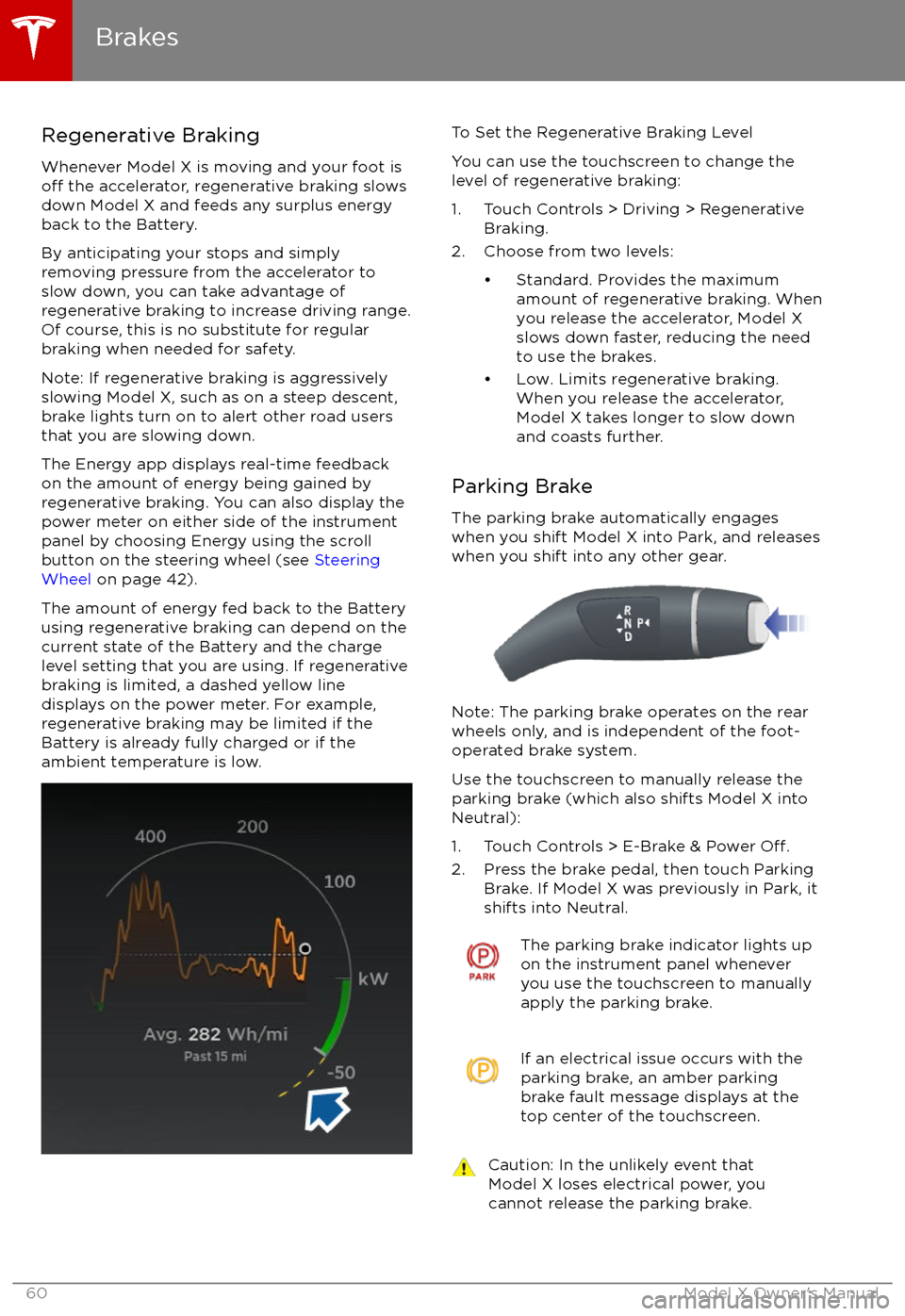
The Energy app displays real-time feedback on the amount of energy being gained by
regenerative braking. You can also display the
power meter on either side of the instrument panel by choosing Energy using the scroll
button on the steering wheel (see Steering
Wheel on page 42).
The amount of energy fed back to the Battery using regenerative braking can depend on the
current state of the Battery and the charge level setting that you are using. If regenerative
braking is limited, a dashed yellow line
displays on the power meter. For example,
regenerative braking may be limited if the Battery is already fully charged or if the
ambient temperature is low.
To Set the Regenerative Braking Level
You can use the touchscreen to change the
level of regenerative braking:
1. Touch Controls > Driving > Regenerative Braking.
2. Choose from two levels:
Page 62 of 202

How It WorksThe traction control system constantly
monitors the speed of the front and rear
wheels. If Model X experiences a loss of
traction, the system minimizes wheel spin by
controlling brake pressure and motor power.
By default, the traction control system is
always active. Under normal conditions, it should remain active to ensure maximum
safety.This indicator flashes on the
instrument panel whenever the
traction control system is actively
controlling brake pressure and motor
power to minimize wheel spin. If the
indicator stays on, a fault is detected with the traction control system.
Contact Tesla Service.Warning: Traction control cannot prevent
accidents caused by driving dangerously
or turning too sharply at high speeds.Warning: If the above indicator remains
illuminated in situations in which you have
not enabled Slip Start (described next), the traction control system may not be
operating correctly. Contact Tesla Service immediately.
Allowing Wheel Slip
To allow the wheels to spin at a limited speed,
you can enable Slip Start. Slip Start can be
enabled only when Model X is moving 48 km/h or slower. Slip Start automatically
disables when the speed exceeds 80 km/h.
Under normal conditions, Slip Start should not
be enabled. Enable it only in circumstances where you deliberately want the wheels tospin, such as:
Page 65 of 202
When Model X is stopped, Vehicle Holdcontinues to apply the brakes even after you
remove your foot from the brake pedal. When
driving on a hill or on a
flat surface, brake as
you normally would. You can release the brake
pedal, and remain stopped (even on a hill),
whenever the instrument panel displays the
Vehicle Hold indicator light.
This indicator displays on the
instrument panel whenever Vehicle
Hold is engaged.
To disengage Vehicle Hold, press the
accelerator pedal or press and release the
brake pedal.
Note: Shifting into Neutral also disengages Vehicle Hold.
Note: After actively braking Model X for
approximately 10 minutes, Model X shifts into
Park and Vehicle Hold cancels. Model X also
shifts into Park if it detects that the driver has
left the vehicle.
Vehicle Hold
64Model X Owner
Page 74 of 202

Warning: Under no circumstances shouldyou exit Trailer Mode when towing a
trailer. Doing so can cause serious injury
and/or death.Warning: Do not use the air suspension setting to appropriately match the height
of the hitch with the height of the trailer.
While Towing a Trailer
Model X is designed primarily as a passenger-
carrying vehicle. Towing a trailer puts additional load on the motor, drive train,brakes, tires and suspension and
significantlydecreases range. If you decide to tow a trailer,
proceed with caution and follow these general
guidelines:
Page 80 of 202
If Model X is equipped with Driver Assistance
components (see About Driver Assistance on
page 77) and you have purchased the optional
Autopilot Tech Package, the forward looking camera and the radar sensor are designed to
determine when there is a vehicle in front of
you in the same lane. If the area in front of Model X is clear,
Traffic-Aware Cruise Control
maintains a set driving speed. When a vehicle
is detected,
Traffic-Aware Cruise Control is
designed to slow down Model X as needed to
maintain a selected time-based distance from
the vehicle in front, up to the set speed.
Traffic-Aware Cruise Control does not
eliminate the need to watch the road in front
of you and to apply the brakes when needed.
Traffic-Aware Cruise Control is primarily
intended for driving on dry, straight roads,
such as highways and freeways. It should not
be used on city streets.
Warning: Traffic-Aware Cruise Control is
designed for your driving comfort and
convenience and is not a collision warning or avoidance system. It is your
responsibility to stay alert, drive safely,
and be in control of the vehicle at all
times. Never depend on
Traffic-AwareCruise Control to adequately slow down
Model X. Always watch the road in front
of you and be prepared to take corrective
action at all times. Failure to do so can
result in serious injury or death.
Warning: Although Traffic-Aware Cruise
Control is capable of detecting
pedestrians and cyclists, never depend on
Traffic-Aware Cruise Control to
adequately slow down Model X for them.
Always watch the road in front of you and be prepared to take corrective action at
all times. Failure to do so can result in
serious injury or death.
Warning: Do not use Traffic-Aware Cruise
Control on city streets or on roads where
traffic conditions are constantly changing.
Warning: Do not use Traffic-Aware Cruise
Control on winding roads with sharp
curves, on icy or slippery road surfaces, or
when weather conditions (such as heavy
rain, snow, fog, etc) make it inappropriate
to drive at a consistent speed.
Traffic-
Aware Cruise Control does not adapt
driving speed based on road and driving
conditions.
Operating Traffic-Aware Cruise
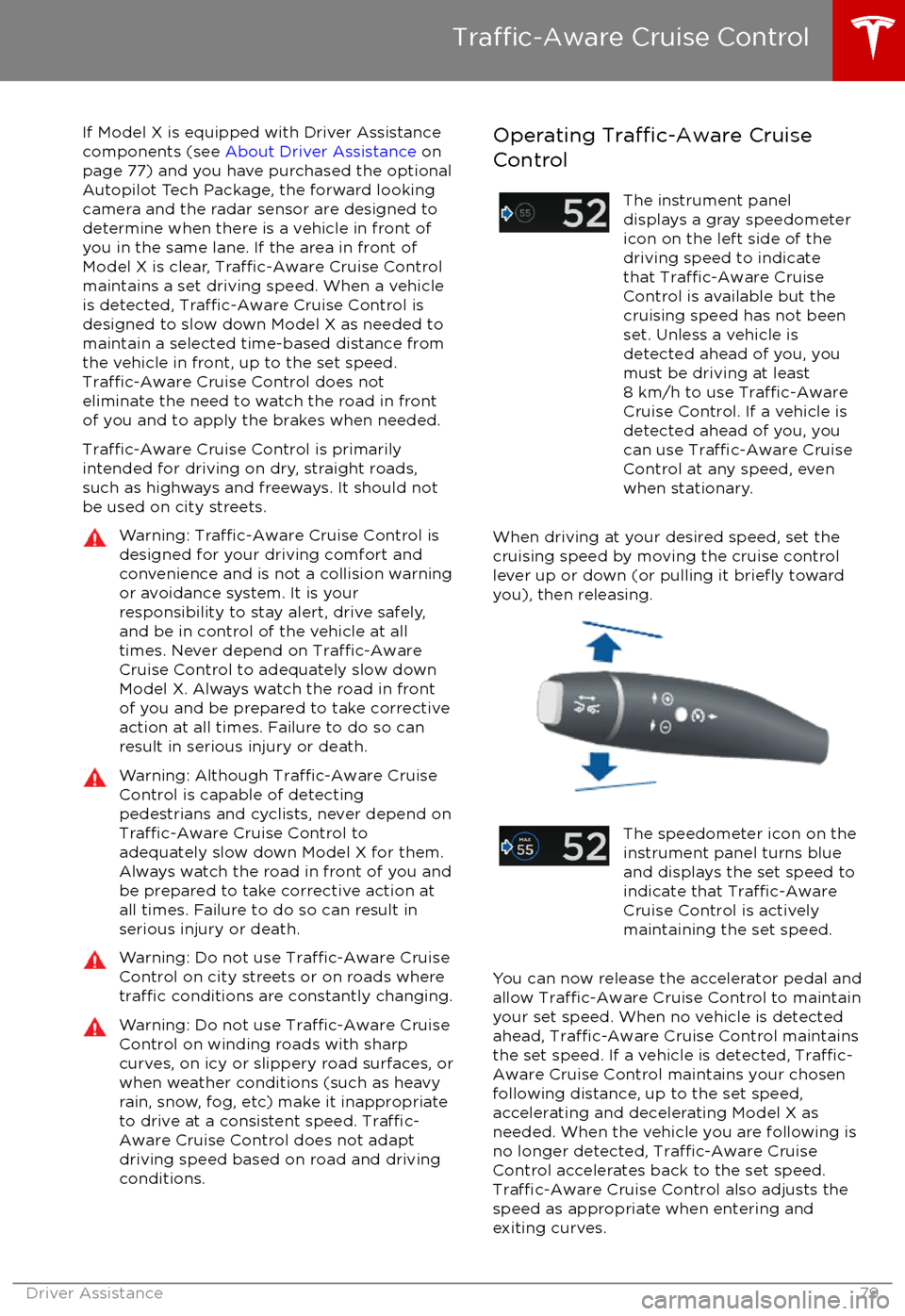
ControlThe instrument panel
displays a gray speedometer
icon on the left side of the
driving speed to indicate
that
Traffic-Aware Cruise
Control is available but the
cruising speed has not been
set. Unless a vehicle is
detected ahead of you, you
must be driving at least
8 km/h to use
Traffic-AwareCruise Control. If a vehicle is
detected ahead of you, you
can use
Traffic-Aware Cruise
Control at any speed, even
when stationary.
When driving at your desired speed, set the cruising speed by moving the cruise control
lever up or down (or pulling it
briefly toward
you), then releasing.
The speedometer icon on the
instrument panel turns blue
and displays the set speed to
indicate that
Traffic-AwareCruise Control is actively
maintaining the set speed.
You can now release the accelerator pedal and
allow Traffic-Aware Cruise Control to maintain
your set speed. When no vehicle is detected ahead,
Traffic-Aware Cruise Control maintains
the set speed. If a vehicle is detected, Traffic-
Aware Cruise Control maintains your chosen
following distance, up to the set speed,
accelerating and decelerating Model X as
needed. When the vehicle you are following is
no longer detected,
Traffic-Aware Cruise
Control accelerates back to the set speed.
Traffic-Aware Cruise Control also adjusts the
speed as appropriate when entering and
exiting curves.
Traffic-Aware Cruise Control
Driver Assistance79
Page 81 of 202
You can accelerate at any time when driving ata set speed using Traffic-Aware Cruise
Control. But when you release the accelerator,
Model X returns to the set speed.
When following a vehicle,
Traffic-Aware Cruise
Control remains active at low speeds, even if
Model X comes to a standstill while following a
vehicle. When
traffic is moving again, Traffic-
Aware Cruise Control resumes operating at
your currently set speed. However, if an or
object is detected in front of Model X,
Traffic-
Aware Cruise Control goes into a HOLD state
and the instrument panel displays a message
indicating that you need to resume cruise
control. To resume, press the accelerator pedalor pull the cruise control lever toward you (see
Canceling and Resuming on page 83).
In right hand
traffic, engaging the right turn
signal when driving in the right-most lane
within 50 meters of an exit (on a controlled
access road only, such as a highway or
freeway), causes
Traffic-Aware Cruise Control
to assume you are exiting. As a result, Traffic-
Aware Cruise Control begins to slow down the
vehicle. Likewise in left hand traffic, when
engaging the left turn signal when driving in
the left-most lane within 50 meters of an exit.
The onboard GPS (Global Positioning System)
determines if you are driving in a region with
right or left hand
traffic. In situations where
GPS data is unavailable (for example,
inadequate signal), engaging the turn signal
near an exit does not cause
Traffic-AwareCruise Control to slow down the vehicle.
Note: If you double-pull the cruise control
lever (or single-pull when
Traffic-Aware Cruise
Control is active), Autosteer activates and the set speed changes to either your current
driving speed, or the speed limit plus any
offset you have defined, whichever is greater
(see Cruising at the Speed Limit on page
81).
Note: When
Traffic-Aware Cruise Control is
actively slowing down Model X to maintain the
selected distance from the vehicle ahead, the brake lights turn on to alert other road users
that you are slowing down. You may also
notice slight movement of the brake pedal.
Note: If traveling 80 km/h or faster,
Traffic-
Aware Cruise Control requires that you be in a
passing lane in order to pass a vehicle. If you
are in a non-passing lane (to the right of a
vehicle in right-hand
traffic or to the left of a
vehicle in left-hand traffic), Traffic-AwareCruise Control prevents you from passing
vehicles. Instead, Model X will slow down and
match the vehicle