brake light TESLA MODEL X 2017 Owner's Manual (UK)
[x] Cancel search | Manufacturer: TESLA, Model Year: 2017, Model line: MODEL X, Model: TESLA MODEL X 2017Pages: 202, PDF Size: 4.82 MB
Page 3 of 202
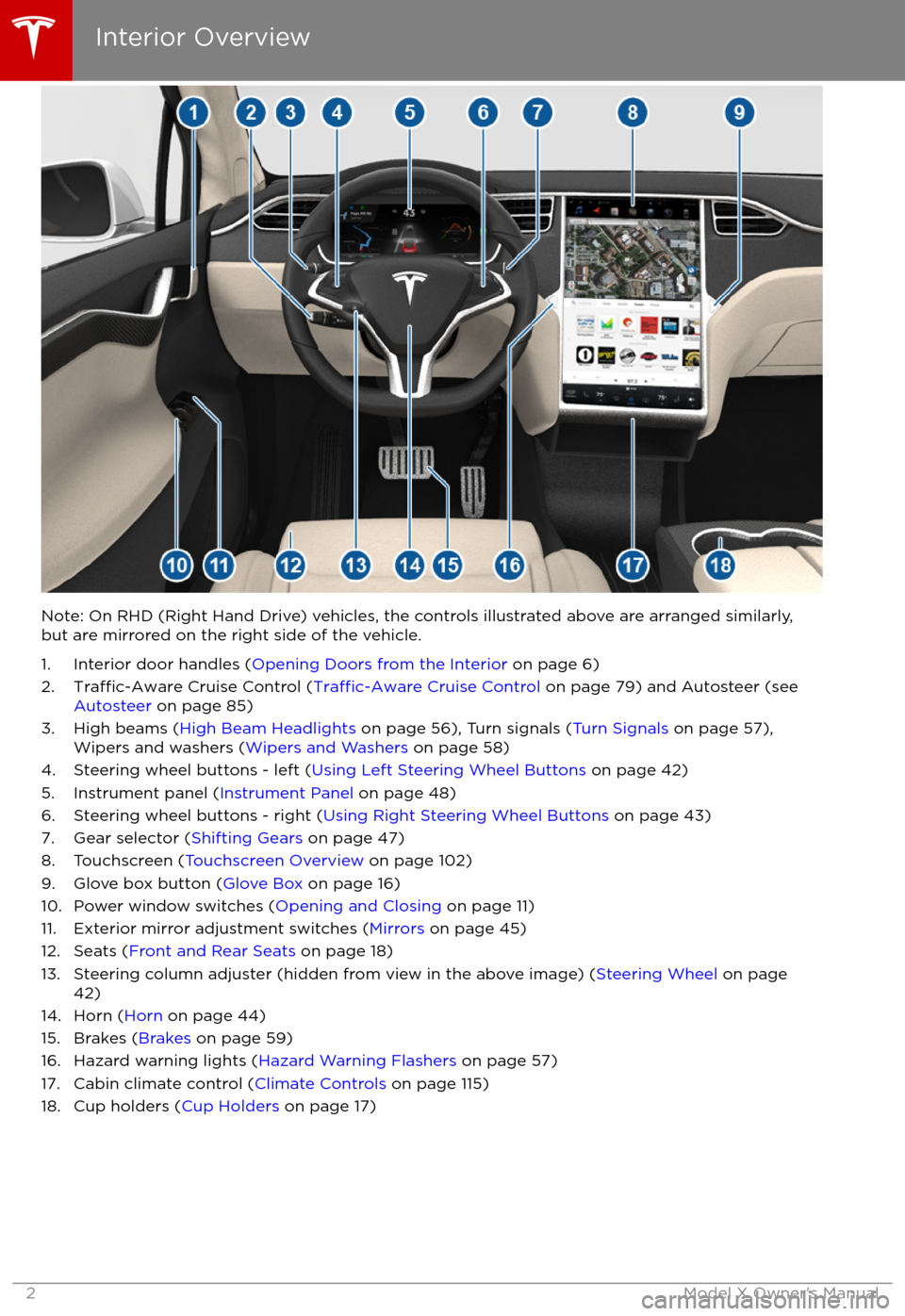
Note: On RHD (Right Hand Drive) vehicles, the controls illustrated above are arranged similarly,but are mirrored on the right side of the vehicle.
1. Interior door handles ( Opening Doors from the Interior on page 6)
2.
Traffic-Aware Cruise Control (Traffic-Aware Cruise Control on page 79) and Autosteer (see
Autosteer on page 85)
3. High beams ( High Beam Headlights on page 56), Turn signals ( Turn Signals on page 57),
Wipers and washers ( Wipers and Washers on page 58)
4. Steering wheel buttons - left ( Using Left Steering Wheel Buttons on page 42)
5. Instrument panel ( Instrument Panel on page 48)
6. Steering wheel buttons - right ( Using Right Steering Wheel Buttons on page 43)
7. Gear selector ( Shifting Gears on page 47)
8. Touchscreen ( Touchscreen Overview on page 102)
9. Glove box button ( Glove Box on page 16)
10. Power window switches ( Opening and Closing on page 11)
11. Exterior mirror adjustment switches ( Mirrors on page 45)
12. Seats ( Front and Rear Seats on page 18)
13. Steering column adjuster (hidden from view in the above image) ( Steering Wheel on page
42)
14. Horn ( Horn on page 44)
15. Brakes ( Brakes on page 59)
16. Hazard warning lights ( Hazard Warning Flashers on page 57)
17. Cabin climate control ( Climate Controls on page 115)
18. Cup holders ( Cup Holders on page 17)
Interior Overview
2Model X Owner
Page 50 of 202

IndicatorDescriptionFront fog lights (optional). See Lights on page 53.Rear fog lights. See Lights on page 53.Adaptive Front Lighting. See Adaptive Front Lighting System (AFS) on page 56.Electronic stability control systems are actively minimizing wheel spin by controlling
brake pressure and motor power (indicator flashes). See Traction Control on page 61.
If this indicator stays illuminated, a fault is detected (contact Tesla immediately).Smart Air Suspension
Page 60 of 202
Braking Systems
Model X has an anti-lock braking system
(ABS) that prevents the wheels from locking when you apply maximum brake pressure. This
improves steering control during heavy
braking in most road conditions.
During emergency braking conditions, the
ABS constantly monitors the speed of each
wheel and varies the brake pressure according to the grip available.
The alteration of brake pressure can be felt as
a pulsing sensation through the brake pedal.
This demonstrates that the ABS is operating
and is not a cause for concern. Keep
firm and
steady pressure on the brake pedal while
experiencing the pulsing.
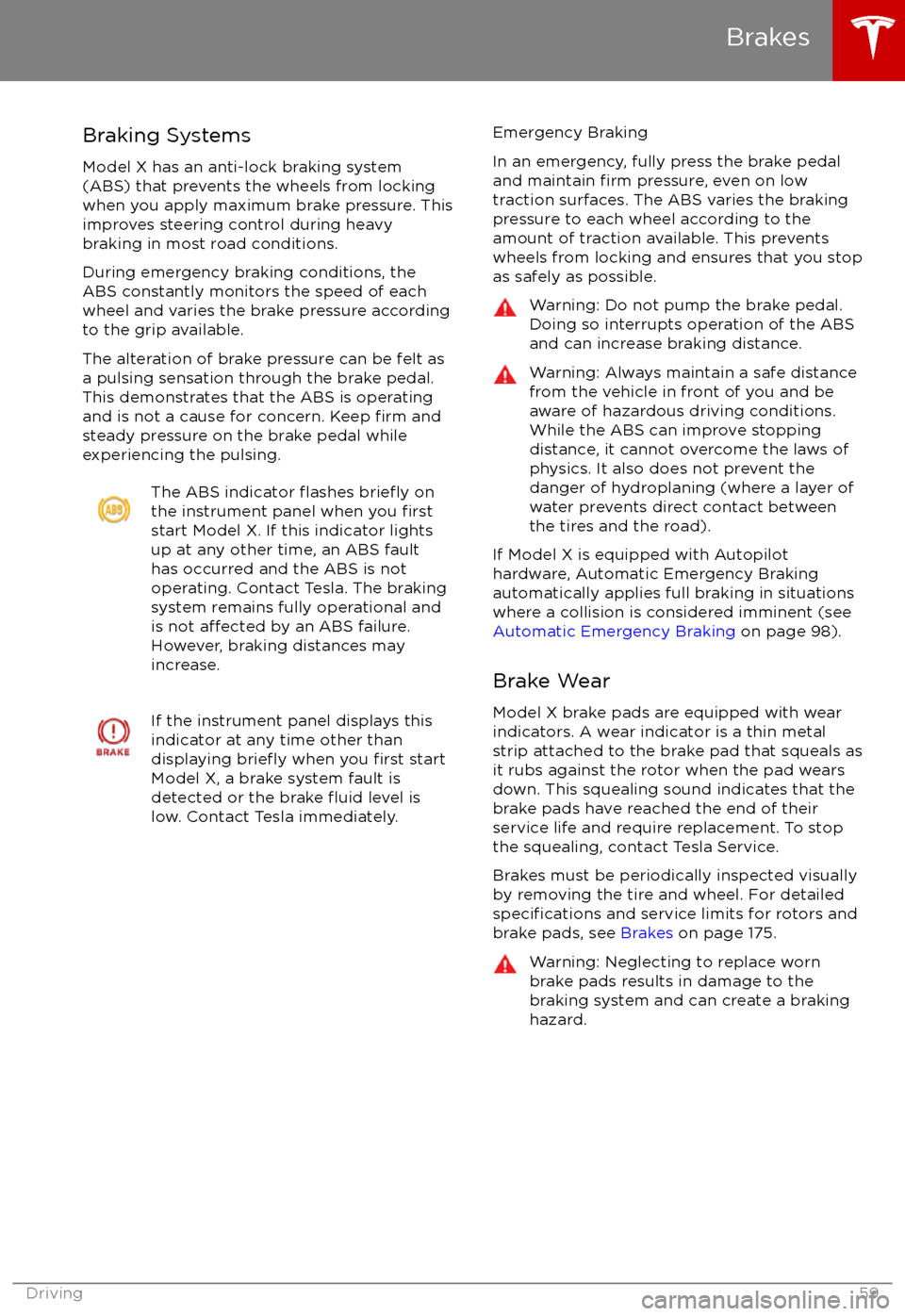
The ABS indicator flashes briefly on
the instrument panel when you firststart Model X. If this indicator lights
up at any other time, an ABS fault
has occurred and the ABS is not
operating. Contact Tesla. The braking system remains fully operational and
is not
affected by an ABS failure.
However, braking distances may increase.
If the instrument panel displays this
indicator at any time other than
displaying
briefly when you first start
Model X, a brake system fault is
detected or the brake
fluid level is
low. Contact Tesla immediately.
Emergency Braking
In an emergency, fully press the brake pedal
and maintain
firm pressure, even on low
traction surfaces. The ABS varies the braking
pressure to each wheel according to the
amount of traction available. This prevents
wheels from locking and ensures that you stop
as safely as possible.
Warning: Do not pump the brake pedal.
Doing so interrupts operation of the ABS
and can increase braking distance.Warning: Always maintain a safe distance
from the vehicle in front of you and be
aware of hazardous driving conditions.
While the ABS can improve stopping
distance, it cannot overcome the laws of physics. It also does not prevent the
danger of hydroplaning (where a layer of
water prevents direct contact between the tires and the road).
If Model X is equipped with Autopilot
hardware, Automatic Emergency Braking
automatically applies full braking in situations
where a collision is considered imminent (see
Automatic Emergency Braking on page 98).
Brake Wear Model X brake pads are equipped with wearindicators. A wear indicator is a thin metal
strip attached to the brake pad that squeals as
it rubs against the rotor when the pad wears
down. This squealing sound indicates that the
brake pads have reached the end of their
service life and require replacement. To stop
the squealing, contact Tesla Service.
Brakes must be periodically inspected visually by removing the tire and wheel. For detailed
specifications and service limits for rotors and
brake pads, see Brakes on page 175.
Warning: Neglecting to replace worn
brake pads results in damage to the
braking system and can create a braking
hazard.
Brakes
Driving59
Page 61 of 202
Regenerative Braking
Whenever Model X is moving and your foot is
off the accelerator, regenerative braking slows
down Model X and feeds any surplus energy
back to the Battery.
By anticipating your stops and simply
removing pressure from the accelerator to slow down, you can take advantage ofregenerative braking to increase driving range.
Of course, this is no substitute for regular braking when needed for safety.
Note: If regenerative braking is aggressively
slowing Model X, such as on a steep descent,
brake lights turn on to alert other road usersthat you are slowing down.
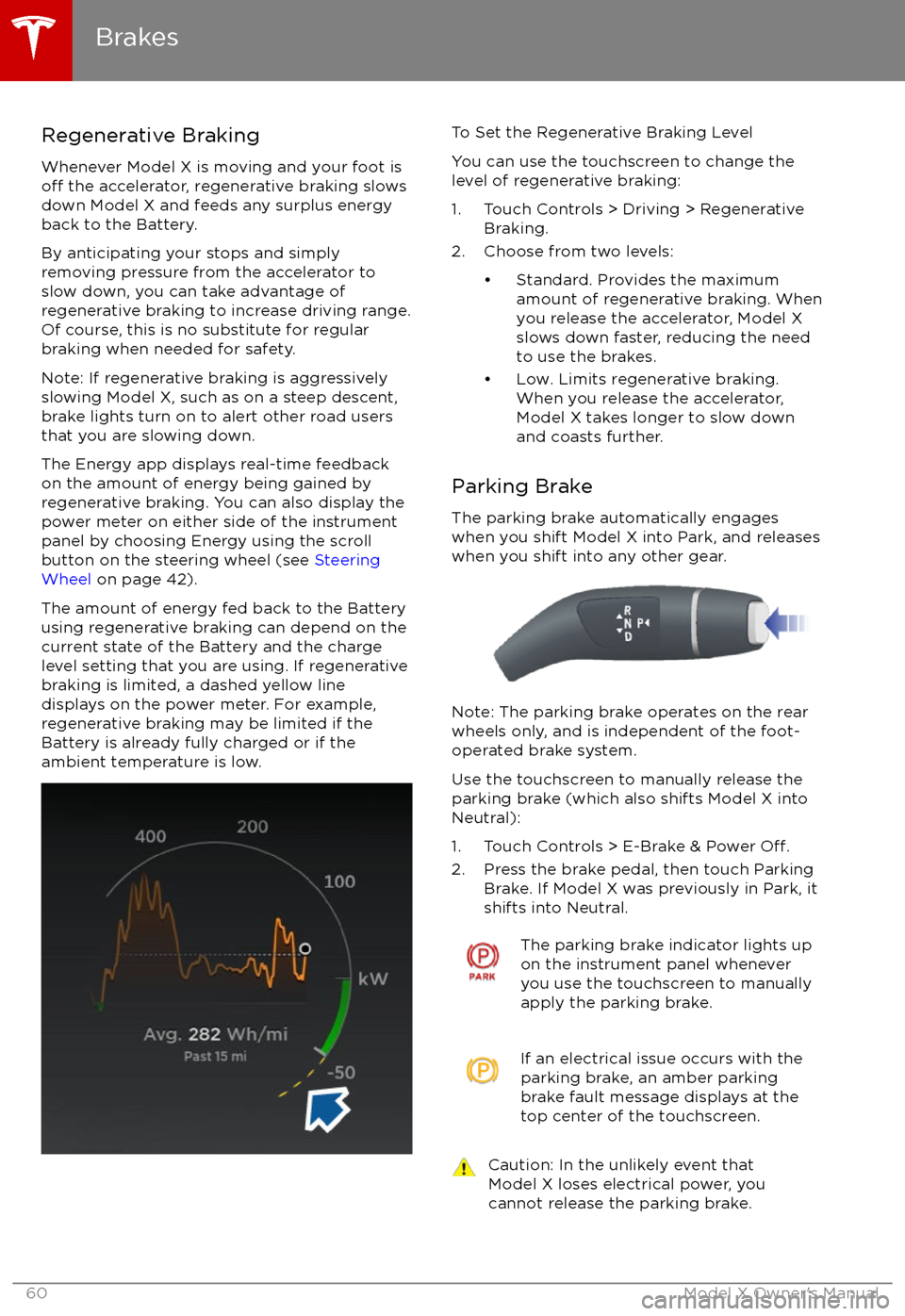
The Energy app displays real-time feedback on the amount of energy being gained by
regenerative braking. You can also display the
power meter on either side of the instrument panel by choosing Energy using the scroll
button on the steering wheel (see Steering
Wheel on page 42).
The amount of energy fed back to the Battery using regenerative braking can depend on the
current state of the Battery and the charge level setting that you are using. If regenerative
braking is limited, a dashed yellow line
displays on the power meter. For example,
regenerative braking may be limited if the Battery is already fully charged or if the
ambient temperature is low.
To Set the Regenerative Braking Level
You can use the touchscreen to change the
level of regenerative braking:
1. Touch Controls > Driving > Regenerative Braking.
2. Choose from two levels:
Page 65 of 202
When Model X is stopped, Vehicle Holdcontinues to apply the brakes even after you
remove your foot from the brake pedal. When
driving on a hill or on a
flat surface, brake as
you normally would. You can release the brake
pedal, and remain stopped (even on a hill),
whenever the instrument panel displays the
Vehicle Hold indicator light.
This indicator displays on the
instrument panel whenever Vehicle
Hold is engaged.
To disengage Vehicle Hold, press the
accelerator pedal or press and release the
brake pedal.
Note: Shifting into Neutral also disengages Vehicle Hold.
Note: After actively braking Model X for
approximately 10 minutes, Model X shifts into
Park and Vehicle Hold cancels. Model X also
shifts into Park if it detects that the driver has
left the vehicle.
Vehicle Hold
64Model X Owner
Page 81 of 202
You can accelerate at any time when driving ata set speed using Traffic-Aware Cruise
Control. But when you release the accelerator,
Model X returns to the set speed.
When following a vehicle,
Traffic-Aware Cruise
Control remains active at low speeds, even if
Model X comes to a standstill while following a
vehicle. When
traffic is moving again, Traffic-
Aware Cruise Control resumes operating at
your currently set speed. However, if an or
object is detected in front of Model X,
Traffic-
Aware Cruise Control goes into a HOLD state
and the instrument panel displays a message
indicating that you need to resume cruise
control. To resume, press the accelerator pedalor pull the cruise control lever toward you (see
Canceling and Resuming on page 83).
In right hand
traffic, engaging the right turn
signal when driving in the right-most lane
within 50 meters of an exit (on a controlled
access road only, such as a highway or
freeway), causes
Traffic-Aware Cruise Control
to assume you are exiting. As a result, Traffic-
Aware Cruise Control begins to slow down the
vehicle. Likewise in left hand traffic, when
engaging the left turn signal when driving in
the left-most lane within 50 meters of an exit.
The onboard GPS (Global Positioning System)
determines if you are driving in a region with
right or left hand
traffic. In situations where
GPS data is unavailable (for example,
inadequate signal), engaging the turn signal
near an exit does not cause
Traffic-AwareCruise Control to slow down the vehicle.
Note: If you double-pull the cruise control
lever (or single-pull when
Traffic-Aware Cruise
Control is active), Autosteer activates and the set speed changes to either your current
driving speed, or the speed limit plus any
offset you have defined, whichever is greater
(see Cruising at the Speed Limit on page
81).
Note: When
Traffic-Aware Cruise Control is
actively slowing down Model X to maintain the
selected distance from the vehicle ahead, the brake lights turn on to alert other road users
that you are slowing down. You may also
notice slight movement of the brake pedal.
Note: If traveling 80 km/h or faster,
Traffic-
Aware Cruise Control requires that you be in a
passing lane in order to pass a vehicle. If you
are in a non-passing lane (to the right of a
vehicle in right-hand
traffic or to the left of a
vehicle in left-hand traffic), Traffic-AwareCruise Control prevents you from passing
vehicles. Instead, Model X will slow down and
match the vehicle
Page 161 of 202

Cleaning the ExteriorTo prevent damage to the paint, immediately
remove corrosive substances (bird droppings, tree resin, dead insects, tar spots, road salt,
industrial fallout, etc). Do not wait until
Model X is due for a complete wash. If
necessary, use denatured alcohol to remove
tar spots and stubborn grease stains, then
immediately wash the area with water and a
mild, non-detergent soap to remove the
alcohol.
Follow these steps when washing the exterior
of Model X:
1. Rinse Thoroughly Before washing,
flush grime and grit from
the bodywork using a hose. Flush away
accumulations of mud in areas where
debris easily collects (such as wheel
arches and panel seams). If salt has been used on the highways (such as during
winter months), thoroughly rinse all traces of road salt from the underside of thevehicle.
2. Hand Wash
Hand wash Model X using a clean soft
cloth and cold or lukewarm water
containing a mild, good quality car
shampoo.
3. Rinse with Clean Water
After washing, rinse with clean water to
prevent soap from drying on the surfaces.
4. Dry Thoroughly and Clean Exterior Glass
After washing and rinsing, dry thoroughly
with a chamois.
Clean windows and mirrors using an automotive glass cleaner. Do not scrape,
or use any abrasive cleaning
fluid on glass
or mirrored surfaces.
Cautions for Exterior CleaningCaution: Do not use windshield treatmentfluids. Doing so can interfere with wiper
friction and cause a chattering sound.Caution: Do not use hot water and
detergents.Caution: In hot weather, do not wash in direct sunlight.Caution: If using a pressure washer,
maintain a distance of at least 30 cm
between the nozzle and the surface of
Model X. Keep the nozzle moving and do
not concentrate the water jet on any one
area.Caution: Do not aim water hoses directly
at window, door or hood seals, or through
wheel apertures onto brake components.Caution: Avoid using tight-napped or
rough cloths, such as washing mitts.Caution: If washing in an automatic car
wash, use Touchless car washes only. These car washes have no parts (brushes,
etc.) that touch the surfaces of Model X.
Using any other type of car wash could
cause damage that is not covered by the
warranty.Caution: Do not use chemical based
wheel cleaners. These can damage the
finish on the wheels.
Caution: Avoid using a high pressure
power washer on the rear view camera or
parking sensors (if equipped) and do not
clean a sensor or camera lens with a
sharp or abrasive object that can scratch
or damage its surface.
Cleaning
160Model X Owner
Page 184 of 202
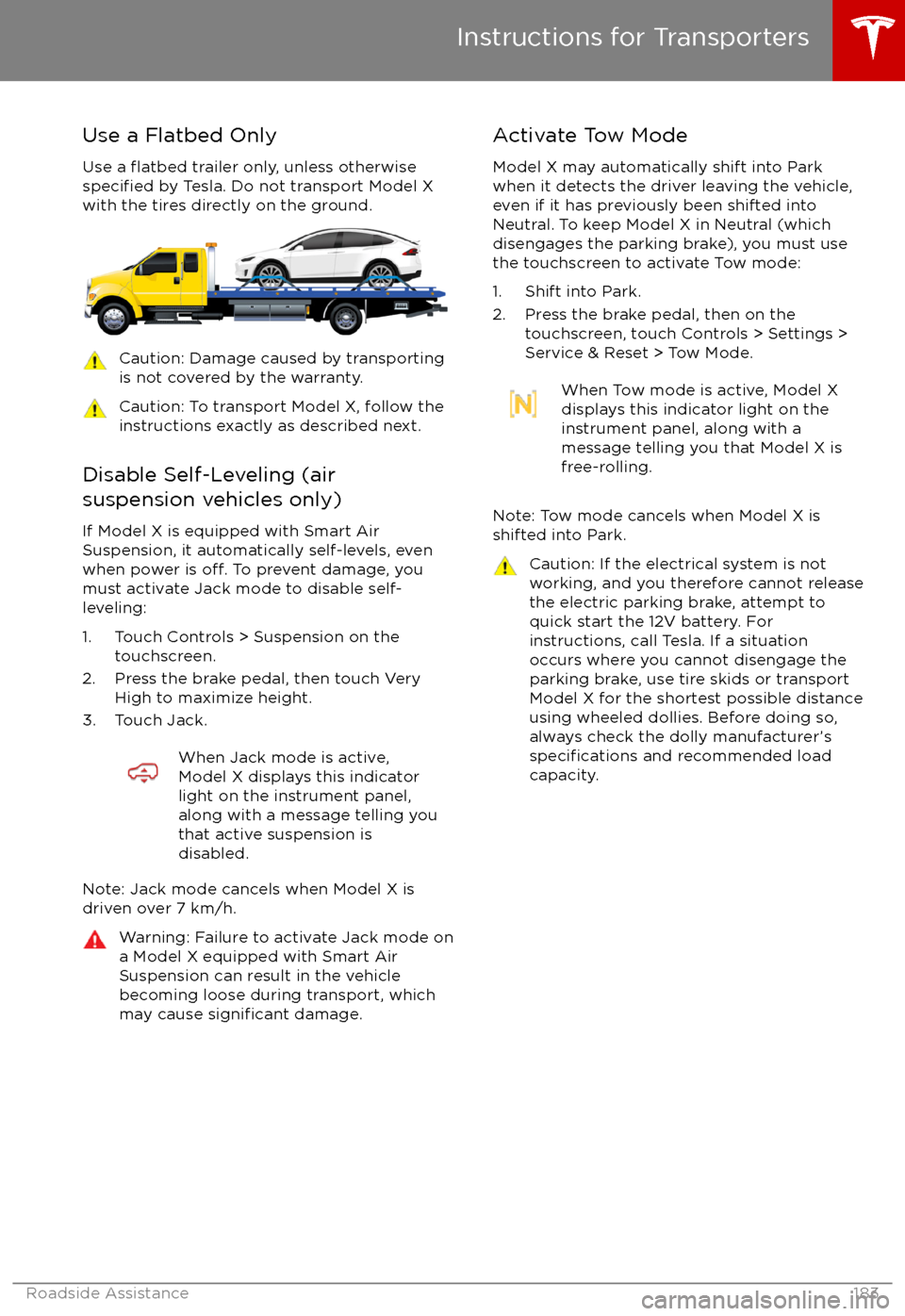
Use a Flatbed OnlyUse a
flatbed trailer only, unless otherwisespecified by Tesla. Do not transport Model X
with the tires directly on the ground.
Caution: Damage caused by transporting is not covered by the warranty.Caution: To transport Model X, follow the
instructions exactly as described next.
Disable Self-Leveling (air
suspension vehicles only)
If Model X is equipped with Smart Air
Suspension, it automatically self-levels, even
when power is
off. To prevent damage, you
must activate Jack mode to disable self-
leveling:
1. Touch Controls > Suspension on the touchscreen.
2. Press the brake pedal, then touch Very High to maximize height.
3. Touch Jack.
When Jack mode is active,
Model X displays this indicator
light on the instrument panel,
along with a message telling you
that active suspension is
disabled.
Note: Jack mode cancels when Model X is
driven over 7 km/h.
Warning: Failure to activate Jack mode on
a Model X equipped with Smart Air
Suspension can result in the vehicle
becoming loose during transport, which
may cause
significant damage.
Activate Tow Mode
Model X may automatically shift into Park
when it detects the driver leaving the vehicle,
even if it has previously been shifted into Neutral. To keep Model X in Neutral (which
disengages the parking brake), you must use
the touchscreen to activate Tow mode:
1. Shift into Park.
2. Press the brake pedal, then on the touchscreen, touch Controls > Settings >
Service & Reset > Tow Mode.When Tow mode is active, Model X
displays this indicator light on the
instrument panel, along with a
message telling you that Model X is
free-rolling.
Note: Tow mode cancels when Model X is
shifted into Park.
Caution: If the electrical system is not
working, and you therefore cannot release
the electric parking brake, attempt to
quick start the 12V battery. For
instructions, call Tesla. If a situation
occurs where you cannot disengage the
parking brake, use tire skids or transport Model X for the shortest possible distance
using wheeled dollies. Before doing so,
always check the dolly manufacturer
Page 195 of 202
AABS (Anti-lock Braking System) 59
Acceleration (dual-motor) 107
access panel, removing 164accessoriesinstalling 167
plugging into power socket 126
adaptive headlights 56
air circulation 116
air conditioning 115
air distribution 116
air
filter 119
air suspension 121
air vents 119
airbag, front passenger, disabling 37
airbags 35
alarm 136
all-season tires 153
always connected, setting 67
anti-lock braking (ABS) 59
audioplaying files 122
steering wheel buttons 42
volume control 122
Auto High Beam 56
Auto Lane Change 88
auto-raising suspension 120
Autopark 90
Autopilot 77
Autosteer 85
average range 67
B
backup camera 69
battery (12V)complete discharge 144specifications 175Battery (high voltage)care of 144
coolant 164
specifications 176
temperature limits 144
battery (key), replacing 5
blind spot warning 95
Bluetoothdevices, playing audio files from 125
general information 127
phone, pairing and using 127
body repairs 167
body touch up 162
brake
fluid replacement 150
brakesautomatic in emergencies 97fluid level 164
overview of 59
specifications 175
brightness of displays 111
C
Cabin Overheat Protection setting 111
cabin temperature control 115
Calendar app 134
camera (rear view) 69
car cover 162
car washes 160
carpets, cleaning 161
CE
certifications 189
CHAdeMO 143
chains 154
change of ownership 114
charge port 145
charge port light 147
chargingcharge settings 148
components and equipment 142
instructions 145
public charging stations 143
scheduling 148
status of 149
charging locations, finding 130
child protectiondisabling liftgate and rear door handles 9
disabling rear window switches 11child seatsdisabling front passenger airbag 37
installing and using 25
cleaning 160
climate controls 115
Cold Weather controls 107
collision avoidance assist 97
console12V power socket 126
cup holders 17
USB ports 126
consumption chart 67
contact informationroadside assistance 180coolantBattery, checking level of 164
Battery, replacement interval 150
copyrights 185, 186
Creep 107
cruise control 79
cup holders 17
D
DAB radio 123
dashboard overview 2
data recording 187
day mode 111
declarations of conformity 189
Index
194Model X Owner
Page 196 of 202

delivery mileage 187devicesBluetooth, playing audio files 125
connecting 126
playing audio
files from 125
dimensions 172
display brightness 111
dome (map) lights 53
door labels 169
Door Unlock Mode 9
doors 4
doors, opening 4
Drive gear 47
drive-away locking 9
driverprofiles 40
seat adjustment 18driver assistanceAuto Lane Change 88
Autopark 90
Autosteer 85
blind spot warning 95
collision avoidance assist 97
forward collision warning 97
overtake acceleration 79
overview 77
settings for 111
side collision avoidance 95
side collision warning 95
staying inside lane markings 95
Traffic-Aware Cruise Control 79
drivingseating position 18
starting 46
tips to maximize range 67
E
electric parking brake 60
emergency
flashers 57
energygained from regenerative braking 60
range information 48
energy & charging setting 111
Energy app 67
energy saving mode 67
Erase & Reset 114
event data recording 187
exteriorcar cover 162
cleaning 160
dimensions 172
lights 53
overview 3
polishing, touch up, & repair 162F
factory defaults, restoring 114
factory reset 114
fan speed, interior 116
favorite destinations 132
Favorites 129
Favorites (Media Player) 124
FCC
certifications 189
features, downloading new 140
ferries, avoiding 131
firmware (software) updates 140flash drives, playing audio files from 125flashers, warning 57flat tire repair 156floor mats 162
fluidsreplacement intervals 150
reservoirs, checking 164
fog lights 53
forward collision warning 97
front passenger detection 37
front trunk 14
G
garage doors, opening 137
gates, opening 137
GAWR 170
gears 47
glove box 16
Gross Axle Weight Rating 170
Gross Vehicle Weight Rating 170
ground clearance 172, 173
GVWR 170
H
hazard warning
flashers 57
head restraints 21
headlightsadaptive 56
after exit 56
high beams 56
heated wipers 58
heating 115
height adjustments (suspension)auto-raising 120
automatic and manual settings 121
disabling (Jack mode) 121
high beam headlights 56
high voltageBattery specifications 176
components 142
safety 150
hills, stopping on 64
Home location 132
Index
Index195