brake TESLA MODEL X 2020 User Guide
[x] Cancel search | Manufacturer: TESLA, Model Year: 2020, Model line: MODEL X, Model: TESLA MODEL X 2020Pages: 247, PDF Size: 6.48 MB
Page 80 of 247
Use the touchscreen to manually release the
parking brake (which also shifts Model X into Neutral):
1. Touch Controls > Safety & Security .
2. Press the brake pedal, then touch Parking
Brake . If Model X was previously in Park, it
shifts into Neutral.When you use the touchscreen to
manually apply the parking brake,
the red parking brake indicator lights
up on the instrument panel.If the parking brake experiences an
electrical issue, the amber parking brake indicator lights up and a fault
message displays at the top of the
instrument panel.Caution: In the unlikely event that
Model X loses electrical power, you
cannot access the touchscreen and are
therefore unable to release the parking
brake. Contact Tesla.
Brake Wear
Model X brake pads are equipped with wear indicators. A wear indicator is a thin metal
strip attached to the brake pad that squeals as
it rubs against the rotor when the pad wears
down. This squealing sound indicates that the
brake pads have reached the end of their service life and require replacement. To
replace the brake pads, contact Tesla Service.
Brakes must be periodically inspected visually by removing the tire and wheel. For detailed
specifications and service limits for rotors and
brake pads, see Subsystems on page 215.
Additionally, Tesla recommends cleaning and
lubricating the brake calipers every year or
12,500 miles (20,000 km) if in an area where
roads are salted during winter months.
Warning: Neglecting to replace worn
brake pads damages the braking system
and can result in a braking hazard.
Braking and Stopping
Driving79
Page 81 of 247
Traction Control
How It Works The traction control system constantly
monitors the speed of the front and rear
wheels. If Model X experiences a loss of
traction, the system minimizes wheel spin by
controlling brake pressure and motor power.
By default, the traction control system is on. Under normal conditions, it should remain on
to ensure maximum safety.
This yellow indicator
Page 84 of 247
Vehicle Hold
When Model X is stopped, Vehicle Hold can
continue to apply the brakes even after you
remove your foot from the brake pedal. When
driving on a hill or on a
Page 99 of 247

1.Connect the wiring on the brake controller
to the appropriate locations on the 4-pin
pigtail connector included with your
Model X.
1 - Brake control output to trailer
2 - Ground
3 - Brake On Signal
4 - 12V Power (20A)
2. Remove the cover located under the
dashboard in the driver
Page 100 of 247

Towing Guidelines
Model X is designed primarily as a passenger-
carrying vehicle. Towing a trailer puts additional load on the motor(s), drive train,
brakes, tires, and suspension and significantly
decreases range. If you decide to tow a trailer,
proceed with caution and follow these general
guidelines:
Page 103 of 247
Attaching and Removing the Ball
Mount
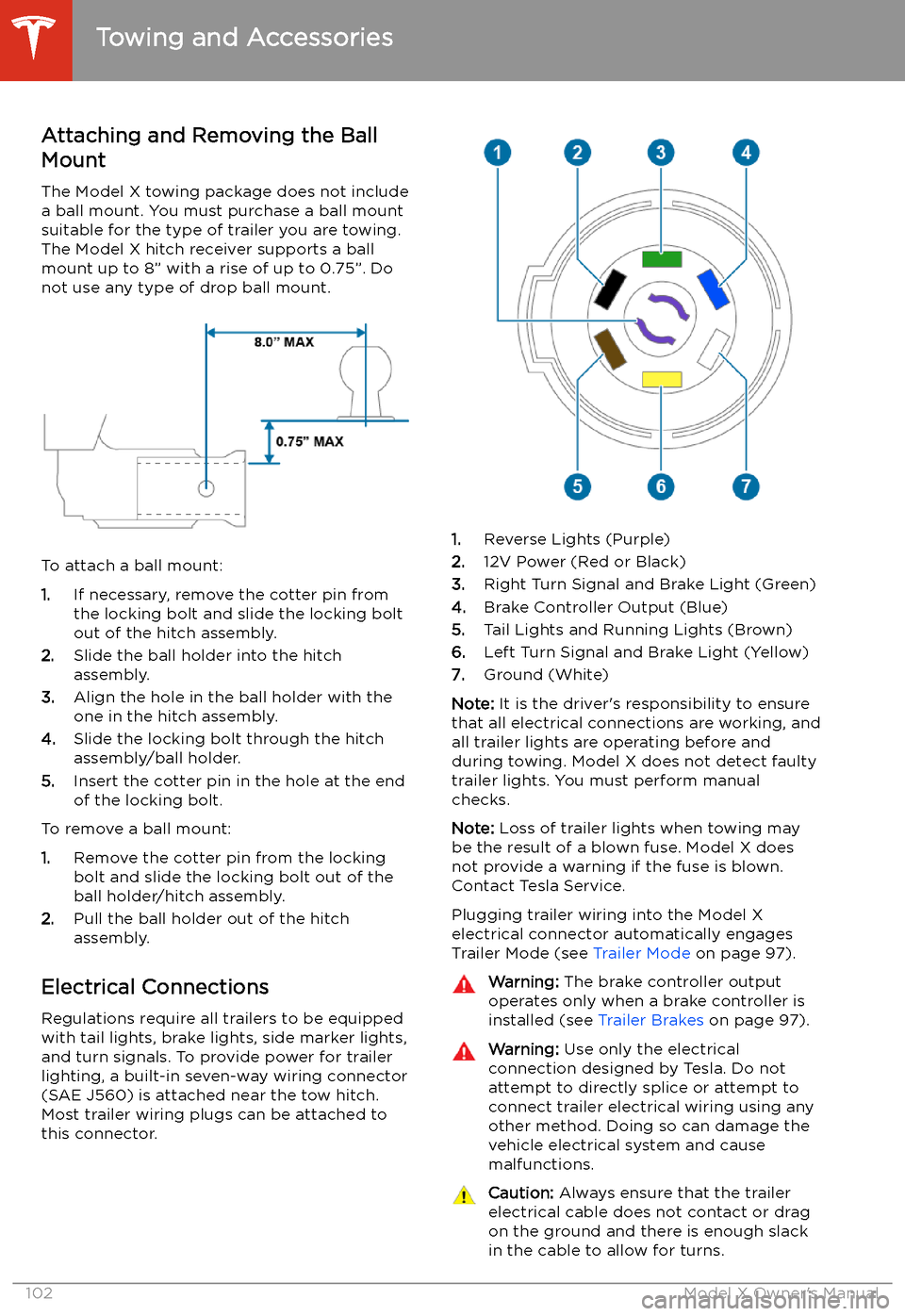
The Model X towing package does not include
a ball mount. You must purchase a ball mount
suitable for the type of trailer you are towing. The Model X hitch receiver supports a ballmount up to 8” with a rise of up to 0.75”. Do
not use any type of drop ball mount.
To attach a ball mount:
1. If necessary, remove the cotter pin from
the locking bolt and slide the locking bolt out of the hitch assembly.
2. Slide the ball holder into the hitch
assembly.
3. Align the hole in the ball holder with the
one in the hitch assembly.
4. Slide the locking bolt through the hitch
assembly/ball holder.
5. Insert the cotter pin in the hole at the end
of the locking bolt.
To remove a ball mount:
1. Remove the cotter pin from the locking
bolt and slide the locking bolt out of the
ball holder/hitch assembly.
2. Pull the ball holder out of the hitch
assembly.
Electrical Connections
Regulations require all trailers to be equipped
with tail lights, brake lights, side marker lights,
and turn signals. To provide power for trailer
lighting, a built-in seven-way wiring connector (SAE J560) is attached near the tow hitch.Most trailer wiring plugs can be attached tothis connector.
1. Reverse Lights (Purple)
2. 12V Power (Red or Black)
3. Right Turn Signal and Brake Light (Green)
4. Brake Controller Output (Blue)
5. Tail Lights and Running Lights (Brown)
6. Left Turn Signal and Brake Light (Yellow)
7. Ground (White)
Note: It is the driver
Page 136 of 247
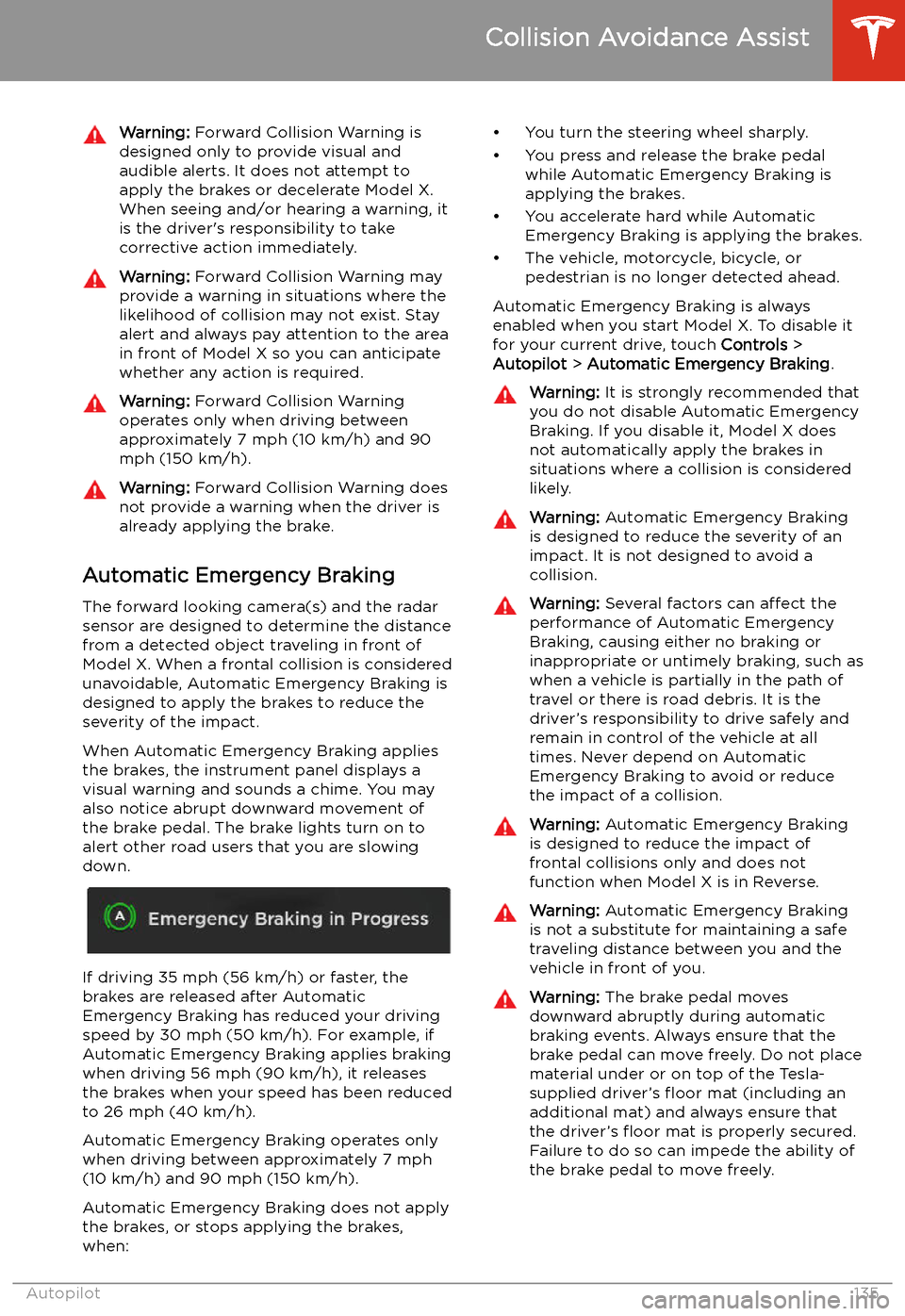
Warning: Forward Collision Warning is
designed only to provide visual and
audible alerts. It does not attempt to
apply the brakes or decelerate Model X.
When seeing and/or hearing a warning, it
is the driver
Page 137 of 247

Obstacle-Aware AccelerationObstacle-Aware Acceleration is designed toreduce the impact of a collision by reducing
motor torque and in some cases applying the
brakes, if Model X detects an object in its driving path. For example, Model X, while
parked in front of a closed garage door with
the Drive gear engaged, detects that you have
pressed hard on the accelerator pedal.
Although Model X still accelerates and hits the
garage door, the reduced torque may result in
less damage.
Obstacle-Aware Acceleration is designed to
operate only when all of these conditions are
simultaneously met:
Page 217 of 247
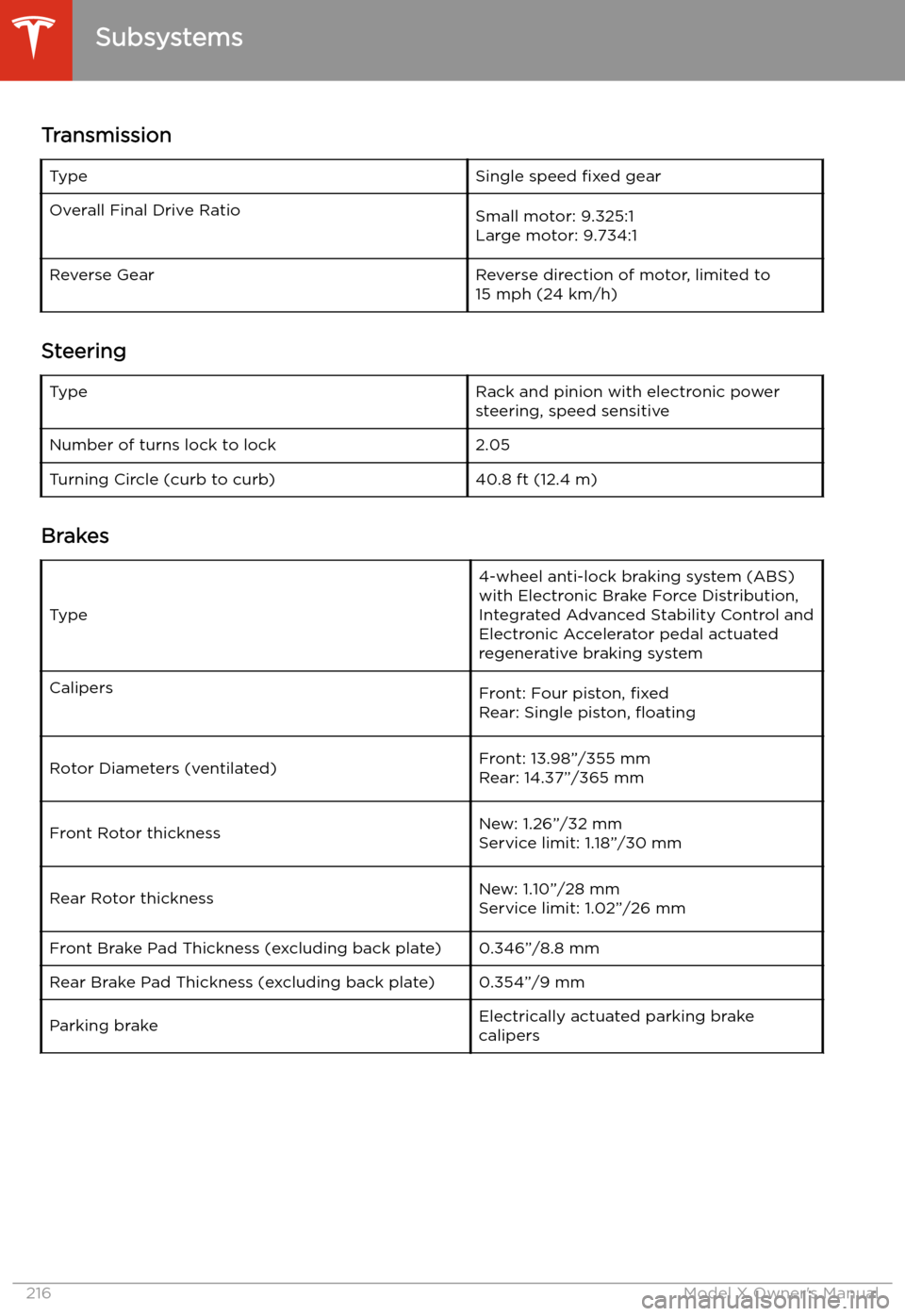
TransmissionTypeSingle speed fixed gearOverall Final Drive RatioSmall motor: 9.325:1
Large motor: 9.734:1Reverse GearReverse direction of motor, limited to
15 mph (24 km/h)
Steering
TypeRack and pinion with electronic power steering, speed sensitiveNumber of turns lock to lock2.05Turning Circle (curb to curb)40.8 ft (12.4 m)
Brakes
Type
4-wheel anti-lock braking system (ABS)
with Electronic Brake Force Distribution,
Integrated Advanced Stability Control and
Electronic Accelerator pedal actuated
regenerative braking systemCalipersFront: Four piston, fixed
Rear: Single piston,
Page 229 of 247
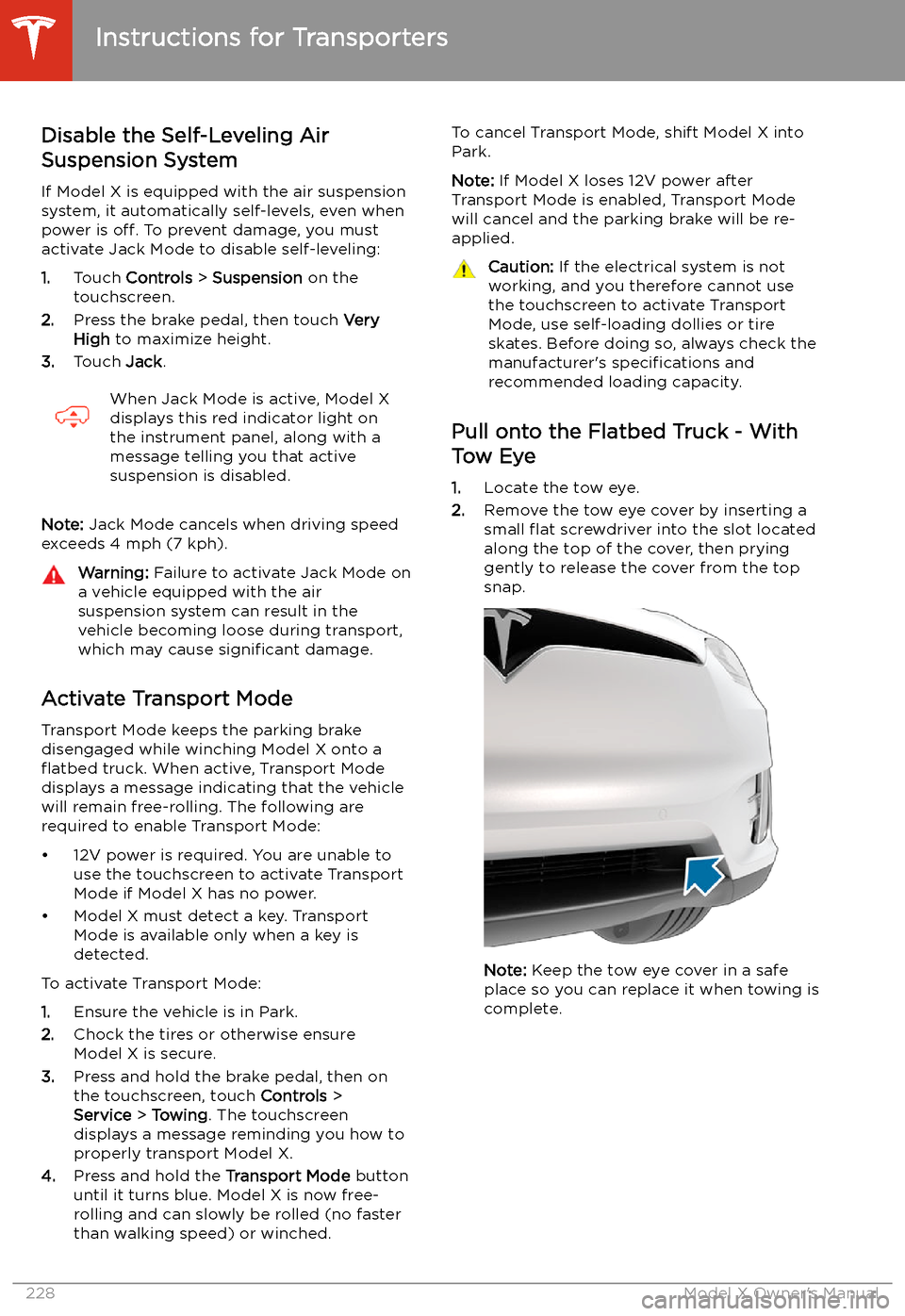
Disable the Self-Leveling AirSuspension System
If Model X is equipped with the air suspension
system, it automatically self-levels, even when
power is off. To prevent damage, you must
activate Jack Mode to disable self-leveling:
1. Touch Controls > Suspension on the
touchscreen.
2. Press the brake pedal, then touch Very
High to maximize height.
3. Touch Jack.When Jack Mode is active, Model X
displays this red indicator light on
the instrument panel, along with a
message telling you that active
suspension is disabled.
Note: Jack Mode cancels when driving speed
exceeds 4 mph (7 kph).
Warning: Failure to activate Jack Mode on
a vehicle equipped with the air
suspension system can result in the
vehicle becoming loose during transport,
which may cause significant damage.
Activate Transport Mode
Transport Mode keeps the parking brake
disengaged while winching Model X onto a