seats TESLA MODEL X 2021 Owner´s Manual
[x] Cancel search | Manufacturer: TESLA, Model Year: 2021, Model line: MODEL X, Model: TESLA MODEL X 2021Pages: 212, PDF Size: 5.07 MB
Page 118 of 212
1.Close
Touch the circled X in the top left corner of a window to close it (or you can touch anywhere
outside the window).
2. Doors
Touch to open or close doors.
3. Seats
If Model X is equipped with monopost second row seats, touch to move the second row seats
forward or backward (see Adjusting Second Row Monopost Seats on page 21).
4. Suspension
If Model X is equipped with Smart Air Suspension, touch to manually raise or lower Model X, or to remove a previously saved auto-raising location (see Smart Air Suspension on page 133).
Model X must be powered on and you must press the brake pedal before you can change
suspension settings. Smart Air Suspension causes Model X to self-level, even when powered off. Therefore, when towing or lifting, you must disable self-leveling (see Instructions for
Transporters on page 195 and Jacking and Lifting on page 176).
5. Driving
Page 126 of 212
Climate Controls
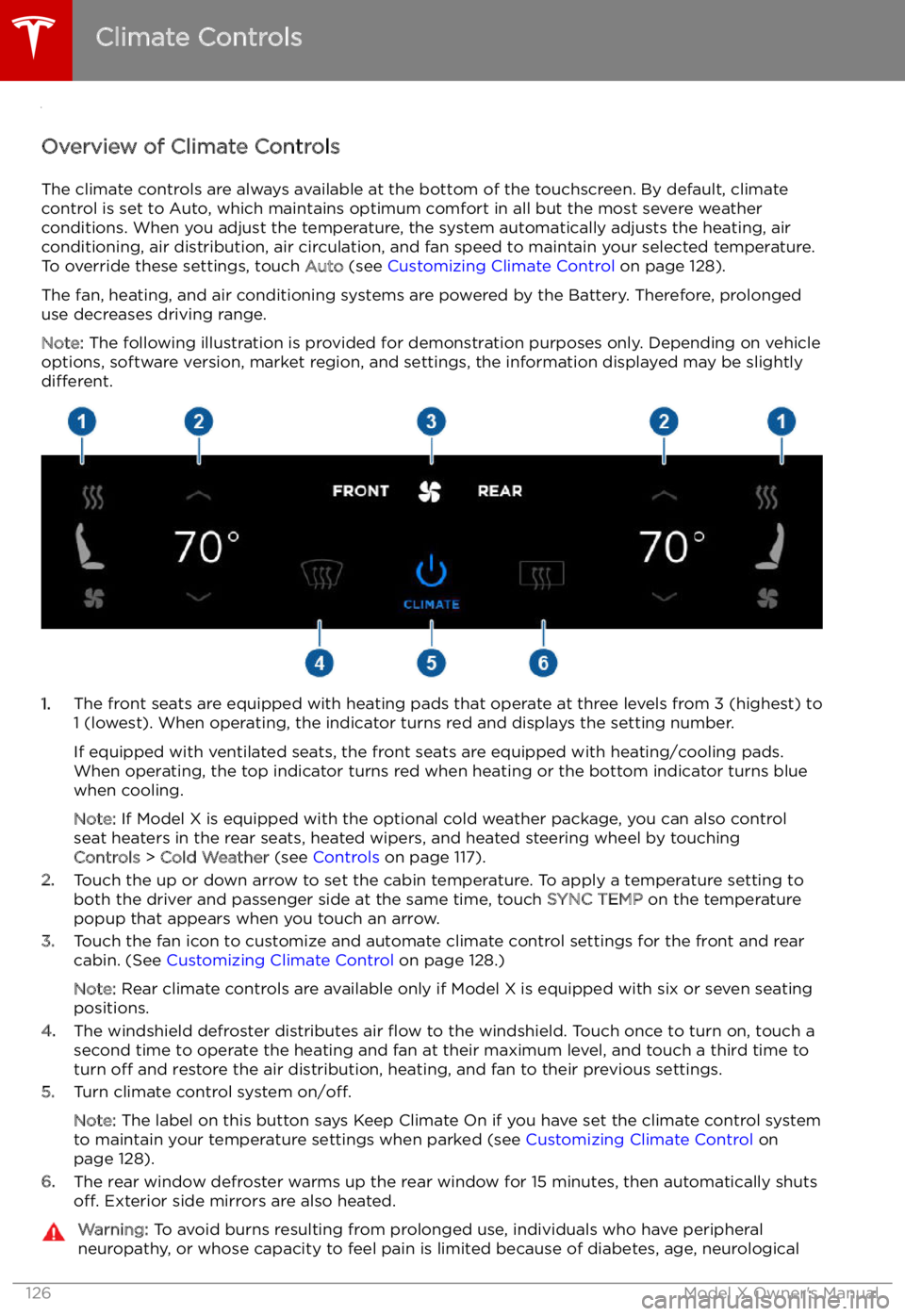
Overview of Climate Controls
The climate controls are always available at the bottom of the touchscreen. By default, climate control is set to Auto, which maintains optimum comfort in all but the most severe weather conditions. When you adjust the temperature, the system automatically adjusts the heating, air
conditioning, air distribution, air circulation, and fan speed to maintain your selected temperature.
To override these settings, touch Auto (see Customizing Climate Control on page 128).
The fan, heating, and air conditioning systems are powered by the Battery. Therefore, prolonged
use decreases driving range.
Note: The following illustration is provided for demonstration purposes only. Depending on vehicle
options, software version, market region, and settings, the information displayed may be slightly
different.
1. The front seats are equipped with heating pads that operate at three levels from 3 (highest) to
1 (lowest). When operating, the indicator turns red and displays the setting number.
If equipped with ventilated seats, the front seats are equipped with heating/cooling pads.
When operating, the top indicator turns red when heating or the bottom indicator turns blue
when cooling.
Note: If Model X is equipped with the optional cold weather package, you can also control
seat heaters in the rear seats, heated wipers, and heated steering wheel by touching Controls > Cold Weather (see Controls on page 117).
2. Touch the up or down arrow to set the cabin temperature. To apply a temperature setting to
both the driver and passenger side at the same time, touch SYNC TEMP on the temperature
popup that appears when you touch an arrow.
3. Touch the fan icon to customize and automate climate control settings for the front and rear
cabin. (See Customizing Climate Control on page 128.)
Note: Rear climate controls are available only if Model X is equipped with six or seven seating
positions.
4. The windshield defroster distributes air
Page 130 of 212
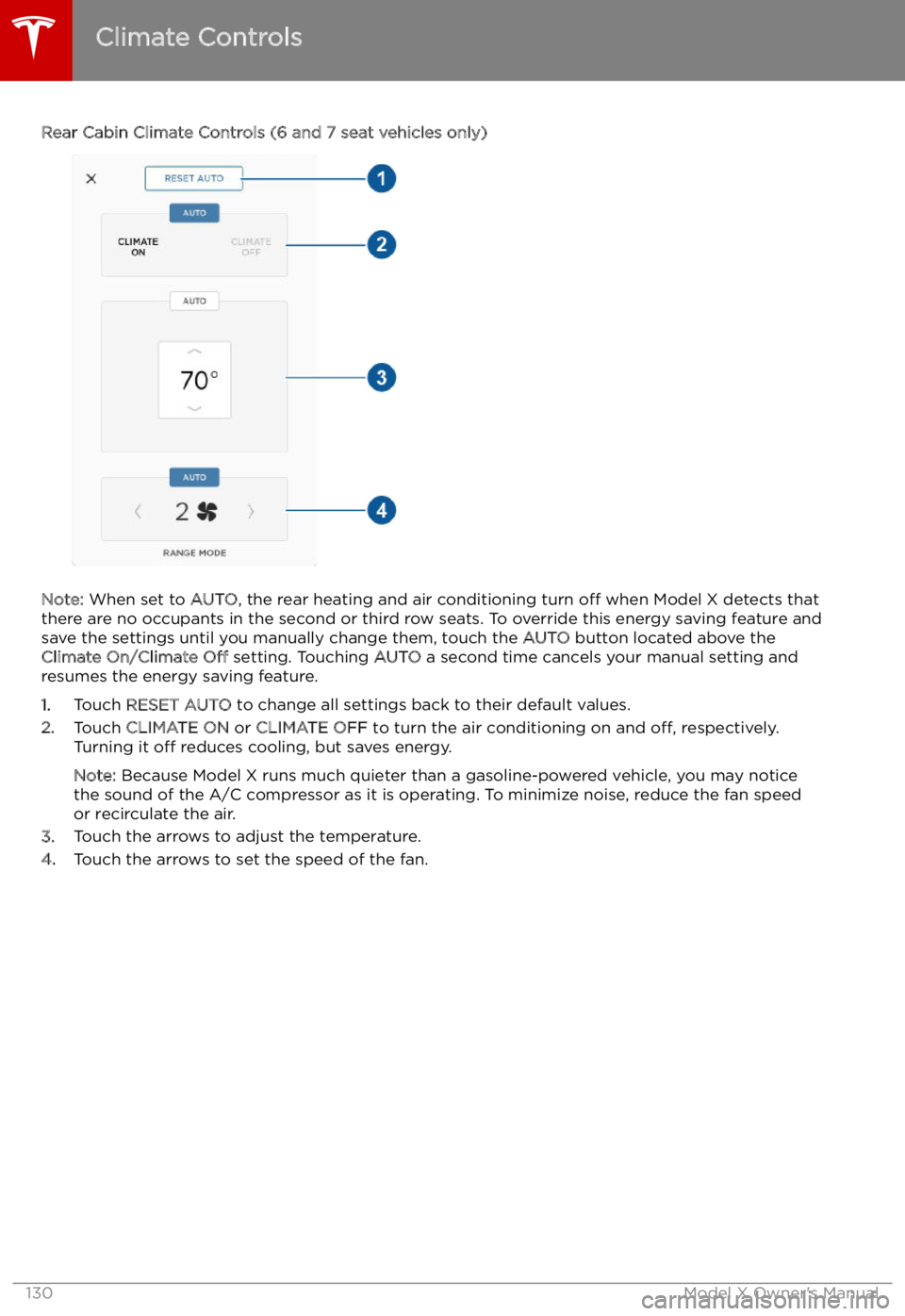
Rear Cabin Climate Controls (6 and 7 seat vehicles only)
Note: When set to AUTO, the rear heating and air conditioning turn off when Model X detects that
there are no occupants in the second or third row seats. To override this energy saving feature and
save the settings until you manually change them, touch the AUTO button located above the
Climate On/Climate Off setting. Touching AUTO a second time cancels your manual setting and
resumes the energy saving feature.
1. Touch RESET AUTO to change all settings back to their default values.
2. Touch CLIMATE ON or CLIMATE OFF to turn the air conditioning on and off, respectively.
Turning it off reduces cooling, but saves energy.
Note: Because Model X runs much quieter than a gasoline-powered vehicle, you may notice
the sound of the A/C compressor as it is operating. To minimize noise, reduce the fan speed
or recirculate the air.
3. Touch the arrows to adjust the temperature.
4. Touch the arrows to set the speed of the fan.
Climate Controls
130Model X Owner
Page 183 of 212

Shoulder RoomFrontRear
Third60.7 in 56.8 in 40 in1542 mm
1442 mm 1016 mmHip RoomFront Rear
Third55.6 in 59 in
38.5 in1412 mm
1498 mm 978 mm
Cargo Volume
Front TrunkRear*TotalSeven Seat Vehicles6.6 cu ft (187 L)76.5 cu ft (2166 L)**83.1 cu ft (2353 L)Six Seat Vehicles6.6 cu ft (187 L)70.7 cu ft (2002 L)**77.3 cu ft (2189 L)Five Seat Vehicles6.6 cu ft (187 L)81.2 cu ft (2299.5 L)**87.8 cu ft (2486.5 L)* Maximum cargo volume behind the front row seats. Includes the 12.6 cu ft (357 L) cargo area
in the rear trunk (area behind the third row seats, if equipped).** Second row seats fully forward and/or folded.
Weights
Curb Weight* - 60D/75D5,185 lbs2,352 kgCurb Weight* - 90D5,267 lbs2,389 kgCurb Weight* - P90D5,377 lbs2,439 kgCurb Weight* - 100D5,421 lbs2,459 kgCurb Weight* - P100D5,483 lbs2,487 kgGVWR** - 60D/75D6,581 lbs2,985 kgGVWR** - 90D6,658 lbs3,020 kgGVWR** - P90D6,768 lbs3,070 kgGVWR** - 100D6,788 lbs3,079 kgGVWR** - P100D6,878 lbs3,120 kgGross Vehicle Weight Distribution -
60D/75DFront: 2,890 lbs Rear: 3,690 lbsFront: 1,311 kg
Rear: 1,674 kgGross Vehicle Weight Distribution - 90DFront: 2,977 lbs Rear: 3,681 lbsFront: 1,350 kgRear: 1,670 kgGross Vehicle Weight Distribution -P90DFront: 2,976 lbs Rear: 3,792 lbsFront: 1,350 kgRear: 1,720 kgGross Vehicle Weight Distribution -100DFront: 3,097 lbs Rear: 3,690 lbsFront: 1,405 kg Rear: 1,674 kg
Dimensions and Weights
Specifications183
Page 210 of 212
mirrors 49
mobile app 153Mobile Connectordescription 155
using 158
modifications 177
motor torque, reduced 108
my car does what? 197
N naming 124
navigation 142
NCC certifications 201
Neutral gear 52
night mode 121
O odometer 73
offset from speed limit 110
overhang dimensions 182
overtake acceleration 89
Owner Information, about 198
P Park Assist 68
Park gear 52
parking brake 66
parking, automatic 100
parts replacement 177
Passive Entry 121
Pedal Misapplication Mitigation 106
personal data, erasing 125
phonesteering wheel buttons 47
using 140
PIN 45
power management 74
power socket 138
power windows 12
powering on and off 50
Preconditioning 121
preferences, setting 121
public charging stations 155
R
radar 86
radio 135
Radio Frequency information 201
rangedisplayed on instrument panel 53
driving tips to maximize 74range (continued)regenerative braking 65
range assurance 74
Range mode 74
Range Mode 117
Rated range 121
re-routing 144
rear seats, accessing 23
rear view camera 76
rear window switches, disabling 12
Recent (Media Player) 137
Recents 142
regenerative braking 65
region format 121
relative speed limit 110
release notes 152
restarting the touchscreen 50
Reverse gear 52
RFID transponders 177
roadside assistance 193
rotating tires 165
route overview 144
S
safety informationairbags 42
child seats 38
seat belts 28seat beltscleaning 171
in a collision 27
overview of 26
pre-tensioners 27
wearing when pregnant 27
seat covers 25
seat heaters 126
seating capacity 180
seatsadjusting 20
heaters 126
seats, second row 21
security settings 148
sensors 86
service data recording 199
service intervals 163
Settings 121
Settings, erasing 125
shifting gears 52
Show Commute Advice 144
side collision warning 104
slip start 67
Smart Preconditioning 121
software reset 125
software updates 152
specificationscargo volume 183
dimensions 182
Index
210Model X Owner
Page 211 of 212
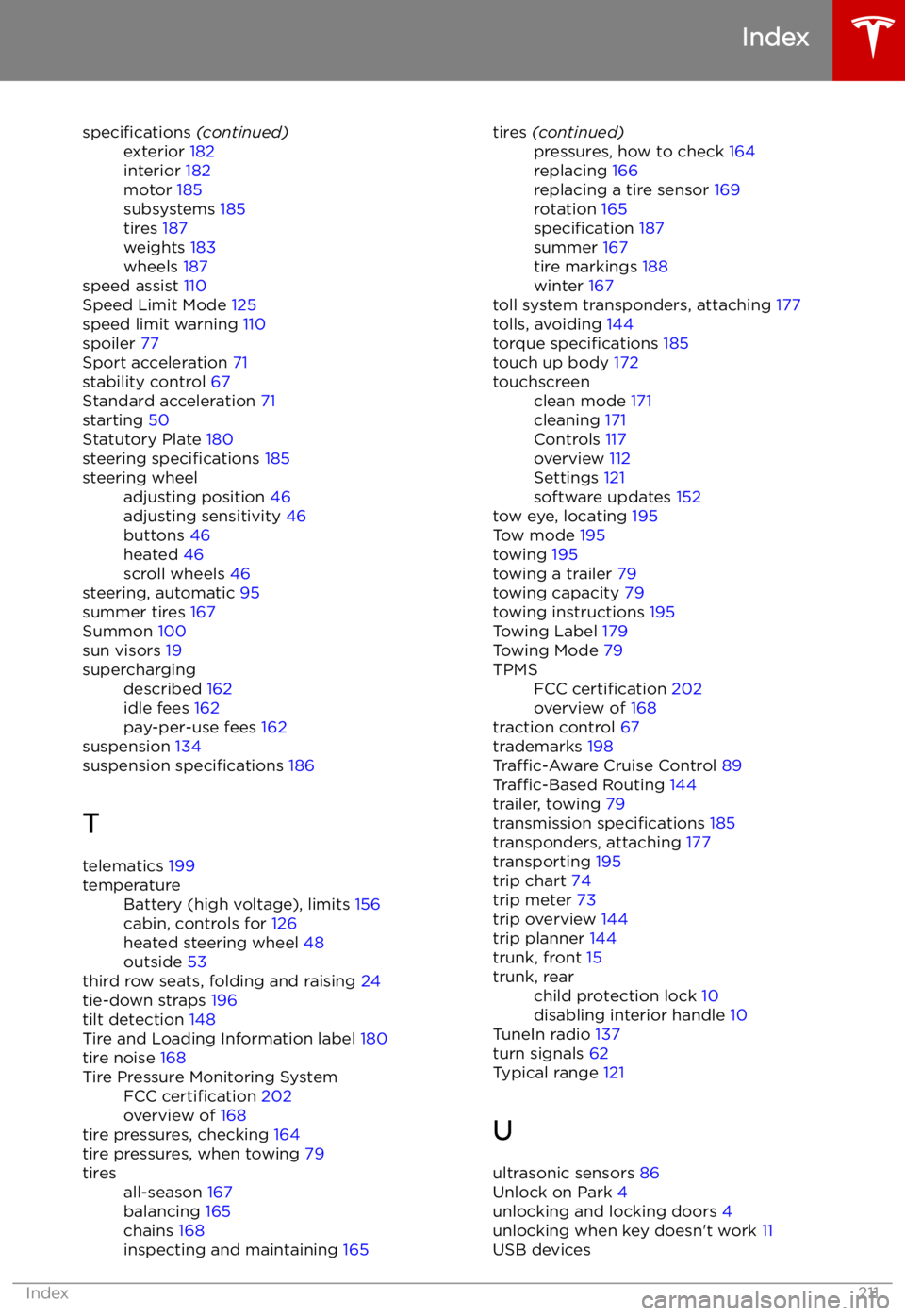
specifications (continued)exterior 182
interior 182
motor 185
subsystems 185
tires 187
weights 183
wheels 187
speed assist 110
Speed Limit Mode 125
speed limit warning 110
spoiler 77
Sport acceleration 71
stability control 67
Standard acceleration 71
starting 50
Statutory Plate 180
steering specifications 185
steering wheeladjusting position 46
adjusting sensitivity 46
buttons 46
heated 46
scroll wheels 46
steering, automatic
95
summer tires 167
Summon 100
sun visors 19
superchargingdescribed 162
idle fees 162
pay-per-use fees 162
suspension 134
suspension specifications 186
T telematics 199
temperatureBattery (high voltage), limits 156
cabin, controls for 126
heated steering wheel 48
outside 53
third row seats, folding and raising 24
tie-down straps 196
tilt detection 148
Tire and Loading Information label 180
tire noise 168
Tire Pressure Monitoring SystemFCC certification 202
overview of 168
tire pressures, checking 164
tire pressures, when towing 79
tiresall-season 167
balancing 165
chains 168
inspecting and maintaining 165tires (continued)pressures, how to check 164
replacing 166
replacing a tire sensor 169
rotation 165
specification 187
summer 167
tire markings 188
winter 167
toll system transponders, attaching 177
tolls, avoiding 144
torque specifications 185
touch up body 172
touchscreenclean mode 171
cleaning 171
Controls 117
overview 112
Settings 121
software updates 152
tow eye, locating 195
Tow mode 195
towing 195
towing a trailer 79
towing capacity 79
towing instructions 195
Towing Label 179
Towing Mode 79
TPMSFCC certification 202
overview of 168
traction control 67
trademarks 198
Traffic-Aware Cruise Control 89
Traffic-Based Routing 144
trailer, towing 79
transmission specifications 185
transponders, attaching 177
transporting 195
trip chart 74
trip meter 73
trip overview 144
trip planner 144
trunk, front 15
trunk, rearchild protection lock 10
disabling interior handle 10
TuneIn radio 137
turn signals 62
Typical range 121
U ultrasonic sensors 86
Unlock on Park 4
unlocking and locking doors 4
unlocking when key doesn