instrument panel TESLA MODEL X 2022 Owner´s Manual
[x] Cancel search | Manufacturer: TESLA, Model Year: 2022, Model line: MODEL X, Model: TESLA MODEL X 2022Pages: 212, PDF Size: 5.07 MB
Page 160 of 212
Note: If charging at a Tesla Supercharger, and
paid supercharging is potentially in effect, the
charging screen also displays information
about your previous or current Supercharger
session (see Supercharger Usage Fees and
Idle Fees on page 162).
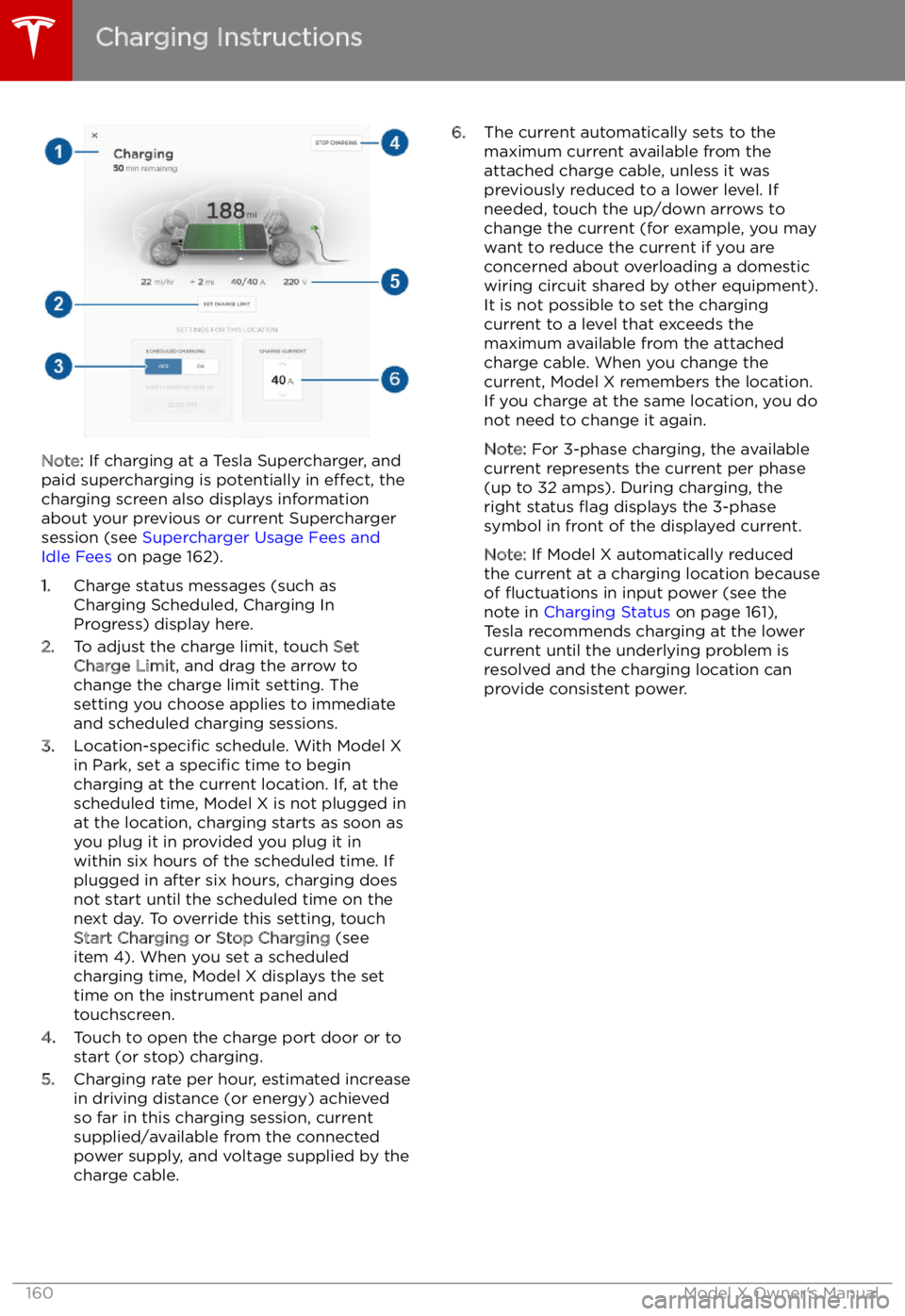
1. Charge status messages (such as
Charging Scheduled, Charging In
Progress) display here.
2. To adjust the charge limit, touch Set
Charge Limit , and drag the arrow to
change the charge limit setting. The
setting you choose applies to immediate
and scheduled charging sessions.
3. Location-specific schedule. With Model X
in Park, set a specific time to begin
charging at the current location. If, at the
scheduled time, Model X is not plugged in
at the location, charging starts as soon as
you plug it in provided you plug it in
within six hours of the scheduled time. If
plugged in after six hours, charging does
not start until the scheduled time on the
next day. To override this setting, touch Start Charging or Stop Charging (see
item 4). When you set a scheduled
charging time, Model X displays the set
time on the instrument panel and
touchscreen.
4. Touch to open the charge port door or to
start (or stop) charging.
5. Charging rate per hour, estimated increase
in driving distance (or energy) achieved
so far in this charging session, current
supplied/available from the connected
power supply, and voltage supplied by the
charge cable.
6. The current automatically sets to the
maximum current available from the
attached charge cable, unless it was
previously reduced to a lower level. If
needed, touch the up/down arrows to
change the current (for example, you may
want to reduce the current if you are
concerned about overloading a domestic
wiring circuit shared by other equipment).
It is not possible to set the charging
current to a level that exceeds the
maximum available from the attached charge cable. When you change the
current, Model X remembers the location.
If you charge at the same location, you do
not need to change it again.
Note: For 3-phase charging, the available
current represents the current per phase
(up to 32 amps). During charging, the
right status
Page 200 of 212

Reporting Safety Defects
Contacting Tesla For detailed information about your Model X,
go to www.tesla.com , and log on to your Tesla
Account, or sign up to get an account.
If you have any questions or concerns about
your Model X, call Tesla. To find the number
for your region, go to www.tesla.com, select
your region at the bottom of the page, then
view contact information.
Note: You can also use voice commands to
provide feedback to Tesla. Say "Note",
"Report", "Bug note", or "Bug report" followed
by your brief comments. Model X takes a
snapshot of its systems, including your current
location, vehicle diagnostic data, and screen
captures of the touchscreen and instrument
panel. Tesla periodically reviews these notes and uses them to continue improving Model X.
Reporting Safety Defects
200Model X Owner
Page 210 of 212
mirrors 49
mobile app 153Mobile Connectordescription 155
using 158
modifications 177
motor torque, reduced 108
my car does what? 197
N naming 124
navigation 142
NCC certifications 201
Neutral gear 52
night mode 121
O odometer 73
offset from speed limit 110
overhang dimensions 182
overtake acceleration 89
Owner Information, about 198
P Park Assist 68
Park gear 52
parking brake 66
parking, automatic 100
parts replacement 177
Passive Entry 121
Pedal Misapplication Mitigation 106
personal data, erasing 125
phonesteering wheel buttons 47
using 140
PIN 45
power management 74
power socket 138
power windows 12
powering on and off 50
Preconditioning 121
preferences, setting 121
public charging stations 155
R
radar 86
radio 135
Radio Frequency information 201
rangedisplayed on instrument panel 53
driving tips to maximize 74range (continued)regenerative braking 65
range assurance 74
Range mode 74
Range Mode 117
Rated range 121
re-routing 144
rear seats, accessing 23
rear view camera 76
rear window switches, disabling 12
Recent (Media Player) 137
Recents 142
regenerative braking 65
region format 121
relative speed limit 110
release notes 152
restarting the touchscreen 50
Reverse gear 52
RFID transponders 177
roadside assistance 193
rotating tires 165
route overview 144
S
safety informationairbags 42
child seats 38
seat belts 28seat beltscleaning 171
in a collision 27
overview of 26
pre-tensioners 27
wearing when pregnant 27
seat covers 25
seat heaters 126
seating capacity 180
seatsadjusting 20
heaters 126
seats, second row 21
security settings 148
sensors 86
service data recording 199
service intervals 163
Settings 121
Settings, erasing 125
shifting gears 52
Show Commute Advice 144
side collision warning 104
slip start 67
Smart Preconditioning 121
software reset 125
software updates 152
specificationscargo volume 183
dimensions 182
Index
210Model X Owner