parking TESLA MODEL X 2023 User Guide
[x] Cancel search | Manufacturer: TESLA, Model Year: 2023, Model line: MODEL X, Model: TESLA MODEL X 2023Pages: 296, PDF Size: 8.56 MB
Page 199 of 296
Cautions for Exterior CleaningCAUTION: Do not wash in direct sunlight.CAUTION: Do not use windshield treatment fluids.
Doing so can interfere with wiper friction and
cause a chattering sound.
CAUTION: Do not use hot water, detergents, or
highly alkaline or caustic cleaning products,
especially those containing hydroxide.
CAUTION: If using a pressure washer, maintain a
distance of at least 12" (30 cm) between the
nozzle and the surface of Model X. Avoid aiming
the water jet directly at parking sensors (if
equipped). Keep the nozzle moving and do not
concentrate the water jet on any one area.
CAUTION: Do not aim water hoses directly at
windows, door, or hood seals or at electronic
modules or exposed cabling.
CAUTION: To avoid corrosive damage that may
not be covered by the warranty, rinse away any
road salt from the underside of the vehicle, wheel
wells, and brakes. After cleaning the vehicle, dry
the brakes by going on a short drive and applying
the brakes multiple times.
CAUTION: Avoid using tight-napped or rough
cloths, such as washing mitts. A high-quality
microfiber cleaning cloth is recommended.
CAUTION: If washing in an automatic car wash, use
touchless car washes only. These car washes have
no parts (brushes, etc.) that touch the surfaces of
Model X. Some touchless car washes use caustic
solutions that, over time, can cause discoloration
of decorative exterior trim. Avoid exposure to
soaps and chemicals above pH 13. If unsure, check
the product label or ask the staff at the car wash.
Damage caused by improper washing is not
covered by the warranty.
CAUTION: If washing in an automatic car wash,
make sure the vehicle is locked. In addition, avoid
using controls on the touchscreen that can result
in accidentally opening doors or trunks while the
vehicle is being washed. Any damage caused is
not covered by the warranty.
CAUTION: Ensure the wipers are off before
washing Model X to avoid the risk of damaging the
wipers.
CAUTION: Do not use chemical based wheel
cleaners or pre-wash products. These can damage
the finish on the wheels.
WARNING: Never spray liquid at a high velocity
(for example, if using a pressure washer) towards
the charge port while Model X is charging. Failure
to follow these instructions can result in serious
injury or damage to the vehicle, charging
equipment, or property.
Cleaning the Interior
Frequently inspect and clean the interior to maintain its
appearance and to prevent premature wear. If possible,
immediately wipe up spills and remove marks. For
general cleaning, wipe interior surfaces using a soft cloth (such as
microfiber) dampened with a mixture of warm
water and mild non-detergent cleaner (test all cleaners on a concealed area before use). To avoid streaks, dry immediately with a soft lint-free cloth.
Interior Glass
Do not scrape, or use any abrasive cleaning fluid on
glass or mirrored surfaces. This can damage the
reflective surface of the mirror and the heating elements
in the rear window.
Airbags
Do not allow any substance to enter an airbag cover. This could
affect correct operation.
Dashboard and Plastic Surfaces
Do not polish the upper surfaces of the dashboard. Polished surfaces are
reflective and could interfere with
your driving view.
Seats
Wipe spills and chemical residues from interior surfaces as soon as possible using a soft cloth moistened with warm water and non-detergent soap. Wipe gently in a circular motion. Then wipe dry using a soft, lint-free cloth.
Although seating surfaces are designed to repel stains, Tesla recommends regular cleaning to maintain
performance and an as-new appearance. Promptly treat
dye transfer from clothing, such as indigo-dyed denim.
Avoid contact with harsh chemicals, including certain cosmetics. Never use cleaners containing alcohol or bleach. Spot-test cleaners on an inconspicuous area
before applying to visible surfaces.
If equipped with leather seats, note that leather is prone to dye-transfer which can cause discoloration, particularly on light colored leather. White and tan
leather is coated with an anti-soiling treatment. Using detergents or commercially available leather cleaners and conditioners is not recommended because they can discolor or dry out the leather.
Vacuum cloth seats as needed to remove any loose dirt.
CAUTION: Aftermarket, non-Tesla seat covers may
inhibit the sensitivity of a seat
Page 223 of 296

DO NOT TRANSPORT WITH
WHEELS ON THE GROUND
The front and rear motors in Model X generate power
when the wheels spin. Always transport
Model X with all
four tires
off the ground. Ensure that the tires are unable
to spin at any time during transport.
WARNING: NEVER TRANSPORT YOUR VEHICLE
WITH THE TIRES IN A POSITION WHERE THEY
CAN SPIN. DOING SO CAN LEAD TO SIGNIFICANT
DAMAGE AND OVERHEATING. IN RARE CASES
EXTREME OVERHEATING MAY CAUSE THE
SURROUNDING COMPONENTS TO IGNITE.
Do not transport Model X using any method that is not
specified by Tesla. Adhere to the instructions provided in
the following sections and observe all warnings and
cautions provided. Damage caused by improper
transporting of your vehicle is not covered by the
warranty.
NOTE: Tesla is not liable or responsible for reimbursing
services not dispatched through Tesla Roadside Assistance.
Approved Methods for Transporting
A flatbed truck or comparable transport vehicle is the
recommended method of transporting
Model X. The
vehicle can face either direction when using a
flatbed.
If Model X must be transported without a flatbed truck,
then wheel lifts and dollies must be used to ensure that
all four wheels are
off of the ground. This method may
only be used for a maximum of
35 miles (55 km), and
must not exceed the manufacturer speed rating of the
dollies. With this method, Tesla recommends the vehicle
faces forward so that the front wheels are lifted and the rear wheels are on dollies.
NOTE: Transporting Model X with the front wheels on
dollies is not recommended, but may be done if an
external
steering yoke (or steering wheel) lock is applied
and care is taken to prevent the front wheels from
spinning.
CAUTION: DO NOT TRANSPORT YOUR VEHICLE
IF THERE IS ANY CHANCE OF ANY OF THE
WHEELS SPINNING.
CAUTION: Enable Transport Mode (see Activate
Transport Mode on page 222) before winching
Model X onto a flatbed truck. If Transport Mode is
not available or the touchscreen is not accessible,
self-loading dollies or tire skates must be used to
load the vehicle into the approved transportation
position. Tesla is not responsible for any damage
caused by or during the transport of Model X,
including personal property damage or damage
caused by using self-loading dollies or tire skates.
NOTE: Transport Mode is only intended to allow for
winching
Model X onto a flatbed truck or repositioning
the vehicle out of a parking space. While in Transport Mode, the tires are allowed to rotate slowly (under
3
mph or 5 km/h) and for a very short distance (less than
30 feet or 10 meters). See Activate Transport Mode on
page 222. Exceeding these boundaries can lead to
significant damage and overheating that is not covered
by the warranty.
WARNING: Model X is equipped with high voltage
components that may be compromised as a result
of a collision (see High Voltage Components on
page 176). Before transporting Model X, it is
important to assume these components are
energized. Always follow high voltage safety
precautions (wearing personal protection
equipment, etc.) until emergency response
professionals have evaluated the vehicle and can
accurately confirm that all high voltage systems
are no longer energized. Failure to do so may
result in serious injury.
Instructions for Transporters
221Roadside Assistance
Page 224 of 296
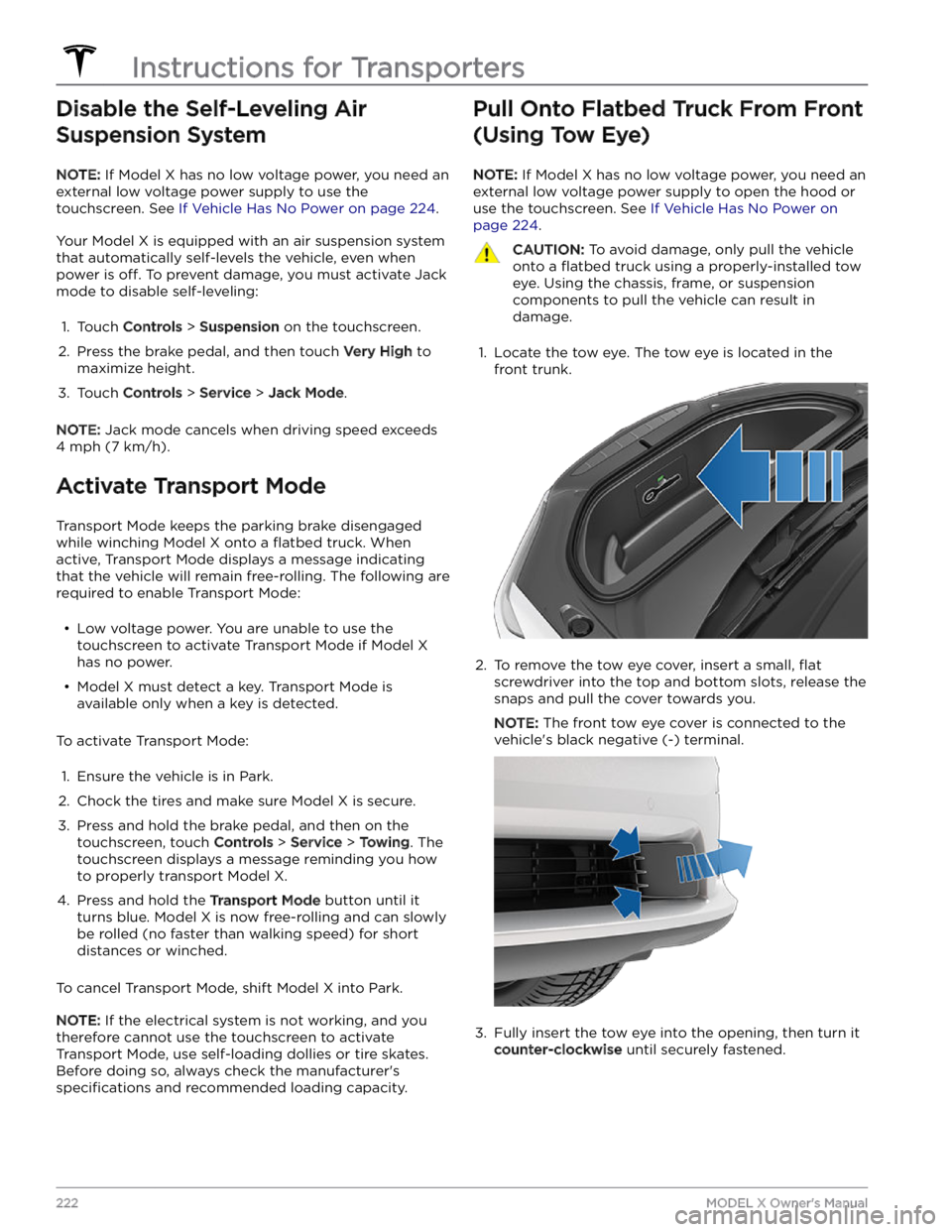
Disable the Self-Leveling Air Suspension System
NOTE: If Model X has no low voltage power, you need an
external
low voltage power supply to use the
touchscreen. See
If Vehicle Has No Power on page 224.
Your Model X is equipped with an air suspension system
that automatically self-levels the vehicle, even when
power is
off. To prevent damage, you must activate Jack
mode to disable self-leveling:
1.
Touch Controls > Suspension on the touchscreen.
2.
Press the brake pedal, and then touch Very High to
maximize height.
3.
Touch Controls > Service > Jack Mode.
NOTE: Jack mode cancels when driving speed exceeds
4 mph (7 km/h).
Activate Transport Mode
Transport Mode keeps the parking brake disengaged
while winching
Model X onto a flatbed truck. When
active, Transport Mode displays a message indicating that the vehicle will remain free-rolling. The following are required to enable Transport Mode:
Page 290 of 296
carpets, cleaning: 198
CCS (Combo): 177
certifications (CE): 284
certifications (FCC): 284
certifications (IC): 284
certifications (NCC): 284
CHAdeMO: 177
chains: 195
change of ownership: 12
charge port: 180
charge port light: 181
charge port manual release: 184
charge port release cable: 184
charging: 176, 177, 180
components and equipment: 176
instructions: 180
public charging stations: 177
charging locations, finding: 167
charging stations, displaying on map: 164
child protection: 24
disabling rear window switches: 24
child seats - installing and using: 43
cleaning: 196
climate controls: 136
coat hangers, rear: 32
cold weather best practices: 96
collision avoidance assist: 131
Colorizer: 173
connecting to Wi-Fi: 159
console, low voltage power socket: 31
consumption chart: 187
contact information: 221, 284
roadside assistance: 221
Tesla: 284
copyrights: 278
correct seating positions: 54
covers (seat): 39
cruise control: 101
D
dashboard overview: 5
Dashcam: 152
data recording: 281
data sharing: 281
Declarations of Conformity: 284
delivery mileage: 282
detection, passenger: 52
devices: 171
Bluetooth, playing audio files: 171
dimensions (vehicle exterior): 208
dimensions (vehicle interior): 208
dimensions (vehicle): 208
display settings: 7
Dog: 140
door labels: 206
door seals: 198
cleaning: 198
doors: 19, 22, 23
Child Lock: 23
interior locking and unlocking: 22
locking: 19
Unlock on Park: 23
unlocking: 19
doors function: 22
Walk-Away Door Lock: 22
Drag Strip Mode: 83
Drive: 66
drive away locking: 23
drive modes: 65
driver: 57
profiles: 57
driver seat adjustment: 35
driving: 63, 186
starting: 63
tips to maximize range: 186
E
Easy Entry button: 37, 38
easy entry, driver profile: 57
EDR (event data recorder): 281
electric parking brake: 77
emergency braking: 131
Emergency Lane Departure Avoidance: 128
emergency lights: 70
emergency rear door opening: 21
emission control label: 205
energy: 71, 77
gained from regenerative braking: 77
range information: 71
Energy app: 187
energy use predictions (navigating): 168
Entertainment: 173
Erase & Reset: 12
event data recording: 281
exterior: 3, 196, 198
car cover: 198
cleaning: 196
overview: 3
polishing, touch up, & repair: 198
Index
Page 292 of 296
opening: 25
lifting: 202
lights, adaptive headlights: 69
lights, dome (map): 68
lights, exterior: 68
lights, fog: 68
lights, hazard warning: 70
lights, headlights after exit: 69
lights, interior: 68
load limits: 206
location tracking: 164
locking: 19
low voltage power socket: 31
lug nut covers: 192
M
maintenance: 188, 189, 190, 196, 200, 201
cleaning: 196
daily checks: 188
fluid replacement intervals: 189
monthly checks: 188
replacing wiper blades: 200
service intervals: 188
tires: 190
washer fluid, topping up: 200
washer jets, cleaning: 201
map orientation: 164
map updates: 169
mats: 199
media: 170, 173
settings: 170
sources, show and hide: 170
microphones, noise reduction: 32
mileage upon delivery: 282
mirrors: 62
mobile app: 162
mobile app access: 162
Mobile Connector: 177, 180
description: 177
using: 180
modifications: 203
motor specifications: 211
My Apps: 11
my car does what?: 173
myQ: 156
programming and using: 156
N
naming your vehicle: 12
Navigate on Autopilot: 110
Neutral: 67
NHTSA, contacting: 284
O
Obstacle-Aware Acceleration: 131
occupancy sensor: 52
occupant classification: 53
odometer: 84
Off-Peak Charging: 185
offset from speed limit: 134
Online Routing: 168
opening console: 30
opening hood without power: 224
overhang dimensions for your vehicle: 208
overtake acceleration: 101
Owner Information, about: 278
P
Park: 66
Park Assist: 80
parking brake: 77
parking, using Autopark: 120
parking, using Summon: 122
parking, when towing a trailer: 91
parts replacement: 203
passenger airbag (front): 52
passenger detection (front): 52
pedestrian warning: 86
personal data, erasing: 12
phone: 13, 143
authenticating as a key: 13
using: 143
phone app: 144
phone charger, inductive: 31
phone charger, wireless: 31
phone key: 13, 17
adding as a key: 17
removing as a key: 17
PIN: 58
PIN to Drive: 150
power: 77
gained from regenerative braking: 77
power cycling: 63
power windows: 24, 204
powering on and off: 63
Preconditioning: 185
Proposition 65: 282
public charging stations: 177
Index