brake TESLA MODEL X 2023 Owners Manual
[x] Cancel search | Manufacturer: TESLA, Model Year: 2023, Model line: MODEL X, Model: TESLA MODEL X 2023Pages: 296, PDF Size: 8.56 MB
Page 65 of 296
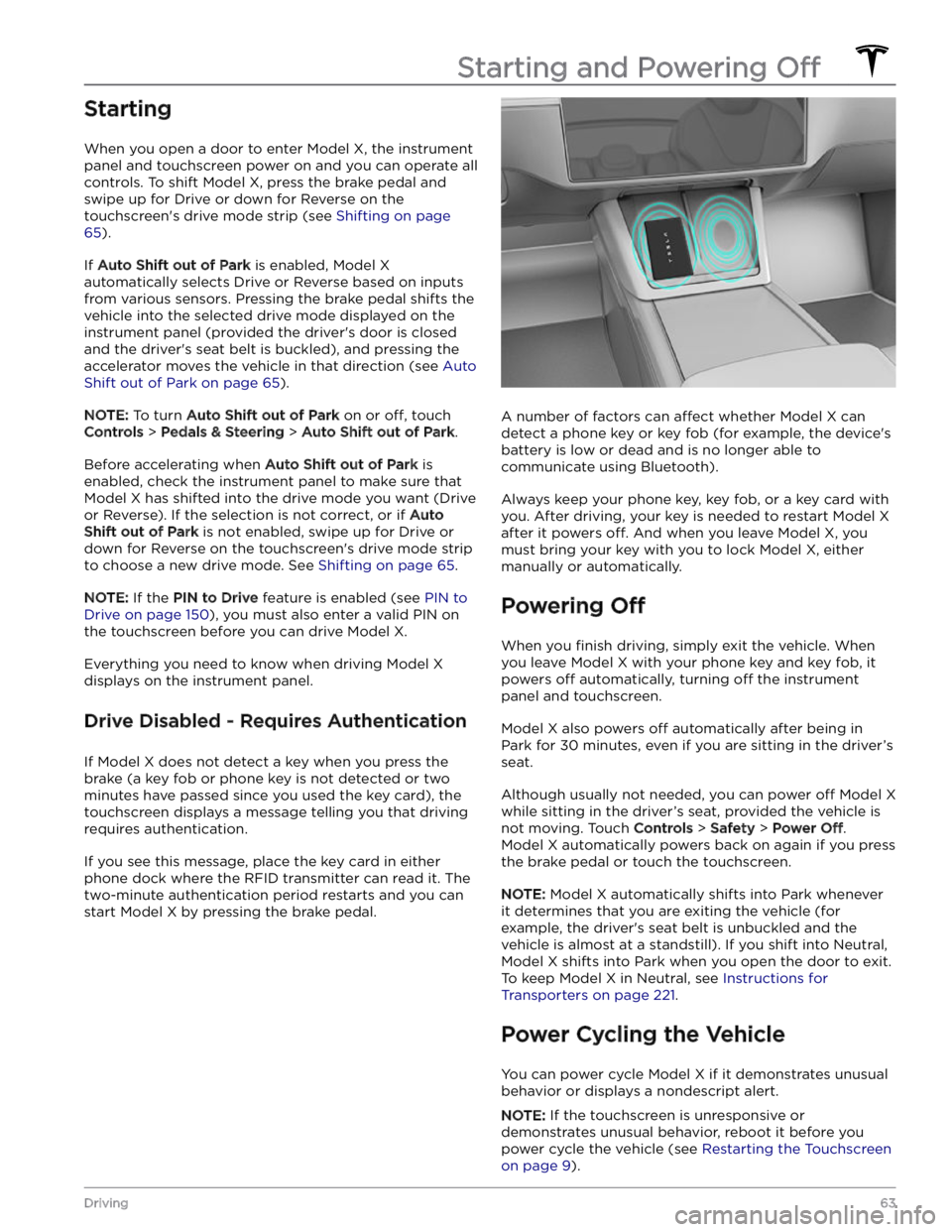
Starting
When you open a door to enter Model X, the instrument
panel and touchscreen power on and you can operate all controls. To shift
Model X, press the brake pedal and
swipe up for Drive or down for Reverse on the
touchscreen
Page 66 of 296

1. Shift into Park.2.
On the touchscreen, touch Controls > Safety > Power
Off.
3.
Wait for at least two minutes without interacting with the vehicle. Do not open the doors, touch the brake
pedal, touch the touchscreen, etc.
4.
After two minutes, press the brake pedal or open the
door to wake the vehicle.
Starting and Powering Off
64MODEL X Owner
Page 69 of 296

Neutral
Neutral allows Model X to roll freely when you are not
pressing the brake pedal. To shift into Neutral, do any of the following:
Page 75 of 296
10. The power meter displays real-time power usage. During acceleration, the bar fills to the right with a gray color
(or white if the display is dark) to represent power being used. During deceleration (when
Model X is moving and
you release your foot from the accelerator pedal), the bar
fills to the left with a green color to represent power
being fed back to the Battery by regenerative braking (see
Regenerative Braking on page 77).
11.
When Autosteer is active and detects the driving lane, it is highlighted in blue (see Autosteer on page 105).
Depending on the current driving scenario, you may see neighboring lanes.
NOTE: In situations where Autosteer is unable to detect lane markings, the driving lane is determined based on
the vehicle you are following.
NOTE: If Navigate on Autopilot is active, the driving lane displays as a single blue line in front of Model X (see
Navigate on Autopilot on page 110).
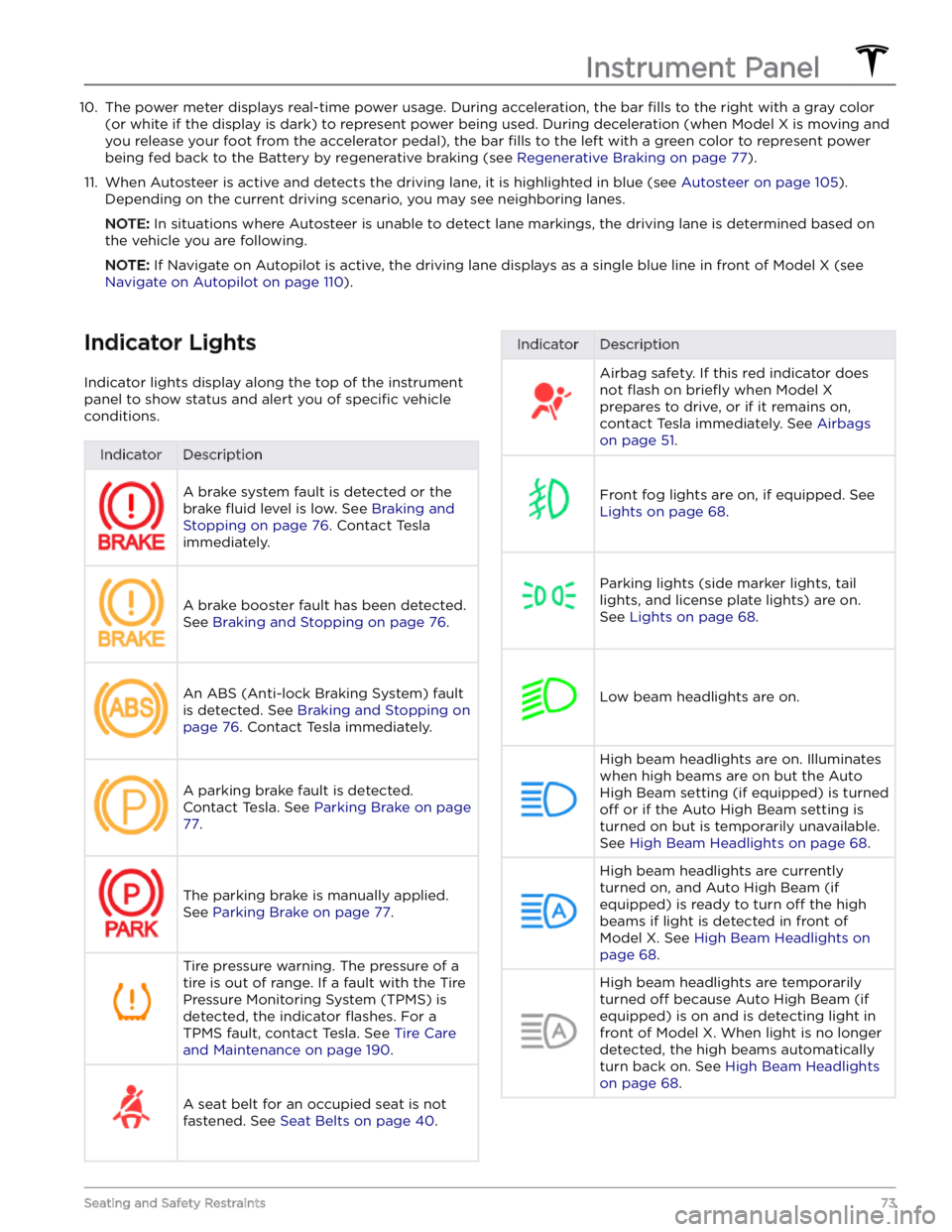
Indicator Lights
Indicator lights display along the top of the instrument panel to show status and alert you of
specific vehicle
conditions.
IndicatorDescriptionA brake system fault is detected or the brake
fluid level is low. See Braking and
Stopping on page 76. Contact Tesla
immediately.
A brake booster fault has been detected. See
Braking and Stopping on page 76.
An ABS (Anti-lock Braking System) fault is detected. See
Braking and Stopping on
page 76. Contact Tesla immediately.
A parking brake fault is detected. Contact Tesla. See
Parking Brake on page
77.
The parking brake is manually applied.
See
Parking Brake on page 77.
Tire pressure warning. The pressure of a tire is out of range. If a fault with the Tire Pressure Monitoring System (TPMS) is
detected, the indicator
flashes. For a
TPMS fault, contact Tesla. See
Tire Care
and Maintenance on page 190.
A seat belt for an occupied seat is not
fastened. See
Seat Belts on page 40.
IndicatorDescriptionAirbag safety. If this red indicator does not
flash on briefly when Model X
prepares to drive, or if it remains on, contact Tesla immediately. See
Airbags
on page 51.
Front fog lights are on, if equipped. See
Lights on page 68.
Parking lights (side marker lights, tail
lights, and license plate lights) are on. See
Lights on page 68.
Low beam headlights are on.
High beam headlights are on. Illuminates when high beams are on but the Auto High Beam setting (if equipped) is turned
off or if the Auto High Beam setting is
turned on but is temporarily unavailable.
See
High Beam Headlights on page 68.
High beam headlights are currently
turned on, and Auto High Beam (if equipped) is ready to turn
off the high
beams if light is detected in front of
Model X. See High Beam Headlights on
page 68.
High beam headlights are temporarily
turned
off because Auto High Beam (if
equipped) is on and is detecting light in
front of
Model X. When light is no longer
detected, the high beams automatically turn back on. See
High Beam Headlights
on page 68.
Instrument Panel
73Seating and Safety Restraints
Page 76 of 296
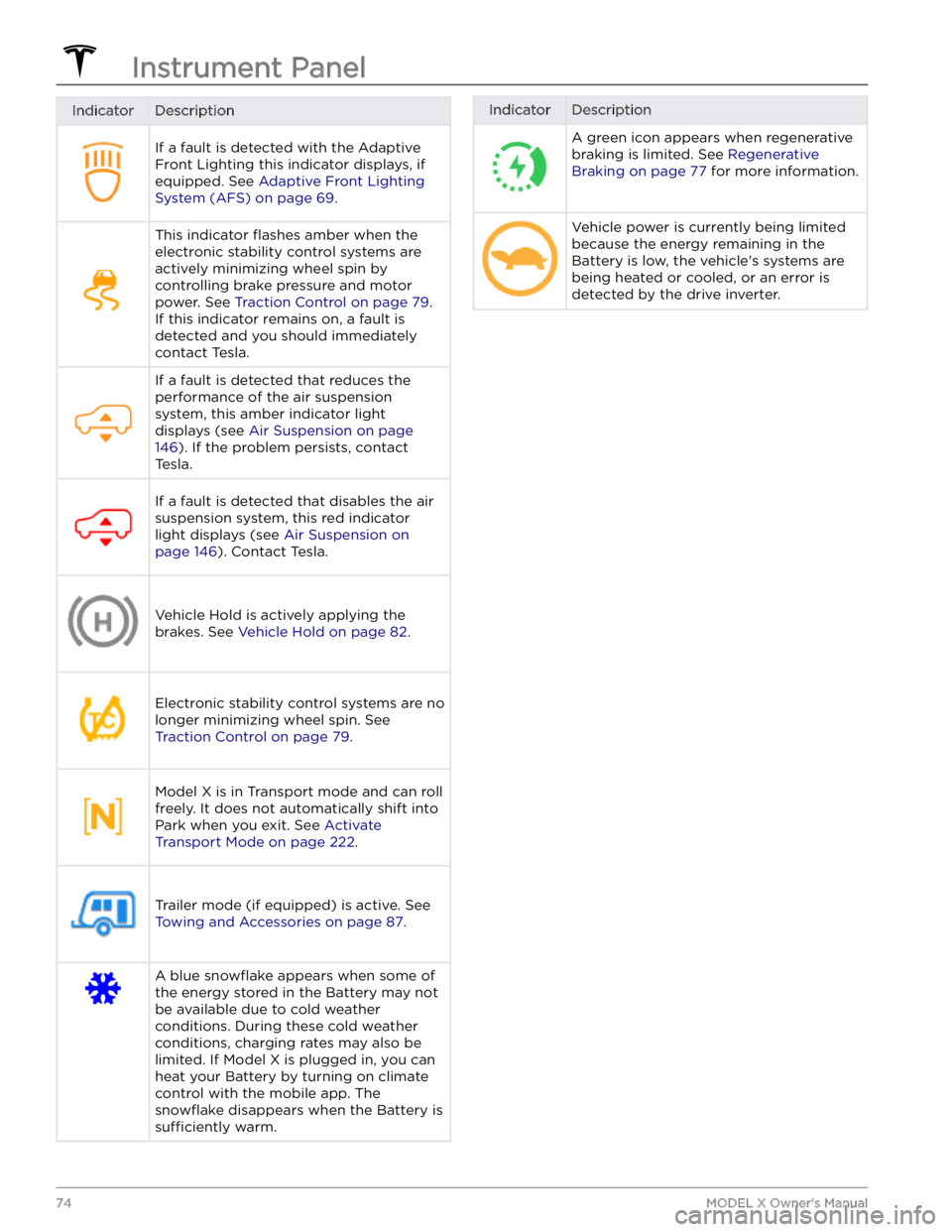
IndicatorDescriptionIf a fault is detected with the Adaptive Front Lighting this indicator displays, if equipped. See
Adaptive Front Lighting
System (AFS) on page 69.
This indicator flashes amber when the
electronic stability control systems are actively minimizing wheel spin by
controlling brake pressure and motor
power. See
Traction Control on page 79.
If this indicator remains on, a fault is detected and you should immediately contact Tesla.
If a fault is detected that reduces the performance of the air suspension system, this amber indicator light
displays (see
Air Suspension on page
146). If the problem persists, contact
Tesla.
If a fault is detected that disables the air suspension system, this red indicator light displays (see
Air Suspension on
page 146). Contact Tesla.
Vehicle Hold is actively applying the brakes. See
Vehicle Hold on page 82.
Electronic stability control systems are no longer minimizing wheel spin. See
Traction Control on page 79.
Model X is in Transport mode and can roll
freely. It does not automatically shift into Park when you exit. See
Activate
Transport Mode on page 222.
Trailer mode (if equipped) is active. See
Towing and Accessories on page 87.
A blue snowflake appears when some of
the energy stored in the Battery may not be available due to cold weather
conditions. During these cold weather
conditions, charging rates may also be limited. If
Model X is plugged in, you can
heat your Battery by turning on climate control with the mobile app. The
snowflake disappears when the Battery is
sufficiently warm.
IndicatorDescriptionA green icon appears when regenerative
braking is limited. See
Regenerative
Braking on page 77 for more information.
Vehicle power is currently being limited
because the energy remaining in the
Battery is low, the vehicle
Page 78 of 296
Braking SystemsWARNING: Properly functioning braking systems
are critical to ensure safety. If you experience a
problem with the brake pedal, brake calipers, or
any component of a Model X braking system,
contact Tesla immediately.
Model X has an anti-lock braking system (ABS) that
prevents the wheels from locking when you apply
maximum brake pressure. This improves steering control
during heavy braking in most road conditions.
During emergency braking conditions, the ABS
constantly monitors the speed of each wheel and varies
the brake pressure according to the grip available.
The alteration of brake pressure can be felt as a pulsing sensation through the brake pedal. This demonstrates that the ABS is operating and is not a cause for concern. Keep
firm and steady pressure on the brake pedal while
experiencing the pulsing.
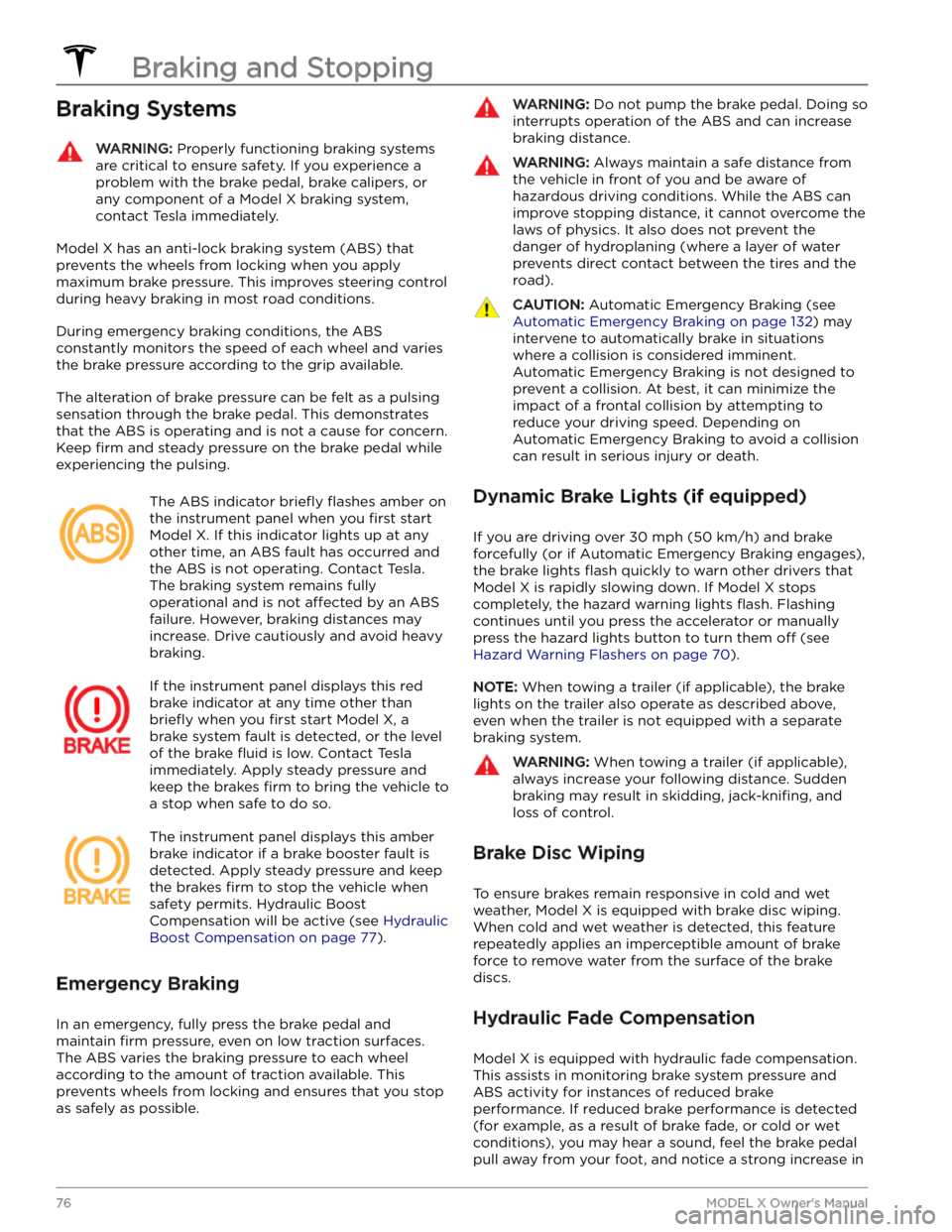
The ABS indicator briefly flashes amber on
the
instrument panel when you first start
Model X. If this indicator lights up at any
other time, an ABS fault has occurred and the ABS is not operating. Contact Tesla.
The braking system remains fully
operational and is not
affected by an ABS
failure. However, braking distances may increase. Drive cautiously and avoid heavy braking.
If the instrument panel displays this red
brake indicator at any time other than
briefly when you first start Model X, a
brake system fault is detected, or the level
of the brake
fluid is low. Contact Tesla
immediately. Apply steady pressure and keep the brakes
firm to bring the vehicle to
a stop when safe to do so.
The instrument panel displays this amber
brake indicator if a brake booster fault is detected. Apply steady pressure and keep the brakes
firm to stop the vehicle when
safety permits. Hydraulic Boost Compensation will be active (see
Hydraulic
Boost Compensation on page 77).
Emergency Braking
In an emergency, fully press the brake pedal and
maintain
firm pressure, even on low traction surfaces.
The ABS varies the braking pressure to each wheel
according to the amount of traction available. This prevents wheels from locking and ensures that you stop as safely as possible.
WARNING: Do not pump the brake pedal. Doing so
interrupts operation of the ABS and can increase
braking distance.
WARNING: Always maintain a safe distance from
the vehicle in front of you and be aware of
hazardous driving conditions. While the ABS can
improve stopping distance, it cannot overcome the
laws of physics. It also does not prevent the
danger of hydroplaning (where a layer of water
prevents direct contact between the tires and the
road).
CAUTION: Automatic Emergency Braking (see
Automatic Emergency Braking on page 132) may
intervene to automatically brake in situations
where a collision is considered imminent.
Automatic Emergency Braking is not designed to
prevent a collision. At best, it can minimize the
impact of a frontal collision by attempting to
reduce your driving speed. Depending on
Automatic Emergency Braking to avoid a collision
can result in serious injury or death.
Dynamic Brake Lights (if equipped)
If you are driving over 30 mph (50 km/h) and brake
forcefully
(or if Automatic Emergency Braking engages),
the brake lights
flash quickly to warn other drivers that
Model X is rapidly slowing down. If Model X stops
completely, the hazard warning lights
flash. Flashing
continues until you press the accelerator or manually press the hazard lights button to turn them
off (see
Hazard Warning Flashers on page 70).
NOTE: When towing a trailer (if applicable), the brake
lights on the trailer also operate as described above,
even when the trailer is not equipped with a separate
braking system.
WARNING: When towing a trailer (if applicable),
always increase your following distance. Sudden
braking may result in skidding, jack-knifing, and
loss of control.
Brake Disc Wiping
To ensure brakes remain responsive in cold and wet
weather,
Model X is equipped with brake disc wiping.
When cold and wet weather is detected, this feature
repeatedly applies an imperceptible amount of brake
force to remove water from the surface of the brake
discs.
Hydraulic Fade Compensation
Model X is equipped with hydraulic fade compensation.
This assists in monitoring brake system pressure and ABS activity for instances of reduced brake
performance. If reduced brake performance is detected (for example, as a result of brake fade, or cold or wet
conditions), you may hear a sound, feel the brake pedal pull away from your foot, and notice a strong increase in
Braking and Stopping
76MODEL X Owner
Page 79 of 296

braking. Brake as you normally would and continue to
press the brake pedal without releasing or pumping the brakes.CAUTION: If brakes are not functioning properly,
stop the vehicle when safety permits and contact
Tesla Service.
WARNING: Always maintain a safe driving distance
from the vehicle in front of you and exercise
caution when driving conditions are hazardous.
Brake disc wiping and hydraulic fade
compensation is not a substitute for adequately
applying the brakes.
Hydraulic Boost Compensation
Model X is equipped with a brake booster that activates
the brakes when the brake pedal is pressed. Hydraulic boost compensation provides mechanical assistance if the brake booster fails. If a brake booster failure is detected, the brake pedal feels
stiffer to press and you
may hear a sound when you press the brake pedal. To
stop
Model X, apply steady force to the brake pedal
without releasing or pumping. Drive cautiously and
maintain a safe distance from other road users
Page 80 of 296

NOTE: The parking brake operates on the rear wheels
only, and is independent of the pedal-operated brake
system.CAUTION: In the unlikely event that Model X loses
electrical power, you cannot access the
touchscreen and are therefore unable to release
the parking brake without first jump starting (see
Jump Starting on page 226).
WARNING: In snowy or icy conditions the rear
wheels may not have sufficient traction to prevent
Model X from sliding down a slope, particularly if
not using winter tires. Avoid parking on hills in
snowy or icy conditions. You are always
responsible for parking safely.
WARNING: Your Model X may display an alert if
the road is too steep to safely park on, or if the
parking brakes are not properly engaged. These
alerts are for guidance purposes only and are not a
substitute for the driver
Page 81 of 296

How It Works
The traction control system constantly monitors the speed of the front and rear wheels. If
Model X
experiences a loss of traction, the system minimizes wheel spin by controlling brake pressure and motor power. By default, the traction control system is on. Under normal conditions, it should remain on to ensure
maximum safety.
This yellow indicator flashes on the
instrument panel whenever the traction
control system is actively controlling brake
pressure and motor power to minimize wheel spin. If the indicator stays on, a fault is detected with the traction control system. Contact Tesla Service.
WARNING: Traction control cannot prevent
collisions caused by driving dangerously or turning
too sharply at high speeds.
Allowing Wheel Slip
To allow the wheels to spin at a limited speed, you can
enable Slip Start.
Slip Start can be enabled only when
Model X is moving 30 mph (48 km/h) or slower. Slip
Start automatically disables when the speed exceeds
50 mph (80 km/h).
Under normal conditions, Slip Start should not be enabled. Enable it only in circumstances where you
deliberately want the wheels to spin, such as:
Page 84 of 296

When Model X is stopped, Vehicle Hold can continue to
apply the brakes even after you remove your foot from
the brake pedal.
When the vehicle