wheel TESLA MODEL Y 2020 Owner´s Manual
[x] Cancel search | Manufacturer: TESLA, Model Year: 2020, Model line: MODEL Y, Model: TESLA MODEL Y 2020Pages: 232, PDF Size: 7.68 MB
Page 62 of 232

Braking SystemsWARNING: Properly functioning braking systems
are critical to ensure safety. If you experience a
problem with the brake pedal, brake caliper, or
any component of a Model Y braking system,
contact Tesla immediately.
Model Y has an anti-lock braking system (ABS) that
prevents the wheels from locking when you apply
maximum brake pressure. This improves steering
control during heavy braking in most road conditions.
During emergency braking conditions, the ABS
constantly monitors the speed of each wheel and varies
the brake pressure according to the grip available.
The alteration of brake pressure can be felt as a pulsing sensation through the brake pedal. This demonstrates that the ABS is operating and is not a cause for concern. Keep
firm and steady pressure on the brake
pedal while experiencing the pulsing.
The ABS indicator briefly flashes yellow
on the
touchscreen when you first start
Model Y. If this indicator lights up at any
other time, an ABS fault has occurred
and the ABS is not operating. Contact
Tesla. The braking system remains fully
operational and is not
affected by an
ABS failure. However, braking distances may increase. Drive cautiously and avoid
heavy braking.
If the touchscreen displays this red brake
indicator at any time other than
briefly
when you first start Model Y, a brake
system fault is detected, or the level of
the brake
fluid is low. Contact Tesla
immediately. Apply steady pressure and
keep the brakes
firm to bring the vehicle
to a stop when safe to do so.
If the touchscreen displays this yellow
brake indicator at any time, a brake booster fault is detected. Apply steady
pressure and keep the brakes
firm to
bring the vehicle to a stop when safe to do so. Hydraulic Boost Compensation will be active (see
Hydraulic Boost
Compensation on page 61).
Emergency Braking
In an emergency, fully press the brake pedal and
maintain
firm pressure, even on low traction surfaces.
The ABS varies the braking pressure to each wheel
according to the amount of traction available. This prevents wheels from locking and ensures that you stop as safely as possible.
WARNING: Do not pump the brake pedal. Doing
so interrupts operation of the ABS and can
increase braking distance.
WARNING: Always maintain a safe distance from
the vehicle in front of you and be aware of
hazardous driving conditions. While the ABS can
improve stopping distance, it cannot overcome
the laws of physics. It also does not prevent the
danger of hydroplaning (where a layer of water
prevents direct contact between the tires and the
road).
Automatic Emergency Braking is designed to automatically brake in situations where a collision is
considered imminent (see
Automatic Emergency
Braking on page 115).
WARNING: Automatic Emergency Braking is not
designed to prevent a collision. At best, it can
minimize the impact of a frontal collision by
attempting to reduce your driving speed.
Depending on Automatic Emergency Braking to
avoid a collision can result in serious injury or
death.
CAUTION: In emergency situations, if the brakes
are not functioning properly, press and hold the
Park button on the drive stalk to bring the vehicle
to a stop. Do not use this method to stop the
vehicle unless absolutely necessary.
Brake Disc Wiping
To ensure your brakes remain responsive in cold and
wet weather,
Model Y is equipped with brake disc
wiping. When cold and wet weather is detected, this
feature repeatedly applies an imperceptible amount of brake force to clear away water from the surface of the brake discs.
Hydraulic Fade Compensation
Your vehicle is also equipped with hydraulic fade
compensation. This feature assists in monitoring brake
system pressure and ABS activity for instances of lower
brake performance. If lower brake performance is
detected (for example, as a result of brake fade, or cold
or wet conditions), you may feel the brake pedal pull away from your foot, detect some noise, and notice a strong increase in vehicle braking. Continue to press the
brake pedal without releasing or "pumping" them
Page 65 of 232

How It Works
The traction control system constantly monitors the
speed of the front and rear wheels. If
Model Y
experiences a loss of traction, the system minimizes wheel spin by controlling brake pressure and motor power. By default, the traction control system is on. Under normal conditions, it should remain on to ensure maximum safety.
This yellow indicator flashes on the
touchscreen whenever the traction
control system is actively controlling
brake pressure and motor power to
minimize wheel spin. If the indicator stays on, a fault is detected with the
traction control system. Contact Tesla
Service.
WARNING: Traction control cannot prevent
collisions caused by driving dangerously or
turning too sharply at high speeds.
Disabling Traction Control
Under normal conditions, the traction control system should remain on. Turn it
off only in circumstances
where you deliberately want the wheels to spin, such as:
Page 67 of 232
If chimes are turned on (see Controlling Audible
Feedback on page 65), an audible beep sounds as you
approach an object. You can temporarily mute the chime by pressing the scroll button on the left side of the steering wheel or by touching the mute button on the bottom left corner of the Park Assist view.
NOTE: If a sensor is unable to provide feedback, the
touchscreen displays an alert message.
CAUTION: Keep sensors clean from dirt, debris,
snow, and ice. Avoid using a high pressure power
washer on the sensors and do not clean a sensor
with a sharp or abrasive object that can scratch or
damage its surface.
CAUTION: Do not install accessories or stickers on
or near the parking sensors.
Controlling Audible Feedback
You can use Park Assist with or without audible feedback. To turn chimes on or
off, touch Controls >
Safety & Security > Park Assist Chimes.
To mute the chimes temporarily, press the scroll button on the left side of the steering wheel or touch the mute button in the corner of the Park Assist view. The chimes
are muted until you shift into a
different gear or drive
over
5 mph (8 km/h).
Limitations and False Warnings
The parking sensors may not function correctly in these situations:
Page 71 of 232
Camera Location
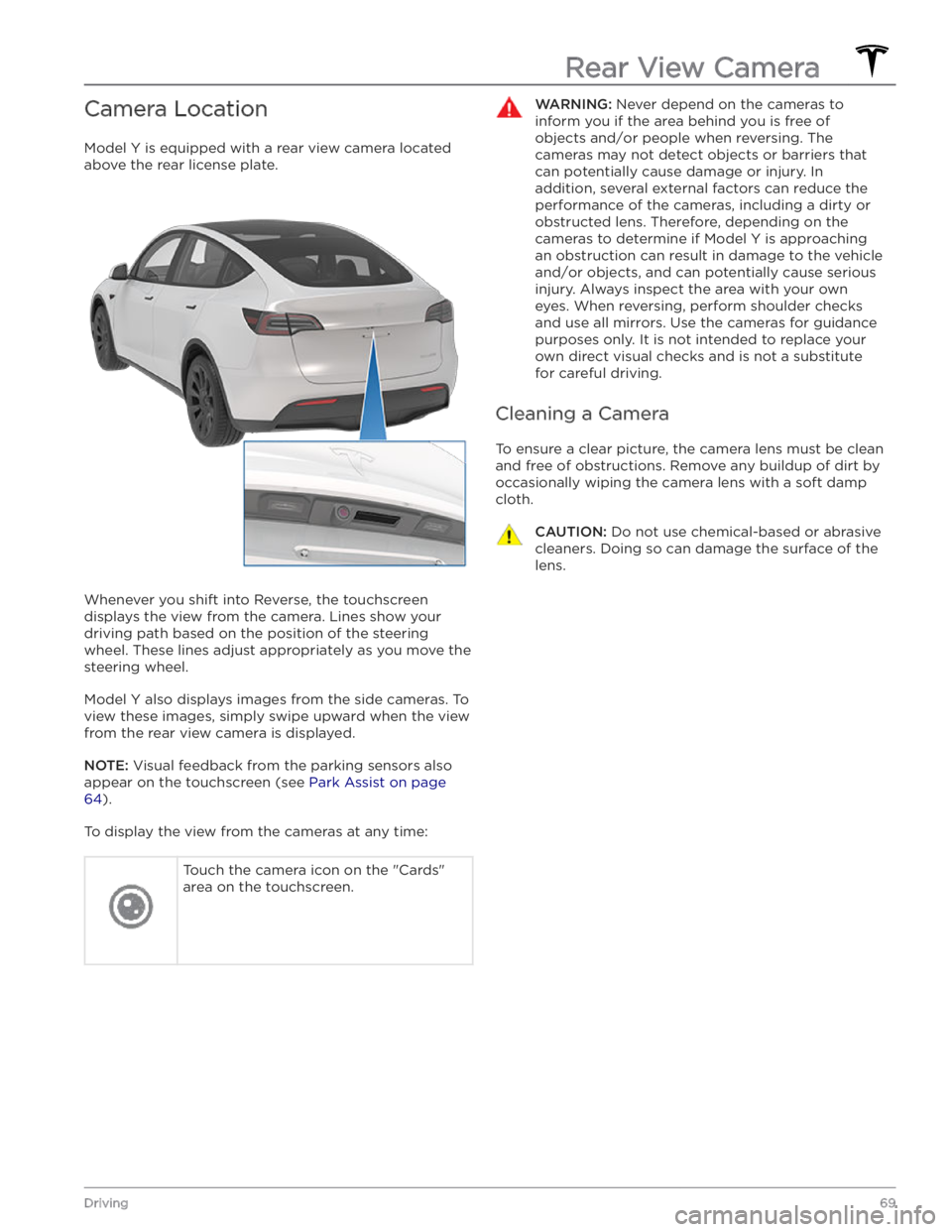
Model Y is equipped with a rear view camera located
above the rear license plate.
Whenever you shift into Reverse, the touchscreen displays the view from the camera. Lines show your
driving path based on the position of the steering wheel. These lines adjust appropriately as you move the
steering wheel.
Model Y also displays images from the side cameras. To
view these images, simply swipe
upward when the view
from the rear view camera is displayed.
NOTE: Visual feedback from the parking sensors also
appear on the
touchscreen (see Park Assist on page
64).
To display the view from the cameras at any time:
Touch the camera icon on the "Cards"
area on the touchscreen.WARNING: Never depend on the cameras to
inform you if the area behind you is free of
objects and/or people when reversing. The
cameras may not detect objects or barriers that
can potentially cause damage or injury. In
addition, several external factors can reduce the
performance of the cameras, including a dirty or
obstructed lens. Therefore, depending on the
cameras to determine if Model Y is approaching
an obstruction can result in damage to the vehicle
and/or objects, and can potentially cause serious
injury. Always inspect the area with your own
eyes. When reversing, perform shoulder checks
and use all mirrors. Use the cameras for guidance
purposes only. It is not intended to replace your
own direct visual checks and is not a substitute
for careful driving.
Cleaning a Camera
To ensure a clear picture, the camera lens must be clean
and free of obstructions. Remove any buildup of dirt by
occasionally wiping the camera lens with a soft damp cloth.
CAUTION: Do not use chemical-based or abrasive
cleaners. Doing so can damage the surface of the
lens.
Rear View Camera
69Driving
Page 87 of 232

Changing the Cruising Speed
Roll the right scroll wheel up to increase, or down to decrease, the set speed. Slowly rolling the scroll wheel
changes the set speed in
1 mph (1 km/h) increments and
quickly rolling the scroll wheel changes the set speed to the closest
5 mph (5 km/h) increment.
You can also use the touchscreen to change the set
cruising speed:
Page 95 of 232

NOTE: Navigate on Autopilot is a BETA feature and is
not available in all market regions.
When using Autosteer on a controlled-access road (such as a highway or freeway), Navigate on Autopilot guides
Model Y to off-ramps and interchanges based
on your navigation route. Along the highway portion of a navigation route, Navigate on Autopilot also changes lanes to prepare for exits and to minimize the driving time to your destination.
WARNING: Navigate on Autopilot does not make
driving autonomous. You must pay attention to
the road, keep your hands on the steering wheel
at all times, and remain aware of your navigation
route.
WARNING: As is the case with normal driving, be
extra careful around blind corners, highway
interchanges, and exits because obstacles can
appear quickly and at any time.
WARNING: Navigate on Autopilot may not
recognize or detect oncoming vehicles, stationary
objects, and special-use lanes such as those used
exclusively for bikes, carpools, emergency
vehicles, etc. Remain alert at all times and be
prepared to take immediate action. Failure to do
so can cause damage, injury or death.
Enabling and Customizing Navigate
on Autopilot
To enable Navigate on Autopilot, touch Controls >
Autopilot > Navigate on Autopilot (Beta). Then, to
customize how you want Navigate on Autopilot to operate, touch
CUSTOMIZE NAVIGATE ON AUTOPILOT:
Page 123 of 232
Driving
Acceleration: Adjust the amount of acceleration. Chill
limits acceleration for a slightly smoother and gentler
ride, whereas
Standard or Sport (depending on vehicle
configuration) provides the normal level of acceleration.
NOTE: When Chill is selected, Chill displays on the
touchscreen above the driving speed.
Steering Mode: Adjust the amount of effort required to
turn the steering wheel.
Sport feels more responsive
whereas
Comfort feels easier to drive and park (see
Adjusting Steering Effort on page 46).
Stopping Mode: Choose how you want Model Y to
behave once regenerative braking has reduced the driving speed to a very low speed, a driving gear is still
engaged, and both the accelerator and brake pedals are
released. See
Stopping Mode on page 61. You can adjust
this setting only when
Model Y is in Park.
Slip Start: Turn Slip Start ON to disable traction control
and allow wheels to spin to make it easier to dislodge the vehicle when stuck in mud, snow, ice, etc. (see
Traction Control on page 63).
Off-Road Assist: Turn Off-Road Assist ON to disable
traction control and allow wheels to spin when driving
off-road (see Traction Control on page 63).
Trailer Mode: (Available only if equipped with the tow
package) Must always be active when towing a trailer.
Some Autopilot features and rear sensor functionality may not be available. See
Trailer Mode on page 75).
Autopilot
Autopilot features that provide a safer and more
convenient driving experience. Some Autopilot features
are not controlled through
Controls. See About
Autopilot on page 81 for more information.
Page 166 of 232

Maintaining Tire Pressures
If you are not towing a trailer, keep tires inflated to the
pressures shown on the Tire and Loading Information label, even if it
differs from the pressure printed on the
tire itself. The Tire and Loading Information label is located on the center door pillar and is visible when the
front door is open.
If you are towing a trailer, do not use the tire pressures printed on the Tire and Loading Information Label.
Instead, refer to the tire pressures published in the
towing topic
(see Towing and Accessories on page 73).
NOTE: If your Model Y is fitted with Tesla accessory
wheels or tires, some information may be
different from
the labels on the vehicle.
The Tire Pressure indicator light on the
touchscreen alerts you if one or more
tires is
under-inflated.
After inflating the tire to the recommended pressure,
you must drive over
15 mph (25 km/h) for a short
amount of time to activate the Tire Pressure Monitoring
System (TPMS), which turns
off the Tire Pressure
indicator light.
If the indicator light flashes for one minute whenever
you power on
Model Y, a fault with the TPMS is detected
(see
TPMS Malfunction on page 168).
NOTE: Display tire pressures in the "Cards" area, located
toward the bottom on the left side of the touchscreen
,
as described in Touchscreen Overview on page 4. You
can also choose whether you want to display tire pressures using BAR or PSI by touching
Controls >
Display > Tire Pressure.
WARNING: Under-inflation is the most common
cause of tire failures and can cause a tire to
overheat, resulting in severe tire cracking, tread
separation, or blowout, which causes unexpected
loss of vehicle control and increased risk of injury.
Under-inflation also reduces the vehicle
Page 167 of 232

Tire Wear
Adequate tread depth is important for proper tire
performance. Tires with a tread depth less than
4/32”
(3 mm) are more likely to hydroplane in wet conditions
and should not be used. Tires with a tread depth less than
5/32” (4 mm) do not perform well in snow and
slush and should not be used when driving in winter conditions.
Model Y is originally fitted with tires that have wear
indicators molded into the tread pattern. When the
tread has been worn down to
4/32” (3 mm), the
indicators start to appear at the surface of the tread pattern, producing the
effect of a continuous band of
rubber across the width of the tire. For optimal performance and safety, Tesla recommends replacing tires before the wear indicators are visible.
Tire Rotation, Balance, and Wheel
Alignment
Tesla recommends rotating the tires every 6,250 miles
(10,000 km) or if tread depth difference is 2/32 in (1.5
mm) or greater, whichever comes first.
Unbalanced wheels (sometimes noticeable as vibration through the steering wheel)
affect vehicle handling and
tire life. Even with regular use, wheels can get out of
balance. Therefore, they should be balanced as required.
If tire wear is uneven (on one side of the tire only) or
becomes abnormally excessive, check the alignment of wheels.
NOTE: When replacing only two tires, install the new
tires on the rear if your vehicle
Page 168 of 232

NOTE: Installing winter tires with aggressive compound
and tread design may result in temporarily-reduced regenerative braking power. However, your vehicle is
designed to continuously recalibrate itself, and after changing tires it will increasingly restore regenerative
braking power after some moderate-torque straight-line accelerations. For most drivers this occurs after a short period of normal driving, but drivers who normally
accelerate lightly may need to use slightly harder accelerations while the recalibration is in progress.WARNING: For your safety, use only tires and
wheels that match the original specification. Tires
that do not match the original specification can
affect the operation of the TPMS.
WARNING: Never exceed the speed rating of your
vehicle