battery TESLA MODEL Y 2021 Owner´s Manual
[x] Cancel search | Manufacturer: TESLA, Model Year: 2021, Model line: MODEL Y, Model: TESLA MODEL Y 2021Pages: 250, PDF Size: 8.4 MB
Page 160 of 250
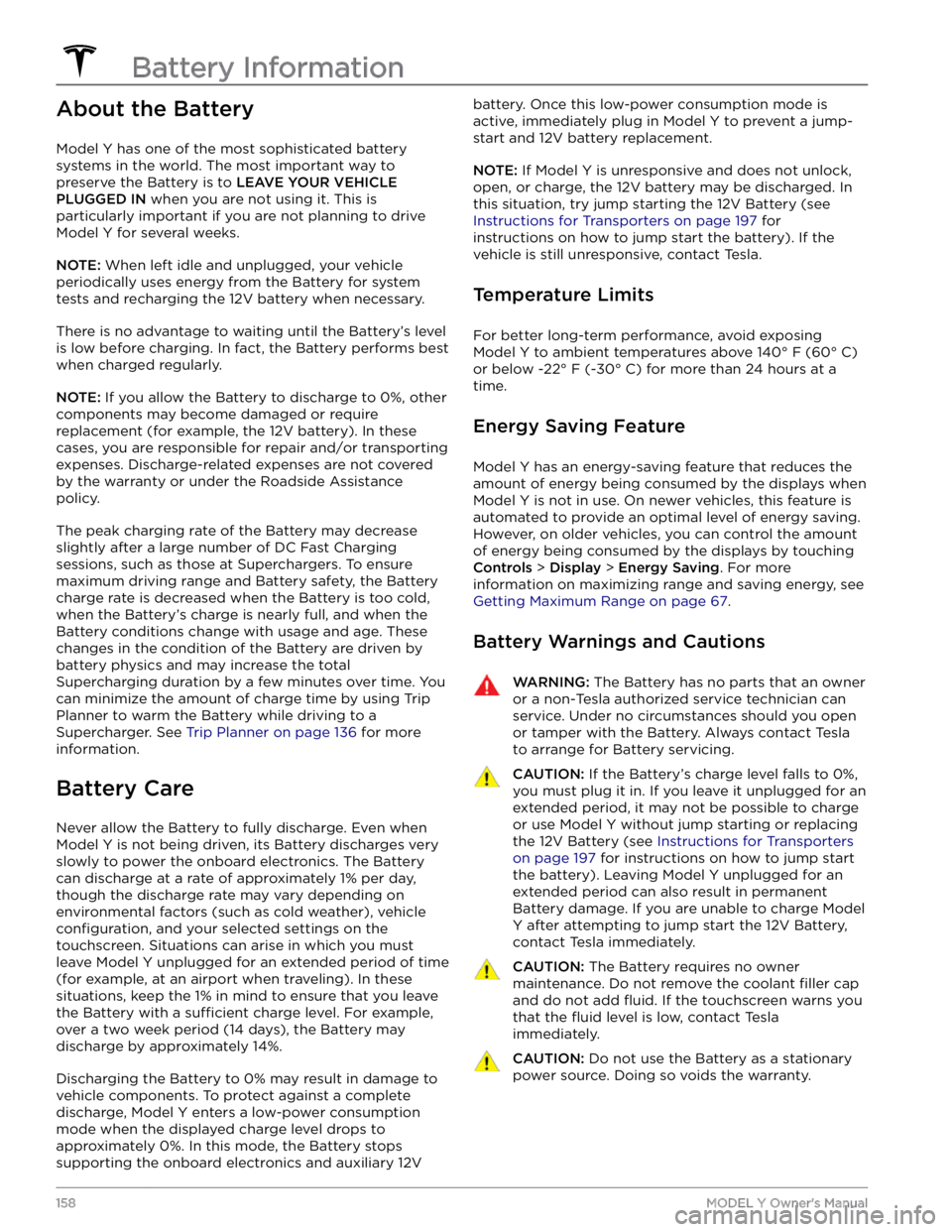
About the Battery
Model Y has one of the most sophisticated battery
systems in the world. The most important way to preserve the Battery is to
LEAVE YOUR VEHICLE
PLUGGED IN when you are not using it. This is
particularly important if you are not planning to drive
Model Y for several weeks.
NOTE: When left idle and unplugged, your vehicle
periodically uses energy from the Battery for system
tests and recharging the 12V battery when necessary.
There is no advantage to waiting until the Battery
Page 163 of 250
NOTE: The charge port automatically closes within
approximately 10 seconds of removing the connector from the charge port.CAUTION: Tesla strongly recommends leaving
Model Y plugged in when not in use. This
maintains the Battery at the optimum level of
charge.
CAUTION: Model Y does not shift out of Park if the
charge port is unable to determine whether a
charging cable is plugged in. Ensure any charging
cables are unplugged and follow the instructions
on the touchscreen to proceed (see Park on page
52).
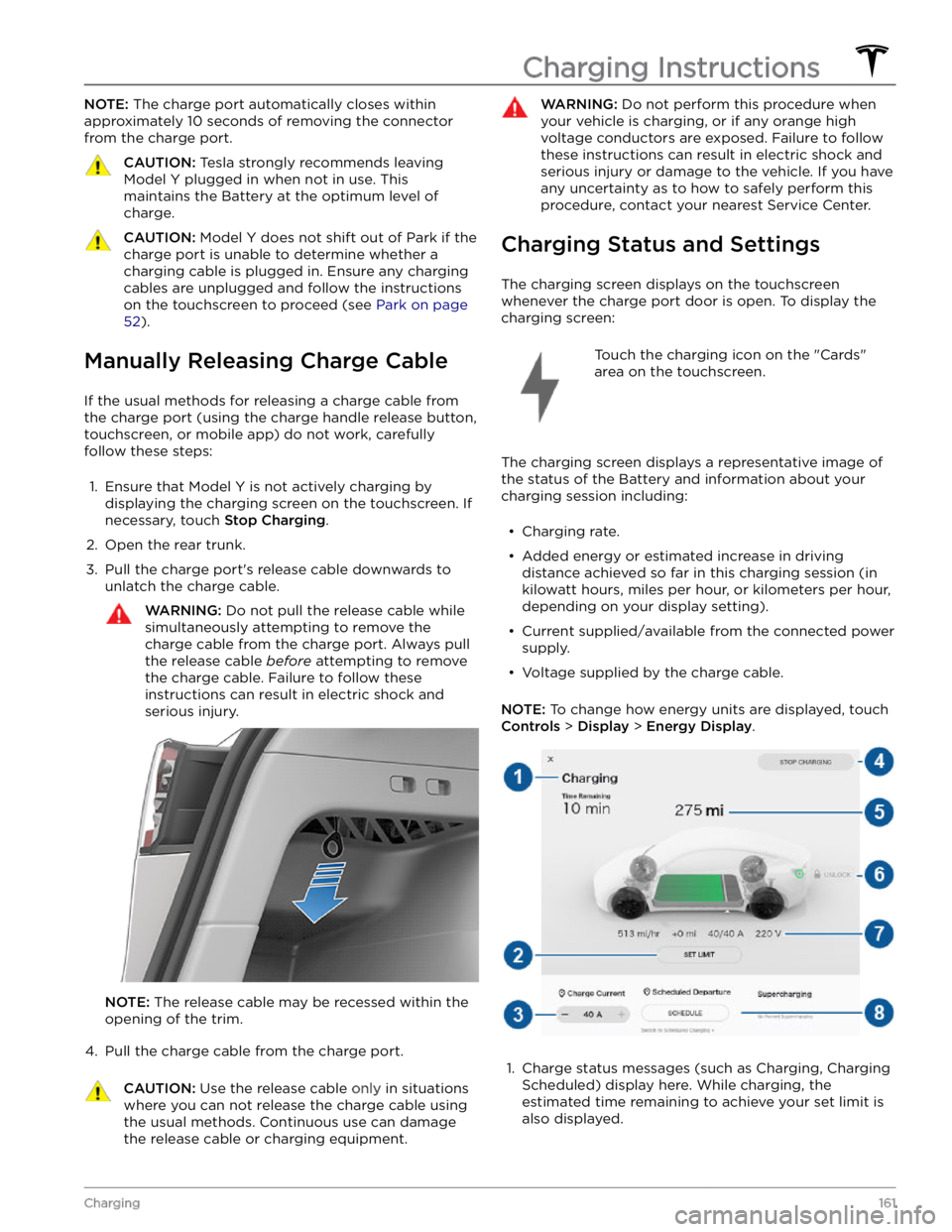
Manually Releasing Charge Cable
If the usual methods for releasing a charge cable from the charge port (using the charge handle release button,
touchscreen, or mobile app) do not work, carefully
follow these steps:
1.
Ensure that Model Y is not actively charging by
displaying the charging screen on the touchscreen. If necessary, touch
Stop Charging.
2.
Open the rear trunk.
3.
Pull the charge port
Page 164 of 250

2. Adjust the charge limit by touching Set Limit, and
drag the arrow below the battery to indicate the level of charging you want. The setting you choose applies
to immediate and scheduled charging sessions.3.
The current automatically sets to the maximum
current available from the attached charge cable,
unless it was previously reduced to a lower level. If
needed, touch
- or + to change the current (for
example, you may want to reduce the current if you
are concerned about overloading a domestic wiring circuit shared by other equipment). It is not possible to set the charging current to a level that exceeds the
maximum available from the attached charge cable. When you change the current,
Model Y remembers
the location. If you charge at the same location, you
do not need to change it again.
NOTE: If Model Y is charging and detects unexpected
Page 167 of 250
*If the vehicle is used for towing, the brake fluid should
be replaced every 2 years regardless of the health check.
NOTE: Any damage caused by opening the Battery
coolant reservoir is excluded from the warranty.
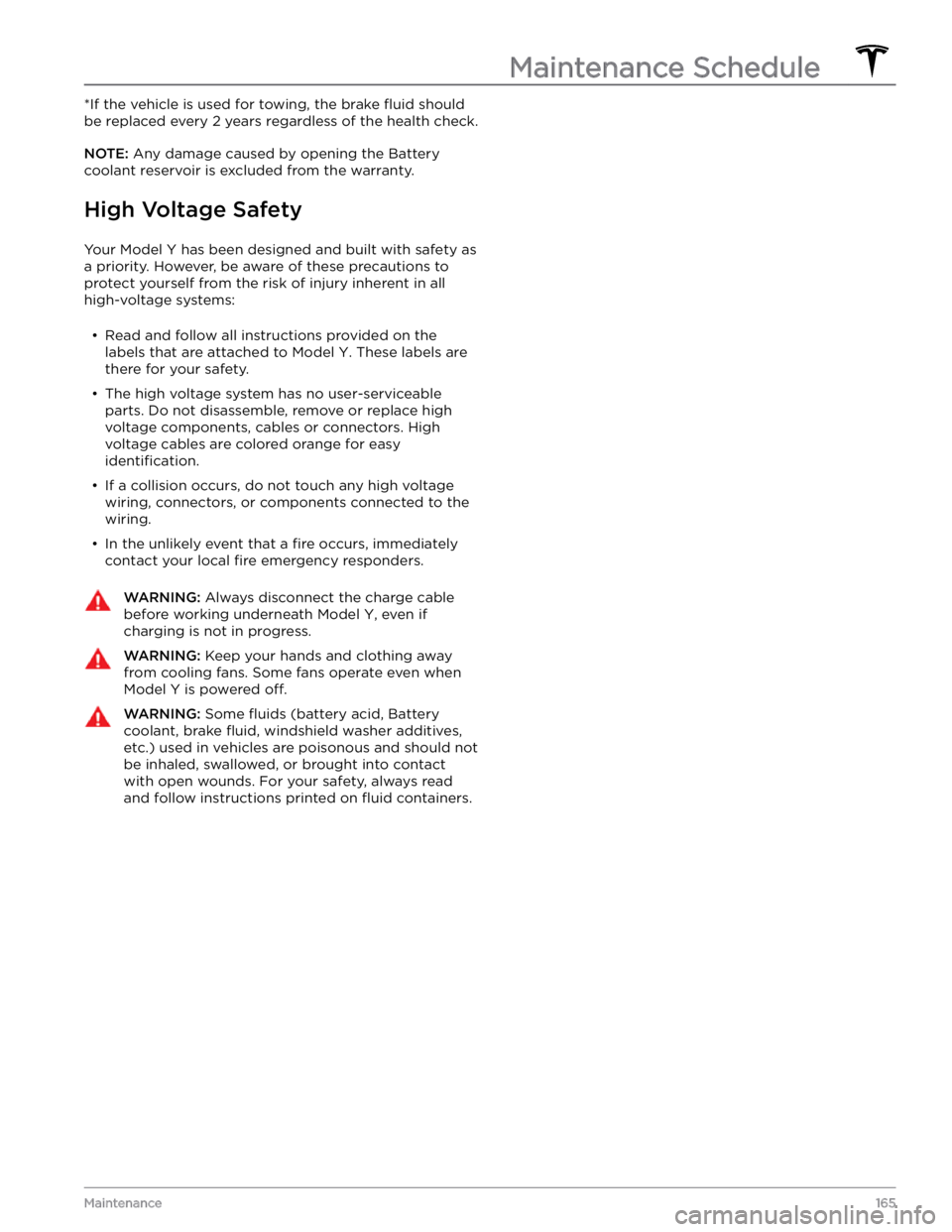
High Voltage Safety
Your Model Y has been designed and built with safety as
a priority. However, be aware of these precautions to protect yourself from the risk of injury inherent in all high-voltage systems:
Page 178 of 250
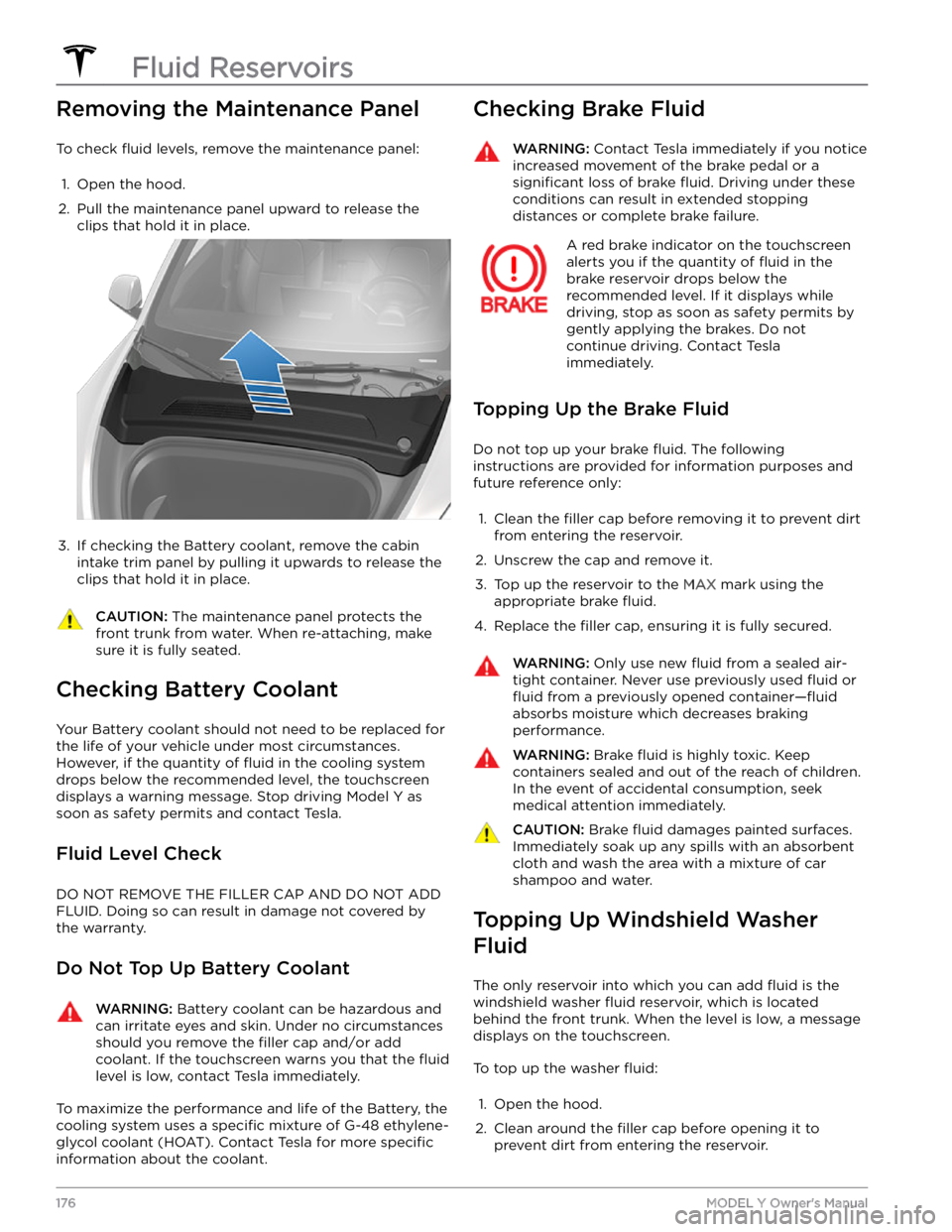
Removing the Maintenance Panel
To check fluid levels, remove the maintenance panel:
1.
Open the hood.
2.
Pull the maintenance panel upward to release the clips that hold it in place.
3.
If checking the Battery coolant, remove the cabin intake trim panel by pulling it upwards to release the clips that hold it in place.
CAUTION: The maintenance panel protects the
front trunk from water. When re-attaching, make
sure it is fully seated.
Checking Battery Coolant
Your Battery coolant should not need to be replaced for
the life of your vehicle under most circumstances. However, if the quantity of
fluid in the cooling system
drops below the recommended level, the
touchscreen
displays a warning message. Stop driving Model Y as
soon as safety permits and contact Tesla.
Fluid Level Check
DO NOT REMOVE THE FILLER CAP AND DO NOT ADD
FLUID. Doing so can result in damage not covered by
the warranty.
Do Not Top Up Battery Coolant
WARNING: Battery coolant can be hazardous and
can irritate eyes and skin. Under no circumstances
should you remove the filler cap and/or add
coolant. If the touchscreen warns you that the fluid
level is low, contact Tesla immediately.
To maximize the performance and life of the Battery, the
cooling system uses a
specific mixture of G-48 ethylene-
glycol coolant (HOAT). Contact Tesla for more
specific
information about the coolant.
Checking Brake FluidWARNING: Contact Tesla immediately if you notice
increased movement of the brake pedal or a
significant loss of brake fluid. Driving under these
conditions can result in extended stopping
distances or complete brake failure.
A red brake indicator on the touchscreen
alerts you if the quantity of fluid in the
brake reservoir drops below the
recommended level. If it displays while driving, stop as soon as safety permits by
gently applying the brakes. Do not
continue driving. Contact Tesla
immediately.
Topping Up the Brake Fluid
Do not top up your brake fluid. The following
instructions are provided for information purposes and future reference only:
1.
Clean the filler cap before removing it to prevent dirt
from entering the reservoir.
2.
Unscrew the cap and remove it.
3.
Top up the reservoir to the MAX mark using the
appropriate brake
fluid.
4.
Replace the filler cap, ensuring it is fully secured.
WARNING: Only use new fluid from a sealed air-
tight container. Never use previously used fluid or
fluid from a previously opened container
Page 180 of 250
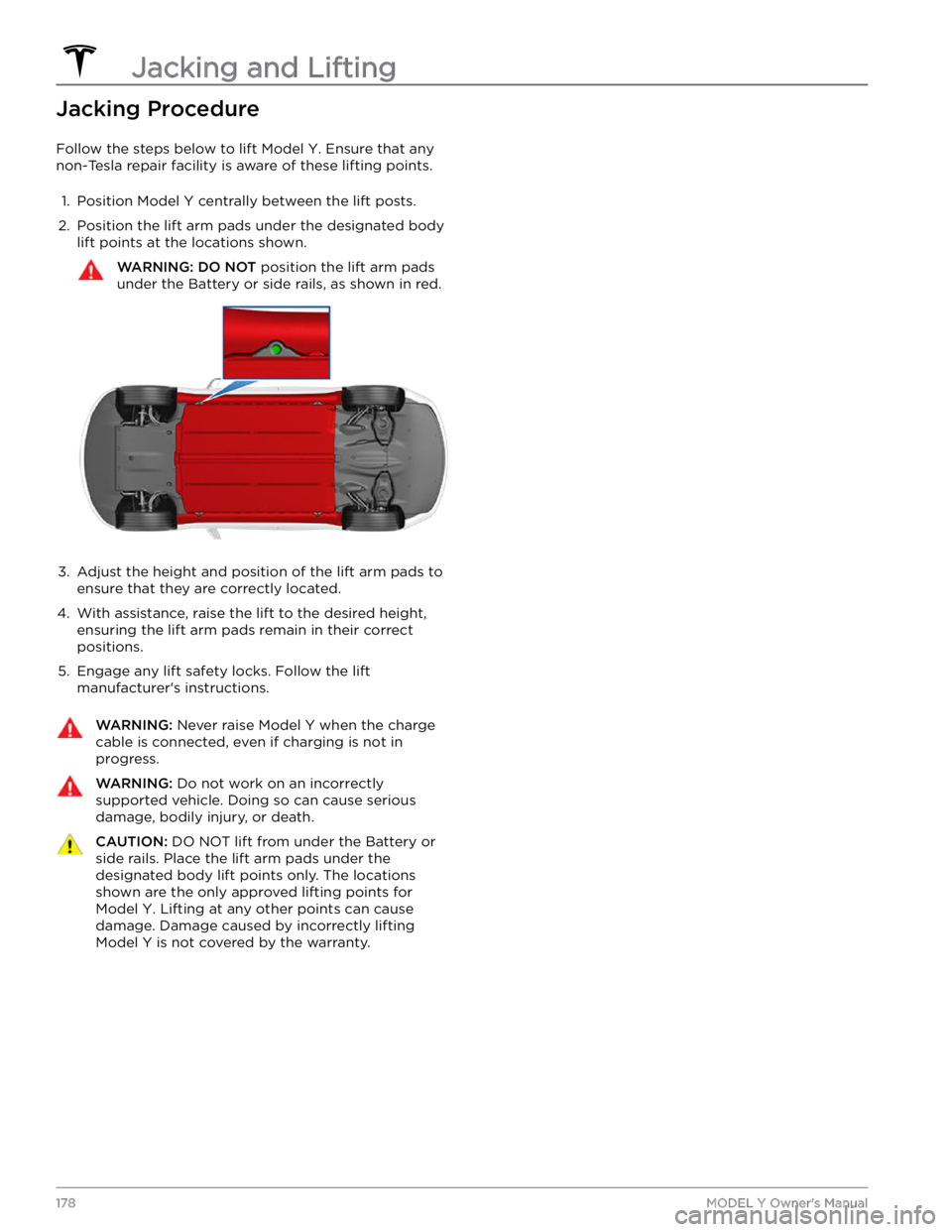
Jacking Procedure
Follow the steps below to lift Model Y. Ensure that any
non-Tesla repair facility is aware of these lifting points.
1.
Position Model Y centrally between the lift posts.
2.
Position the lift arm pads under the designated body lift points at the locations shown.
WARNING: DO NOT position the lift arm pads
under the Battery or side rails, as shown in red.
3.
Adjust the height and position of the lift arm pads to ensure that they are correctly located.
4.
With assistance, raise the lift to the desired height, ensuring the lift arm pads remain in their correct positions.
5.
Engage any lift safety locks. Follow the lift
manufacturer
Page 190 of 250
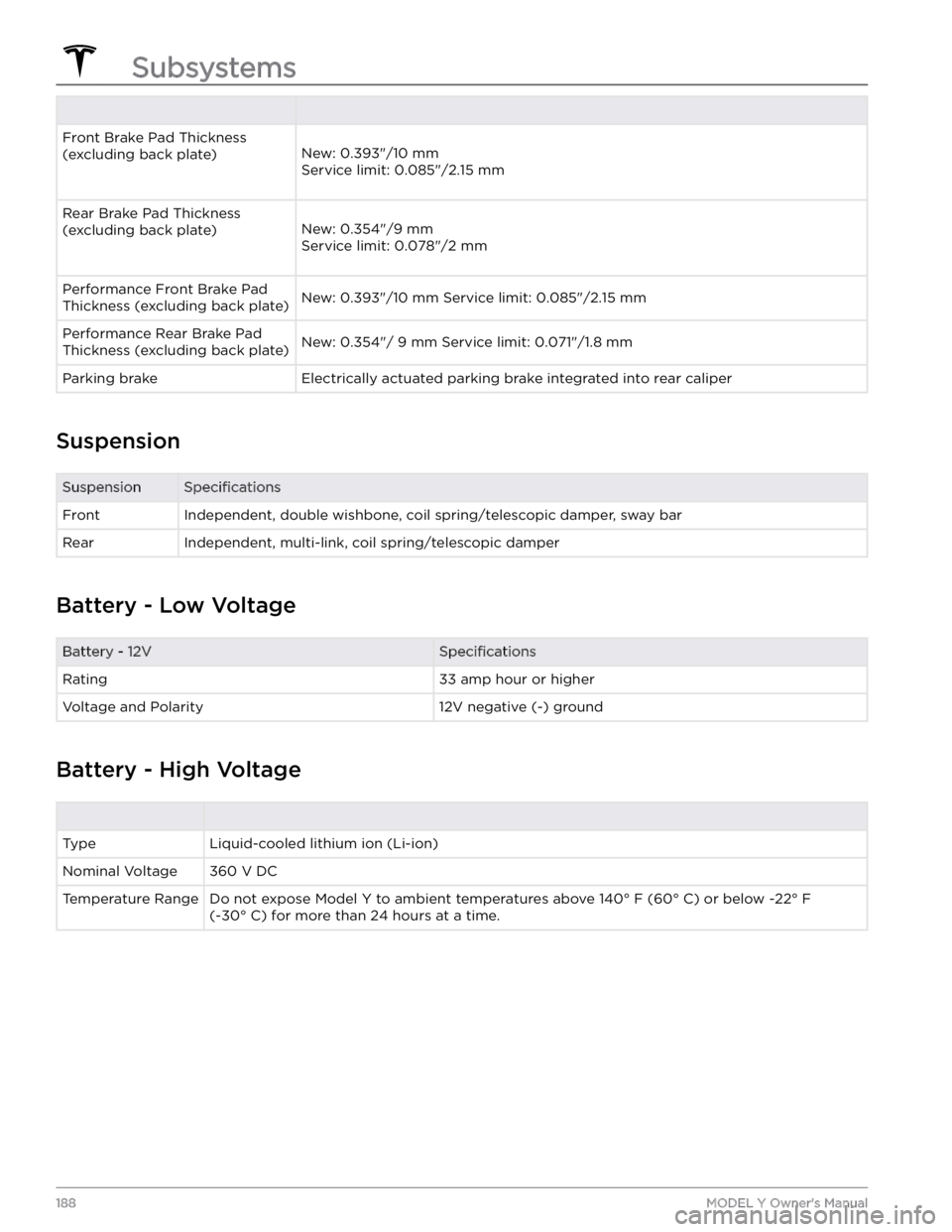
Front Brake Pad Thickness (excluding back plate)
New: 0.393"/10 mm
Service limit: 0.085"/2.15 mm
Rear Brake Pad Thickness (excluding back plate)
New: 0.354"/9 mm
Service limit: 0.078"/2 mm
Performance Front Brake Pad
Thickness (excluding back plate)New: 0.393"/10 mm Service limit: 0.085"/2.15 mmPerformance Rear Brake Pad
Thickness (excluding back plate)New: 0.354"/ 9 mm Service limit: 0.071"/1.8 mmParking brakeElectrically actuated parking brake integrated into rear caliper
Suspension
SuspensionSpecificationsFrontIndependent, double wishbone, coil spring/telescopic damper, sway barRearIndependent, multi-link, coil spring/telescopic damper
Battery - Low Voltage
Battery - 12VSpecificationsRating33 amp hour or higherVoltage and Polarity12V negative (-) ground
Battery - High Voltage
TypeLiquid-cooled lithium ion (Li-ion)Nominal Voltage360 V DCTemperature RangeDo not expose Model Y to ambient temperatures above 140
Page 202 of 250
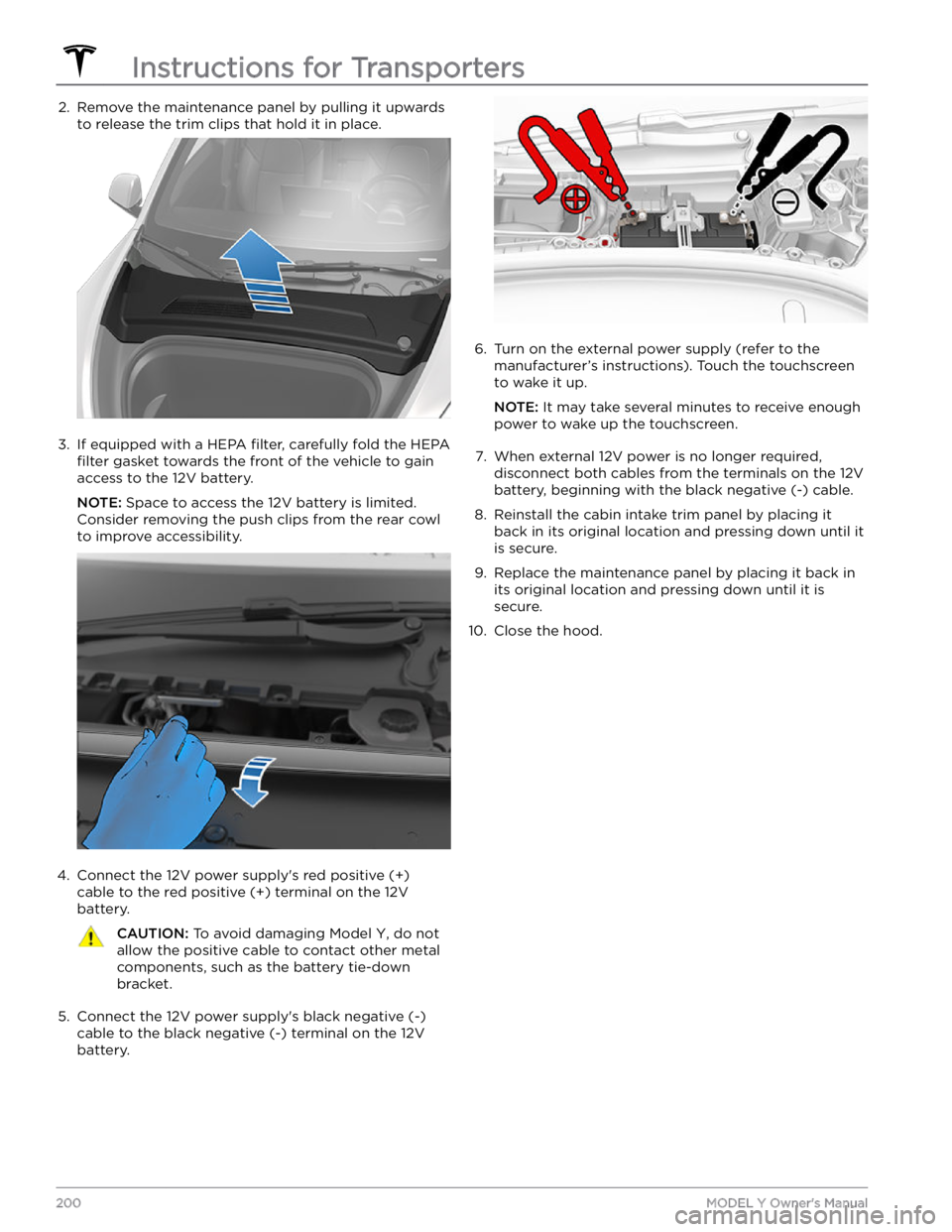
2. Remove the maintenance panel by pulling it upwards to release the trim clips that hold it in place.3.
If equipped with a HEPA filter, carefully fold the HEPA
filter gasket towards the front of the vehicle to gain
access to the 12V battery.
NOTE: Space to access the 12V battery is limited.
Consider removing the push clips from the rear cowl
to improve accessibility.
4.
Connect the 12V power supply
Page 240 of 250

If the outlet is worn, it should be replaced with a high-quality outlet. Consider upgrading to a Tesla Wall Connector
for greater convenience and highest charging speed.
(UMC_a017)
Charge rate reduced - Wall plug temperature high
Wall outlet and wiring inspection recommended
High temperature detected by Mobile Connector alerts indicate the outlet used to charge is becoming too warm, so
charging has been slowed to protect the outlet.
This is not typically an issue with your vehicle or your Mobile Connector, but rather an issue with the outlet. A warm outlet may be caused by a plug that is not fully inserted, a loose building wiring connection to the outlet, or an outlet that is beginning to wear out.
To regain normal charge speed, make sure your adapter is fully plugged into the outlet. If charging speed does not
return to normal, contact an electrician to inspect the outlet and building wiring connections to the outlet and
complete any repairs needed.
If the outlet is worn, it should be replaced with a high-quality outlet. Consider upgrading to a Tesla Wall Connector
for greater convenience and highest charging speed.
(VCFRONT_a180)
Electrical system power reduced
Vehicle may shut down unexpectedly
The electrical system cannot maintain the voltage required to support all vehicle features.
If this alert is present while you are driving, it is possible your vehicle will shut down unexpectedly.
It is also possible that your vehicle will not restart after the current drive.
It is recommended that you eliminate or reduce your use of any non-essential features. This can help your vehicle maintain adequate electrical power for essential functions. It may also prevent your vehicle from shutting down
before you reach your immediate destination, although this is not guaranteed.
If this alert remains active, schedule service immediately. Without service, your vehicle may shut down unexpectedly
or may not restart.
(VCFRONT_a182)
12V battery must be replaced - Schedule service
Software will not update until battery is replaced
The 12V battery is showing degraded performance and needs to be replaced. Until the 12V battery is replaced,
vehicle software updates will not complete.
It is recommended that you have the 12V battery replaced at your earliest convenient opportunity.
You can schedule service via the Tesla Mobile App, or with an independent service provider that offers 12V battery
replacement for your vehicle. Please note that independent service provider options may vary, based on your vehicle
configuration and your location.
Your vehicle is OK to drive with this alert present. However, if you delay the 12V battery replacement, your vehicle
may eventually not have enough power to start or to restart after a recent drive.
If the 12V battery is too low to turn on the vehicle or open the doors, follow the instructions in Jump Starting the 12V
Battery on page 199.
For more information on the battery system, see Battery Information on page 158.
Troubleshooting Alerts
238MODEL Y Owner
Page 243 of 250

A
ABS (Anti-lock Braking System): 60
absolute speed limit: 120
access panel, removing: 176
accessories: 21
plugging into power socket: 21
accessories, towing: 74
adjacent lane speed: 114
aero covers: 168
air circulation: 128
air conditioning: 128
air distribution: 128
air filter: 131
air vents: 130
airbags: 38
alarm: 145
all-season tires: 170
Always Show Estimated Round Trip Energy: 136
ambient lights: 53
anti-lock braking (ABS): 60
application launcher: 4
Arcade: 201
audio: 47, 138, 140
equalizer: 140
immersive sound: 140
playing files: 138
steering wheel scroll button: 47
volume control: 138
auto fold: 49
auto high beam: 54
Auto Lane Change: 93
auto tilt: 49
AUTO wipers: 59
automatic emergency braking: 118
automatic navigation: 133
Autopark: 106
autopilot: 114
blind spot collision warning: 114
side collision warning: 114
Autopilot: 83, 86, 91, 93, 106, 108, 117, 120
Auto Lane Change: 93
automatic emergency braking: 117
Autopark: 106
Autosteer: 91
collision avoidance assist: 117
forward collision warning: 117
overtake acceleration: 86
overview: 83
speed assist: 120
speed limit warning: 120
staying within speed limits: 120
Summon: 108
Traffic-Aware Cruise Control: 86
Autopilot components: 83
Autosteer: 91
average range: 68
B
backup camera: 69
battery (12V): 158, 189
complete discharge: 158
specifications: 189
Battery (high voltage): 158, 176, 189
care of: 158
coolant: 176
specifications: 189
temperature limits: 158
battery (key), replacing: 8
blind spot collision warning: 114
Bluetooth: 139, 141
devices, playing audio files from: 139
general information: 141
phone, pairing and using: 141
body repairs: 179
body touch up: 174
Boombox: 203
brakes: 60, 118, 176, 187
automatic in emergencies: 118
fluid level: 176
overview of: 60
specifications: 187
Bumper Clearance (Summon): 108
C
cabin air filter: 131
cabin camera: 22
cabin temperature control: 128
Calendar app: 143
calibrating windows: 13
California Proposition 65: 205
camera (rear view): 69
cameras (autopilot): 83
Camp Mode: 130
car cover: 174
car wash mode: 172
car washes: 172
card: 7
cargo area: 15
cargo volume: 185
Index