trunk TESLA MODEL Y 2021 Owner´s Manual
[x] Cancel search | Manufacturer: TESLA, Model Year: 2021, Model line: MODEL Y, Model: TESLA MODEL Y 2021Pages: 250, PDF Size: 8.4 MB
Page 26 of 250
WARNING: Riding in a moving vehicle with the
seat back reclined can result in serious injuries in a
collision, as you could slide under the lap belt or
be propelled into the seat belt. Ensure your seat
back is reclined no more than 30 degrees when
the vehicle is moving.
Adjusting Second Row Seat Backs
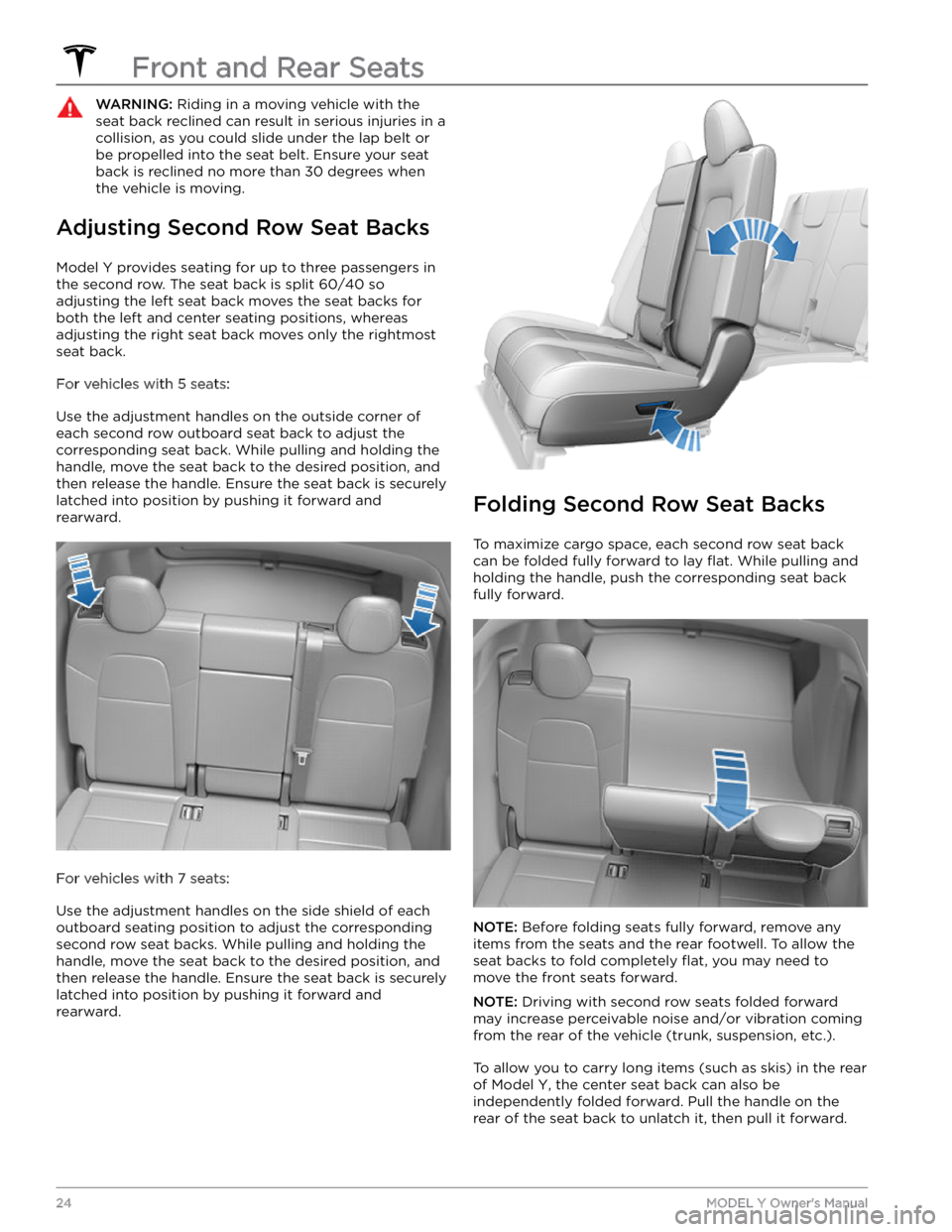
Model Y provides seating for up to three passengers in
the second row. The seat back is split 60/40 so adjusting the left seat back moves the seat backs for both the left and center seating positions, whereas
adjusting the right seat back moves only the rightmost seat back.
For vehicles with 5 seats:
Use the adjustment handles on the outside corner of each second row outboard seat back to adjust the corresponding seat back. While pulling and holding the
handle, move the seat back to the desired position, and then release the handle. Ensure the seat back is securely latched into position by pushing it forward and
rearward.
For vehicles with 7 seats:
Use the adjustment handles on the side shield of each outboard seating position to adjust the corresponding second row seat backs. While pulling and holding the
handle, move the seat back to the desired position, and then release the handle. Ensure the seat back is securely latched into position by pushing it forward and rearward.
Folding Second Row Seat Backs
To maximize cargo space, each second row seat back can be folded fully forward to lay
flat. While pulling and
holding the handle, push the corresponding seat back fully forward.
NOTE: Before folding seats fully forward, remove any
items from the seats and the rear footwell. To allow the
seat backs to fold completely
flat, you may need to
move the front seats forward.
NOTE: Driving with second row seats folded forward
may increase perceivable noise and/or vibration coming from the rear of the vehicle (trunk, suspension, etc.).
To allow you to carry long items (such as skis) in the rear
of
Model Y, the center seat back can also be
independently folded forward. Pull the handle on the
rear of the seat back to unlatch it, then pull it forward.
Front and Rear Seats
24MODEL Y Owner
Page 27 of 250
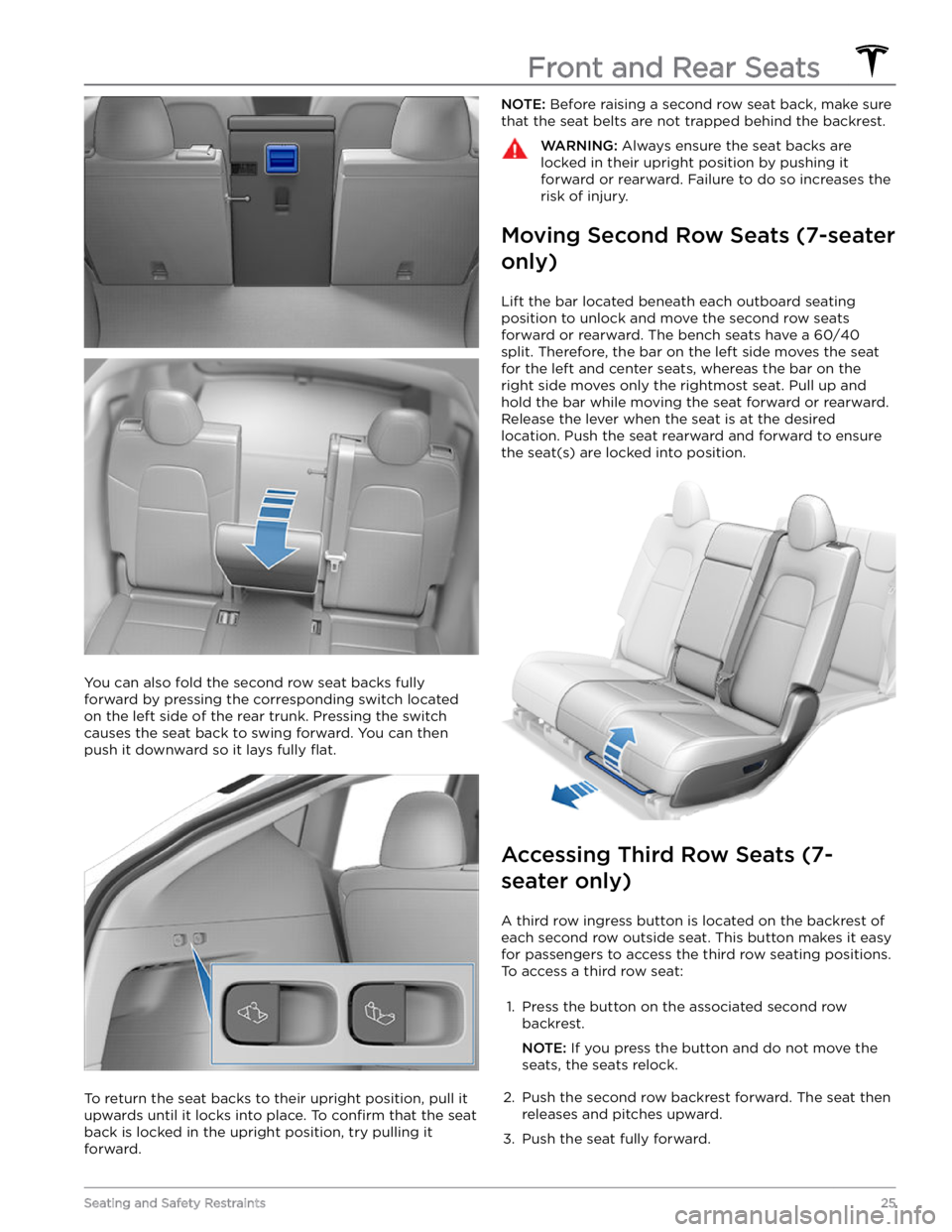
You can also fold the second row seat backs fully
forward by pressing the corresponding switch located on the left side of the rear trunk. Pressing the switch causes the seat back to swing forward. You can then push it downward so it lays fully
flat.
To return the seat backs to their upright position, pull it upwards until it locks into place. To
confirm that the seat
back is locked in the upright position, try pulling it forward.
NOTE: Before raising a second row seat back, make sure
that the seat belts are not trapped behind the backrest.WARNING: Always ensure the seat backs are
locked in their upright position by pushing it
forward or rearward. Failure to do so increases the
risk of injury.
Moving Second Row Seats (7-seater
only)
Lift the bar located beneath each outboard seating position to unlock and move the second row seats
forward or rearward. The bench seats have a 60/40 split. Therefore, the bar on the left side moves the seat for the left and center seats, whereas the bar on the
right side moves only the rightmost seat. Pull up and
hold the bar while moving the seat forward or rearward. Release the lever when the seat is at the desired location. Push the seat rearward and forward to ensure the seat(s) are locked into position.
Accessing Third Row Seats (7-
seater only)
A third row ingress button is located on the backrest of each second row outside seat. This button makes it easy for passengers to access the third row seating positions.
To access a third row seat:
1.
Press the button on the associated second row backrest.
NOTE: If you press the button and do not move the
seats, the seats relock.
2.
Push the second row backrest forward. The seat then releases and pitches upward.
3.
Push the seat fully forward.
Front and Rear Seats
25Seating and Safety Restraints
Page 59 of 250
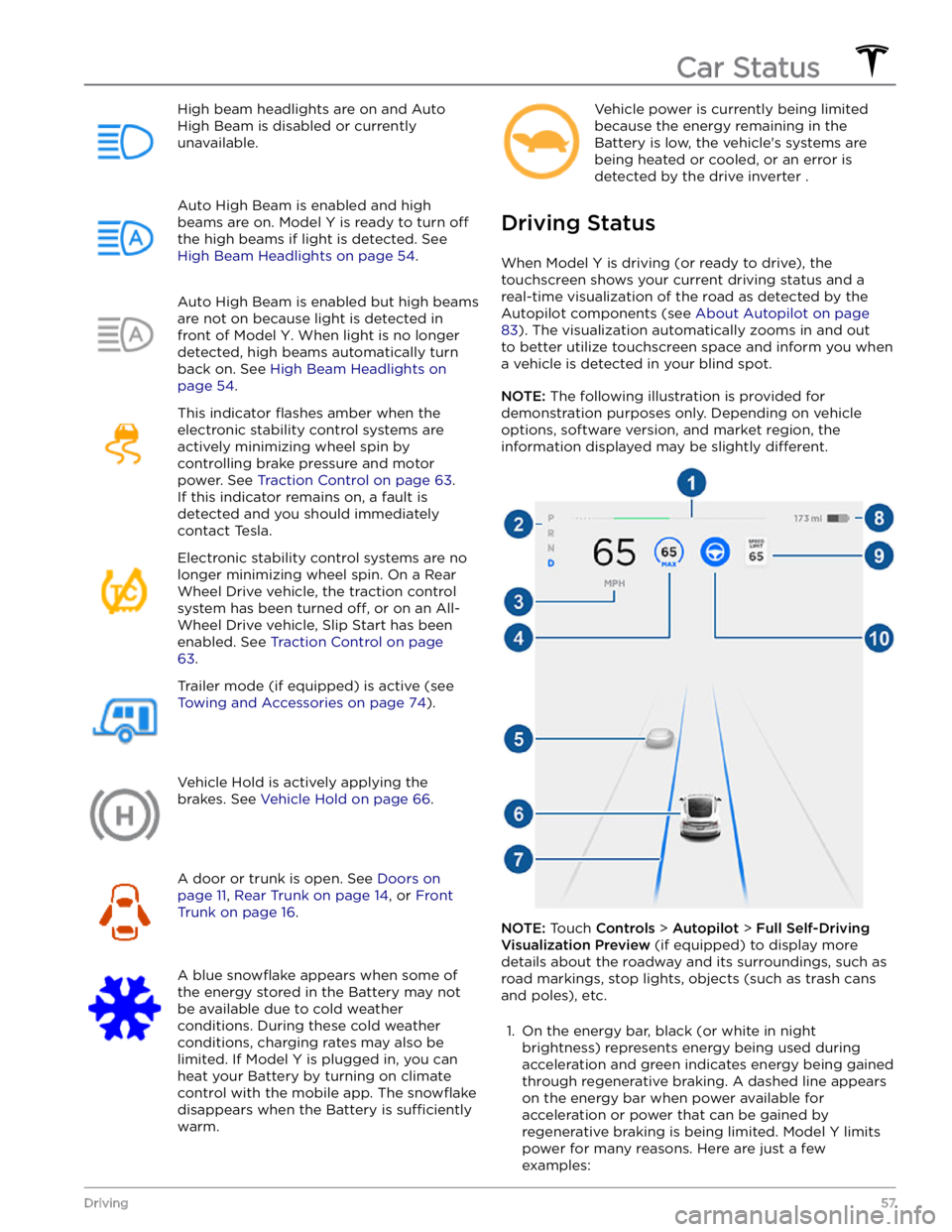
High beam headlights are on and Auto
High Beam is disabled or currently
unavailable.Auto High Beam is enabled and high
beams are on.
Model Y is ready to turn off
the high beams if light is detected. See
High Beam Headlights on page 54.
Auto High Beam is enabled but high beams
are not on because light is detected in front of
Model Y. When light is no longer
detected, high beams automatically turn
back on. See
High Beam Headlights on
page 54.
This indicator flashes amber when the
electronic stability control systems are actively minimizing wheel spin by
controlling brake pressure and motor
power. See
Traction Control on page 63.
If this indicator remains on, a fault is detected and you should immediately contact Tesla.
Electronic stability control systems are no longer minimizing wheel spin. On a Rear Wheel Drive vehicle, the traction control system has been turned
off, or on an All-
Wheel Drive vehicle, Slip Start has been
enabled. See
Traction Control on page
63.
Trailer mode (if equipped) is active (see
Towing and Accessories on page 74).
Vehicle Hold is actively applying the brakes. See
Vehicle Hold on page 66.
A door or trunk is open. See Doors on
page 11, Rear Trunk on page 14, or Front
Trunk on page 16.
A blue snowflake appears when some of
the energy stored in the Battery may not be available due to cold weather
conditions. During these cold weather
conditions, charging rates may also be limited. If
Model Y is plugged in, you can
heat your Battery by turning on climate control with the mobile app. The
snowflake
disappears when the Battery is sufficiently
warm.
Vehicle power is currently being limited
because the energy remaining in the
Battery is low, the vehicle
Page 147 of 250
About the Security System
If Model Y does not detect an authenticated phone, key
fob, or key card and a locked door or trunk is opened, an alarm sounds and the headlights and turn signals
flash.
To deactivate the alarm, press any button on the mobile
app or tap your key card or key fob against the card reader located
approximately one third the way up of
the driver
Page 163 of 250
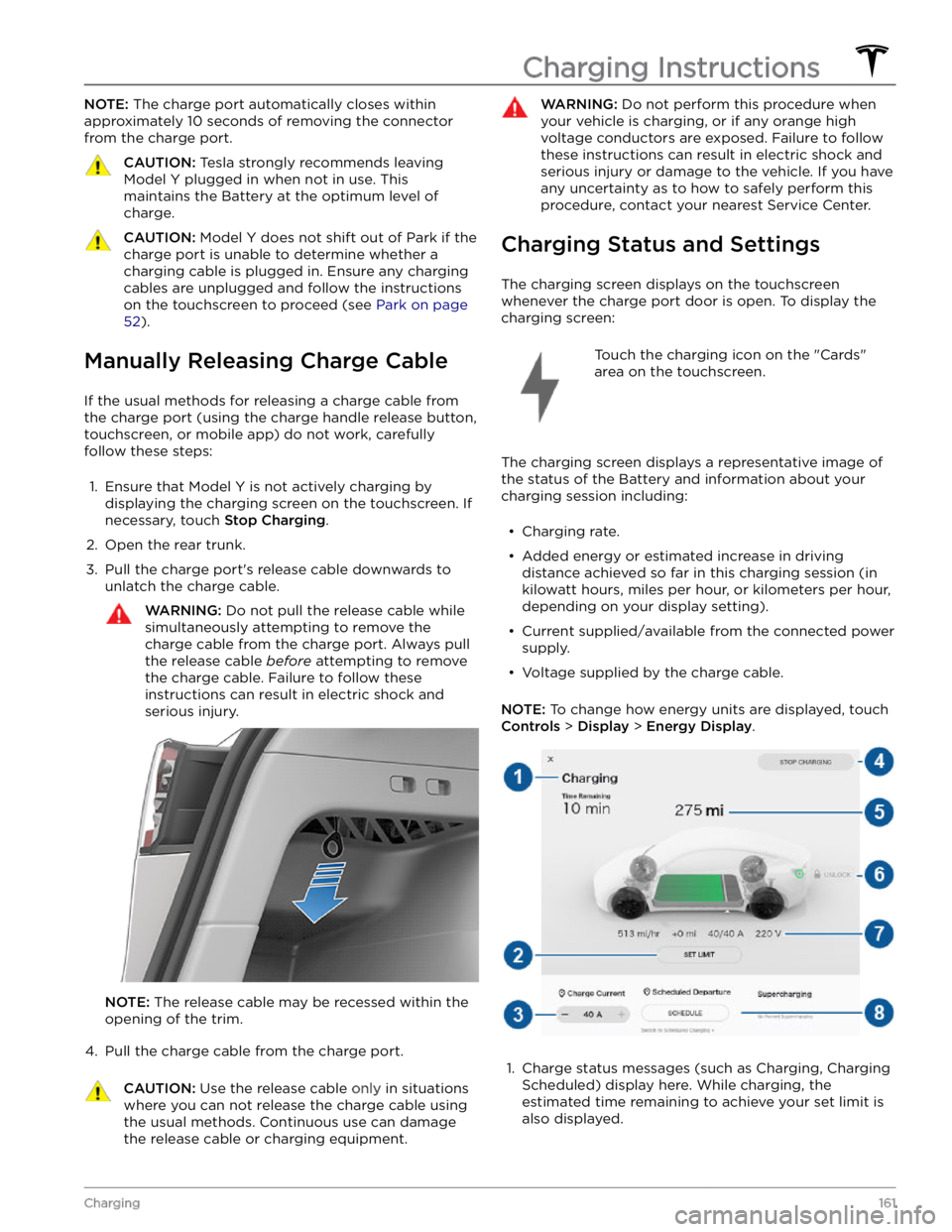
NOTE: The charge port automatically closes within
approximately 10 seconds of removing the connector from the charge port.CAUTION: Tesla strongly recommends leaving
Model Y plugged in when not in use. This
maintains the Battery at the optimum level of
charge.
CAUTION: Model Y does not shift out of Park if the
charge port is unable to determine whether a
charging cable is plugged in. Ensure any charging
cables are unplugged and follow the instructions
on the touchscreen to proceed (see Park on page
52).
Manually Releasing Charge Cable
If the usual methods for releasing a charge cable from the charge port (using the charge handle release button,
touchscreen, or mobile app) do not work, carefully
follow these steps:
1.
Ensure that Model Y is not actively charging by
displaying the charging screen on the touchscreen. If necessary, touch
Stop Charging.
2.
Open the rear trunk.
3.
Pull the charge port
Page 175 of 250
CAUTION: To avoid corrosive damage that may
not be covered by the warranty, rinse away any
road salt from the underside of the vehicle, wheel
wells, and brakes. After cleaning the vehicle, dry
the brakes by going on a short drive and applying
the brakes multiple times.
CAUTION: Avoid using tight-napped or rough
cloths, such as washing mitts. A high-quality
microfiber cleaning cloth is recommended.
CAUTION: If washing in an automatic car wash, use
touchless car washes only. These car washes have
no parts (brushes, etc.) that touch the surfaces of
Model Y. Some touchless car washes use caustic
solutions that, over time, can cause discoloration
of decorative exterior trim. Avoid exposure to
soaps and chemicals above pH 13. If unsure, check
the product label or ask the staff at the car wash.
Damage caused by improper washing is not
covered by the warranty.
CAUTION: If washing in an automatic car wash,
make sure the vehicle is locked. In addition, avoid
using controls on the touchscreen that can result
in accidentally opening doors or trunks while the
vehicle is being washed. Any damage caused is
not covered by the warranty.
CAUTION: Ensure the wipers are off before
washing Model Y to avoid the risk of damaging the
wipers.
CAUTION: Do not use chemical based wheel
cleaners or pre-wash products. These can damage
the finish on the wheels.
WARNING: Never spray liquid at a high velocity
(for example, if using a pressure washer) towards
the charge port while Model Y is charging. Failure
to follow these instructions can result in serious
injury or damage to the vehicle, charging
equipment, or property.
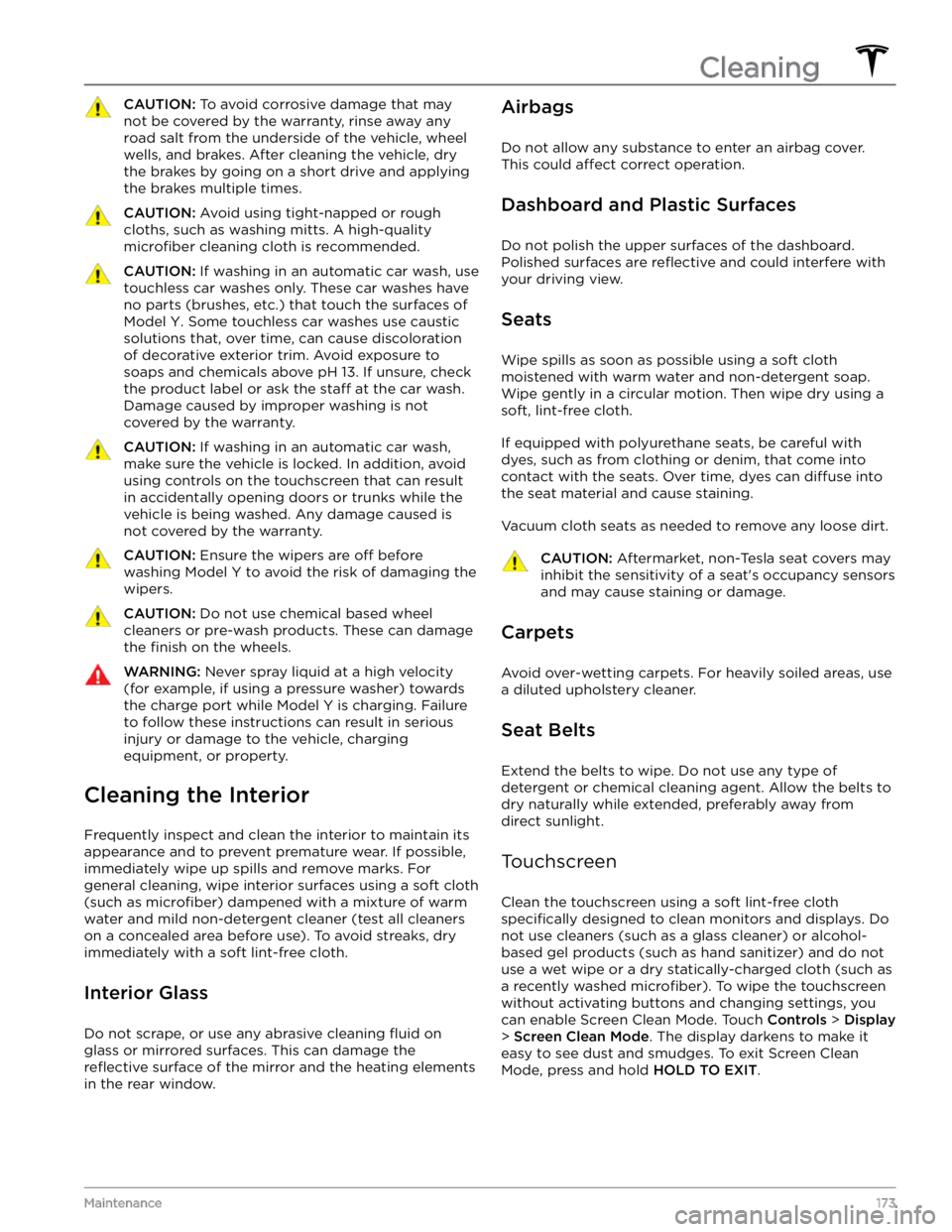
Cleaning the Interior
Frequently inspect and clean the interior to maintain its appearance and to prevent premature wear. If possible, immediately wipe up spills and remove marks. For
general cleaning, wipe interior surfaces using a soft cloth (such as
microfiber) dampened with a mixture of warm
water and mild non-detergent cleaner (test all cleaners on a concealed area before use). To avoid streaks, dry immediately with a soft lint-free cloth.
Interior Glass
Do not scrape, or use any abrasive cleaning fluid on
glass or mirrored surfaces. This can damage the
reflective surface of the mirror and the heating elements
in the rear window.
Airbags
Do not allow any substance to enter an airbag cover.
This could
affect correct operation.
Dashboard and Plastic Surfaces
Do not polish the upper surfaces of the dashboard. Polished surfaces are
reflective and could interfere with
your driving view.
Seats
Wipe spills as soon as possible using a soft cloth
moistened with warm water and non-detergent soap.
Wipe gently in a circular motion. Then wipe dry using a soft, lint-free cloth.
If equipped with polyurethane seats, be careful with dyes, such as from clothing or denim, that come into contact with the seats. Over time, dyes can
diffuse into
the seat material and cause staining.
Vacuum cloth seats as needed to remove any loose dirt.
CAUTION: Aftermarket, non-Tesla seat covers may
inhibit the sensitivity of a seat
Page 178 of 250
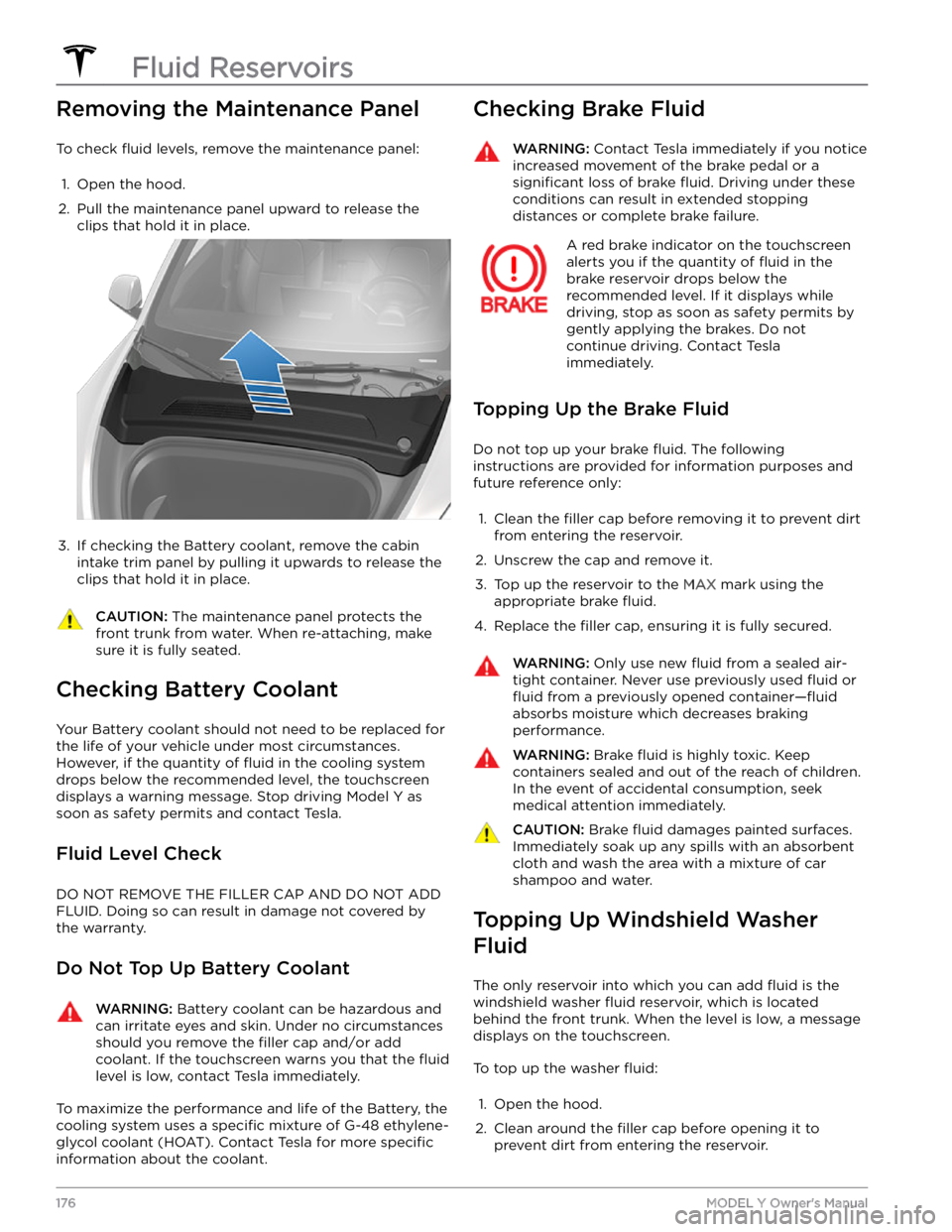
Removing the Maintenance Panel
To check fluid levels, remove the maintenance panel:
1.
Open the hood.
2.
Pull the maintenance panel upward to release the clips that hold it in place.
3.
If checking the Battery coolant, remove the cabin intake trim panel by pulling it upwards to release the clips that hold it in place.
CAUTION: The maintenance panel protects the
front trunk from water. When re-attaching, make
sure it is fully seated.
Checking Battery Coolant
Your Battery coolant should not need to be replaced for
the life of your vehicle under most circumstances. However, if the quantity of
fluid in the cooling system
drops below the recommended level, the
touchscreen
displays a warning message. Stop driving Model Y as
soon as safety permits and contact Tesla.
Fluid Level Check
DO NOT REMOVE THE FILLER CAP AND DO NOT ADD
FLUID. Doing so can result in damage not covered by
the warranty.
Do Not Top Up Battery Coolant
WARNING: Battery coolant can be hazardous and
can irritate eyes and skin. Under no circumstances
should you remove the filler cap and/or add
coolant. If the touchscreen warns you that the fluid
level is low, contact Tesla immediately.
To maximize the performance and life of the Battery, the
cooling system uses a
specific mixture of G-48 ethylene-
glycol coolant (HOAT). Contact Tesla for more
specific
information about the coolant.
Checking Brake FluidWARNING: Contact Tesla immediately if you notice
increased movement of the brake pedal or a
significant loss of brake fluid. Driving under these
conditions can result in extended stopping
distances or complete brake failure.
A red brake indicator on the touchscreen
alerts you if the quantity of fluid in the
brake reservoir drops below the
recommended level. If it displays while driving, stop as soon as safety permits by
gently applying the brakes. Do not
continue driving. Contact Tesla
immediately.
Topping Up the Brake Fluid
Do not top up your brake fluid. The following
instructions are provided for information purposes and future reference only:
1.
Clean the filler cap before removing it to prevent dirt
from entering the reservoir.
2.
Unscrew the cap and remove it.
3.
Top up the reservoir to the MAX mark using the
appropriate brake
fluid.
4.
Replace the filler cap, ensuring it is fully secured.
WARNING: Only use new fluid from a sealed air-
tight container. Never use previously used fluid or
fluid from a previously opened container
Page 187 of 250
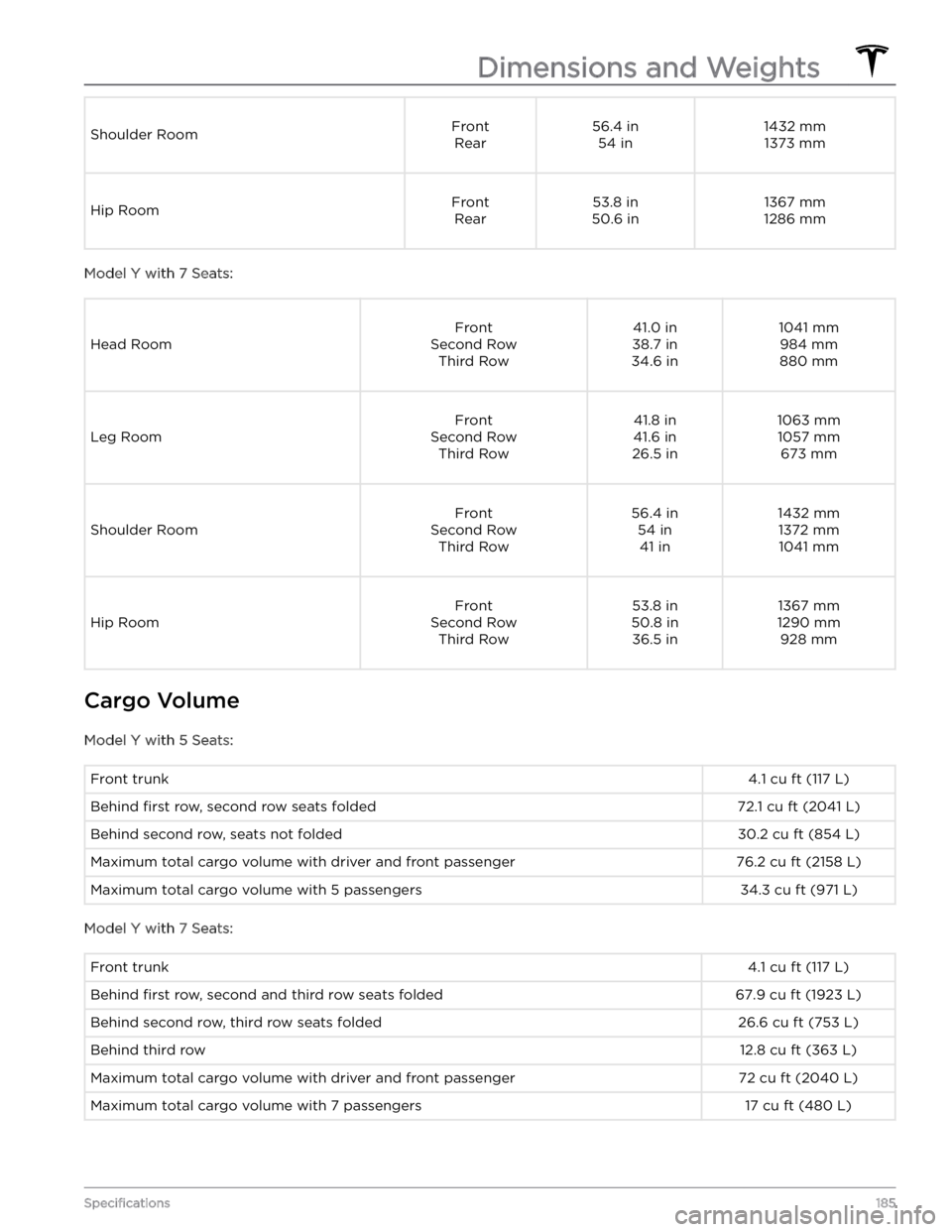
Shoulder RoomFrontRear56.4 in 54 in1432 mm1373 mmHip RoomFront Rear53.8 in
50.6 in1367 mm
1286 mm
Model Y with 7 Seats:
Head Room
Front
Second Row Third Row41.0 in
38.7 in
34.6 in1041 mm 984 mm
880 mm
Leg Room
Front
Second Row Third Row41.8 in
41.6 in
26.5 in1063 mm 1057 mm 673 mm
Shoulder Room
Front
Second Row Third Row56.4 in54 in41 in1432 mm1372 mm1041 mm
Hip Room
Front
Second Row Third Row53.8 in
50.8 in 36.5 in1367 mm
1290 mm 928 mm
Cargo Volume
Model Y with 5 Seats:
Front trunk4.1 cu ft (117 L)Behind first row, second row seats folded72.1 cu ft (2041 L)Behind second row, seats not folded30.2 cu ft (854 L)Maximum total cargo volume with driver and front passenger76.2 cu ft (2158 L)Maximum total cargo volume with 5 passengers34.3 cu ft (971 L)
Model Y with 7 Seats:
Front trunk4.1 cu ft (117 L)Behind first row, second and third row seats folded67.9 cu ft (1923 L)Behind second row, third row seats folded26.6 cu ft (753 L)Behind third row12.8 cu ft (363 L)Maximum total cargo volume with driver and front passenger72 cu ft (2040 L)Maximum total cargo volume with 7 passengers17 cu ft (480 L)
Dimensions and Weights
185Specifications
Page 245 of 250
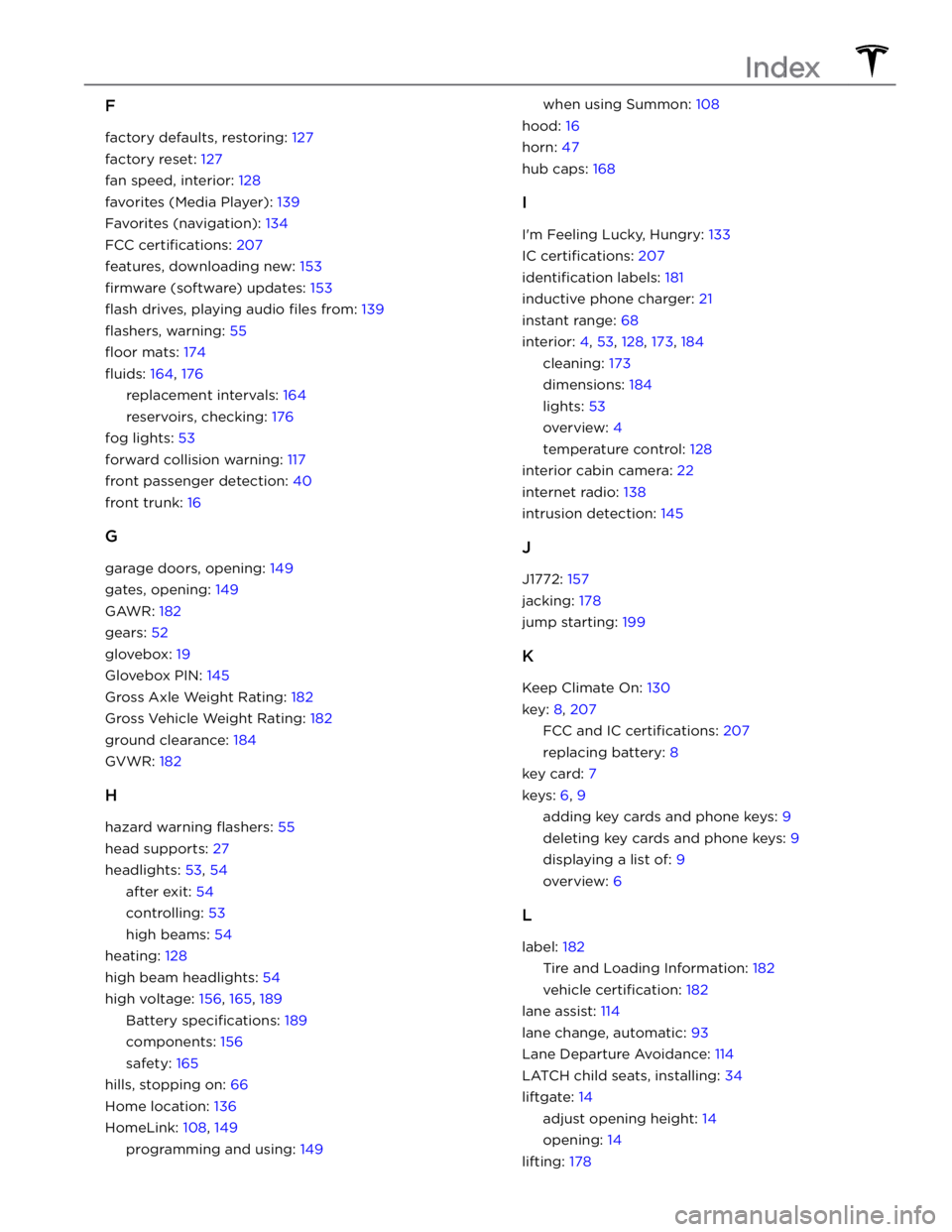
F
factory defaults, restoring: 127
factory reset: 127
fan speed, interior: 128
favorites (Media Player): 139
Favorites (navigation): 134
FCC certifications: 207
features, downloading new: 153
firmware (software) updates: 153
flash drives, playing audio files from: 139
flashers, warning: 55
floor mats: 174
fluids: 164, 176
replacement intervals: 164
reservoirs, checking: 176
fog lights: 53
forward collision warning: 117
front passenger detection: 40
front trunk: 16
G
garage doors, opening: 149
gates, opening: 149
GAWR: 182
gears: 52
glovebox: 19
Glovebox PIN: 145
Gross Axle Weight Rating: 182
Gross Vehicle Weight Rating: 182
ground clearance: 184
GVWR: 182
H
hazard warning flashers: 55
head supports: 27
headlights: 53, 54
after exit: 54
controlling: 53
high beams: 54
heating: 128
high beam headlights: 54
high voltage: 156, 165, 189
Battery specifications: 189
components: 156
safety: 165
hills, stopping on: 66
Home location: 136
HomeLink: 108, 149
programming and using: 149
when using Summon: 108
hood: 16
horn: 47
hub caps: 168
I
I
Page 248 of 250
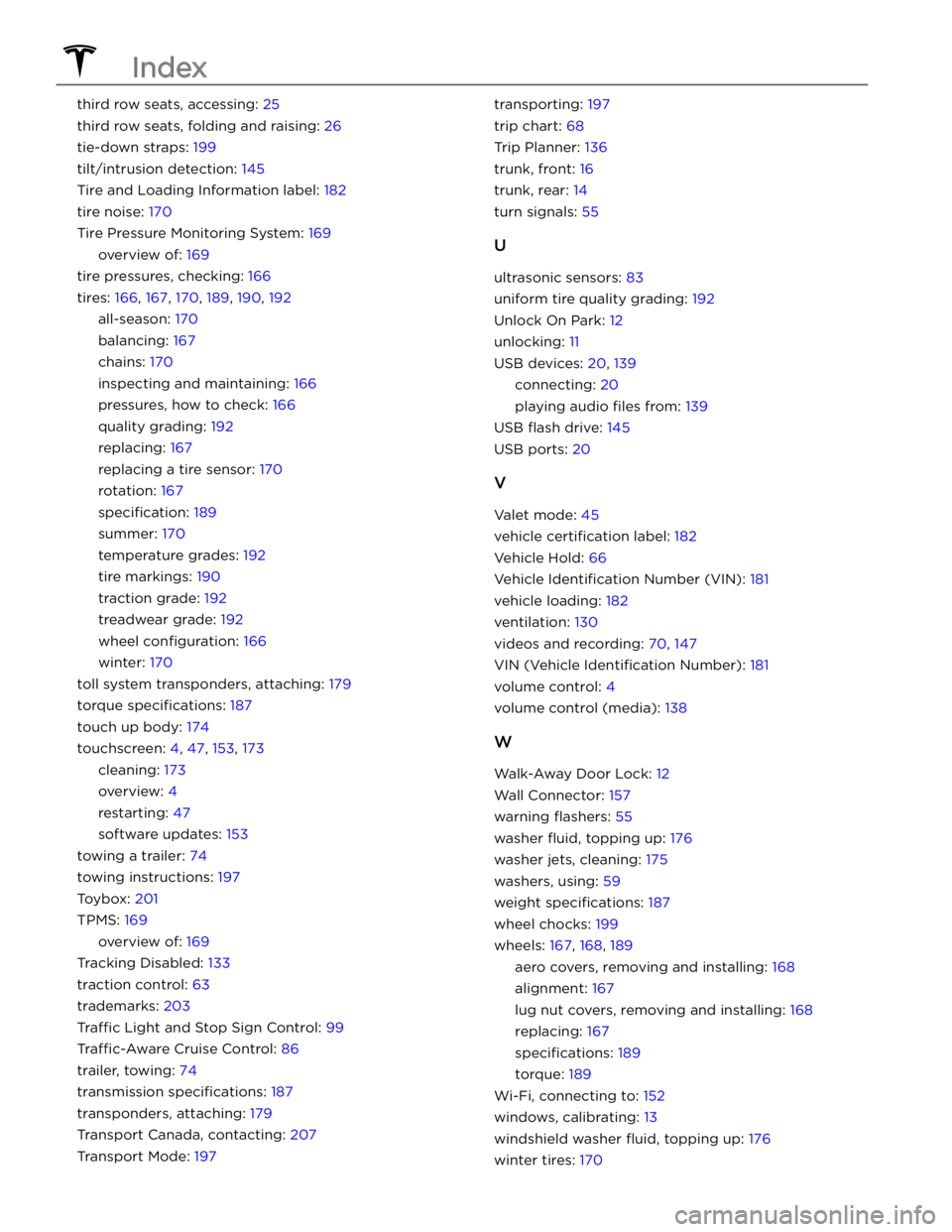
third row seats, accessing: 25
third row seats, folding and raising: 26
tie-down straps: 199
tilt/intrusion detection: 145
Tire and Loading Information label: 182
tire noise: 170
Tire Pressure Monitoring System: 169
overview of: 169
tire pressures, checking: 166
tires: 166, 167, 170, 189, 190, 192
all-season: 170
balancing: 167
chains: 170
inspecting and maintaining: 166
pressures, how to check: 166
quality grading: 192
replacing: 167
replacing a tire sensor: 170
rotation: 167
specification: 189
summer: 170
temperature grades: 192
tire markings: 190
traction grade: 192
treadwear grade: 192
wheel configuration: 166
winter: 170
toll system transponders, attaching: 179
torque specifications: 187
touch up body: 174
touchscreen: 4, 47, 153, 173
cleaning: 173
overview: 4
restarting: 47
software updates: 153
towing a trailer: 74
towing instructions: 197
Toybox: 201
TPMS: 169
overview of: 169
Tracking Disabled: 133
traction control: 63
trademarks: 203
Traffic Light and Stop Sign Control: 99
Traffic-Aware Cruise Control: 86
trailer, towing: 74
transmission specifications: 187
transponders, attaching: 179
Transport Canada, contacting: 207
Transport Mode: 197
transporting: 197
trip chart: 68
Trip Planner: 136
trunk, front: 16
trunk, rear: 14
turn signals: 55
U
ultrasonic sensors: 83
uniform tire quality grading: 192
Unlock On Park: 12
unlocking: 11
USB devices: 20, 139
connecting: 20
playing audio files from: 139
USB flash drive: 145
USB ports: 20
V
Valet mode: 45
vehicle certification label: 182
Vehicle Hold: 66
Vehicle Identification Number (VIN): 181
vehicle loading: 182
ventilation: 130
videos and recording: 70, 147
VIN (Vehicle Identification Number): 181
volume control: 4
volume control (media): 138
W
Walk-Away Door Lock: 12
Wall Connector: 157
warning flashers: 55
washer fluid, topping up: 176
washer jets, cleaning: 175
washers, using: 59
weight specifications: 187
wheel chocks: 199
wheels: 167, 168, 189
aero covers, removing and installing: 168
alignment: 167
lug nut covers, removing and installing: 168
replacing: 167
specifications: 189
torque: 189
Wi-Fi, connecting to: 152
windows, calibrating: 13
windshield washer fluid, topping up: 176
winter tires: 170
Index