ECU TESLA MODEL Y 2021 Owner´s Manual
[x] Cancel search | Manufacturer: TESLA, Model Year: 2021, Model line: MODEL Y, Model: TESLA MODEL Y 2021Pages: 250, PDF Size: 8.4 MB
Page 182 of 250
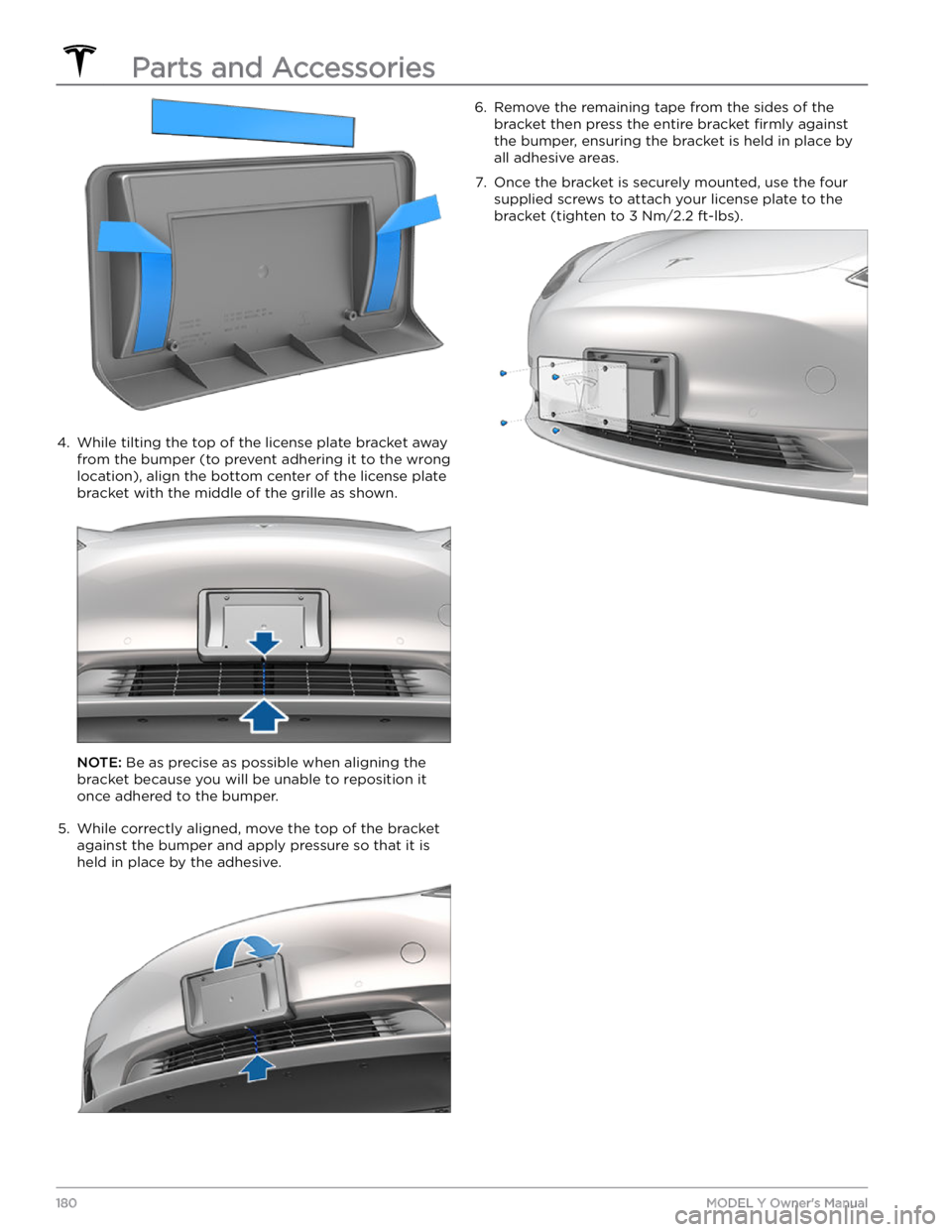
4.
While tilting the top of the license plate bracket away
from the bumper (to prevent adhering it to the wrong
location), align the bottom center of the license plate bracket with the middle of the grille as shown.
NOTE: Be as precise as possible when aligning the
bracket because you will be unable to reposition it once adhered to the bumper.
5.
While correctly aligned, move the top of the bracket
against the bumper and apply pressure so that it is held in place by the adhesive.
6. Remove the remaining tape from the sides of the
bracket then press the entire bracket
firmly against
the bumper, ensuring the bracket is held in place by
all adhesive areas.
7.
Once the bracket is securely mounted, use the four supplied screws to attach your license plate to the bracket (tighten to 3 Nm/2.2 ft-lbs).Parts and Accessories
180MODEL Y Owner
Page 201 of 250
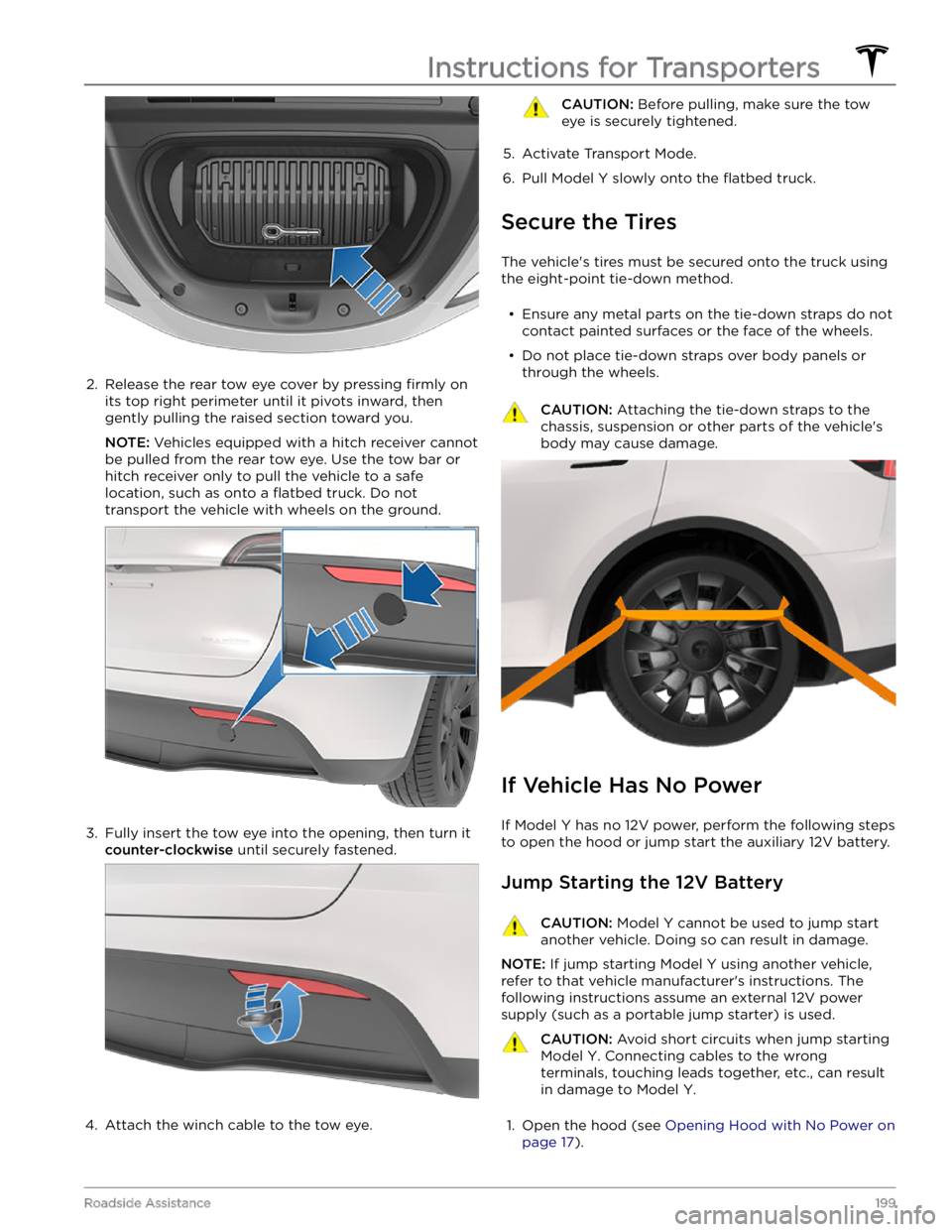
2.
Release the rear tow eye cover by pressing firmly on
its top right perimeter until it pivots inward, then
gently pulling the raised section toward you.
NOTE: Vehicles equipped with a hitch receiver cannot
be pulled from the rear tow eye. Use the tow bar or
hitch receiver only to pull the vehicle to a safe
location, such as onto a
flatbed truck. Do not
transport the vehicle with wheels on the ground.
3.
Fully insert the tow eye into the opening, then turn it
counter-clockwise until securely fastened.
4.
Attach the winch cable to the tow eye.
CAUTION: Before pulling, make sure the tow
eye is securely tightened.
5.
Activate Transport Mode.
6.
Pull Model Y slowly onto the flatbed truck.
Secure the Tires
The vehicle
Page 215 of 250

(CC_a003)
Unable to charge - Wall Connector GFCI tripped
Disconnect and retry or use different equipment
What this alert means:
Ground fault. Current is leaking through an unsafe path. Possible Line to ground or Neutral to ground fault.
What to do:
Try again by disconnecting the Wall Connector from the vehicle and reconnecting. If the problem persists, turn OFF
the circuit breaker servicing the Wall Connector, wait 10 seconds, turn the circuit breaker ON again, then try
reconnecting the Wall Connector to the vehicle. If the problem persists, contact Tesla.
(CC_a004)
Unable to charge - Wall Connector issue
Wall Connector needs service
What this alert means:
Wall Connector hardware issue. Possible issues include:
1.
Contactor not working
2.
Self-test of internal ground fault monitoring circuit failed
3.
Thermal sensor disconnected
4.
Other hardware component issues
What to do:
An internal issue was detected by the Wall Connector.
1.
Try charging again by disconnecting the Wall Connector from the vehicle and reconnecting.
2.
If the issue persists, turn OFF the circuit breaker for the Wall Connector, wait 10 seconds, and turn the circuit
breaker ON again. Then try reconnecting the Wall Connector to the vehicle.
3.
If the issue persists, check for loose connections.
a.
Make sure there is no power to the Wall Connector.
b.
Remove the face plate and inspect the wiring terminals for any loose connections.
c.
Contact an electrician if necessary to make sure all wires are properly connected and torqued according to the
instructions in the Wall Connector Installation Manual.
4.
Once all connections have been checked and made secure, restore power to the Wall Connector and try charging
again by reconnecting to the vehicle.
5.
If the issue persists, the Wall Connector needs service. Schedule a service appointment through your Mobile App.
(CC_a005)
Unable to charge - Wall Connector GFCI tripped
Disconnect and retry or use different equipment
What this alert means:
Ground fault. Current is leaking through an unsafe path. Possible Line to ground or Neutral to ground fault.
What to do:
Troubleshooting Alerts
213Consumer Information
Page 217 of 250

(CC_a010)
Unable to charge - Wall Connector issue
Wall Connector needs service
What this alert means:
Wall Connector hardware issue. Possible issues include:
1.
Contactor not working
2.
Self-test of internal ground fault monitoring circuit failed
3.
Thermal sensor disconnected
4.
Other hardware component issues
What to do:
An internal issue was detected by the Wall Connector.
1.
Try charging again by disconnecting the Wall Connector from the vehicle and reconnecting.
2.
If the issue persists, turn OFF the circuit breaker for the Wall Connector, wait 10 seconds, and turn the circuit
breaker ON again. Then try reconnecting the Wall Connector to the vehicle.
3.
If the issue persists, check for loose connections.
a.
Make sure there is no power to the Wall Connector.
b.
Remove the face plate and inspect the wiring terminals for any loose connections.
c.
Contact an electrician if necessary to make sure all wires are properly connected and torqued according to the
instructions in the Wall Connector Installation Manual.
4.
Once all connections have been checked and made secure, restore power to the Wall Connector and try charging
again by reconnecting to the vehicle.
5.
If the issue persists, the Wall Connector needs service. Schedule a service appointment through your Mobile App.
(CC_a011)
Unable to charge - Wall Connector too hot
Let Wall Connector cool and try again
What this alert means:
Over temperature protection (latchoff).
What to do:
Make sure the Wall Connector is not covered by anything and that there is no heat source nearby. If the problem
persists in normal ambient temperatures (under 100
Page 220 of 250

(CC_a019)
Unable to charge - Vehicle connection issue
Insert charge handle fully into charge port
What this alert means:
A communication error occurred between the Wall Connector and the vehicle.
What to do:
Try again by disconnecting the Wall Connector from the vehicle and reconnecting. If possible, plug the vehicle into
another Wall Connector or a Mobile Connector to determine if the vehicle is able to communicate with other
charging equipment. If the problem persists, contact Tesla.
(CC_a020)
Unable to charge - Wall Connector issue
Wall Connector needs service
What this alert means:
Wall Connector hardware issue. Possible issues include:
1.
Contactor not working
2.
Self-test of internal ground fault monitoring circuit failed
3.
Thermal sensor disconnected
4.
Other hardware component issues
What to do:
An internal issue was detected by the Wall Connector.
1.
Try charging again by disconnecting the Wall Connector from the vehicle and reconnecting.
2.
If the issue persists, turn OFF the circuit breaker for the Wall Connector, wait 10 seconds, and turn the circuit
breaker ON again. Then try reconnecting the Wall Connector to the vehicle.
3.
If the issue persists, check for loose connections.
a.
Make sure there is no power to the Wall Connector.
b.
Remove the face plate and inspect the wiring terminals for any loose connections.
c.
Contact an electrician if necessary to make sure all wires are properly connected and torqued according to the
instructions in the Wall Connector Installation Manual.
4.
Once all connections have been checked and made secure, restore power to the Wall Connector and try charging
again by reconnecting to the vehicle.
5.
If the issue persists, the Wall Connector needs service. Schedule a service appointment through your Mobile App.
(CC_a021)
Unable to charge - No primary Wall Connector
Check that primary unit is powered and available
What this alert means:
Circuit Breaker Sharing Network: Need one (and only one) Wall Connector set to Master.
What to do:
Troubleshooting Alerts
218MODEL Y Owner
Page 222 of 250

3. Thermal sensor disconnected4.
Other hardware component issues
What to do:
An internal issue was detected by the Wall Connector.
1.
Try charging again by disconnecting the Wall Connector from the vehicle and reconnecting.
2.
If the issue persists, turn OFF the circuit breaker for the Wall Connector, wait 10 seconds, and turn the circuit
breaker ON again. Then try reconnecting the Wall Connector to the vehicle.
3.
If the issue persists, check for loose connections.
a.
Make sure there is no power to the Wall Connector.
b.
Remove the face plate and inspect the wiring terminals for any loose connections.
c.
Contact an electrician if necessary to make sure all wires are properly connected and torqued according to the
instructions in the Wall Connector Installation Manual.
4.
Once all connections have been checked and made secure, restore power to the Wall Connector and try charging
again by reconnecting to the vehicle.
5.
If the issue persists, the Wall Connector needs service. Schedule a service appointment through your Mobile App.
(CC_a026)
Unable to charge - Wall Connector issue
Wall Connector needs service
What this alert means:
Wall Connector hardware issue. Possible issues include:
1.
Contactor not working
2.
Self-test of internal ground fault monitoring circuit failed
3.
Thermal sensor disconnected
4.
Other hardware component issues
What to do:
An internal issue was detected by the Wall Connector.
1.
Try charging again by disconnecting the Wall Connector from the vehicle and reconnecting.
2.
If the issue persists, turn OFF the circuit breaker for the Wall Connector, wait 10 seconds, and turn the circuit
breaker ON again. Then try reconnecting the Wall Connector to the vehicle.
3.
If the issue persists, check for loose connections.
a.
Make sure there is no power to the Wall Connector.
b.
Remove the face plate and inspect the wiring terminals for any loose connections.
c.
Contact an electrician if necessary to make sure all wires are properly connected and torqued according to the
instructions in the Wall Connector Installation Manual.
4.
Once all connections have been checked and made secure, restore power to the Wall Connector and try charging
again by reconnecting to the vehicle.
5.
If the issue persists, the Wall Connector needs service. Schedule a service appointment through your Mobile App.
Troubleshooting Alerts
220MODEL Y Owner
Page 223 of 250

(CC_a027)
Unable to charge - Wall Connector issue
Wall Connector needs service
What this alert means:
Wall Connector hardware issue. Possible issues include:
1.
Contactor not working
2.
Self-test of internal ground fault monitoring circuit failed
3.
Thermal sensor disconnected
4.
Other hardware component issues
What to do:
An internal issue was detected by the Wall Connector.
1.
Try charging again by disconnecting the Wall Connector from the vehicle and reconnecting.
2.
If the issue persists, turn OFF the circuit breaker for the Wall Connector, wait 10 seconds, and turn the circuit
breaker ON again. Then try reconnecting the Wall Connector to the vehicle.
3.
If the issue persists, check for loose connections.
a.
Make sure there is no power to the Wall Connector.
b.
Remove the face plate and inspect the wiring terminals for any loose connections.
c.
Contact an electrician if necessary to make sure all wires are properly connected and torqued according to the instructions in the Wall Connector Installation Manual.
4.
Once all connections have been checked and made secure, restore power to the Wall Connector and try charging
again by reconnecting to the vehicle.
5.
If the issue persists, the Wall Connector needs service. Schedule a service appointment through your Mobile App.
(CC_a028)
Unable to charge - Incorrect switch setting
Wall Connector rotary switch must be adjusted
What this alert means:
Incorrect rotary switch setting.
What to do:
Make sure there is no power to the Wall Connector. Remove the face plate and adjust the rotary switch to a valid
operating current setting. The correlation between switch setting and current is printed on the inside of the Wall
Connector. You can also refer to the Set the Operating Current section in the Wall Connector Installation Manual. If
the Wall Connector is set up for load sharing (paired with other Wall Connectors), the rotary switch of the master
unit must be set to an operating current setting that allows each paired Wall Connector to receive at least 6A of
charge current. Example: Three Wall Connectors are paired for load sharing. The master unit needs to be set to a
current of at least 3 * 6A = 18A or greater.
(CC_a029)
Unable to charge - Vehicle connection issue
Insert charge handle fully into charge port
What this alert means:
A communication error occurred between the Wall Connector and the vehicle.
Troubleshooting Alerts
221Consumer Information
Page 247 of 250
recent (Media Player): 139
Recents (navigation): 134
recording videos: 70, 147
regenerative braking: 61
relative speed limit: 120
release notes: 153
restarting the touchscreen: 50
Reverse gear: 52
RFID transponders: 179
roadside assistance: 197
roof racks: 184
rotating tires: 167
Round Trip Energy (navigating): 136
S
safety defects, reporting: 207
safety information: 31, 37, 44
airbags: 44
child seats: 37
seat belts: 31
Schedule: 162
schedule service: 154
scheduled charging: 162
scheduled departure: 162
using: 162
seat belts: 29, 30, 173
cleaning: 173
in a collision: 30
overview of: 29
pre-tensioners: 30
wearing when pregnant: 30
seat covers: 28
seat heaters: 128, 130
seating capacity: 182
seats: 23, 128
heaters: 128
second row seats, adjusting and folding: 24
security settings: 145
sensors: 83
Sentry Mode: 145
service data recording: 204
service intervals: 164
Settings, erasing: 127
shifting gears: 52
Show Calendar Upon Entry: 143
Side Clearance (Summon): 108
side collision warning: 114
slip start: 63
Smart Summon: 111
smartphone: 6
authenticating as a key: 6
Software Reinstall: 153
software reset: 127
software update preferences: 153
software updates: 153
specifications: 184, 185, 187, 189
12V battery: 189
brakes: 187
cargo volume: 185
dimensions: 184
exterior: 184
High Voltage Battery: 189
interior: 184
motor: 187
steering: 187
subsystems: 187
suspension: 189
tires: 189
transmission: 187
weights: 187
wheels: 189
speed assist: 120
Speed Limit Mode: 126
speed limit warning: 120
stability control: 63
starting: 50
steering specifications: 187
steering wheel: 53
lights, controlling: 53
steering, automatic: 91
streaming radio: 138
streaming services: 138
summer tires: 170
Summon: 108
Summon Distance: 108
supercharging: 163
described: 163
idle fees: 163
pay-per-use fees: 163
suspension specifications: 189
T
telematics: 204
temperature: 47, 56, 128, 158, 192
Battery (high voltage), limits: 158
cabin, controls for: 128
heated steering wheel: 47
outside: 56
tires: 192
Teslacam: 70
Index