steering wheel TESLA MODEL Y 2022 Owner´s Manual
[x] Cancel search | Manufacturer: TESLA, Model Year: 2022, Model line: MODEL Y, Model: TESLA MODEL Y 2022Pages: 250, PDF Size: 8.4 MB
Page 93 of 250
NOTE: Depending on market region, vehicle
configuration, options purchased, and software version,
your vehicle may not be equipped with Autosteer, or the
feature may not operate exactly as described.
NOTE: Autosteer is a BETA feature.
Autosteer builds upon Traffic-Aware Cruise Control (see
Traffic-Aware Cruise Control on page 86), intelligently
keeping
Model Y in its driving lane when cruising at a set
speed.
Autosteer also allows you to use the turn signals
to move Model Y into an adjacent lane (see Auto Lane
Change on page 93). Autosteer detects lane markings
and the presence of vehicles and objects to
steer Model
Y.
NOTE: To display more details about the roadway and its
surroundings, such as road markings, stop lights, objects (such as trash cans and poles), etc., touch
Controls >
Autopilot > Full Self-Driving Visualization Preview (if
equipped).
CAUTION: Ensure all cameras and sensors are
clean. Dirty cameras and sensors, as well as
environmental conditions such as rain and faded
lane markings, affect performance.
WARNING: Autosteer is a hands-on feature. You
must keep your hands on the steering wheel at all
times.
WARNING: Autosteer is intended for use on
highways and limited-access roads with a fully
attentive driver. When using Autosteer, hold the
steering wheel and be mindful of road conditions
and surrounding traffic. Do not use Autosteer on
city streets, in construction zones, or in areas
where bicyclists or pedestrians may be present.
Never depend on Autosteer to determine an
appropriate driving path. Always be prepared to
take immediate action. Failure to follow these
instructions could cause damage, serious injury or
death.
Operating Autosteer
Before you can operate Autosteer, you must enable it by touching
Controls > Autopilot > Autosteer (Beta).
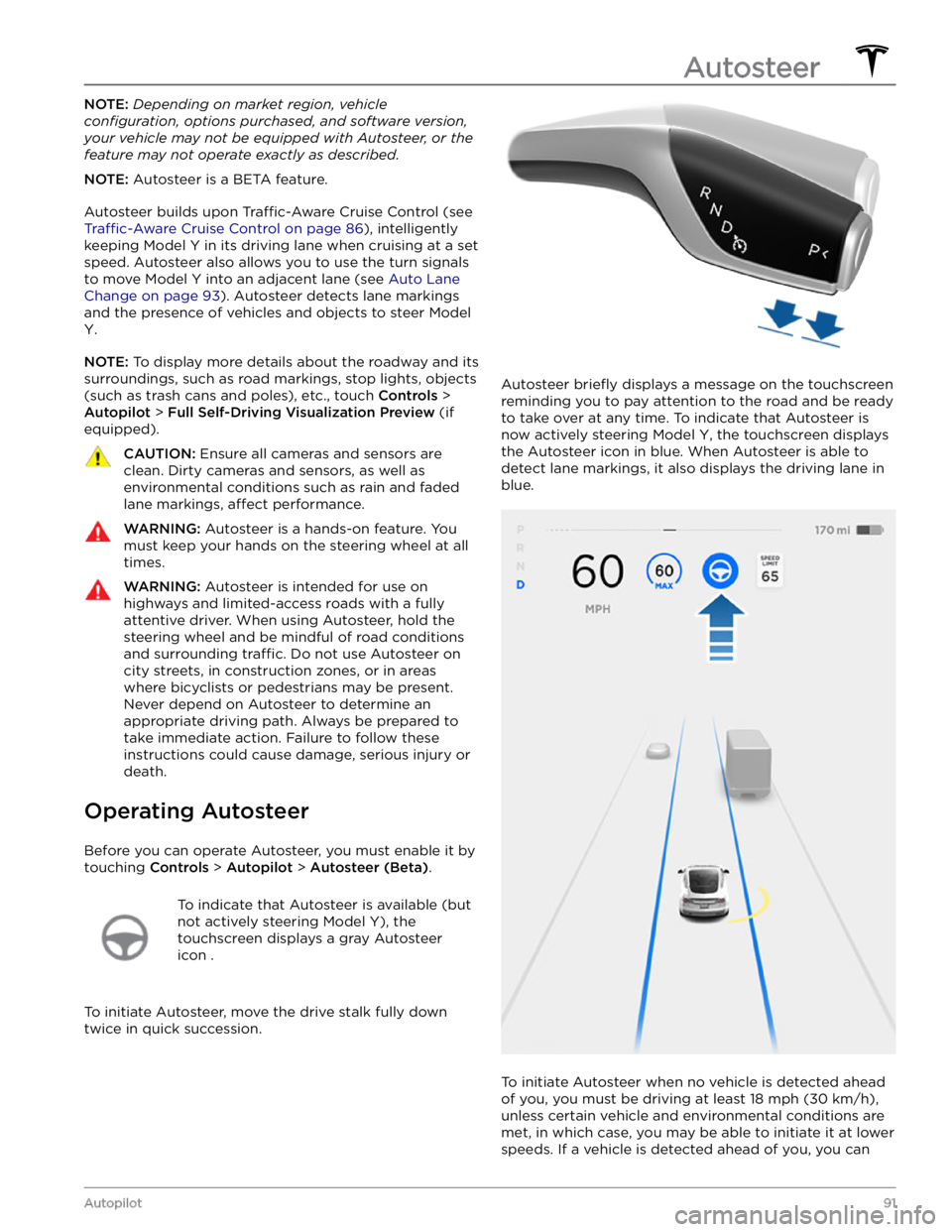
To indicate that Autosteer is available (but
not actively steering
Model Y), the
touchscreen displays a gray Autosteer
icon .
To initiate Autosteer, move the drive stalk fully down
twice in quick succession.
Autosteer briefly displays a message on the touchscreen
reminding you to pay attention to the road and be ready
to take over at any time. To indicate that Autosteer is
now actively steering
Model Y, the touchscreen displays
the Autosteer icon in blue. When Autosteer is able to detect lane markings, it also displays the driving lane in blue.
To initiate Autosteer when no vehicle is detected ahead
of you, you must be driving at least
18 mph (30 km/h),
unless certain vehicle and environmental conditions are met, in which case, you may be able to initiate it at lower speeds. If a vehicle is detected ahead of you, you can
Autosteer
91Autopilot
Page 98 of 250
NOTE: Navigate on Autopilot is a BETA feature.
NOTE: Depending on market region, vehicle
configuration, options purchased, and software version,
your vehicle may not be equipped with Navigate on
Autopilot, or the feature may not operate exactly as
described.
When using Autosteer on a controlled-access road (such as a highway or freeway), Navigate on Autopilot guides
Model Y to off-ramps and interchanges based on your
navigation route. Along the highway portion of a navigation route, Navigate on Autopilot also changes
lanes to prepare for exits and to minimize the driving time to your destination.
WARNING: Navigate on Autopilot does not make
driving autonomous. You must pay attention to the
road, keep your hands on the steering wheel at all
times, and remain aware of your navigation route.
WARNING: As is the case with normal driving, be
extra careful around blind corners, highway
interchanges, and exits because obstacles can
appear quickly and at any time.
WARNING: Navigate on Autopilot may not
recognize or detect oncoming vehicles, stationary
objects, and special-use lanes such as those used
exclusively for bikes, carpools, emergency vehicles,
etc. Remain alert at all times and be prepared to
take immediate action. Failure to do so can cause
damage, injury or death.
Enabling and Customizing Navigate
on Autopilot
To enable Navigate on Autopilot, touch Controls >
Autopilot > Navigate on Autopilot (Beta). Then, to
customize how you want Navigate on Autopilot to operate, touch
CUSTOMIZE NAVIGATE ON AUTOPILOT:
Page 105 of 250
Stop Signs and Road Markings
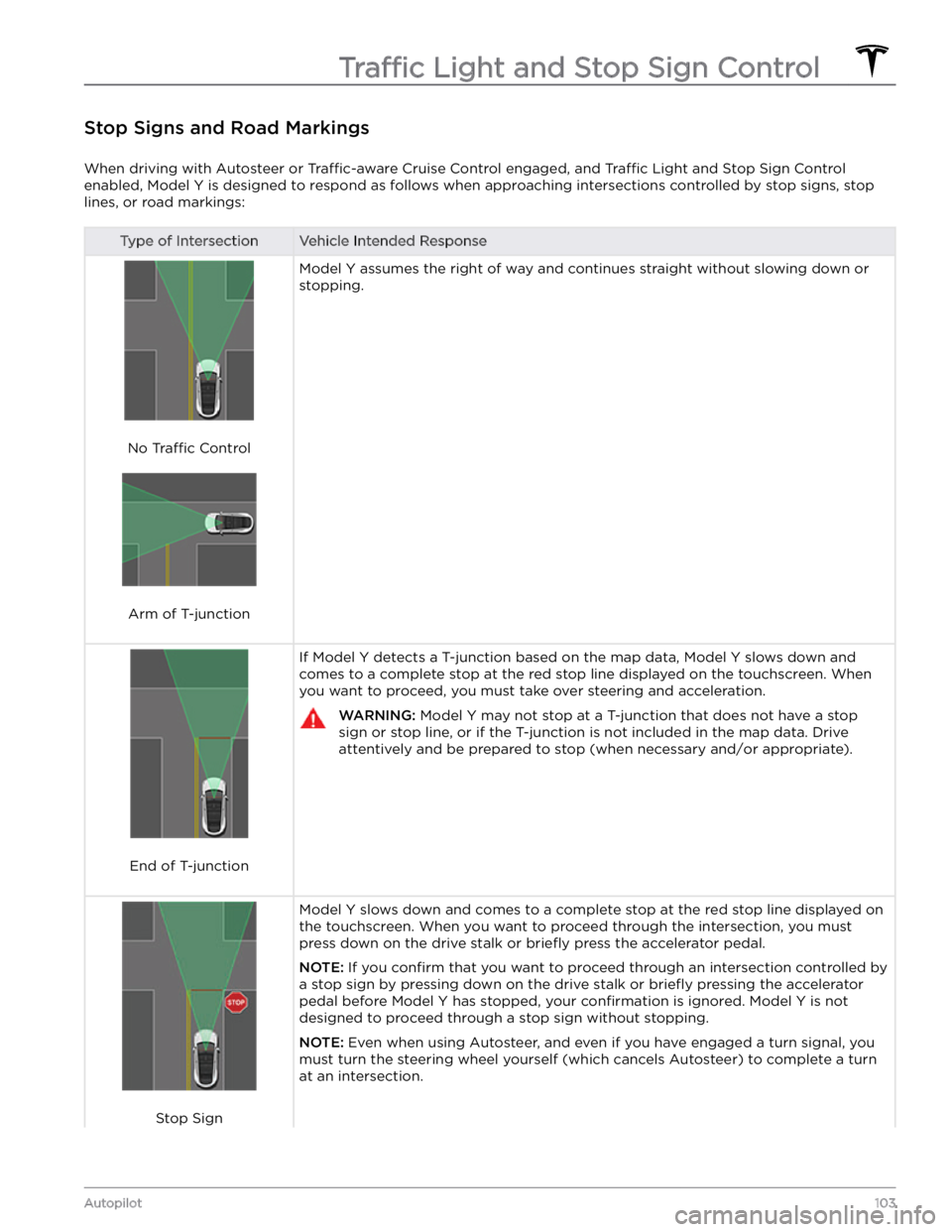
When driving with Autosteer or Traffic-aware Cruise Control engaged, and Traffic Light and Stop Sign Control
enabled,
Model Y is designed to respond as follows when approaching intersections controlled by stop signs, stop
lines, or road markings:
Type of IntersectionVehicle Intended Response
No Traffic Control
Arm of T-junction
Model Y assumes the right of way and continues straight without slowing down or
stopping.
End of T-junction
If Model Y detects a T-junction based on the map data, Model Y slows down and
comes to a complete stop at the red stop line displayed on the
touchscreen. When
you want to proceed, you must take over steering and acceleration.
WARNING: Model Y may not stop at a T-junction that does not have a stop
sign or stop line, or if the T-junction is not included in the map data. Drive
attentively and be prepared to stop (when necessary and/or appropriate).
Stop Sign
Model Y slows down and comes to a complete stop at the red stop line displayed on
the
touchscreen. When you want to proceed through the intersection, you must
press down on the drive stalk or briefly press the accelerator pedal.
NOTE: If you confirm that you want to proceed through an intersection controlled by
a stop sign by
pressing down on the drive stalk or briefly pressing the accelerator
pedal before
Model Y has stopped, your confirmation is ignored. Model Y is not
designed to proceed through a stop sign without stopping.
NOTE: Even when using Autosteer, and even if you have engaged a turn signal, you
must turn the
steering wheel yourself (which cancels Autosteer) to complete a turn
at an intersection.
Traffic Light and Stop Sign Control
103Autopilot
Page 109 of 250
To Cancel Parking
Autopark cancels the parking sequence when you
manually move the
steering wheel, change gears, or
touch
Cancel on the touchscreen. Autopark also cancels
parking when:
Page 126 of 250
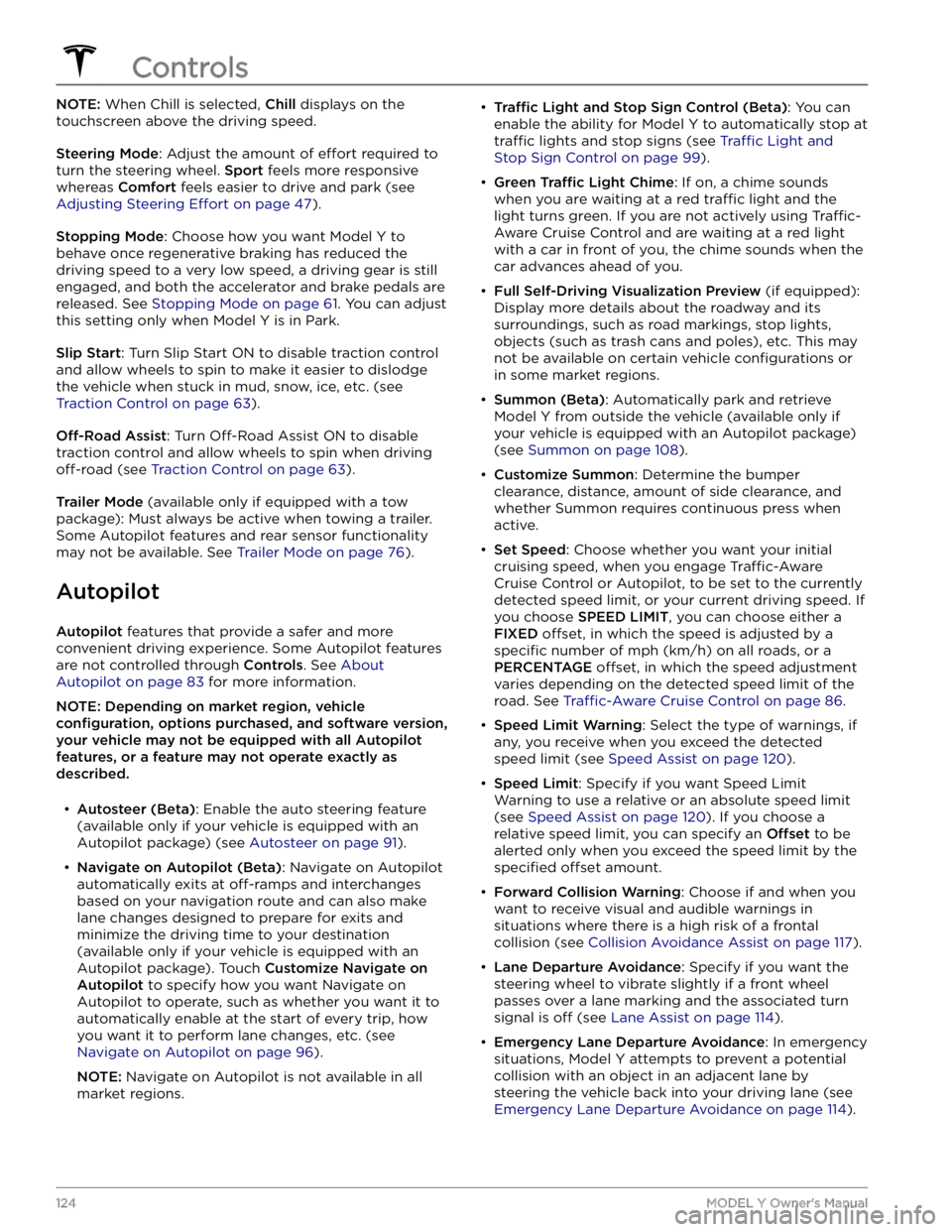
NOTE: When Chill is selected, Chill displays on the
touchscreen above the driving speed.
Steering Mode: Adjust the amount of effort required to
turn the steering wheel.
Sport feels more responsive
whereas
Comfort feels easier to drive and park (see
Adjusting Steering Effort on page 47).
Stopping Mode: Choose how you want Model Y to
behave once regenerative braking has reduced the driving speed to a very low speed, a driving gear is still
engaged, and both the accelerator and brake pedals are
released. See
Stopping Mode on page 61. You can adjust
this setting only when
Model Y is in Park.
Slip Start: Turn Slip Start ON to disable traction control
and allow wheels to spin to make it easier to dislodge the vehicle when stuck in mud, snow, ice, etc. (see
Traction Control on page 63).
Off-Road Assist: Turn Off-Road Assist ON to disable
traction control and allow wheels to spin when driving
off-road (see Traction Control on page 63).
Trailer Mode (available only if equipped with a tow
package): Must always be active when towing a trailer.
Some Autopilot features and rear sensor functionality may not be available. See
Trailer Mode on page 76).
Autopilot
Autopilot features that provide a safer and more
convenient driving experience. Some Autopilot features
are not controlled through
Controls. See About
Autopilot on page 83 for more information.
NOTE: Depending on market region, vehicle
configuration, options purchased, and software version,
your vehicle may not be equipped with all Autopilot
features, or a feature may not operate exactly as
described.
Page 131 of 250
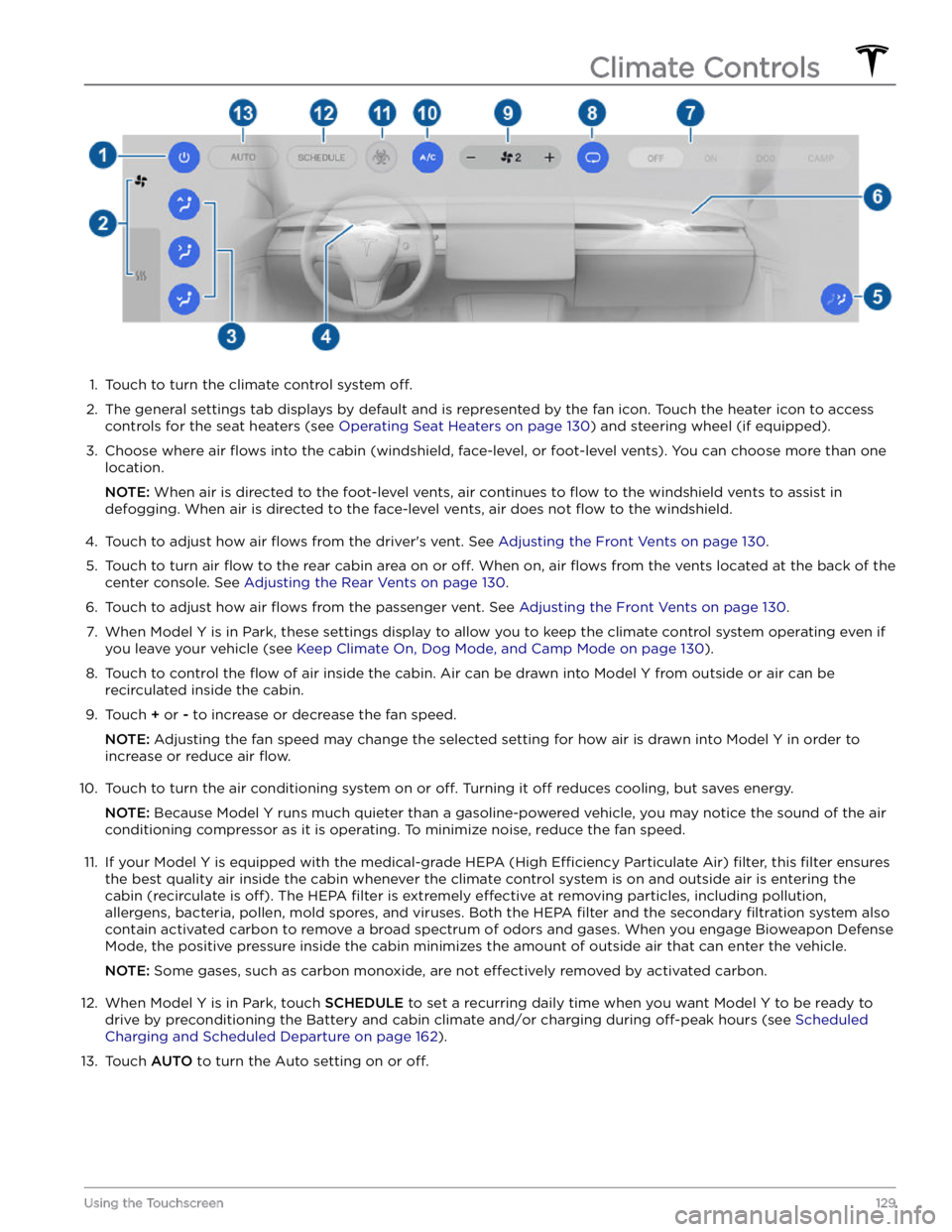
1.
Touch to turn the climate control system off.
2.
The general settings tab displays by default and is represented by the fan icon. Touch the heater icon to access
controls for the seat heaters (see
Operating Seat Heaters on page 130) and steering wheel (if equipped).
3.
Choose where air flows into the cabin (windshield, face-level, or foot-level vents). You can choose more than one
location.
NOTE: When air is directed to the foot-level vents, air continues to flow to the windshield vents to assist in
defogging. When air is directed to the face-level vents, air does not
flow to the windshield.
4.
Touch to adjust how air flows from the driver
Page 169 of 250
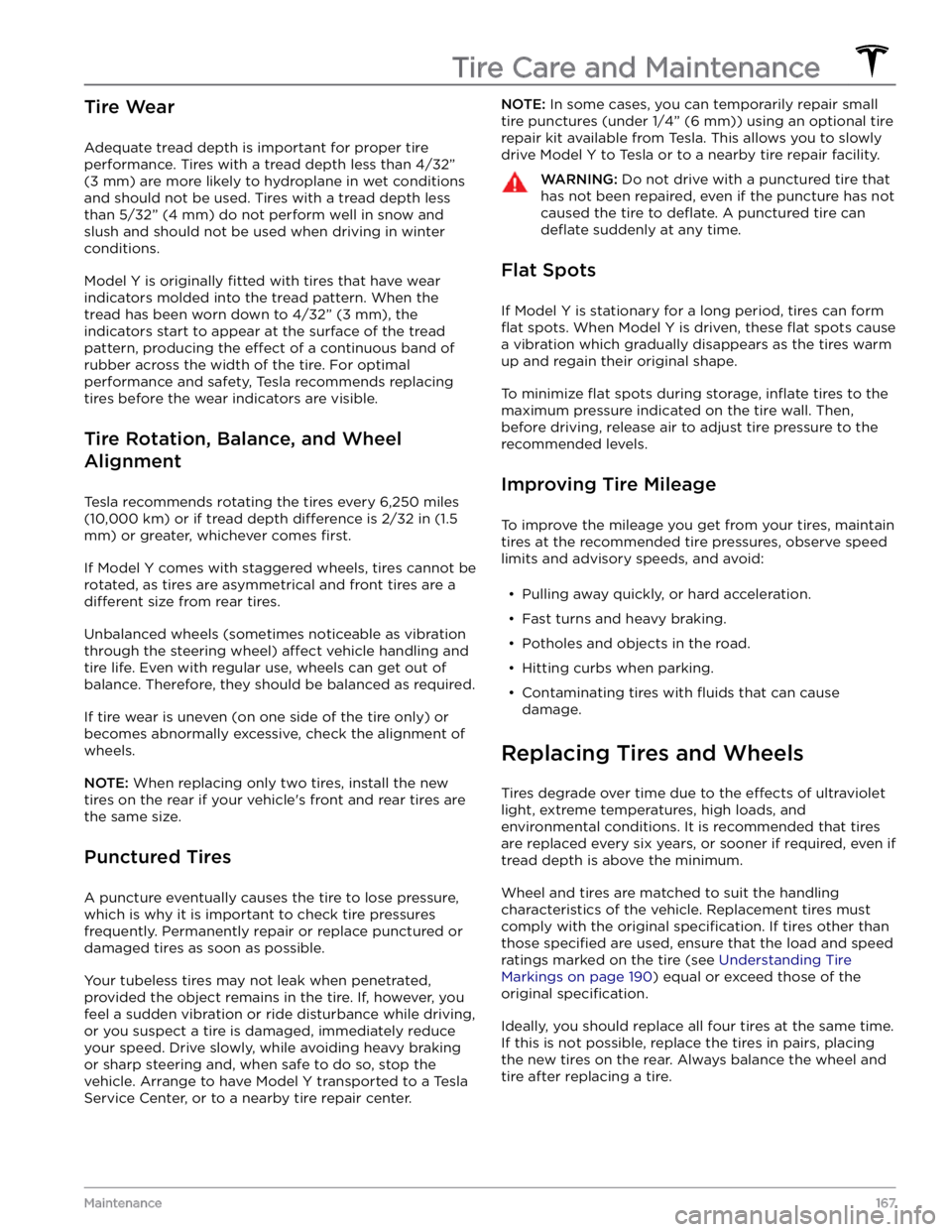
Tire Wear
Adequate tread depth is important for proper tire
performance. Tires with a tread depth less than
4/32”
(3 mm) are more likely to hydroplane in wet conditions
and should not be used. Tires with a tread depth less than
5/32” (4 mm) do not perform well in snow and
slush and should not be used when driving in winter conditions.
Model Y is originally fitted with tires that have wear
indicators molded into the tread pattern. When the
tread has been worn down to
4/32” (3 mm), the
indicators start to appear at the surface of the tread pattern, producing the
effect of a continuous band of
rubber across the width of the tire. For optimal performance and safety, Tesla recommends replacing tires before the wear indicators are visible.
Tire Rotation, Balance, and Wheel
Alignment
Tesla recommends rotating the tires every 6,250 miles
(10,000 km) or if tread depth difference is 2/32 in (1.5
mm) or greater, whichever comes first.
If Model Y comes with staggered wheels, tires cannot be rotated, as tires are asymmetrical and front tires are a
different size from rear tires.
Unbalanced wheels (sometimes noticeable as vibration through the
steering wheel) affect vehicle handling and
tire life. Even with regular use, wheels can get out of balance. Therefore, they should be balanced as required.
If tire wear is uneven (on one side of the tire only) or
becomes abnormally excessive, check the alignment of wheels.
NOTE: When replacing only two tires, install the new
tires on the rear if your vehicle
Page 189 of 250
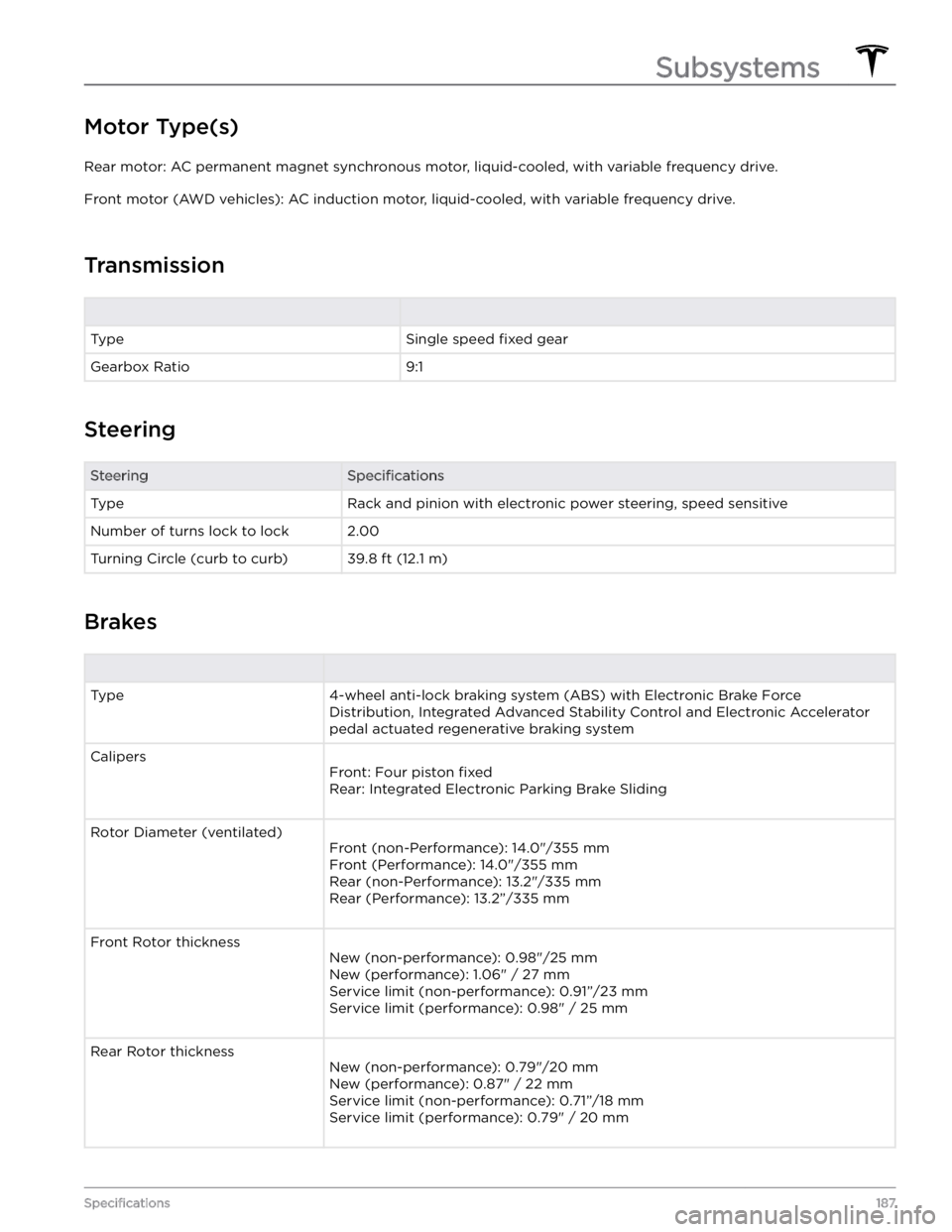
Motor Type(s)
Rear motor: AC permanent magnet synchronous motor, liquid-cooled, with variable frequency drive.
Front motor (AWD vehicles): AC induction motor, liquid-cooled, with variable frequency drive.
Transmission
TypeSingle speed fixed gearGearbox Ratio9:1
Steering
SteeringSpecificationsTypeRack and pinion with electronic power steering, speed sensitiveNumber of turns lock to lock2.00Turning Circle (curb to curb)39.8 ft (12.1 m)
Brakes
Type4-wheel anti-lock braking system (ABS) with Electronic Brake Force Distribution, Integrated Advanced Stability Control and Electronic Accelerator
pedal actuated regenerative braking systemCalipers
Front: Four piston fixed
Rear: Integrated Electronic Parking Brake Sliding
Rotor Diameter (ventilated)
Front (non-Performance): 14.0"/355 mm
Front (Performance): 14.0"/355 mm
Rear (non-Performance): 13.2"/335 mm
Rear (Performance): 13.2”/335 mm
Front Rotor thickness
New (non-performance): 0.98"/25 mm
New (performance): 1.06" / 27 mm Service limit (non-performance): 0.91”/23 mmService limit (performance): 0.98" / 25 mm
Rear Rotor thickness
New (non-performance): 0.79"/20 mm
New (performance): 0.87" / 22 mm Service limit (non-performance): 0.71”/18 mm
Service limit (performance): 0.79" / 20 mm
Subsystems
187Specifications
Page 243 of 250
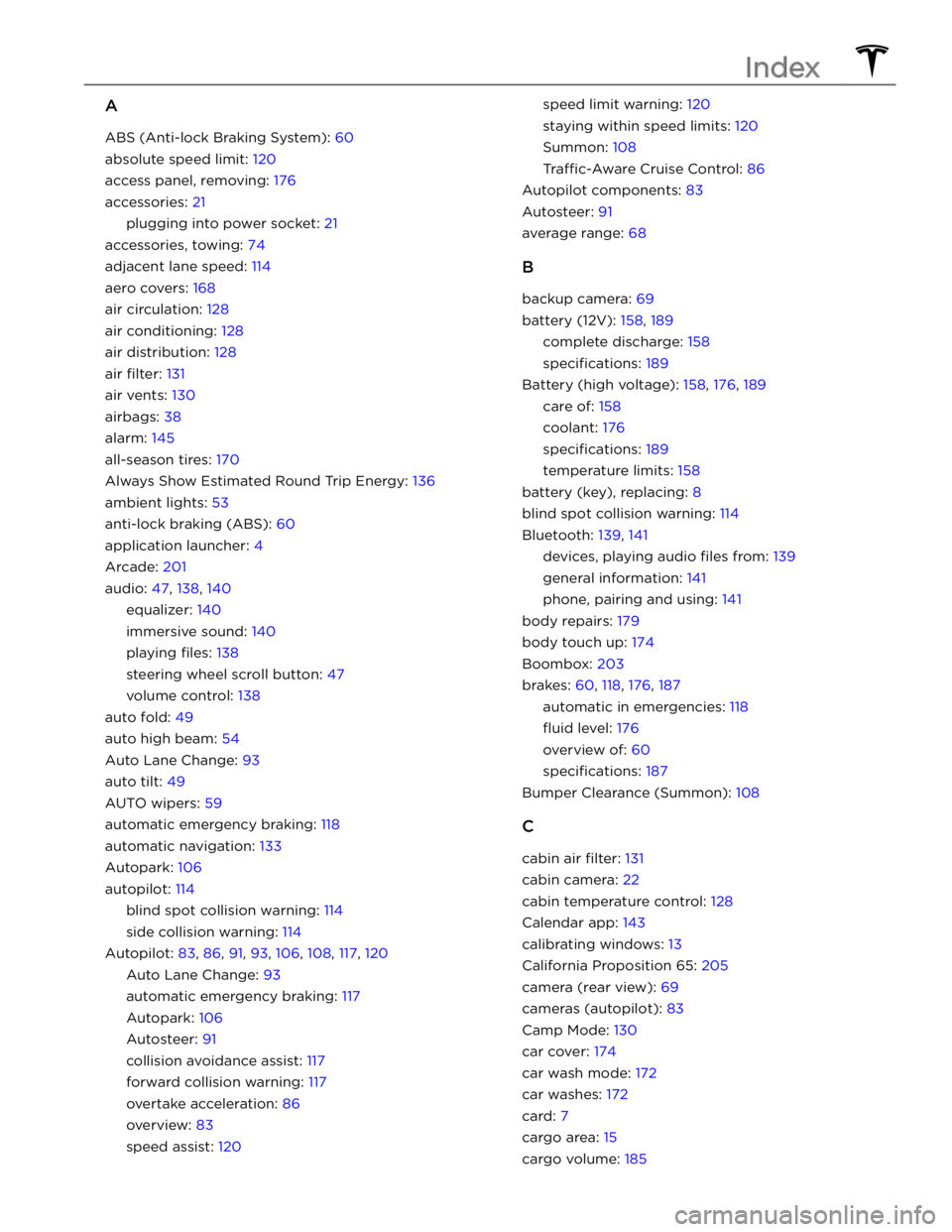
A
ABS (Anti-lock Braking System): 60
absolute speed limit: 120
access panel, removing: 176
accessories: 21
plugging into power socket: 21
accessories, towing: 74
adjacent lane speed: 114
aero covers: 168
air circulation: 128
air conditioning: 128
air distribution: 128
air filter: 131
air vents: 130
airbags: 38
alarm: 145
all-season tires: 170
Always Show Estimated Round Trip Energy: 136
ambient lights: 53
anti-lock braking (ABS): 60
application launcher: 4
Arcade: 201
audio: 47, 138, 140
equalizer: 140
immersive sound: 140
playing files: 138
steering wheel scroll button: 47
volume control: 138
auto fold: 49
auto high beam: 54
Auto Lane Change: 93
auto tilt: 49
AUTO wipers: 59
automatic emergency braking: 118
automatic navigation: 133
Autopark: 106
autopilot: 114
blind spot collision warning: 114
side collision warning: 114
Autopilot: 83, 86, 91, 93, 106, 108, 117, 120
Auto Lane Change: 93
automatic emergency braking: 117
Autopark: 106
Autosteer: 91
collision avoidance assist: 117
forward collision warning: 117
overtake acceleration: 86
overview: 83
speed assist: 120
speed limit warning: 120
staying within speed limits: 120
Summon: 108
Traffic-Aware Cruise Control: 86
Autopilot components: 83
Autosteer: 91
average range: 68
B
backup camera: 69
battery (12V): 158, 189
complete discharge: 158
specifications: 189
Battery (high voltage): 158, 176, 189
care of: 158
coolant: 176
specifications: 189
temperature limits: 158
battery (key), replacing: 8
blind spot collision warning: 114
Bluetooth: 139, 141
devices, playing audio files from: 139
general information: 141
phone, pairing and using: 141
body repairs: 179
body touch up: 174
Boombox: 203
brakes: 60, 118, 176, 187
automatic in emergencies: 118
fluid level: 176
overview of: 60
specifications: 187
Bumper Clearance (Summon): 108
C
cabin air filter: 131
cabin camera: 22
cabin temperature control: 128
Calendar app: 143
calibrating windows: 13
California Proposition 65: 205
camera (rear view): 69
cameras (autopilot): 83
Camp Mode: 130
car cover: 174
car wash mode: 172
car washes: 172
card: 7
cargo area: 15
cargo volume: 185
Index
Page 247 of 250
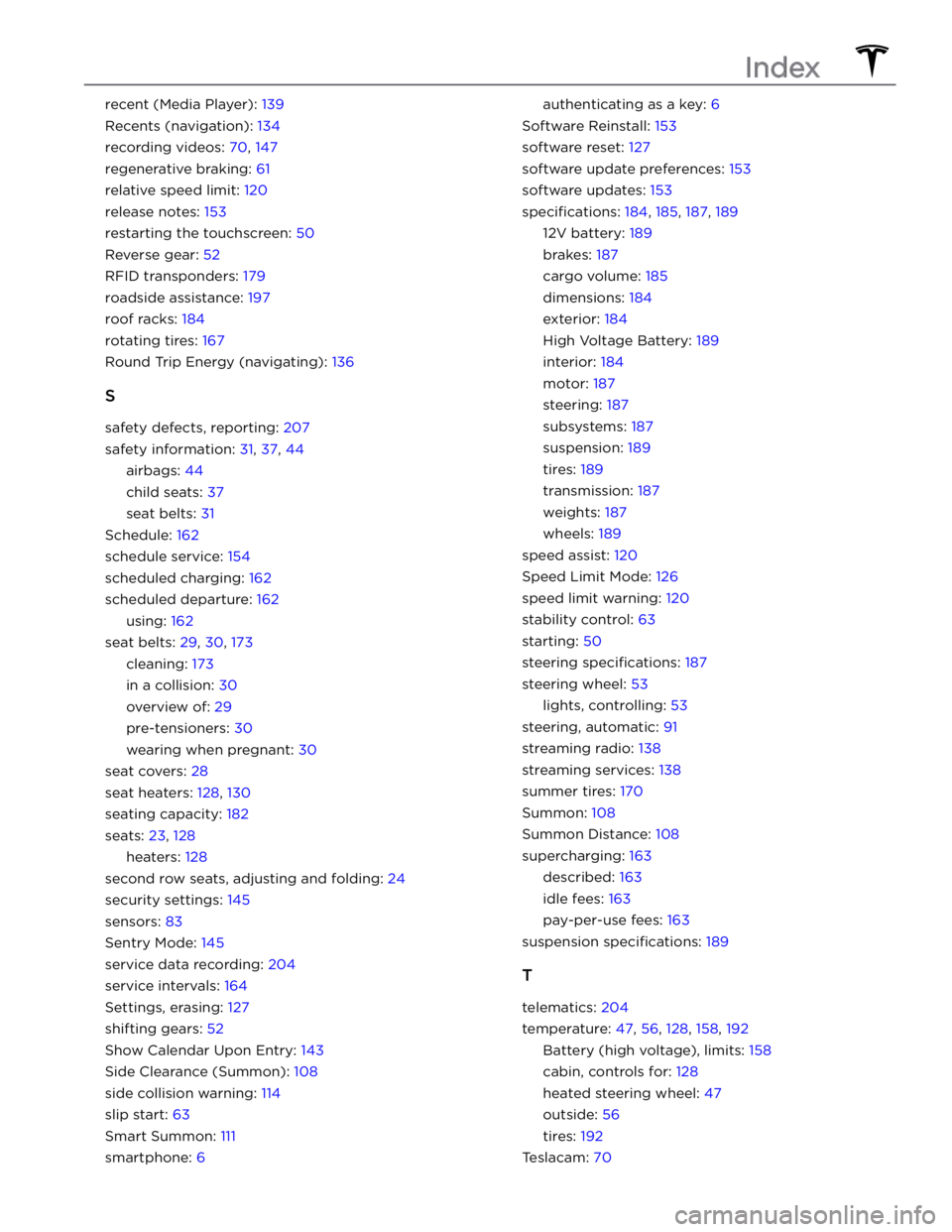
recent (Media Player): 139
Recents (navigation): 134
recording videos: 70, 147
regenerative braking: 61
relative speed limit: 120
release notes: 153
restarting the touchscreen: 50
Reverse gear: 52
RFID transponders: 179
roadside assistance: 197
roof racks: 184
rotating tires: 167
Round Trip Energy (navigating): 136
S
safety defects, reporting: 207
safety information: 31, 37, 44
airbags: 44
child seats: 37
seat belts: 31
Schedule: 162
schedule service: 154
scheduled charging: 162
scheduled departure: 162
using: 162
seat belts: 29, 30, 173
cleaning: 173
in a collision: 30
overview of: 29
pre-tensioners: 30
wearing when pregnant: 30
seat covers: 28
seat heaters: 128, 130
seating capacity: 182
seats: 23, 128
heaters: 128
second row seats, adjusting and folding: 24
security settings: 145
sensors: 83
Sentry Mode: 145
service data recording: 204
service intervals: 164
Settings, erasing: 127
shifting gears: 52
Show Calendar Upon Entry: 143
Side Clearance (Summon): 108
side collision warning: 114
slip start: 63
Smart Summon: 111
smartphone: 6
authenticating as a key: 6
Software Reinstall: 153
software reset: 127
software update preferences: 153
software updates: 153
specifications: 184, 185, 187, 189
12V battery: 189
brakes: 187
cargo volume: 185
dimensions: 184
exterior: 184
High Voltage Battery: 189
interior: 184
motor: 187
steering: 187
subsystems: 187
suspension: 189
tires: 189
transmission: 187
weights: 187
wheels: 189
speed assist: 120
Speed Limit Mode: 126
speed limit warning: 120
stability control: 63
starting: 50
steering specifications: 187
steering wheel: 53
lights, controlling: 53
steering, automatic: 91
streaming radio: 138
streaming services: 138
summer tires: 170
Summon: 108
Summon Distance: 108
supercharging: 163
described: 163
idle fees: 163
pay-per-use fees: 163
suspension specifications: 189
T
telematics: 204
temperature: 47, 56, 128, 158, 192
Battery (high voltage), limits: 158
cabin, controls for: 128
heated steering wheel: 47
outside: 56
tires: 192
Teslacam: 70
Index