service TESLA MODEL Y 2022 Owner´s Manual
[x] Cancel search | Manufacturer: TESLA, Model Year: 2022, Model line: MODEL Y, Model: TESLA MODEL Y 2022Pages: 250, PDF Size: 8.4 MB
Page 220 of 250

(CC_a019)
Unable to charge - Vehicle connection issue
Insert charge handle fully into charge port
What this alert means:
A communication error occurred between the Wall Connector and the vehicle.
What to do:
Try again by disconnecting the Wall Connector from the vehicle and reconnecting. If possible, plug the vehicle into
another Wall Connector or a Mobile Connector to determine if the vehicle is able to communicate with other
charging equipment. If the problem persists, contact Tesla.
(CC_a020)
Unable to charge - Wall Connector issue
Wall Connector needs service
What this alert means:
Wall Connector hardware issue. Possible issues include:
1.
Contactor not working
2.
Self-test of internal ground fault monitoring circuit failed
3.
Thermal sensor disconnected
4.
Other hardware component issues
What to do:
An internal issue was detected by the Wall Connector.
1.
Try charging again by disconnecting the Wall Connector from the vehicle and reconnecting.
2.
If the issue persists, turn OFF the circuit breaker for the Wall Connector, wait 10 seconds, and turn the circuit
breaker ON again. Then try reconnecting the Wall Connector to the vehicle.
3.
If the issue persists, check for loose connections.
a.
Make sure there is no power to the Wall Connector.
b.
Remove the face plate and inspect the wiring terminals for any loose connections.
c.
Contact an electrician if necessary to make sure all wires are properly connected and torqued according to the
instructions in the Wall Connector Installation Manual.
4.
Once all connections have been checked and made secure, restore power to the Wall Connector and try charging
again by reconnecting to the vehicle.
5.
If the issue persists, the Wall Connector needs service. Schedule a service appointment through your Mobile App.
(CC_a021)
Unable to charge - No primary Wall Connector
Check that primary unit is powered and available
What this alert means:
Circuit Breaker Sharing Network: Need one (and only one) Wall Connector set to Master.
What to do:
Troubleshooting Alerts
218MODEL Y Owner
Page 221 of 250

Only one Wall Connector can be set to a master configuration. All other linked Wall Connectors must be set to
paired (position F). Set one of the Wall Connectors to Master and all others to paired.
(CC_a022)
Unable to charge - More than 1 primary unit
Ensure only 1 Wall Connector is set as primary
What this alert means:
Circuit Breaker Sharing Network: Need one (and only one) Wall Connector set to Master.
What to do:
Only one Wall Connector can be set to a master configuration. All other linked Wall Connectors must be set to
paired (position F). Set one of the Wall Connectors to Master and all others to paired.
(CC_a023)
Unable to charge - Too many Wall Connectors
Ensure no more than 3 units paired with primary
What this alert means:
Circuit Breaker Sharing Network: More than three Wall Connectors are paired with the same Master.
What to do:
One or more paired Wall Connectors must be moved to a different circuit and disconnected (unpaired) from this
Circuit Breaker Sharing Network.
(CC_a024)
Unable to charge - Low Wall Connector current
Primary unit current setting must be increased
What this alert means:
Incorrect rotary switch setting.
What to do:
Make sure there is no power to the Wall Connector. Remove the face plate and adjust the rotary switch to a valid
operating current setting. The correlation between switch setting and current is printed on the inside of the Wall
Connector. You can also refer to the Set the Operating Current section in the Wall Connector Installation Manual. If
the Wall Connector is set up for load sharing (paired with other Wall Connectors), the rotary switch of the master
unit must be set to an operating current setting that allows each paired Wall Connector to receive at least 6A of
charge current. Example: Three Wall Connectors are paired for load sharing. The master unit needs to be set to a
current of at least 3 * 6A = 18A or greater.
(CC_a025)
Unable to charge - Wall Connector issue
Wall Connector needs service
What this alert means:
Wall Connector hardware issue. Possible issues include:
1.
Contactor not working
2.
Self-test of internal ground fault monitoring circuit failed
Troubleshooting Alerts
219Consumer Information
Page 222 of 250

3. Thermal sensor disconnected4.
Other hardware component issues
What to do:
An internal issue was detected by the Wall Connector.
1.
Try charging again by disconnecting the Wall Connector from the vehicle and reconnecting.
2.
If the issue persists, turn OFF the circuit breaker for the Wall Connector, wait 10 seconds, and turn the circuit
breaker ON again. Then try reconnecting the Wall Connector to the vehicle.
3.
If the issue persists, check for loose connections.
a.
Make sure there is no power to the Wall Connector.
b.
Remove the face plate and inspect the wiring terminals for any loose connections.
c.
Contact an electrician if necessary to make sure all wires are properly connected and torqued according to the
instructions in the Wall Connector Installation Manual.
4.
Once all connections have been checked and made secure, restore power to the Wall Connector and try charging
again by reconnecting to the vehicle.
5.
If the issue persists, the Wall Connector needs service. Schedule a service appointment through your Mobile App.
(CC_a026)
Unable to charge - Wall Connector issue
Wall Connector needs service
What this alert means:
Wall Connector hardware issue. Possible issues include:
1.
Contactor not working
2.
Self-test of internal ground fault monitoring circuit failed
3.
Thermal sensor disconnected
4.
Other hardware component issues
What to do:
An internal issue was detected by the Wall Connector.
1.
Try charging again by disconnecting the Wall Connector from the vehicle and reconnecting.
2.
If the issue persists, turn OFF the circuit breaker for the Wall Connector, wait 10 seconds, and turn the circuit
breaker ON again. Then try reconnecting the Wall Connector to the vehicle.
3.
If the issue persists, check for loose connections.
a.
Make sure there is no power to the Wall Connector.
b.
Remove the face plate and inspect the wiring terminals for any loose connections.
c.
Contact an electrician if necessary to make sure all wires are properly connected and torqued according to the
instructions in the Wall Connector Installation Manual.
4.
Once all connections have been checked and made secure, restore power to the Wall Connector and try charging
again by reconnecting to the vehicle.
5.
If the issue persists, the Wall Connector needs service. Schedule a service appointment through your Mobile App.
Troubleshooting Alerts
220MODEL Y Owner
Page 223 of 250

(CC_a027)
Unable to charge - Wall Connector issue
Wall Connector needs service
What this alert means:
Wall Connector hardware issue. Possible issues include:
1.
Contactor not working
2.
Self-test of internal ground fault monitoring circuit failed
3.
Thermal sensor disconnected
4.
Other hardware component issues
What to do:
An internal issue was detected by the Wall Connector.
1.
Try charging again by disconnecting the Wall Connector from the vehicle and reconnecting.
2.
If the issue persists, turn OFF the circuit breaker for the Wall Connector, wait 10 seconds, and turn the circuit
breaker ON again. Then try reconnecting the Wall Connector to the vehicle.
3.
If the issue persists, check for loose connections.
a.
Make sure there is no power to the Wall Connector.
b.
Remove the face plate and inspect the wiring terminals for any loose connections.
c.
Contact an electrician if necessary to make sure all wires are properly connected and torqued according to the instructions in the Wall Connector Installation Manual.
4.
Once all connections have been checked and made secure, restore power to the Wall Connector and try charging
again by reconnecting to the vehicle.
5.
If the issue persists, the Wall Connector needs service. Schedule a service appointment through your Mobile App.
(CC_a028)
Unable to charge - Incorrect switch setting
Wall Connector rotary switch must be adjusted
What this alert means:
Incorrect rotary switch setting.
What to do:
Make sure there is no power to the Wall Connector. Remove the face plate and adjust the rotary switch to a valid
operating current setting. The correlation between switch setting and current is printed on the inside of the Wall
Connector. You can also refer to the Set the Operating Current section in the Wall Connector Installation Manual. If
the Wall Connector is set up for load sharing (paired with other Wall Connectors), the rotary switch of the master
unit must be set to an operating current setting that allows each paired Wall Connector to receive at least 6A of
charge current. Example: Three Wall Connectors are paired for load sharing. The master unit needs to be set to a
current of at least 3 * 6A = 18A or greater.
(CC_a029)
Unable to charge - Vehicle connection issue
Insert charge handle fully into charge port
What this alert means:
A communication error occurred between the Wall Connector and the vehicle.
Troubleshooting Alerts
221Consumer Information
Page 225 of 250

As this alert is usually specific to external charging equipment and power sources, and it does not typically indicate
an issue with your vehicle that can be resolved by scheduling service, it is recommended that you:
Page 228 of 250

(CP_a054)
Charge port latch not engaged
Fully insert charge cable or check for obstruction
The charge port latch is unable to latch the charge cable in the charge port inlet. If the latch is not engaged, AC charging (for example, charging with a Tesla Mobile Connector or Wall Connector) will be limited to 16A and DC Fast
Charging / Supercharging will be unavailable.
The charge port light will pulse amber if this alert appears during AC charging and will be solid amber if this alert appears when attempting to DC Fast Charge / Supercharge.
If your vehicle begins charging and the charge port light pulses green, the charge cable may not have been fully
inserted before. The latch may not have engaged during previous attempts because the cable was not fully inserted.
AC charging should no longer be limited, and DC Fast Charging / Supercharging should be available.
If charging is still limited or the vehicle will not charge at all, inspect the charge port inlet and the charge cable
connector for any obstructions (use a
flashlight as needed). Debris and/or foreign objects in the charge port inlet or
the charge cable connector can prevent you from fully inserting the charge cable. If the cable is not fully inserted,
the charge port latch will not engage.
It is recommended that any debris / foreign objects be removed. Afterward, try re-inserting the cable into the charge port inlet. AC charging should no longer be limited, and DC Fast Charging / Supercharging should be available.
As this alert is usually specific to external charging equipment and power sources, and it does not typically indicate
an issue with your vehicle that can be resolved by scheduling service, it is recommended that you:
Page 229 of 250

As this alert is usually specific to external charging equipment and power sources, and it does not typically indicate
an issue with your vehicle that can be resolved by scheduling service, it is recommended that you:
Page 232 of 250
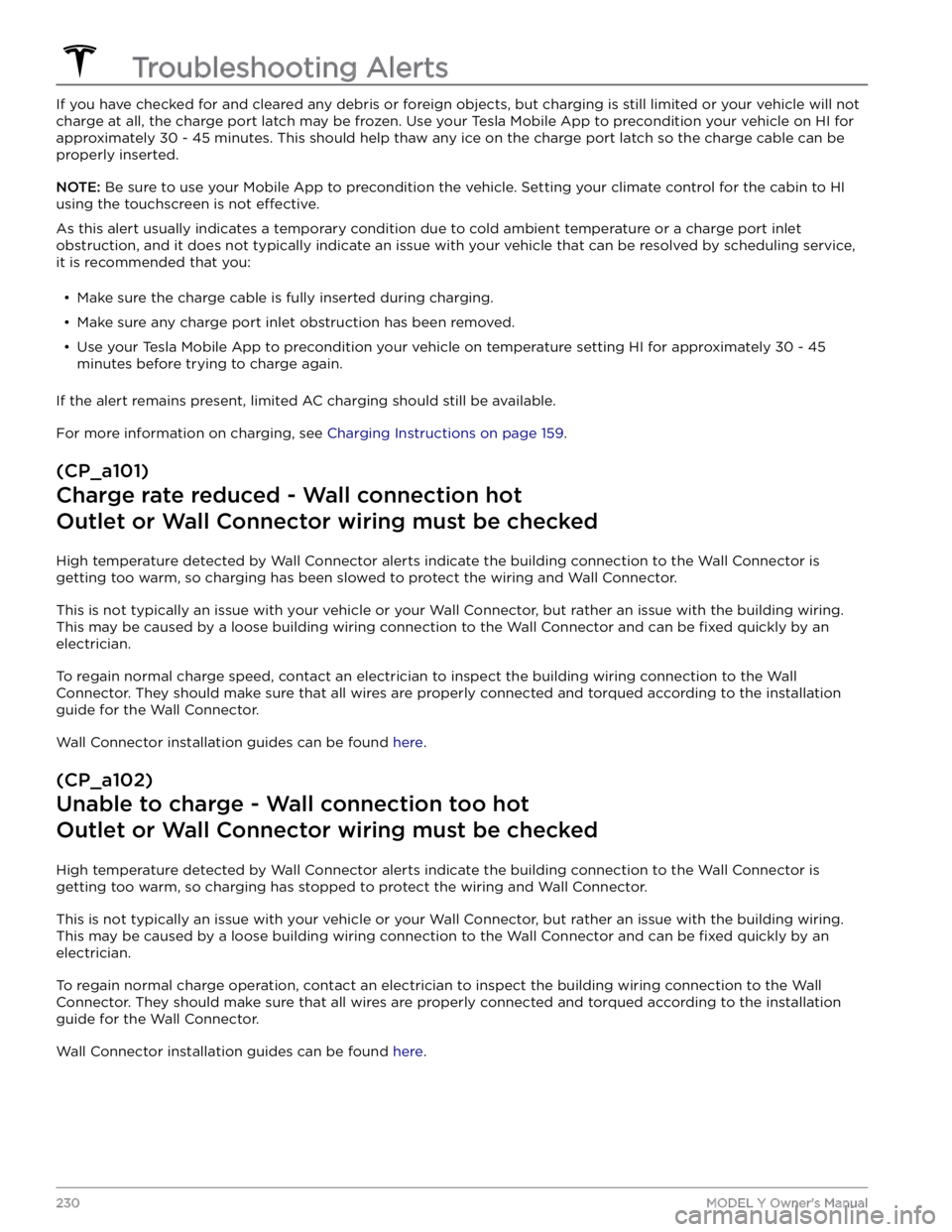
If you have checked for and cleared any debris or foreign objects, but charging is still limited or your vehicle will not charge at all, the charge port latch may be frozen. Use your Tesla Mobile App to precondition your vehicle on HI for approximately 30 - 45 minutes. This should help thaw any ice on the charge port latch so the charge cable can be
properly inserted.
NOTE: Be sure to use your Mobile App to precondition the vehicle. Setting your climate control for the cabin to HI
using the touchscreen is not
effective.
As this alert usually indicates a temporary condition due to cold ambient temperature or a charge port inlet obstruction, and it does not typically indicate an issue with your vehicle that can be resolved by scheduling service, it is recommended that you:
Page 239 of 250

As this alert is usually specific to external charging equipment and power sources, and it does not typically indicate
an issue with your vehicle that can be resolved by scheduling service, it is recommended that you:
Page 240 of 250
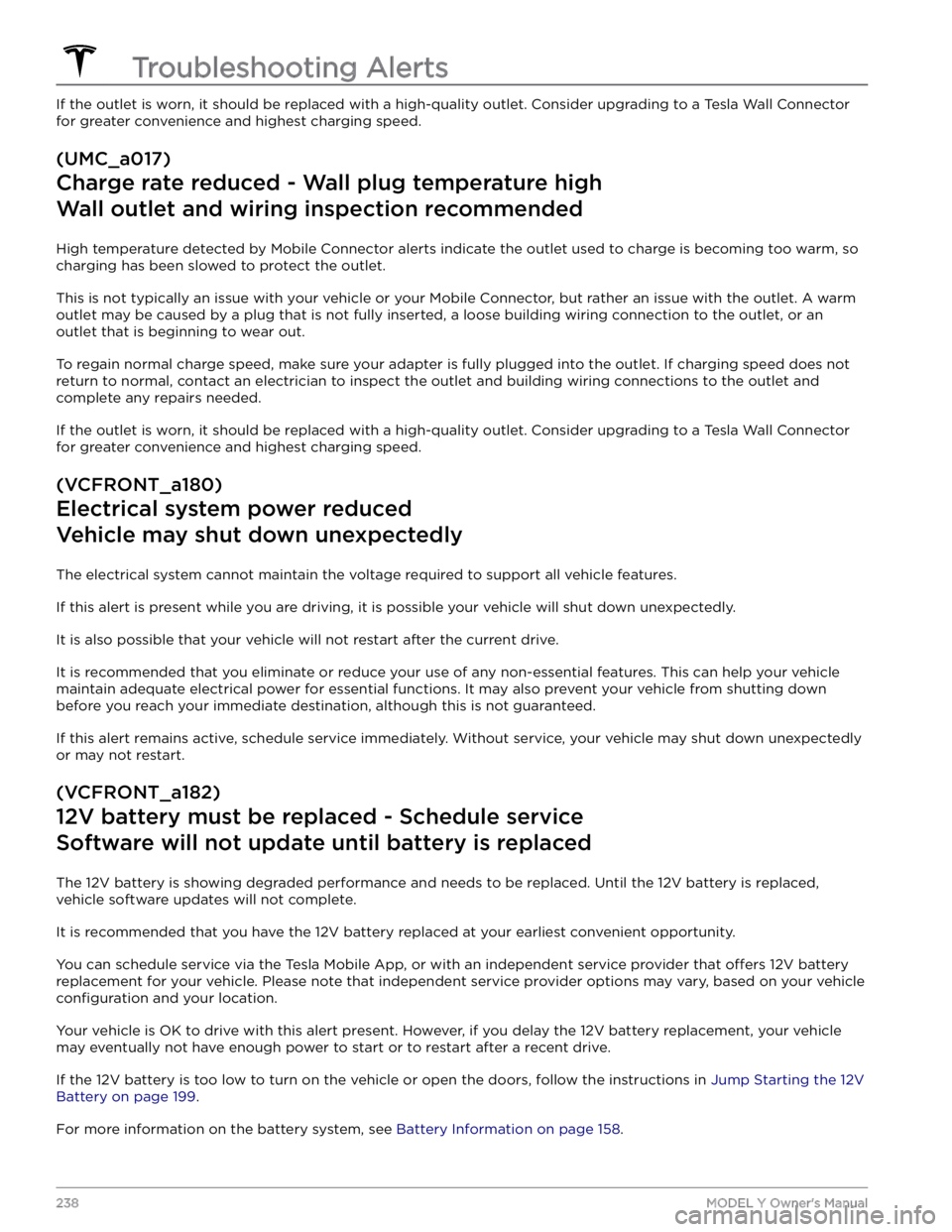
If the outlet is worn, it should be replaced with a high-quality outlet. Consider upgrading to a Tesla Wall Connector
for greater convenience and highest charging speed.
(UMC_a017)
Charge rate reduced - Wall plug temperature high
Wall outlet and wiring inspection recommended
High temperature detected by Mobile Connector alerts indicate the outlet used to charge is becoming too warm, so
charging has been slowed to protect the outlet.
This is not typically an issue with your vehicle or your Mobile Connector, but rather an issue with the outlet. A warm outlet may be caused by a plug that is not fully inserted, a loose building wiring connection to the outlet, or an outlet that is beginning to wear out.
To regain normal charge speed, make sure your adapter is fully plugged into the outlet. If charging speed does not
return to normal, contact an electrician to inspect the outlet and building wiring connections to the outlet and
complete any repairs needed.
If the outlet is worn, it should be replaced with a high-quality outlet. Consider upgrading to a Tesla Wall Connector
for greater convenience and highest charging speed.
(VCFRONT_a180)
Electrical system power reduced
Vehicle may shut down unexpectedly
The electrical system cannot maintain the voltage required to support all vehicle features.
If this alert is present while you are driving, it is possible your vehicle will shut down unexpectedly.
It is also possible that your vehicle will not restart after the current drive.
It is recommended that you eliminate or reduce your use of any non-essential features. This can help your vehicle maintain adequate electrical power for essential functions. It may also prevent your vehicle from shutting down
before you reach your immediate destination, although this is not guaranteed.
If this alert remains active, schedule service immediately. Without service, your vehicle may shut down unexpectedly
or may not restart.
(VCFRONT_a182)
12V battery must be replaced - Schedule service
Software will not update until battery is replaced
The 12V battery is showing degraded performance and needs to be replaced. Until the 12V battery is replaced,
vehicle software updates will not complete.
It is recommended that you have the 12V battery replaced at your earliest convenient opportunity.
You can schedule service via the Tesla Mobile App, or with an independent service provider that offers 12V battery
replacement for your vehicle. Please note that independent service provider options may vary, based on your vehicle
configuration and your location.
Your vehicle is OK to drive with this alert present. However, if you delay the 12V battery replacement, your vehicle
may eventually not have enough power to start or to restart after a recent drive.
If the 12V battery is too low to turn on the vehicle or open the doors, follow the instructions in Jump Starting the 12V
Battery on page 199.
For more information on the battery system, see Battery Information on page 158.
Troubleshooting Alerts
238MODEL Y Owner