climate TESLA MODEL Y 2023 User Guide
[x] Cancel search | Manufacturer: TESLA, Model Year: 2023, Model line: MODEL Y, Model: TESLA MODEL Y 2023Pages: 298, PDF Size: 10.28 MB
Page 129 of 298
Overview of Climate Controls
Climate controls are available at the bottom of the touchscreen. By default, climate control is set to Auto, which
maintains optimum comfort in all but the most severe weather conditions. When you adjust the cabin temperature
while in the
Auto setting, the system automatically adjusts the heating, air conditioning, air distribution, and fan
speed to maintain the cabin at your selected temperature.
Touch the displayed temperature at the bottom of the touchscreen to access the main climate controls screen, where you can adjust your climate preferences. You can revert back to Auto at any time by touching
Auto. Touch the
power button on the main climate controls screen to toggle on or
off. For quick access to common controls, touch <
or > to display the climate popup.
NOTE: The climate control system is powered by the high voltage Battery. Therefore, prolonged use decreases
driving range.
WARNING: To avoid burns resulting from prolonged use, individuals who have peripheral neuropathy, or whose
capacity to feel pain is limited because of diabetes, age, neurological injury, or some other condition, should
exercise caution when using the climate control system and seat heaters.
Adjusting Climate Control Settings
NOTE: Easily adjust your climate preferences, such as turning on the seat heater or changing the cabin temperature,
hands-free by using voice commands (see
Voice Commands on page 136).
NOTE: For one-touch access to seat heaters and defrosters, you can add these controls to My Apps. See
Customizing My Apps on page 8.
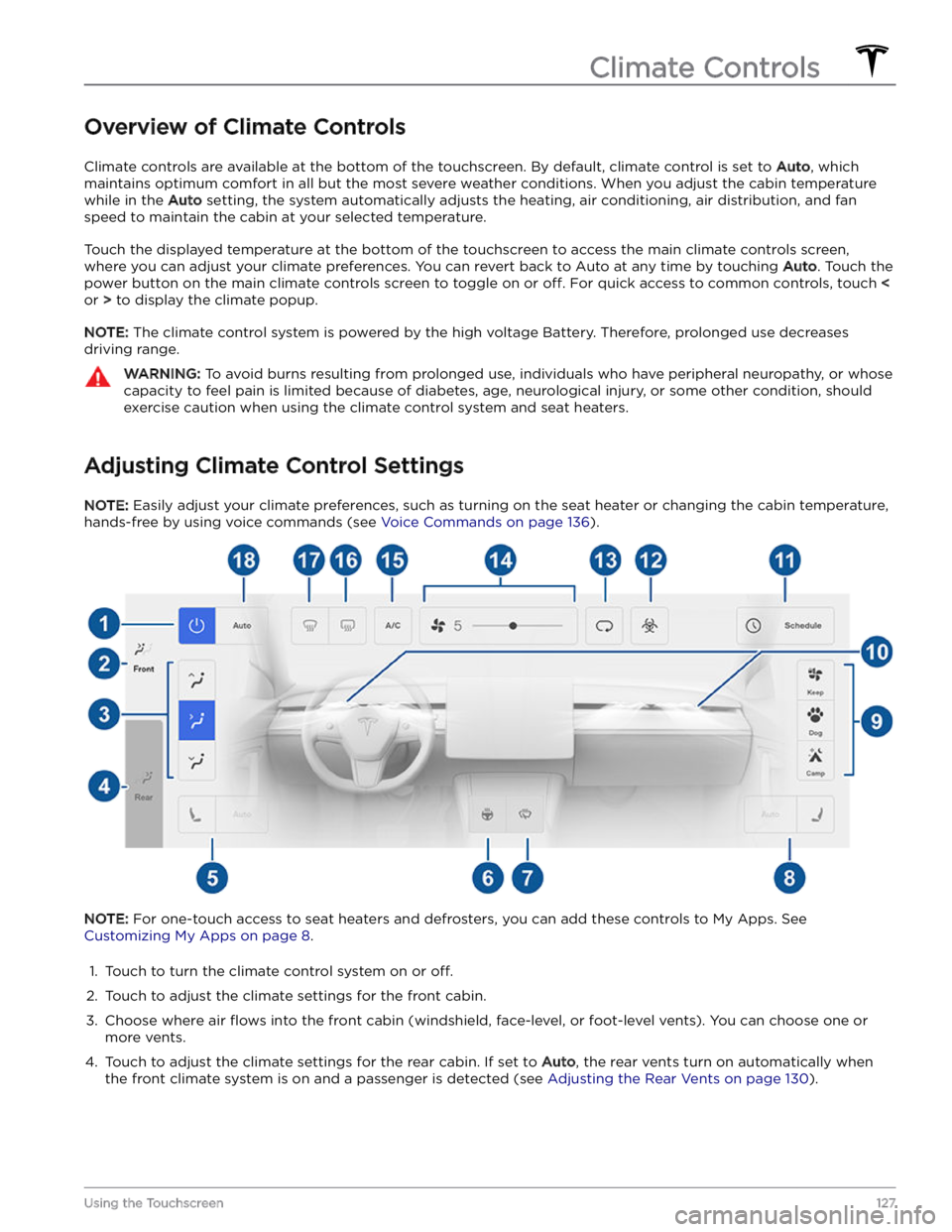
1.
Touch to turn the climate control system on or off.
2.
Touch to adjust the climate settings for the front cabin.
3.
Choose where air flows into the front cabin (windshield, face-level, or foot-level vents). You can choose one or
more vents.
4.
Touch to adjust the climate settings for the rear cabin. If set to Auto, the rear vents turn on automatically when
the front climate system is on and a passenger is detected (see Adjusting the Rear Vents on page 130).
Climate Controls
127Using the Touchscreen
Page 131 of 298
NOTE: For one-touch access to seat heaters and defrosters, you can add these controls to My Apps. See
Customizing My Apps on page 8.
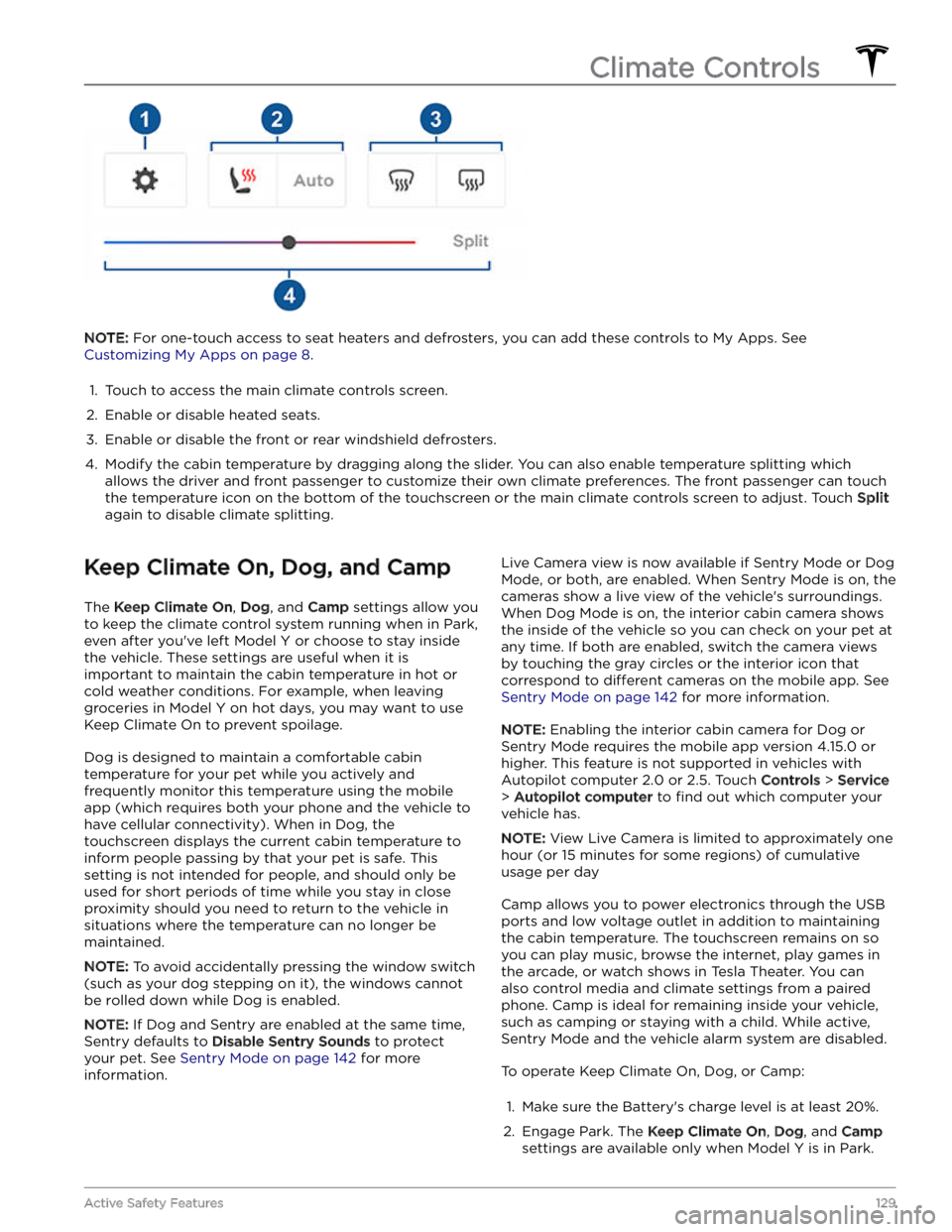
1.
Touch to access the main climate controls screen.
2.
Enable or disable heated seats.
3.
Enable or disable the front or rear windshield defrosters.
4.
Modify the cabin temperature by dragging along the slider. You can also enable temperature splitting which
allows the driver and front passenger to customize their own climate preferences. The front passenger can touch
the temperature icon on the bottom of the touchscreen or the main climate controls screen to adjust. Touch
Split
again to disable climate splitting.
Keep Climate On, Dog, and Camp
The Keep Climate On, Dog, and Camp settings allow you
to keep the climate control system running when in Park,
even after you
Page 132 of 298
3. If necessary, adjust the climate settings.4.
On the climate controls screen, touch Keep Climate
On, Dog, or Camp.
NOTE: You can also control Dog and Camp from the
mobile app, by swiping up from the gray bar on the
Climate screen.
The climate control system attempts to maintain your climate settings until you shift out of Park or manually
turn it
off. Avoid using Keep Climate On, Dog, or Camp
when the Battery
Page 133 of 298

Cabin Air Filter(s)
Model Y has one or more air filters to prevent pollen,
industrial fallout, road dust and other particles from entering through the vents.
NOTE: Cabin air filter(s) require periodic replacement.
See
Service Intervals on page 177.
Cabin Overheat Protection
Cabin Overheat Protection prevents the cabin from
getting too hot in scorching ambient conditions. While not necessary to activate whenever you leave
Model Y,
the climate control system can reduce and maintain the temperature of your vehicle
Page 138 of 298
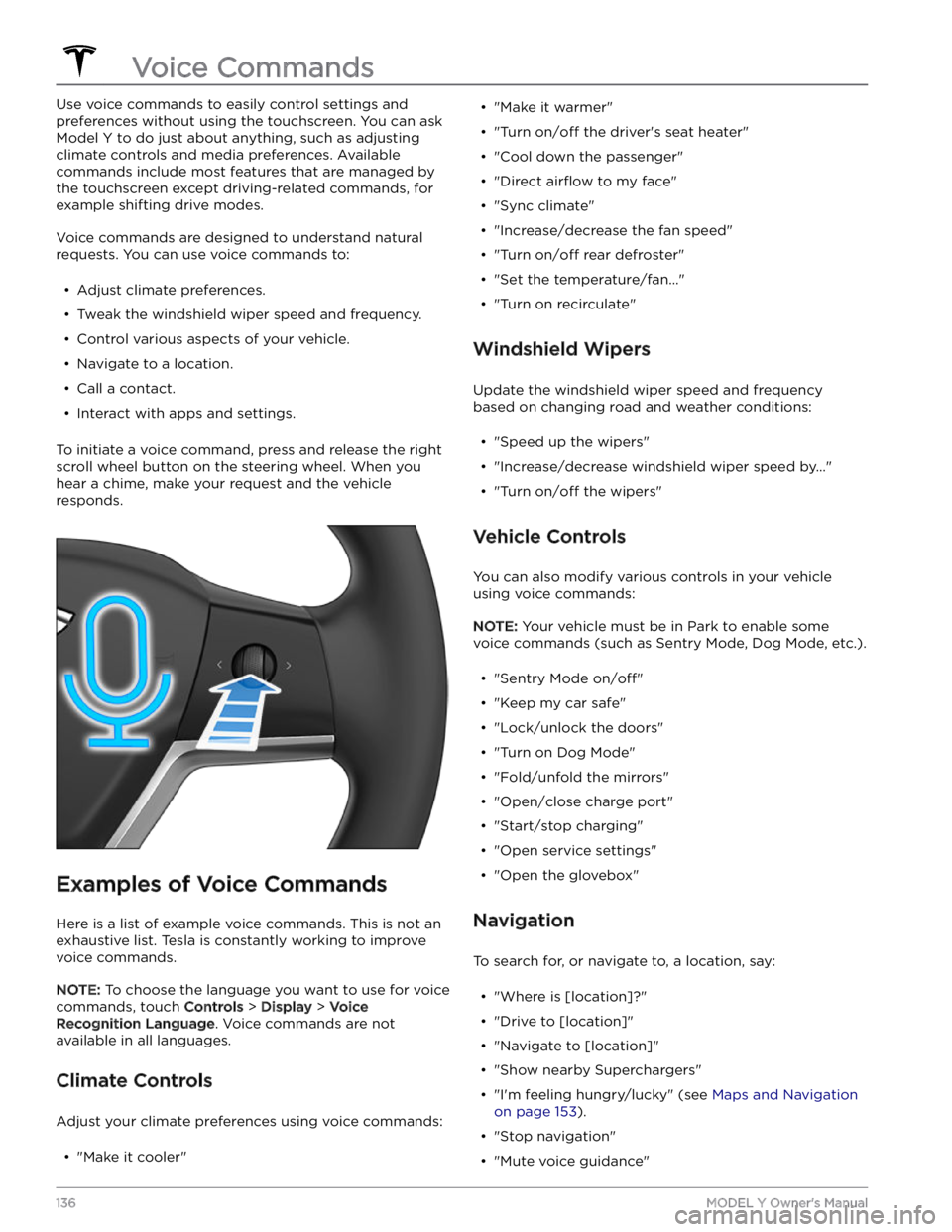
Use voice commands to easily control settings and
preferences without using the touchscreen. You can ask
Model Y to do just about anything, such as adjusting
climate controls and media preferences. Available
commands include most features that are managed by the touchscreen except driving-related commands, for example shifting drive modes.
Voice commands are designed to understand natural
requests. You can use voice commands to:
Page 154 of 298

Climate
You can check the interior temperature and heat or cool the cabin before driving (even if it
Page 176 of 298

Toggle between Scheduled Departure and Scheduled Charging by touching
Controls > Charging > Switch to
Scheduled Charging/Scheduled Departure when Model
Y is in Park.
NOTE: Scheduled Charging/Scheduled Departure
settings are also available on the Climate Controls screen and in the Tesla mobile app.
Think of Scheduled Charging as "When do I want
charging to start?" and think of
Scheduled Departure
Off-Peak Charging which is "When do I want charging to
be complete?"
Scheduled Charging can be used together with
Scheduled Departure Preconditioning but not with
Scheduled Departure Off-Peak Charging.
Scheduled Charging/Scheduled Departure settings are
automatically saved for each location.
NOTE: If you plug in Model Y with both Off-Peak
Charging and Scheduled Charging deselected, your
vehicle charges immediately.
Using Scheduled Charging
Use Scheduled Charging to specify a daily time in which
you want
Model Y to start charging.
With Scheduled Charging selected, enable the feature
then set a daily time to start charging.
NOTE: Scheduled Charging starts charging immediately
if
Model Y is plugged in up to six hours after the
scheduled start time. However, if
Model Y is plugged in
after six hours of the scheduled charging time, charging may not start until the scheduled time on the next day.
Using Scheduled Departure
Use Scheduled Departure to set a daily time when you
want
Model Y to be ready to drive. Model Y
automatically calculates when it needs to start preconditioning and/or charging. This ensures that charging is complete and/or the cabin climate and Battery are preconditioned by your departure time.
When Scheduled Departure is displayed, touch
Schedule to set a daily time when you want Model Y to
be ready to drive. Specify a time, then touch
Settings to
enable one or both of the following departure features.
When plugging in with
Off-Peak Charging enabled, the
vehicle
briefly draws power (you may hear clicking) to
calculate the necessary charging start time.
After you
Page 197 of 298

Topping Up Windshield Washer
Fluid
The only reservoir into which you can add fluid is the
windshield washer
fluid reservoir, which is located
behind the front trunk. When the level is low, a message
displays on the
touchscreen.
To top up the washer fluid:
1.
Open the hood.
2.
Clean around the filler cap before opening it to
prevent dirt from entering the reservoir.
3.
Open the filler cap.
4.
While avoiding spilling, fill the reservoir until the fluid
level is visible just below the filler neck. The reservoir
has a capacity of 4.5 liters.
5.
Wipe up any spills immediately and wash the
affected area with water.
6.
Reinstall the filler cap.
CAUTION: Use only windshield washer fluid meant
for automotive vehicles. Using other substances,
such as untreated water, can result in bacterial
growth within the climate control system resulting
in odor or potential damage that is not covered by
warranty.
NOTE: Some national or local regulations restrict the use
of Volatile Organic Compounds (VOCs). VOCs are
commonly used as antifreeze in washer
fluid. Use a
washer
fluid with limited VOC content only if it provides
adequate freeze resistance for all climates in which you drive
Model Y.
CAUTION: Do not add formulated washer fluids
that contain water repellent or bug wash. These
fluids can cause streaking, smearing, and
squeaking or other noises.
WARNING: In temperatures below 40
Page 254 of 298

To help thaw any ice on the charge port latch, press the Defrost Car button in your Tesla Mobile App to defrost your
vehicle for approximately 30 to 45 minutes.
NOTE: Be sure to use Defrost Car in your Mobile App to defrost your vehicle. Adjusting the climate control settings
in your vehicle
Page 277 of 298

When this alert is present, the electrical system cannot maintain the voltage required to support all vehicle features. Many vehicle functions may no longer work.
It is possible your vehicle may lose all electrical power. If this occurs, you can still use the manual door releases to exit the vehicle if necessary. For more information, see
Opening Doors from the Interior on page 14.
This alert may be present due to various vehicle conditions. For more information and further recommended actions,
check for other active vehicle alerts.
If this alert remains present, it is recommended that you schedule service immediately. Without service, your vehicle
may not drive, may shut down unexpectedly, or may not restart.
VCFRONT_a192
Electrical system is unable to support all features
Switching off features to conserve energy
What this alert means:
The electrical system cannot support all vehicle features. Your vehicle is shutting down nonessential features to preserve energy for essential functions.
If you are driving when this alert is present, it is possible your vehicle may shut down unexpectedly. It is also possible
that your vehicle will not restart once parked.
Nonessential features may be unavailable, including seat heaters, cabin climate control, and in-vehicle entertainment.
This is expected behavior intended to help your vehicle maintain adequate electrical power for essential functions,
including the ability to operate headlights, windows and doors, hazard lights, and the front trunk (frunk).
It is possible your vehicle may lose all electrical power. If this occurs, you can still use the manual door releases to exit the vehicle if necessary. For more information, see
Opening Doors from the Interior on page 14.
What to do:
This alert may be present due to various vehicle conditions. For more information and further recommended actions,
check for other active vehicle alerts.
VCFRONT_a216
Vehicle may not restart - Service is required
Electrical system issue detected
What this alert means:
An abnormally large and sustained power draw while driving or Supercharging / DC Fast Charging has made your
vehicle