park TESLA MODEL Y 2023 Owner's Guide
[x] Cancel search | Manufacturer: TESLA, Model Year: 2023, Model line: MODEL Y, Model: TESLA MODEL Y 2023Pages: 298, PDF Size: 10.28 MB
Page 176 of 298

Toggle between Scheduled Departure and Scheduled Charging by touching
Controls > Charging > Switch to
Scheduled Charging/Scheduled Departure when Model
Y is in Park.
NOTE: Scheduled Charging/Scheduled Departure
settings are also available on the Climate Controls screen and in the Tesla mobile app.
Think of Scheduled Charging as "When do I want
charging to start?" and think of
Scheduled Departure
Off-Peak Charging which is "When do I want charging to
be complete?"
Scheduled Charging can be used together with
Scheduled Departure Preconditioning but not with
Scheduled Departure Off-Peak Charging.
Scheduled Charging/Scheduled Departure settings are
automatically saved for each location.
NOTE: If you plug in Model Y with both Off-Peak
Charging and Scheduled Charging deselected, your
vehicle charges immediately.
Using Scheduled Charging
Use Scheduled Charging to specify a daily time in which
you want
Model Y to start charging.
With Scheduled Charging selected, enable the feature
then set a daily time to start charging.
NOTE: Scheduled Charging starts charging immediately
if
Model Y is plugged in up to six hours after the
scheduled start time. However, if
Model Y is plugged in
after six hours of the scheduled charging time, charging may not start until the scheduled time on the next day.
Using Scheduled Departure
Use Scheduled Departure to set a daily time when you
want
Model Y to be ready to drive. Model Y
automatically calculates when it needs to start preconditioning and/or charging. This ensures that charging is complete and/or the cabin climate and Battery are preconditioned by your departure time.
When Scheduled Departure is displayed, touch
Schedule to set a daily time when you want Model Y to
be ready to drive. Specify a time, then touch
Settings to
enable one or both of the following departure features.
When plugging in with
Off-Peak Charging enabled, the
vehicle
briefly draws power (you may hear clicking) to
calculate the necessary charging start time.
After you
Page 194 of 298

Cautions for Exterior CleaningCAUTION: Do not wash in direct sunlight.CAUTION: Do not use windshield treatment fluids.
Doing so can interfere with wiper friction and
cause a chattering sound.
CAUTION: Do not use hot water, detergents, or
highly alkaline or caustic cleaning products,
especially those containing hydroxide.
CAUTION: If using a pressure washer, maintain a
distance of at least 12" (30 cm) between the
nozzle and the surface of Model Y. Avoid aiming
the water jet directly at parking sensors (if
equipped). Keep the nozzle moving and do not
concentrate the water jet on any one area.
CAUTION: Do not aim water hoses directly at
windows, door, or hood seals or at electronic
modules or exposed cabling.
CAUTION: To avoid corrosive damage that may
not be covered by the warranty, rinse away any
road salt from the underside of the vehicle, wheel
wells, and brakes. After cleaning the vehicle, dry
the brakes by going on a short drive and applying
the brakes multiple times.
CAUTION: Avoid using tight-napped or rough
cloths, such as washing mitts. A high-quality
microfiber cleaning cloth is recommended.
CAUTION: If washing in an automatic car wash, use
touchless car washes only. These car washes have
no parts (brushes, etc.) that touch the surfaces of
Model Y. Some touchless car washes use caustic
solutions that, over time, can cause discoloration
of decorative exterior trim. Avoid exposure to
soaps and chemicals above pH 13. If unsure, check
the product label or ask the staff at the car wash.
Damage caused by improper washing is not
covered by the warranty.
CAUTION: If washing in an automatic car wash,
make sure the vehicle is locked. In addition, avoid
using controls on the touchscreen that can result
in accidentally opening doors or trunks while the
vehicle is being washed. Any damage caused is
not covered by the warranty.
CAUTION: Ensure the wipers are off before
washing Model Y to avoid the risk of damaging the
wipers.
CAUTION: Do not use chemical based wheel
cleaners or pre-wash products. These can damage
the finish on the wheels.
WARNING: Never spray liquid at a high velocity
(for example, if using a pressure washer) towards
the charge port while Model Y is charging. Failure
to follow these instructions can result in serious
injury or damage to the vehicle, charging
equipment, or property.
Cleaning the Interior
Frequently inspect and clean the interior to maintain its
appearance and to prevent premature wear. If possible,
immediately wipe up spills and remove marks. For
general cleaning, wipe interior surfaces using a soft cloth (such as
microfiber) dampened with a mixture of warm
water and mild non-detergent cleaner (test all cleaners on a concealed area before use). To avoid streaks, dry immediately with a soft lint-free cloth.
Interior Glass
Do not scrape, or use any abrasive cleaning fluid on
glass or mirrored surfaces. This can damage the
reflective surface of the mirror and the heating elements
in the rear window.
Airbags
Do not allow any substance to enter an airbag cover. This could
affect correct operation.
Dashboard and Plastic Surfaces
Do not polish the upper surfaces of the dashboard. Polished surfaces are
reflective and could interfere with
your driving view.
Seats
Wipe spills and chemical residues from interior surfaces as soon as possible using a soft cloth moistened with warm water and non-detergent soap. Wipe gently in a circular motion. Then wipe dry using a soft, lint-free cloth.
Although seating surfaces are designed to repel stains, Tesla recommends regular cleaning to maintain
performance and an as-new appearance. Promptly treat
dye transfer from clothing, such as indigo-dyed denim.
Avoid contact with harsh chemicals, including certain cosmetics. Never use cleaners containing alcohol or bleach. Spot-test cleaners on an inconspicuous area
before applying to visible surfaces.
Vacuum cloth seats as needed to remove any loose dirt.
CAUTION: Aftermarket, non-Tesla seat covers may
inhibit the sensitivity of a seat
Page 201 of 298
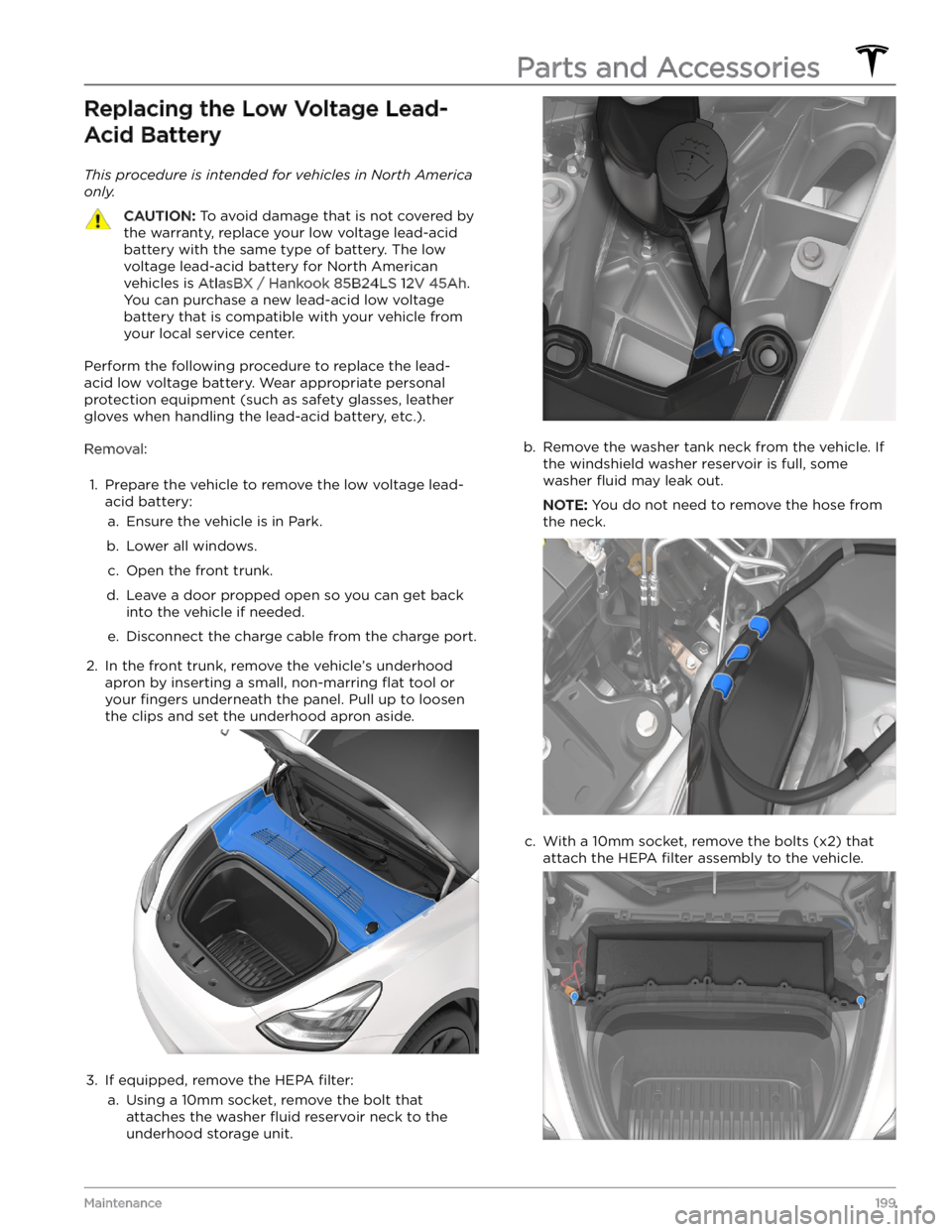
Replacing the Low Voltage Lead-Acid Battery
This procedure is intended for vehicles in North America
only.
CAUTION: To avoid damage that is not covered by
the warranty, replace your low voltage lead-acid
battery with the same type of battery. The low
voltage lead-acid battery for North American
vehicles is AtlasBX / Hankook 85B24LS 12V 45Ah.
You can purchase a new lead-acid low voltage
battery that is compatible with your vehicle from
your local service center.
Perform the following procedure to replace the lead-acid low voltage battery. Wear appropriate personal protection equipment (such as safety glasses, leather gloves when handling the lead-acid battery, etc.).
Removal:
1.
Prepare the vehicle to remove the low voltage lead-
acid battery:
a.
Ensure the vehicle is in Park.
b.
Lower all windows.
c.
Open the front trunk.
d.
Leave a door propped open so you can get back
into the vehicle if needed.
e.
Disconnect the charge cable from the charge port.
2.
In the front trunk, remove the vehicle
Page 215 of 298

Motor Type(s)
Rear motor: AC permanent magnet synchronous motor, liquid-cooled, with variable frequency drive.
Front motor (AWD vehicles): AC induction motor, liquid-cooled, with variable frequency drive.
Transmission
TypeSingle speed fixed gearGearbox Ratio9:1
Steering
SteeringSpecificationsTypeRack and pinion with electronic power steering, speed sensitiveNumber of turns lock to lock2.00Turning Circle (curb to curb)39.8 ft (12.1 m)
Brakes
Type4-wheel anti-lock braking system (ABS) with Electronic Brake Force Distribution, Integrated Advanced Stability Control and Electronic Accelerator
pedal actuated regenerative braking systemCalipers
Front: Four piston fixed
Rear: Integrated Electronic Parking Brake Sliding
Rotor Diameter (ventilated)
Front (non-Performance): 14.0"/355 mm
Front (Performance): 14.0"/355 mm
Rear (non-Performance): 13.2"/335 mm
Rear (Performance): 13.2
Page 216 of 298

Lateral runout
0.050 mm
Chordal runout
0.040 mm
Disk thickness variation (DTV)
0.010 mm
Front Brake Pad Thickness (excluding back plate)
New: 0.393"/10 mm
Service limit: 0.085"/2.15 mm
Rear Brake Pad Thickness (excluding back plate)
New: 0.354"/9 mm
Service limit: 0.078"/2 mm
Performance Front Brake Pad
Thickness (excluding back plate)New: 0.393"/10 mm Service limit: 0.085"/2.15 mmPerformance Rear Brake Pad
Thickness (excluding back plate)New: 0.354"/ 9 mm Service limit: 0.071"/1.8 mmParking brakeElectrically actuated parking brake integrated into rear caliper
Suspension
SuspensionSpecificationsFrontIndependent, double wishbone, coil spring/telescopic damper, sway barRearIndependent, multi-link, coil spring/telescopic damper
Battery - Low Voltage
Battery - Low VoltageSpecificationsRating33 amp hour or higherVoltage and PolarityLow voltage negative (-) ground
Battery - High Voltage
TypeLiquid-cooled lithium ion (Li-ion)Nominal Voltage345 V DCTemperature RangeDo not expose Model Y to ambient temperatures above 140
Page 225 of 298

DO NOT TRANSPORT WITH
WHEELS ON THE GROUND
The motors in Model Y generate power when the wheels
spin. Always transport
Model Y with all four tires off the
ground. Ensure that the tires are unable to spin at any time during transport.
WARNING: NEVER TRANSPORT YOUR VEHICLE
WITH THE TIRES IN A POSITION WHERE THEY
CAN SPIN. DOING SO CAN LEAD TO SIGNIFICANT
DAMAGE AND OVERHEATING. IN RARE CASES
EXTREME OVERHEATING MAY CAUSE THE
SURROUNDING COMPONENTS TO IGNITE.
Do not transport Model Y using any method that is not
specified by Tesla. Adhere to the instructions provided in
the following sections and observe all warnings and
cautions provided. Damage caused by improper
transporting of your vehicle is not covered by the
warranty.
NOTE: Tesla is not liable or responsible for reimbursing
services not dispatched through Tesla Roadside Assistance.
Approved Methods for Transporting
A flatbed truck or comparable transport vehicle is the
recommended method of transporting
Model Y. The
vehicle can face either direction when using a
flatbed.
If Model Y must be transported without a flatbed truck,
then wheel lifts and dollies must be used to ensure that
all four wheels are
off of the ground. This method may
only be used for a maximum of
35 miles (55 km), and
must not exceed the manufacturer speed rating of the
dollies. With this method, Tesla recommends the vehicle
facing forward so that the front wheels are lifted and the rear wheels are on dollies.CAUTION: Enable Transport Mode (see Activate
Transport Mode on page 223) before winching Model
Y onto a flatbed truck (see Pull Onto Flatbed Truck
From Front on page 224 and Pull Onto Flatbed Truck
From Rear on page 224). If Transport Mode is not
available or the touchscreen is not accessible, self-
loading dollies or tire skates must be used to load
the vehicle into the approved transportation
position. Tesla is not responsible for any damage
caused by or during the transport of Model Y,
including personal property damage or damage
caused by using self-loading dollies or tire skates.
NOTE: Transport Mode is only intended to allow for
winching
Model Y onto a flatbed truck or repositioning
the vehicle out of a parking space. While in Transport Mode, the tires are allowed to rotate slowly (under
3
mph or 5 km/h) and for a very short distance (less than
30 feet or 10 meters). See Activate Transport Mode on
page 223. Exceeding these boundaries can lead to
significant damage and overheating that is not covered
by the warranty.
WARNING: Model Y is equipped with high voltage
components that may be compromised as a result
of a collision (see High Voltage Components on
page 165). Before transporting Model Y, it is
important to assume these components are
energized. Always follow high voltage safety
precautions (wearing personal protection
equipment, etc.) until emergency response
professionals have evaluated the vehicle and can
accurately confirm that all high voltage systems
are no longer energized. Failure to do so may
result in serious injury.
Activate Transport Mode
Transport Mode keeps the parking brake disengaged
while winching
Model Y onto a flatbed truck. When
active, Transport Mode displays a message indicating that the vehicle will remain free-rolling. To enable
Transport Mode:
Page 226 of 298

1. Ensure Model Y is in Park.2.
Chock the tires or make sure Model Y is secure.
3.
Press and hold the brake pedal, then on the touchscreen, touch
Controls > Service > Towing. The
touchscreen displays a message reminding you how
to properly transport
Model Y.
4.
Press and hold the Transport Mode button until it
turns blue.
Model Y is now free-rolling and can slowly
be rolled (no faster than walking speed) or winched.
To cancel Transport Mode, shift Model Y into Park.
NOTE: If your vehicle is equipped with a lead-acid low
voltage battery (see
Jump Starting on page 227):
Transport Mode may cancel if
Model Y loses low voltage
power after Transport Mode is enabled.
CAUTION: If the electrical system is not working,
and you therefore cannot use the touchscreen to
activate Transport Mode, use self-loading dollies or
tire skates. Before doing so, always check the
manufacturer
Page 232 of 298

APP_w218
Autosteer speed limit exceeded
Take control of steering wheel
What this alert means:
Autosteer is unavailable because your vehicle has exceeded the maximum speed limit for this driver assistance
feature.
What to do:
Take immediate control of the steering wheel and maintain control until you reach your destination.
In most cases, Autosteer will not be available for the rest of your current drive. To reset it, bring the vehicle to a
complete stop and shift into Park. When you shift into Drive to travel to your next destination, Autosteer should be
available again.
NOTE: If this alert becomes active while you are driving in Germany, Autosteer should be available again once your
vehicle is traveling below the Autosteer speed limit.
If Autosteer is not available during your next drive, and remains unavailable throughout subsequent drives, schedule
service at your convenience. Your vehicle is OK to drive in the meantime.
For more information, see Autosteer on page 96.
APP_w221
Cruise control unavailable
Reduced front radar visibility
What this alert means:
Traffic-Aware Cruise Control and Autosteer are unavailable because the radar located in the front bumper area of
your vehicle has no or low visibility.
This could be a temporary obstruction caused by factors like snow, ice, dirt, or mud.
What to do:
Continue to your destination. Your vehicle is OK to drive. Traffic-Aware Cruise Control and Autosteer will remain
unavailable as long as the radar lacks adequate visibility.
If the alert persists throughout your drive, examine the front bumper before your next planned drive and attempt to
clear any obstruction. See the About Autopilot on page 88 sections
Page 257 of 298

This alert may be caused by a temporary condition that will be resolved automatically. If this alert clears during your
current drive, or is no longer present when you start your next drive, it was likely caused by a temporary condition.
No action is required.
This alert may also indicate a condition requiring front motor inspection and service. If this alert persists throughout
subsequent drives, it is recommended that you schedule service. Your vehicle is OK to drive in the meantime.
DI_a166
Vehicle automatically parked to prevent rollaway
Fasten seatbelt and close door to stay in gear
What this alert means:
Your vehicle has automatically shifted into Park (P) because it determined the driver was leaving or no longer
present. This is expected vehicle behavior under various circumstances.
Your vehicle will automatically shift into Park if all of these conditions are true:
Page 258 of 298

When any condition preventing Cruise Control activation is no longer present, Cruise Control should be available. If
this alert persists throughout subsequent drives, schedule service at your earliest convenience. Your vehicle is OK to
drive in the meantime.
For more information, see Traffic-Aware Cruise Control on page 91.
DI_a184
Autopark canceled
Take control
What this alert means:
Autopark has been canceled.
Autopark might have been canceled because: