seats TESLA MODEL Y 2023 Owners Manual
[x] Cancel search | Manufacturer: TESLA, Model Year: 2023, Model line: MODEL Y, Model: TESLA MODEL Y 2023Pages: 298, PDF Size: 10.28 MB
Page 3 of 298

Overview................................................................3
Exterior Overview............................................................................3
Interior Overview.............................................................................4
Touchscreen Overview..................................................................5
Opening and Closing.......................................10
Keys.....................................................................................................10
Doors..................................................................................................14
Windows............................................................................................17
Rear Trunk.........................................................................................18
Front Trunk......................................................................................20
Interior Storage and Electronics..............................................23
Seating and Safety Restraints.....................27
Front and Rear Seats...................................................................27
Seat Belts.........................................................................................33
Child Safety Seats.........................................................................36
Airbags..............................................................................................43
Driving..................................................................50
Driver Profiles.................................................................................50
Steering Wheel...............................................................................52
Mirrors...............................................................................................54
Starting and Powering Off.........................................................55
Shifting..............................................................................................56
Lights.................................................................................................58
Car Status..........................................................................................61
Wipers and Washers....................................................................64
Braking and Stopping..................................................................65
Traction Control.............................................................................69
Park Assist.......................................................................................70
Vehicle Hold....................................................................................72
Acceleration Modes......................................................................73
Track Mode......................................................................................74
Trip Information.............................................................................76
Rear Facing Camera(s)...............................................................77
Pedestrian Warning System......................................................78
Towing and Accessories.............................................................79
Cold Weather Best Practices....................................................85
Autopilot..............................................................88
About Autopilot.............................................................................88
Traffic-Aware Cruise Control.....................................................91
Autosteer.........................................................................................96
Navigate on Autopilot................................................................101
Traffic Light and Stop Sign Control.....................................104
Autopark...........................................................................................111
Summon...........................................................................................113
Smart Summon..............................................................................116
Active Safety Features...................................119
Lane Assist......................................................................................119
Collision Avoidance Assist........................................................122
Speed Assist..................................................................................125
Cabin Camera................................................................................126
Using the Touchscreen..................................127
Climate Controls...........................................................................127
Phone, Calendar, and Web Conferencing...........................133
Voice Commands.........................................................................136
Safety & Security Settings.......................................................138
Dashcam.........................................................................................140
Sentry Mode..................................................................................142
USB Drive Requirements for Recording Videos..............144
Smart Garage Connectivity.....................................................145
Connecting to Wi-Fi...................................................................148
Software Updates........................................................................149
Mobile App......................................................................................151
Navigation and Entertainment...................153
Maps and Navigation..................................................................153
Media................................................................................................159
Theater, Arcade, and Toybox...................................................162
Charging and Energy Consumption........165
Electric Vehicle Components..................................................165
High Voltage Battery Information.........................................167
Charging Instructions.................................................................169
Scheduled Charging and Scheduled Departure..............174
Getting Maximum Range..........................................................175
Maintenance......................................................177
Maintenance Service Intervals................................................177
Tire Care and Maintenance......................................................184
Cleaning...........................................................................................191
Windshield Wiper Blades, Jets and Fluid...........................195
Jacking and Lifting......................................................................197
Parts and Accessories................................................................198
Do It Yourself Maintenance....................................................206
Specifications..................................................207
Identification Labels..................................................................207
Vehicle Loading..........................................................................208
Dimensions.....................................................................................210
Subsystems....................................................................................213
Wheels and Tires..........................................................................215
Roadside Assistance.....................................222
Contacting Tesla Roadside Assistance...............................222
Instructions for Transporters..................................................223
Running Out of Range..............................................................226
Jump Starting...............................................................................227
Troubleshooting.............................................229
Troubleshooting Alerts.............................................................229
Contents
Page 18 of 298

Child Locks
Model Y has child locks on the rear doors to prevent
them from being opened using the interior release buttons. On the touchscreen,
touch Controls > Locks >
Child Lock. You can choose Both to engage the child
lock on both rear doors, or you can choose
Left or Right
to engage it on just a specific door.
WARNING: It is recommended that you turn on
child locks when children are seated in the rear
seats.
Unlock on Park
When you stop Model Y and engage Park, you can
choose to unlock all doors. To turn this feature on or
off,
touch Controls > Locks > Unlock on Park.
NOTE: If set to OFF, you can unlock all doors by
pressing the Park button a second time after engaging Park.
Doors
16MODEL Y Owner
Page 25 of 298

Center Console
In addition to housing an RFID transmitter that reads key fobs and key cards (see
Key Card on page 10), the
center console includes cup holders, two storage
compartments, and
a wireless phone charger.
To open the main storage compartment, pull its cover upward. Open the front storage compartment by sliding its cover forward.
Second Row Console
Your Model Y has a rear console integrated in the center
of the second row seat back. Pull the console down to
access the rear cup holders, or use it as an armrest.
Third Row Cup Holders (7-seat
models only)
If Model Y is equipped with seven seats, two cup holders
are located between the third row seats.
Glovebox
To open the glovebox, touch Controls > Glovebox. The
glovebox automatically opens and its light turns on.
To close the glovebox, push it upward until it clicks into its closed position.
For additional glovebox security, touch Controls >
Safety > Glovebox PIN to set a 4-digit PIN (see
Glovebox PIN on page 138).
NOTE: If you leave the glovebox open, its light
eventually turns
off.
Interior Storage and Electronics
23Opening and Closing
Page 29 of 298

Correct Driving Position
The seat, head support, seat belt and airbags work
together to maximize your safety. Using these correctly ensures greater protection.
Position the seat so you can wear the seat belt correctly, while being as far away from the front airbag as possible:
1.
Sit upright with both feet on the floor and the seat
back reclined no more than 30 degrees.
2.
Make sure you can easily reach the pedals and that your arms are slightly bent when holding the steering wheel. Your chest should be at least
10 inches
(25 cm) from the center of the airbag cover.
3.
Place the shoulder section of the seat belt mid-way between your neck and your shoulder. Fit the lap section of the belt tightly across your hips, not across your stomach.
Model Y seats include integrated head supports in the
front that cannot be adjusted or removed.
Adjusting the Front Seats1.
Move seat forward/backward and adjust the seat
Page 30 of 298
WARNING: Riding in a moving vehicle with the
seat back reclined can result in serious injuries in a
collision, as you could slide under the lap belt or
be propelled into the seat belt. Ensure your seat
back is reclined no more than 30 degrees when
the vehicle is moving.
Calibrating Seats
(If equipped) You can calibrate the driver seat. This is useful if you
find your seat range limited or your driver
profile does not automatically adjust the seat for you.
Navigate to
Controls > Service > Driver Seat, Steering &
Mirrors Calibration and follow the instructions on the
touchscreen.
WARNING: Ensure nothing is behind or
underneath the driver seat during calibration.
Failure to do so may cause serious injury.
Adjusting Second Row Seat Backs
Model Y provides seating for up to three passengers in
the second row. The seat back is split 60/40 so adjusting the left seat back moves the seat backs for both the left and center seating positions, whereas
adjusting the right seat back moves only the rightmost
seat back.
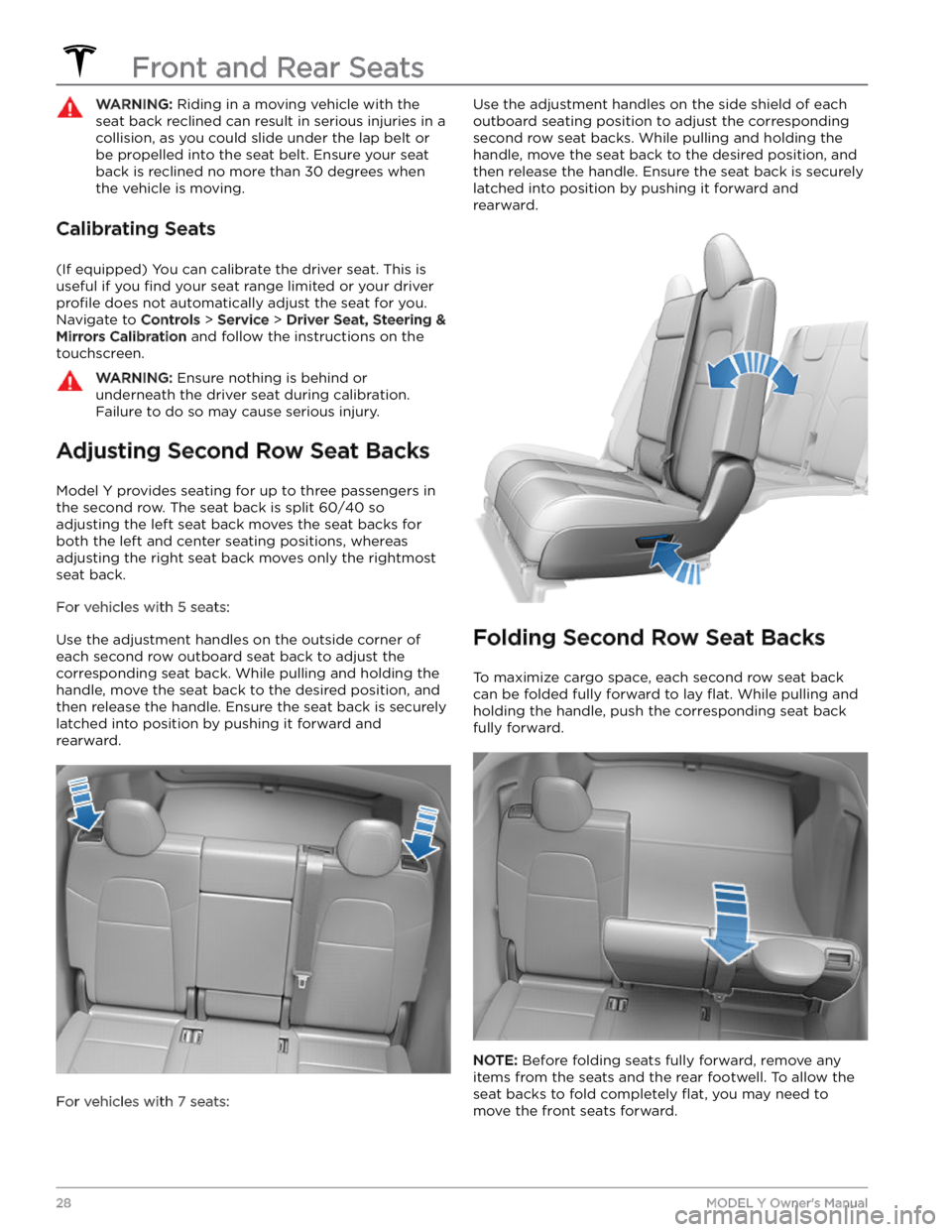
For vehicles with 5 seats:
Use the adjustment handles on the outside corner of each second row outboard seat back to adjust the corresponding seat back. While pulling and holding the
handle, move the seat back to the desired position, and then release the handle. Ensure the seat back is securely latched into position by pushing it forward and rearward.
For vehicles with 7 seats:
Use the adjustment handles on the side shield of each
outboard seating position to adjust the corresponding second row seat backs. While pulling and holding the
handle, move the seat back to the desired position, and then release the handle. Ensure the seat back is securely latched into position by pushing it forward and rearward.
Folding Second Row Seat Backs
To maximize cargo space, each second row seat back can be folded fully forward to lay
flat. While pulling and
holding the handle, push the corresponding seat back fully forward.
NOTE: Before folding seats fully forward, remove any
items from the seats and the rear footwell. To allow the
seat backs to fold completely
flat, you may need to
move the front seats forward.
Front and Rear Seats
28MODEL Y Owner
Page 31 of 298
NOTE: Driving with second row seats folded forward
may increase perceivable noise and/or vibration coming from the rear of the vehicle (trunk, suspension, etc.).
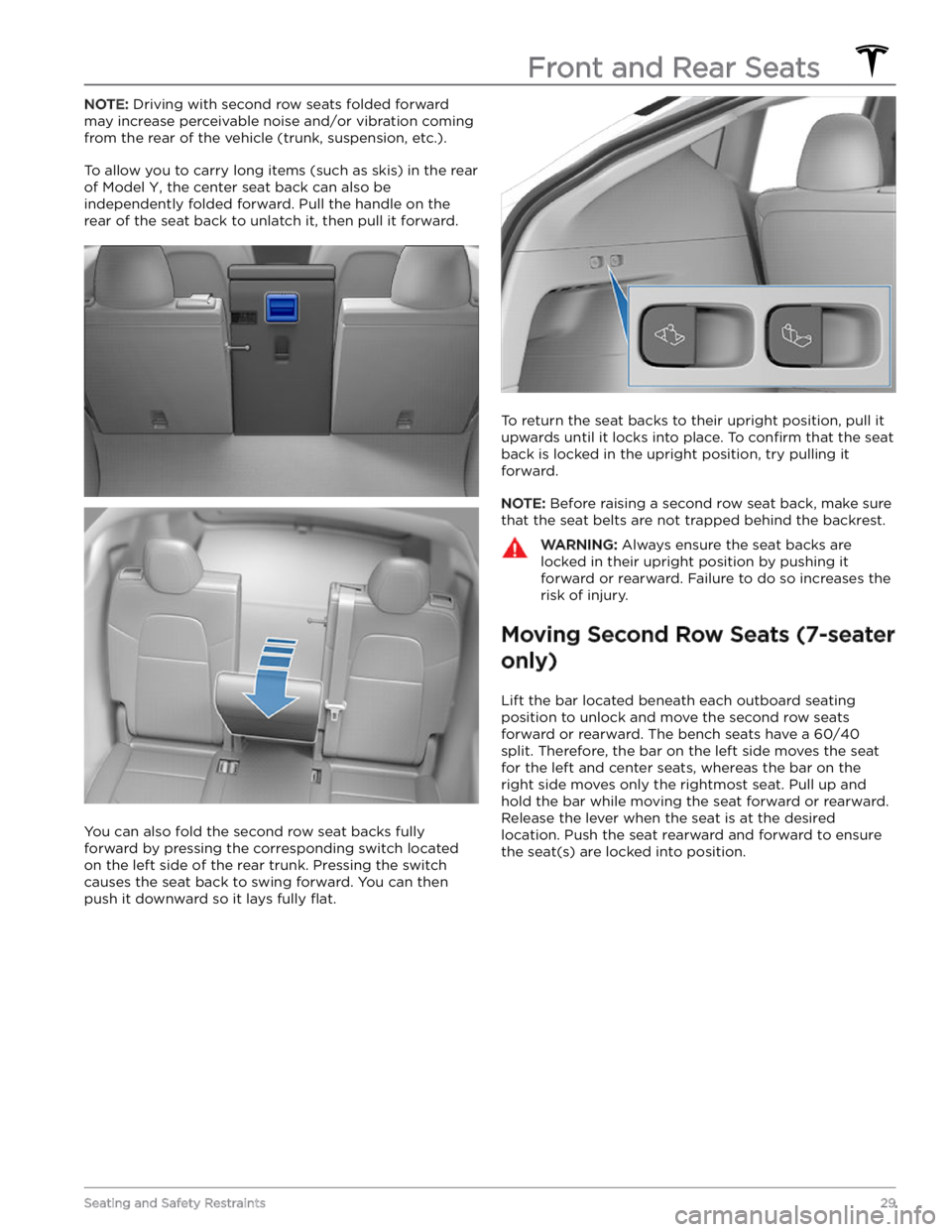
To allow you to carry long items (such as skis) in the rear of
Model Y, the center seat back can also be
independently folded forward. Pull the handle on the
rear of the seat back to unlatch it, then pull it forward.
You can also fold the second row seat backs fully
forward by pressing the corresponding switch located on the left side of the rear trunk. Pressing the switch causes the seat back to swing forward. You can then push it downward so it lays fully
flat.
To return the seat backs to their upright position, pull it
upwards until it locks into place. To
confirm that the seat
back is locked in the upright position, try pulling it forward.
NOTE: Before raising a second row seat back, make sure
that the seat belts are not trapped behind the backrest.
WARNING: Always ensure the seat backs are
locked in their upright position by pushing it
forward or rearward. Failure to do so increases the
risk of injury.
Moving Second Row Seats (7-seater
only)
Lift the bar located beneath each outboard seating position to unlock and move the second row seats
forward or rearward. The bench seats have a 60/40 split. Therefore, the bar on the left side moves the seat for the left and center seats, whereas the bar on the
right side moves only the rightmost seat. Pull up and
hold the bar while moving the seat forward or rearward. Release the lever when the seat is at the desired location. Push the seat rearward and forward to ensure the seat(s) are locked into position.
Front and Rear Seats
29Seating and Safety Restraints
Page 32 of 298
Accessing Third Row Seats (7-
seater only)
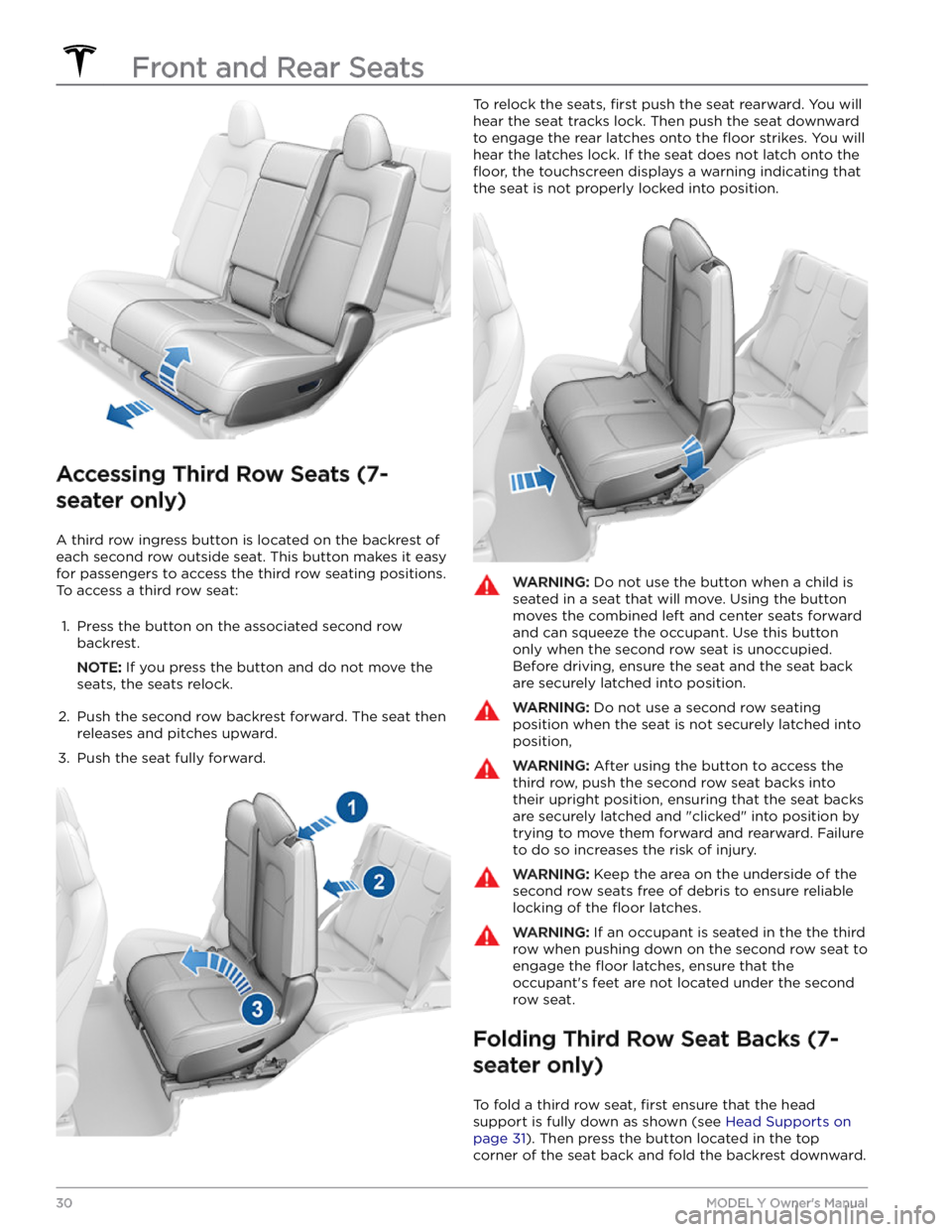
A third row ingress button is located on the backrest of each second row outside seat. This button makes it easy for passengers to access the third row seating positions.
To access a third row seat:
1.
Press the button on the associated second row backrest.
NOTE: If you press the button and do not move the
seats, the seats relock.
2.
Push the second row backrest forward. The seat then releases and pitches upward.
3.
Push the seat fully forward.
To relock the seats, first push the seat rearward. You will
hear the seat tracks lock. Then push the seat downward to engage the rear latches onto the
floor strikes. You will
hear the latches lock. If the seat does not latch onto the
floor, the touchscreen displays a warning indicating that
the seat is not properly locked into position.
WARNING: Do not use the button when a child is
seated in a seat that will move. Using the button
moves the combined left and center seats forward
and can squeeze the occupant. Use this button
only when the second row seat is unoccupied.
Before driving, ensure the seat and the seat back
are securely latched into position.
WARNING: Do not use a second row seating
position when the seat is not securely latched into
position,
WARNING: After using the button to access the
third row, push the second row seat backs into
their upright position, ensuring that the seat backs
are securely latched and "clicked" into position by
trying to move them forward and rearward. Failure
to do so increases the risk of injury.
WARNING: Keep the area on the underside of the
second row seats free of debris to ensure reliable
locking of the floor latches.
WARNING: If an occupant is seated in the the third
row when pushing down on the second row seat to
engage the floor latches, ensure that the
occupant
Page 33 of 298

NOTE: To return the seat backs to the upright position,
pull the seat back upward until it latches into place. Try pulling the backrest forward to
confirm that it is securely
latched in the upright position.
NOTE: Before folding the seat backs, remove any items
from the seats and the footwell. To allow the backrests
to fold completely
flat, you may need to move the
second row seats forward.
NOTE: Driving with the third row backrests folded
forward may result in increased perceivable noise and/or vibration coming from the rear of the vehicle (trunk,
suspension, etc.).
WARNING: Always ensure the seat backrests are
locked in their upright position before travel.
Failure to do so increases the risk of injury.
Head Supports
The front seats include integrated head supports that you can not adjust.
The second row outboard seats include an adjustable head support that you can raise, lower, or remove. When
either of these seats is occupied by a passenger that is not in a child safety seat, the corresponding head support should be adjusted (align the center of the head support with the center of the occupant
Page 34 of 298

WARNING: To minimize the risk of severe injury or
death in the event of a collision, ensure that head
supports are positioned correctly before driving.
Removing/Installing a Head Support
All head supports in the second and third row (if
equipped) seating positions can be removed. To remove
a head support:
1.
Fully raise the head support by pulling it upward.
2.
Press and hold the button located at the base of one of the posts.
3.
Insert a short, flat object (such as a small flat-head
screwdriver) into the opening in the base of the
opposite post and pull the head support upward.
To re-install the head support:
1.
With the front of the head support facing forward, insert both posts into the corresponding holes on the
seat back.
2.
Press downward on the head support until it clicks into place.
3.
Pull upward on the head support to ensure that it is secure.
WARNING: Ensure that the head support is
correctly installed before seating an occupant.
Failure to do so increases the risk of injury or
death if a collision occurs.
Seat Heaters
The front and second row seats contain heating pads
that operate at three levels from 3 (highest) to 1 (lowest).
To operate the seat heaters, see Climate
Controls on page 127.
WARNING: To avoid burns resulting from
prolonged use, individuals who have peripheral
neuropathy, or whose capacity to feel pain is
limited because of diabetes, age, neurological
injury, or some other condition, should exercise
caution when using the climate control system and
seat heaters.
Seat Covers
WARNING: Do not use seat covers in Model Y.
Doing so could restrict deployment of the seat-
mounted side air bags if a collision occurs. Also, if
the vehicle is equipped with an occupant detection
system that is used to determine the status of the
passenger front airbag, seat covers may interfere
with this system.
Front and Rear Seats
32MODEL Y Owner
Page 35 of 298

Wearing Seat Belts
Using seat belts and child safety seats is the most
effective way to protect occupants if a collision occurs.
Therefore, wearing a seat belt is required by law in most jurisdictions.
Both the driver and passenger seats are equipped with three-point inertia reel seat belts. Inertia reel belts are automatically tensioned to allow occupants to move
comfortably during normal driving conditions.
To
securely hold child safety seats, all passenger seating
positions are equipped with an automatic locking
retractor (ALR) feature that, by fully extracting the seat
belt (beyond the length needed for a typical adult
occupant), locks the belt into place until the seat belt is
unbuckled.
The seat belt reel automatically locks to prevent
movement of occupants if
Model Y experiences a force
associated with hard acceleration, braking, cornering, or
an impact in a collision.
Seat Belt Reminders
The seat belt reminder on the touchscreen
alerts you if a seat belt for an occupied driver or passenger seat is unbuckled. If all
occupants are buckled up and the
reminder stays on, re-buckle seat belts to
ensure they are correctly latched. Also
remove any heavy objects (such as a
briefcase) from an unoccupied seat. If the
reminder light continues to stay on,
contact Tesla.
You can temporarily disable a seat belt reminder associated with a rear seating position. This is useful when you are carrying an object in a rear seat that
triggers the seat belt reminder alert. To disable the
reminder, touch the associated seat on the seat belt reminder popup message that displays on the touchscreen when a seat belt reminder is active. When a reminder is disabled, the seat belt reminder icon is replaced by a seat icon, for the current drive only. Touch the seat again to re-enable the reminder.
WARNING: Seat belts must be worn by passengers
in all seating positions. Do not disable a seat belt
reminder when the seating position is occupied by
a passenger.
To Fasten a Belt
1.
Ensure correct positioning of the seat (see Correct
Driving Position on page 27).
2.
Draw the belt out smoothly, ensuring the belt lays flat
across the pelvis, chest and mid-point of your collar
bone, between the neck and shoulder.
3. Insert the latch plate into the buckle and press
together until you hear a click indicating it is locked
in place.4.
Pull the belt to check that it is securely fastened.
5.
Pull the diagonal part of the belt toward the reel to
remove excess slack.
To Adjust the Shoulder Anchor
Height
Model Y is equipped with an adjustable shoulder anchor
for each front seat to ensure that the seat belt is positioned correctly. The seat belt should lay
flat across
the mid-point of your collar bone while in the correct driving position
(see Correct Driving Position on page
27). Adjust the height of the shoulder anchor if the seat
belt is not positioned correctly:
1.
Press and hold the button on the shoulder anchor to release the locking mechanism.
2.
While holding the button, move the shoulder anchor up or down, as necessary, to correctly position the seat belt.
3.
Release the button on the shoulder anchor so that it
locks into position.
4.
Without pressing the button, pull on the seat belt webbing and attempt to move the shoulder anchor
downward to check that it is locked into position.
Seat Belts
33Seating and Safety Restraints