test TESLA MODEL Y 2023 Owners Manual
[x] Cancel search | Manufacturer: TESLA, Model Year: 2023, Model line: MODEL Y, Model: TESLA MODEL Y 2023Pages: 298, PDF Size: 10.28 MB
Page 7 of 298
WARNING: Always pay attention to road and traffic conditions when driving. To minimize driver distraction and
ensure the safety of vehicle occupants as well as other road users, avoid using the touchscreen to adjust
settings while the vehicle is in motion.
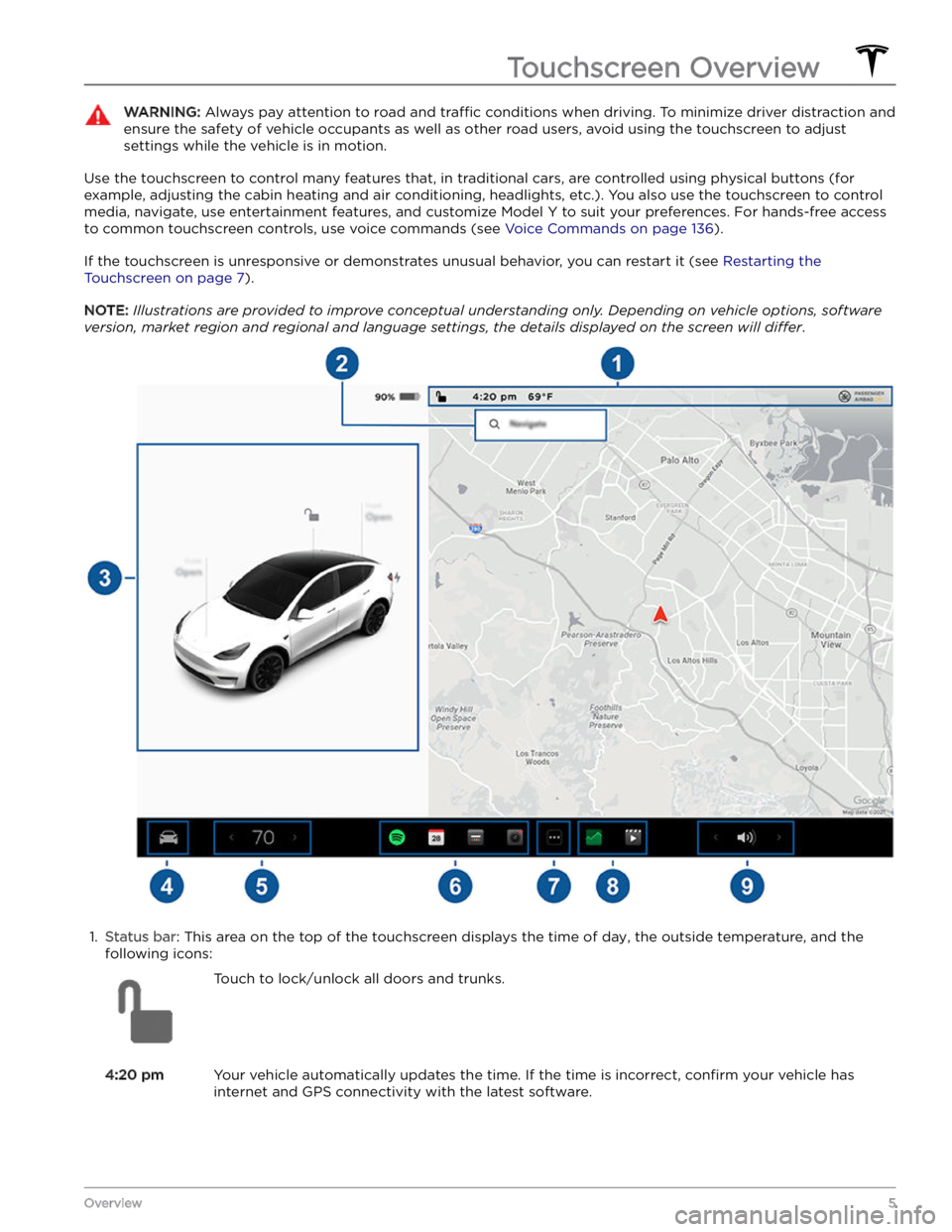
Use the touchscreen to control many features that, in traditional cars, are controlled using physical buttons (for example, adjusting the cabin heating and air conditioning, headlights, etc.). You also use the touchscreen to control
media, navigate, use entertainment features, and customize
Model Y to suit your preferences. For hands-free access
to common touchscreen controls, use voice commands (see
Voice Commands on page 136).
If the touchscreen is unresponsive or demonstrates unusual behavior, you can restart it (see Restarting the
Touchscreen on page 7).
NOTE: Illustrations are provided to improve conceptual understanding only. Depending on vehicle options, software
version, market region and regional and language settings, the details displayed on the screen will differ.
1.
Status bar: This area on the top of the touchscreen displays the time of day, the outside temperature, and the
following icons:
Touch to lock/unlock all doors and trunks.4:20 pmYour vehicle automatically updates the time. If the time is incorrect, confirm your vehicle has
internet and GPS connectivity with the latest software.
Touchscreen Overview
5Overview
Page 15 of 298
5. Test that the key fob works by unlocking and locking
Model Y.
WARNING: Key fob batteries contain a chemical
burn hazard and should not be ingested. The key
fob contains a coin cell battery. If the coin cell
battery is swallowed, it can cause severe internal
burns within two hours and can lead to death.
Keep new and used batteries away from children. If
the battery compartment does not close securely,
stop using the product and keep it away from
children. If you think batteries might have been
swallowed or placed inside any part of the body,
seek immediate medical attention.
Managing Keys
To display a list of all keys (phone keys, key cards, and key fobs) that can access your
Model Y, touch Controls
> Locks. An icon displays next to each key to indicate
whether the key is a phone key, key card, or key fob. Use
this list to manage keys that have access to your
Model
Y. To add or delete keys, see Adding and Removing Keys
on page 13.
Model Y supports up to 19 keys. When you reach this
limit, you must delete a key before adding a new one.
NOTE: You can use the same key for more than one
Model Y. This prevents you from having to deal with
multiple keys when you switch vehicles. If you customize the name of an authenticated key card or key fob on one
Model Y (by touching the pencil icon), any other Model
Y to which the key card or key fob is authenticated also
displays the changed name.
Adding and Removing Keys
To add a new key card or key fob:
NOTE: When adding a key fob, ensure it is at room
temperature. Pairing a key fob that is very cold can be unsuccessful.
1.
On the touchscreen, touch Controls > Locks > Keys >
Add Key.
2.
Scan your new key card or key fob on the card reader located behind the cup holders on the top of the center console. After the new key card or key fob is recognized, remove it from the card reader.
3.
Scan a key card or key fob that has already been paired to the vehicle to
confirm new key pairing.
4.
When complete, the key list includes the new key.
Touch the associated pencil icon to customize the name of the key.
Removing a key:
When you no longer want a key to access Model Y (for
example, you lost your phone or key card, etc.), follow these steps to remove it.1.
On the touchscreen, touch Controls > Locks.
2.
In the key list, find the key that you would like to
delete and touch its associated trash icon.
3.
When prompted, scan an authenticated key card or key fob on the card reader to
confirm the deletion.
When complete, the key list no longer includes the
deleted key.
NOTE: Model Y requires at least one authenticated key
card or key fob at all times. If only one key card remains on the key list, you cannot delete it.
Keys
13Opening and Closing
Page 37 of 298

2. With the belt unfastened, unreel the webbing to its limit. Check that unreeling is free from snags, and
visually check the webbing for wear. Allow the webbing to retract, checking that retraction is
smooth and complete.3.
With the webbing half unreeled, hold the tongue plate and pull forward quickly. The mechanism should lock automatically and prevent further unreeling.
If a seat belt fails any of these tests, contact Tesla immediately.
For information about cleaning seat belts, see Seat Belts
on page 193.
Seat Belt Warnings
WARNING: Seat belts should be worn by all
occupants at all times, even if driving for a very
short distance. Failure to do so increases the risk
of injury or death if a collision occurs.
WARNING: Secure small children in a suitable child
safety seat as described in the Child Safety Seat
topic. Always follow the child safety seat
manufacturer
Page 41 of 298

In the second row, install LATCH child safety seats in the
outboard seating positions only. Use only a seat belt
retained seat in the center position.
To install a LATCH child safety seat, slide the safety seat
latches onto the anchor bars until they click into place. Carefully read and follow the instructions provided by
the child safety seat manufacturer.
NOTE: Lower LATCH anchors should not be used with
child seats or booster seats that have an integrated safety belt in situations where the combined weight of
the child plus the child restraint is more than
65 lbs (29.5
kg). In these situations, use the safety belt instead.
NOTE: If Model Y is equipped with seven seats, the third
row seating positions are not equipped with
LATCH
anchors. Use only seat belt retained child safety seats in a third row seating position.
Once installed, test the security of the installation before
seating a child. Attempt to twist the child safety seat from side to side and try to pull it away from the seat, then check to ensure the anchors remain securely in place.
Attaching Upper Tether Straps
If an upper tether strap is provided, attach its hook to the anchor point located behind the seat.
NOTE: The location of anchor points may not be readily
visible but can be found by identifying a slice in the seat
Page 43 of 298

For a single-strap tether in the third row (if equipped),
position the strap over the head support.
Testing a Child Safety Seat
Before seating a child, always make sure the child safety seat is not loose:
1.
Hold the child safety seat by the belt path and try to slide the safety seat from side to side and front to back.
2. If the seat moves more than one inch (2.5 cm), it is
too loose. Tighten the belt or reconnect the
LATCH
retained child safety seat.
3.
If you are unable to reduce slack, try a different seat
location or try another child safety seat.
Child Safety Seat Warnings
WARNING: Extreme hazard! Do not seat a child on
the front passenger seat even if you are using a
child safety seat. This seat has an airbag in front of
it. Although this airbag is disabled when Model Y
detects a lightweight passenger, do not rely on
technology to protect your child.
WARNING: Seat belt retained child safety seats are
designed to be secured in the vehicle using lap
seat belts or the lap belt portion of a lap-shoulder
seat belt. Children could be endangered in a crash
if their child safety seat is not properly secured.
WARNING: According to collision statistics,
children are safer when properly restrained in the
second row seating positions than in the front
passenger seat.
WARNING: Do not use a forward-facing child
safety seat until your child weighs over 20 lbs (9
kg) and can sit independently. Up to the age of
two, a child
Page 157 of 298
While navigating, the map tracks your location and
displays the current leg of your trip. You can display the
entire route at any time by swiping down to expand the
turn-by-turn direction list or touching the route overview
icon.
To stop navigating, touch Cancel, located in the bottom
corner of the turn-by-turn direction list.
If Navigate on Autopilot (if available in
your market region) is enabled, you can
turn it on for the navigation route by
touching
Navigate on Autopilot in the
turn-by-turn direction list (when the
feature is active, the icon is blue).
Navigate
on Autopilot is a full self-driving (Beta)
feature that automatically changes lanes
and steers
Model Y on controlled-access
roads (like highways and freeways), along a
navigation route. For details, see
Navigate
on Autopilot on page 101.
Selecting an Alternate Route
Depending on market region and vehicle configuration,
this feature may not be available on your vehicle. Your
vehicle must be equipped with Premium Connectivity.
After you have entered a destination with one stop, the
map displays up to three alternate routes. This allows you to easily compare total travel time and
traffic
information for each route. If you do not select a
preferred route within the timeout period, the fastest route is automatically selected.
Adding Stops to a Route
After you have entered a destination, you can edit your
route by adding, deleting or reordering stops. Touch the three dots at the bottom of the turn-by-turn direction
list to view options to edit your route.
Add Stop allows you to add a stop by
searching for a location or adding a Home,
Recent or Favorite destination. You can
also add a stop by touching any pin on the map and selecting
Add from the popup.
Edit Stop allows you to set up a complex
trip by adding or deleting stops on your route. Drag and drop stops by touching the equal sign to reorder your trip.
Automatic Navigation
NOTE: Automatic Navigation may not be available in all
market regions and on all vehicle configurations.
Automatic Navigation can predict a destination when
you get in your vehicle. When your phone
Page 169 of 298

About the High Voltage Battery
Model Y has one of the most sophisticated battery
systems in the world. The most important way to preserve the high voltage Battery is to
LEAVE YOUR
VEHICLE PLUGGED IN when you are not using it. This is
particularly important if you are not planning to drive
Model Y for several weeks.
NOTE: When left idle and unplugged, your vehicle
periodically uses energy from the Battery for system
tests and recharging the
low voltage battery when
necessary.
There is no advantage to waiting until the Battery
Page 178 of 298
Range Assurance
The driving range displayed in Model Y is an estimate of
the remaining battery energy based on EPA-rated
consumption. It may not account for your personal
driving patterns or external conditions. The displayed range on the
touchscreen may decrease faster than the
actual distance driven.
To view estimated range based
on your recent energy consumption, open the Energy
app to display the graph.
NOTE: Rated driving range is based on EPA-rated
consumption in the United States, which deviates from tests advertised and performed in other jurisdictions.
Model Y helps protect you against running out of energy.
Your vehicle continuously monitors its energy level and proximity to known charging locations.
Touch Chargers in the Navigation search
bar to toggle between types of chargers,
including Superchargers and destination charging sites.
When you are at risk of driving beyond the range of
known charging locations, the touchscreen displays a message giving you the opportunity to display a list of
charging locations that are within range. When you
select a charging location from the list,
Model Y provides
navigation instructions and the turn-by-turn direction list displays the predicted amount of energy that will remain when you arrive at the charging destination.
Trip Planner (if available in your market region) routes
you through Supercharger locations to minimize the amount of time you spend charging and driving. To
enable, touch
Controls > Navigation > Trip Planner (see
Trip Planner on page 157).
Energy App
The Energy app provides a visual representation of your
vehicle
Page 194 of 298

Cautions for Exterior CleaningCAUTION: Do not wash in direct sunlight.CAUTION: Do not use windshield treatment fluids.
Doing so can interfere with wiper friction and
cause a chattering sound.
CAUTION: Do not use hot water, detergents, or
highly alkaline or caustic cleaning products,
especially those containing hydroxide.
CAUTION: If using a pressure washer, maintain a
distance of at least 12" (30 cm) between the
nozzle and the surface of Model Y. Avoid aiming
the water jet directly at parking sensors (if
equipped). Keep the nozzle moving and do not
concentrate the water jet on any one area.
CAUTION: Do not aim water hoses directly at
windows, door, or hood seals or at electronic
modules or exposed cabling.
CAUTION: To avoid corrosive damage that may
not be covered by the warranty, rinse away any
road salt from the underside of the vehicle, wheel
wells, and brakes. After cleaning the vehicle, dry
the brakes by going on a short drive and applying
the brakes multiple times.
CAUTION: Avoid using tight-napped or rough
cloths, such as washing mitts. A high-quality
microfiber cleaning cloth is recommended.
CAUTION: If washing in an automatic car wash, use
touchless car washes only. These car washes have
no parts (brushes, etc.) that touch the surfaces of
Model Y. Some touchless car washes use caustic
solutions that, over time, can cause discoloration
of decorative exterior trim. Avoid exposure to
soaps and chemicals above pH 13. If unsure, check
the product label or ask the staff at the car wash.
Damage caused by improper washing is not
covered by the warranty.
CAUTION: If washing in an automatic car wash,
make sure the vehicle is locked. In addition, avoid
using controls on the touchscreen that can result
in accidentally opening doors or trunks while the
vehicle is being washed. Any damage caused is
not covered by the warranty.
CAUTION: Ensure the wipers are off before
washing Model Y to avoid the risk of damaging the
wipers.
CAUTION: Do not use chemical based wheel
cleaners or pre-wash products. These can damage
the finish on the wheels.
WARNING: Never spray liquid at a high velocity
(for example, if using a pressure washer) towards
the charge port while Model Y is charging. Failure
to follow these instructions can result in serious
injury or damage to the vehicle, charging
equipment, or property.
Cleaning the Interior
Frequently inspect and clean the interior to maintain its
appearance and to prevent premature wear. If possible,
immediately wipe up spills and remove marks. For
general cleaning, wipe interior surfaces using a soft cloth (such as
microfiber) dampened with a mixture of warm
water and mild non-detergent cleaner (test all cleaners on a concealed area before use). To avoid streaks, dry immediately with a soft lint-free cloth.
Interior Glass
Do not scrape, or use any abrasive cleaning fluid on
glass or mirrored surfaces. This can damage the
reflective surface of the mirror and the heating elements
in the rear window.
Airbags
Do not allow any substance to enter an airbag cover. This could
affect correct operation.
Dashboard and Plastic Surfaces
Do not polish the upper surfaces of the dashboard. Polished surfaces are
reflective and could interfere with
your driving view.
Seats
Wipe spills and chemical residues from interior surfaces as soon as possible using a soft cloth moistened with warm water and non-detergent soap. Wipe gently in a circular motion. Then wipe dry using a soft, lint-free cloth.
Although seating surfaces are designed to repel stains, Tesla recommends regular cleaning to maintain
performance and an as-new appearance. Promptly treat
dye transfer from clothing, such as indigo-dyed denim.
Avoid contact with harsh chemicals, including certain cosmetics. Never use cleaners containing alcohol or bleach. Spot-test cleaners on an inconspicuous area
before applying to visible surfaces.
Vacuum cloth seats as needed to remove any loose dirt.
CAUTION: Aftermarket, non-Tesla seat covers may
inhibit the sensitivity of a seat
Page 200 of 298

Parts, Accessories, and
Modifications
Use only genuine Tesla parts and accessories. Tesla
performs rigorous testing on parts to ensure their
suitability, safety, and reliability. Purchase these parts
from Tesla, where they are professionally installed and
where you can receive expert advice about
modifications to Model Y. Accessories are available for
purchase from Tesla stores or online at
www.tesla.com.
NOTE: Some accessories may not be available in your
market region.
Tesla is unable to assess parts manufactured by other distributors and therefore accepts no responsibility if you use non-Tesla parts on
Model Y.
WARNING: Installing non-approved parts and
accessories, or performing non-approved
modifications, can affect the performance of
Model Y and the safety of its occupants. Any
damage caused by using or installing non-
approved parts, or by performing non-approved
modifications, is not covered by the warranty.
WARNING: Tesla does not accept liability for
death, personal injury or damage that occurs if you
use or install non-approved accessories or make
non-approved modifications.
Body Repairs
If your Model Y is in a collision, contact Tesla or a Tesla-
approved Body Shop to ensure that it is repaired with genuine Tesla parts. Tesla has selected and approved
body shops that meet strict requirements for training, equipment, quality, and customer satisfaction.
Some repair shops and insurance companies might suggest using non-original equipment or salvaged parts
to save money. However, these parts do not meet Tesla