battery TESLA ROADSTER 2008 User Guide
[x] Cancel search | Manufacturer: TESLA, Model Year: 2008, Model line: ROADSTER, Model: TESLA ROADSTER 2008Pages: 115, PDF Size: 46.35 MB
Page 50 of 115
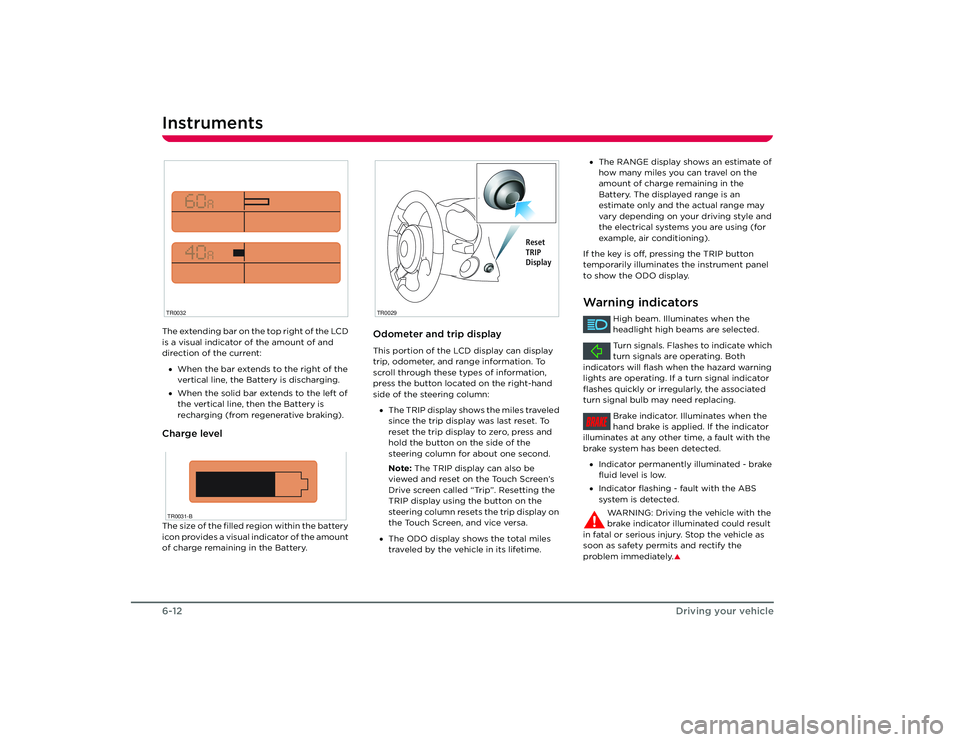
Instruments6-12Driving your vehicleThe extending bar on the top right of the LCD
is a visual indicator of the amount of and
direction of the current:
• When the bar extends to the right of the
vertical line, the Battery is discharging.
• When the solid bar extends to the left of
the vertical line, then the Battery is
recharging (from regenerative braking).Charge levelThe size of the filled region within the battery
icon provides a visual indicator of the amount
of charge remaining in the Battery.
Odometer and trip displayThis portion of the LCD display can display
trip, odometer, and range information. To
scroll through these types of information,
press the button located on the right-hand
side of the steering column:
• The TRIP display shows the miles traveled
since the trip display was last reset. To
reset the trip display to zero, press and
hold the button on the side of the
steering column for about one second.
Note: The TRIP display can also be
viewed and reset on the Touch Screen’s
Drive screen called “Trip”. Resetting the
TRIP display using the button on the
steering column resets the trip display on
the Touch Screen, and vice versa.
• The ODO display shows the total miles
traveled by the vehicle in its lifetime.
TR0032TR0031-B
TR0029
Reset
TRIP
Display
•The RANGE display shows an estimate of
how many miles you can travel on the
amount of charge remaining in the
Battery. The displayed range is an
estimate only and the actual range may
vary depending on your driving style and
the electrical systems you are using (for
example, air conditioning).
If the key is off, pressing the TRIP button
temporarily illuminates the instrument panel
to show the ODO display.Warning indicators
High beam. Illuminates when the
headlight high beams are selected.
Turn signals. Flashes to indicate which
turn signals are operating. Both
indicators will flash when the hazard warning
lights are operating. If a turn signal indicator
flashes quickly or irregularly, the associated
turn signal bulb may need replacing.
Brake indicator. Illuminates when the
hand brake is applied. If the indicator
illuminates at any other time, a fault with the
brake system has been detected.
• Indicator permanently illuminated - brake
fluid level is low.
• Indicator flashing - fault with the ABS
system is detected.
WARNING: Driving the vehicle with the
brake indicator illuminated could result
in fatal or serious injury. Stop the vehicle as
soon as safety permits and rectify the
problem immediately.
S
BRAKE
Roadster OHB.book Page 12 Thursday, October 2, 2008 8:59 AM
Page 51 of 115
Instruments
6-13
Driving your vehicle
Charge indicator. Flashes amber when
the vehicle is charging.
Charge indicator. Illuminates red when
the charging port door is open and
the vehicle is not charging.
Caution: Never run the vehicle until the
Battery is fully depleted. If the Battery
is fully depleted, all electrical systems on the
vehicle are inoperable and the vehicle can not
be driven.
Tire pressure indicator. Illuminates
when the pressure of a tire is out of
range. If a fault with the Tire Pressure
Monitoring System (TPMS) is detected, the
warning indicator flas hes. Check the Touch
Screen for more information.
Seat belt warning. Illuminates
whenever the driver’s seat belt is
unbuckled and the starter switch is in the ON
position. Also, an audible sound will be heard
for six seconds if the starter switch is turned
to the ON position and the drivers seat belt is
unbuckled. If the car is driven more than a
tenth of a mile with the driver’s seat belt
unbuckled, you’ll hear a warning tone.
Airbag warning. Illu minates during the
system check that occurs when the
starter switch is turned to the ON position.
This indicator should extinguish within
approximately six seconds. If the light fails to
illuminate, or fails to extinguish after six
seconds, a fault has occurred and you must
contact Tesla Motors. Warning: If the airbag indicator is
illuminated, the airbag system will be
deactivated. Contact Tesla Motors
immediately. In the event of an accident the
airbags may not inflate.
S
Non-critical fault. Illuminates yellow
when a non-critical fault is detected.
For example, when power is reduced due to
high temperature. Bring the vehicle to Tesla
Motors for servicing as soon as possible.
Critical fault. Illuminates red when a
critical fault is detected. This is usually
accompanied by the inability to drive the
vehicle and a shutdown of all electrical
systems. Stop the vehicle as soon as it is safe
to do so, and contact Tesla Motors.
Traction control. Illuminates when the
traction control has been manually
deactivated and will il luminate briefly in
situations where traction control is in use.
Cruise control. Illuminates when the
cruise control system is operating.
Frost warning. Illuminates when the
temperature outside the vehicle falls
below 37º F (3º C). Extinguishes when the
temperature raises again to
exceed 41º F (5º C).
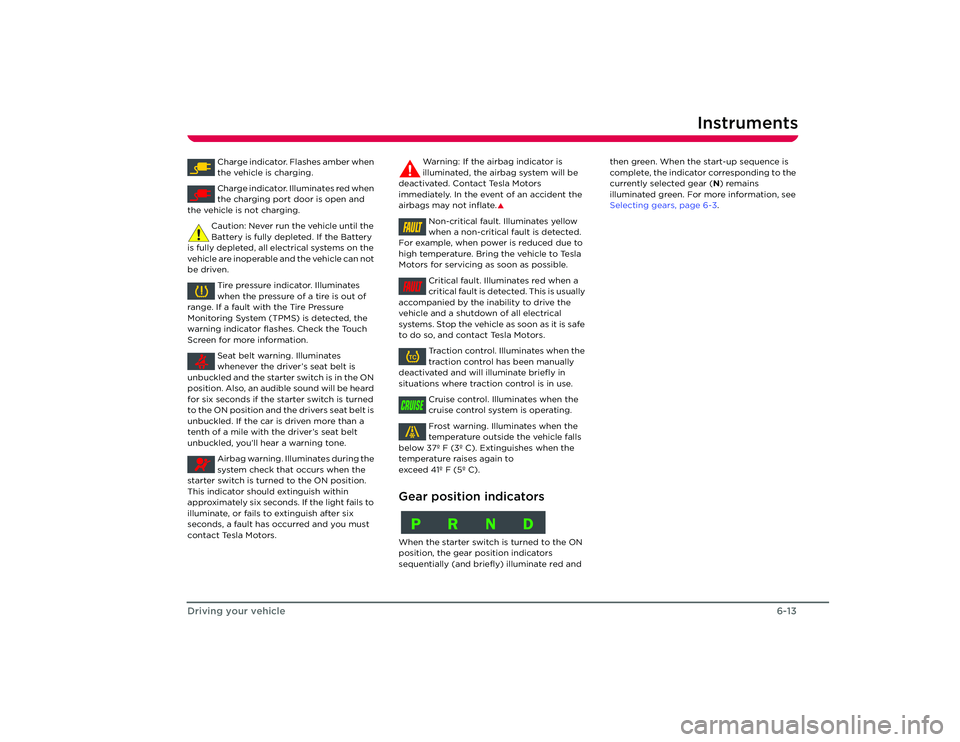
Gear position indicatorsWhen the starter switch is turned to the ON
position, the gear po sition indicators
sequentially (and briefly) illuminate red and then green. When the start-up sequence is
complete, the indicator corresponding to the
currently selected gear (
N) remains
illuminated green. For more information, see
Selecting gears, page 6-3 .FAULTFAULTTCCRUISEPRND
Roadster OHB.book Page 13 Thursday, October 2, 2008 8:59 AM
Page 56 of 115
Interior temperature control7-4
Comfort and convenience
Interior temperature controlGeneral informationThe temperature of the air inside the vehicle
is controlled using the controls on the center
console.
Heating is provided by a high voltage electric
heater located under the hood. Cooling is
provided by an all-electric air conditioning
system located under the hood. In addition to
cooling the cabin, the system also cools the
Battery.
Note: In high ambient temperatures, the
system may not be able to achieve the
desired cabin temperature. This is normal,
with priority being given to cooling the
Battery to ensure that cell temperatures stay
within a range that supports long life and
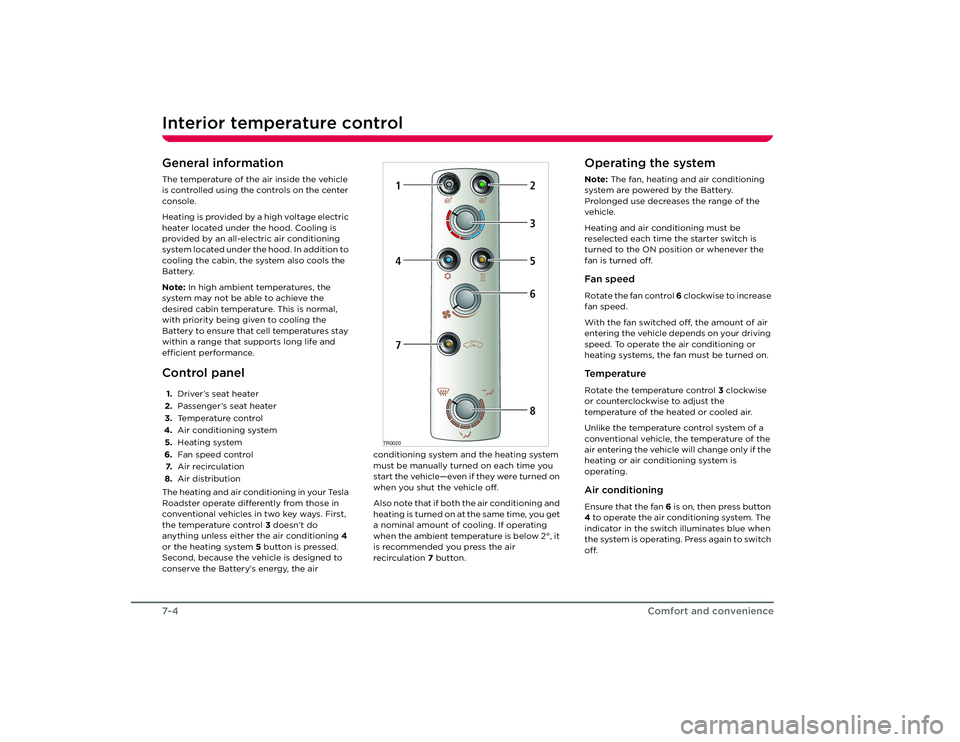
efficient performance.Control panel1. Driver’s seat heater
2. Passenger’s seat heater
3. Temperature control
4. Air conditioning system
5. Heating system
6. Fan speed control
7. Air recirculation
8. Air distribution
The heating and air conditioning in your Tesla
Roadster operate differently from those in
conventional vehicles in two key ways. First,
the temperature control 3 doesn’t do
anything unless either the air conditioning 4
or the heating system 5 button is pressed.
Second, because the vehicle is designed to
conserve the Battery’s energy, the air conditioning system and the heating system
must be manually turned on each time you
start the vehicle—even if they were turned on
when you shut the vehicle off.
Also note that if both the air conditioning and
heating is turned on at the same time, you get
a nominal amount of cooling. If operating
when the ambient temperature is below 2°, it
is recommended you press the air
recirculation
7 button.
Operating the systemNote: The fan, heating and air conditioning
system are powered by the Battery.
Prolonged use decreases the range of the
vehicle.
Heating and air conditioning must be
reselected each time the starter switch is
turned to the ON position or whenever the
fan is turned off.Fan speedRotate the fan control 6 clockwise to increase
fan speed.
With the fan switched off, the amount of air
entering the vehicle depends on your driving
speed. To operate the air conditioning or
heating systems, the fan must be turned on.Te m p e r a t u r eRotate the temperature control 3 clockwise
or counterclockwise to adjust the
temperature of the heated or cooled air.
Unlike the temperature control system of a
conventional vehicle, the temperature of the
air entering the vehicle will change only if the
heating or air conditioning system is
operating.Air conditioningEnsure that the fan 6 is on, then press button
4 to operate the air conditioning system. The
indicator in the switch illuminates blue when
the system is operating. Press again to switch
off.
TR0020
1
2
47
5368
Roadster OHB.book Page 4 Th ursday, October 2, 2008 8:59 AM
Page 57 of 115
Interior temperature control
7-5
Comfort and convenience
Rotate the temperature control to achieve
the desired air temperature.
Note: In high ambient temperatures, cooling
may be temporarily diverted away from the
passenger compartment to cool the Battery.HeatingEnsure that the fan 6 is on, then press button
5 to operate the heating system. The
indicator in the switch will illuminate amber
when the system is operating. Press again to
switch off.
Rotate the temperature control to achieve
the desired air temperature.Air recirculationPress button 7 to operate air recirculation.
The indicator in the switch will illuminate
green. Press again to switch off.
When air recirculation is operating, and the
soft-top or hard-top is installed, 90% of the
air from within the passenger compartment is
recirculated, instead of being drawn from
outside the vehicle. This is useful for
preventing fumes from entering the vehicle
or to effectively maintain a constant
temperature.
Note: It is recommended that recirculation is
switched off for a short period each hour to
refresh the air inside the vehicle, and to help
prevent the windshield from fogging.Air distributionRotate the air distribution control 8 to
change the points at which air enters the
passenger compartment. Windshield vents
Footwell vents
Face vents
Air flow from the vents can be mixed by
positioning the control between the
distribution settings.
Ve n t i l a t i o nAir is drawn into the ventilation system
through the grill at the front of the vehicle.
Keep the grill clear of obstructions (leaves,
snow, etc.).
Press the thumb depression to open the
vents and rotate to direct the air. The vents
on each side of the dashboard can be
adjusted to direct air onto the side windows.
Note: With the face level vents open, airflow
to the foot and windshield outlets is reduced. TR0026
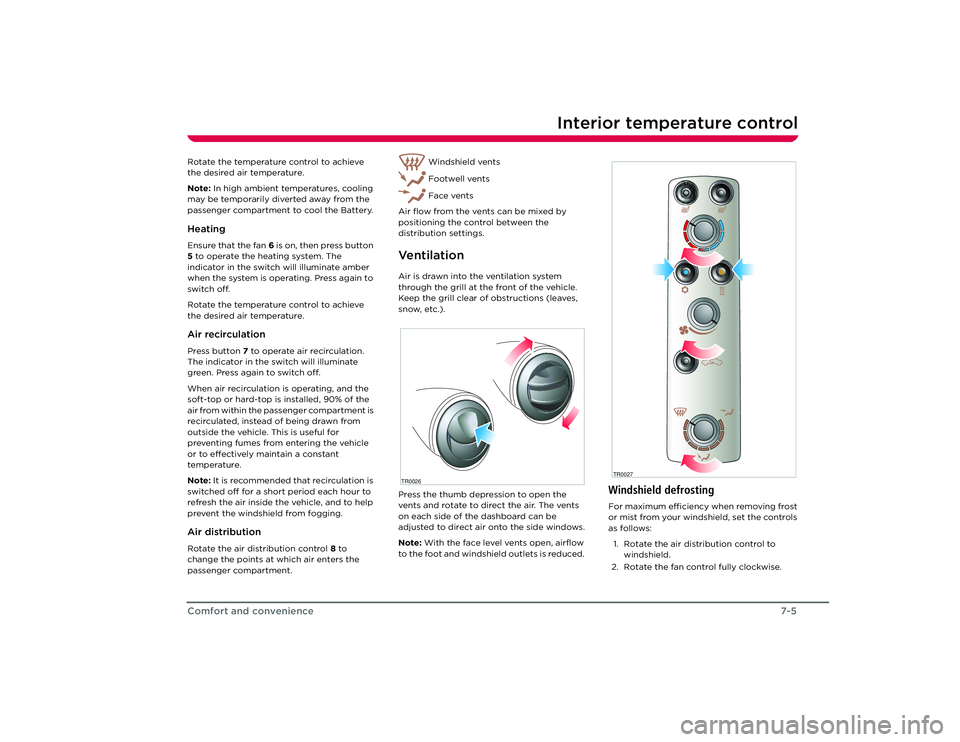
Windshield defrostingFor maximum efficiency when removing frost
or mist from your windshield, set the controls
as follows:
1. Rotate the air distribution control to windshield.
2. Rotate the fan control fully clockwise.TR0027
Roadster OHB.book Page 5 Th ursday, October 2, 2008 8:59 AM
Page 58 of 115
Interior temperature control7-6
Comfort and convenience
3. Switch on both the heating and air conditioning.
4. Rotate the heating control for maximum heat.
When the windshield has fully cleared, adjust
the controls as required.Seat heatersThe seat heaters operate only when the
starter switch is in the ACC or ON position.
Note: The seat heaters must be reselected
each time the starter switch is turned to the
ON position.
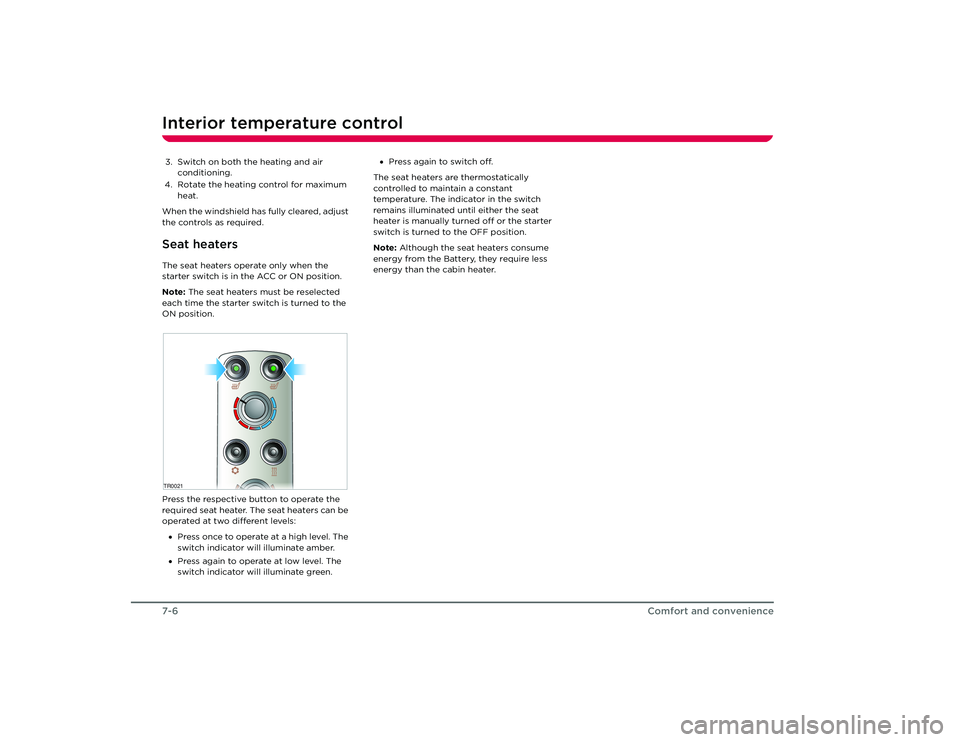
Press the respective button to operate the
required seat heater. The seat heaters can be
operated at two different levels:
• Press once to operate at a high level. The
switch indicator will illuminate amber.
• Press again to operate at low level. The
switch indicator will illuminate green. •
Press again to switch off.
The seat heaters are thermostatically
controlled to maintain a constant
temperature. The indicator in the switch
remains illuminated until either the seat
heater is manually turned off or the starter
switch is turned to the OFF position.
Note: Although the seat heaters consume
energy from the Battery, they require less
energy than the cabin heater.TR0021 Roadster OHB.book Page 6 Th ursday, October 2, 2008 8:59 AM
Page 69 of 115
9-1
Maintenance and careMaintenanceGeneral information 8-2
Routine maintenance 8-2
Owner maintenance 8-2
Opening and closing the hood 8-3
Fluid reservoirs Fluid reservoir locations 8-4
Brake fluid 8-4
Windshield washer fluid 8-5
Battery coolant 8-5
Windshield wiper and washer Checking the wiper blade 8-6
Replacing the wiper blade 8-6
Windshield washer jets 8-6
Cleaning and vehicle care Environmental precautions 8-7
Cleaning the vehicle exterior 8-7
Polishing the body 8-8
Using a car cover 8-8
Paint damage and rectification 8-8
Cleaning the vehicle interior 8-8
Roadster OHB.book Page 1 Th ursday, October 2, 2008 8:59 AM
Page 70 of 115
Maintenance9-2
Maintenance and care
Maintenance and care
MaintenanceGeneral informationRegular maintenance is the key to ensuring
the continued reliability and efficiency of
your vehicle.
Maintenance is the owner's responsibility and
you must ensure that the appropriate
maintenance is carried out when required
and according to the recommendations
specified by Tesla Motors.Routine maintenanceTake your vehicle to Tesla Motors at the
regularly scheduled maintenance intervals of
every 12 months, or every 12,000 miles,
whichever comes first.
Maintenance and service must be performed
by Tesla-certified technicians. Damages or
failures caused by maintenance or repairs
performed by non-Tesla certified technicians
are not covered under the New Vehicle
Limited Warranty.
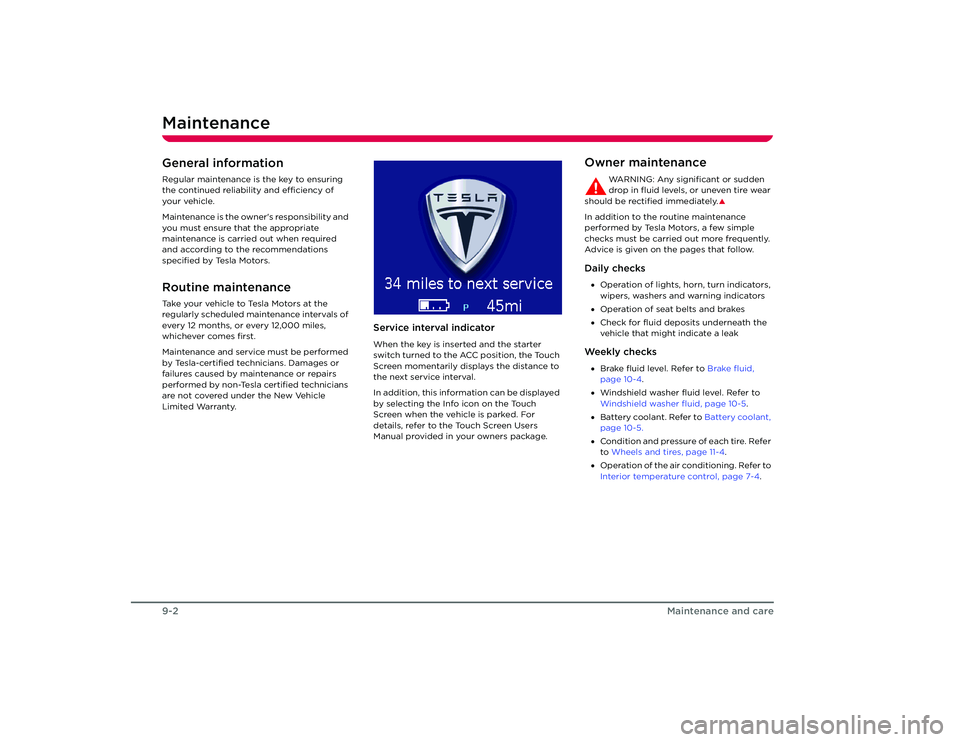
Service interval indicatorWhen the key is inserted and the starter
switch turned to the ACC position, the Touch
Screen momentarily displays the distance to
the next service interval.
In addition, this information can be displayed
by selecting the Info icon on the Touch
Screen when the vehicle is parked. For
details, refer to the Touch Screen Users
Manual provided in your owners package.
Owner maintenance
WARNING: Any significant or sudden
drop in fluid levels, or uneven tire wear
should be rectified immediately.
S
In addition to the routine maintenance
performed by Tesla Motors, a few simple
checks must be carried out more frequently.
Advice is given on the pages that follow.Daily checks• Operation of lights, horn, turn indicators,
wipers, washers and warning indicators
• Operation of seat belts and brakes
• Check for fluid deposits underneath the
vehicle that might indicate a leakWe e k l y c h e c k s•Brake fluid level. Refer to Brake fluid,
page 10-4 .
• Windshield washer fluid level. Refer to
Windshield washer fluid, page 10-5 .
• Battery coolant. Refer to Battery coolant,
page 10-5.
• Condition and pressure of each tire. Refer
to Wheels and tires, page 11-4 .
• Operation of the air conditioning. Refer to
Interior temperature control, page 7-4.
Roadster OHB.book Page 2 Th ursday, October 2, 2008 8:59 AM
Page 72 of 115
Fluid reservoirs9-4
Maintenance and care
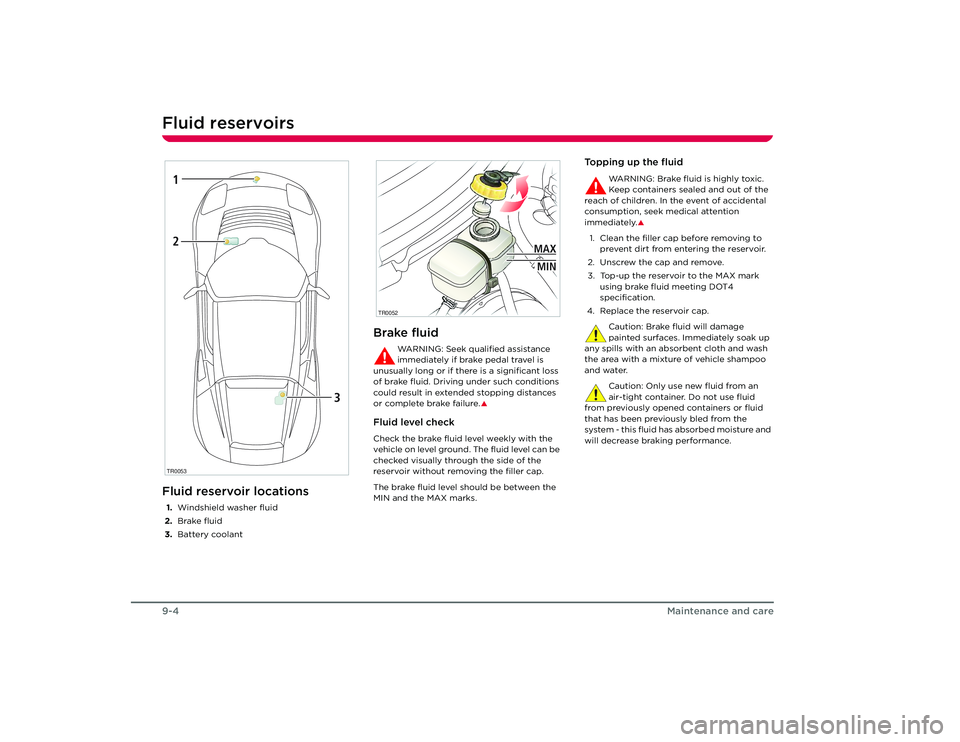
Fluid reservoirsFluid reservoir locations1.Windshield washer fluid
2. Brake fluid
3. Battery coolant
Brake fluid
WARNING: Seek qualified assistance
immediately if brake pedal travel is
unusually long or if there is a significant loss
of brake fluid. Driving under such conditions
could result in extended stopping distances
or complete brake failure.
S
Fluid level checkCheck the brake fluid level weekly with the
vehicle on level ground. The fluid level can be
checked visually through the side of the
reservoir without removing the filler cap.
The brake fluid level should be between the
MIN and the MAX marks.
Topping up the fluid
WARNING: Brake fluid is highly toxic.
Keep containers sealed and out of the
reach of children. In the event of accidental
consumption, seek medical attention
immediately.
S
1. Clean the filler cap before removing to prevent dirt from entering the reservoir.
2. Unscrew the cap and remove.
3. Top-up the reservoir to the MAX mark using brake fluid meeting DOT4
specification.
4. Replace the reservoir cap.
Caution: Brake fluid will damage
painted surfaces. Immediately soak up
any spills with an absorbent cloth and wash
the area with a mixtur e of vehicle shampoo
and water.
Caution: Only use new fluid from an
air-tight container. Do not use fluid
from previously opened containers or fluid
that has been previously bled from the
system - this fluid has absorbed moisture and
will decrease braking performance.
TR00531
2
3
TR0052
MAXMIN
Roadster OHB.book Page 4 Th ursday, October 2, 2008 8:59 AM
Page 73 of 115
Fluid reservoirs
9-5
Maintenance and care
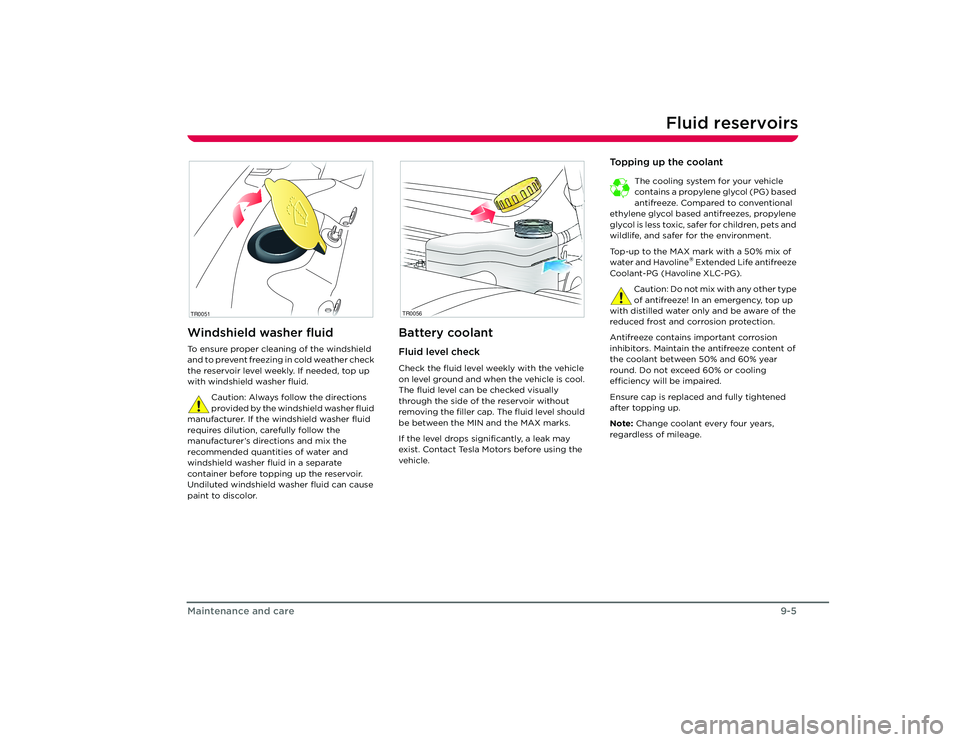
Windshield washer fluidTo ensure proper cleaning of the windshield
and to prevent freezing in cold weather check
the reservoir level weekly. If needed, top up
with windshield washer fluid.
Caution: Always follow the directions
provided by the windshield washer fluid
manufacturer. If the windshield washer fluid
requires dilution, carefully follow the
manufacturer’s directions and mix the
recommended quantities of water and
windshield washer fluid in a separate
container before topping up the reservoir.
Undiluted windshield washer fluid can cause
paint to discolor.
Battery coolantFluid level checkCheck the fluid level weekly with the vehicle
on level ground and when the vehicle is cool.
The fluid level can be checked visually
through the side of the reservoir without
removing the filler cap. The fluid level should
be between the MIN and the MAX marks.
If the level drops significantly, a leak may
exist. Contact Tesla Motors before using the
vehicle.
To p p i n g u p t h e c o o l a n t
The cooling system for your vehicle
contains a propylene glycol (PG) based
antifreeze. Compared to conventional
ethylene glycol based antifreezes, propylene
glycol is less toxic, sa fer for children, pets and
wildlife, and safer for the environment.
Top-up to the MAX mark with a 50% mix of
water and Havoline
® Extended Life antifreeze
Coolant-PG (Havoline XLC-PG).
Caution: Do not mix with any other type
of antifreeze! In an emergency, top up
with distilled water only and be aware of the
reduced frost and corrosion protection.
Antifreeze contains important corrosion
inhibitors. Maintain the antifreeze content of
the coolant between 50% and 60% year
round. Do not exceed 60% or cooling
efficiency will be impaired.
Ensure cap is replaced and fully tightened
after topping up.
Note: Change coolant every four years,
regardless of mileage.
TR0051
TR0056
Roadster OHB.book Page 5 Th ursday, October 2, 2008 8:59 AM
Page 75 of 115
Cleaning and vehicle care
9-7
Maintenance and care
Cleaning and vehicle careEnvironmental precautions
Some cleaning products contain
chemicals that are hazardous to the
environment. Always take precautions
to prevent fluids from spilling.
It is illegal to pollute drains, rivers and
waterways. Used toxic chemicals must be
disposed of at authorized waste disposal
sites only.
Cleaning the vehicle exteriorHand washing
Caution: Substances that are corrosive,
such as bird droppings, tree resin, dead
insects, tar spots, road salt and industrial
fall-out can damage the vehicle's paint.
Remove such deposits as soon as possible to
prevent damage. To preserve the paint finish, observe the
following:
• Before washing, use a hose to remove
heavy deposits of mud and dirt.
• Never wash a vehicle that is “hot to the
touch” or during exposure to strong,
direct sunlight.
• Wash the body using cold or lukewarm
water containing a good quality wash and
wax shampoo.
• Never use strong household detergents
or soap. These products can discolor and
spot painted surfaces.
• For best results, always use a clean
sponge or car wash mitt with plenty of
water.
• After washing, rinse with clean water and
thoroughly wipe dry with a chamois. Do
not allow cleaning agents to dry on the
finish.
Automatic car washers and pressure
washers
Caution: Tesla Motors recommends that
you hand wash your vehicle.
Do not use an automatic car washer or
pressure washer as these may damage your
vehicle’s paint finish, soft top, or other
components. The use of a pressure washer to
clean components in the Battery
compartment may damage critical seals on
the Battery and other electrical components.
Note: Vehicle or paint damage caused by
using an automatic car washer or pressure
washer is not covered under the New Vehicle
Limited Warranty.
Underbody maintenanceIf salt has been used on the highways (such as
during winter months), thoroughly remove all
traces of road salt. Use a hose to rinse salt
from the underside of the vehicle.
Flush away accumulations of mud in areas
where debris easily collects (such as wheel
arches and panel seams).Removing tar spotsUse denatured alcohol to remove tar spots
and stubborn grease stains from paint. After
cleaning, immediately wash the area with
soapy water to remove the alcohol.Washing the soft-top
Caution: Scrubbing or brushing with a
hard bristle brush will damage the
fibers of the fabric, causing fabric
deterioration and impairing its cosmetic
appearance.
When washing the soft-top, follow these
guidelines:
1. Before washing, vacuum the soft-top using a soft brush attachment to remove
dust and dirt.
2. Soften encrusted dirt using soap and water, then rinse with clean water.
3. Wash using mild soap and water. Never use solvent, petroleum or chemical-based
cleaners, detergents, or wash/wax
compounds.
TR0159
Roadster OHB.book Page 7 Th ursday, October 2, 2008 8:59 AM