display TESLA ROADSTER 2008 User Guide
[x] Cancel search | Manufacturer: TESLA, Model Year: 2008, Model line: ROADSTER, Model: TESLA ROADSTER 2008Pages: 115, PDF Size: 46.35 MB
Page 43 of 115
Driving basics
6-5
Driving your vehicle
Hand brake
WARNING: Do not apply the hand
brake when the vehicle is moving. This
could result in a loss of control and may
damage the rear brakes.
S
The hand brake operates on the rear wheels
only, and is totally independent of the foot
operated hydraulic brake system.
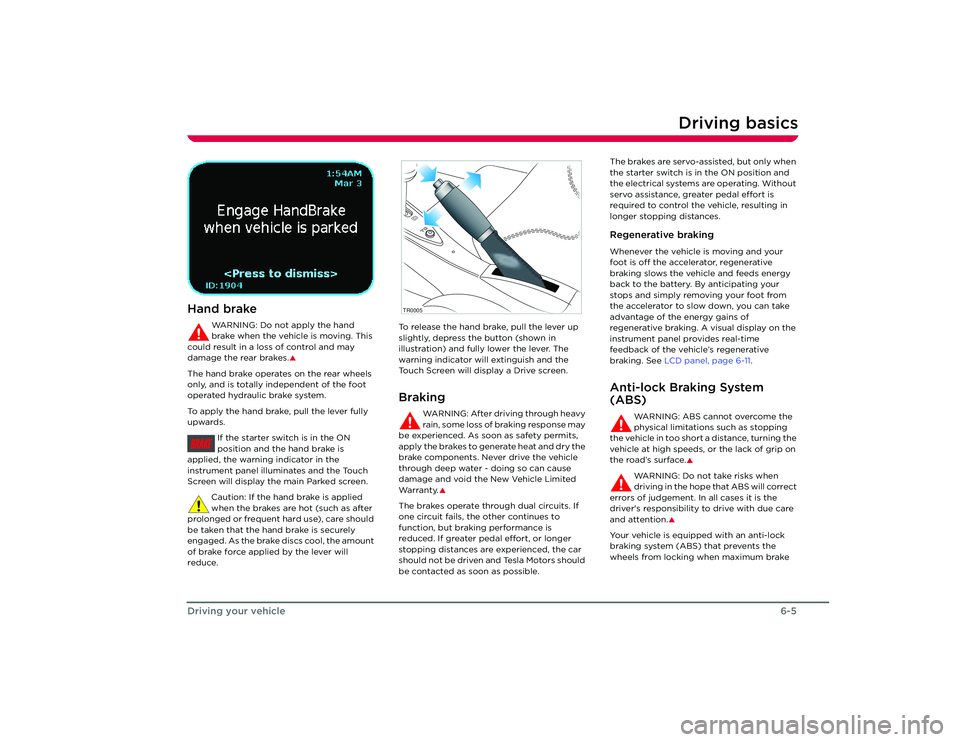
To apply the hand brake, pull the lever fully
upwards.
If the starter switch is in the ON
position and the hand brake is
applied, the warnin g indicator in the
instrument panel illuminates and the Touch
Screen will display the main Parked screen.
Caution: If the hand brake is applied
when the brakes are hot (such as after
prolonged or frequent hard use), care should
be taken that the hand brake is securely
engaged. As the brake discs cool, the amount
of brake force applied by the lever will
reduce. To release the hand brake, pull the lever up
slightly, depress the button (shown in
illustration) and fully lower the lever. The
warning indicator will extinguish and the
Touch Screen will display a Drive screen.
Braking
WARNING: After driving through heavy
rain, some loss of braking response may
be experienced. As soon as safety permits,
apply the brakes to generate heat and dry the
brake components. Never drive the vehicle
through deep water - doing so can cause
damage and void the New Vehicle Limited
Wa r ra n t y.
S
The brakes operate through dual circuits. If
one circuit fails, the other continues to
function, but brakin g performance is
reduced. If greater pedal effort, or longer
stopping distances are experienced, the car
should not be driven and Tesla Motors should
be contacted as soon as possible. The brakes are servo-assisted, but only when
the starter switch is in the ON position and
the electrical systems are operating. Without
servo assistance, greater pedal effort is
required to control the vehicle, resulting in
longer stopping distances.
Regenerative brakingWhenever the vehicle is moving and your
foot is off the accelerator, regenerative
braking slows the vehicle and feeds energy
back to the battery. By anticipating your
stops and simply removing your foot from
the accelerator to slow down, you can take
advantage of the energy gains of
regenerative braking. A visual display on the
instrument panel provides real-time
feedback of the vehicle’s regenerative
braking. See
LCD panel, page 6-11 .Anti-lock Braking System
(ABS)
WARNING: ABS cannot overcome the
physical limitations such as stopping
the vehicle in too short a distance, turning the
vehicle at high speeds, or the lack of grip on
the road’s surface.
S
WARNING: Do not take risks when
driving in the hope that ABS will correct
errors of judgement. In all cases it is the
driver's responsibility to drive with due care
and attention.
S
Your vehicle is equipp ed with an anti-lock
braking system (ABS) that prevents the
wheels from locking when maximum brake
BRAKE
TR0005
Roadster OHB.book Page 5 Th ursday, October 2, 2008 8:59 AM
Page 49 of 115
Instruments
6-11
Driving your vehicle
Instruments
BRAKE FAU LT
CRUISE
TC
P
R
N
D
mph
rpm
x1000
150
140
130
120
110
100
50
40
30
20 10 90
60 80
70
0
0
1
2
3
4
5
6
7
8
9
10
11
12
13
1415
BRAKE
FAU LT
CRUISE
TC
PRND
mph
rpmx1000
150140130120110100
5040302010
90
60
80
70
0
012345
6
7
8
910
1112131415
TR0028noc
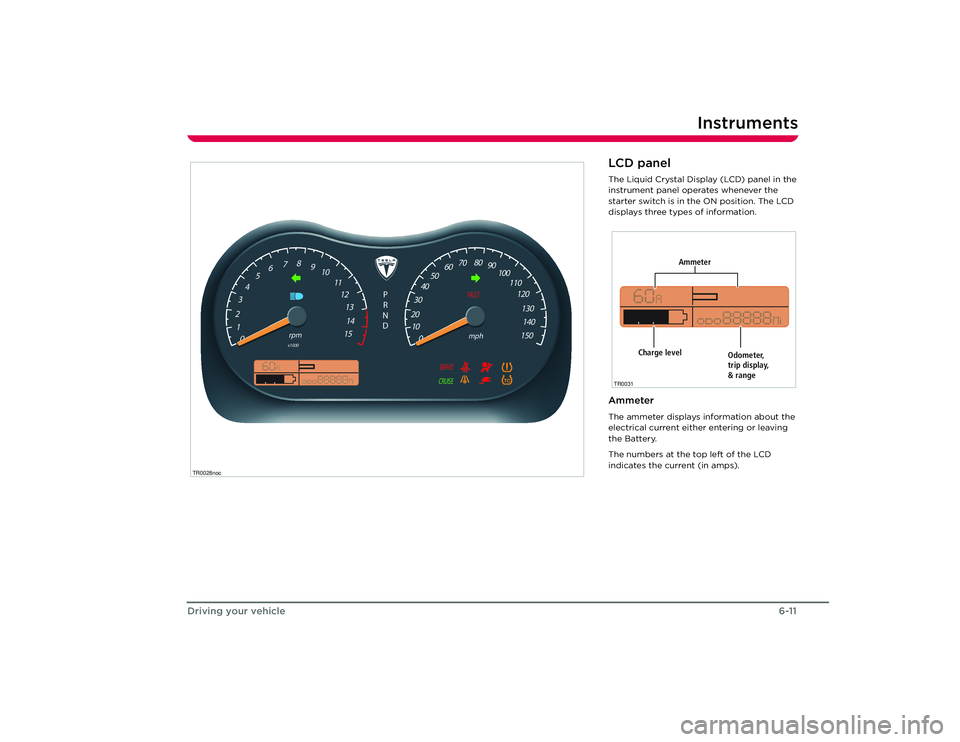
LCD panelThe Liquid Crystal Display (LCD) panel in the
instrument panel operates whenever the
starter switch is in the ON position. The LCD
displays three types of information.AmmeterThe ammeter displays information about the
electrical current either entering or leaving
the Battery.
The numbers at the top left of the LCD
indicates the current (in amps).
Ammeter
Odometer,
trip display,
& range
Charge level
TR0031
Roadster OHB.book Page 11 Thursday, October 2, 2008 8:59 AM
Page 50 of 115
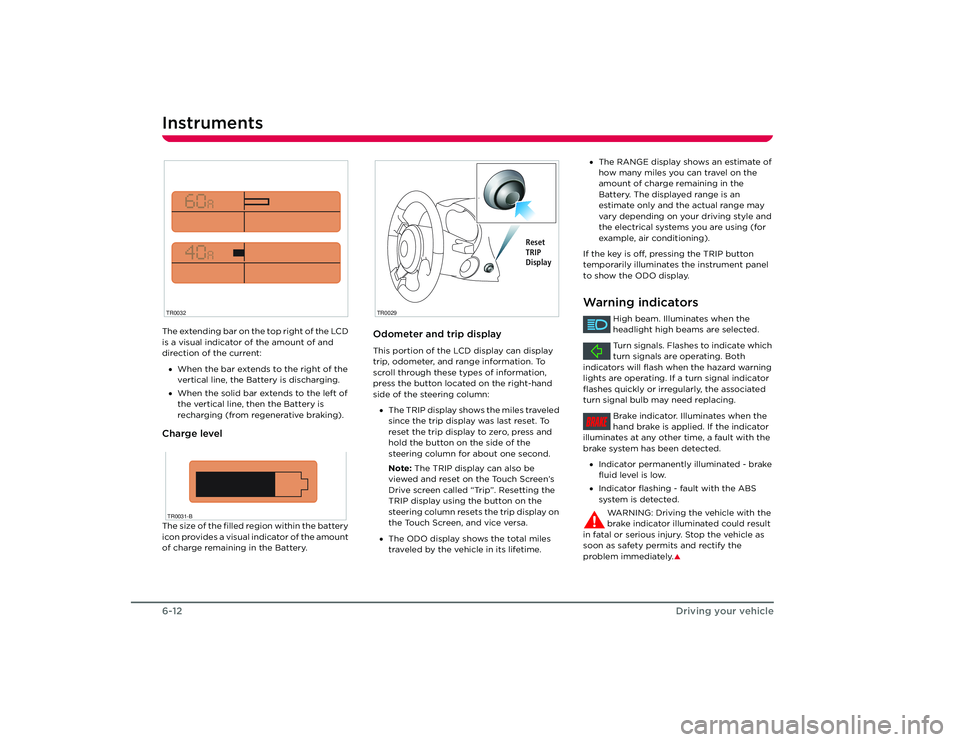
Instruments6-12Driving your vehicleThe extending bar on the top right of the LCD
is a visual indicator of the amount of and
direction of the current:
• When the bar extends to the right of the
vertical line, the Battery is discharging.
• When the solid bar extends to the left of
the vertical line, then the Battery is
recharging (from regenerative braking).Charge levelThe size of the filled region within the battery
icon provides a visual indicator of the amount
of charge remaining in the Battery.
Odometer and trip displayThis portion of the LCD display can display
trip, odometer, and range information. To
scroll through these types of information,
press the button located on the right-hand
side of the steering column:
• The TRIP display shows the miles traveled
since the trip display was last reset. To
reset the trip display to zero, press and
hold the button on the side of the
steering column for about one second.
Note: The TRIP display can also be
viewed and reset on the Touch Screen’s
Drive screen called “Trip”. Resetting the
TRIP display using the button on the
steering column resets the trip display on
the Touch Screen, and vice versa.
• The ODO display shows the total miles
traveled by the vehicle in its lifetime.
TR0032TR0031-B
TR0029
Reset
TRIP
Display
•The RANGE display shows an estimate of
how many miles you can travel on the
amount of charge remaining in the
Battery. The displayed range is an
estimate only and the actual range may
vary depending on your driving style and
the electrical systems you are using (for
example, air conditioning).
If the key is off, pressing the TRIP button
temporarily illuminates the instrument panel
to show the ODO display.Warning indicators
High beam. Illuminates when the
headlight high beams are selected.
Turn signals. Flashes to indicate which
turn signals are operating. Both
indicators will flash when the hazard warning
lights are operating. If a turn signal indicator
flashes quickly or irregularly, the associated
turn signal bulb may need replacing.
Brake indicator. Illuminates when the
hand brake is applied. If the indicator
illuminates at any other time, a fault with the
brake system has been detected.
• Indicator permanently illuminated - brake
fluid level is low.
• Indicator flashing - fault with the ABS
system is detected.
WARNING: Driving the vehicle with the
brake indicator illuminated could result
in fatal or serious injury. Stop the vehicle as
soon as safety permits and rectify the
problem immediately.
S
BRAKE
Roadster OHB.book Page 12 Thursday, October 2, 2008 8:59 AM
Page 70 of 115
Maintenance9-2
Maintenance and care
Maintenance and care
MaintenanceGeneral informationRegular maintenance is the key to ensuring
the continued reliability and efficiency of
your vehicle.
Maintenance is the owner's responsibility and
you must ensure that the appropriate
maintenance is carried out when required
and according to the recommendations
specified by Tesla Motors.Routine maintenanceTake your vehicle to Tesla Motors at the
regularly scheduled maintenance intervals of
every 12 months, or every 12,000 miles,
whichever comes first.
Maintenance and service must be performed
by Tesla-certified technicians. Damages or
failures caused by maintenance or repairs
performed by non-Tesla certified technicians
are not covered under the New Vehicle
Limited Warranty.
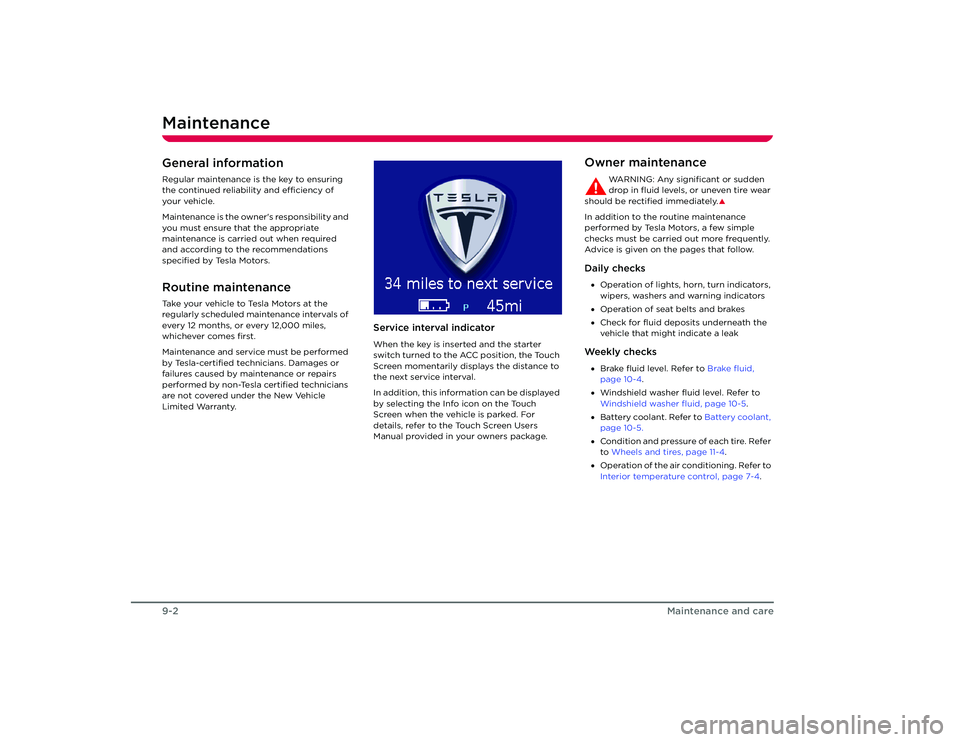
Service interval indicatorWhen the key is inserted and the starter
switch turned to the ACC position, the Touch
Screen momentarily displays the distance to
the next service interval.
In addition, this information can be displayed
by selecting the Info icon on the Touch
Screen when the vehicle is parked. For
details, refer to the Touch Screen Users
Manual provided in your owners package.
Owner maintenance
WARNING: Any significant or sudden
drop in fluid levels, or uneven tire wear
should be rectified immediately.
S
In addition to the routine maintenance
performed by Tesla Motors, a few simple
checks must be carried out more frequently.
Advice is given on the pages that follow.Daily checks• Operation of lights, horn, turn indicators,
wipers, washers and warning indicators
• Operation of seat belts and brakes
• Check for fluid deposits underneath the
vehicle that might indicate a leakWe e k l y c h e c k s•Brake fluid level. Refer to Brake fluid,
page 10-4 .
• Windshield washer fluid level. Refer to
Windshield washer fluid, page 10-5 .
• Battery coolant. Refer to Battery coolant,
page 10-5.
• Condition and pressure of each tire. Refer
to Wheels and tires, page 11-4 .
• Operation of the air conditioning. Refer to
Interior temperature control, page 7-4.
Roadster OHB.book Page 2 Th ursday, October 2, 2008 8:59 AM
Page 76 of 115
Cleaning and vehicle care9-8
Maintenance and care
WheelsWash wheels with warm, fresh water
containing a good quality wash and wax
shampoo. Thoroughly rinse the wheels to
remove any soap residue.Windshield, windows and mirrorsRegularly clean all windows inside and out
using a window cleaning solution. An
automotive glass cleaner is recommended.
After washing the vehicle with wash/wax
products, clean the outside of the windshield
with glass cleaner.
Mirror glass is particularly susceptible to
damage. Do not use abrasive cleaning
compounds.Wiper bladesClean wiper blades using mild soap and warm
water only. Do not use petroleum or
alcohol-based cleaners.
Polishing the bodyTo preserve the cosmetic appearance of the
body, occasionally apply a good quality
polish. A good polish should contain a very
mild abrasive that removes surface
contamination without damaging the
surface, a mild filling compound to reduce the
appearance of scratches, and wax to provide
a barrier between the cleaned body surface
and airborne contaminants.
Do not use cutting paste, color restoration
compounds, or polishes containing a harsh
abrasive. These can scour the surface and
permanently degrade the body.Using a car coverTo preserve the cosmetic appearance of the
body, you may want to use a car cover. Only
an approved Tesla Motors car cover should be
used. DONOT use the car cover when
charging the vehicle. Doing so can interfere
with adequate cooling during charging.Paint damage and rectificationTreat chips and scratches to the paint using a
paint touch-up pen. Use the touch-up pen
after washing but before polishing or waxing.
More extensive repairs to the body should
only be carried out by a facility approved by
Tesla Motors. Contact Tesla Motors for a list of
approved body repair facilities.
Cleaning the vehicle interiorPlastic materials
Caution: Do not polish the upper
surfaces of the dashboard. Polished
surfaces are reflective and may interfere with
the driver's view.
Clean with diluted upholstery cleaner, then
wipe with a damp cloth.
Carpet and fabricsClean with diluted upholstery cleaner. Test a
concealed area first.LeatherClean with warm water and a non-detergent
soap. Dry and polish with a dry, clean,
lint-free cloth.Seat beltsExtend the belts and clean with warm, soapy,
fresh water only. Do not use any type of
detergent or chemical cleaning agent. Allow
the belts to dry naturally while extended,
preferably away from direct sunlight.Instruments and display screensClean the instrument panel, Touch Screen,
and audio system screen using a damp cloth.
Do not use cleaning co mpounds or solutions.
Roadster OHB.book Page 8 Th ursday, October 2, 2008 8:59 AM
Page 79 of 115
Energy Depletion
10-3
Roadside emergencies
Energy DepletionDealing with a discharged
BatteryWhen driving the vehicle, the Touch Screen
displays warning messages as the level of
charge approaches a low level. You’ll notice
the color of the charge level graph on the
Energy screen turn yellow, then red, to alert
you that you need to charge the vehicle.
If you ignore these warnings and continue to
drive the vehicle, the charge level will
eventually reach 0% and the car will stop. Pull
the vehicle over to a safe location and call
Roadside Assistance.
Caution: If the Battery’s charge level
falls to 0%, it must be plugged in
immediately. Failure to do so can
permanently damage the Battery and this
damage is not covered by the New Vehicle
Limited Warranty. Also, if you allow the
Battery to fall to a critically low level it may
not be possible to charge the vehicle. If you
are unable to charge the vehicle, contact
Te s l a M o t o r s . A few extra milesWhen the vehicle’s Battery is fully depleted
while driving, the vehicle switches to
RESERVE mode which provides you with the
opportunity to immedi ately get the vehicle
off the road. The distance you can drive in
RESERVE mode is very limited (depending
on energy being used it could be as little as 1
mile).
Roadster OHB.book Page 3 Th ursday, October 2, 2008 8:59 AM
Page 81 of 115
Tire repair
10-5
Roadside emergencies
Note: In cold conditions, use the vehicle’s
heater to warm the aerosol.
3. Position the wheel (if possible) so that the puncture is at the bottom.
4. Remove the valve cap and clean the valve thread.
5. Vigorously shake the tire sealant for approximately 30 seconds.
6. Screw the filler tube onto the tire valve and break the safety seal.
7. Hold the tire sealant upright and turn the knob one-quarter turn clockwise. If you
need to stop the process, simply turn the
knob back to the ‘OFF’ position.
8. Empty the entire contents of the tire sealant into the tire. When the sealant
stops flowing through the filler tube, turn
the knob to the ‘OFF’ position and
unscrew the filler tube from the tire valve.
Note: If tire sealant comes into contact
with the vehicle’s paint, immediately
wash the area with water to avoid
permanent damage.
9. If the wheel rim has lifted from the ground, drive immediately for 6 to 12
miles (10 to 20 km) to distribute the
sealant evenly inside the tire. Then drive
gently and do not exceed 30 mph
(45 km/h).
WARNING: If the wheel rim has not
lifted from the ground, call
Roadside Assistance to have the vehicle
transported to a repair facility.
S
10. Drive to the nearest service station and inflate the tire to the correct pressure (see
Specifications and tire pressures,
page 11-4 .) If the required pressure
cannot be reached, then the tire is too
severely damaged and you should have
the vehicle transported to a tire repair
facility. Do not drive!
Note: When adjusting tire pressures, you
can display tire pressure values on the
Touch Screen’s tire pressure screen.
However, the values displayed by the
Touch Screen will not be updated until
you place the car in drive long enough for
the tire pressure monitoring sensors to
take new readings. For details, refer to the
Touch Screen Users Manual provided in
your owners package.
11. If the correct tire pressure was achieved, continue driving. Drive carefully and do
not exceed 30 mph (45 km/h). At the
earliest opportunity, have the tire
repaired or replaced and replace the used
tire sealant.
WARNING: Always inform the tire
repairer that tire sealant has been
used. If the tire is to be subsequently
deflated, only do so in a well ventilated
area. The aerosol sealant can damage the
wheel sensor that measures tire pressure.
Therefore, the wheel sensor must be
replaced.
S
Replacing the tire sealantAlways replace the used tire sealant with one
of the same type and capacity (400 ml). Tire
sealants are available through most reputable
automotive retailers.
Roadster OHB.book Page 5 Th ursday, October 2, 2008 8:59 AM
Page 89 of 115
Vehicle recovery
10-13
Roadside emergencies
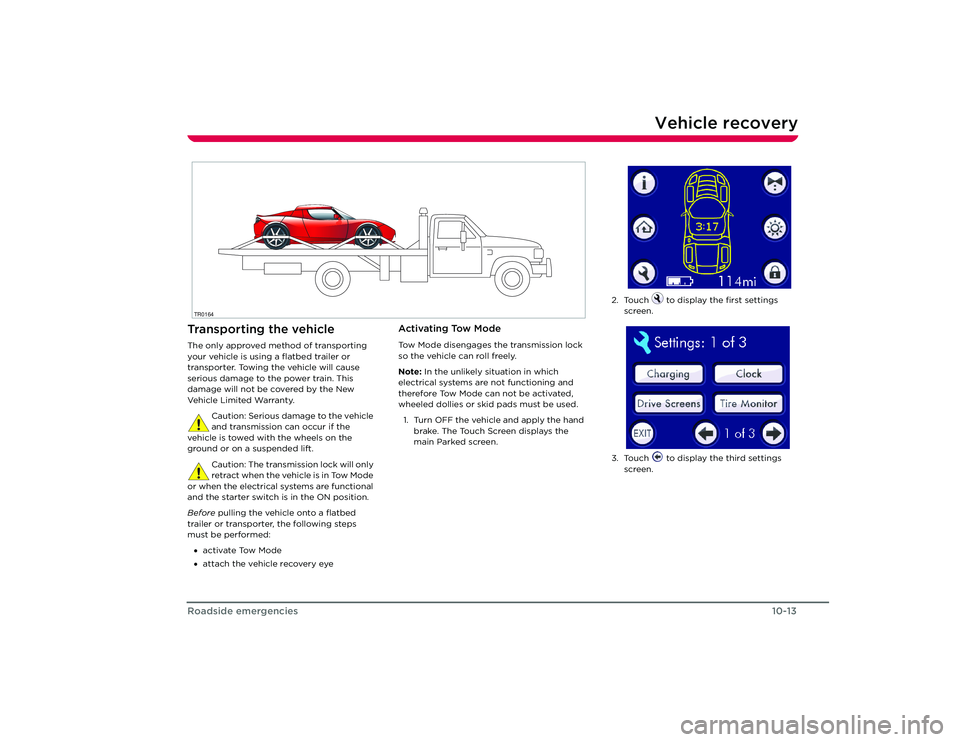
Vehicle recoveryTransporting the vehicleThe only approved method of transporting
your vehicle is using a flatbed trailer or
transporter. Towing the vehicle will cause
serious damage to the power train. This
damage will not be covered by the New
Ve h i c l e L i m i t e d Wa r ra n t y.
Caution: Serious damage to the vehicle
and transmission can occur if the
vehicle is towed with the wheels on the
ground or on a suspended lift.
Caution: The transmission lock will only
retract when the vehicle is in Tow Mode
or when the electrical systems are functional
and the starter switch is in the ON position.
Before pulling the vehicle onto a flatbed
trailer or transporter, the following steps
must be performed:
• activate Tow Mode
• attach the vehicle recovery eye
Activating Tow ModeTow Mode disengages the transmission lock
so the vehicle can roll freely.
Note: In the unlikely situation in which
electrical systems are not functioning and
therefore Tow Mode can not be activated,
wheeled dollies or skid pads must be used.
1. Turn OFF the vehicle and apply the hand brake. The Touch Screen displays the
main Parked screen.
TR0164
2. Touch to display the first settings screen.
3. Touch to display the third settings screen.
Roadster OHB.book Page 13 Thursday, October 2, 2008 8:59 AM
Page 90 of 115
Vehicle recovery10-14
Roadside emergencies
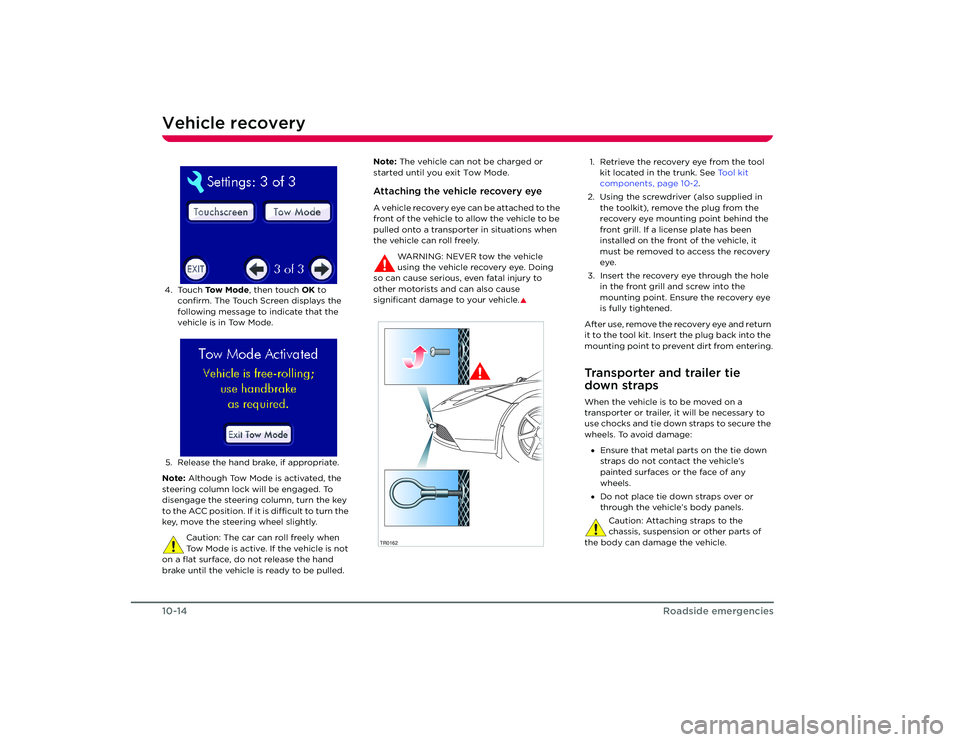
4. Touch To w M o d e , then touch OK to
confirm. The Touch Screen displays the
following message to indicate that the
vehicle is in Tow Mode.
5. Release the hand brake, if appropriate.
Note: Although Tow Mode is activated, the
steering column lock will be engaged. To
disengage the steering column, turn the key
to the ACC position. If it is difficult to turn the
key, move the steering wheel slightly.
Caution: The car can roll freely when
Tow Mode is active. If the vehicle is not
on a flat surface, do not release the hand
brake until the vehicle is ready to be pulled. Note:
The vehicle can not be charged or
started until you exit Tow Mode.
Attaching the vehicle recovery eyeA vehicle recovery eye can be attached to the
front of the vehicle to allow the vehicle to be
pulled onto a transporter in situations when
the vehicle can roll freely.
WARNING: NEVER tow the vehicle
using the vehicle recovery eye. Doing
so can cause serious, even fatal injury to
other motorists and can also cause
significant damage to your vehicle.
S
1. Retrieve the recovery eye from the tool kit located in the trunk. See Tool kit
components, page 10-2.
2. Using the screwdriver (also supplied in the toolkit), remove the plug from the
recovery eye mounting point behind the
front grill. If a license plate has been
installed on the front of the vehicle, it
must be removed to access the recovery
eye.
3. Insert the recovery eye through the hole in the front grill and screw into the
mounting point. Ensure the recovery eye
is fully tightened.
After use, remove the recovery eye and return
it to the tool kit. Insert the plug back into the
mounting point to prevent dirt from entering.Transporter and trailer tie
down strapsWhen the vehicle is to be moved on a
transporter or trailer, it will be necessary to
use chocks and tie down straps to secure the
wheels. To avoid damage: • Ensure that metal parts on the tie down
straps do not contact the vehicle’s
painted surfaces or the face of any
wheels.
• Do not place tie down straps over or
through the vehicle’s body panels.
Caution: Attaching straps to the
chassis, suspension or other parts of
the body can damage the vehicle.
TR0162
Roadster OHB.book Page 14 Thursday, October 2, 2008 8:59 AM
Page 92 of 115
Vehicle identification11-2
Technical specifications
Technical specifications
Vehicle identification
SFZRE11B063000000*SFZRE11B063000000*
TR0047
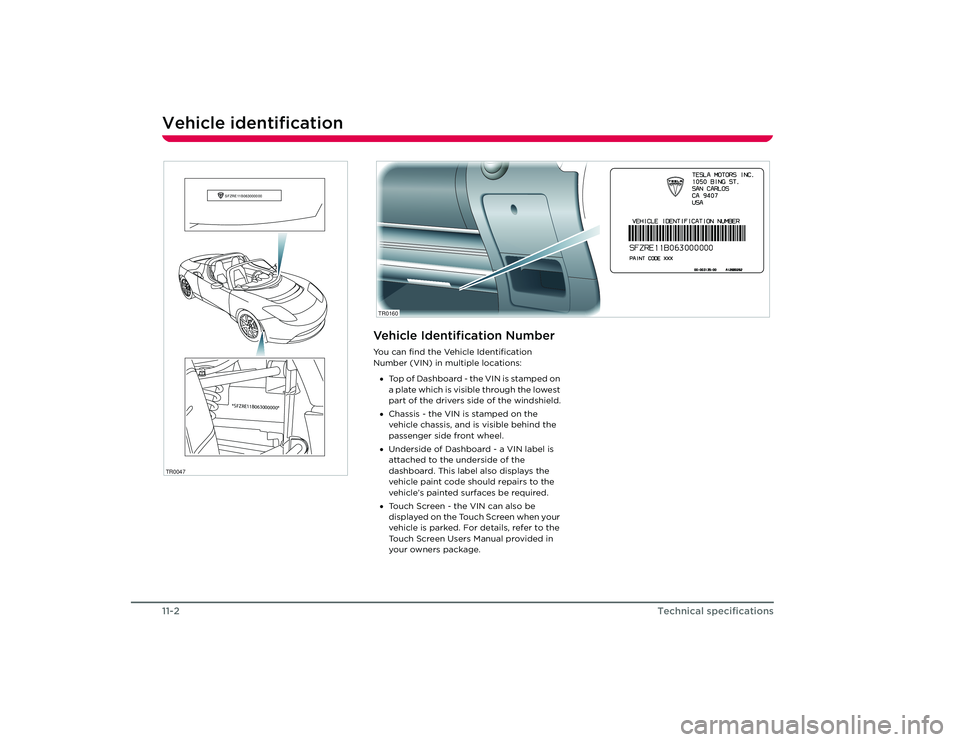
Vehicle Identification NumberYou can find the Vehicle Identification
Number (VIN) in multiple locations:• Top of Dashboard - the VIN is stamped on
a plate which is visible through the lowest
part of the drivers side of the windshield.
• Chassis - the VIN is stamped on the
vehicle chassis, and is visible behind the
passenger side front wheel.
• Underside of Dashboard - a VIN label is
attached to the underside of the
dashboard. This label also displays the
vehicle paint code should repairs to the
vehicle’s painted surfaces be required.
• Touch Screen - the VIN can also be
displayed on the Touch Screen when your
vehicle is parked. For details, refer to the
Touch Screen Users Manual provided in
your owners package. TR0160
Roadster OHB.book Page 2 Th ursday, October 2, 2008 8:59 AM