door lock TESLA ROADSTER 2008 User Guide
[x] Cancel search | Manufacturer: TESLA, Model Year: 2008, Model line: ROADSTER, Model: TESLA ROADSTER 2008Pages: 115, PDF Size: 46.35 MB
Page 29 of 115
Vehicle security4-8
Doors, locks, and security
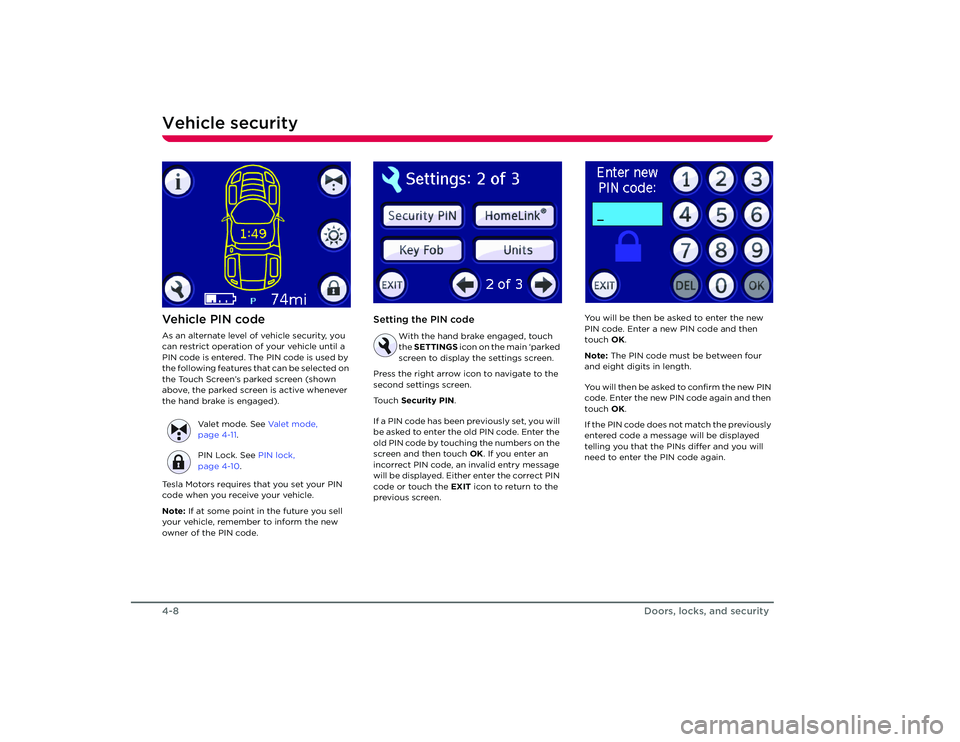
Ve h i c l e P I N c o d eAs an alternate level of vehicle security, you
can restrict operation of your vehicle until a
PIN code is entered. The PIN code is used by
the following features that can be selected on
the Touch Screen’s parked screen (shown
above, the parked screen is active whenever
the hand brake is engaged).
Tesla Motors requires that you set your PIN
code when you receive your vehicle.
Note: If at some point in the future you sell
your vehicle, remember to inform the new
owner of the PIN code.
Setting the PIN code
With the hand brake engaged, touch
the SETTINGS icon on the main ‘parked
screen to display the settings screen.
Press the right arrow icon to navigate to the
second settings screen.
Touch Security PIN .
If a PIN code has been previously set, you will
be asked to enter the old PIN code. Enter the
old PIN code by touching the numbers on the
screen and then touch OK. If you enter an
incorrect PIN code, an invalid entry message
will be displayed. Either enter the correct PIN
code or touch the EXIT icon to return to the
previous screen. You will be then be asked to enter the new
PIN code. Enter a new PIN code and then
touch
OK.
Note: The PIN code must be between four
and eight digits in length.
You will then be asked to confirm the new PIN
code. Enter the new PIN code again and then
touch OK.
If the PIN code does not match the previously
entered code a message will be displayed
telling you that the PINs differ and you will
need to enter the PIN code again.
Valet mode. See
Va l e t m o d e ,
page 4-11 .
PIN Lock. See PIN lock,
page 4-10 .
Roadster OHB.book Page 8 Th ursday, October 2, 2008 8:59 AM
Page 30 of 115
Vehicle security
4-9
Doors, locks, and security
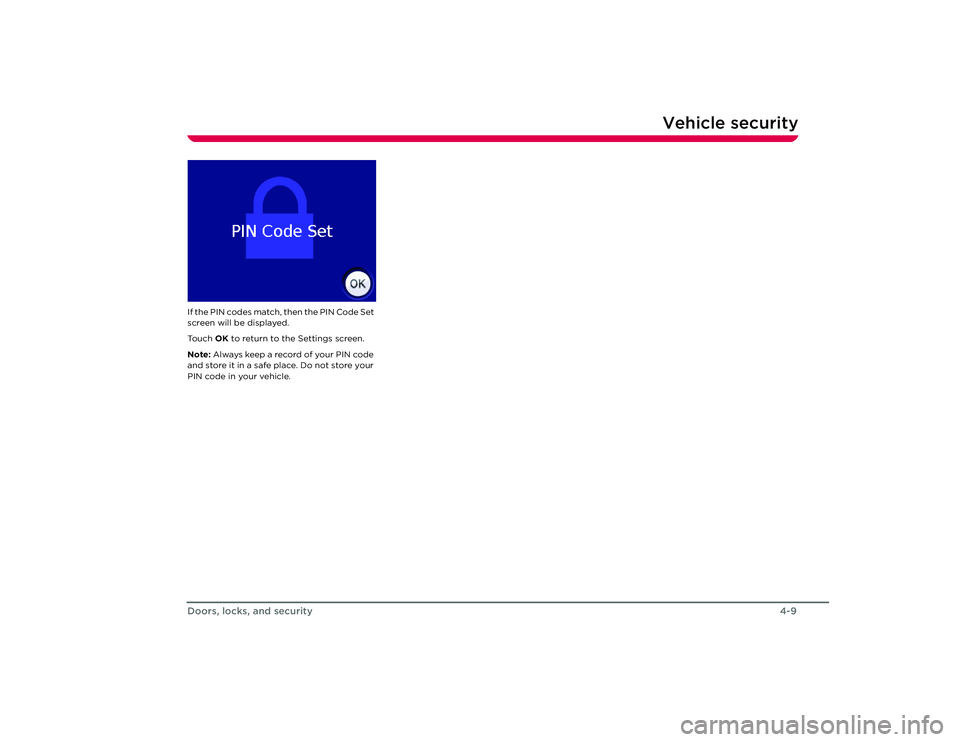
If the PIN codes match, then the PIN Code Set
screen will be displayed.
To u c h OK to return to the Settings screen.
Note: Always keep a reco rd of your PIN code
and store it in a safe place. Do not store your
PIN code in your vehicle.
Roadster OHB.book Page 9 Th ursday, October 2, 2008 8:59 AM
Page 31 of 115
Vehicle security4-10
Doors, locks, and security
PIN lockWhen activated, the PIN lock inhibits starting
and driving your vehicle until the PIN code is
entered on the Touch Screen.
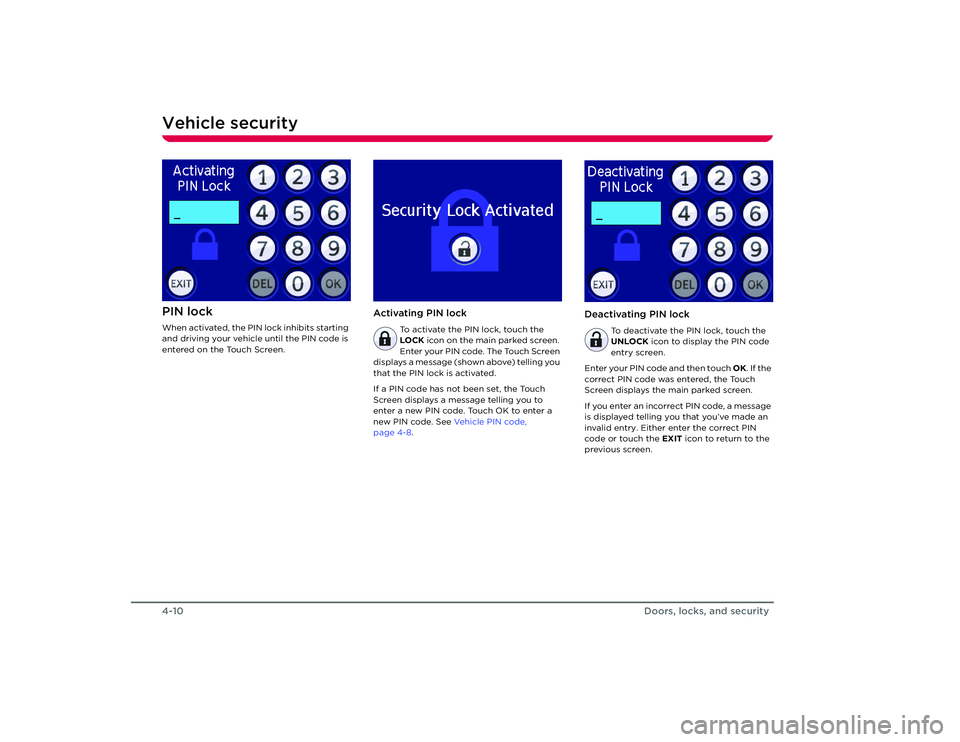
Activating PIN lock
To activate the PIN lock, touch the
LOCK icon on the main parked screen.
Enter your PIN code. The Touch Screen
displays a message (shown above) telling you
that the PIN lock is activated.
If a PIN code has not been set, the Touch
Screen displays a message telling you to
enter a new PIN code. Touch OK to enter a
new PIN code. See Ve h i c l e P I N c o d e ,
page 4-8.
Deactivating PIN lock
To deactivate the PIN lock, touch the
UNLOCK icon to display the PIN code
entry screen.
Enter your PIN code and then touch OK. If the
correct PIN code was entered, the Touch
Screen displays the main parked screen.
If you enter an incorrect PIN code, a message
is displayed telling you that you’ve made an
invalid entry. Either enter the correct PIN
code or touch the EXIT icon to return to the
previous screen.
Roadster OHB.book Page 10 Thursday, October 2, 2008 8:59 AM
Page 32 of 115
Vehicle security
4-11
Doors, locks, and security
Va l e t m o d eFor your peace of mind, your vehicle has a
unique valet mode for those times that your
vehicle is parked by another person.
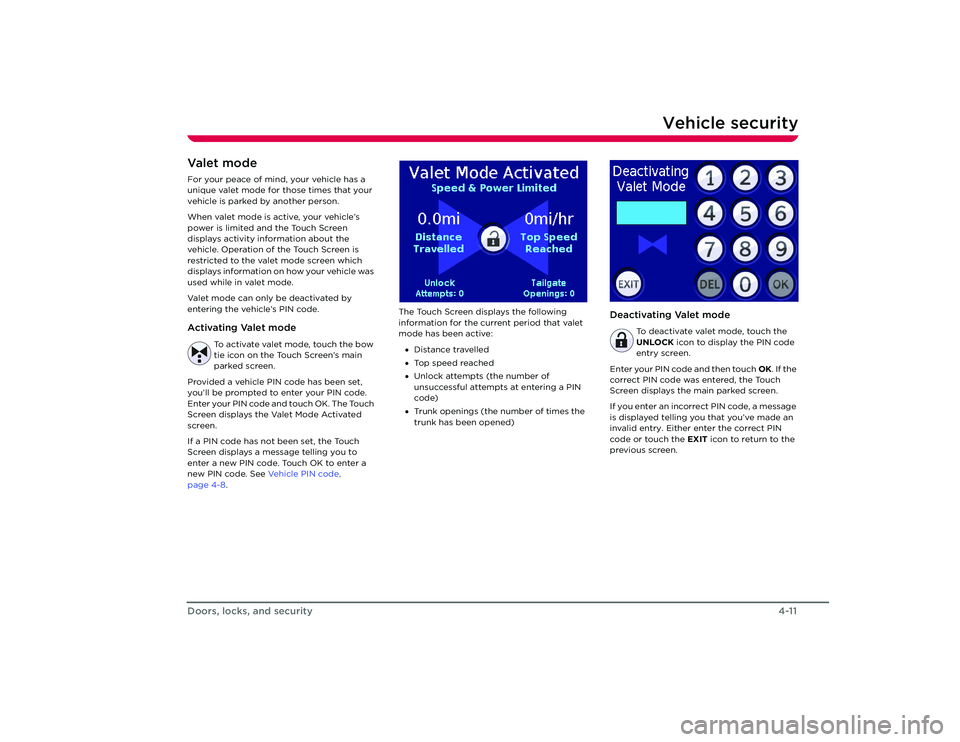
When valet mode is active, your vehicle’s
power is limited and the Touch Screen
displays activity information about the
vehicle. Operation of the Touch Screen is
restricted to the valet mode screen which
displays information on how your vehicle was
used while in valet mode.
Valet mode can only be deactivated by
entering the vehicle’s PIN code. Activating Valet mode
To activate valet mode, touch the bow
tie icon on the Touch Screen’s main
parked screen.
Provided a vehicle PIN code has been set,
you’ll be prompted to enter your PIN code.
Enter your PIN code and touch OK. The Touch
Screen displays the Valet Mode Activated
screen.
If a PIN code has not been set, the Touch
Screen displays a message telling you to
enter a new PIN code. Touch OK to enter a
new PIN code. See Ve h i c l e P I N c o d e ,
page 4-8 . The Touch Screen displays the following
information for the curr
ent period that valet
mode has been active:
• Distance travelled
• Top speed reached
• Unlock attempts (the number of
unsuccessful attempts at entering a PIN
code)
• Trunk openings (the number of times the
trunk has been opened)
Deactivating Valet mode
To deactivate valet mode, touch the
UNLOCK icon to display the PIN code
entry screen.
Enter your PIN code and then touch OK. If the
correct PIN code was entered, the Touch
Screen displays the main parked screen.
If you enter an incorrect PIN code, a message
is displayed telling you that you’ve made an
invalid entry. Either enter the correct PIN
code or touch the EXIT icon to return to the
previous screen.
Roadster OHB.book Page 11 Thursday, October 2, 2008 8:59 AM
Page 40 of 115
Driving basics6-2
Driving your vehicle
Driving your vehicle
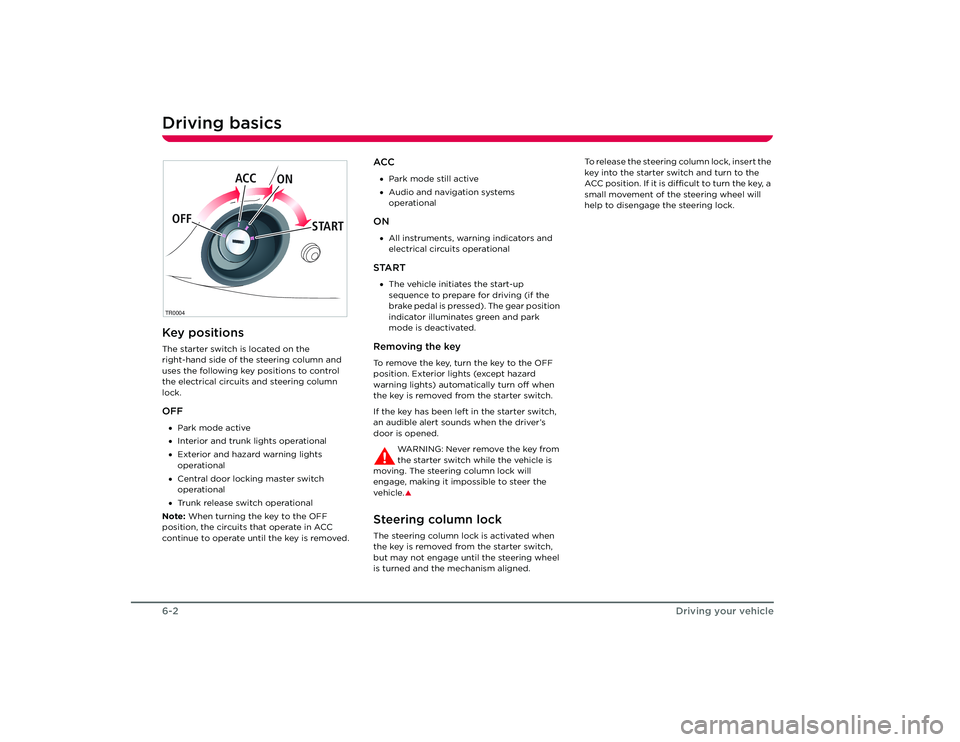
Driving basicsKey positionsThe starter switch is located on the
right-hand side of the steering column and
uses the following key positions to control
the electrical circuits and steering column
lock.OFF•Park mode active
• Interior and trunk lights operational
• Exterior and hazard warning lights
operational
• Central door locking master switch
operational
• Trunk release switch operational
Note: When turning the key to the OFF
position, the circuits that operate in ACC
continue to operate until the key is removed.
ACC• Park mode still active
• Audio and navigation systems
operationalON•All instruments, warning indicators and
electrical circuits operationalSTART•The vehicle initiates the start-up
sequence to prepare for driving (if the
brake pedal is pressed). The gear position
indicator illuminates green and park
mode is deactivated.Removing the keyTo remove the key, turn the key to the OFF
position. Exterior lights (except hazard
warning lights) automatically turn off when
the key is removed from the starter switch.
If the key has been left in the starter switch,
an audible alert sounds when the driver’s
door is opened.
WARNING: Never remove the key from
the starter switch while the vehicle is
moving. The steering column lock will
engage, making it impossible to steer the
vehicle.
S
Steering column lockThe steering column lock is activated when
the key is removed from the starter switch,
but may not engage until the steering wheel
is turned and the mechanism aligned. To release the steering column lock, insert the
key into the starter switch and turn to the
ACC position. If it is difficult to turn the key, a
small movement of the steering wheel will
help to disengage the steering lock.
TR0004OFF
ACC
ON
STARTRoadster OHB.book Page 2 Th ursday, October 2, 2008 8:59 AM
Page 59 of 115
Interior accessories
7-7
Comfort and convenience
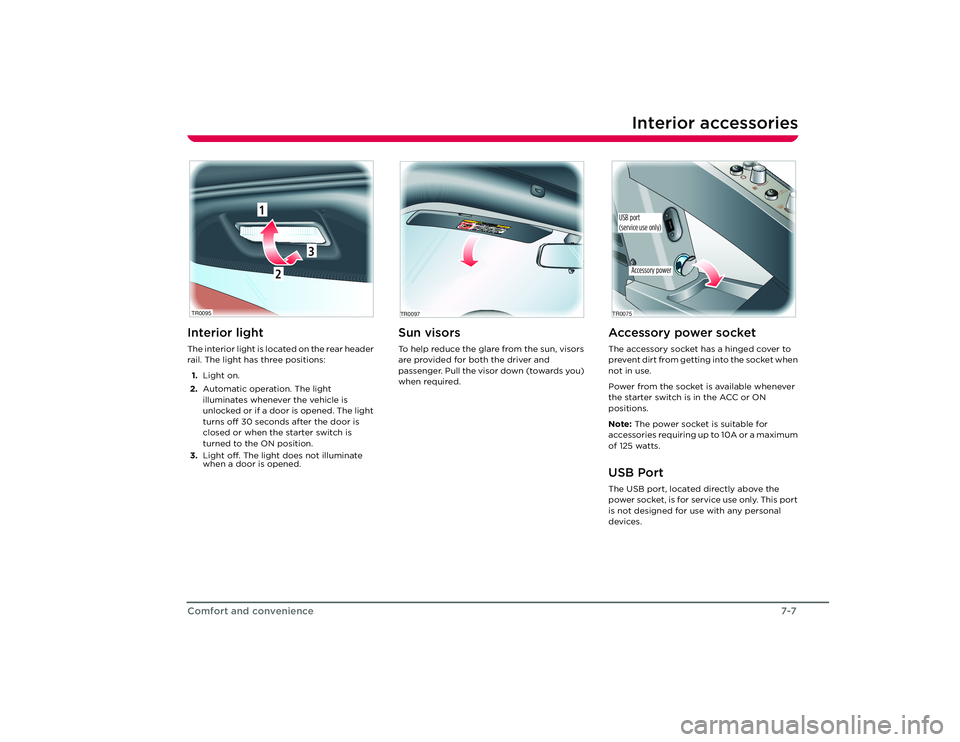
Interior accessoriesInterior lightThe interior light is located on the rear header
rail. The light has three positions:
1. Light on.
2. Automatic operation. The light
illuminates whenever the vehicle is
unlocked or if a door is opened. The light
turns off 30 seconds after the door is
closed or when the starter switch is
turned to the ON position.
3. Light off. The light does not illuminate
when a door is opened.
Sun visorsTo help reduce the glare from the sun, visors
are provided for both the driver and
passenger. Pull the visor down (towards you)
when required.
TR0095
2
1
3
TR0097
Accessory power socketThe accessory socket has a hinged cover to
prevent dirt from getting into the socket when
not in use.
Power from the socket is available whenever
the starter switch is in the ACC or ON
positions.
Note: The power socket is suitable for
accessories requiring up to 10A or a maximum
of 125 watts.USB PortThe USB port, located directly above the
power socket, is for service use only. This port
is not designed for use with any personal
devices.
Accessory power
TR0075USB port
(service use only)
Roadster OHB.book Page 7 Th ursday, October 2, 2008 8:59 AM
Page 62 of 115
Removable roof7-10Comfort and convenienceInstalling the soft-top
WARNING: Never attempt to install the
soft-top while the vehicle is moving.
This could cause an accident in which you or
others may be seriously injured or killed.
S
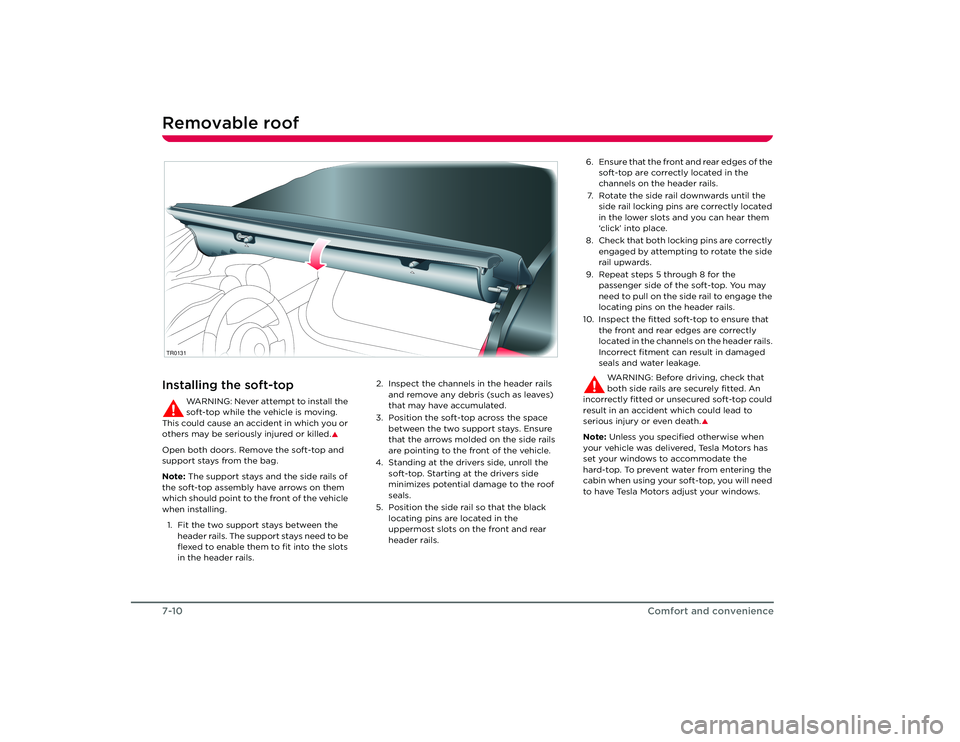
Open both doors. Remove the soft-top and
support stays from the bag.
Note: The support stays and the side rails of
the soft-top assembly have arrows on them
which should point to the front of the vehicle
when installing.
1. Fit the two support stays between the header rails. The support stays need to be
flexed to enable them to fit into the slots
in the header rails. 2. Inspect the channels in the header rails
and remove any debris (such as leaves)
that may have accumulated.
3. Position the soft-top across the space between the two support stays. Ensure
that the arrows molded on the side rails
are pointing to the front of the vehicle.
4. Standing at the drivers side, unroll the soft-top. Starting at the drivers side
minimizes potential damage to the roof
seals.
5. Position the side rail so that the black locating pins are located in the
uppermost slots on the front and rear
header rails.TR0131
6. Ensure that the front and rear edges of the soft-top are correctly located in the
channels on the header rails.
7. Rotate the side rail downwards until the side rail locking pins are correctly located
in the lower slots and you can hear them
‘click’ into place.
8. Check that both locking pins are correctly engaged by attempting to rotate the side
rail upwards.
9. Repeat steps 5 through 8 for the passenger side of the soft-top. You may
need to pull on the side rail to engage the
locating pins on the header rails.
10. Inspect the fitted soft-top to ensure that the front and rear edges are correctly
located in the channels on the header rails.
Incorrect fitment can result in damaged
seals and water leakage.
WARNING: Before driving, check that
both side rails are securely fitted. An
incorrectly fitted or unsecured soft-top could
result in an accident which could lead to
serious injury or even death.
S
Note: Unless you specified otherwise when
your vehicle was delivered, Tesla Motors has
set your windows to accommodate the
hard-top. To prevent water from entering the
cabin when using your soft-top, you will need
to have Tesla Motors adjust your windows.
Roadster OHB.book Page 10 Thursday, October 2, 2008 8:59 AM
Page 63 of 115
Removable roof
7-11
Comfort and convenience
TR0128
Removing the soft-top
WA R N I N G : N e v e r a t t e m p t t o r e m o v e
the soft-top while the vehicle is moving.
This could cause an accident in which you or
others may be seriously injured or killed.
S
Caution: It is recommended that you
release the side towards the front of the
vehicle first to prevent the adjusters for the
tensioning cables from damaging the seals.
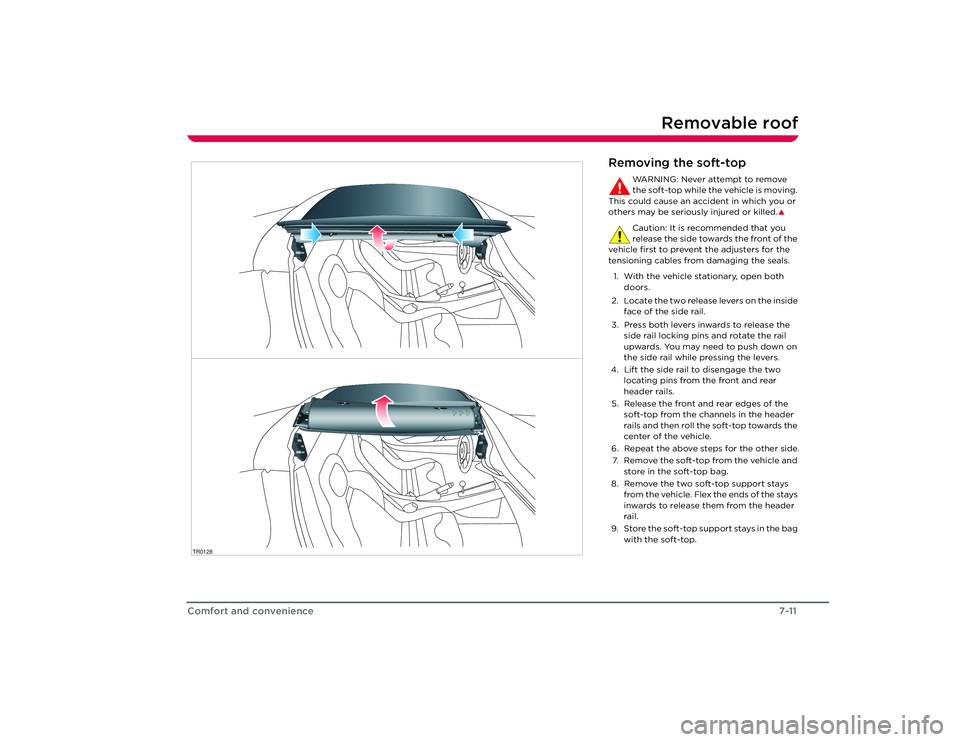
1. With the vehicle stationary, open both doors.
2. Locate the two release levers on the inside face of the side rail.
3. Press both levers inwards to release the side rail locking pins and rotate the rail
upwards. You may need to push down on
the side rail while pressing the levers.
4. Lift the side rail to disengage the two locating pins from the front and rear
header rails.
5. Release the front and rear edges of the soft-top from the channels in the header
rails and then roll the soft-top towards the
center of the vehicle.
6. Repeat the above steps for the other side. 7. Remove the soft-top from the vehicle and store in the soft-top bag.
8. Remove the two soft-top support stays from the vehicle. Flex the ends of the stays
inwards to release them from the header
rail.
9. Store the soft-top support stays in the bag with the soft-top.
Roadster OHB.book Page 11 Thursday, October 2, 2008 8:59 AM
Page 84 of 115
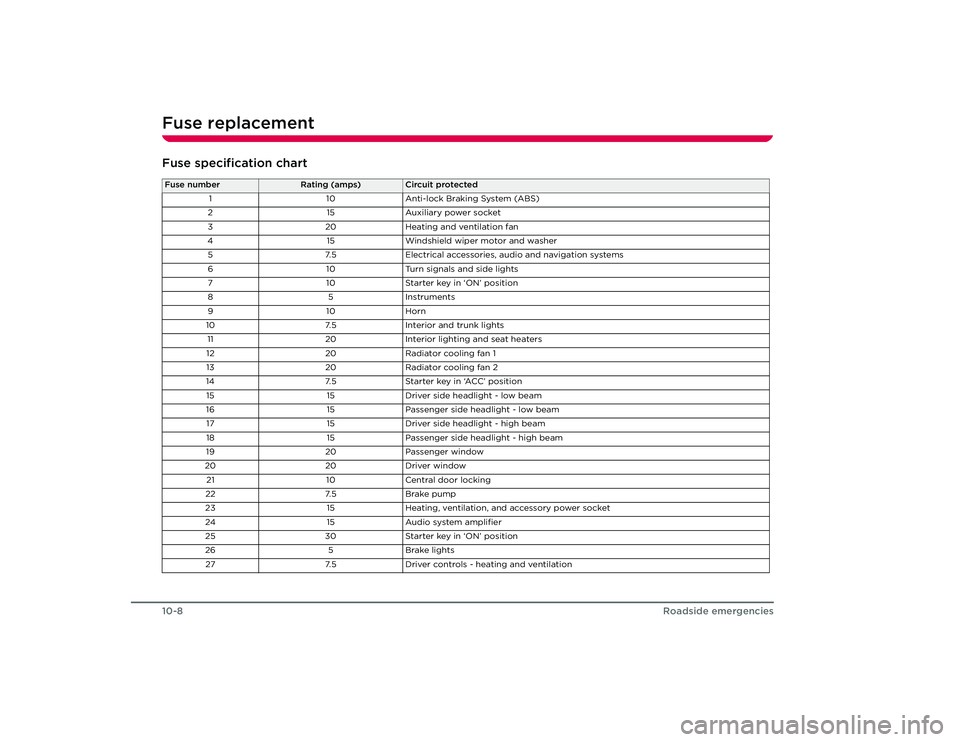
Fuse replacement10-8
Roadside emergencies
Fuse specification chartFuse number
Rating (amps)
Circuit protected
1 10Anti-lock Braking System (ABS)
2 15Auxiliary power socket
3 20Heating and ventilation fan
4 15Windshield wiper motor and washer
5 7.5Electrical accessories, audio and navigation systems
6 10Turn signals and side lights
7 10Starter key in ‘ON’ position
85 In stru m en ts
91 0Horn
10 7.5Interior and trunk lights
11 20Interior lighting and seat heaters
12 20Radiator cooling fan 1
13 20Radiator cooling fan 2
14 7.5Starter key in ‘ACC’ position
15 15Driver side headlight - low beam
16 15Passenger side headlight - low beam
17 15Driver side headlight - high beam
18 15Passenger side headlight - high beam
19 20Passenger window
20 20Driver window
21 10Central door locking
22 7.5Brake pump
23 15Heating, ventilation, and accessory power socket
24 15Audio system amplifier
25 30Starter key in ‘ON’ position
26 5Brake lights
27 7.5Driver controls - heating and ventilation
Roadster OHB.book Page 8 Th ursday, October 2, 2008 8:59 AM
Page 110 of 115
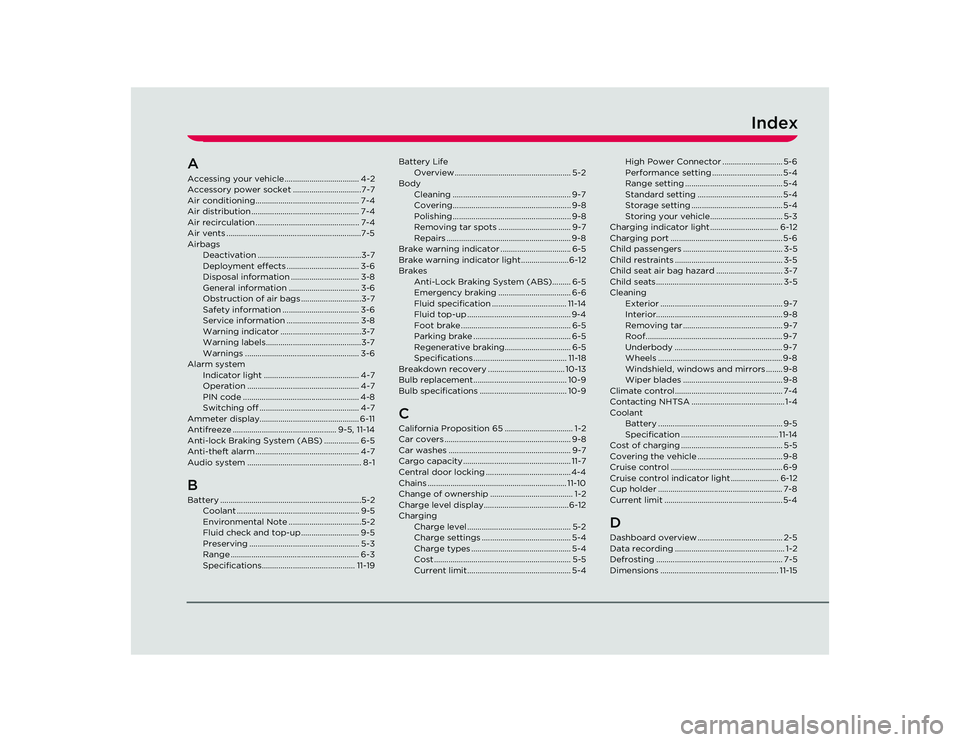
Index
AAccessing your vehicle.................................... 4-2
Accessory power socket .................................7-7
Air conditioning.................................................. 7-4
Air distribution .................................................... 7-4
Air recirculation .................................................. 7-4
Air vents .................................................................7-5
AirbagsDeactivation ..................................................3-7
Deployment effects ................................... 3-6
Disposal information ................................. 3-8
General information .................................. 3-6
Obstruction of air bags .............................3-7
Safety information ..................................... 3-6
Service information ................................... 3-8
Warning indicator .......................................3-7
Warning labels..............................................3-7
Warnings ....................................................... 3-6
Alarm system Indicator light .............................................. 4-7
Operation ...................................................... 4-7
PIN code ........................................................ 4-8
Switching off ................................................ 4-7
Ammeter display................................................ 6-11
Antifreeze .................................................. 9-5, 11-14
Anti-lock Braking System (ABS) ................. 6-5
Anti-theft alarm .................................................. 4-7
Audio system ....................................................... 8-1BBattery ....................................................................5-2 Coolant ........................................................... 9-5
Environmental Note ...................................5-2
Fluid check and top-up ............................ 9-5
Preserving ..................................................... 5-3
Range .............................................................. 6-3
Specifications............................................. 11-19 Battery Life
Overview ........................................................ 5-2
Body Cleaning ......................................................... 9-7
Covering......................................................... 9-8
Polishing ......................................................... 9-8
Removing tar spots ................................... 9-7
Repairs ............................................................ 9-8
Brake warning indicator .................................. 6-5
Brake warning indicator light .......................6-12
Brakes Anti-Lock Braking System (ABS)......... 6-5
Emergency braking ................................... 6-6
Fluid specification .................................... 11-14
Fluid top-up .................................................. 9-4
Foot brake ..................................................... 6-5
Parking brake ............................................... 6-5
Regenerative braking................................ 6-5
Specifications ............................................. 11-18
Breakdown recovery ..................................... 10-13
Bulb replacement............................................. 10-9
Bulb specifications .......................................... 10-9
CCalifornia Proposition 65 ................................. 1-2
Car covers ............................................................. 9-8
Car washes ........................................................... 9-7
Cargo capacity.................................................... 11-7
Central door locking ......................................... 4-4
Chains ................................................................... 11-10
Change of ownership ........................................ 1-2
Charge level display.........................................6-12
Charging Charge level .................................................. 5-2
Charge settings ........................................... 5-4
Charge types ................................................ 5-4
Cost .................................................................. 5-5
Current limit.................................................. 5-4 High Power Connector ............................. 5-6
Performance setting .................................. 5-4
Range setting ............................................... 5-4
Standard setting ......................................... 5-4
Storage setting ............................................ 5-4
Storing your vehicle................................... 5-3
Charging indicator light ................................. 6-12
Charging port ...................................................... 5-6
Child passengers ................................................ 3-5
Child restraints .................................................... 3-5
Child seat air bag hazard ................................ 3-7
Child seats............................................................. 3-5
Cleaning Exterior ........................................................... 9-7
Interior............................................................. 9-8
Removing tar ................................................ 9-7
Roof.................................................................. 9-7
Underbody .................................................... 9-7
Wheels ............................................................ 9-8
Windshield, windows and mirrors ........ 9-8
Wiper blades ................................................ 9-8
Climate control.................................................... 7-4
Contacting NHTSA ............................................. 1-4
Coolant Battery ............................................................ 9-5
Specification ............................................... 11-14
Cost of charging ................................................. 5-5
Covering the vehicle ......................................... 9-8
Cruise control ...................................................... 6-9
Cruise control indicator lig ht ....................... 6-12
Cup holder ............................................................ 7-8
Current limit ......................................................... 5-4
DDashboard overview ......................................... 2-5
Data recording ..................................................... 1-2
Defrosting ............................................................. 7-5
Dimensions ......................................................... 11-15
Roadster OHB.book Page 1 Th ursday, October 2, 2008 8:59 AM