key TESLA ROADSTER 2008 User Guide
[x] Cancel search | Manufacturer: TESLA, Model Year: 2008, Model line: ROADSTER, Model: TESLA ROADSTER 2008Pages: 115, PDF Size: 46.35 MB
Page 40 of 115
Driving basics6-2
Driving your vehicle
Driving your vehicle
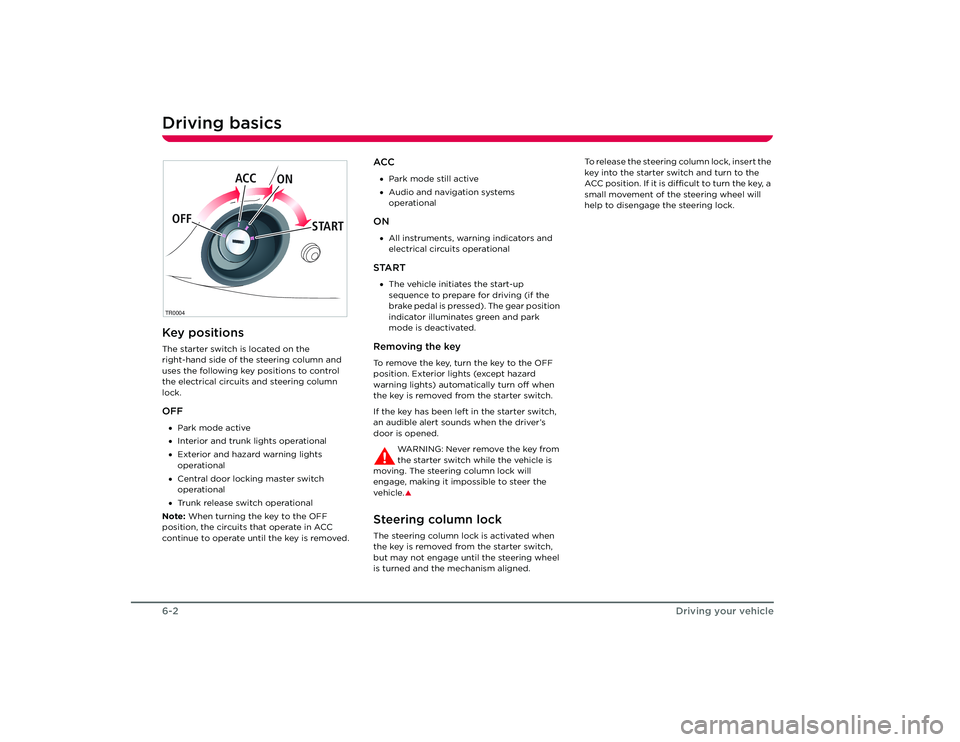
Driving basicsKey positionsThe starter switch is located on the
right-hand side of the steering column and
uses the following key positions to control
the electrical circuits and steering column
lock.OFF•Park mode active
• Interior and trunk lights operational
• Exterior and hazard warning lights
operational
• Central door locking master switch
operational
• Trunk release switch operational
Note: When turning the key to the OFF
position, the circuits that operate in ACC
continue to operate until the key is removed.
ACC• Park mode still active
• Audio and navigation systems
operationalON•All instruments, warning indicators and
electrical circuits operationalSTART•The vehicle initiates the start-up
sequence to prepare for driving (if the
brake pedal is pressed). The gear position
indicator illuminates green and park
mode is deactivated.Removing the keyTo remove the key, turn the key to the OFF
position. Exterior lights (except hazard
warning lights) automatically turn off when
the key is removed from the starter switch.
If the key has been left in the starter switch,
an audible alert sounds when the driver’s
door is opened.
WARNING: Never remove the key from
the starter switch while the vehicle is
moving. The steering column lock will
engage, making it impossible to steer the
vehicle.
S
Steering column lockThe steering column lock is activated when
the key is removed from the starter switch,
but may not engage until the steering wheel
is turned and the mechanism aligned. To release the steering column lock, insert the
key into the starter switch and turn to the
ACC position. If it is difficult to turn the key, a
small movement of the steering wheel will
help to disengage the steering lock.
TR0004OFF
ACC
ON
STARTRoadster OHB.book Page 2 Th ursday, October 2, 2008 8:59 AM
Page 41 of 115
Driving basics
6-3
Driving your vehicle
Starting the vehicleFollow these steps to prepare the vehicle for
driving:
1. Tesla recommends selecting the N gear position.
2. Press and hold down the brake pedal.
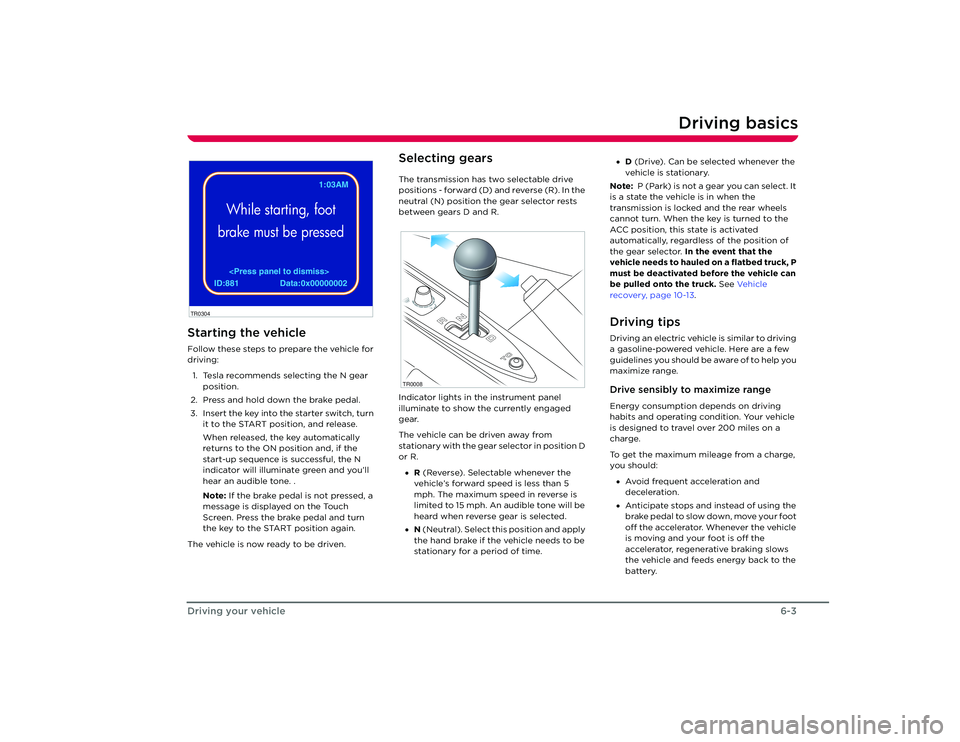
3. Insert the key into the starter switch, turn it to the START position, and release.
When released, the key automatically
returns to the ON position and, if the
start-up sequence is successful, the N
indicator will illuminate green and you’ll
hear an audible tone. .
Note: If the brake pedal is not pressed, a
message is displayed on the Touch
Screen. Press the brake pedal and turn
the key to the START position again.
The vehicle is now ready to be driven.
Selecting gearsThe transmission has two selectable drive
positions - forward (D) and reverse (R). In the
neutral (N) position the gear selector rests
between gears D and R.
Indicator lights in the instrument panel
illuminate to show the currently engaged
gear.
The vehicle can be driven away from
stationary with the gear selector in position D
or R. • R (Reverse). Selectable whenever the
vehicle’s forward speed is less than 5
mph. The maximum speed in reverse is
limited to 15 mph. An audible tone will be
heard when reverse gear is selected.
• N (Neutral). Select th is position and apply
the hand brake if the vehicle needs to be
stationary for a period of time. •
D (Drive). Can be selected whenever the
vehicle is stationary.
Note: P (Park) is not a gear you can select. It
is a state the vehicle is in when the
transmission is locked and the rear wheels
cannot turn. When the key is turned to the
ACC position, this state is activated
automatically, regardless of the position of
the gear selector. In the event that the
vehicle needs to hauled on a flatbed truck, P
must be deactivated before the vehicle can
be pulled onto the truck. See Ve h i c l e
recovery, page 10-13 .
Driving tipsDriving an electric vehicle is similar to driving
a gasoline-powered vehicle. Here are a few
guidelines you should be aware of to help you
maximize range.Drive sensibly to maximize rangeEnergy consumption depends on driving
habits and operating condition. Your vehicle
is designed to travel over 200 miles on a
charge.
To get the maximum mileage from a charge,
you should:
• Avoid frequent acceleration and
deceleration.
• Anticipate stops and instead of using the
brake pedal to slow down, move your foot
off the accelerator. Whenever the vehicle
is moving and your foot is off the
accelerator, regenerative braking slows
the vehicle and feeds energy back to the
battery.
EST.
PIN Code Chang brakedWhile starting, foot
brake must be pressed
ID:881 Data:0x00000002 1:03AM
TR0304
TR0008
Roadster OHB.book Page 3 Th ursday, October 2, 2008 8:59 AM
Page 45 of 115
Switches and controls
6-7
Driving your vehicle
Switches and controlsExterior lightsThe exterior lights are controlled using a
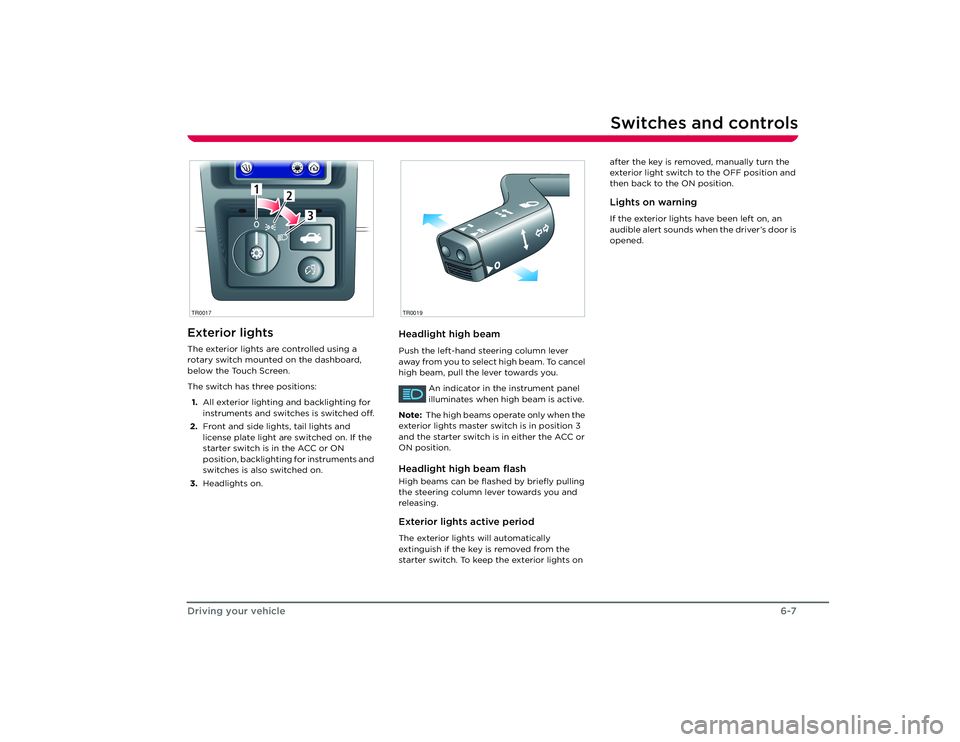
rotary switch mounted on the dashboard,
below the Touch Screen.
The switch has three positions:
1. All exterior lighting and backlighting for
instruments and switches is switched off.
2. Front and side lights, tail lights and
license plate light are switched on. If the
starter switch is in the ACC or ON
position, backlighting for instruments and
switches is also switched on.
3. Headlights on.
Headlight high beamPush the left-hand steering column lever
away from you to select high beam. To cancel
high beam, pull the lever towards you.
An indicator in the instrument panel
illuminates when high beam is active.
Note: The high beams operate only when the
exterior lights master switch is in position 3
and the starter switch is in either the ACC or
ON position.Headlight high beam flashHigh beams can be flas hed by briefly pulling
the steering column lever towards you and
releasing.Exterior lights active periodThe exterior lights will automatically
extinguish if the key is removed from the
starter switch. To keep the exterior lights on after the key is removed, manually turn the
exterior light switch to the OFF position and
then back to the ON position.
Lights on warningIf the exterior lights have been left on, an
audible alert sounds when the driver’s door is
opened.
1
2
3
1
2
3
TR0017
R
O
TR0019
Roadster OHB.book Page 7 Th
ursday, October 2, 2008 8:59 AM
Page 48 of 115
Switches and controls6-10
Driving your vehicle
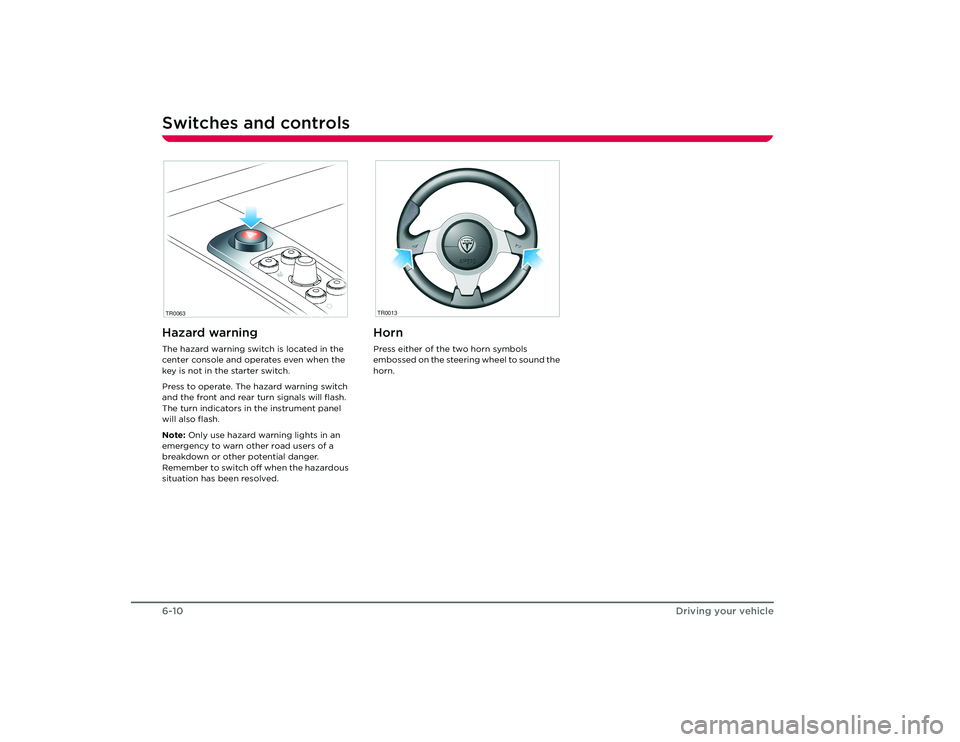
Hazard warningThe hazard warning switch is located in the
center console and operates even when the
key is not in the starter switch.
Press to operate. The hazard warning switch
and the front and rear turn signals will flash.
The turn indicators in the instrument panel
will also flash.
Note: Only use hazard warning lights in an
emergency to warn other road users of a
breakdown or other potential danger.
Remember to switch off when the hazardous
situation has been resolved.
HornPress either of the two horn symbols
embossed on the steering wheel to sound the
horn.
TR0063
TR0013
Roadster OHB.book Page 10 Thursday, October 2, 2008 8:59 AM
Page 50 of 115
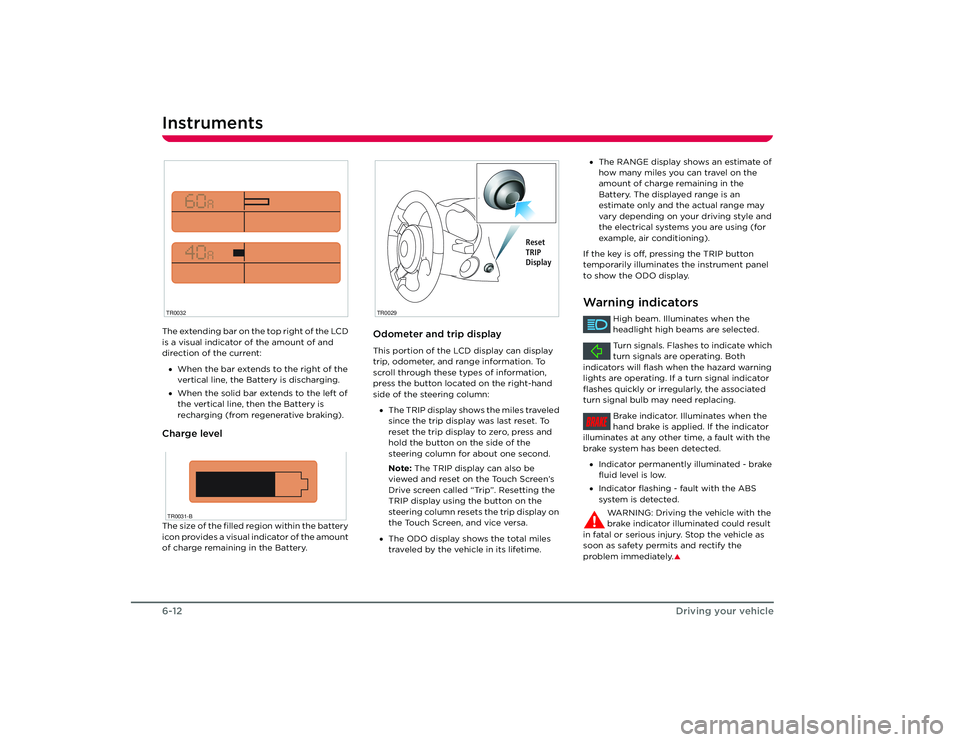
Instruments6-12Driving your vehicleThe extending bar on the top right of the LCD
is a visual indicator of the amount of and
direction of the current:
• When the bar extends to the right of the
vertical line, the Battery is discharging.
• When the solid bar extends to the left of
the vertical line, then the Battery is
recharging (from regenerative braking).Charge levelThe size of the filled region within the battery
icon provides a visual indicator of the amount
of charge remaining in the Battery.
Odometer and trip displayThis portion of the LCD display can display
trip, odometer, and range information. To
scroll through these types of information,
press the button located on the right-hand
side of the steering column:
• The TRIP display shows the miles traveled
since the trip display was last reset. To
reset the trip display to zero, press and
hold the button on the side of the
steering column for about one second.
Note: The TRIP display can also be
viewed and reset on the Touch Screen’s
Drive screen called “Trip”. Resetting the
TRIP display using the button on the
steering column resets the trip display on
the Touch Screen, and vice versa.
• The ODO display shows the total miles
traveled by the vehicle in its lifetime.
TR0032TR0031-B
TR0029
Reset
TRIP
Display
•The RANGE display shows an estimate of
how many miles you can travel on the
amount of charge remaining in the
Battery. The displayed range is an
estimate only and the actual range may
vary depending on your driving style and
the electrical systems you are using (for
example, air conditioning).
If the key is off, pressing the TRIP button
temporarily illuminates the instrument panel
to show the ODO display.Warning indicators
High beam. Illuminates when the
headlight high beams are selected.
Turn signals. Flashes to indicate which
turn signals are operating. Both
indicators will flash when the hazard warning
lights are operating. If a turn signal indicator
flashes quickly or irregularly, the associated
turn signal bulb may need replacing.
Brake indicator. Illuminates when the
hand brake is applied. If the indicator
illuminates at any other time, a fault with the
brake system has been detected.
• Indicator permanently illuminated - brake
fluid level is low.
• Indicator flashing - fault with the ABS
system is detected.
WARNING: Driving the vehicle with the
brake indicator illuminated could result
in fatal or serious injury. Stop the vehicle as
soon as safety permits and rectify the
problem immediately.
S
BRAKE
Roadster OHB.book Page 12 Thursday, October 2, 2008 8:59 AM
Page 54 of 115
Power windows7-2
Comfort and convenience
Comfort and convenience
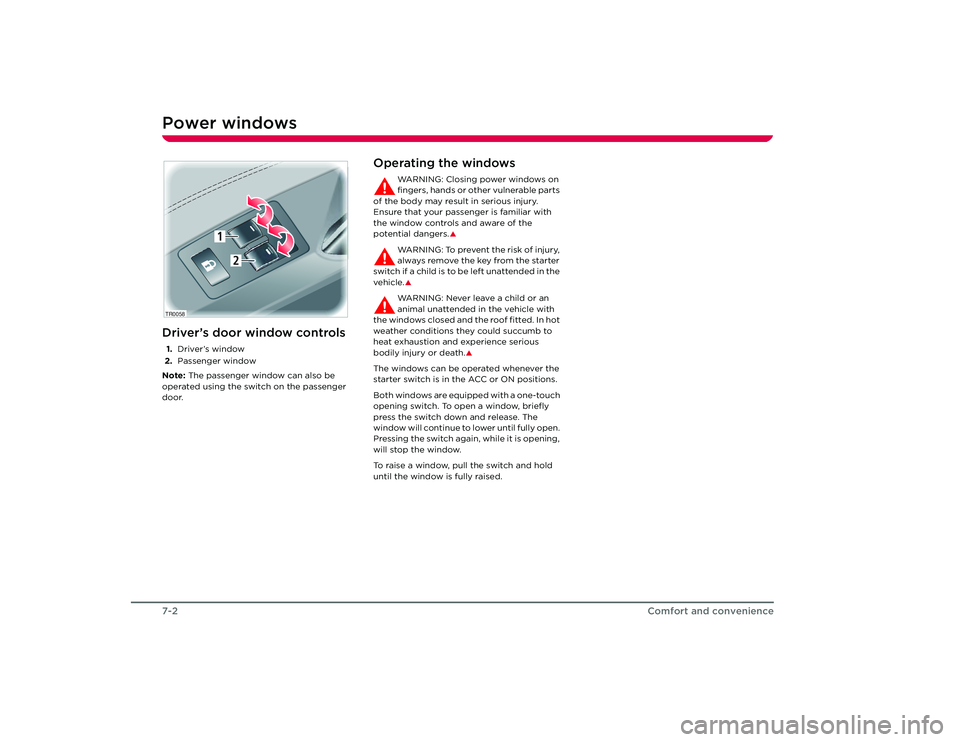
Power windowsDriver’s door window controls1.Driver’s window
2. Passenger window
Note: The passenger window can also be
operated using the switch on the passenger
door.
Operating the windows
WARNING: Closing power windows on
fingers, hands or other vulnerable parts
of the body may result in serious injury.
Ensure that your passenger is familiar with
the window controls and aware of the
potential dangers.
S
WARNING: To prevent the risk of injury,
always remove the key from the starter
switch if a child is to be left unattended in the
vehicle.SWARNING: Never leave a child or an
animal unattended in the vehicle with
the windows closed and the roof fitted. In hot
weather conditions they could succumb to
heat exhaustion and experience serious
bodily injury or death.
S
The windows can be operated whenever the
starter switch is in the ACC or ON positions.
Both windows are equipped with a one-touch
opening switch. To open a window, briefly
press the switch down and release. The
window will continue to lower until fully open.
Pressing the switch again, while it is opening,
will stop the window.
To raise a window, pull the switch and hold
until the window is fully raised.
TR0058
1
2
Roadster OHB.book Page 2 Th ursday, October 2, 2008 8:59 AM
Page 56 of 115
Interior temperature control7-4
Comfort and convenience
Interior temperature controlGeneral informationThe temperature of the air inside the vehicle
is controlled using the controls on the center
console.
Heating is provided by a high voltage electric
heater located under the hood. Cooling is
provided by an all-electric air conditioning
system located under the hood. In addition to
cooling the cabin, the system also cools the
Battery.
Note: In high ambient temperatures, the
system may not be able to achieve the
desired cabin temperature. This is normal,
with priority being given to cooling the
Battery to ensure that cell temperatures stay
within a range that supports long life and
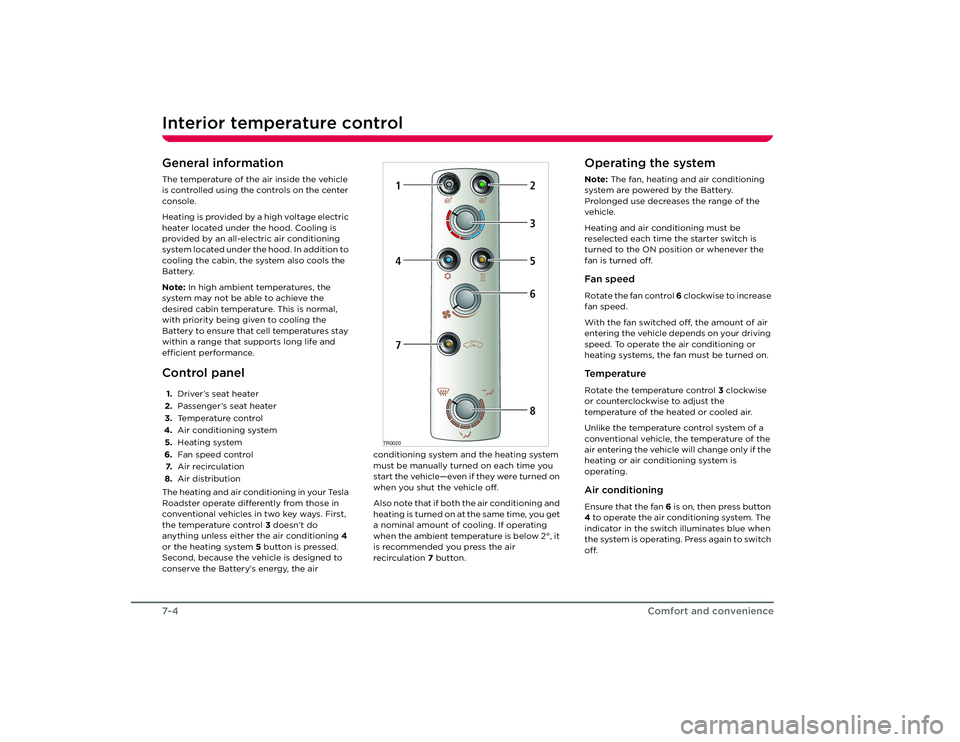
efficient performance.Control panel1. Driver’s seat heater
2. Passenger’s seat heater
3. Temperature control
4. Air conditioning system
5. Heating system
6. Fan speed control
7. Air recirculation
8. Air distribution
The heating and air conditioning in your Tesla
Roadster operate differently from those in
conventional vehicles in two key ways. First,
the temperature control 3 doesn’t do
anything unless either the air conditioning 4
or the heating system 5 button is pressed.
Second, because the vehicle is designed to
conserve the Battery’s energy, the air conditioning system and the heating system
must be manually turned on each time you
start the vehicle—even if they were turned on
when you shut the vehicle off.
Also note that if both the air conditioning and
heating is turned on at the same time, you get
a nominal amount of cooling. If operating
when the ambient temperature is below 2°, it
is recommended you press the air
recirculation
7 button.
Operating the systemNote: The fan, heating and air conditioning
system are powered by the Battery.
Prolonged use decreases the range of the
vehicle.
Heating and air conditioning must be
reselected each time the starter switch is
turned to the ON position or whenever the
fan is turned off.Fan speedRotate the fan control 6 clockwise to increase
fan speed.
With the fan switched off, the amount of air
entering the vehicle depends on your driving
speed. To operate the air conditioning or
heating systems, the fan must be turned on.Te m p e r a t u r eRotate the temperature control 3 clockwise
or counterclockwise to adjust the
temperature of the heated or cooled air.
Unlike the temperature control system of a
conventional vehicle, the temperature of the
air entering the vehicle will change only if the
heating or air conditioning system is
operating.Air conditioningEnsure that the fan 6 is on, then press button
4 to operate the air conditioning system. The
indicator in the switch illuminates blue when
the system is operating. Press again to switch
off.
TR0020
1
2
47
5368
Roadster OHB.book Page 4 Th ursday, October 2, 2008 8:59 AM
Page 67 of 115
HomeLink®
7-15
Comfort and convenience
HomeLink
®
HomeLink
® Universal
Transceiver
Your vehicle is equipped with a HomeLink
®
Universal Transceiver that you can use to
operate most Radio Frequency (RF) devices
such as garage doors, gates, lights and
security systems. Your transceiver can be
programmed using the Touch Screen to
operate up to three individual devices.
Devices can be operated by touching a
button on the Touch Screen. You can also set
up the third button on the key fob to operate
a device. For details on how to program
HomeLink, refer to the Touch Screen Users
Manual, provided in your owners package.
For security purposes, when you sell your
vehicle, you should erase your HomeLink
settings.
WARNING: Do not use the HomeLink
Universal Transceiver with any garage
door opener that la cks safety stop and
reverse features as required by federal safety
standards. A garage door opener which
cannot detect an object in the path of a
closing garage door and then automatically
stop and reverse, does not meet current
federal safety standards. Using a garage door
opener without these features increases the
risk of injury or death.
S
You’re vehicle should be turned off
while programming the HomeLink
Universal Transceiver.
S
During programming, your garage
door or gate may open or close. Make
sure that people and objects are clear of the
garage door or gate that you are
programming.
S
FCC ComplianceThis device complies with Part 15 of the FCC
Rules. Operation is subject to the following
two conditions:
1. This device may not cause harmful interference, and
2. This device must accept any interference received, including interference that may
cause undesired operation.
Any unauthorized modification to this device
could void the user’s authority to operate the
equipment.
Roadster OHB.book Page 15 Thursday, October 2, 2008 8:59 AM
Page 70 of 115
Maintenance9-2
Maintenance and care
Maintenance and care
MaintenanceGeneral informationRegular maintenance is the key to ensuring
the continued reliability and efficiency of
your vehicle.
Maintenance is the owner's responsibility and
you must ensure that the appropriate
maintenance is carried out when required
and according to the recommendations
specified by Tesla Motors.Routine maintenanceTake your vehicle to Tesla Motors at the
regularly scheduled maintenance intervals of
every 12 months, or every 12,000 miles,
whichever comes first.
Maintenance and service must be performed
by Tesla-certified technicians. Damages or
failures caused by maintenance or repairs
performed by non-Tesla certified technicians
are not covered under the New Vehicle
Limited Warranty.
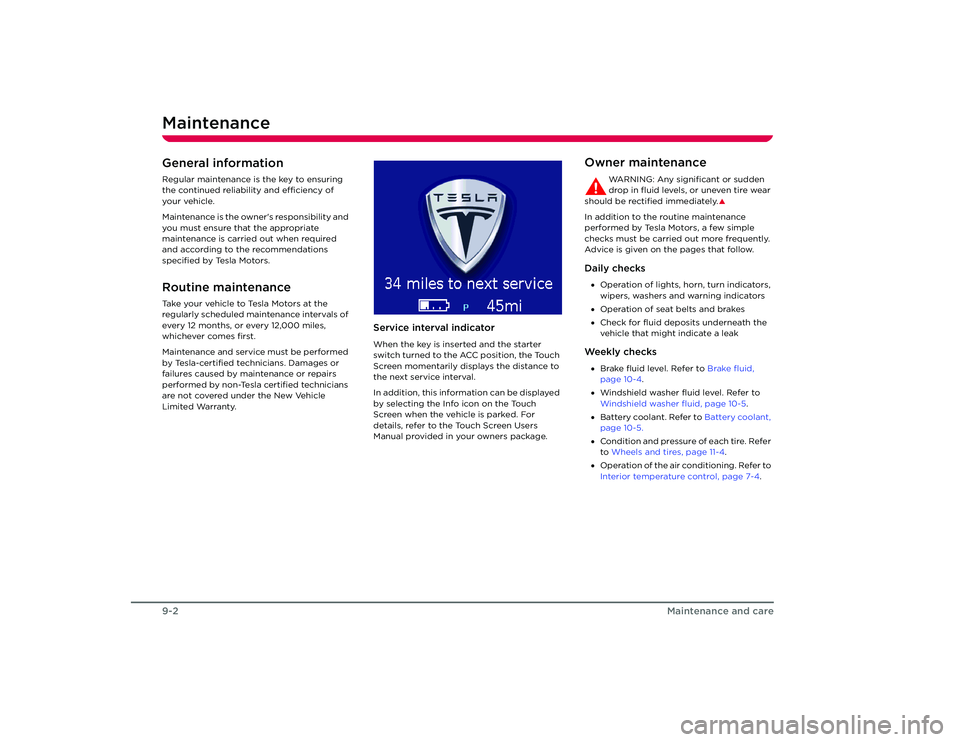
Service interval indicatorWhen the key is inserted and the starter
switch turned to the ACC position, the Touch
Screen momentarily displays the distance to
the next service interval.
In addition, this information can be displayed
by selecting the Info icon on the Touch
Screen when the vehicle is parked. For
details, refer to the Touch Screen Users
Manual provided in your owners package.
Owner maintenance
WARNING: Any significant or sudden
drop in fluid levels, or uneven tire wear
should be rectified immediately.
S
In addition to the routine maintenance
performed by Tesla Motors, a few simple
checks must be carried out more frequently.
Advice is given on the pages that follow.Daily checks• Operation of lights, horn, turn indicators,
wipers, washers and warning indicators
• Operation of seat belts and brakes
• Check for fluid deposits underneath the
vehicle that might indicate a leakWe e k l y c h e c k s•Brake fluid level. Refer to Brake fluid,
page 10-4 .
• Windshield washer fluid level. Refer to
Windshield washer fluid, page 10-5 .
• Battery coolant. Refer to Battery coolant,
page 10-5.
• Condition and pressure of each tire. Refer
to Wheels and tires, page 11-4 .
• Operation of the air conditioning. Refer to
Interior temperature control, page 7-4.
Roadster OHB.book Page 2 Th ursday, October 2, 2008 8:59 AM
Page 82 of 115
Wheels10-6
Roadside emergencies
WheelsRemoving the wheel
WARNING: Never work under the
vehicle with a jack as the only means of
support. If the vehicle slips off the jack, you or
someone else could be seriously injured.
S
1. Apply the hand brake and remove the key from the starter switch.
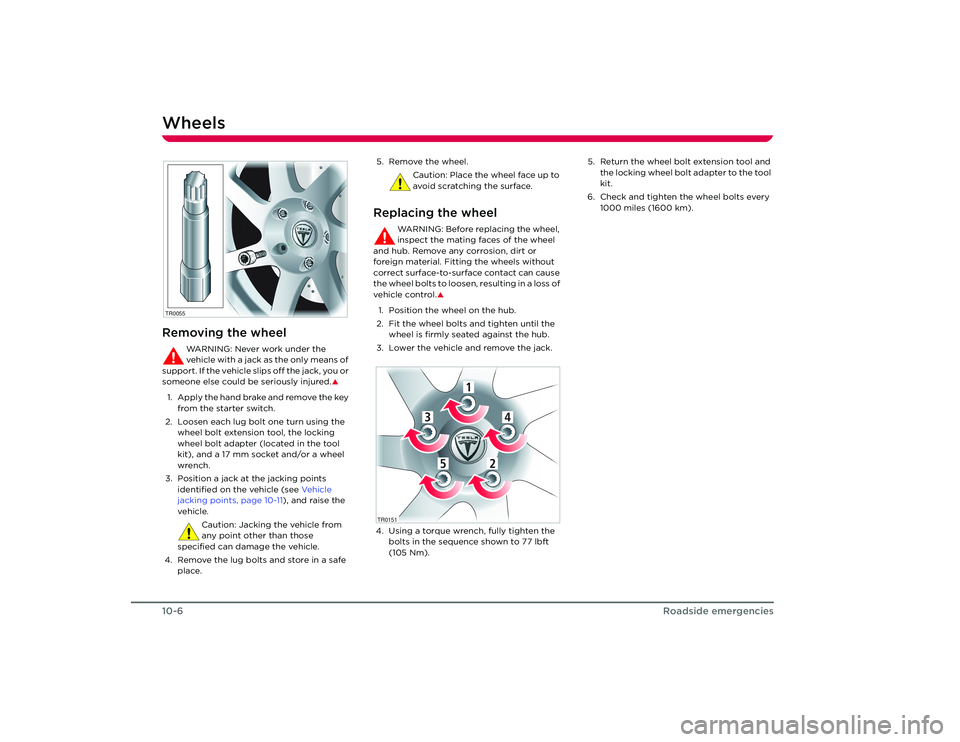
2. Loosen each lug bolt one turn using the wheel bolt extension tool, the locking
wheel bolt adapter (located in the tool
kit), and a 17 mm socket and/or a wheel
wrench.
3. Position a jack at the jacking points identified on the vehicle (see Ve h i c l e
jacking points, page 10-11 ), and raise the
vehicle.
Caution: Jacking the vehicle from
any point other than those
specified can damage the vehicle.
4. Remove the lug bolts and store in a safe place. 5. Remove the wheel.
Caution: Place the wheel face up to
avoid scratching the surface.
Replacing the wheel
WARNING: Before replacing the wheel,
inspect the mating faces of the wheel
and hub. Remove any corrosion, dirt or
foreign material. Fitting the wheels without
correct surface-to-surface contact can cause
the wheel bolts to loosen, resulting in a loss of
vehicle control.
S
1. Position the wheel on the hub.
2. Fit the wheel bolts and tighten until the wheel is firmly seated against the hub.
3. Lower the vehicle and remove the jack.
4. Using a torque wrench, fully tighten the bolts in the sequence shown to 77 lbft
(105 Nm). 5. Return the wheel bolt extension tool and
the locking wheel bolt adapter to the tool
kit.
6. Check and tighten the wheel bolts every 1000 miles (1600 km).
TR0055
1
4
3
5
2
1
4
3
5
2
TR0151
Roadster OHB.book Page 6 Th ursday, October 2, 2008 8:59 AM