trunk TESLA ROADSTER 2008 User Guide
[x] Cancel search | Manufacturer: TESLA, Model Year: 2008, Model line: ROADSTER, Model: TESLA ROADSTER 2008Pages: 115, PDF Size: 46.35 MB
Page 32 of 115
Vehicle security
4-11
Doors, locks, and security
Va l e t m o d eFor your peace of mind, your vehicle has a
unique valet mode for those times that your
vehicle is parked by another person.
When valet mode is active, your vehicle’s
power is limited and the Touch Screen
displays activity information about the
vehicle. Operation of the Touch Screen is
restricted to the valet mode screen which
displays information on how your vehicle was
used while in valet mode.
Valet mode can only be deactivated by
entering the vehicle’s PIN code. Activating Valet mode
To activate valet mode, touch the bow
tie icon on the Touch Screen’s main
parked screen.
Provided a vehicle PIN code has been set,
you’ll be prompted to enter your PIN code.
Enter your PIN code and touch OK. The Touch
Screen displays the Valet Mode Activated
screen.
If a PIN code has not been set, the Touch
Screen displays a message telling you to
enter a new PIN code. Touch OK to enter a
new PIN code. See Ve h i c l e P I N c o d e ,
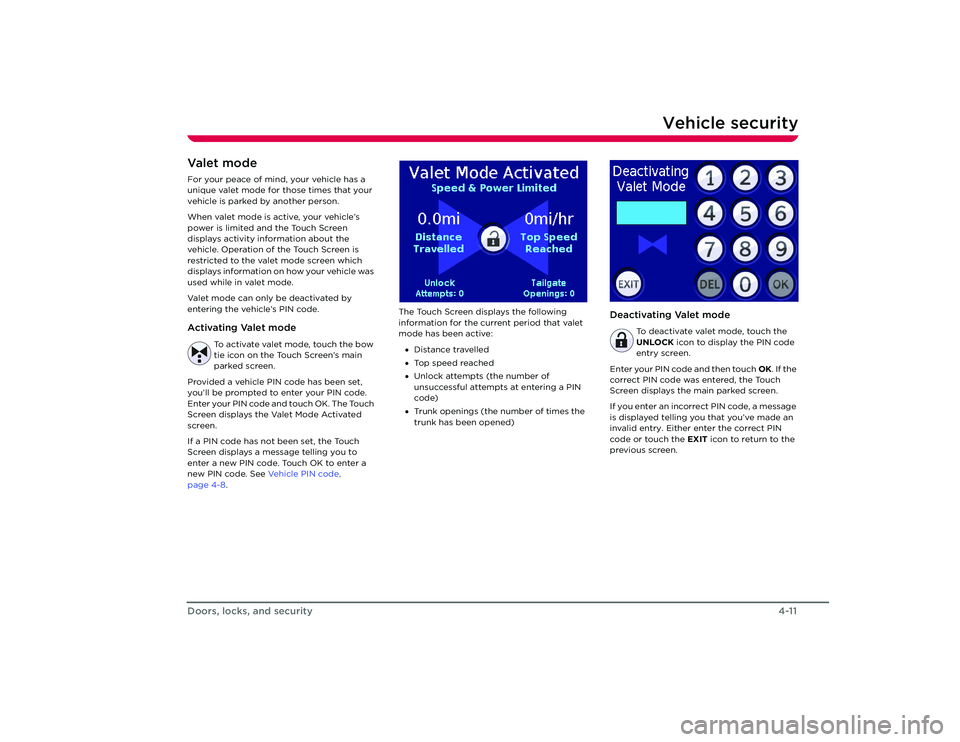
page 4-8 . The Touch Screen displays the following
information for the curr
ent period that valet
mode has been active:
• Distance travelled
• Top speed reached
• Unlock attempts (the number of
unsuccessful attempts at entering a PIN
code)
• Trunk openings (the number of times the
trunk has been opened)
Deactivating Valet mode
To deactivate valet mode, touch the
UNLOCK icon to display the PIN code
entry screen.
Enter your PIN code and then touch OK. If the
correct PIN code was entered, the Touch
Screen displays the main parked screen.
If you enter an incorrect PIN code, a message
is displayed telling you that you’ve made an
invalid entry. Either enter the correct PIN
code or touch the EXIT icon to return to the
previous screen.
Roadster OHB.book Page 11 Thursday, October 2, 2008 8:59 AM
Page 40 of 115
Driving basics6-2
Driving your vehicle
Driving your vehicle
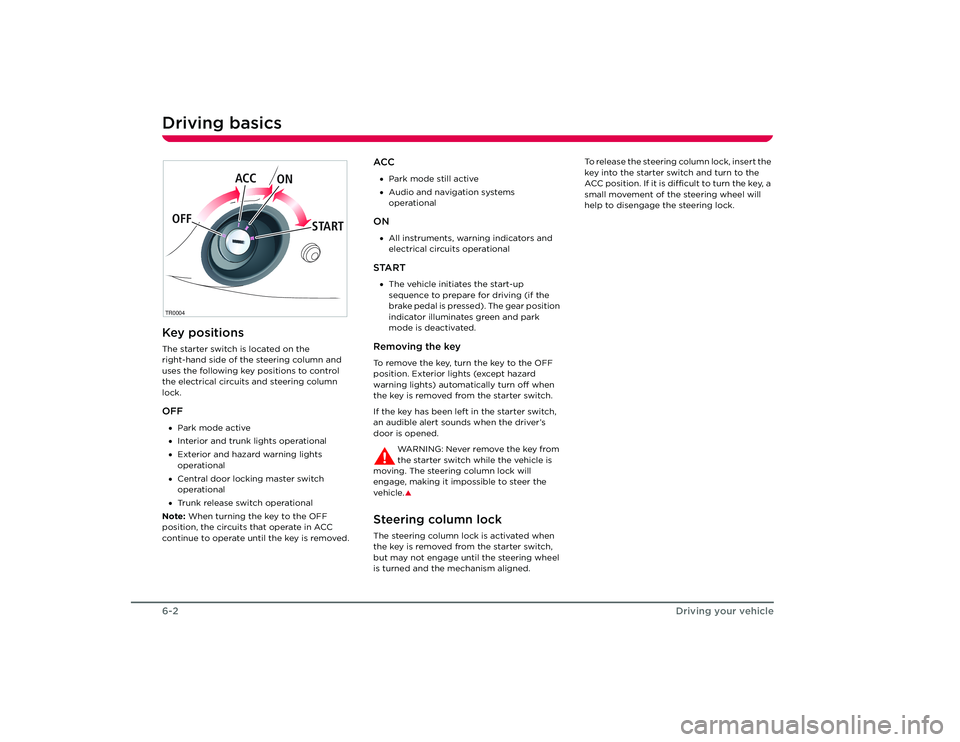
Driving basicsKey positionsThe starter switch is located on the
right-hand side of the steering column and
uses the following key positions to control
the electrical circuits and steering column
lock.OFF•Park mode active
• Interior and trunk lights operational
• Exterior and hazard warning lights
operational
• Central door locking master switch
operational
• Trunk release switch operational
Note: When turning the key to the OFF
position, the circuits that operate in ACC
continue to operate until the key is removed.
ACC• Park mode still active
• Audio and navigation systems
operationalON•All instruments, warning indicators and
electrical circuits operationalSTART•The vehicle initiates the start-up
sequence to prepare for driving (if the
brake pedal is pressed). The gear position
indicator illuminates green and park
mode is deactivated.Removing the keyTo remove the key, turn the key to the OFF
position. Exterior lights (except hazard
warning lights) automatically turn off when
the key is removed from the starter switch.
If the key has been left in the starter switch,
an audible alert sounds when the driver’s
door is opened.
WARNING: Never remove the key from
the starter switch while the vehicle is
moving. The steering column lock will
engage, making it impossible to steer the
vehicle.
S
Steering column lockThe steering column lock is activated when
the key is removed from the starter switch,
but may not engage until the steering wheel
is turned and the mechanism aligned. To release the steering column lock, insert the
key into the starter switch and turn to the
ACC position. If it is difficult to turn the key, a
small movement of the steering wheel will
help to disengage the steering lock.
TR0004OFF
ACC
ON
STARTRoadster OHB.book Page 2 Th ursday, October 2, 2008 8:59 AM
Page 42 of 115
Driving basics6-4
Driving your vehicle
•Drive with the top on and the windows up
to minimize aerodynamic drag.
• Keep tires at the recommended inflation
pressures.
• Remove unnecessary belongings from
the trunk.
• Minimize the use of resources such as
heating and air conditioning. Using seat
heaters to keep warm is more efficient
than heating the cabin.
In addition to driv ing habits, energy
consumption is also increased based on
environmental conditions, such as cold
weather and hilly roads.
The Touch Screen’s Energy screen displays
precise real-time feedback on the amount of
energy you’re using. Energy feedback is also
displayed on the LCD display on the
instrument panel. Deep waterDo not drive through flooded areas, water of
unknown depth, or deep puddles. When
driving through even a relatively shallow
puddle, drive slowly to prevent water from
entering the vehicle. Carrying items in cabin areaThe trunk is the preferred place to carry
objects. In an accident, during hard braking,
or sudden maneuvers, loose items carried in
the vehicle’s cabin area can be thrown
around, and cause injury to occupants unless
securely fastened.Roadster OHB.book Page 4 Th ursday, October 2, 2008 8:59 AM
Page 77 of 115
10-1
Roadside emergenciesTool kitTool kit location 9-2
Tool kit components 9-2
Energy Depletion Dealing with a discharged Battery 9-3
Getting a few extra miles 9-3
Tire repair Tire sealant 9-4
Safety precautions 9-4
Repairing a tire 9-4
Replacing the tire sealant 9-5
Wheels Removing the wheel 9-6
Replacing the wheel 9-6
Fuse replacement Replacing a fuse 9-7
Fuse specification chart 9-8
Bulb replacement Replacing a bulb 9-9
Interior light 9-9
Trunk light 9-10
License plate light 9-10
Raising the vehicle Vehicle jacking points 9-11
Vehicle lifting points 9-12
Vehicle recovery Transporting the vehicle 9-13
Transporter tie down straps 9-14
Roadster OHB.book Page 1 Th ursday, October 2, 2008 8:59 AM
Page 78 of 115
Tool kit10-2
Roadside emergencies
Roadside emergencies
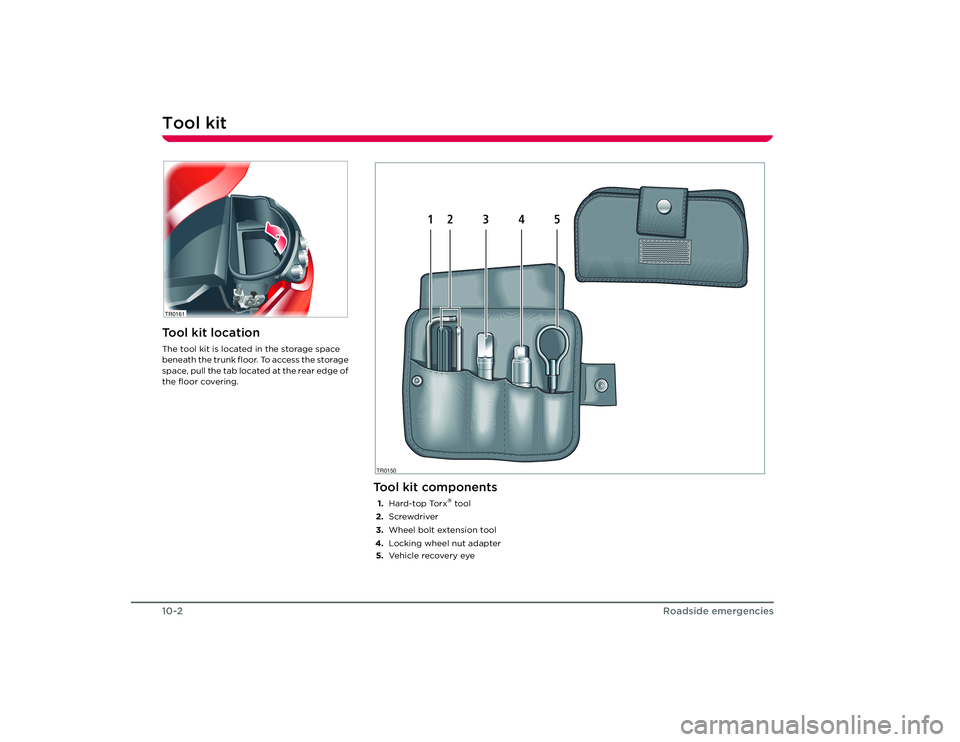
Tool kitTool kit locationThe tool kit is located in the storage space
beneath the trunk floor. To access the storage
space, pull the tab located at the rear edge of
the floor covering.TR0161
Tool kit components1.Hard-top Torx
® tool
2. Screwdriver
3. Wheel bolt extension tool
4. Locking wheel nut adapter
5. Ve h i c l e re c ove r y eye
TR0150
1
2
3
4
5
Roadster OHB.book Page 2 Th ursday, October 2, 2008 8:59 AM
Page 80 of 115
Tire repair10-4
Roadside emergencies
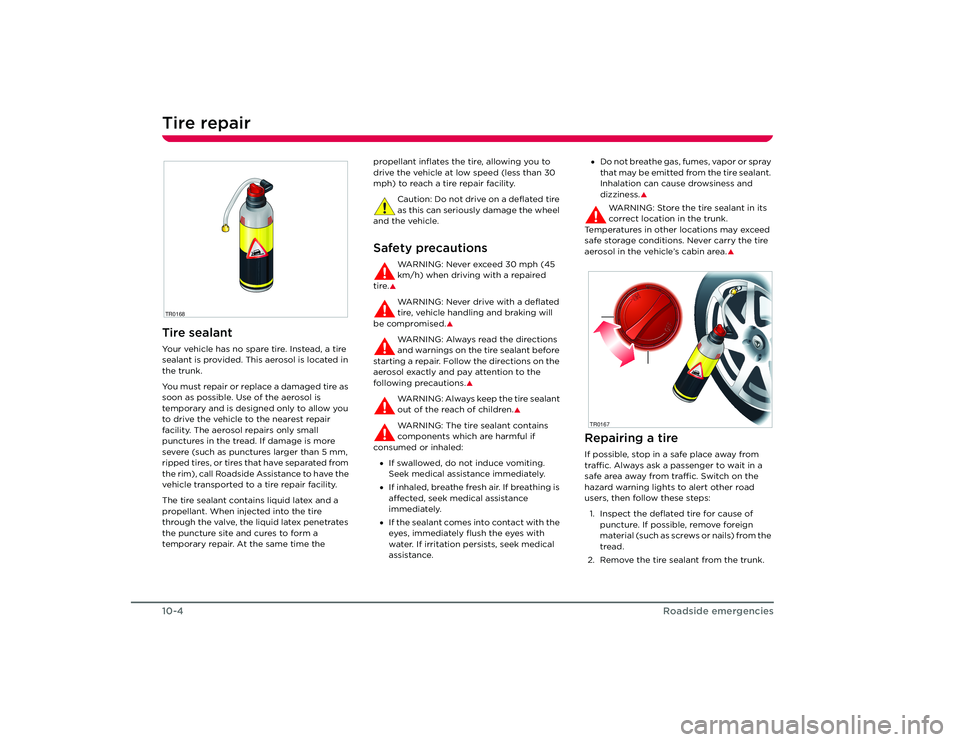
Tire repairTire sealantYour vehicle has no spare tire. Instead, a tire
sealant is provided. This aerosol is located in
the trunk.
You must repair or replace a damaged tire as
soon as possible. Use of the aerosol is
temporary and is designed only to allow you
to drive the vehicle to the nearest repair
facility. The aerosol repairs only small
punctures in the tread. If damage is more
severe (such as punctures larger than 5 mm,
ripped tires, or tires that have separated from
t h e r i m ) , c a l l R o a d s i d e A s s i s t a n c e t o h a ve t h e
vehicle transported to a tire repair facility.
The tire sealant contains liquid latex and a
propellant. When injected into the tire
through the valve, the liquid latex penetrates
the puncture site and cures to form a
temporary repair. At the same time the propellant inflates the tire, allowing you to
drive the vehicle at low speed (less than 30
mph) to reach a tire repair facility.
Caution: Do not drive on a deflated tire
as this can seriously damage the wheel
and the vehicle.
Safety precautions
WARNING: Never exceed 30 mph (45
km/h) when driving with a repaired
tire.SWARNING: Never drive with a deflated
tire, vehicle handling and braking will
be compromised.
S
WARNING: Always read the directions
and warnings on the tire sealant before
starting a repair. Follow the directions on the
aerosol exactly and pay attention to the
following precautions.
S
WARNING: Always keep the tire sealant
out of the reach of children.
S
WARNING: The tire sealant contains
components which are harmful if
consumed or inhaled:
• If swallowed, do not induce vomiting.
Seek medical assistance immediately.
• If inhaled, breathe fresh air. If breathing is
affected, seek medical assistance
immediately.
• If the sealant comes into contact with the
eyes, immediately flush the eyes with
water. If irritation persists, seek medical
assistance. •
Do not breathe gas, fumes, vapor or spray
that may be emitted from the tire sealant.
Inhalation can cause drowsiness and
dizziness.
S
WARNING: Store the tire sealant in its
correct location in the trunk.
Temperatures in other locations may exceed
safe storage conditions. Never carry the tire
aerosol in the vehicle’s cabin area.
S
Repairing a tireIf possible, stop in a safe place away from
traffic. Always ask a passenger to wait in a
safe area away from traffic. Switch on the
hazard warning lights to alert other road
users, then follow these steps:
1. Inspect the deflated tire for cause of puncture. If possible, remove foreign
material (such as screws or nails) from the
tread.
2. Remove the tire sealant from the trunk.
TR0168
TR0167
Roadster OHB.book Page 4 Th ursday, October 2, 2008 8:59 AM
Page 84 of 115
Fuse replacement10-8
Roadside emergencies
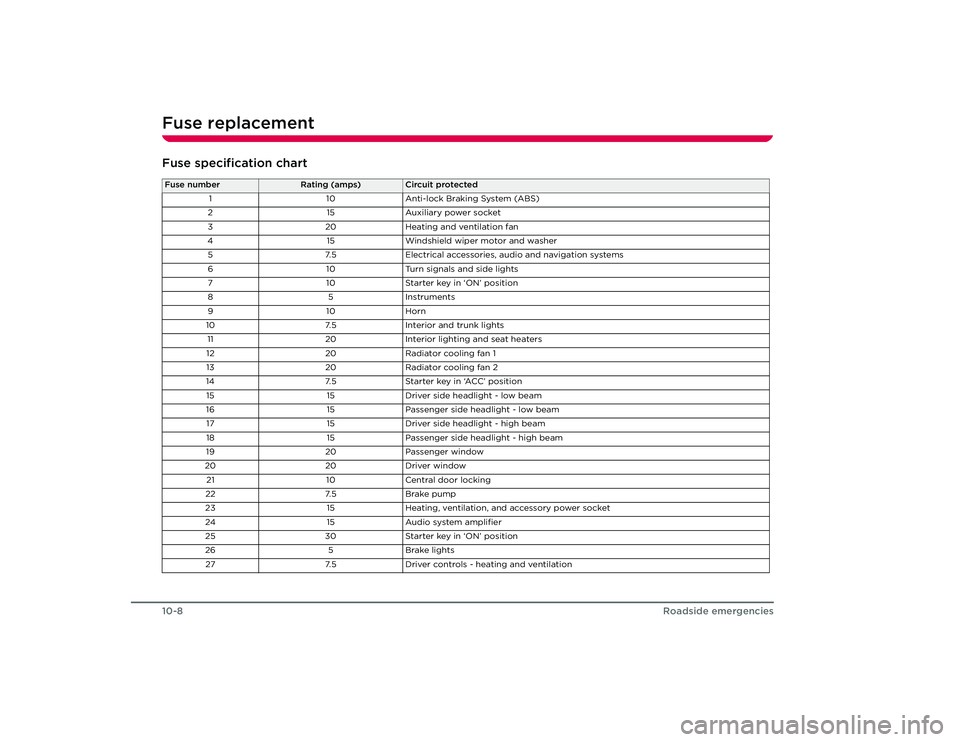
Fuse specification chartFuse number
Rating (amps)
Circuit protected
1 10Anti-lock Braking System (ABS)
2 15Auxiliary power socket
3 20Heating and ventilation fan
4 15Windshield wiper motor and washer
5 7.5Electrical accessories, audio and navigation systems
6 10Turn signals and side lights
7 10Starter key in ‘ON’ position
85 In stru m en ts
91 0Horn
10 7.5Interior and trunk lights
11 20Interior lighting and seat heaters
12 20Radiator cooling fan 1
13 20Radiator cooling fan 2
14 7.5Starter key in ‘ACC’ position
15 15Driver side headlight - low beam
16 15Passenger side headlight - low beam
17 15Driver side headlight - high beam
18 15Passenger side headlight - high beam
19 20Passenger window
20 20Driver window
21 10Central door locking
22 7.5Brake pump
23 15Heating, ventilation, and accessory power socket
24 15Audio system amplifier
25 30Starter key in ‘ON’ position
26 5Brake lights
27 7.5Driver controls - heating and ventilation
Roadster OHB.book Page 8 Th ursday, October 2, 2008 8:59 AM
Page 85 of 115
Bulb replacement
10-9
Roadside emergencies
Bulb replacementReplacing a bulbAlways check the operation of all exterior
lights before driving the vehicle. Replace a
bulb only with one of the same type and
specification.Light Emitting Diode (LED) lightsThe following lights on your vehicle use the
latest LED technology and if any of these
lights stop working, it must be replaced by
Te s l a M o t o r s :
• Front side marker light
• Rear side marker light
• Reverse lights
• Tail/brake lights
• Rear turn signals
Unlike traditional filament bulbs, these lights
have a long life and low power consumption
while providing the same amount of
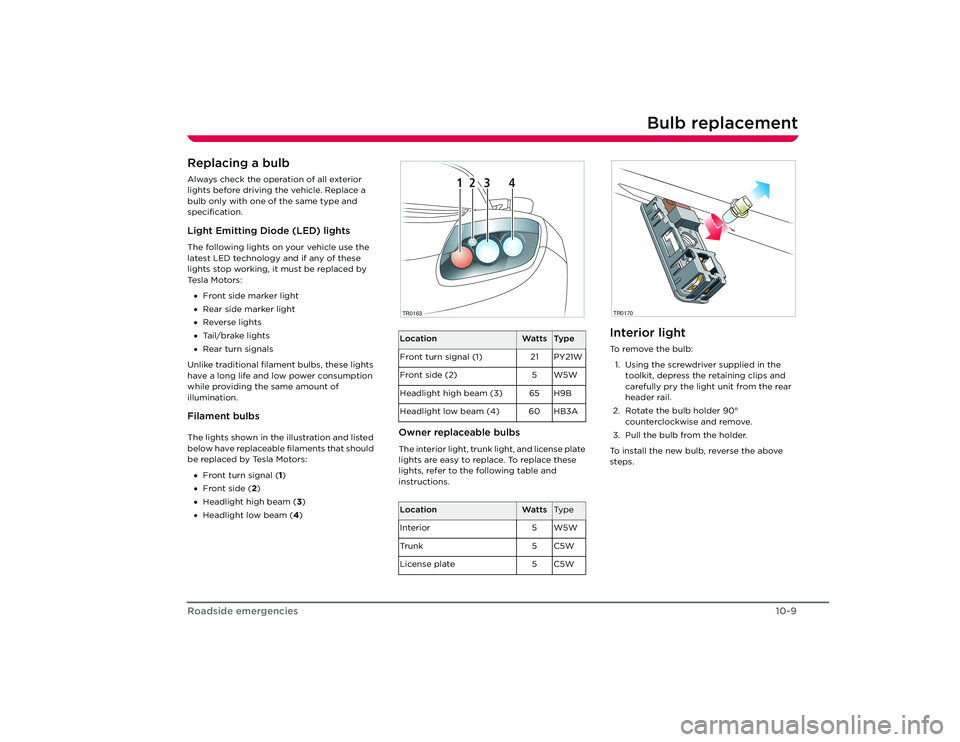
illumination.Filament bulbsThe lights shown in the illustration and listed
below have replaceable filaments that should
be replaced by Tesla Motors:
• Front turn signal ( 1)
• Front side (2 )
• Headlight high beam ( 3)
• Headlight low beam (4 )
Owner replaceable bulbsThe interior light, trunk light, and license plate
lights are easy to replace. To replace these
lights, refer to the following table and
instructions.
Interior lightTo r e m o v e t h e b u l b :
1. Using the screwdriver supplied in the toolkit, depress the retaining clips and
carefully pry the light unit from the rear
header rail.
2. Rotate the bulb holder 90° counterclockwise and remove.
3. Pull the bulb from the holder.
To install the new bulb, reverse the above
steps.
Location
Watts
Ty p e
Front turn signal (1) 21 PY21W
Front side (2) 5 W5W
Headlight high beam (3) 65 H9B
Headlight low beam (4) 60 HB3A
Location
Watts
Ty p e
Interior 5 W5W
Tr u n k 5 C 5 W
License plate 5 C5W
1
2
3
4
1
2
3
4
TR0163
TR0170
Roadster OHB.book Page 9 Th ursday, October 2, 2008 8:59 AM
Page 86 of 115
Bulb replacement10-10
Roadside emergencies
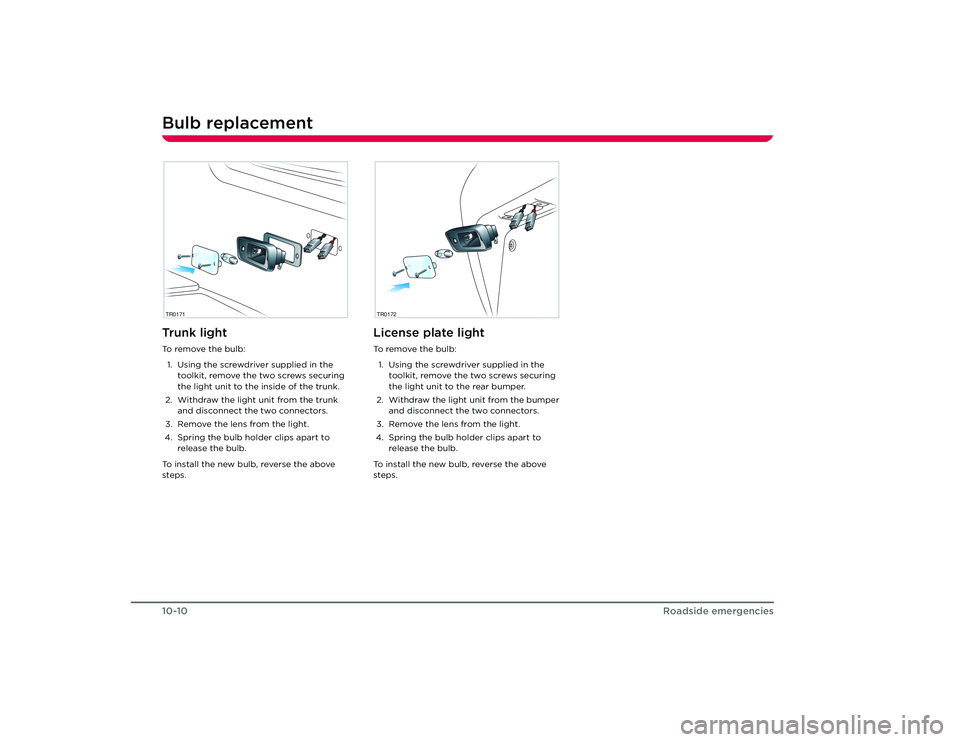
Tr u n k l i g h tTo r e m o v e t h e b u l b :1. Using the screwdriver supplied in the toolkit, remove the two screws securing
the light unit to the inside of the trunk.
2. Withdraw the light unit from the trunk and disconnect the two connectors.
3. Remove the lens from the light.
4. Spring the bulb holder clips apart to release the bulb.
To install the new bulb, reverse the above
steps.
License plate lightTo r e m o v e t h e b u l b : 1. Using the screwdriver supplied in the toolkit, remove the two screws securing
the light unit to the rear bumper.
2. Withdraw the light unit from the bumper and disconnect the two connectors.
3. Remove the lens from the light.
4. Spring the bulb holder clips apart to release the bulb.
To install the new bulb, reverse the above
steps.
TR0171
TR0172
Roadster OHB.book Page 10 Thursday, October 2, 2008 8:59 AM
Page 90 of 115
Vehicle recovery10-14
Roadside emergencies
4. Touch To w M o d e , then touch OK to
confirm. The Touch Screen displays the
following message to indicate that the
vehicle is in Tow Mode.
5. Release the hand brake, if appropriate.
Note: Although Tow Mode is activated, the
steering column lock will be engaged. To
disengage the steering column, turn the key
to the ACC position. If it is difficult to turn the
key, move the steering wheel slightly.
Caution: The car can roll freely when
Tow Mode is active. If the vehicle is not
on a flat surface, do not release the hand
brake until the vehicle is ready to be pulled. Note:
The vehicle can not be charged or
started until you exit Tow Mode.
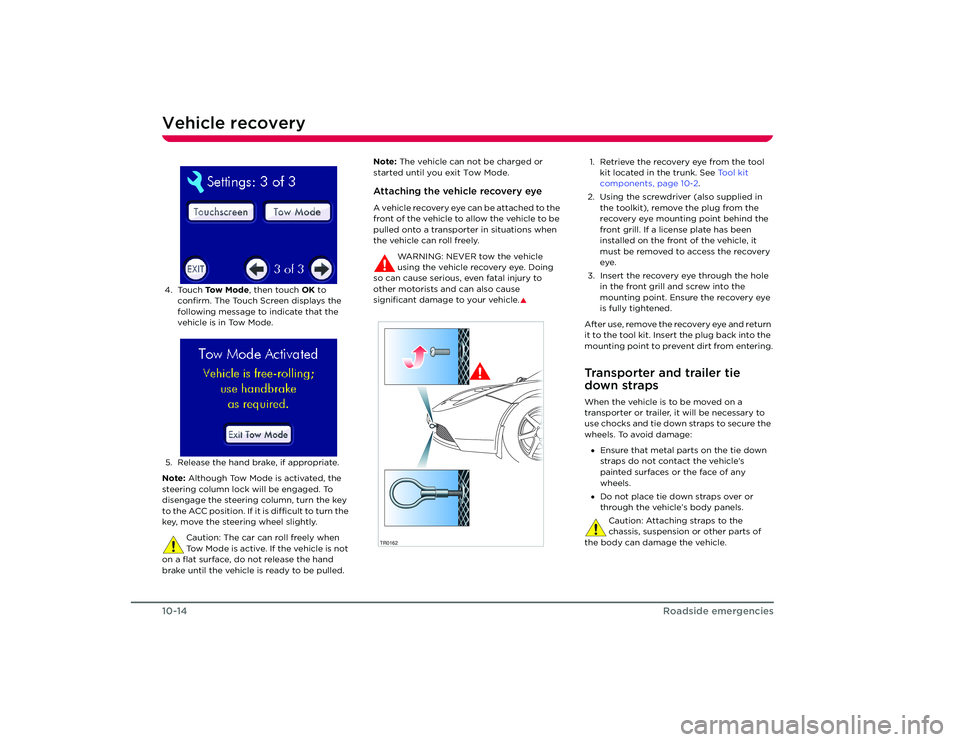
Attaching the vehicle recovery eyeA vehicle recovery eye can be attached to the
front of the vehicle to allow the vehicle to be
pulled onto a transporter in situations when
the vehicle can roll freely.
WARNING: NEVER tow the vehicle
using the vehicle recovery eye. Doing
so can cause serious, even fatal injury to
other motorists and can also cause
significant damage to your vehicle.
S
1. Retrieve the recovery eye from the tool kit located in the trunk. See Tool kit
components, page 10-2.
2. Using the screwdriver (also supplied in the toolkit), remove the plug from the
recovery eye mounting point behind the
front grill. If a license plate has been
installed on the front of the vehicle, it
must be removed to access the recovery
eye.
3. Insert the recovery eye through the hole in the front grill and screw into the
mounting point. Ensure the recovery eye
is fully tightened.
After use, remove the recovery eye and return
it to the tool kit. Insert the plug back into the
mounting point to prevent dirt from entering.Transporter and trailer tie
down strapsWhen the vehicle is to be moved on a
transporter or trailer, it will be necessary to
use chocks and tie down straps to secure the
wheels. To avoid damage: • Ensure that metal parts on the tie down
straps do not contact the vehicle’s
painted surfaces or the face of any
wheels.
• Do not place tie down straps over or
through the vehicle’s body panels.
Caution: Attaching straps to the
chassis, suspension or other parts of
the body can damage the vehicle.
TR0162
Roadster OHB.book Page 14 Thursday, October 2, 2008 8:59 AM