air conditioning TESLA ROADSTER 2008 Owners Manual
[x] Cancel search | Manufacturer: TESLA, Model Year: 2008, Model line: ROADSTER, Model: TESLA ROADSTER 2008Pages: 115, PDF Size: 46.35 MB
Page 13 of 115
Interior
2-5
Your vehicle at a glance
Dashboard overview1. Touch Screen. See Touch Scr een Users Manual provided in your owners package .
2. Turn signals, headlight high beam and cruise control. See Exterior lights, page 6-7 and Cruise control, page 6-9.
3. Instruments. See Instruments, page 6-11.
4. Windshield wiper and washer. See Windshield wiper and washer, page 6-8.
5. Hazard warning light switch. See Hazard warning, page 6-10.
6. Heating and air conditioning. See Interior temperature control, page 7-4.
7. Gear selector. See Selecting gears, page 6-3.
8. Traction control switch. See Traction control, page 6-6.
9. Accessory power socket. See Accessory power socket, page 7-7.
10. Horn. See Horn, page 6-10 .
11. Starter switch. See Starting the vehicle, page 6-3.
12. Hood release. See Opening and closing the hood, page 9-3.
13. Trunk release. See Opening the trunk, page 4-6.
14. Instrument panel illumination control. See Instrument panel lighting, page 6-14.
15. Exterior lights master switch. See Exterior lights, page 6-7.
16. Power windows. See Operating the windows, page 7-2.
17. Central door locking. See Central door locking, page 4-4.
Roadster OHB.book Page 5 Th ursday, October 2, 2008 8:59 AM
Page 34 of 115
General information about charging5-2
Charging your vehicle
Charging your vehicle
General information about chargingImportant!
Caution: If the Battery’s charge level
falls to 0%, it must be plugged in
immediately. Failure to do so can
permanently damage the Battery and this
damage is not covered by the New Vehicle
Limited Warranty. Also, if you allow the
Battery to fall to a critically low level it may
not be possible to charge the vehicle. If you
are unable to charge the vehicle, contact
Te s l a M o t o r s .
WARNING: The Battery has no parts
that an owner, or a non-Tesla authorized
technician can service. Under no
circumstances should you open or tamper
with the Battery. Always contact Tesla Motors
to arrange for Battery servicing
.S
At the end of its service life, the Battery
will be recycled. Contact Tesla Motors
for recycling arrangements.
The BatteryThe Tesla Roadster’s Battery provides power
to the motor as well as all the other electrical
systems on the vehicle, such as lights,
instruments, audio system, etc.
The Battery is one of the largest and most
advanced battery packs in the world,
consisting of several thousand lithium-ion
battery cells that store enough energy for the
vehicle to travel over 200 miles without
recharging.
Note: Actual range will vary based on driving
style. The vehicle consumes more energy if
you are driving aggressively, driving up hills, or are using more resources such as air
conditioning. Also, over time, the Battery
experiences a gradual loss of capacity,
inherent in all lithium-ion batteries. So, as
your vehicle ages, the ca
pacity of the Battery
declines.
As you drive your vehicle, the level of charge
in the Battery is depleted and you’ll need to
recharge it. The Roadster’s built-in charging
system allows you to easily recharge it by
connecting an electrical power supply to the
vehicle’s charging port.
Designed to be plugged inThe Tesla Roadster is de signed to be plugged
in when not in use. This ensures that the next
time you use the vehicle, it is fully charged
and ready to go. There is no advantage to
waiting until battery level is low before
charging. In fact, by plugging it in every night,
you eliminate the risk of damage that could
be caused by over-discharging the battery.
When plugged in, the vehicle takes care of
itself, preserving battery life by managing the
charge level and keeping the Battery at an
ideal temperature. The vehicle wakes up
every 24 hours and, if needed, automatically
initiates the charging process to keep the
Battery at an optimum charge level.
If you’re not driving your vehicle every day,
see Storing your vehicle, page 5-3 .
Leaving the vehicle unpluggedEven when you’re not driving the vehicle, the
Battery will slowly lose its charge. Therefore,
when you’re not using the vehicle, you should
leave it plugged in. However, situations may
arise in which you must leave the vehicle
unplugged for an extended time (for
example, at an airport when travelling for a
couple of weeks). If this is the case, it is your
responsibility to ensure that the Battery does
not become fully depleted. Charge the
Battery to a maximum level before leaving it,
and keep in mind that when the vehicle is left
unplugged, the Battery’s charge level will
drop to a level of approximately 50% within
the first week, and then decline at a rate of
approximately 5% each subsequent week.
Plan accordingly to ensure that the Battery
never approaches a level of 0%.
Over-discharge can permanently damage the
Battery.
If for some reason, you are unable to keep the
vehicle plugged in when it is not being used,
it is up to you to preserve battery life by
paying attention to the charge level and the
temperature (see bulleted list below). If
leaving your vehicle unplugged for more than
24 hours, follow these do’s and don’ts to
avoid prematurely decreasing the life of your
vehicle’s Battery:
• DO leave the vehicle plugged in whenever
possible.
• DO maintain at least a 15% charge level in
the Battery if leaving it unplugged for
more than 48 hours.
Roadster OHB.book Page 2 Th ursday, October 2, 2008 8:59 AM
Page 42 of 115
Driving basics6-4
Driving your vehicle
•Drive with the top on and the windows up
to minimize aerodynamic drag.
• Keep tires at the recommended inflation
pressures.
• Remove unnecessary belongings from
the trunk.
• Minimize the use of resources such as
heating and air conditioning. Using seat
heaters to keep warm is more efficient
than heating the cabin.
In addition to driv ing habits, energy
consumption is also increased based on
environmental conditions, such as cold
weather and hilly roads.
The Touch Screen’s Energy screen displays
precise real-time feedback on the amount of
energy you’re using. Energy feedback is also
displayed on the LCD display on the
instrument panel. Deep waterDo not drive through flooded areas, water of
unknown depth, or deep puddles. When
driving through even a relatively shallow
puddle, drive slowly to prevent water from
entering the vehicle. Carrying items in cabin areaThe trunk is the preferred place to carry
objects. In an accident, during hard braking,
or sudden maneuvers, loose items carried in
the vehicle’s cabin area can be thrown
around, and cause injury to occupants unless
securely fastened.Roadster OHB.book Page 4 Th ursday, October 2, 2008 8:59 AM
Page 50 of 115
Instruments6-12Driving your vehicleThe extending bar on the top right of the LCD
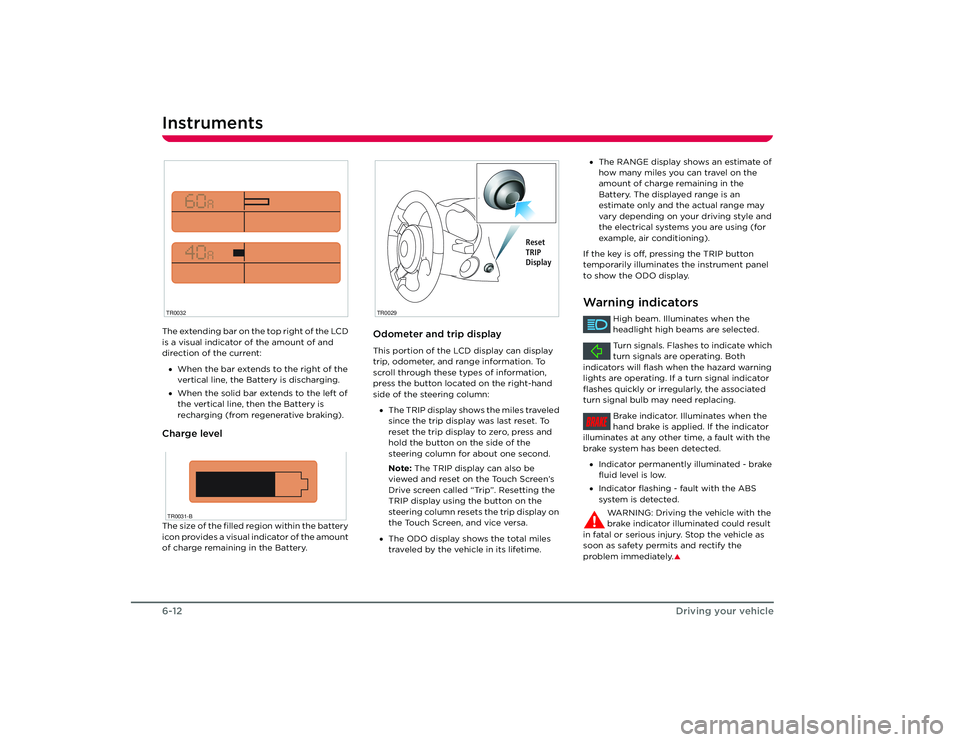
is a visual indicator of the amount of and
direction of the current:
• When the bar extends to the right of the
vertical line, the Battery is discharging.
• When the solid bar extends to the left of
the vertical line, then the Battery is
recharging (from regenerative braking).Charge levelThe size of the filled region within the battery
icon provides a visual indicator of the amount
of charge remaining in the Battery.
Odometer and trip displayThis portion of the LCD display can display
trip, odometer, and range information. To
scroll through these types of information,
press the button located on the right-hand
side of the steering column:
• The TRIP display shows the miles traveled
since the trip display was last reset. To
reset the trip display to zero, press and
hold the button on the side of the
steering column for about one second.
Note: The TRIP display can also be
viewed and reset on the Touch Screen’s
Drive screen called “Trip”. Resetting the
TRIP display using the button on the
steering column resets the trip display on
the Touch Screen, and vice versa.
• The ODO display shows the total miles
traveled by the vehicle in its lifetime.
TR0032TR0031-B
TR0029
Reset
TRIP
Display
•The RANGE display shows an estimate of
how many miles you can travel on the
amount of charge remaining in the
Battery. The displayed range is an
estimate only and the actual range may
vary depending on your driving style and
the electrical systems you are using (for
example, air conditioning).
If the key is off, pressing the TRIP button
temporarily illuminates the instrument panel
to show the ODO display.Warning indicators
High beam. Illuminates when the
headlight high beams are selected.
Turn signals. Flashes to indicate which
turn signals are operating. Both
indicators will flash when the hazard warning
lights are operating. If a turn signal indicator
flashes quickly or irregularly, the associated
turn signal bulb may need replacing.
Brake indicator. Illuminates when the
hand brake is applied. If the indicator
illuminates at any other time, a fault with the
brake system has been detected.
• Indicator permanently illuminated - brake
fluid level is low.
• Indicator flashing - fault with the ABS
system is detected.
WARNING: Driving the vehicle with the
brake indicator illuminated could result
in fatal or serious injury. Stop the vehicle as
soon as safety permits and rectify the
problem immediately.
S
BRAKE
Roadster OHB.book Page 12 Thursday, October 2, 2008 8:59 AM
Page 56 of 115
Interior temperature control7-4
Comfort and convenience
Interior temperature controlGeneral informationThe temperature of the air inside the vehicle
is controlled using the controls on the center
console.
Heating is provided by a high voltage electric
heater located under the hood. Cooling is
provided by an all-electric air conditioning
system located under the hood. In addition to
cooling the cabin, the system also cools the
Battery.
Note: In high ambient temperatures, the
system may not be able to achieve the
desired cabin temperature. This is normal,
with priority being given to cooling the
Battery to ensure that cell temperatures stay
within a range that supports long life and
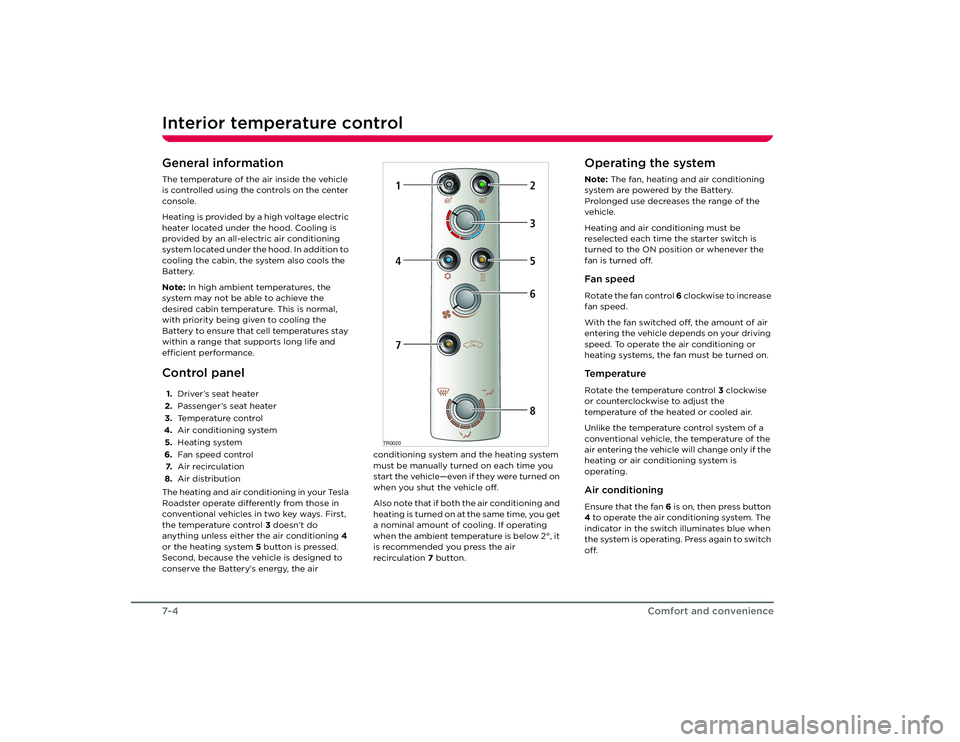
efficient performance.Control panel1. Driver’s seat heater
2. Passenger’s seat heater
3. Temperature control
4. Air conditioning system
5. Heating system
6. Fan speed control
7. Air recirculation
8. Air distribution
The heating and air conditioning in your Tesla
Roadster operate differently from those in
conventional vehicles in two key ways. First,
the temperature control 3 doesn’t do
anything unless either the air conditioning 4
or the heating system 5 button is pressed.
Second, because the vehicle is designed to
conserve the Battery’s energy, the air conditioning system and the heating system
must be manually turned on each time you
start the vehicle—even if they were turned on
when you shut the vehicle off.
Also note that if both the air conditioning and
heating is turned on at the same time, you get
a nominal amount of cooling. If operating
when the ambient temperature is below 2°, it
is recommended you press the air
recirculation
7 button.
Operating the systemNote: The fan, heating and air conditioning
system are powered by the Battery.
Prolonged use decreases the range of the
vehicle.
Heating and air conditioning must be
reselected each time the starter switch is
turned to the ON position or whenever the
fan is turned off.Fan speedRotate the fan control 6 clockwise to increase
fan speed.
With the fan switched off, the amount of air
entering the vehicle depends on your driving
speed. To operate the air conditioning or
heating systems, the fan must be turned on.Te m p e r a t u r eRotate the temperature control 3 clockwise
or counterclockwise to adjust the
temperature of the heated or cooled air.
Unlike the temperature control system of a
conventional vehicle, the temperature of the
air entering the vehicle will change only if the
heating or air conditioning system is
operating.Air conditioningEnsure that the fan 6 is on, then press button
4 to operate the air conditioning system. The
indicator in the switch illuminates blue when
the system is operating. Press again to switch
off.
TR0020
1
2
47
5368
Roadster OHB.book Page 4 Th ursday, October 2, 2008 8:59 AM
Page 58 of 115
Interior temperature control7-6
Comfort and convenience
3. Switch on both the heating and air conditioning.
4. Rotate the heating control for maximum heat.
When the windshield has fully cleared, adjust
the controls as required.Seat heatersThe seat heaters operate only when the
starter switch is in the ACC or ON position.
Note: The seat heaters must be reselected
each time the starter switch is turned to the
ON position.
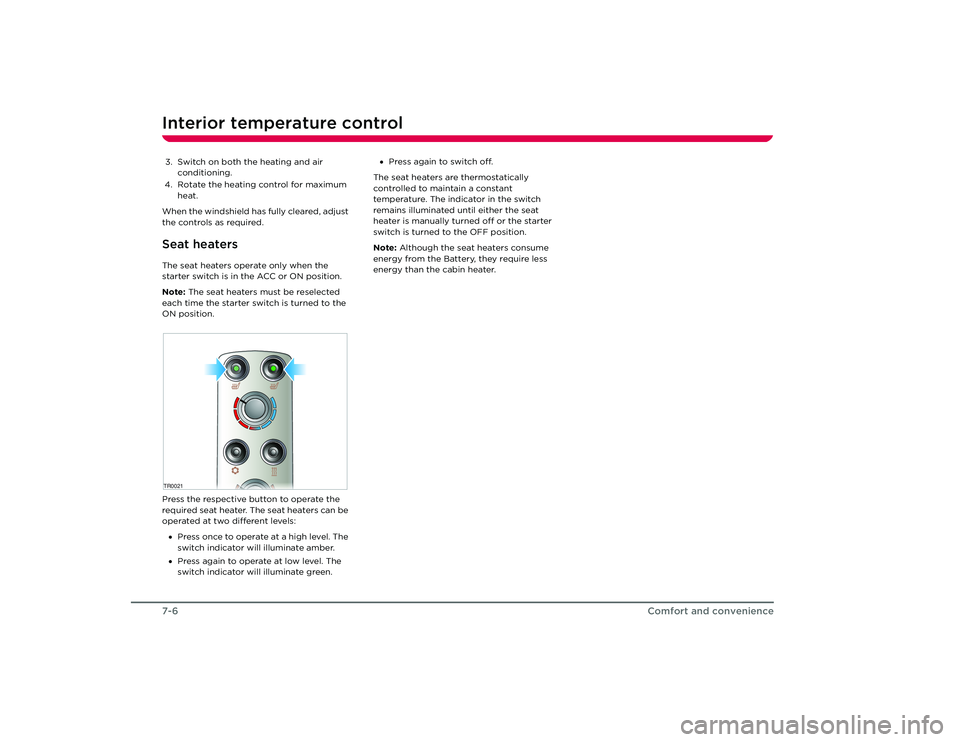
Press the respective button to operate the
required seat heater. The seat heaters can be
operated at two different levels:
• Press once to operate at a high level. The
switch indicator will illuminate amber.
• Press again to operate at low level. The
switch indicator will illuminate green. •
Press again to switch off.
The seat heaters are thermostatically
controlled to maintain a constant
temperature. The indicator in the switch
remains illuminated until either the seat
heater is manually turned off or the starter
switch is turned to the OFF position.
Note: Although the seat heaters consume
energy from the Battery, they require less
energy than the cabin heater.TR0021 Roadster OHB.book Page 6 Th ursday, October 2, 2008 8:59 AM
Page 70 of 115
Maintenance9-2
Maintenance and care
Maintenance and care
MaintenanceGeneral informationRegular maintenance is the key to ensuring
the continued reliability and efficiency of
your vehicle.
Maintenance is the owner's responsibility and
you must ensure that the appropriate
maintenance is carried out when required
and according to the recommendations
specified by Tesla Motors.Routine maintenanceTake your vehicle to Tesla Motors at the
regularly scheduled maintenance intervals of
every 12 months, or every 12,000 miles,
whichever comes first.
Maintenance and service must be performed
by Tesla-certified technicians. Damages or
failures caused by maintenance or repairs
performed by non-Tesla certified technicians
are not covered under the New Vehicle
Limited Warranty.
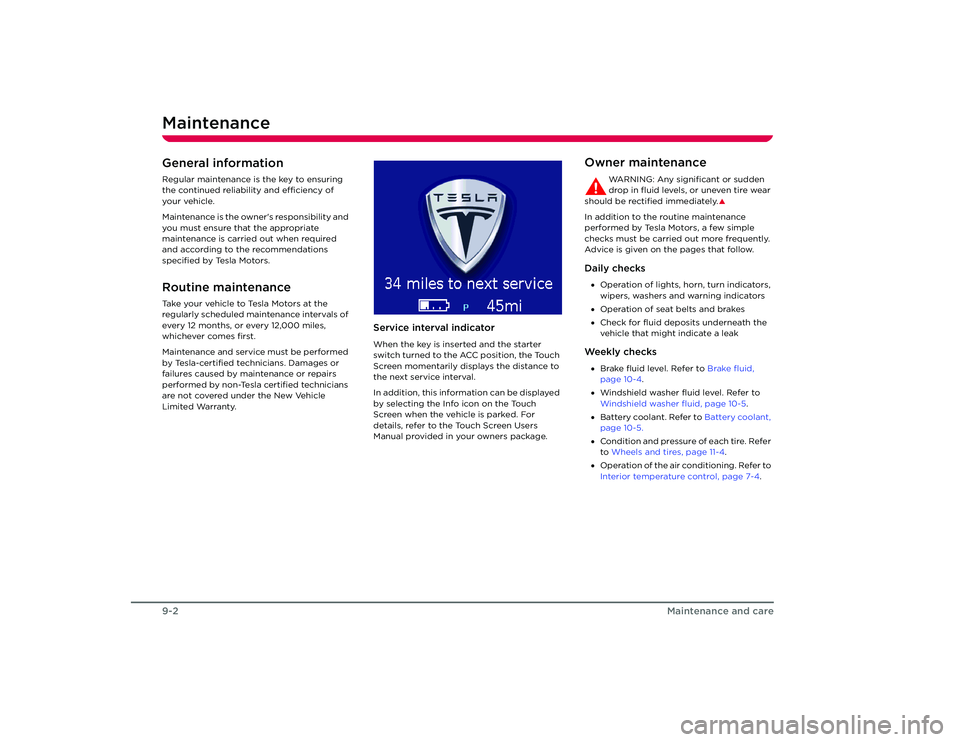
Service interval indicatorWhen the key is inserted and the starter
switch turned to the ACC position, the Touch
Screen momentarily displays the distance to
the next service interval.
In addition, this information can be displayed
by selecting the Info icon on the Touch
Screen when the vehicle is parked. For
details, refer to the Touch Screen Users
Manual provided in your owners package.
Owner maintenance
WARNING: Any significant or sudden
drop in fluid levels, or uneven tire wear
should be rectified immediately.
S
In addition to the routine maintenance
performed by Tesla Motors, a few simple
checks must be carried out more frequently.
Advice is given on the pages that follow.Daily checks• Operation of lights, horn, turn indicators,
wipers, washers and warning indicators
• Operation of seat belts and brakes
• Check for fluid deposits underneath the
vehicle that might indicate a leakWe e k l y c h e c k s•Brake fluid level. Refer to Brake fluid,
page 10-4 .
• Windshield washer fluid level. Refer to
Windshield washer fluid, page 10-5 .
• Battery coolant. Refer to Battery coolant,
page 10-5.
• Condition and pressure of each tire. Refer
to Wheels and tires, page 11-4 .
• Operation of the air conditioning. Refer to
Interior temperature control, page 7-4.
Roadster OHB.book Page 2 Th ursday, October 2, 2008 8:59 AM
Page 104 of 115
Approved fluids and capacities11-14
Technical specifications
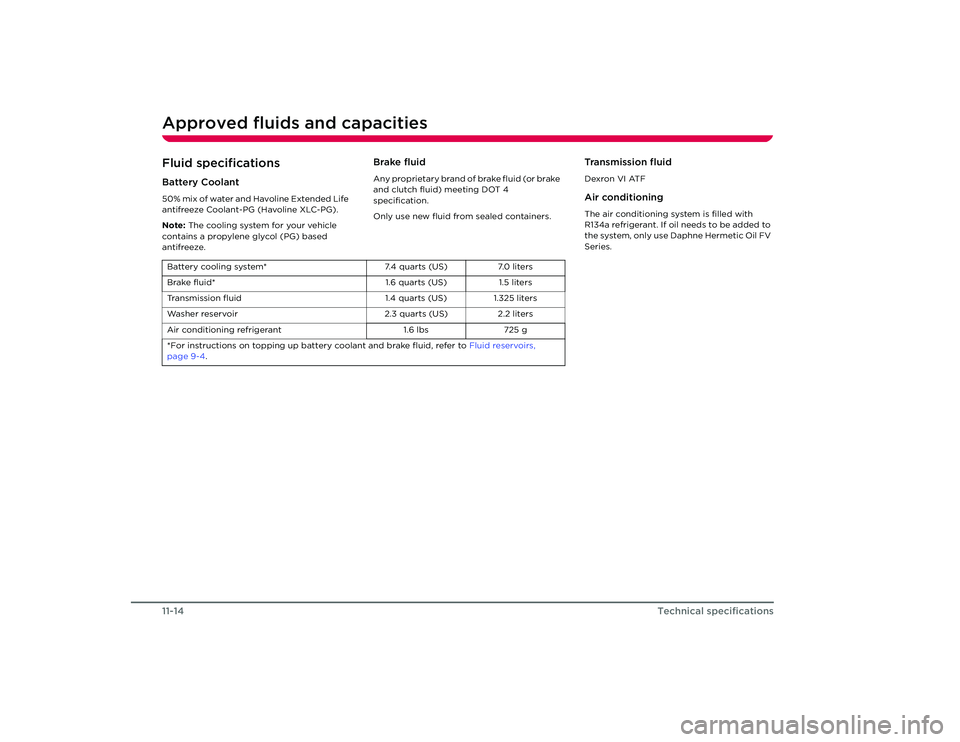
Approved fluids and capacitiesFluid specificationsBattery Coolant50% mix of water and Havoline Extended Life
antifreeze Coolant-PG (Havoline XLC-PG).
Note: The cooling system for your vehicle
contains a propylene glycol (PG) based
antifreeze.
Brake fluidAny proprietary brand of brake fluid (or brake
and clutch fluid) meeting DOT 4
specification.
Only use new fluid from sealed containers.
Transmission fluidDexron VI ATFAir conditioningThe air conditioning system is filled with
R134a refrigerant. If oil needs to be added to
the system, only use Daphne Hermetic Oil FV
Series.
Battery cooling system* 7.4 quarts (US)7.0 liters
Brake fluid* 1.6 quarts (US)1.5 liters
Transmission fluid 1.4 quarts (US)1.325 liters
Washer reservoir 2.3 quarts (US)2.2 liters
Air conditioning refrigerant 1.6 lbs725 g
*For instructions on topping up batt ery coolant and brake fluid, refer to Fluid reservoirs,
page 9-4 .
Roadster OHB.book Page 14 Thursday, October 2, 2008 8:59 AM
Page 110 of 115
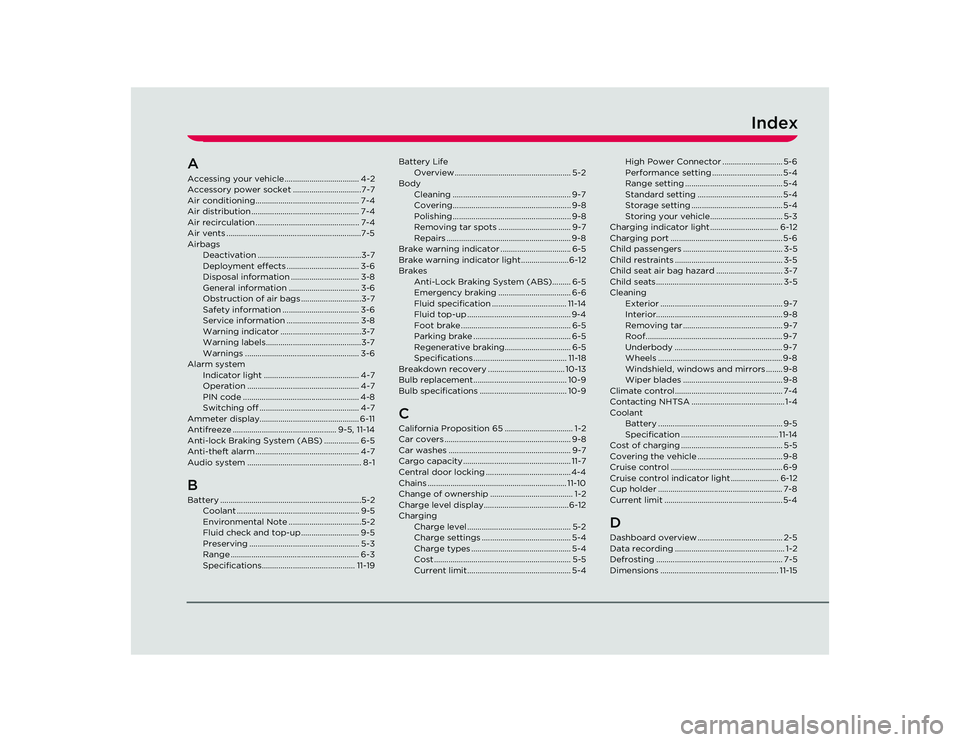
Index
AAccessing your vehicle.................................... 4-2
Accessory power socket .................................7-7
Air conditioning.................................................. 7-4
Air distribution .................................................... 7-4
Air recirculation .................................................. 7-4
Air vents .................................................................7-5
AirbagsDeactivation ..................................................3-7
Deployment effects ................................... 3-6
Disposal information ................................. 3-8
General information .................................. 3-6
Obstruction of air bags .............................3-7
Safety information ..................................... 3-6
Service information ................................... 3-8
Warning indicator .......................................3-7
Warning labels..............................................3-7
Warnings ....................................................... 3-6
Alarm system Indicator light .............................................. 4-7
Operation ...................................................... 4-7
PIN code ........................................................ 4-8
Switching off ................................................ 4-7
Ammeter display................................................ 6-11
Antifreeze .................................................. 9-5, 11-14
Anti-lock Braking System (ABS) ................. 6-5
Anti-theft alarm .................................................. 4-7
Audio system ....................................................... 8-1BBattery ....................................................................5-2 Coolant ........................................................... 9-5
Environmental Note ...................................5-2
Fluid check and top-up ............................ 9-5
Preserving ..................................................... 5-3
Range .............................................................. 6-3
Specifications............................................. 11-19 Battery Life
Overview ........................................................ 5-2
Body Cleaning ......................................................... 9-7
Covering......................................................... 9-8
Polishing ......................................................... 9-8
Removing tar spots ................................... 9-7
Repairs ............................................................ 9-8
Brake warning indicator .................................. 6-5
Brake warning indicator light .......................6-12
Brakes Anti-Lock Braking System (ABS)......... 6-5
Emergency braking ................................... 6-6
Fluid specification .................................... 11-14
Fluid top-up .................................................. 9-4
Foot brake ..................................................... 6-5
Parking brake ............................................... 6-5
Regenerative braking................................ 6-5
Specifications ............................................. 11-18
Breakdown recovery ..................................... 10-13
Bulb replacement............................................. 10-9
Bulb specifications .......................................... 10-9
CCalifornia Proposition 65 ................................. 1-2
Car covers ............................................................. 9-8
Car washes ........................................................... 9-7
Cargo capacity.................................................... 11-7
Central door locking ......................................... 4-4
Chains ................................................................... 11-10
Change of ownership ........................................ 1-2
Charge level display.........................................6-12
Charging Charge level .................................................. 5-2
Charge settings ........................................... 5-4
Charge types ................................................ 5-4
Cost .................................................................. 5-5
Current limit.................................................. 5-4 High Power Connector ............................. 5-6
Performance setting .................................. 5-4
Range setting ............................................... 5-4
Standard setting ......................................... 5-4
Storage setting ............................................ 5-4
Storing your vehicle................................... 5-3
Charging indicator light ................................. 6-12
Charging port ...................................................... 5-6
Child passengers ................................................ 3-5
Child restraints .................................................... 3-5
Child seat air bag hazard ................................ 3-7
Child seats............................................................. 3-5
Cleaning Exterior ........................................................... 9-7
Interior............................................................. 9-8
Removing tar ................................................ 9-7
Roof.................................................................. 9-7
Underbody .................................................... 9-7
Wheels ............................................................ 9-8
Windshield, windows and mirrors ........ 9-8
Wiper blades ................................................ 9-8
Climate control.................................................... 7-4
Contacting NHTSA ............................................. 1-4
Coolant Battery ............................................................ 9-5
Specification ............................................... 11-14
Cost of charging ................................................. 5-5
Covering the vehicle ......................................... 9-8
Cruise control ...................................................... 6-9
Cruise control indicator lig ht ....................... 6-12
Cup holder ............................................................ 7-8
Current limit ......................................................... 5-4
DDashboard overview ......................................... 2-5
Data recording ..................................................... 1-2
Defrosting ............................................................. 7-5
Dimensions ......................................................... 11-15
Roadster OHB.book Page 1 Th ursday, October 2, 2008 8:59 AM