dashboard TESLA ROADSTER 2008 Owners Manual
[x] Cancel search | Manufacturer: TESLA, Model Year: 2008, Model line: ROADSTER, Model: TESLA ROADSTER 2008Pages: 115, PDF Size: 46.35 MB
Page 9 of 115
2-1
Your vehicle at a glance
ExteriorExterior overview 2-3
Interior Dashboard overview 2-5
Roadster OHB.book Page 1 Thursday, October 2, 2008 8:59 AM
Page 13 of 115
Interior
2-5
Your vehicle at a glance
Dashboard overview1. Touch Screen. See Touch Scr een Users Manual provided in your owners package .
2. Turn signals, headlight high beam and cruise control. See Exterior lights, page 6-7 and Cruise control, page 6-9.
3. Instruments. See Instruments, page 6-11.
4. Windshield wiper and washer. See Windshield wiper and washer, page 6-8.
5. Hazard warning light switch. See Hazard warning, page 6-10.
6. Heating and air conditioning. See Interior temperature control, page 7-4.
7. Gear selector. See Selecting gears, page 6-3.
8. Traction control switch. See Traction control, page 6-6.
9. Accessory power socket. See Accessory power socket, page 7-7.
10. Horn. See Horn, page 6-10 .
11. Starter switch. See Starting the vehicle, page 6-3.
12. Hood release. See Opening and closing the hood, page 9-3.
13. Trunk release. See Opening the trunk, page 4-6.
14. Instrument panel illumination control. See Instrument panel lighting, page 6-14.
15. Exterior lights master switch. See Exterior lights, page 6-7.
16. Power windows. See Operating the windows, page 7-2.
17. Central door locking. See Central door locking, page 4-4.
Roadster OHB.book Page 5 Th ursday, October 2, 2008 8:59 AM
Page 19 of 115
Airbag system3-6Seating and safety restra
ints
Airbag systemGeneral informationThe airbag for the driver is located in the
padded hub of the steering wheel. The airbag
for the passenger is located on the
dashboard. These are indicated by the word
AIRBAG on the trim.
Provided the occupants are correctly seated
and the seat belts are properly worn, the
airbags provide additional protection to the
chest and face of the occupants in the event
of a severe frontal impact.
Note: Airbags inflate and deflate very quickly
and will not protect occupants against the
effects of secondary impacts that may occur.
How the system works
WARNING: The airbags are a
supplemental restraint system
providing additional protection in certain
types of collisions only - they do not replace
the need to wear a seat belt.
S
Operation of the airbag system depends on
the rate at which your vehicle's passenger
compartment changes speed as a result of a
collision.
In the event of a collision, the airbag control
unit monitors the rate of deceleration
induced by the collision to determine
whether the airbags should be deployed.
When deployed, airbags inflate instantly, with
considerable force accompanied by a loud
noise. The inflated bag, together with the
seat belt restraint system, limit the movement
of the occupants, thereby reducing the risk of
injury to the head and upper torso.
TR0082
1
2
The airbag system is not designed to operate
as a result of:
• Rear collisions
• Minor front impacts
• Minor side impacts
• Heavy braking
• Driving over bumps or potholes
It follows, therefore, that significant superficial
damage can occur without the air bags
deploying or, conversely, that a relatively small
amount of structural damage can cause the
airbags to be deployed.Deployment effects
WARNING: Following inflation, some
airbag system components are hot. Do
not touch until they have cooled.
S
WARNING: The airbag module inflates
with considerable speed and force. An
inflating airbag can cause facial abrasions and
other injuries. To limit these injuries, ensure
that occupants are correctly seated, with the
seat as far back as is practical, and are
wearing seat belts.
S
WARNING: The National Highway Traffic
Safety Administration (NHTSA)
recommends a minimum distance of 10 inches
(25 cm) between an occupant’s chest and the
driver’s airbag module.
S
When the airbags are deployed, a fine powder
is released. This is not a malfunction. However,
the powder may irritate the skin and should be
thoroughly flushed from the eyes and from
any cuts or abrasions on the skin.
Roadster OHB.book Page 6 Th ursday, October 2, 2008 8:59 AM
Page 20 of 115
Airbag system
3-7
Seating and s afety restraints
After inflation, the airbags will deflate to
provide a gradual cushioning effect for the
occupants and to ensure the driver's forward
vision is not obscured.
If the airbags have been deployed, always
have the airbags, seat belt pre-tensioners and
any associated components checked and, if
necessary, replaced by Tesla Motors.
After any accident, always have the airbags,
seat belt pre-tensioners and any associated
components checked and, if necessary,
replaced by Tesla Motors.Obstruction of airbags
WARNING: Do not allow passengers to
obstruct the operation of the airbags
by placing feet, knees or any other part of the
body, or any other objects in contact with, or
in close proximity to, an airbag module.
S
WARNING: Do not attach or position
items on an airbag cover which could
interfere with the inflation of the airbag or be
propelled inside your vehicle and injure
occupants.
S
Airbag warning indicator
A warning indicator in the instrument
panel alerts you of any malfunction of
the airbag system.
The components of the system being
monitored include: the airbag modules, the
seat belt pre-tensioners, the airbag control
unit and the airbag wiring harness.
When the starter switch is turned to the ON
position, the airbag control unit monitors the
readiness of the system’s electrical circuits.
Contact Tesla Motors if:
• The warning indicator fails to illuminate
when the starter switch is turned to the
ON position.
• The warning indicator fails to extinguish
within approximately six seconds after
the starter switch is turned to the ON
position.
• The warning indicator illuminates while
your vehicle is being driven.
Airbag warning labels
WARNING: Extreme hazard! Do not use
a rearward facing child restraint on a
seat protected by an airbag in front of it.
Doing so increases the risk of death or
serious injury when the airbag deploys.
S
Airbag warning information is printed on the
driver’s and passenger’s sun visor.Using child seats
WARNING: Currently, child seats and
restraints are not approved for use in
your vehicle. Until these are available, Tesla
Motors strongly recommends that children
are not carried as passengers in your vehicle,
and that you do not fit any type of child seat
into your vehicle. Death or serious injury may
occur if the child is too close to the
dashboard when the airbag inflates.
S
Passenger airbag deactivation
WARNING: Your vehicle is fitted with an
airbag system that has no provision for
switching off or deactivating the passenger
airbag.S
!WARNING
DEATH or SERIOUS INJURY can occurChildren 12 and under can be killed by the airbagNEVER put a rear facing child seat in the frontSit as far back as possible from the air bagALWAYS use SEAT BELTS and CHILD RESTRAINTS
TR0138
Roadster OHB.book Page 7 Th ursday, October 2, 2008 8:59 AM
Page 21 of 115
Airbag system3-8
Seating and safety restraints
Airbag service information
WARNING: The disposal of used airbag
units is subject to stringent regulations,
and should only be handled by Tesla
Motors.S
For your safety, a Tesla Motors technician,
who is familiar with your vehicle, must
perform the following tasks:
• Removal, replacement, repair, or
modification, of any wiring or component
in the vicinity of airbag system
components, including the steering
wheel, steering column, dashboard and
instrument panel.
• Modification to the front or side of your
vehicle, including the bumper and
chassis.
In addition, always seek the assistance of
Te s l a M o t o r s i f : • An airbag inflates
• A pre-tensioner activates
• The front or side of your vehicle is
damaged, even if the airbag has not
inflated
• Any part of an airbag module cover
shows signs of cracking or damageRoadster OHB.book Page 8 Th ursday, October 2, 2008 8:59 AM
Page 27 of 115
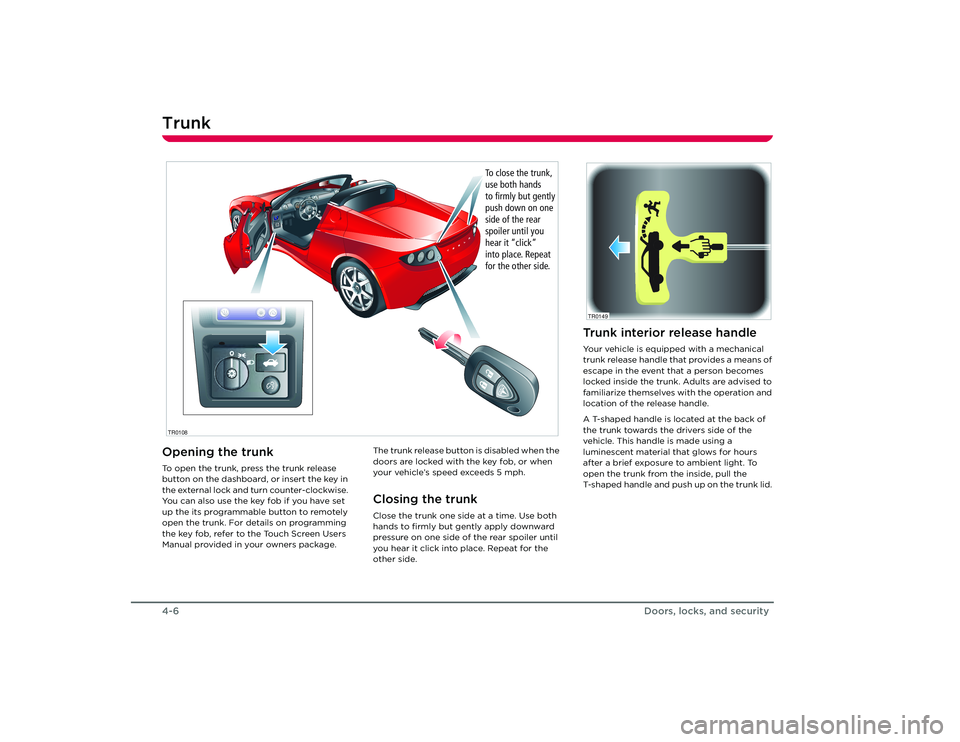
Trunk4-6Doors, locks, and securityTr u n kOpening the trunkTo open the trunk, press the trunk release
button on the dashboard, or insert the key in
the external lock and turn counter-clockwise.
You can also use the key fob if you have set
up the its programmable button to remotely
open the trunk. For details on programming
the key fob, refer to the Touch Screen Users
Manual provided in your owners package.The trunk release button is disabled when the
doors are locked with the key fob, or when
your vehicle’s speed exceeds 5 mph.
Closing the trunkClose the trunk one side at a time. Use both
hands to firmly but gently apply downward
pressure on one side of
the rear spoiler until
you hear it click into place. Repeat for the
other side.
T C2
R
1
BR
AK E FA
UL
T
C R
U I
S Emp
h
rp
mx
1 0
001
50
1
4
0
13
0
1
20
1
10
1
00
5 0
4 0
3 0
2 0
10 9
0
60 8
0
7
0
0
0
1
2
3
4
5
6
7
8
9
10
11
12
13
1 4
1 5TCP
RN 1 2
2:0
0PM
2:00PM
TR0108
To close the trunk,
use both hands
to firmly but gently
push down on one
side of the rear
spoiler until you
hear it “click”
into place. Repeat
for the other side.
Trunk interior release handleYour vehicle is equipped with a mechanical
trunk release handle that provides a means of
escape in the event that a person becomes
locked inside the trunk. Adults are advised to
familiarize themselves with the operation and
location of the release handle.
A T-shaped handle is located at the back of
the trunk towards the drivers side of the
vehicle. This handle is made using a
luminescent material that glows for hours
after a brief exposure to ambient light. To
open the trunk from the inside, pull the
T-shaped handle and push up on the trunk lid. TR0149
Roadster OHB.book Page 6 Th ursday, October 2, 2008 8:59 AM
Page 45 of 115
Switches and controls
6-7
Driving your vehicle
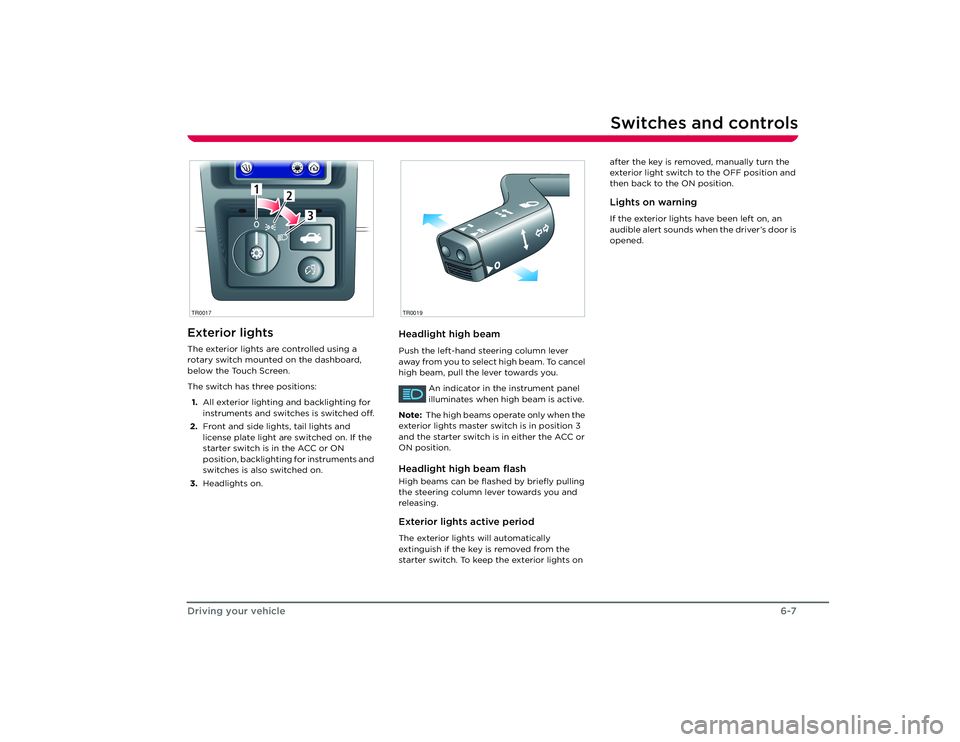
Switches and controlsExterior lightsThe exterior lights are controlled using a
rotary switch mounted on the dashboard,
below the Touch Screen.
The switch has three positions:
1. All exterior lighting and backlighting for
instruments and switches is switched off.
2. Front and side lights, tail lights and
license plate light are switched on. If the
starter switch is in the ACC or ON
position, backlighting for instruments and
switches is also switched on.
3. Headlights on.
Headlight high beamPush the left-hand steering column lever
away from you to select high beam. To cancel
high beam, pull the lever towards you.
An indicator in the instrument panel
illuminates when high beam is active.
Note: The high beams operate only when the
exterior lights master switch is in position 3
and the starter switch is in either the ACC or
ON position.Headlight high beam flashHigh beams can be flas hed by briefly pulling
the steering column lever towards you and
releasing.Exterior lights active periodThe exterior lights will automatically
extinguish if the key is removed from the
starter switch. To keep the exterior lights on after the key is removed, manually turn the
exterior light switch to the OFF position and
then back to the ON position.
Lights on warningIf the exterior lights have been left on, an
audible alert sounds when the driver’s door is
opened.
1
2
3
1
2
3
TR0017
R
O
TR0019
Roadster OHB.book Page 7 Th
ursday, October 2, 2008 8:59 AM
Page 52 of 115
Instruments6-14
Driving your vehicle
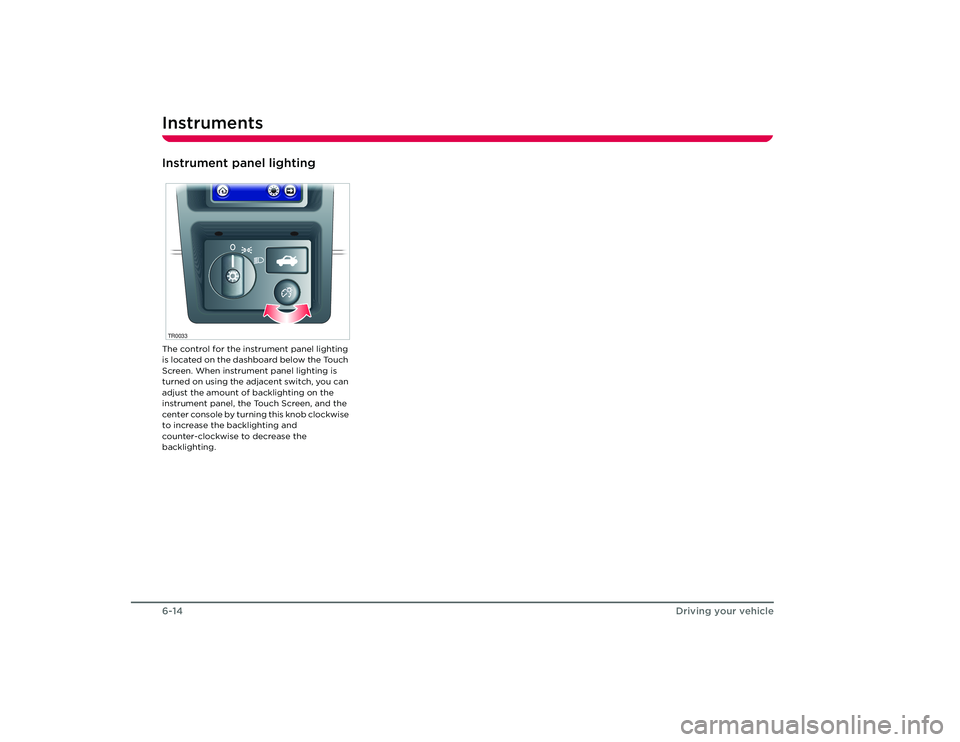
Instrument panel lightingThe control for the instrument panel lighting
is located on the dashboard below the Touch
Screen. When instrument panel lighting is
turned on using the adjacent switch, you can
adjust the amount of backlighting on the
instrument panel, the Touch Screen, and the
center console by turning this knob clockwise
to increase the backlighting and
counter-clockwise to decrease the
backlighting.TR0033Roadster OHB.book Page 14 Thursday, October 2, 2008 8:59 AM
Page 57 of 115
Interior temperature control
7-5
Comfort and convenience
Rotate the temperature control to achieve
the desired air temperature.
Note: In high ambient temperatures, cooling
may be temporarily diverted away from the
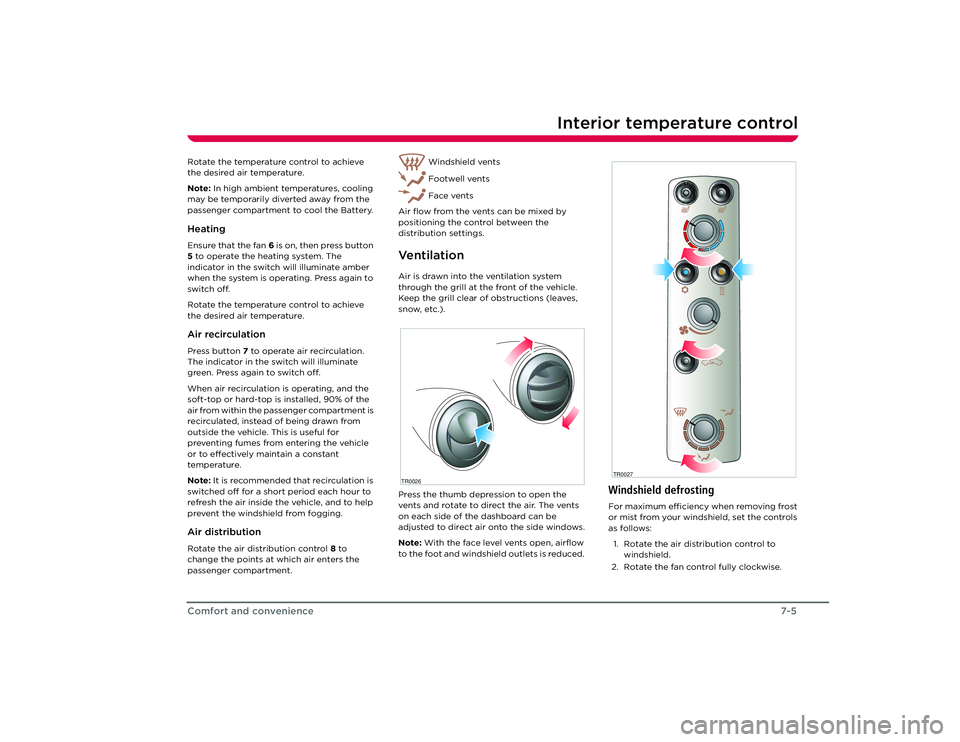
passenger compartment to cool the Battery.HeatingEnsure that the fan 6 is on, then press button
5 to operate the heating system. The
indicator in the switch will illuminate amber
when the system is operating. Press again to
switch off.
Rotate the temperature control to achieve
the desired air temperature.Air recirculationPress button 7 to operate air recirculation.
The indicator in the switch will illuminate
green. Press again to switch off.
When air recirculation is operating, and the
soft-top or hard-top is installed, 90% of the
air from within the passenger compartment is
recirculated, instead of being drawn from
outside the vehicle. This is useful for
preventing fumes from entering the vehicle
or to effectively maintain a constant
temperature.
Note: It is recommended that recirculation is
switched off for a short period each hour to
refresh the air inside the vehicle, and to help
prevent the windshield from fogging.Air distributionRotate the air distribution control 8 to
change the points at which air enters the
passenger compartment. Windshield vents
Footwell vents
Face vents
Air flow from the vents can be mixed by
positioning the control between the
distribution settings.
Ve n t i l a t i o nAir is drawn into the ventilation system
through the grill at the front of the vehicle.
Keep the grill clear of obstructions (leaves,
snow, etc.).
Press the thumb depression to open the
vents and rotate to direct the air. The vents
on each side of the dashboard can be
adjusted to direct air onto the side windows.
Note: With the face level vents open, airflow
to the foot and windshield outlets is reduced. TR0026
Windshield defrostingFor maximum efficiency when removing frost
or mist from your windshield, set the controls
as follows:
1. Rotate the air distribution control to windshield.
2. Rotate the fan control fully clockwise.TR0027
Roadster OHB.book Page 5 Th ursday, October 2, 2008 8:59 AM
Page 76 of 115
Cleaning and vehicle care9-8
Maintenance and care
WheelsWash wheels with warm, fresh water
containing a good quality wash and wax
shampoo. Thoroughly rinse the wheels to
remove any soap residue.Windshield, windows and mirrorsRegularly clean all windows inside and out
using a window cleaning solution. An
automotive glass cleaner is recommended.
After washing the vehicle with wash/wax
products, clean the outside of the windshield
with glass cleaner.
Mirror glass is particularly susceptible to
damage. Do not use abrasive cleaning
compounds.Wiper bladesClean wiper blades using mild soap and warm
water only. Do not use petroleum or
alcohol-based cleaners.
Polishing the bodyTo preserve the cosmetic appearance of the
body, occasionally apply a good quality
polish. A good polish should contain a very
mild abrasive that removes surface
contamination without damaging the
surface, a mild filling compound to reduce the
appearance of scratches, and wax to provide
a barrier between the cleaned body surface
and airborne contaminants.
Do not use cutting paste, color restoration
compounds, or polishes containing a harsh
abrasive. These can scour the surface and
permanently degrade the body.Using a car coverTo preserve the cosmetic appearance of the
body, you may want to use a car cover. Only
an approved Tesla Motors car cover should be
used. DONOT use the car cover when
charging the vehicle. Doing so can interfere
with adequate cooling during charging.Paint damage and rectificationTreat chips and scratches to the paint using a
paint touch-up pen. Use the touch-up pen
after washing but before polishing or waxing.
More extensive repairs to the body should
only be carried out by a facility approved by
Tesla Motors. Contact Tesla Motors for a list of
approved body repair facilities.
Cleaning the vehicle interiorPlastic materials
Caution: Do not polish the upper
surfaces of the dashboard. Polished
surfaces are reflective and may interfere with
the driver's view.
Clean with diluted upholstery cleaner, then
wipe with a damp cloth.
Carpet and fabricsClean with diluted upholstery cleaner. Test a
concealed area first.LeatherClean with warm water and a non-detergent
soap. Dry and polish with a dry, clean,
lint-free cloth.Seat beltsExtend the belts and clean with warm, soapy,
fresh water only. Do not use any type of
detergent or chemical cleaning agent. Allow
the belts to dry naturally while extended,
preferably away from direct sunlight.Instruments and display screensClean the instrument panel, Touch Screen,
and audio system screen using a damp cloth.
Do not use cleaning co mpounds or solutions.
Roadster OHB.book Page 8 Th ursday, October 2, 2008 8:59 AM