CD player TOYOTA 4RUNNER 1996 User Guide
[x] Cancel search | Manufacturer: TOYOTA, Model Year: 1996, Model line: 4RUNNER, Model: TOYOTA 4RUNNER 1996Pages: 217, PDF Size: 4.49 MB
Page 102 of 217

99
If you have pushed the track button more than
you wanted to, push the other side of
the button. The track number will be re- duced.
The track number you select is not valid if it is higher than the number of tracks re-
maining on the current cassette side. After the beginning of the tape is reached, the player will automatically
start playing the same side.
After the end of the tape is reached,the player will automatically reverse
sides and start playing the other side.
There must be at least 3 seconds of blank
space between tracks for the track button
to work correctly. In addition, the feature
may not work well with some spokenword, live, or classical recordings. Compact Disc Player Push either side of the track button until
the number of the track you want to listen
to appears on the display. If you want to return the beginning of the current track,
push the down side of the button one time,
quickly.
/ (Reverse/Fast forward but-
tons)
Cassette Player Push the fast forward button to fast for-
ward a cassette tape. FFº will appear on
the display. Push the reverse button to re- wind a tape. REWº will appear on the dis-
play.
To stop the tape while it is fast forwarding,
push on the up side of the track down/up
button or TAPEº; to stop the tape while it
is rewinding, push on the down side of the
track down/up button or TAPEº.
If a tape side rewinds completely, the ca-
sette player will stop and then play that
same side. If a tape fast forwards com-
pletely, the cassette player will play the
other side of the tape, using the auto-re- verse feature. Compact Disc Player
If you want to fast forward or reverse
through a compact disc track, push and
hold in the fast forward or reverse button.
When you release the button, the com-
pact disc player will resume playing. AM
VFM
Push AM VFMº to switch between the AM
and FM bands. AMº, FM1º or FM2º will
appear on the display. These systems al- low you to set twelve FM stations, two for
each button.
If the audio system is off, you can turn on
the radio by pushing AM VFMº. Also, push
AM VFMº to switch from cassette or com-
pact disc operation to radio operation. BAL (Balance)
This knob lets you adjust the balance be- tween the right and left speakers. Push MID/BALº so that it pops out of its
retracted position. Pull out the knob. Turn
the knob to adjust the balance. Push theknob back into its retracted position. BASS This knob lets you adjust the bass level.
Push BASSº so that it pops out of its re-
tracted position. Turn the knob to adjust
the bass. Push the knob back into its re-tracted position.
Page 103 of 217

100CD (Compact Disc)
Push CDº to switch from radio or cas-
sette
operation to compact disc operation.
If the audio system is off, you can turn on
the compact disc player by pushing CDº.
In both cases, a disc must already be
loaded in the player.
When the audio is set into compact disc
operation, the display shows the track
number currently being played. Pushing CDº changes the display to show the
length of the current program being
played so far. By pushing the button once
again, the display returns to that of track
number. Dolby )
B VC*
If you are listening to a tape that was re- corded with Dolby )
B or C Noise Reduc-
tion, push the button by the double-Dsymbol until the appropriate symbol ap-
pears on the display. To turn off Dolby )
,
push the button until the symbol disap-
pears from the display. The Dolby B NR mode reduces tape noise by about 10 dB. The Dolby C NR mode re- duces tape noise by another 10 dB, or
about 20 dB total. For best sound repro-
duction, select the same NR mode that was used to record the tape. *
: Dolby noise reduction manufactured under license from Dolby Lab-
oratories Licensing Corporation. DOLBYº and the double-D symbol
are trademark of Dolby Laboratories Licensing Corporation.
Five EQ settings
Page 104 of 217

101
EQ (Equalizer)
Your audio system can store five different EQ settings in its memory so that you willnot need to readjust in every time you lis-
ten to a different program.
Five common settings are sorted in the
system's memory when it is manufac- tured (see illustration).
To use a preset EQ setting: Push EQº.
The levels for the first setting and EQ-1º
will a
ppear on the display. Push EQº until
you reach the setting you want. The audio
system will adjust the program you are
hearing to the selected setting.
To change a preset EQ setting: Push EQº
until the setting you want to change ap-
pears on the display. Adjust the bass, mid-range, and treble levels using the
BASSº, MID/BALº, and TREB/FADEº.
To save an EQ setting: After you have changed a setting, push EQº until you
hear a beep. This will replace the original factory setting with your new one.
To cancel one of the EQ settings you
saved: With the setting on the display,
push in and hold EQº until you have
heard both the first saveº beep and a sec-
ond beep that means the setting has been
canceled. The original factory setting will
appear on the display. To cancel all of the changed EQ settings: Push and hold in EQº until you hear a third beep.
FADE
This knob lets you adjust the balance be- tween the front and rear speakers.
Push TREB/FADEº so that it pops out of
its retracted position. Pull out the knob.
Turn the knob to adjust the front/rear bal-ance. Push the knob back into its re-
tracted position. MID (Mid-range)
This knob lets you adjust the mid-range level. Push MID/BALº knob so that it pops out
of its retracted position. Turn the knob toadjust
the mid-range level. Push the knob
back into its retracted position. MTL (Metal) Display
If a metal or chrome equivalent cassette
tape is put in the cassette player, the play-
er will automatically adapt to it and MTLº
will appear on the display. PROG (Program)
Push PROGº to select the other side of
a cassette tape. The display indicates
which side is currently selected (
~º indi-
cates top side, !º indicates bottom side).
Auto-reverse feature: After the cassette
player reaches the end of a tape side, it automatically reverses and begins to play
the other side. This is true whether the
cassette was playing or fast forwarding.
PWR/VOL (Power/Volume) Push PWR/VOLº to turn the audio sys-
tem on and off. Turn PWR/VOLº to adjust
the volume. RAND (Random)
The random feature allows you to listen to
the tracks on a compact disc in random or-
der.
When you push RANDº, RANDº will ap-
pear on the display and the player will play
the tracks in random order. Push the but-
ton again to turn off the random feature.
Page 105 of 217

102RM (Radio Monitor)
The radio monitor feature allows you to
listen to
the radio while a cassette is being
rewound or fast forwarded. Push RMº. RMº will appear on the dis-
play. Any time you are rewinding or fast
forwarding a cassette tape, the radio will
play the station that was set most recent-
ly. (You can not change the radio station
unless you switch out of the cassette play-
er function.)
Push RMº again to turn off the RM fea- ture.
RPT (Repeat)
The repeat feature automatically replays the current cassette or compact disctrack. Push RPTº while the track is playing.
RPTº will appear on the display. When
the track ends, it will automatically be re-
wound (cassette) and replayed. This pro-
cess will be continued until you push the button again to turn off the repeat feature.
CassettesÐThere must be at least 3 sec- onds of blank space between tracks in or-
der for the repeat feature to work correct-
ly. Scan Radio
You can either scan all the frequencies on a band or scan only the preset stations for
that band.
To scan the preset stations: Quickly push
and release SCANº. If you hear a beep,
you held the button too long, and the radio will scan all the frequencies. The radio willtune in the next preset station up the
band, stay there for a few seconds, and
then move to the next preset station. To
select a station, push SCANº a second time.
To scan all the frequencies: Push SCANº
until you hear a beep. The radio will find
the next station up the station band, stay there for a few seconds, and then scan
again. To select a station, push SCANº a
second time. Cassette player
The cassette player scan feature is similar
to the radio scan feature and uses the same button.
Push SCANº. SCANº will appear on the
display. The player will fast forward to the
next cassette track,
play it for 12 seconds,
and then scan again. To select a track,
push SCANº a second time. If the player reaches the end of one side of a cassette
tape, it will continue scanning on the other
side.
Compact disc player
The compact disc player scan feature is
similar to the radio scan feature.
Push SCANº. SCANº will appear on the
display. The compact disc player will play the next track for 10 seconds, then scan
again. To select a track, push SCANº a
second time. If the pl ayer reaches the end
of the disc, it will continue scanning at
track 1. SKIP
The skip feature allows you to fast forward
past long stretches of blank tape. This is
especially useful at the end of cassettes.
Page 106 of 217

103
Push SKIPº. SKIPº will appear on the
display. The cassette player will keep
track of how much blank space it plays.
Any time it has played about 10 seconds
of blank tape, it will automatically fast for-
ward to the next track and begin to play.
Push the button a second time to turn off the skip feature. ST (Stereo reception) display
Your radio automatically changes to ste- reo reception when a stereo broadcast is
received. STº appears on the display. Ifthe signal becomes weak, the radio re-
duces the amount of channel separation to prevent the weak signal from creating
noise. If the signal becomes extremely weak, the radio switches from stereo to mono reception.
TAPE
Push T
APEº to switch from radio or com-
pact disc operation to cassette operation.
If the audio system is off, you can turn on
the cassette player by pushing TAPEº. In both cases, a cassette must already be
loaded in the player. TREB (Treble)
This knob lets you adjust the treble level.
Push TREB/FADEº so that it pops out of
its retracted position. Turn the
knob to ad-
just the treble. Push the knob back into its
retracted position. TUNE
Tuning
Your Toyota has an electronic tuning radio
(ETR). Push and release the ~º (up) or
! º (down) side of TUNEº to step up or
down the station band. (If you hear a
beep, you held the button too long and the
radio will go into the seek mode.) Seeking
In the seek mode, the radio finds and plays the next station up or down the sta- tion band.
To seek a station, push and hold the ~º or
vº side of TUNEº until you hear a beep. Do this again to find another station. The anti-theft system prevents the audio
system f
rom working after it has been dis-
connected. To activate the system, you
must set a three-digit security code. After the system is set, SECº will appear in the
display each time the ignition is turned
form LOCKº to ACCº or ONº. Also, the
anti-theft light flashes every few seconds
while the ignition key is in the LOCKºposition.
You will need to know your security code
to reactivate your radio after electrical ser-vice is performed on your vehicle.
Choose a security code that is easy to re-
member and keep a copy of it (not in your
Toyota).
NOTICE
If you pushed any wrong buttons on the anti-theft system, the following
messages will appear on the display.
ErrºÐYou have pushed wrongbuttons.
ÐAnti-theft system
(Type 2-2 and 3 only)
Page 114 of 217

111
ILLUMINATION CONTROL LOGIC
On some audio-units, when the instru-
ment panel lights are on, the letters on op-
erable buttons of the mode in current use
light up together with the mode selection and eject buttons. RADIO RECEPTION
Usually, a problem with radio reception
does not mean there is a problem with
your radioÐit is just the normal result of
conditions outside the vehicle.
For example, nearby buildings and terrain
can interfere with FM reception. Power
lines or telephone wires can interfere with
AM signals. And of course, radio signals
have a limited range, and the farther youare from a station, the weaker its signal
will be. In addition, reception conditions
change
constantly as your vehicle moves.
Here are some common reception prob-
lems that probably do not indicate a prob- lem with your radio: FM
Fading and drifting stationsÐGenerally,
the effective range of FM is about 40 km
(25 miles). Once outside this range, you
may notice fading and drifting, which in- crease with the distance from the radio
transmitter. They are often accompanied by distortion.
Multi-pathÐFM signals are reflective,
making it
possible for two signals to reach
your antenna at the same time. If this hap-
pens, the signals will cancel each other
out, causing a momentary flutter or loss of
reception.
Static and flutteringÐThese occur when
signals are blocked by buildings, trees, or other large objects. Increasing the bass
level may reduce static and fluttering.
Station swappingÐIf the FM signal you are listening to is interrupted or weak-
ened, and there is another strong station
nearby on the FM band, your radio may
tune in the second station until the original
signal can be picked up again. AM FadingÐAM broadcasts are reflected by the upper atmosphereÐespecially atnight. These reflected signals can inter-
fere with those received directly from the radio station, causing the radio station tosound alternately strong and weak.
Station interferenceÐWhen a reflected
signal and a signal received directly froma radio station are very nearly the same
frequency, they can interfere with each
other,
making it difficult to hear the broad-
cast.
StaticÐAM is easily affected by external sources of electrical noise, such as high
tension power lines, lightening, or electri- cal motors. This results in static.
CARING FOR YOUR CASSETTE PLAY-
ER AND TAPES
For high performance from your cassette
player and tapes:
Clean the tape head and other parts regu-
larly. A dirty tape head or tape path can de-
crease sound quality and tangle your
cassette tapes. The easiest way to
clean them is by using a cleaning tape.
ÐCar audio system operatinghints
Page 115 of 217

11 2Use high-quality cassettes.
Low-quality cassette tapes can cause
many problems, including poor sound, inconsistent playing speed, and
constant auto-reversing. They can
also get stuck or tangled in the cas-
sette player.
Do not use a cassette if it has been
damaged or tangled or if its label is
peeling off.
Do not leave a cassette in the player if
you are not listening to it, especially if it is hot outside.
Store cassettes in their cases and out
of direct sunlight.
Avoid using cassettes with a total play-
ing time longer than 100 minutes (50
minutes per side). The tape used in
these cassettes is thin and could get
stuck or tangled in the cassette player.
CARING FOR YOUR COMPACT DISC
PLAYER AND DISCS Use only compact discs labeled as shown.
Extremely high temperatures can
keep your compact disc player from working. On hot days, use the air con-
ditioning to cool the vehicle interior be-
fore you listen to a disc.
Bumpy roads or other vibrations maymake your compact disc player skip.
If moisture gets into your compact disc
player, you may not hear any sound even though your compact disc player
appears to be working. Remove thedisc from the player and wait until itdries.
Handle compact discs carefully, espe-
cially when you are inserting them.
Hold them on the edge and do not
bend them. Avoid getting fingerprints
on them, particularly on the shiny side.
Dirt, scrapes, warping, pin holes, or
other disc damage could cause the
player to skip or to repeat a section of
a track. (To see a pin hole, hold the disc
up to the light.)
Remove discs from the compact disc
player when you are not listening to
them. S tore them in their plastic cases
away from moisture, heat, and directsunlight.
To clean a compact disc: Wipe it with a
soft, lint-free cloth that has been damp-
ened with water. Wipe in a straight line
from the center to the edge of the disc (not
in circles). Dry it with another soft, lint-
free cloth. Do not use a conventional re-cord cleaner or anti-static device.
Page 116 of 217
11 3
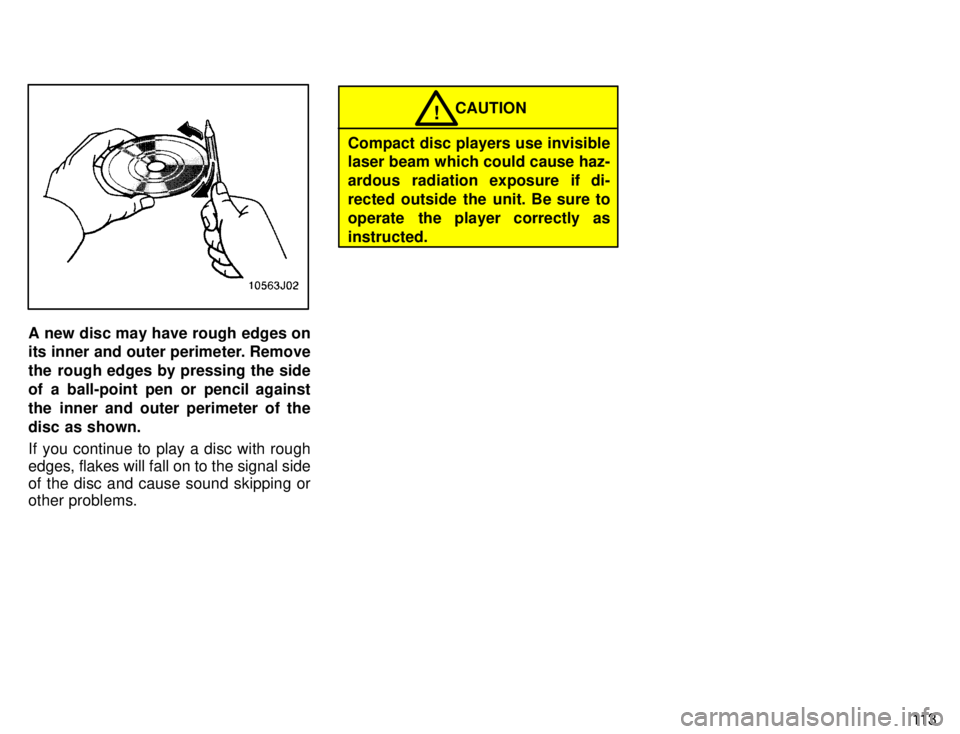
A new disc may have rough edges on
its inner and outer perimeter. Remove
the rough edges by pressing the side
of a ball-point pen or pencil against
the inner and outer perimeter of the
disc as shown.
If you continue to play a disc with rough edges, flakes will fall on to the signal side
of the disc and cause sound skipping or other problems.
CAUTION!
Compact disc players use invisible laser beam which could cause haz-
ardous radiation exposure if di-
rected outside the unit. Be sure to
operate the player correctly asinstructed.