instrument panel TOYOTA 4RUNNER 1996 User Guide
[x] Cancel search | Manufacturer: TOYOTA, Model Year: 1996, Model line: 4RUNNER, Model: TOYOTA 4RUNNER 1996Pages: 217, PDF Size: 4.49 MB
Page 55 of 217

52
High-Low beamsÐFor high beams,
turn the headlights on and push the lever away from you (position 1). Pull the lever
toward you (position 2) for low beams.
The headlight high beam indicator light
(blue light) on the instrument panel will tell
you that the high beams are on.
Flashing the high beam headlights
(position 3)ÐPull the lever all the way
back. The high beam headlights turn off
when you release the lever.
You can flash the high beam headlights with the knob turned to OFFº.TURN SIGNAL
To signal a turn, push the headlight/
turn signal lever up or down to posi-
tion 1. The key must be in the ONº position. The lever automatically returns after you make a turn, but you may have to returnit by hand after you change lanes.
To signal a lane change, move the lever
up or down to the pressure point (position2) and hold it.
If the turn signal indicator lights (green
lights) on the instrument panel flash faster
than normal, a front or rear turn signal bulb is burned out.To turn on the emergency flashers,
push the switch.
All the turn signal lights will flash. To turn
them off, push the switch once again.
Turn on the emergency flashers to warn other drivers if your vehicle must be
stopped where it might be a traf fic hazard.
Always pull as far off the road as possible.
The turn signal light switch will not work
when the emergency flashers are operat-ing.
Emergency flashers
Page 56 of 217

53
NOTICE
To prevent the battery from being discharged, do not leave the switch
on longer than necessary when the engine is not running.
To adjust the brightness of the instru-
ment panel lights, turn the knob.To turn on the interior light, slide the switch.
The interior light switch has the following positions: ONºÐKeeps the light on all the time.
OFFºÐTurns the light off. DOORºÐTurns the light on when any of
the side door is opened. The light goes off
when all the side door is closed.
Instrument panel light control Interior light
Page 84 of 217
81
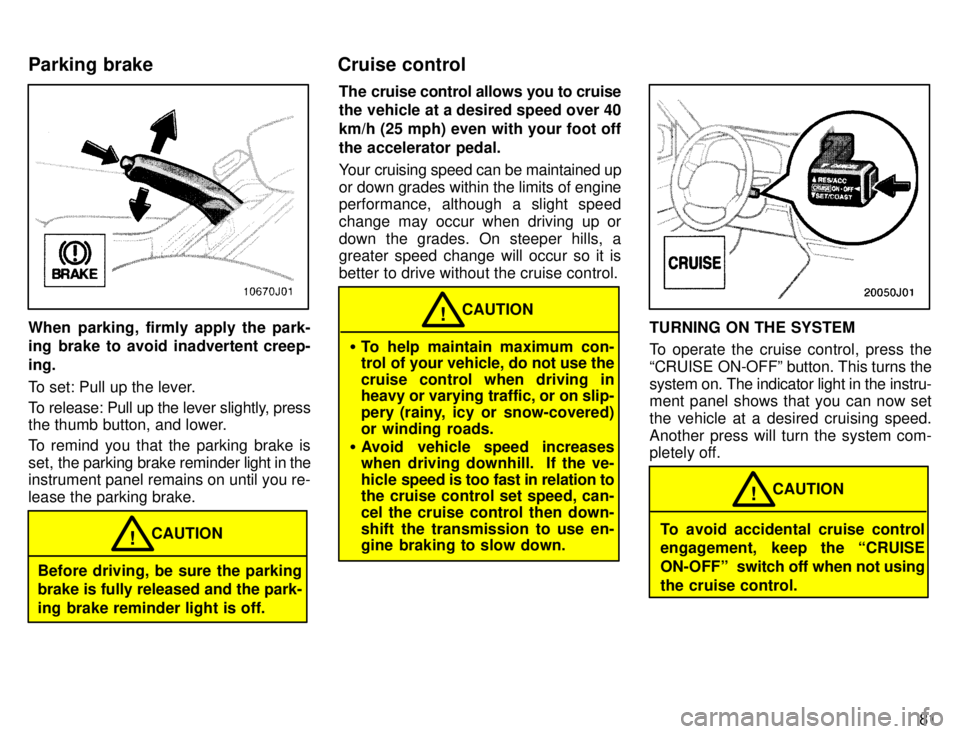
When parking, firmly apply the park-
ing brake to avoid inadvertent creep- ing.
To set: Pull up the lever.
To release: Pull up the lever slightly, press
the thumb button, and lower.
To remind you that the parking brake is
set, the parking brake reminder light in the
instrument panel remains on until you re-lease the parking brake.
Before driving, be sure the parking brake is fully released and the park-
ing brake reminder light is off. CAUTION
! The cruise control allows you to cruise
the vehicle at a desired speed over 40 km/h (25 mph) even with your foot offthe accelerator pedal.
Your cruising speed can be maintained up
or down grades within the limits of engine
performance, although a slight speed
change may occur when driving up or
down the grades. On steeper hills, a greater speed change will occur so it is
better to drive without the cruise control.
To help maintain maximum con-
trol of your vehicle, do not use the
cruise control when driving in heavy or varying traffic, or on slip-
pery (rainy, icy or snow-covered)
or winding roads.
Avoid vehicle speed increases
when driving downhill. If the ve-
hicle speed is too fast in relation to
the cruise control set speed, can-
cel the cruise control then down-
shift the transmission to use en-
gine braking to slow down. CAUTION
!TURNING ON THE SYSTEM
To operate the cruise control, press the
CRUISE ON-OFFº button. This turns thesystem on. The indicator light in the instru-
ment panel shows that you can now set
the vehicle at a desired cruising speed.
Another press will turn the system com-
pletely off.
To avoid accidental cruise control
engagement, keep the CRUISE
ON-OFFº
switch off when not using
the cruise control. CAUTION
!
Parking brake Cruise control
Page 118 of 217

11 5
Fan speed selector
Move the lever to adjust the fan speedÐto the right to increase, to the left to de-crease.
Temperature selector
Move the lever to adjust the temperature Ðto the right to warm, to the left to cool.
Air flow selector
Move the l
ever to select the vents used for
air flow.
1. Panel ÐAir flows mainly from the in-
strument panel vents.
2. Bi-level ÐAir flows from both the floor
vents and the instrument panel vents.
3. Floor ÐAir flows mainly from the floor
vents.
4. Floor/Windshield ÐAir flows mainly
from the floor vents and windshield vents.
5. Windshield ÐAir flows mainly from
the windshield vents. For details about air flow selector settings, see the illustration after A/Cº button.
On models with air conditioning, moving
the air flow control lever to windshield
position
turns on the air conditioning. This
is to clear up the front view more quickly. Moving the air flow control lever to anoth-
er position turns off the air conditioning.
Page 122 of 217

11 9
Defrosting The outside of the windshield For best results, set controls to:
Fan speed ÐAny setting except OFFº
Temperature Ð Towards WARM
(red zone)
Air intake ÐFRESH (outside air)
Air flow ÐWINDSHIELD
Air conditioning ÐOFF
On models with air conditioning, moving the air flow control lever to this position
turns on the air conditioning. This is to
clear up the front view more quickly. Moving the air flow control lever to anoth-
er position turns off the air conditioning. To heat the vehicle interior while de-
frosting the windshield, choose floor/
windshield air flow.
Side vents
Lower vent If air flow control is not satisfactory, check the instrument panel vents. The instru-
ment panel vents may be opened or
closed as shown.
ÐInstrument panel vents
Page 124 of 217

Part 1Clock
121
OPERATION OF INSTRUMENTS AND CONTROLSÐ
Chapter 1-8 Other equipment
Clock
Cigarette lighter and ashtray
Glovebox
Miscellany holder
Miscellany box
Cup holder
Tie-down hooks
Luggage cover
Floor mat
The digital clock indicates the time.
The key must be in the ``ACCº or ``ON'' position.
To reset the hour: Push the Hº button.
To reset the minutes: Push the Mº button.
If quick adjustment to a full hour is de- sired, push the :00º button.
For example, if the :00º button is de-
pressed when the time is between
1:01Ð1:29, the time will change to 1:00.
If the time is between 1:30Ð1:59, the time
will change to 2:00.
Once the electrical power source has
been disconnected from the clock, the
time is automatically set to 1:00 (oneo'clock). When the instrument panel lights are turned on, the brightness of the time indi-cation will be reduced.
Page 125 of 217
122
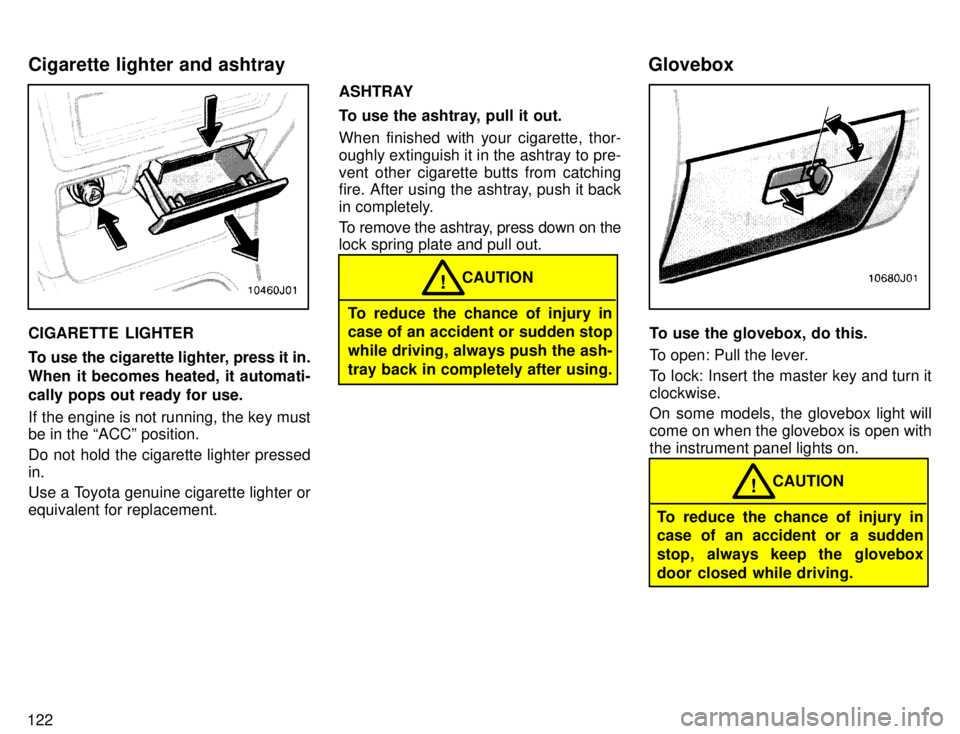
CIGARETTE LIGHTER
To use the cigarette lighter, press it in.
When it becomes heated, it automati-
cally pops out ready for use.
If the engine is not running, the key must be in the ACCº position.
Do not hold the cigarette lighter pressed in.
Use a Toyota genuine cigarette lighter or equivalent for replacement.ASHTRAY
To use the ashtray, pull it out. When finished with your cigarette, thor-
oughly extinguish it in the ashtray to pre-
vent other cigarette butts from catching
fire. After using the ashtray, push it back
in completely.
To remove the ashtray, press down on the lock spring plate and pull out.
To reduce the chance of injury in
case of an accident or sudden stop while driving, always push the ash-tray back in completely after using.
CAUTION
!
To use the glovebox, do this.
To open: Pull the lever.
To lock: Insert the master key and turn it clockwise.
On some models, the glovebox light will come on when the glovebox is open withthe instrument panel lights on.
To reduce the chance of injury in
case of an accident or a sudden
stop, always keep the glovebox
door closed while driving.
CAUTION
!
Cigarette lighter and ashtray
Glovebox
Page 139 of 217
136
Do not place anything on the filler
panel or luggage cover. Such
items may be thrown about and
possibly injure people in the ve-
hicle during sudden braking or an
accident. (secure all items in a
safe place.)
Do not drive with objects left on
top of the instrument panel. They
may interfere with the driver's field
of view. Or they may move during
sharp vehicle acceleration or turn-
ing, and impair the driver's control
of the vehicle. In an accident theymay injure the vehicle occupants.
NOTICE
Do not load the vehicle beyond the vehicle capacity weight specified in
Part 8.
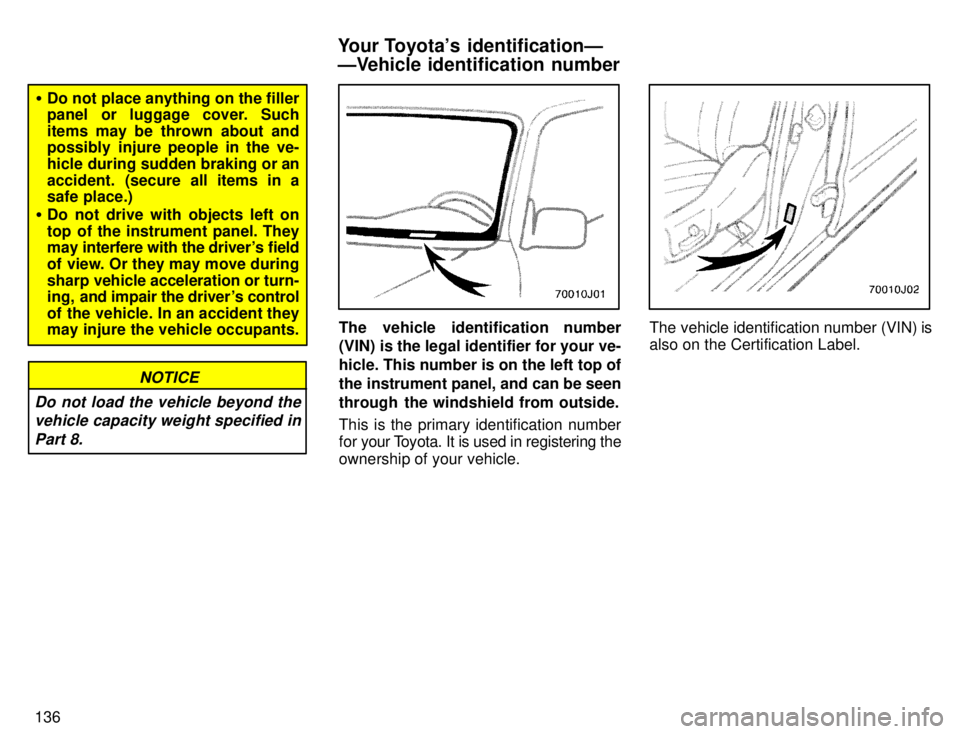
The vehicle identification number
(VIN) is the legal identifier for your ve- hicle. This number is on the left top of
the instrument panel, and can be seen
through the windshield from outside.
This is the primary identification number
for your T oyota. It is used in registering the
ownership of your vehicle.The vehicle identification number (VIN) is
also on the Certification Label.
Your Toyota's identificationÐ
ÐVehicle identification number
Page 173 of 217
170
CAUTION!
Do not wash the vehicle floor with
water, or allow water to get onto the
floor when cleaning the vehicle in-
terior or exterior. Water may get into
audio components or other electri-
cal components above or under the
floor carpet (or mat) and cause a
malfunction; and it may cause body
corrosion.
Vinyl interior
The vinyl upholstery may be easily
cleaned with a mild soap or detergent
and water.
First vacuum over the upholstery to re-
move loose dirt. Then, using a sponge or
soft cloth, apply the soap solution to the vi-
nyl. After allowing it to soak in for a few
minutes to loosen the dirt, remove the dirt
and wipe off the soap with a clean damp
cloth. If all the dirt does not come off, re-
peat the procedure. Commercial foam-
ing-type vinyl cleaners are also available
which work well. Follow the manufactur-
er's instructions.Do not use solvent, thinner,
gasoline or window cleaner on the
interior.
NOTICE
Carpets
Use a good foam-type shampoo to
clean the carpets.
Begin by vacuuming thoroughly to re-
move as much dirt as possible. Several
types of foam cleaners are available; some are in aerosol cans and others are
powders or liquids which you mix with wa-
ter to produce a foam. To shampoo the
carpets, use a sponge or brush to applythe foam. Rub in overlapping circles. Do not apply waterÐthe best results are obtained by keeping the carpet as dry aspossible. Read the shampoo instructions
and follow them closely. Seat belts
The seat belts may be cleaned with
mild soap and water or with lukewarm
water.
Use a cloth or sponge. As you are clean-
ing, check the belts for excessive wear,
fraying, or cuts.
Do not use dye or bleach on the
beltsÐit may weaken them.
NOTICE
Windows
The windows may be cleaned with any
household window cleaner.
When cleaning the inside of the
windows, be careful not to scratch
or damage the heater wires on therear window.
NOTICE
Air conditioning control panel, car au-
dio, instrument panel, console panel,
and switches Use a soft damp cloth for cleaning.
Soak a clean soft cloth in water or luke-
warm water then lightly wipe off any dirt.
Cleaning the interior
Page 188 of 217

185
Checking and replacing fuses Parts (if replacement is necessary):
Fuse with same amperage rating as original
Tools: Conventional wrench (for instrument
lower panel nut)
Adding washer fluid Parts: Water
Washer fluid containing antifreeze (for winter use)
Tools: Funnel
Replacing light bulbs Parts: Bulb with same number and wattage rating as original (See charts in Re-
placing light bulbsº in Chapter 7-3.)
Tools: Screwdriver